When you export 360 video to a format that can be uploaded to YouTube, Facebook, or other online service that supports 360 video, you get a wide, warped video file that looks like this:
For the Insta360 ONE X2 and X3 cameras, the front facing camera (the one opposite of the preview screen) will be the focal point of the video. In this case, it’s the entrance of the Whalebone Grill in the Awa (water) realm of the new-for-2022 Lost Island Themepark in Waterloo, Iowa. (This new park is pretty amazing with its backstory and unique themes.)
But, what if you wanted the 360 view to default to a different view when first played? Unfortunately, the Insta360 mobile app and desktop apps do not provide a way to do this (currently; folks have been asking about it for years, so maybe one day…). Often, the advice is to put the video in a video editor like Premier or Final Cut Pro and change it there.
Some quick web searching led me to this REDDIT post with a comment from user glitch007 explaining a way to use the free ffmpeg utility to reprocess 360 video and set the initial view:
ffmpeg has command line options to specify the X/Y adjustments (yaw and pitch) for the 360 video export. You can import the original MP4 file and export it out as a new MP4 with the view changed. If, for example, I wanted my Whalebone Grill video to start with folks facing the seating area, I could change that and it would look like this:
In this example, “yaw=90” tells it to change the X view by 90 degrees. You could pass in 180 to make the video face the opposite direction. The “pitch” controls the looking up and down, and “roll” controls tilt (I believe; I haven’t actually tested it).
e … Equirectangular projection (the type of 360 format the video is in).
yaw / pitch / roll … Set rotation for the output video. Values in degrees.
glitch007 shared a timesaver where you specify a start and end section of the video and can quickly process just a snippet so you can see the results before doing the entire video. Using “-ss” sets the starting section, and adding “-to” lets you specify the ending second:
If you run that, you’d get a 5 second clips covering seconds 3 to 8 of the video, and could look at that and see how the view is. This allows quickly making changes to yaw/pitch/roll to get what you want.
I used the ffmpeg command line utility to do this, but there may be Windows/Mac programs that put a graphical user interface on it, making it easier for folks to use. If you know of a good one, please leave a link in the comments.
The Insta360 app has an option to change the password on the X3 camera. This may also work on other cameras, but I have not tested it. I have done a password change, but have not verified this actually did anything.
This option will cause the camera to display an authorization prompt, and once confirmed, you can type in a new WiFi password which the device will use.
I encourage ALL Insta360 camera owners to do this, as the default password is well documented and it allows anyone within WiFi range to access and download any photos/videos on the camera.
I did not expect to need to make any changes to my Insta360 ONE X2 filename article, but it looks like things have changed in the new X3 model. The files are no longer compatible (reading a ONE X2 memory car in an X3 will report corrupt files), and some of the names have been changed.
A quick one is the LRV (Low Resolution Video) files. On the ONE X2, they would be named like this:
LRV_20220925_160926_11_072.insv.mp4
You could open that in any video player, since it was an MP4 file.
But on the X3, the LRV files are named like this:
LRV_20220925_160925_11_070.lrv
With the Insta360 Studio plugin installed, my Mac recognizes them as an INSV file but cannot preview them. Just like with normal .insv files, you can add .mp4 to the end and then at least open/view them.
The new InstaX3 was announced on 9/8/2022, and made instantly available on Amazon. It shipped with beta firmware, but had a 1.0.00 update available to install during activation.
If you have found any bugs, please leave a comment with the version and details and I will add them to this list. As workarounds are discovered, I will update this list.
As a new version of firmware is released, these bugs will be re-tested. When they work for some, and not for others, a note will be added to that effect.
Initially, the camera shipped with pre-1.0.00 beta software. It would prompt to upgrade to 1.0.00 on activation from the app.
2022-9-9 – v1.0.00
TBA – various crashes, settings being changed, etc.
2022-09-19 – v1.0.04
TBA
Open WiFi – a poorly implemented WiFi system has the camera broadcast itself as a WiFi hotspot to anyone within range, and allows users that know the default WiFi password all X3 cameras have to access and download any files on the memory card from a web browser… or worse. (Suggested by commenter, yt)
Raw notes… will be cleaned up and made purty with more details, soon.
X3: up to 30 seconds between taking photos via app, and more timing notes.
Some notes on timing, for those who want to compare against your existing camera. This is with the current firmware that the camera will install when you activate it (v1.0.00). Recommended Sandisk Extreme 32GB card.
App (on iPhone 13 Pro):
360 Photo, 72MP, 2:1 – there is nearly 4-5 second delay between the time you press the on screen button and the time the X3 clicks. It takes a total of about 15 seconds before the UI updates and you can take the next photo.
360 Photo, 18MP, 2:1 – 4-5 delay, and a total of about 9 seconds.
360 HDR Photo – 3-4, then about 13 seconds total.
150 Photo, 36MP, 16:9 – 3-4, about 11 seconds total.
150 Photo, 9MP, 16:9 – 3-4, about 8 seconds total.
I did have one instance where it took almost 30 seconds to be ready for the next shot.
Camera Button:
Using the button on the camera is almost instant (within a second) and ready for the next photo in about 6-7 seconds total.
In 360 Photo mode, 72MP, pressing the button on the camera makes the click sound between 2-3 seconds later, and it takes a total of 14 seconds before the screen comes back on for the next photo.
In 360 Photo mode, 18MBP, it takes about a second to take the picture, and a total of about 5-6 before you can take the next shot.
In 360 HDR Photo mode, 18MP, it takes about a second to take the picture, and a total of 9-10 seconds before you can take the next shot.
Some of this feels like the timer is on, which isn’t being shown in the app or on the camera. earlier, I used the Quick button and had selected that mode. It seems it may be remembering settings that have since been turned off.
Earlier this week, Insta360 introduced a new camera – the X3. The X3 is the latest 360 action camera, and builds upon the feature set of the ONE X2 which came before it (and the ONE X before it, and so on).
Insta360 X3
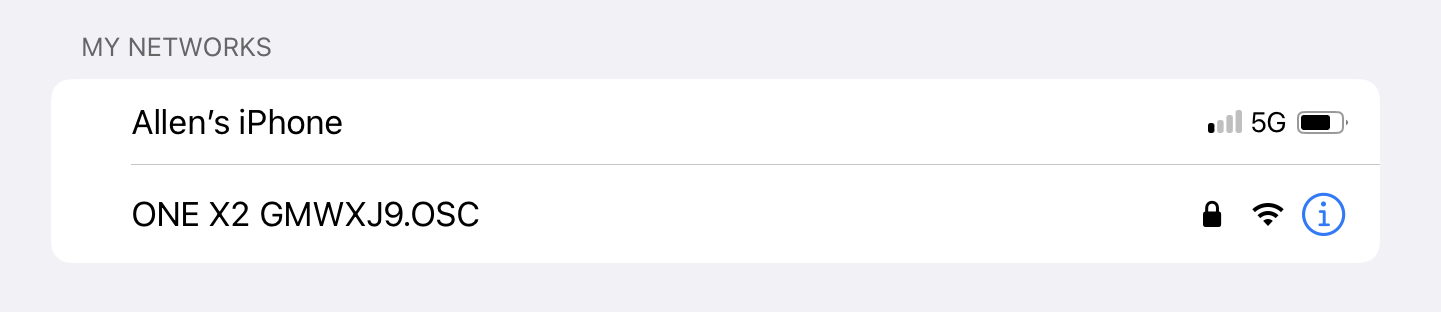
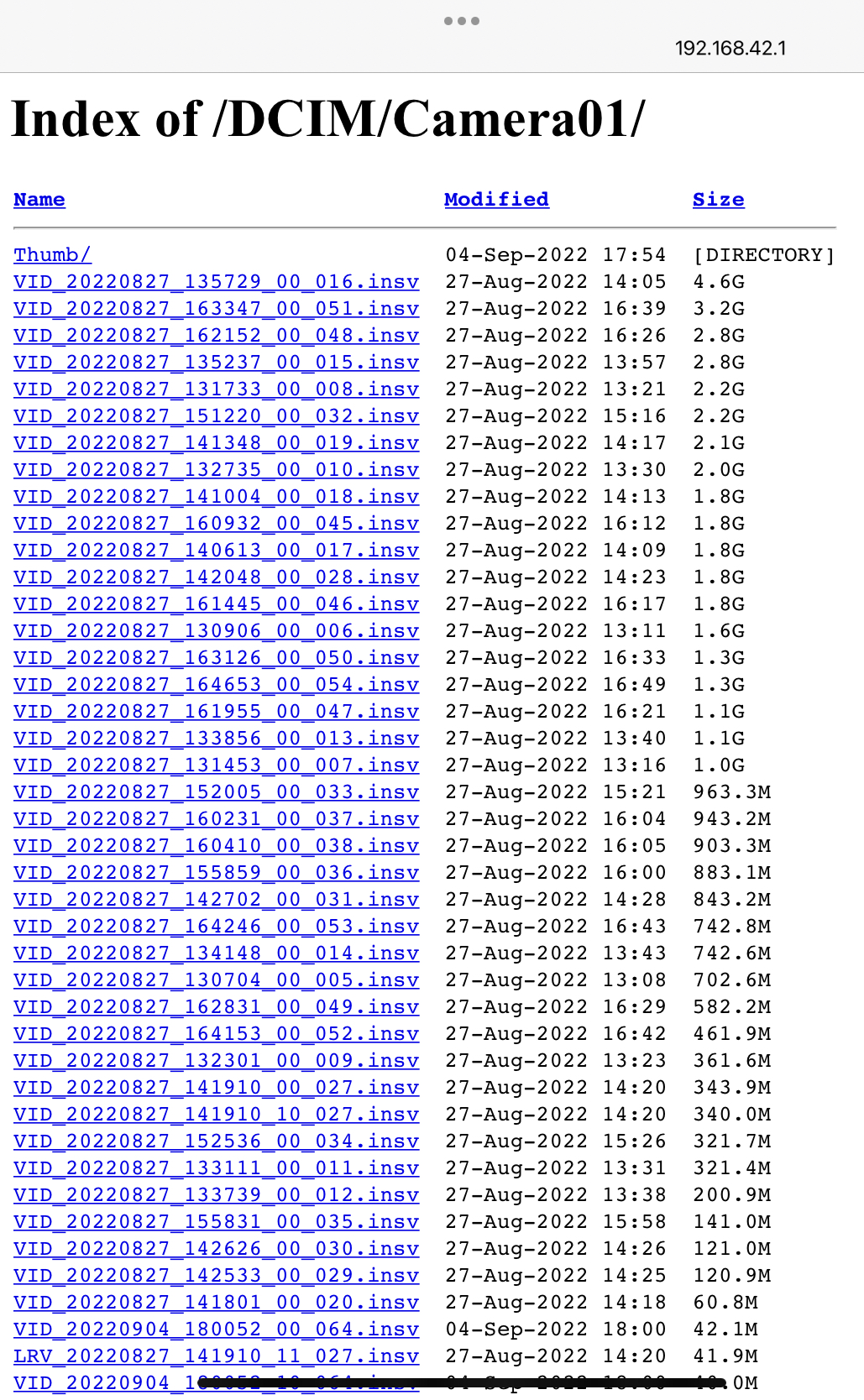
One of the features that was brought over from the ONE X2 is the unprotected WiFi hotspot that is active any time the camera is powered up. This allows anyone within WiFi range the ability to connect to the camera and browse (or download) any photos or videos that are stored on it:
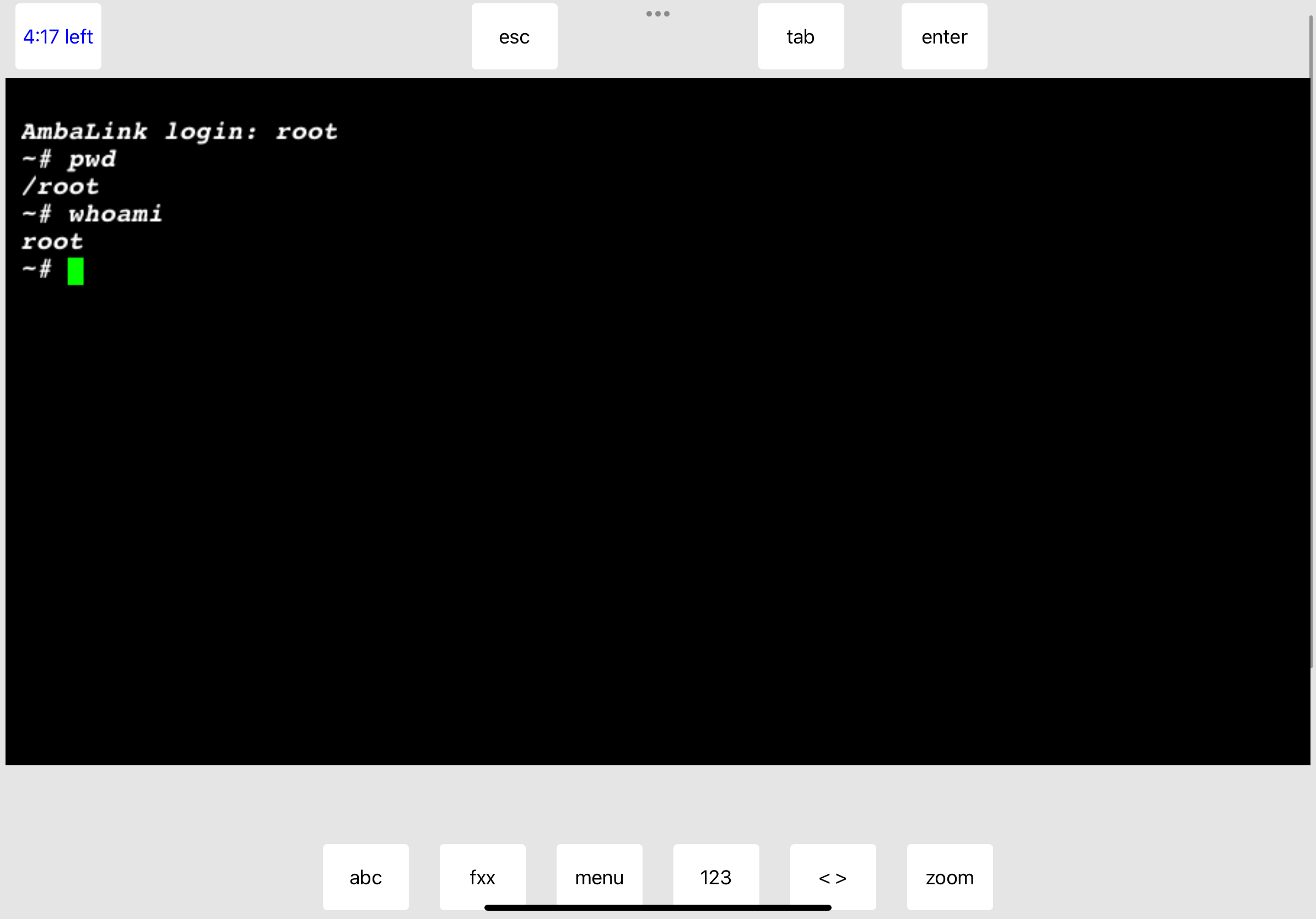
In addition to this, telnet is still enabled, with the root account having no password. Just telnet to that IP address and log in as root to have full access to the camera’s file system:
telnet 192.168.42.1
It is disappointing to see this unsecure access method continued in the next generation of their camera, but the company has posted that they are aware of this and are working on it.
Over on REDDIT, the subject of the gaping Insta360 WiFi security hole has come up again. User K1N6P1X3l linked to this recent article that summarizes the issue’s history:
Of course, the majority of users simply will not care. “It’s very unlikely to happen to me,” they say. “And if it does, so what, they get my photos.”
In other words, this is just like any other security issue out there. Some folks treat them seriously and take steps to avoid the problems, and others just don’t care. If it were not for the “don’t care” crowd, we wouldn’t have such great malware, viruses and ransomware :)
The exploit allows anyone within WiFi range the ability to connect to your camera and do “stuff.” According to the PetaPixel article, Insta360 has already plugged some of this:
Currently the list_directory has already been terminated and it is no longer possible to access the camera content through the browser.
– Insta360 response, per PetaPixel article
Unfortunately, this is not true. Using the current available firmware, v1.0.59_build1, on my ONE X2 I see it appear on WiFi as expected:
…and if I select this interface, and then open the URL in a browser, I find all my files are indeed able to be listed:
I can then click on one of the .insv video files and play it (or save off a copy):
“And it’s just that easy!”
With this camera, there is no privacy because the camera is broadcasting itself to any WiFi devices around it, and allowing any of them to connect without authentication and then browse and view/download anything on the microSD card.
What’s worse is you can also telnet in to the device. I tried that to see if it still worked:
You will notice it did not ask for a password here, either.
Both of these screenshots (web browser and telnet) were done on my iPad.
WHILE I was connected to my X2 via the iPad, I then connected a Windows PC. Using the default password of “88888888” I was now connected from two devices (which for some reason folks think isn’t possible). Both my Windows PC and my iPad were connected and able to access the files from a web browser.
At least two firmware updates have come out since this first appeared on REDDIT, and it does not appear anything has changed.
ScrewX2: The proof-of-concept that a script kiddie could have written
Shortly after this exploit was first mentioned, someone could have easily created a script that would look for WiFi hotspots following the name “ONE X2 xxxxx” and connect to them. The script could then issue http GET commands to retrieve files on the memory card, or telnet in to delete things, potentially bricking the camera.
Worse, the script could deliver a payload of malware, and if the user ever mounted that memory card in a computer, the malware could have been ran accidentally. Hopefully most of us will never run some random executable or installer found on a camera memory card, but it would be tempting to try to find out what “360VIEWER.EXE” does, or “Insta360MacConverter.dmg” is.
I will not link to any such “screwx2” script, and will delete any links to such posted in the comments here. The cat is firmly out of the bag, with the default WiFi password known, and NO password on the web interface or telnet, so all we can do is hope that Insta360 addresses this issue eventually.
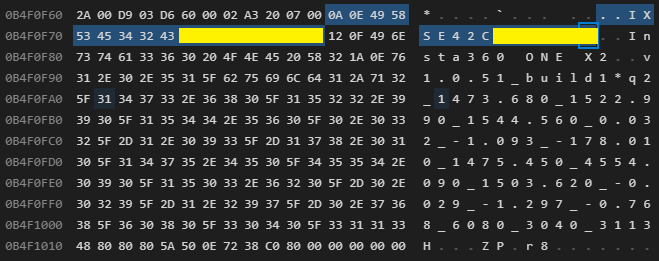
2022-06-09 – Added link to ExifTool source code that parses these sections. ExifTool command line example. Updated output of parser showing the MakerNotes fields. Adding crappy brute force C test code. Added hex dump screen shots of the sections.
*** WORK-IN-PROGRESS ***
I am posting this now in case it helps someone else who is trying to figure this out. My goal is to be able to modify a video recorded in Bullet Time mode to appear as a normal 360 video file. I just need to figure out what bytes to zap in the file…
It contains a Python script that parses the .insv files to export accelerometer and exposure data. This gave me a good starting point for exploring the .insv file format.
From there, searches led me to the ExifTool by Phil Harvey, which has support for parsing .insv files. Here is the parsing code:
The trailer is a series of (up to seven?) entries containing a 2-byte ID followed by a 4-byte offset. I am unsure if the entries are fixed, or if they can be terminated by 0x0000 / 0x00000000 entries if not all segments appear.
.insv file contents.
Segments defined in the Github Python script include:
Parsing begins at offset -78 by reading the 2-byte ID and 4-byte Size. The data for that ID will be located Size bytes earlier in the file. Data parsers for each segment seek there and begin parsing.
ExifTool
I have now found that ExifTool can be used to display these items. It does not show the Trailer information by default, but here is a command that displays it in .json format:
exiftool -ee -G -s -b -j -a -T filename.insv
Maker Notes – ID 0x0101
WORK-IN-PROGRESS: The “maker notes” section appears to use a byte for the type of data, then a byte for the length of that data segment. Some of the bytes appear to be (QuickTime::INSV_MakerNotes)
Hex    Dec   Description
---    ---   -----------
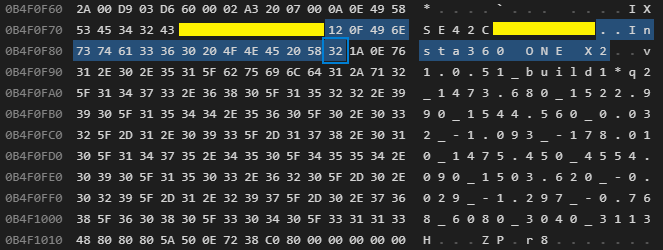
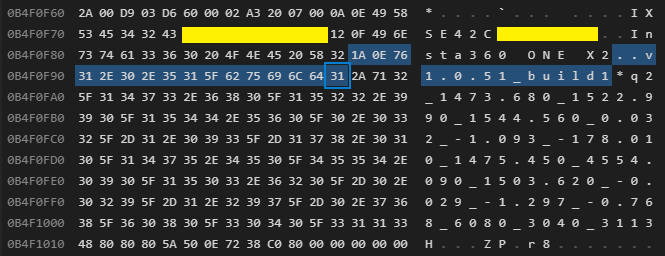
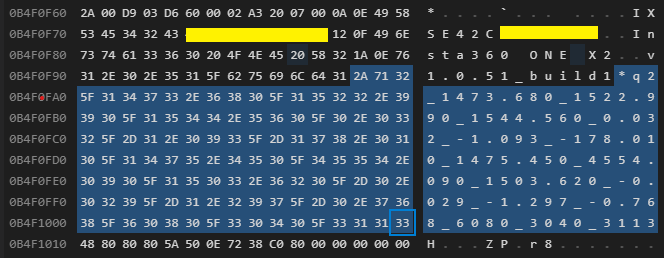
0x0A   10    Serial Number ("IXSE42xxxxxxxx")
0x12   18    Camera Model ("Insta260 ONE X2")
0x1A   26    Firmware Version ("v1.0.51_build1")
0x2A   42    ? Parameters ?
NOTE: It appears that this section (0x0101) may be hard-coded to only have four entries, and the parser just reads four entries and stops. I was expecting some kind of record size or end of record marker, but looking at the ExifTool source shows it just does a for/next loop of 0-3.
Serial Number
Model
Firmware
Parameters
A simple parser I wrote in C can parse out some of these, then it gets lost at the binary data, so there is more to it than just that:
Magic Phrase: 8db42d694ccc418790edff439fe026bf
Good file.
0x0101 0x0000073a - Maker Notes
-------------------------------------------------------------------------------
Maker Notes - offset -1928
-------------------------------------------------------------------------------
  Type: 0x0a (10) - SerialNumber
Length: 0x0e (14)
  Data: 49 58 53 45 34 32 xx xx xx xx xx xx xx xx (edited out)
  Text: IXSE42xxxxxxxx (edited out)

  Type: 0x12 (18) - Model
Length: 0x0f (15)
  Data: 49 6e 73 74 61 33 36 30 20 4f 4e 45 20 58 32
  Text: Insta360 ONE X2

  Type: 0x1a (26) - Firmware
Length: 0x0e (14)
  Data: 76 31 2e 30 2e 35 31 5f 62 75 69 6c 64 31
  Text: v1.0.51_build12

  Type: 0x2a (42) - Parameters
Length: 0x71 (113)
  Data: 32 5f 31 34 37 33 2e 36 38 30 5f 31 35 32 32 2e
        39 39 30 5f 31 35 34 34 2e 35 36 30 5f 30 2e 30
        33 32 5f 2d 31 2e 30 39 33 5f 2d 31 37 38 2e 30
        31 30 5f 31 34 37 35 2e 34 35 30 5f 34 35 35 34
        2e 30 39 30 5f 31 35 30 33 2e 36 32 30 5f 2d 30
        2e 30 32 39 5f 2d 31 2e 32 39 37 5f 2d 30 2e 37
        36 38 5f 36 30 38 30 5f 33 30 34 30 5f 33 31 31
        33
  Text: 2_1473.680_1522.990_1544.560_0.032_-1.093_-178.010_1475.450_4554.090_1503.620_-0.029_-1.297_-0.768_6080_3040_3113

0x0000 0x00000000 - Unknown
0x0000 0x00000000 - Unknown
0x0000 0x00000000 - Unknown
0x0000 0x00000000 - Unknown
0x0000 0x00000000 - Unknown
0x0000 0x000f16f4 - Unknown
More work to be done on this part…
Accelerometer Data – ID 0x0300
TODO
Exposure Data – ID 0x0400
TODO
Timestamps – ID 0x0600
TODO
GPS Data – ID 0x0700
TODO
To be continued…
Crappy Brute-Force C Parsing Test Code
/*--------------------------------------------------------------------------*/
// .insv parser test.
//
// 2022-06-08 0.00 allenh - Initial brute-force version.
// 2022-06-09 0.01 allenh - Code cleanup, more defines.
/*--------------------------------------------------------------------------*/
#include <stdio.h>
#include <stdlib.h>
#include <string.h> // for memset()
#include <stdint.h>
#include <stdbool.h>

#define FILENAME "VID_20220607_102410_00_322.insv"
//#define FILENAME "VID_20220607_104109_00_323.insv"


/*--------------------------------------------------------------------------*/
// Defines / Constants / Enums
/*--------------------------------------------------------------------------*/
#define TRAILER_OFFSET      -78
#define TRAILER_SIZE        42

#define MAGIC_PHRASE_OFFSET -32
#define MAGIC_PHRASE_SIZE   32
#define MAGIC_PHRASE_STRING "8db42d694ccc418790edff439fe026bf"

enum
{
    HID_MAKER_NOTES     = 0x0101,
    HID_ACCELEROMETER   = 0x0300,
    HID_EXPOSURE        = 0x0400,
    HID_TIMESTAMPS      = 0x0600,
    HID_GPS             = 0x0700
} HidEnum;

enum
{
    MAKER_NOTES_SERIALNUMBER = 0x0a,
    MAKER_NOTES_MODEL        = 0x12,
    MAKER_NOTES_FIRMWARE     = 0x1a,
    MAKER_NOTES_PARAMTERS    = 0x2a
} MakeNotesEnum;


/*--------------------------------------------------------------------------*/
// Prototypes
/*--------------------------------------------------------------------------*/
bool checkForMagicPhrase (FILE *fp);

bool parseTrailer (FILE *fp);
bool parseMakerNotes (FILE *fp, long int offset);

const char *getHidString (unsigned int hid);
const char *getMakerNotesString (unsigned int id);

uint32_t freadU32 (FILE *fp);
uint16_t freadU16 (FILE *fp);
uint8_t freadU8 (FILE *fp);
void  hexDump (void *ptr, size_t size);


/*--------------------------------------------------------------------------*/
// Main
/*--------------------------------------------------------------------------*/
int main (int argc, char **argv)
{
    (void)argc;
    (void)argv;

    FILE    *fp = NULL;

    fp = fopen (FILENAME, "rb");

    if (fp != NULL)
    {
        if (checkForMagicPhrase (fp) == true)
        {
            printf ("Good file.\n");

            parseTrailer (fp);
        }
    }
    else
    {
        perror ("Unable to open");
    }

    fclose (fp);

    return errno;
}


/*--------------------------------------------------------------------------*/
// Functions
/*--------------------------------------------------------------------------*/

/*--------------------------------------------------------------------------*/
// Check for the 32-byte magic phrase at the end of the file.
/*--------------------------------------------------------------------------*/
bool checkForMagicPhrase (FILE *fp)
{
    bool    status = false;

    if (fp != NULL)
    {
        int retVal = 0;

        retVal = fseek (fp, MAGIC_PHRASE_OFFSET, SEEK_END);

        if (retVal == 0) // If successful, the function returns zero.
        {
            size_t  bytesRead = 0;
            char    buffer[MAGIC_PHRASE_SIZE+1];

            memset (buffer, 0x0, sizeof(buffer));

            bytesRead = fread (buffer, sizeof(buffer[0]), MAGIC_PHRASE_SIZE, fp);

            if (bytesRead == MAGIC_PHRASE_SIZE)
            {
                if (strncmp (buffer, MAGIC_PHRASE_STRING, sizeof(buffer)) == 0)
                {
                    // Match.
                    printf ("Magic Phrase: %s\n", buffer);

                    status = true;
                }
            }
        }
    }

    return status;
}


/*--------------------------------------------------------------------------*/
// Parse Trailer.
/*--------------------------------------------------------------------------*/
bool parseTrailer (FILE *fp)
{
    bool    status = false;

    if (fp != NULL)
    {
        int retVal = 0;
        long int offset = 0;

        offset = TRAILER_OFFSET;

        while (offset < TRAILER_OFFSET+TRAILER_SIZE)
        {
            retVal = fseek (fp, offset, SEEK_END);

            if (retVal == 0)
            {
                uint16_t hid = 0;
                uint32_t size = 0;

                hid = freadU16 (fp);
                size = freadU32 (fp);

                printf ("0x%04x 0x%08x - %s\n", hid, size, getHidString (hid));

                switch (hid)
                {
                    case HID_MAKER_NOTES:
                        parseMakerNotes (fp, offset-size);
                        break;
                }

                offset = offset + sizeof(uint16_t) + sizeof(uint32_t);
            }
        }
    }

    return status;
}


/*--------------------------------------------------------------------------*/
// Parse INSV_MakerNotes section.
/*--------------------------------------------------------------------------*/
bool parseMakerNotes (FILE *fp, long int offset)
{
    bool status = false;
    uint8_t type = 0;
    uint8_t length = 0;
    size_t bytesRead = 0;
    uint8_t buffer[255];

    printf ("-------------------------------------------------------------------------------\n");
    printf ("Maker Notes - offset %ld\n", offset);
    printf ("-------------------------------------------------------------------------------\n");

    // There can be only four?
    for (int entryNumber=0; entryNumber < 4; entryNumber++)
    {
        if (offset >= TRAILER_OFFSET) // Hack.
        {
            break;
        }

        fseek (fp, offset, SEEK_END);

        type = freadU8 (fp);
        length = freadU8 (fp);

        printf ("  Type: 0x%02x (%u) - %s\n", type, type, getMakerNotesString (type));
        printf ("Length: 0x%02x (%u)\n", length, length);

        bytesRead = fread (buffer, sizeof(uint8_t), length, fp);
        if (bytesRead == length)
        {
            printf ("  Data: ");
            hexDump (buffer, length);

            printf ("  Text: %s\n", buffer);
        }

        offset = offset + length + sizeof(uint8_t) + sizeof(uint8_t);

        printf ("\n");
    }

    return status;
}


/*--------------------------------------------------------------------------*/
// Return pointer to string for Hid.
/*--------------------------------------------------------------------------*/
const char *getHidString (unsigned int hid)
{
    const char *ptr = "Unknown";

    switch (hid)
    {
    case HID_MAKER_NOTES:
        ptr = "Maker Notes";
        break;

    case HID_ACCELEROMETER:
        ptr = "Accelerometer";
        break;

    case HID_EXPOSURE:
        ptr = "Exposure";
        break;

    case HID_TIMESTAMPS:
        ptr = "Timestamps";
        break;

    case HID_GPS:
        ptr = "GPS";
        break;
    }

    return ptr;
}

/*--------------------------------------------------------------------------*/
// Return pointer to string for MakerNotes ID.
/*--------------------------------------------------------------------------*/
const char *getMakerNotesString (unsigned int id)
{
    const char *ptr = "Unknown";

    switch (id)
    {
        case MAKER_NOTES_SERIALNUMBER:
            ptr = "SerialNumber";
            break;

        case MAKER_NOTES_MODEL:
            ptr = "Model";
            break;

        case MAKER_NOTES_FIRMWARE:
            ptr = "Firmware";
            break;

        case MAKER_NOTES_PARAMTERS:
            ptr = "Parameters";
            break;
    }

    return ptr;
}


/*--------------------------------------------------------------------------*/
// Read U32, convert and return.
/*--------------------------------------------------------------------------*/
uint32_t freadU32 (FILE *fp)
{
    uint32_t val = 0;
    uint8_t a,b,c,d;

    a = freadU8 (fp);
    b = freadU8 (fp);
    c = freadU8 (fp);
    d = freadU8 (fp);

    val = (a) | (b << 8) | (c << 16) | (d << 24);

    return val;
}


/*--------------------------------------------------------------------------*/
// Read U16, convert and return.
/*--------------------------------------------------------------------------*/
uint16_t freadU16 (FILE *fp)
{
    uint16_t val = 0;
    uint8_t msb = 0;
    uint8_t lsb = 0;

    msb = freadU8 (fp);
    lsb = freadU8 (fp);

    val = (msb << 8) | (lsb);

    return val;
}


/*--------------------------------------------------------------------------*/
// Read U8.
/*--------------------------------------------------------------------------*/
uint8_t freadU8 (FILE *fp)
{
    uint8_t val = 0;

    val = fgetc (fp);

    return val;
}


/*--------------------------------------------------------------------------*/
// Dump bytes as HEX, with a tab at the start of lines after the first.
/*--------------------------------------------------------------------------*/
void     hexDump (void *ptr, size_t size)
{
    int col = 1;
    if (ptr != NULL)
    {
        for (int idx=0; idx<size; idx++)
        {
            printf ("%02x ", ((uint8_t*)ptr)[idx]);

            if ((col % 16) == 0)
            {
                printf ("\n\t");
                col = 0;
            }
            col++;
        }

        printf ("\n");
    }
}

// End of main.c