I had really hoped that Apple would stay away from all the useless bells and whistles that get in the way of doing actual work. Services like Instagram introduced us to the concept of “filters” on our photos. Today, every phone — sadly, even iPhones — has a bunch of filters you can choose from to make your photo less realistic. Which apparently is an important thing.
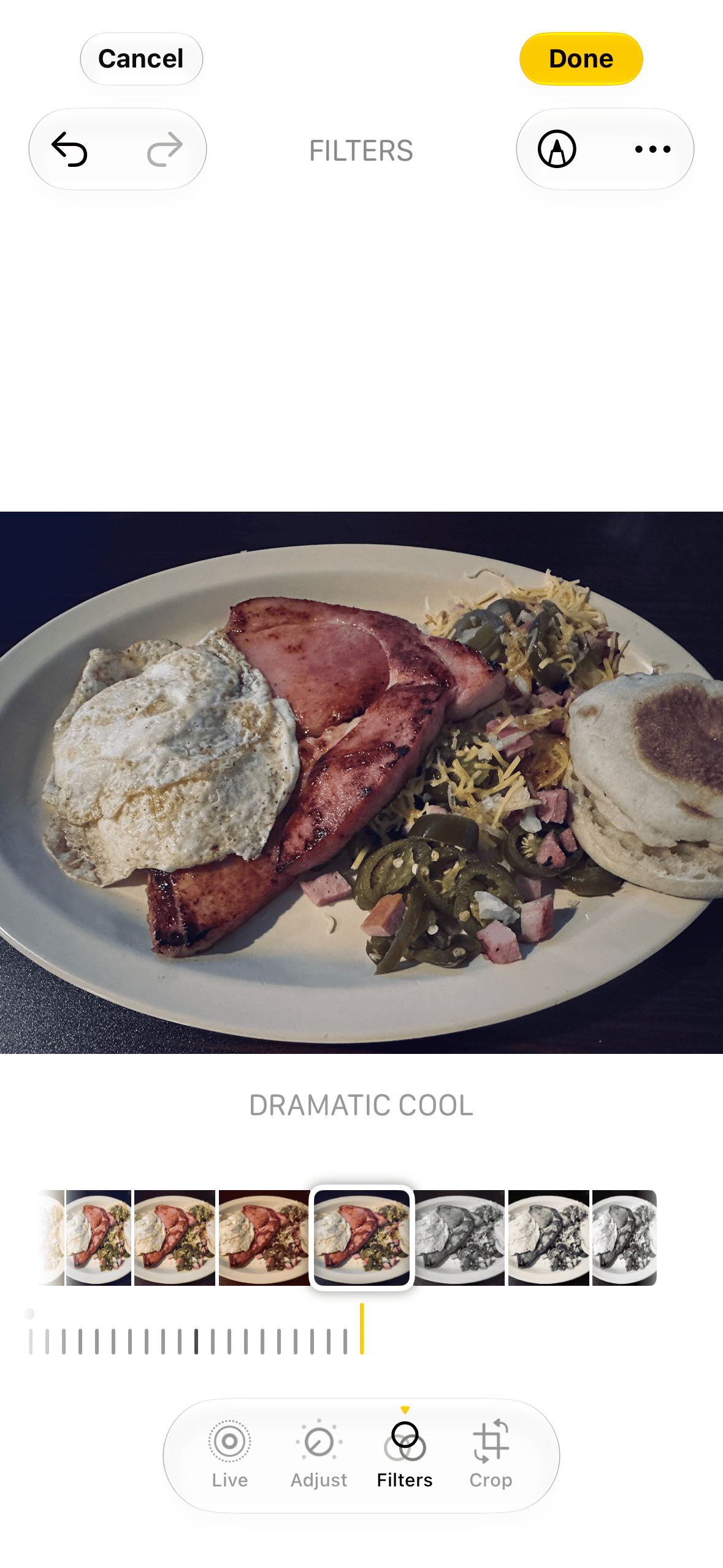
Here is my “dramatic cool” breakfast.
Years before we were labeling everything as “A.I.”, certain Android phones had built-in features like object removal, and similar apps were available as a download for iPhones. You could use this to remove something from your photo that you did not want to be there. While I do understand the usefulness of this, it was just one of many things that will be making the future view of history less accurate. “We have 50,000 photos of this person, but we still don’t know what they actually looked like…”
I had really hoped Apple would avoid all that, but, sadly, with the latest iOS 27 release, even more A.I. stuff has made it into the iPhone.
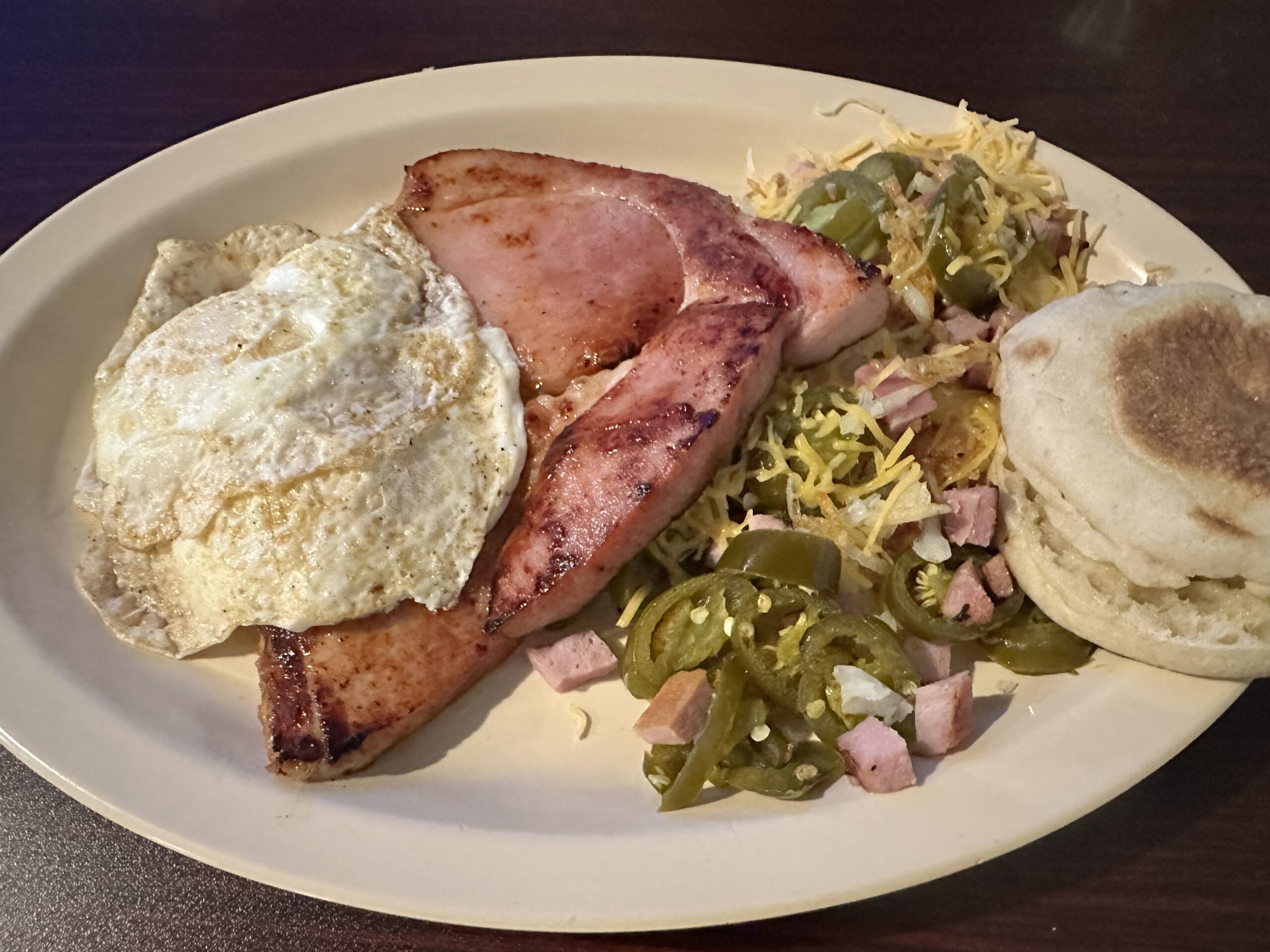
Here is my breakfast photo.
In spite of me taking digital photos since 1996, I still do not claim to be a photographer. I really don’t know anything beyond “point and shoot.” So, sure, I cut off the edge of the plate and English muffin. I was focusing on the main breakfast. No one really needs to see the edge of the muffin or plate, do they?
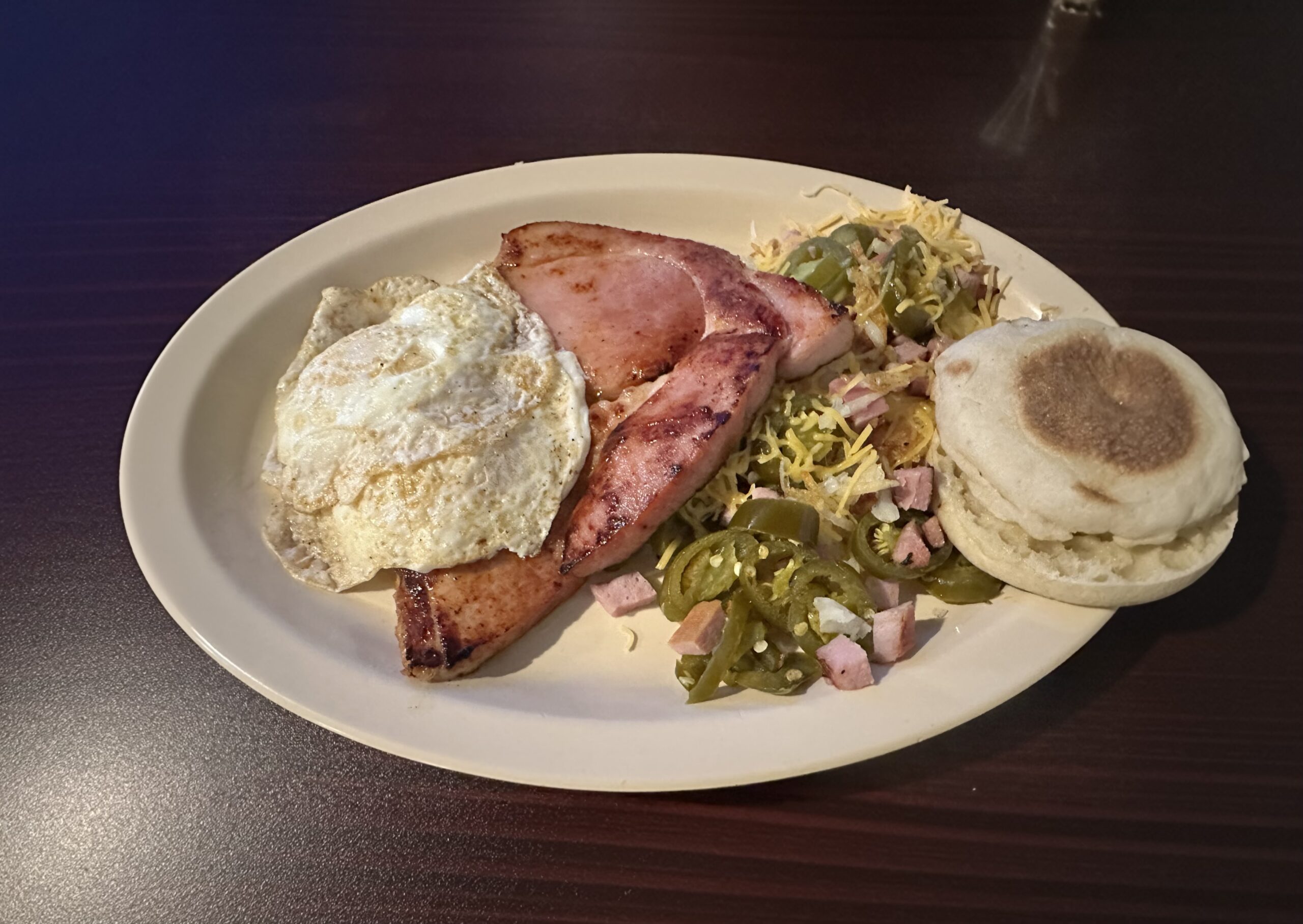
Yet, with Apple Intelligence, now you can “extend” a photo and get fake versions of what might have been there.
Fake A.I. extended edges.
Did the right side of the English muffin really look like that? Unlikely. I could have already taken a bit out of it, and the camera would not know.
There is also a reflection on the table on the top right of the photo. The A.I. tried to make up something that might be sitting there, casting the reflection. But it sure looks … off.
A.I. is just a tool.
You can use a shovel to dig a hole, or use it to hit someone over the head with. The tool is not the problem. Most of us have sharp knives in our household we use in the kitchen, and never use them as weapons of violence.
Just like a straight edge (ruler) allowed “anyone” to draw a straight line, A.I. tools now allow a bad photographer to take a better (?) photo. Well, not actually take, but “fix it later.”
And the world will never know they are looking at partially fake A.I. generated English muffins.
When I brought up my breakfast photo example on my Facebook page, Reece Piccolo-Sellin showed me a definite use for this technology. He provided me with this version of my breakfast photo:
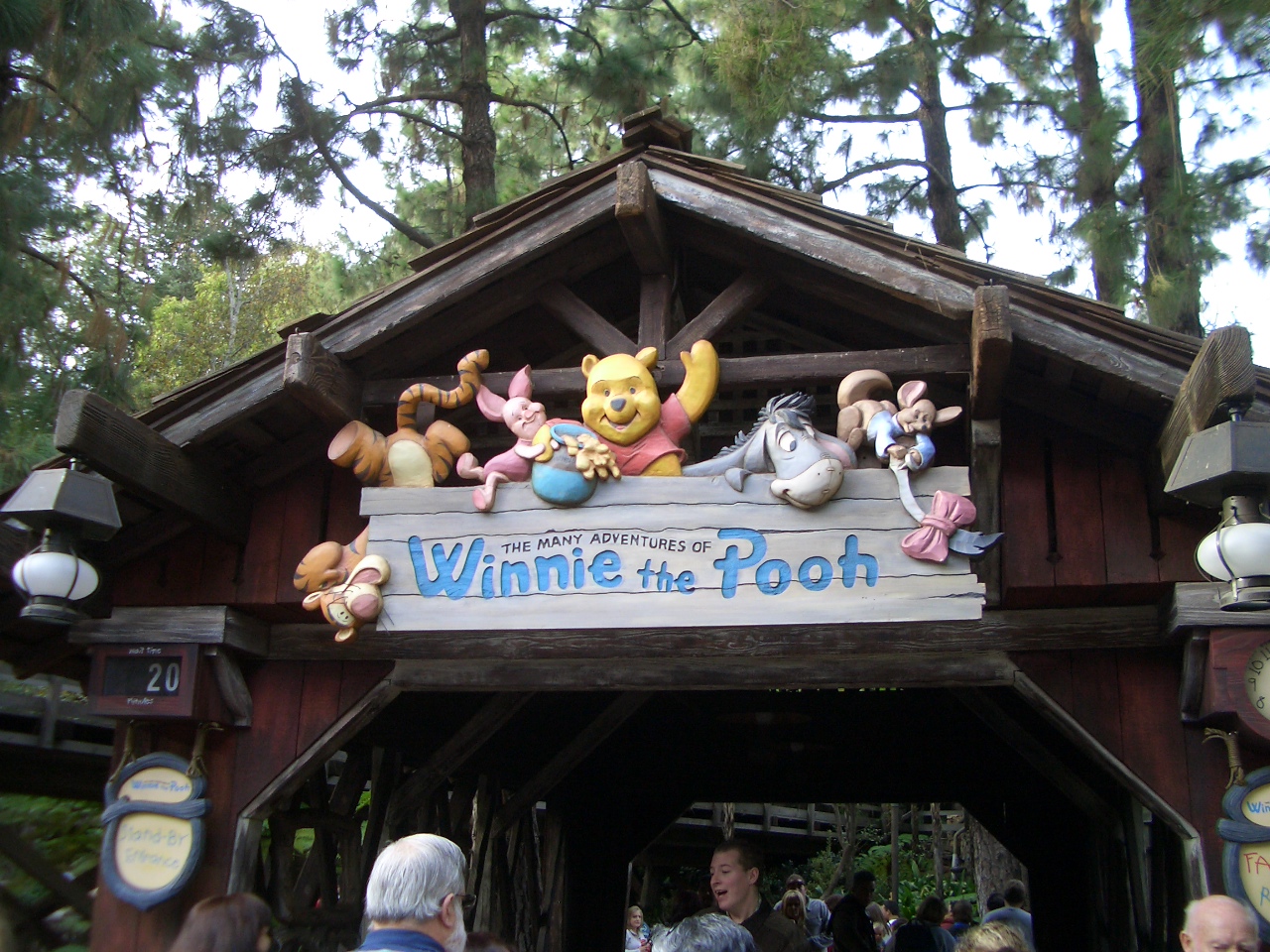
Raymond Kinman is an artist. Specifically, a master woodcarver. He is also famous for his carvings that have been used at Disney theme parks. Yes, Disneyland actually uses hand carved signs!
Raymond Kinman carved sign at Disneyland, 2003. Photo from my DisneyFans.com photo archives.
I had no idea when I took that photo at Disneyland in 2003 that this was actually a hand carved piece. I guess I just assumed it was some fiberglass mold:
You can learn more about Mr. Kinman and see photos of some of his Disney projects at this site:
Today’s topic is, once again, A.I. I have written about A.I. While I hate A.I. slop as much as anyone, I see great value in it as a tool when used by artists, musicians and other creative people. Just like a great guitar can’t make a bad guitar player sound good, a great A.I. doesn’t make a random person able to create works of art or the next Top 40 hit. (Though, since art and music tastes are subjective, it could certainly produce something you really love to see or listen to. There have been many “bad” songs that have gone to #1, and many “bad” paintings that have become legendary.)
But I digress. Again.
Here is Mr. Kinman’s Facebook group where he shares updates:
And here is what he recently posted about A.I. I think this is worth a read as it comes from a master artists with 50+ years of experience.
I’m going to take on something controversial here, so if you’re interested, you’re going to have to slow down and take a minute to read this…’cuz I’d really like to hear your thoughts. I’m going to make the case for why I think using AI can actually be a very good thing for artists.
First, I’m not unaware of the downside. If you think AI is a bad thing for the world, you’re not wrong. I have a fairly decent understanding of the technology and how it works, at least from a layman’s point of view, and I can see nearly an infinite number of ways this could go wrong for humanity. Yeah, the environmental impact. All of it. There is an astonishing upside too, but I’m going to leave that argument alone for now because that’s a rabbit hole I don’t want to go down.
Instead, I want to make the case for what AI is doing FOR the arts and how this has the potential to become a very good thing for artists.
Think about what happened when photography was invented.
Before the camera, one of the primary ways an artist could make a living was painting portraits of wealthy and powerful people. If you wanted a convincing image of yourself, you needed somebody who had spent years learning how to reproduce the human face, the human body, clothing, light and texture with extraordinary accuracy. Then photography came along and suddenly a machine could do that job far faster and more accurately.
You can imagine how frightening that must have been for painters. Why would anybody pay me to spend weeks or months painting a portrait when they can have a photograph taken in minutes? This spells disaster for the artist. The end of painting.
But it wasn’t.
Something much more interesting happened. Photography freed artists from having to spend their careers proving that they could reproduce reality. Artists were suddenly free to explore what else painting could become. Van Gogh, Matisse, Picasso and countless others didn’t have to compete with the camera. They could ask entirely different questions about art. Photography didn’t kill painting. It helped liberate it.
I think AI may be doing something similar, and I want to show you what that looks like in my own work.
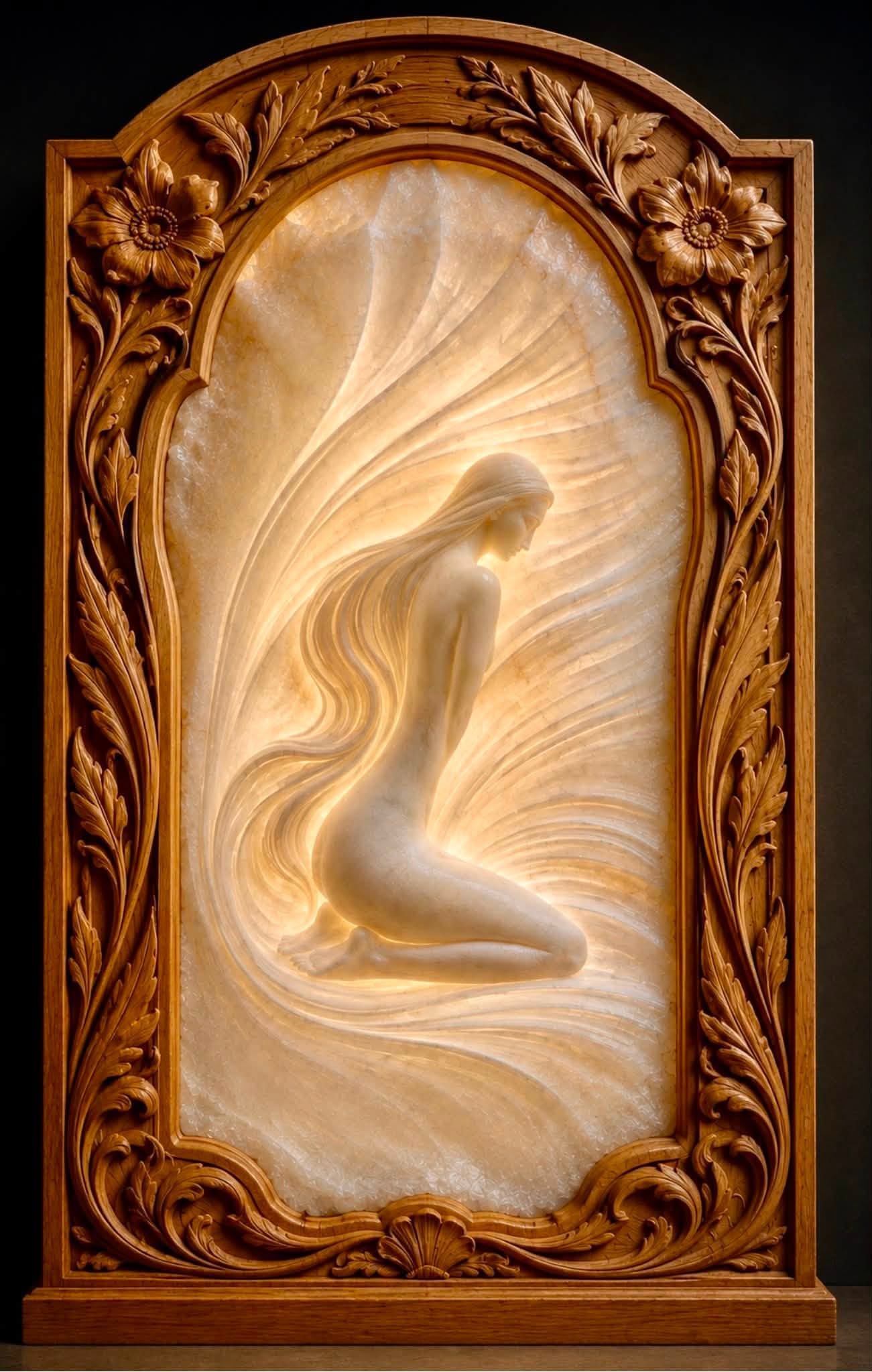
Stone and wood complement one another beautifully, and I had this idea I wanted to explore. I wanted to carve a translucent alabaster relief of a beautiful, tasteful female form, backlit so the stone would glow in the shallow areas, and set it inside a deeply carved wooden frame. I’ve never done any stone carving before, my work has always been in relief woodcarving.
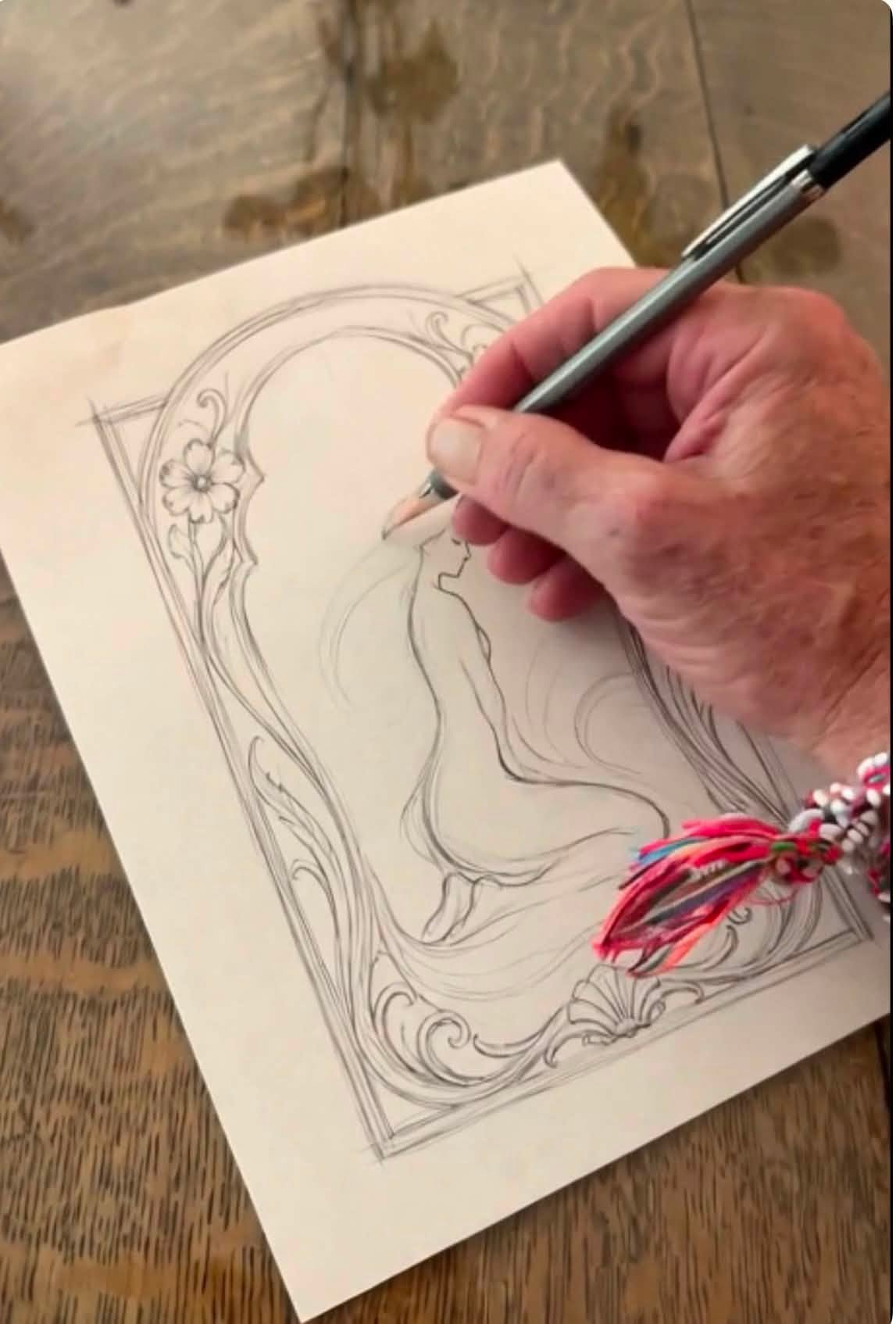
The problem is that I don’t draw very well, and I’m certainly not an illustrator. I can sketch a little, enough to work out my ideas anyway. Everything starts there. The human touch. So I made the little sketch you see here. Then I took the idea to AI.
Screenshot
I asked it to help me visualize what I was imagining. I asked it to push back on my own biases and show me what I wasn’t seeing. I asked it to show me possibilities I hadn’t considered. I asked what I needed to learn about carving stone, what tools I might need, how translucent alabaster behaves with light, and what might actually be possible.
In other words, I asked it to help me see. And it does this astonishingly well.
Screenshot
The second image is not the sculpture. It isn’t even the finished design. It’s a working model of an idea. That distinction is super important to me. Now I have something I can look at, question, change and develop. I can take this model to a real illustrator and have a human being refine it into a workable design. Then I can take that design into my shop and carve the actual sculpture entirely by hand. I’ll be the one holding the tools. I’ll be the one reading the stone. I’ll be the one making the cuts and figuring out what the material will and won’t allow me to do.
I’ve spent nearly fifty years learning how to draw, carve, design and see. AI hasn’t replaced any of that experience. What it has done is give me a way to explore ideas and understand them at a speed I never could before.
If I don’t understand composition, AI can give me a pretty picture. If I DO understand composition, it can give me hundreds of possibilities to examine, reject and develop. If I don’t understand carving, it can give me an image of something that looks like it could be carved. If I’ve been carving for fifty years, I can look at that image and start asking whether the forms actually make sense in wood or stone.
The technology doesn’t eliminate the need for artistic knowledge. In many ways, it makes that knowledge more valuable because I still have to know what I’m looking at. So I’m not interested in having AI make my art for me. I’m interested in using it to expand what I’m capable of imagining.
Photography didn’t end painting. It changed what painting could be. Maybe AI is going to do the same thing for all of us.
For me, this is what I mean by The Human Touch. The tech helps me see farther than I could see before, but eventually the idea comes back into human hands.
Real musicians fought against things like rhythm boxes (later called drum machines), synthesizers and samplers. Today, these technologies are accepted even though somewhere out there a violinist is getting less work because a sampler/synthesizer can be “good enough” on a recording. And, well, drummers may be having the hardest time of all of musicians…
But I digress.
I have discussed the “A.I. is a tool” topic in the past. The better technology works for the untalented, the more impressive it will be when guided by someone who knows what they are doing.
And then there are videos… No one really knows what makes them popular.
A crappy cell phone video can go viral and be seen tens of millions of times. Meanwhile, a whole team that put together an Oscar-worthy short film gets a few hundred views. Your talent means nothing if no one sees it. Getting lucky is still a more powerful way to be seen.
And editing videos? Yeah, some folks do really crappy editing jobs, and get tons of views, while someone who does professional-level editing may produce content no one cares about.
Insta360 is about to give the folks who do really crappy editing a new robot to do their editing for them:
Be on the lookout for more cookie-cutter videos that seem like they were all made by the same editor. Because they will be. Bleep, bloop.
Sure, this will give people with really poor editing skills the ability to have highly polished robot-looking edits done on their footage. It might even produce better results than some skilled editors.
But much like clip art and stock music, once we start seeing it over and over (and over), it will just be another example of “A.I. slop” to many.
But it sure is going to be fun to play with until folks get sick of “the look.”
Then we will need a name for it. “A.I. slop edit?” Comment away if you have some ideas…
Sometime in June 2026, I saw a random post on LinkedIn where someone said they created an emulator for the Texas Instruments TI-99 computer using AI. Could AI really create a full emulator that actually worked? And if so, could it do that for the CoCo?
Turns out, yes, and yes. A CoCo emulator, mostly crafted by AI, has been released. It runs in a web browser! You can find the code here:
There was a time when any sign you saw was hand drawn. As a child of the 1970s, I remember my daycare bus driving us past a billboard where a man was up there painting it by hand. Lettering on doors and windows would also be hand painted.
Today, digital printing, vinyl cutters and other technologies now do most of these tasks.
Even for the non-artistic, there used to be folks who had excellent handwriting, and others (such as me!) that had unreadable sloppy handwriting.
But on a typewriter, both types of folks could produce the same legible result.
I took drafting in high school. We would sit at a drafting table with a built-in straight edge (ruler) and do everything with a pencil and other tools. Lettering was done by hand.
Then C.A.D. software happened.
Your talent no longer impresses me
There was a time when drawing a perfect circle or straight line was a true talent, but today, anyone at a computer can quickly create a perfect circle or perfectly straight line. While there are people that can still manage to do this without computer assistance, they are just doing it “the hard way.” We are no longer appreciating the result — by we might appreciate the effort. A human that can calculate values in their head is impressive, but no one is impressed if you use a calculator to generate the same result.
This is what I think of when it comes to A.I. As a hobbyist musician, getting into keyboards and MIDI allowed me to perfectly “quantize” my playing so my notes were perfect. Only the best keyboard players could play like that, but my late-1980s synthesizer setup let me do it, and I have awful timing. I still can’t play anything “live” and make it sound good – that remains a domain of the truly talented.
Typing in a prompt and generating a photo or drawing is just modern equivalent of using a computer to draw a straight line or circle. The artists and photographers are just using a new tool that can do some of their work without the actual work.
And the funny thing is, these artists using graphics tablets and drawing software on a computer used those tools to replace the artists that were doing everything with paint and pencils.
Lather, rinse, repeat.
If you go back and look at the very early drawing programs (say, MacPaint in 1984) and compare them to what artists use today, that is a huge leap in “what the computer is doing for you.”
Is A.I. really any different? It is yet another “huge leap.”
This text was generated 100% by a human*. Feel free to be impressed.
Until next time…
* Except for spell checking. Remember dictionaries? Yeah, good times.
Step 1: Rename the .PIX file so it has the extension .data. This is needed for GIMP to recognize it as a “raw” data file.
Step 2: Open this image in GIMP by expanding “Select File Type” and choosing Raw image data. That should allow the .data file to show up in the browser to open it.
Step 3: The file will open and you must adjust settings to tell GIMP more about the image. Under Pixel format, select Grayscale 4-bit. For the Width and Height, set them to 256 (if it is a 32K file) or 128 (if it is 8K). Now you should be able to Open the image.
Step 4: With the image open, you will need to Invert it to get the colors correct (Colors -> Invert) and rotate the image clockwise (Image -> Transform -> Rotate 90 clockwise).
Step 5: That should give you a 256×256 or 128×128 16-greyscale image you can now save out in whatever format you wish. GIMP can save based on the extension you give it when exporting. (File -> Export As… then change the extension to .PNG or .GIF or whatever.)
Tada!
Neat.
Or, I had A.I. write this quick conversion script… It can convert one file at a time, or run it in a directory with .PIX files and it will do them all. It currently only supports the 128×128 16-grey and 256×256 16-grey photos. I recall there was a 64-grey mode, so if I find one of those images, I will update the script to do them, too.
#!/usr/bin/env python3
import sys
import glob
from PIL import Image

def convert_pix(pix_file):
    with open(pix_file, 'rb') as f:
        data = f.read()

    if len(data) == 32768:
        width, height = 256, 256
    elif len(data) == 8192:
        width, height = 128, 128
    else:
        print(f"Invalid file size for {pix_file} (expected 8192 or 32768 bytes)")
        return

    pixels = []
    for byte in data:
        pixels.append(byte >> 4)
        pixels.append(byte & 0x0F)

    # Create image
    img = Image.new('P', (width, height))
    img.putdata(pixels)

    # Rotate right 90 degrees (CW)
    img = img.rotate(-90)

    # Invert colors
    inverted_pixels = [15 - p for p in img.getdata()]
    img.putdata(inverted_pixels)

    # Set greyscale palette
    palette = []
    for i in range(16):
        v = i * 255 // 15
        palette.extend([v, v, v])
    img.putpalette(palette)

    # Save as PNG
    output_file = pix_file.replace('.PIX', '.png').replace('.pix', '.png')
    img.save(output_file)
    print(f"Converted {pix_file} ({width}x{height}) to {output_file}")

def main():
    if len(sys.argv) == 1:
        pix_files = glob.glob('*.PIX') + glob.glob('*.pix')
        if not pix_files:
            print("No .PIX files found in current directory")
            sys.exit(1)
    else:
        pix_files = sys.argv[1:]

    for pix_file in pix_files:
        convert_pix(pix_file)

if __name__ == "__main__":
    main()
You can find it on my GitHub along with documentation on what all it needs to run:
When capturing video for Google Street View, Google recommends using 1 frame per second video for walking, and 5 frames per second for biking and lower speeds. A full 30 or even 60 fps video is unnecessarily huge and will take much longer to upload and process … and most of the frames will be discarded by Google anyway.
I had one of the A.I.s (probably CoPilot) automate using the ffmpeg open source command line tool so I could batch convert files in a directory. A very rough work-in-progress version is on my GitHub now:
AI on the CoCo? This is a simple language experiment that I think can be done on the coco if anyone would like to try the code. I asked Grok to write a basic program to read a 10MB corpus of sentences from a dictionary and then build a simple Markov graph db to predict the next word in a sequence.
– Youngstown Ken, via Facebook CoCo group
The attached link went to a Grok-generated conversation about the subject. You can read the short interaction here, and see the generated Python and BASIC-ish code:
So naturally, someone needs to try this and see if it would even work. AI is terrible at BASIC, though I did have some success talking it through some simple 32-column text screen game code when ChatGPT first made a big public splash a few years ago.
Let’s look at the second code variation it produced:
10 REM Two-Level Markov Chain Predictor for TRS-80 CoCo
20 REM Vocabulary: 1000 words, Trigram model fits in 512KB

30 DIM V$(999): REM Vocabulary array (1000 words)
40 DIM F(999): REM Frequency array for vocab building
50 DIM M(499,3): REM Model: 500 trigrams max (w1,w2,w3,prob)
60 N=0: REM Number of trigrams loaded

70 REM Pass 1: Build vocabulary from corpus.txt
80 OPEN "I",#1,"CORPUS.TXT"
90 FOR I=0 TO 999: F(I)=0: NEXT I: REM Initialize frequency
100 IF EOF(1) THEN 140
110 LINE INPUT #1,L$: REM Read line
120 GOSUB 500: REM Process line for word frequencies
130 GOTO 100
140 CLOSE #1

150 REM Sort top 1000 words by frequency (simplified)
160 FOR I=0 TO 999: V$(I)="<UNK>": NEXT I: REM Default to <UNK>
170 W$="":C=0: REM Temp word and count
180 OPEN "I",#1,"CORPUS.TXT" : REM Reopen for word assignment
190 IF EOF(1) THEN 230
200 LINE INPUT #1,L$
210 GOSUB 600: REM Assign top 1000 words
220 GOTO 190
230 CLOSE #1

240 REM Pass 2: Build trigram model
250 OPEN "I",#1,"CORPUS.TXT"
260 IF EOF(1) THEN 300
270 LINE INPUT #1,L$
280 GOSUB 700: REM Build trigrams
290 GOTO 260
300 CLOSE #1

310 REM Input sequence and predict
320 PRINT "Enter two-word sequence (e.g., 'the quick'):"
330 INPUT S$
340 GOSUB 800: REM Extract last two words and predict
350 PRINT "Next word:";W3$
360 GOTO 320: REM Loop for more predictions

500 REM Subroutine: Count word frequencies
510 W$="":P=1
520 IF P>LEN(L$) THEN RETURN
530 C$=MID$(L$,P,1)
540 IF C$=" " OR P=LEN(L$) THEN GOSUB 550: GOTO 570
550 IF W$<>"" THEN FOR I=0 TO 999: IF V$(I)=W$ THEN F(I)=F(I)+1: GOTO 560: NEXT I
560 W$="":P=P+1:GOTO 520
570 W$=W$+C$:P=P+1:GOTO 520

600 REM Subroutine: Assign top 1000 words (simplified)
610 W$="":P=1
620 IF P>LEN(L$) THEN RETURN
630 C$=MID$(L$,P,1)
640 IF C$=" " OR P=LEN(L$) THEN GOSUB 650: GOTO 670
650 IF W$<>"" THEN FOR I=0 TO 999: IF V$(I)="" AND F(I)>C THEN V$(I)=W$:C=F(I): GOTO 660: NEXT I
660 W$="":P=P+1:GOTO 620
670 W$=W$+C$:P=P+1:GOTO 620

700 REM Subroutine: Build trigrams
710 W1$="":W2$="":W3$="":P=1:W=0
720 IF P>LEN(L$) THEN RETURN
730 C$=MID$(L$,P,1)
740 IF C$=" " OR P=LEN(L$) THEN GOSUB 750: GOTO 770
750 IF W$<>"" THEN W=W+1:IF W=1 THEN W1$=W$ ELSE IF W=2 THEN W2$=W$ ELSE IF W=3 THEN W3$=W$:GOSUB 900
760 W$="":P=P+1:GOTO 720
770 W$=W$+C$:P=P+1:GOTO 720

900 REM Subroutine: Add trigram to model
910 IF N>=500 THEN RETURN: REM Limit to 500 trigrams
920 FOR I=0 TO 999: IF V$(I)=W1$ THEN W1=I:GOTO 930: NEXT I:W1=999
930 FOR I=0 TO 999: IF V$(I)=W2$ THEN W2=I:GOTO 940: NEXT I:W2=999
940 FOR I=0 TO 999: IF V$(I)=W3$ THEN W3=I:GOTO 950: NEXT I:W3=999
950 FOR I=0 TO N-1: IF M(I,0)=W1 AND M(I,1)=W2 THEN M(I,3)=M(I,3)+1:RETURN
960 M(N,0)=W1:M(N,1)=W2:M(N,2)=W3:M(N,3)=1:N=N+1
970 RETURN

800 REM Subroutine: Predict next word
810 W1$="":W2$="":P=1
820 IF P>LEN(S$) THEN GOTO 850
830 C$=MID$(S$,P,1)
840 IF C$=" " THEN W1$=W2$:W2$="":P=P+1:GOTO 820 ELSE W2$=W2$+C$:P=P+1:GOTO 820
850 IF W1$="" THEN W1$=W2$:W2$="": REM Handle single word
860 FOR I=0 TO 999: IF V$(I)=W1$ THEN W1=I:GOTO 870: NEXT I:W1=999
870 FOR I=0 TO 999: IF V$(I)=W2$ THEN W2=I:GOTO 880: NEXT I:W2=999
880 W3$="<UNK>":P=0
890 FOR I=0 TO N-1: IF M(I,0)=W1 AND M(I,1)=W2 AND M(I,3)>P THEN W3$=V$(M(I,2)):P=M(I,3)
900 NEXT I
910 RETURN
This is surprising to me, since it does appear to be honoring the 2-character limit of Color BASIC variables, which is something my early interactions with ChatGPT would not do.
The original prompt told it to do something that could run on a CoCo within 512K. Even Super Extended Color BASIC on a 512K CoCo 3 still only gives you 24K of program space on startup. And, as I recently learned, if you try to use a CoCo 3’s 40 or 80 column screen and clear more than about 16K of string space, you get a crash.
I think I may give this a go. I do not understand how any of this works, so I do not expect good results, BUT I do want to at least try to see if I can make the program functional. If it expects to use 512K of RAM for string storage, this program is doomed to fail. But, 24K would be room for 1000 24-byte words, at least.
To be continued … maybe.
In the meantime, check out that Grok link and see what you can come up with. And let me know in the comments.
About a week ago, YouTube decided to show me this video:
While I was aware that AI-generated music was a thing, I had no idea it had gotten this good.
I signed up and spent the next few days playing with SUNO. It produced some pretty amazing and surprising results.
Then, a few days ago, I was shown a video speculating on some new AI music generator that was about to be announced. The claim was it would be 2X better than SUNO.
Yesterday, that service was launched — UDIO (like studio with the ST I guess?). It was down most of the day (overloaded) but late last night I got to play with it, mostly letting it produce random lyrics and tunes
Here is an UDIO generated song about being in love with a VCR:
Udio looks quite promising, with some features missing from SUNO (like the ability to extend a song and add to the START; SUNO allows you to extend from a time code, only).
Initial testing did not let me make any “complete song” like I have been doing with SUNO, but I expect this must be possible with enough attempts – their gallery is full of them.
Vocal quality of Udio is stunning. SUNO sounds great most of the time, but there is an auto-tune/harmonizer digital sound on vocals sometime. I have not heard that yet on any of the dozens of things I have had Udio create.
The music sounds good, but SUNO seems to generate more “wow, I like this song” tracks than Udio. The three “songs” I had SUNO make are just kind of drifting melodies, with no clear chorus or hook or anything. I have certainly heard songs like that, but right now I’d give SUNO the advantage of making “actual songs” versus tunes.