Drobo (2nd gen) to Drobo (3rd gen), part 2

In part 1, I rambled on a bit about my experience with external hard drives and I stated that next I would explain “why I chose Drobo” and that we’d “look at the 2nd generation model versus the 3rd generation model.”

I guess I should do that.

Never Enough Storage

“Just buy a larger hard drive,” people tell me. It must be nice to have so little content you want to store that you can just buy an extra drive and be done with it. As an early adopter of digital photography (I got my first digital camera in 1996), I have taken several hundred thousand digital photos over the years. With no negatives, keeping those digital originals safe is very important. I learned this the hard way when I had a hard drive failure and lost a year’s worth of photos. The only copies I had were the scaled-down and watermarked versions on my website. At least I had those!

All my earlier photos had been archived to stacks of CD-Rs, so I was able to recover most of them, but it was clear I would have to make backups more regularly just in case it ever happened again. (“Just buy more DVD-Rs”.)

And it happened again. Several times, actually. I’ve had a number of hard drives fail on me unexpectedly. Most were still “new” drives, well under warranty. While Seagate or Western Digital will promptly replace the drive, that does little for you data. ALWAYS MAKE BACKUPS! (And always check reviews. The “more reliable” hard drive brand to buy has changed a number of times of the years. I am currently using Western Digital drives, but many years ago I wouldn’t have touched a WD for anything important.)

CD-Rs Aren’t Backups

For me, my main backup strategy was making sure all my digital photos and digital video files were archived to CD-R (then, later, DVD-R). I have stacks of these discs, but, sadly, some of my earliest CD-R backups no longer read. That’s right, Virginia. CD-Rs are not “forever” media. Exposure to UV rays in light can cause bit rot. Just because you copy something to a plastic disc doesn’t mean it’s safe long term.

When I learned CD-Rs were not enough, I decided I needed to do a combination of things:

  1. Every bit of important data should be archived to CD/DVD. Even if it’s not necessarily a long term solution, it’s still important to have a backup that can’t be taken out by a power surge or by dropping a computer.
  2. Every bit of important data should exist on at least two hard drives.
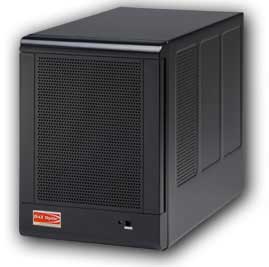
qBox 4-drive enclosure (photo from their website).

qBox 4-drive enclosure (photo from their website).

I started using some qBox-F quad-drive enclosures on my Mac. I had two of them – one for primary storage and the other for backup. Each one was “JBOD” (just a bunch of disks) so they appeared are four separate drives to my Mac. Soon, though, four drives was not enough and I needed more storage. Every time I did, I had to get out the screwdriver and swap out drives and spend hours copying data back and forth. There had to be a better way.

A Better Way: Trayless Hard Drive Enclosures

iStarUSA v7AGE220-SAU enclosure

iStarUSA v7AGE220-SAU enclosure (photo from their website)

The next thing I found were trayless hard drive enclosures. They let you slide bare drives in and out without using tools. I bought a few inexpensive iStarUSA brand 2-drive enclosures. (I always like to have two matching enclosures in case one of them dies so I can swap drives out and get to my data in an emergency.) I was using the now-discontinued Firewire version for primary store (faster than USB 2.0) and had a cheaper USB-only version for emergency backup.

I also found a company that sold plastic hard drive cases that looked like old VHS rental tape cases. I ended up with a bookshelf full of hard drives. When I would copy data to one of them, I would also copy it to the second backup hard drive.

This worked quite well, but every time my collection grew I had to buy two more hard drives (primary and backup). I was hoping for a way to save some money while still getting protection. That’s what let me to research RAID-type hard drive systems.

Saving Money by Going RAID

With RAID, multiple drives are used and data is spread across all the drives. Every block of data is duplicated on another drive. If one drive fails, any data on that drive still exists somewhere else in the RAID array. This sounded like a good solution, but RAID has some limitations.

RAID systems want all drives to be of matching size (and preferably, type). If you put in a 500GB drive and a 750GB drive, the RAID would only use the largest amount that is common to all drives (in this case, 500GB – thus wasting the rest of the 750GB drive). You were also locked to that size. If a drive failed and you replaced it with a larger drive, the data would rebuild on the new drive, but it would only use the size of the former drive. Thus, you couldn’t upgrade capacity without starting over with an all new set of larger drives and copying everything over.

My 2nd generation Drobo (currently for sale on e-Bay).

My 2nd generation Drobo (currently for sale on e-Bay).

I ended up going with a Drobo because their non-standard “magic” was that you didn’t have to have matching hard drives. You could start with two drives of any size, and then add more (up to four) to expand. When you started running out of space, you could replace a drive with a larger one and continue to do this as needed. Drobo looked like a great solution to my ever-growing need for backup data.

Up next: Drobo pros and Drobo cons.

Drobo (2nd gen) to Drobo (3rd gen), part 1

This multi-part series will be an extensive review of the 3rd generation Drobo external hard drive enclosure and my experiences with it after migrating from a 2nd generation Drobo on a Mac. Thank you to Data Robotics for making this possible. My many years with Drobo have sometimes felt like an abusive relationship – I have had numerous instances of data loss and many other problems, but the “magic” of Drobo keeps pulling me back in. Hopefully, after another generation of product advancement, maybe this time things will be better. Drobo loves me. I know it does.

Most article writers seldom give you any indication of why they are qualified to speak on a subject. My experience with external hard drives began a long, long time ago . . . (Well, to you young folks. To me, it seems like only yesterday…) This will have nothing to do with the actual content, so please free to skip to Part 2 (once it is posted).

My Path to External Drives

In 1998, I purchased my first Apple product – an original bondi blue Apple iMac. It had no RS232 serial port, no parallel printer port, and no floppy drive. Instead, it used some weird port called a Universal Serial Bus (USB) to hook up to such devices. There was pretty much nothing available that used USB back then. Early USB devices included mice, keyboards, printers, RS232 serial ports, external floppy drives and hard drives.

In the next MacWorld keynote after the iMac was released, Steve Jobs gave a presentation where he unveiled “Firewire” (Apple’s re-branding of the IEEE-1394 standard). He demonstrated it by showing it used to hook up an external hard drive and a digital video camcorder. Back then, the only way I’d ever seen an external hard drive hooked up to a PC was via the parallel printer port (Iomega Zip drives, for example) or via a SCSI interface. The only way I’d ever seen a camera hooked up was by audio/video inputs to a video digitizing device. It was a very different world!

Seeing Firewire allow importing of digital video from a camcorder was revolutionary, and I instantly knew it was something I wanted to be able to do.

Digression:

Around 1981, my father had a video camera that hooked to a huge VHS recorder. I remember making silly home videos with it a kid. In 1982, we made a trip to Walt Disney World with a “portable” VHS recorder and camera. I guess we recorded some of the earliest vacation “home videos” long before everyone there was carrying around a camera. In the years that followed, things got smaller: all-in-one VHS camcorders would be introduced, and then tiny 8mm video tapes (and VHS-C). The home video revolution was in full swing, but the only way I ever edited video back then was with two video recorders hooked together. As video moved to digital (Digital8 on 8mm tapes, or DV tapes), a new world opened up. Seeing digital video being “imported” from tape in to a computer and then edited on screen non-linearly was magic. I bought a Sony Digital8 camcorder in preparation for having this editing capability at home.

Although Firewire was initially only available on the high-end (and expensive) PowerMac G3 desktop, Apple quickly added it to their next consumer computer when the iMac DV (digital video) was released in 1999. It took me weeks to get one at the local CompUSA, but soon I was set up with a digital camcorder and a computer with Firewire. The only problem was that an hour of digital video took about 13GB of hard drive space, and the iMac DV Special Edition I had only came with a 13GB drive.

This is what led to me purchasing my first external hard drive. (I am not counting the “big floppy” Iomega Zip drives or SyQuest EZ135 drives I used on PCs, my Radio Shack Color Computer or OS-9 MM/1 systems. I had been using those for years, but they weren’t hard drives.)

After filling up this first 30 gigabyte external drive (at least, I think it was 30), I moved on to many more drives over the years, each one larger than the last. Today on my desk I have four external drive enclosures (two 2-bay RAID systems, and two 2nd generation Drobos), a 3TB Seagate backup drive, and about four tiny pocket drives… Between all of those and the drives in my computers, I easily have over 20 terabytes of storage which, sadly, seems to be full at all times.

Over the years I have gone through brand after brand, including many that no longer exist. Western Digital makes up most of the drives I am currently using, though there was a time when their drives were considered bad and you’d have better luck with Seagate. There were other brands that, for awhile, were considered the most reliable. I have no brand loyalty. I just want my data to be protected. EVERY drive can and will fail. Always assume that day will be tomorrow and keep redundant copies of all your important data.

So am I an expect about external hard drives? Not at all . . . but I’ve probably used more of them over the years, and use more of them today, than most folks will in a lifetime.

Up next, why I chose Drobo and a look at the 2nd generation model versus the 3rd generation model.


More cheers for Otterbox, and jeers for Drobo

  • 11/11/2015 Update: I now have my Drobo (thanks, FedEx).
  • 11/17/2015 Update: Eden, an inside sales person at Drobo, seems to have gotten the issue with orders being stuck “unfulfilled” fixed. I wonder if this was just happening to me, or to everyone getting shipments from Drobo? Also, added link to “full review”.

As previously mentioned, Otterbox makes great protective cases for phones and tablets. They also have outstanding customer service and warranty support. Recently, I damaged my iPad Otterbox Defender stand and wanted to get a replacement. Otterbox currently does not sell one for my model iPad so I had to contact them to ask how I could get one. A few e-mail exchanges later and I was told to call in on Monday to pay a $2.99 shipping charge and they’d send me a replacement. Amazingly enough, even with the damage being entirely my fault, they still wanted to send me a replacement at no cost (other than shipping). Everyone I dealt with, e-mail or voice, was incredibly nice and even apologetic over the process. Beyond Disney and Apple, I don’t think I have ever encountered this level of customer service. Way to go, Otterbox.

Meanwhile, things are not going quite as well with Data Robotics, creators of the Drobo backup devices. I have had two of those units which I purchased many years ago. Both are sold old they have been end-of-lifed by Data Robotics. Due to various problems which I will cover in a future article, I am now waiting for a replacement unit to arrive. The order was entered last Monday, then still showed “unfulfilled” in their tracking system three days later. Has Amazon spoiled us so much that we now actually expect a company to ship same or next day for online orders? I had to contact them to ask what was up, and was given a tracking number. Apparently they did ship the next day, but the system didn’t show that.

One week later, and the item is still not here. Actually, FedEx tried to deliver it on Friday, but I work days so I was unable to sign for the package. Due to how Data Robotics ships, I am unable to have the shipment “held for pickup” at the FedEx centers. Instead, I can only have someone sign for it. I am unable to do this, so apparently I am unable to receive packages from Data Robotics… I can’t imagine why they don’t allow me to go to a FedEx office and show my ID there to pick up a package, but would allow a stranger to sign for it at my address.

Hopefully I will eventually be able to get this shipment.

UPDATE: Thanks to the wonderful Cindy at FedEx Ground in Grimes, Iowa, I was able to pick up my Drobo from them on Friday night. She says I should have been able to do that anyway, though the FedEx online system would not let me redirect, and a rep at 800-GO-FEDEX also said I could not due to shipper restrictions. I don’t really care who was right as long as I can get my package ;-)

Eventually, my Drobo will finish rebuilding (it estimated as much as 440+ hours at one point) and I can move the drives in to this new unit for a full review.

Carl England writes books, too?

I met Carl England at the very first Atlanta CoCoFest, I believe, back in 1990. If it wasn’t the 1990 one, it was certainly 1991. I have been a fan of his work ever since. His SuperBoot utility was on virtually every RS-DOS disk I owned that had stuff I wanted to run by typing “DOS”. He is also the guy that demonstrated a Tandy DMP105 printer with an add on that turned it in to a full page scanner. It’s a pity that never made it to market. It was way ahead of its time.

Today I found out Carl has also written a fiction book. He is looking for enouhg nominations on Amazon to get it published. If you don’t mind, take a look:

https://kindlescout.amazon.com/p/GCH5VQG8NI6U

Thanks.

Chainless bicycles?

At another side-project site of mine I have been doing a multi-park review of a “chainless” bike. Instead of a chain, it uses a shaft. Instead of a derailleur, it uses an internal hub. The concept of a chainless bike is very, very old, but Dynamic Bicycles in Rhode Island has taken the idea and updated it with modern technology.

If you have any interest in biking tech, drop by and check out this review:

The Dynamic Bicycles Runabout 8 model is a hybrid bike (meaning it’s bigger/heavier than a street bike, but not quite a mountain bike). Getting rid of the chain solves a ton of problems/challenges with maintaining/tuning a traditional bike. Very cool.

YQ8008 bicycle LED light for $74.96 on e-Bay

  • 2015/8/25 – Added not about $36 YQ8007.
YQ8008 bicycle LED light (pic from e-Bay store), currently $75 on e-Bay.

A relatively new e-Bay store, Newell Development, has a listing for the YQ8008 three-arm bicycle LED light for $74.96 with free shipping from China. This model typically sells for around $130, but many e-Bay stores have it for around $80 with a $20 shipping fee. This $74.96 price is the lowest I have found so far.

They list the item as “generic” but I wrote them to ask if it was a YQ8008 (they use all the same official photos) and they responded:

“…it is Original with 100 Modes Programmable DIY Bike Bicycle Wheel Spoke Light. And it is in stock.”

Although the XuanWheel has four arms (so it can display images at lower speeds), the YQ8008 has a higher LED count per arm and thus produces a higher resolution image. You can check my comparison chart to see more details.

I have also found the YQ8007 (two arms) for $40 with free shipping from GearBest.com. I have received one to review. It shipped on 8/11 and was received in Iowa on 8/20, so just over a week — not bad. (As of this update, it is currently $36.)

See Also: XuanWheel for $79.

XuanWheel bicycle LED light for $79 on Amazon

  • 2015/8/14: Added note about e-Bay seller.
  • 2015/8/24: Added note that it now is shipped by Amazon, and qualifies for Amazon Prime shipping.
  • 2015/12/8: $72 on Amazon currently, and there are some reviews now (and notes from the seller explaining why the iOS app is “untrusted”. Buyer beware!)
XuanWheel (pic from Amazon store).

The XuanWheel (or is it Xuan Wheel?) just saw a $10 price drop. It is currently $79 at Amazon with shipping  from Amazon, so it qualifies for Amazon Prime. This model has four arms, and thus produces an image (or moving video) at lower speeds than the cheaper two arm models.

One of the two e-Bay sellers has them for $69 with free shipping (from China), currently.

See Also: There is also the YQ8008 (now found for $75 on e-Bay with free shipping) three arm unit which has a higher density of LEDs no each arm for higher resolution photos. XuanWheel is probably better at slower speeds, and YQ8008 probably has better images at higher speeds.

Installing iOS apps direct without going through the App Store…

One of the features of Android is that you can install anything you want, from any source — such as a developer’s website. Until app stores made all of this obsolete, this was the way all software was distributed. Sure, there were always index sites, such as VersionTracker.com or Download.com, where you could find links to all the installers, but ultimately everything came direct from the developer.

By contrast, Apple’s iOS apps only install through Apple’s App Store. Except that’s never really been true. Even without jailbreaking an iPhone, you have always been able to install an app direct from a developer for testing purposes. The developer had to be registered with Apple, but beyond that there were no barriers. Downloader beware.

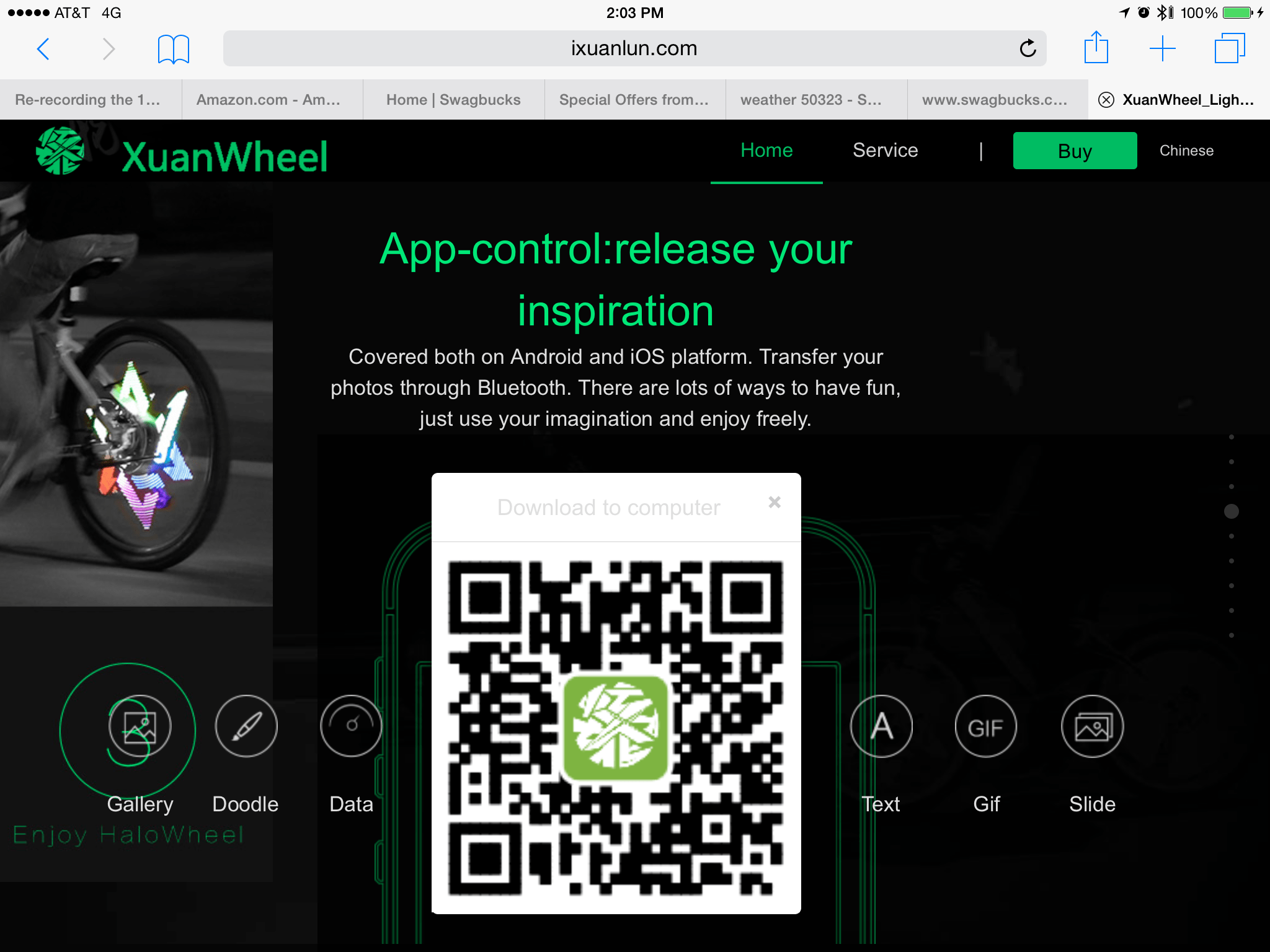
I recently came across what I believe is a misuse of this beta test capability… There is a computerized bicycle light I have been researching and it is programmed via an Android or iPhone app. Their app does not appear in Apple’s App Store. Instead, you get a QR code from their website which will take you to a special download website:

 
I don’t know why they don’t just post the link directly — I have a QR reader app, but most folks I know don’t. For those without a QR reader app, that location goes to:

http://fir.im/halowheelOversea

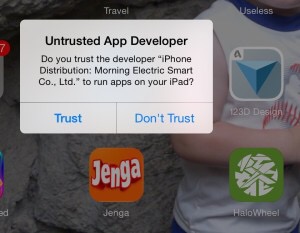
If you go there, you can download the iPhone app direct to your device, and your device will warn you:   


Do you trust this app? XuanWheel iOS app.


You can see the green app icon in the lower right of that screen shot.

So yes, a developer can do this… But isn’t supposed to. I assume they plan to get their app in the App Store at some point… Until then, I wonder how many are brave enouhg to directly install it?

Not me :)


Mac OS X Wireless Diagnostics to speed up WiFi

Did you know that Mac OS X has a hidden utility that will scan surrounding WiFi networks and suggest a better/faster channel for you to use?

Neither did I, until tonight.

After a few months of really slow Internet, I finally decided to contact CenturyLink to see what was wrong. My latency rates were over 800ms and, while speed tests showed good and Hulu and such would usually stream just fine, actual usage (web page loading) was SLOW SLOW SLOW. Anything with packets back and forth (not one way streaming, I guess) was SLOW.

After hooking my MacBook directly to the Actiontec Q1000 modem and shutting of WiFi, I found I was indeed getting fast speed… I then searched to see what could be the problem, and found this article:

http://osxdaily.com/2013/12/11/find-best-wi-fi-channel-wireless-tool-mac/

In it, it suggested the Wireless Diagnostics feature of Mac OS X. By holding down Option when you pull down the WiFi menu from the menu bar, you get more options:

Wireless Diagnostics in Mac OS X

Wireless Diagnostics in Mac OS X (hold down Option).

This brings up a neat little utility which has a Utilities menu with some cool features.

Wireless Diagnostics in Mac OS X

Wireless Diagnostics in Mac OS X is a cool “hidden” utility.

From the Utilities menu, I found Scan to be particularly useful. It will look at all the WiFi access points around you and recommend what channel you should set your WiFi base station/modem to for fastest performance:

Wireless Diagnostics in Mac OS X suggests the best channels to use.

Wireless Diagnostics in Mac OS X suggests the best channels to use.

And, most surprisingly to me, there is a WiFi packet sniffer built in! Enjoy!

Wireless Diagnostics in Mac OS X has a port sniffer!

Wireless Diagnostics in Mac OS X has a port sniffer!

P.S. – By switching from the “Automatic” channel 6 to channel 2, my latency went from 850ms to under 150ms. Still not great, but much better and maybe as much as I can do without moving my wireless devices around or building a Faraday cage around my home. :)