Category Archives: Uncategorized

CoCo and 16-bits

When dealing with bits in Color BASIC, we have AND, OR and NOT. Unfortunately, we can really only use these on values 15-bits or less. For example, here is a table represent various 8-bit values in the range of 0-255:

Dec    Hex   Binary
-----  ----  --------
    0    00  00000000
    1    01  00000001
    2    02  00000010
    4    04  00000100
    8    08  00001000
   16    10  00010000
   32    20  00100000
   64    40  01000000
  128    80  10000000
  255    FF  11111111

We have no problem using 8-bit values with standard Color BASIC. Here is my routine that will print out the bits of any 8-bit value:

0 REM 8BITS.BAS
10 DIM BT(7):FOR BT=0 TO 7:BT(BT)=2^BT:NEXT
20 INPUT "VALUE     ";Z
30 GOSUB 500:GOTO 20
500 REM SHOW Z AS BINARY
510 FOR BT=7 TO 0 STEP-1
520 IF Z AND BT(BT) THEN PRINT "1"; ELSE PRINT "0";
530 NEXT
540 PRINT Z:RETURN

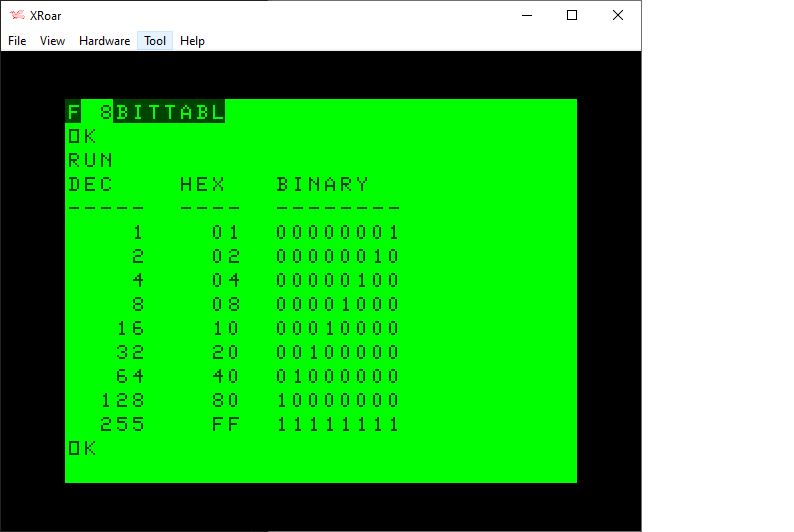
Here is a program using that routine that will print out a similar table:

0 REM 8BITTABL.BAS
10 DIM BT(7):FOR BT=0 TO 7:BT(BT)=INT(2^BT):NEXT
20 PRINT "DEC    HEX   BINARY"
30 PRINT "-----  ----  --------"
40 FOR I=0 TO 7:Z=INT(2^I)
50 GOSUB 100
60 NEXT
70 Z=255:GOSUB 100
80 END

100 REM PRINT TABLE ENTRY
110 PRINT USING"#####    ";Z;
120 IF Z<&H10 THEN PRINT "0";
130 PRINT HEX$(Z);"  ";
140 GOSUB 500
150 RETURN

500 REM SHOW Z AS BINARY
510 FOR BT=7 TO 0 STEP-1
520 IF Z AND BT(BT) THEN PRINT "1"; ELSE PRINT "0";
530 NEXT
540 PRINT:RETURN

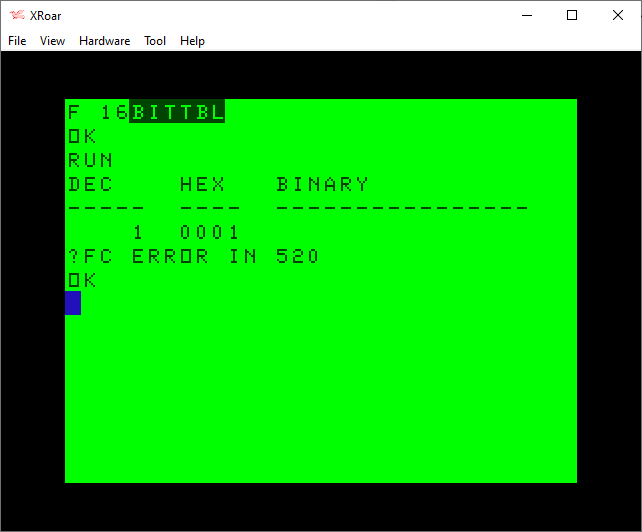
When I started experimenting with bits like this, I tried to modify my routine to work with 16-bit values. It did not work:

0 REM 8BITTABL.BAS - DOES NOT WORK!
10 DIM BT(15):FOR BT=0 TO 15:BT(BT)=INT(2^BT):NEXT
20 PRINT "DEC    HEX   BINARY"
30 PRINT "-----  ----  ----------------"
40 FOR I=0 TO 15:Z=INT(2^I)
50 GOSUB 100
60 NEXT
70 Z=255:GOSUB 100
80 END

100 REM PRINT TABLE ENTRY
110 PRINT USING"#####  ";Z;
120 IF Z<&H10 THEN PRINT "0";
121 IF Z<&H100 THEN PRINT "0";
122 IF Z<&H1000 THEN PRINT "0";
130 PRINT HEX$(Z);"  ";
140 GOSUB 500
150 RETURN

500 REM SHOW Z AS BINARY
510 FOR BT=15 TO 0 STEP-1
520 IF Z AND BT(BT) THEN PRINT "1"; ELSE PRINT "0";
530 NEXT
540 PRINT:RETURN

A bit of investigation revealed that AND could not operate on values greater than 32767 (&H3FFF in hex):

I did not understand why, but I expected it has something to do with integer values being treated as signed values, as if this was an INT16 (−32768 to +32767 range) rather than a UIN16 (0-65535 range).

rflberg to the rescue

I had recently posted a series of YouTube videos discussing bits in Color BASIC. My most recent one showed a program I wrote that demonstrated AND, OR and NOT operations:

The program I demonstrated looked like this:

0 REM ANDOR.BAS
10 DIM BT(7):FOR BT=0 TO 7:BT(BT)=INT(2^BT):NEXT
20 INPUT "VALUE     ";V
30 PRINT "(A/O/N)";
40 A$=INKEY$:IF A$="" THEN 40
50 IF A$="A" THEN M=0:PRINT "AND";:GOTO 90
60 IF A$="O" THEN M=1:PRINT "OR ";:GOTO 90
70 IF A$="N" THEN M=2:PRINT "NOT":GOTO 100
80 SOUND 1,1:GOTO 40
90 INPUT O
100 PRINT:PRINT "    ";:Z=V:GOSUB 500
110 IF M=0 THEN PRINT "AND ";:Z=O:GOSUB 500:Z=V AND O:PRINT "    ";:GOSUB 500
120 IF M=1 THEN PRINT "OR  ";:Z=O:GOSUB 500:Z=V OR O:PRINT "    ";:GOSUB 500
130 IF M=2 THEN PRINT "NOT ";:Z=NOT V:GOSUB 500
140 PRINT:GOTO 20

500 REM SHOW Z AS BINARY
510 FOR BT=7 TO 0 STEP-1
520 IF Z AND BT(BT) THEN PRINT "1"; ELSE PRINT "0";
530 NEXT
540 PRINT:RETURN

In the video I explain how it works, somewhat, but you will notice it works only on 8-bit values. Because I did not know a way to make it work.

However, in the comments, use rflberg left a few comments:

IF you want to see the full bits change the program to this:

10 DIM BT(15):FOR BT=0 TO 15:BT(BT)=2^BT:NEXT
501 IF Z<0 THEN PRINT”1″; ELSE PRINT”0″;
510 FOR BT=14 TO 0 STEP -1

rflberg (via YouTube)

I was intrigued. The modifications did not work for me, but a few additional comments help me understand the intent:

-1 is actually 1111111111111111 and 255 is 0000000011111111. It computes numbers -32768 to 32767. Negative numbers the most significant bit is a 1 and positive numbers is a 0.

-32768 is 1000000000000000 and 32767 is 0111111111111111

rflberg (via YouTube)

I experimented with this for awhile last night, and now I think I understand it. AND, NOT and OR allow you to pass in 0 to 32677 just fine. But, you can also pass in -32768 to -1 as well! It seems to be using the high bit (bit 15) to indicate a negative value. The explanation was to simply use negative values to make AND, NOT and OR see that bit.

The code modification would work if I passed in 0-32767 for the normal 15-bit range then -32768 to 1 to represent the high-bit range. I should be able to modify my routine to do this automatically.

I could use standard bit values for bits 0 to 14 (my BT array values of 1, 2, 4, 8, 16, 32, 64, 128, 256, 512, 1024, 2048, 4096, 8192, and 16384, just like in the earlier table), and then have a special case for bit 15 — a value of -32768 — which I would have in the array as BT(15)=-32768.

Then, in the print bit routine I could check to see if the value was greater than 32767, and turn it in to a negative number by subtracting 65536. (i.e., 32767 would be fine, but 32768 would turn in to -32768).

Since I print out the integer value after the bit display, I decided to make a temporary (altered) variable Z2, and retain the user’s intended Z value. This means I could pass in 32768 and it would print 32768, but would be really using -32768.

I ended up with a minor modification to my program, giving me this routine that will display the bits of any 16-bit value (0-65535):

0 REM 16BITS.BAS
1 REM WORKS THANKS TO rflberg
10 DIM BT(15):FOR BT=0 TO 14:BT(BT)=INT(2^BT):NEXT:BT(15)=-32768

20 INPUT "VALUE     ";Z
30 GOSUB 500:GOTO 20
500 REM SHOW Z AS BINARY
505 IF Z>32767 THEN Z2=Z-65536 ELSE Z2=Z
510 FOR BT=15 TO 0 STEP-1
520 IF Z2 AND BT(BT) THEN PRINT "1"; ELSE PRINT "0";
530 NEXT
540 PRINT Z;Z2:RETURN

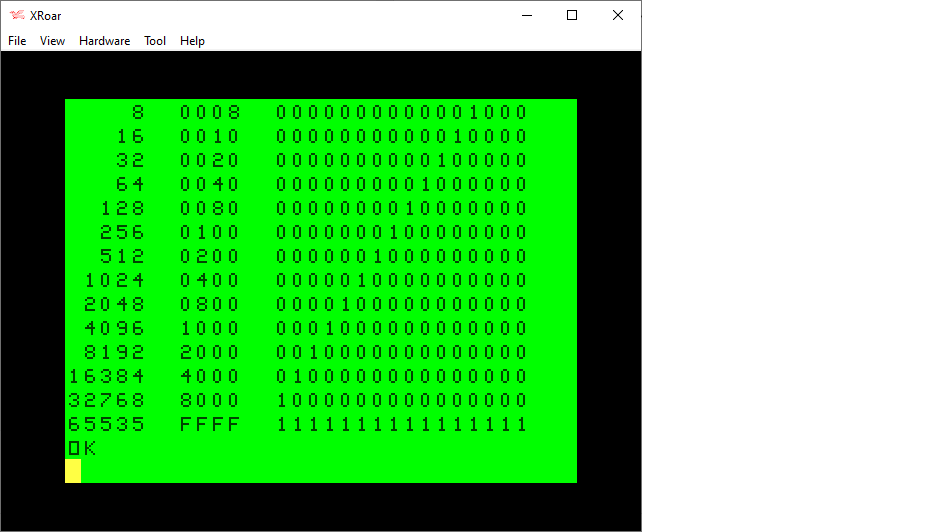
Using this updated routine, I modified my table printing program to handle 16-bits:

0 REM 8BITTABL.BAS
1 REM WORKS THANKS TO rflberg
10 DIM BT(15):FOR BT=0 TO 14:BT(BT)=INT(2^BT):NEXT:BT(15)=-32768
20 PRINT "DEC    HEX   BINARY"
30 PRINT "-----  ----  ----------------"
40 FOR I=0 TO 15:Z=INT(2^I)
50 GOSUB 100
60 NEXT
70 Z=65535:GOSUB 100
80 END

100 REM PRINT TABLE ENTRY
110 PRINT USING"#####  ";Z;
120 IF Z<&H10 THEN PRINT "0";
121 IF Z<&H100 THEN PRINT "0";
122 IF Z<&H1000 THEN PRINT "0";
130 PRINT HEX$(Z);"  ";
140 GOSUB 500
150 RETURN

500 REM SHOW Z AS BINARY
505 IF Z>32767 THEN Z2=Z-65536 ELSE Z2=Z
510 FOR BT=15 TO 0 STEP-1
520 IF Z2 AND BT(BT) THEN PRINT "1"; ELSE PRINT "0";
530 NEXT
540 PRINT:RETURN

Tada! Thanks for those great YouTube comments, I now have a workaround to doing bit detection on all 16 bits. Thank you very much, rflberg!

3X+1 in C#

For my day job, I do embedded C programming for PIC24 compilers and some Windows C programming in something called LabWindows. Lately, I’ve been touching some C# stuff, so I decided to revisit last night’s 3X+1 program by converting it to C#.

You can compile and run it online here: https://www.onlinegdb.com/online_csharp_compiler

// 3X+1

using System;
					
public class Program
{
	public static void Main()
	{
		while (true)
		{
			Int32 x = 0;

			Console.WriteLine();
			Console.Write("STARTING NUMBER? ");
			x = Int32.Parse(Console.ReadLine());
			
			while (true)
			{
				Console.Write(x);
				Console.Write(" ");
				
				if (x == 1) break;
				
				if ((x & 1) == 1) // Odd
				{
					x = x * 3 + 1;
				}
				else // Even
				{
					x = x / 2;
				}
			}
		}
	}
}

Compressing BASIC DATA with Base-64 – part 2

See also: part 1, part 2, part 3 and part 4.

Today we will explore writing a standard base-64 converter in BASIC, and then see if we can make a smaller and faster (and nonstandard) Color-BASIC-specific one.

When we last left off, we were looking at ways to get as much encoded data on to a DATA statement as possible. Instead of using integer numbers (base-10) or hex values (base-16), we began exploring if we could increase the base and use more typeable character to encode the data.

Although it seems we could create a weird base-90 format using every typeable character except for quote (which we’d need to start a DATA line else we couldn’t use comma), the decoder would be much larger and have to do much more work, and we actually wouldn’t benefit since we really need numbers that round to specific numbers of bits:

  • Base-8 (octal) values can be represented by 3-bits (111). (Extended BASIC supports octal when you use &Oxx or just &xx.)
  • Base-16 (hexadecimal) values can be represented as 4-bits (1111). (Extended BASIC supports hexadecimal when you use &Hxx.)
  • Base-32 values would be represented as 5-bits (11111).
  • Base-64 values would be represented as 6-bits (111111).
  • Base-128 values would be represented as 7-bits (111111).

As you can see, a base-90 value isn’t a large enough range to give us an extra bit over base-64. We need to use bases that are nice multiples of the power of 2. Because of this, we’ll ignore a made-up base-90 and look at something a bit more standard, such as base-64 encoding.

Pump up the base

As previously discussed, natively, you can represent a number in a DATA statement as a base-10 value, or a hexadecimal value. Both of these are the value 32:

100 DATA 32,&H20

BASIC will READ them the same way, though hex values are much faster for BASIC to read and parse. Using native hex values like “&H20” is the fastest way to load DATA, but it is also the largest since every value has two extra characters (“&H”) in front.

A recent tip was given by Shaun Bebbington about how you can represent zero just by leaving it out between commas. It saves space, and the parse gets zero from this faster than if you put a zero there:

100 DATA 8,6,7,5,3,,9

But since we are trying to get as much DATA in there as possible, we don’t want to separate numbers by commas. We can pack all the 2-digit hex values together in a string then read that entire string and parse out the individual 2-digit hex values. That is more work, and slower, but gets more data per DATA line. Here are the values 0 to 15 in hex (00 to 0f):

100 DATA 000102030405060708090A0B0C0D0E0F

As previously demonstrated, this is the most efficient way to store HEX values. Even when we pad a low 0-15 value to make it two digits (1 represented by 01), it stills saves space over comma delimited values since no commas are used.

But each hex value is wasting 50% of the bits it takes to represent it. HEX values of 0-15 could be represented by four bits (0000 to 1111). We are storing them as one 8-bit character and thus achieving 50% storage efficiency.

We can do better by using a higher base-x value that can use those wasted bits. We want the highest value we can represent with typeable characters, which is 64 (since the next higher would be 128 and we don’t have a way to type 128 different characters on the CoCo).

Base-64

The standard Base-64 encoding uses the following 64 characters to represent values of 0 to 63:

ABCDEFGHIJKLMNOPQRSTUVWZYZabcdefghijklmnopqrstuvwxyz01234567890+/

Each base-64 character needs 6-bits to be represented (000000-111111).

Representing values that way only wastes 2 bits per character, rather than 4-bits like hex base-16 does:

ASCII HEX Chars.:    ASCII Base-64 Chars.:
      0    15              0    63
     "0"   "F"            "A"   "/"
     /       \            /       \
xxxx0000  xxxx1111   xx000000   xx111111

But, converting to and from base-64 is much trickier. Hex base-16 is as simple as this:

  • Hex F0” -> F is 15 which is 1111 in binary. 0 is 0000 in binary. Thus the first character becomes the left four bits, and the second character becomes the right four bits. Super easy. Barely an inconvenience. Two ASCII bytes represent one byte of data.

But for base-64, we are dealing with 6-bits, and two of those won’t fit into an 8-bit byte. Instead, four base-64 6-bit values are merged together to make a 3-byte 24-bit value.

  • Base-64 “ABCD” (xx000000 xx000001 xx000010 xx000011) -> A is 0 which is 000000 in binary. B is 1 which is 000001 in binary. C is 2 which is 000010 in binary. D is 3 which is 000011 in binary. These values are merged together (removing the unused 2-bits in each one) and stored in 3 bytes as:
+- Byte 1 --+- Byte 2 --+- Byte 3 --+
| 000000|00 | 0001|0000 | 10|000011 |
| \__A__/\___B___/ \___C___/ \_D__/
  • Byte 1 contains 6 bits of base-64 value A and 2 bits of base-64 value B.
  • Byte 2 contains 4 bits of base-64 value B and 4-bits of base-64 value C.
  • Byte 3 contains 2 bits of base-64 value C and 6 bits of base-64 value D.

Well that’s a mess. Moving bits around like that is super easy under languages like C, but a bit more work in BASIC.

Encode this!

We will start with encoding a simple ASCII string into base-64 using a web tool:

https://www.base64encode.org

If you go to that link, you can type something in and then encode it into base-64. I typed:

Greetings from Sub-Etha Software! Do you know where your towel is?

And that gets encoded into this:

R3JlZXRpbmdzIGZyb20gU3ViLUV0aGEgU29mdHdhcmUhIERvIHlvdSBrbm93IHdoZXJlIHlvdXIgdG93ZWwgaXM/

Each character represents a 6-bit (0-63) value which we will have to combine into 8-bit values and decode.

An easy way to decode the characters used by base-64 encoding is with a string:

10 Z$="ABCDEFGHIJKLMNOPQRSTUVWXYZabcdefghijklmnopqrstuvwxyz0123456789+/"

We can use Extended BASIC’s INSTR() function to match a character from the encoded string with a character in that string, and the position it is found in will the the value it represents (well, minus 1, since INSTR returns a base-1 value).

Here is an example that will display the bytes of the encoded string:

0 REM base64-1.bas
10 Z$="ABCDEFGHIJKLMNOPQRSTUVWXYZabcdefghijklmnopqrstuvwxyz0123456789+/"
20 READ A$:PRINT A$
30 FOR A=1 TO LEN(A$)
40 PRINT INSTR(Z$,MID$(A$,A,1))-1;
50 NEXT
1000 REM BASE-64 DATA
1010 DATA R3JlZXRpbmdzIGZyb20gU3ViLUV0aGEgU29mdHdhcmUhIERvIHlvdSBrbm93IHdoZXJlIHlvdXIgdG93ZWwgaXM/

Running that shows me this:

Displaying base-64 values.

If A is 0, then R should be 17, and that is what it prints first. Now we know we can get the values for each character in a base-64 encoded string.

Next we have to turn four 6-bit base-64 values into three bytes (24-bits). I am not sure what a good way to do this is, so I’ll just brute-force it and see how that works out.

First, I know that I need four base-64 values to make my 3 8-bit values, so I’ll modify my loop to skip every four values, and then add an inner loop to process the individual four base-64 values.

Inside that inner loop it will process the next four base-64 6-bit values and convert them into 3 8-bit values.

Here is what I came up with:

0 REM base64.bas
5 POKE65395,0
10 Z$="ABCDEFGHIJKLMNOPQRSTUVWXYZabcdefghijklmnopqrstuvwxyz0123456789+/"
20 READ A$
30 FOR A=1 TO LEN(A$) STEP 4
35 REM GET 4 6-BIT VALUES
40 FOR B=0 TO 3:B(B)=INSTR(Z$,MID$(A$,A+B,1))-1
50 IFB(B)<0 THEN B(B)=0
60 NEXT
65 REM CONVERT TO 3 8-BIT
70 C1=INT(B(0)*INT(2^2)) OR INT(B(1)/INT(2^4))
80 C2=(B(1) AND &HF)*INT(2^4) OR B(2)/INT(2^2)
90 C3=(B(2) AND &H3)*INT(2^6) OR B(3)
100 PRINT CHR$(C1);CHR$(C2);CHR$(C3);
110 NEXT
120 END
1000 REM BASE-64 DATA
1010 DATA R3JlZXRpbmdzIGZyb20gU3ViLUV0aGEgU29mdHdhcmUhIERvIHlvdSBrbm93IHdoZXJlIHlvdXIgdG93ZWwgaXM/

I figured out all the 6-bit to 8-bit stuff (lines 70-90) with alot of trial and error, so I expect there is a faster and easier way to do this. But, then end results is a program that will print out the expected message, albeit really slowly.

A successful, but slow, decode of a base-64 encoded message.

One unexpected problem was with the powers of two — (2^2) and such. They produce rounding errors which caused some bits to be lost. I had to use INT() round them. That took me hours to figure out, but it’s just part of the inaccuracies of floating point values, especially limited ones like a 1970s BASIC used.

PROBLEM: Since the goal here is to put more data in DATA statements, the base-64 decode routine needs to be small. If it is 100 bytes larger than just using HEX, you have to save 100 bytes in DATA before you break even. The routine I give is not small and not fast. It would probably not be useful in the 10 LINE contest I mentioned. Maybe one of you can help improve it.

Now that we have a simple base-64 decoder, the next step will be making an encoder to turn DATA statement values into a base-64 string.

Until next time…
Roger Taylor’s FPGA “Real CoCo” on MiSTer

A 1986 MacPlus on the FPGA MiSTer emulation hardware.

Earlier this year, I bought a MiSTer setup through Roger Taylor. MiSTer is an FPGA platform that can run recreations of consoles (Atari, Sega, Nintento, etc.), arcade games, and home computers (Apple, Commodore, etc.). Roger’s Matchbox CoCo FPGA project has been ported to it.

Here is the new Facebook group that covers all the various FPGA platforms Roger is working on:

https://www.facebook.com/groups/realcoco

Here is the MiSTer Wiki project page:

https://github.com/MiSTer-devel/Main_MiSTer/wiki

Here is Roger Taylor’s site:

I just unboxed mine and hooked it up the other night, and I am quite impressed. Being able to act as a virtualized hardware CoCo 3 as well as all the other machines is a game changer. Software emulators like MAME already let you do that, and I hope to do some comparisons between my Raspberry Pi emulator machine and this FPGA device.

And I still need to pick up a few more of the FPGA devices that can run the CoCo…

The 1987 Max Headroom TV station hijack incident.

Updates:

  • 05-20-2020: Fixed a few typos, added a few more sentences.
From wikipedia.com

Every since I first learned about the Max Headroom signal hijacking incident in 1987, I’ve been fascinated about it. There has been much coverage of this over the years, including some interesting “recreations” of behind-the-scenes footage.

There has even been a documentary about the incident. Here are some to check out:

  1. Oddity Archive episode 1 (2012) (and commentary version).
  2. Oddity Archive episode 137 (2017).
  3. The Bizarre documentary (2019).
  4. “Leaked Footage” (2019).
  5. …and dozens of others if you just search YouTube.

However, one thing remains consistent when I watch videos that theorize on this, or read the REDDIT threads, etc. Most seem to think that this was an inside job (it probably was; would be the easiest explanation). But, most don’t seem to realize how much you could do with good home equipment back in the early 1980s, let alone towards the end of that decade.

1980s home video was better than folks think.

My first encounter with a home video recorder was one my father had — a huge, hulking machine with giant push buttons and a pop up tray to insert the VHS tape. This was around 1980 or 1981.

Over the years, he had all kinds of cool video equipment. We had an early video camera, which could hook to the VCR using an adapter box that would power the camera and turn it’s output into audio/video cables. This camera was an old-style camera that would leave streaks when you moved it past lights due to the way the image sensor worked. Early, ancient stuff!

Later he had a backpack-sized VHS unit that could be ran off a 12V power supply or battery, and we took it, and the external camera, to Walt Disney World in 1982. As a young teen, it took me and another kid to lug it around (one with the recorder strapped to him, and the other operating the camera). This was all consumer equipment.

He also had Betamax (then later a SuperBeta) equipment as well. Folks commenting don’t seem to remember that Beta was widespread for awhile — early video rental stores had both VHS and BETA movies available to rent.

HomeTV!

Before the FCC put and end to it, we had in-home TV stations! You could buy a box that would transmit video to a nearby TV. And by nearby, I mean down the block. My father would broadcast movies in the evenings and let the neighbors know so they could tune in and watch. And that TV transmitter box could be ran on batteries. I remember one Thanksgiving (? or maybe it was a Christmas ?) where I was walking around the festivities with the luggable VHS unit and camera, recording stuff while others watched what I was doing on the TV in the living room. I guess that was really cool, but it was all just normal stuff to me, having grown up around it.

And it kept getting better…

Each time my dad upgraded, the new equipment was even batter. I still have the full size SuperVHS camcorder my father gave me after he upgraded to 8mm video (and it still works!).

Back to Max

Back to the Max Headroom incident… a few things I want to say:

  1. Often you say people say Max was autistic, or drunk, or just nervous. But why? It does not seem to have been a live recording. There is an edit in the middle of the video! At best, the first half could be live then they switch to a tape, or the first part could be a tape and they switch to live, but it would be much easier to just pre-record and hit PLAY on a VCR. Max may have been drunk, but the evidence suggests he wanted it that way or he could have just re-recorded everything.
  2. The edit is often pointed out as being proof that he was a TV station insider because the edit is perfect. Look up “flying erase head.” You could buy VCRs that had this, and they would make seamless cuts from one recording to the next. They cost more, but you could buy a consumer recorder that had one. It was not anything magical or special. BUT, you didn’t even need one. That luggable portable VCR we had could often do really clean edits — even without a flying erase head! My dad edited so many productions using two of those units (including videos that ran at booths at boat shows, that I did computer graphics for, and even a travel video for the island of Belize, which I’d never heard of back then). We had another unit after that one which was not portable, but did edits so well I did STOP MOTION animation with it. Just a nice consumer VCR! You did NOT need professional equipment to get a clean edit.
  3. As to how they hijacked the signal, TV and radio stations commonly had (and still do) their studios at one place, and beamed their broadcast signal to the remote transmitter. Theories say they were up on a tall building. But why? Every radio station remote with a MARTI unit could broadcast from car dealerships. Heck, the run down AM radio station I worked at in 1987 had one, and it was ancient. And TV stations would go “live” from remote events all the time from their news van. I think the folks who talked about a vehicle (why a van?) being used probably make more sense than climbing up a building. It would be far easier to just park somewhere near the receiving dish and beam a low power signal to it, but I only have experience with doing that with radio stations. (There would be a lot of other issues, since I believe the remote news van would be beaming a different type of signal to a special receiver, and would NOT be capable of sending in the broadcast signal.) But, getting a signal in between the studio and the remote transmitter location could be done from the ground. (Or from a building; but it seems far riskier to climb a building and set equipment up.)

In a city the size of Chicago, I have no doubt that cameras and transmitters and all kinds of video things were readily available to those who wanted them. The only magic part here is the equipment that was used to overpower the TV station’s broadcast signal. An insider would have information, but folks could buy a lot of used equipment like this even back then (before eBay). The requirement to have need a license to operate it did not prevent you from buying it. (Anyone could by a HAM radio, but it was illegal to use it without a license, for example, and we had a place where I grew up that sold police radios and such.)

So who knows. Insider (or at least someone from the industry) makes sense. HAM radio/electronics hobbyists? Sure, why not. But I wish folks would drop the claims of the clean edit as proof it was someone with professional equipment. At least the Oddity guy talked about it looking like it was on a VHS unit (though that was just because of the poor picture quality — the fact that it did such a lean edit shows it would have been a higher quality machine).

I sure hope one day we hear the story behind this event.

Until next time…