Category Archives: Retro Computing

Compressing BASIC DATA with Base-64 – part 1

See also: part 1, part 2, part 3 and part 4.

NOTE: This article was started a year or two ago, so some references may no longer be pertinent.

NOTE 2: It was then updated in April 2020 before finally being published in November, so some references in the updates may no longer be relevant.

There is some kind of “10 line BASIC” contest, and one of the categories allows for assembly language as long as it can be embedded in a typeable BASIC program. I previously discussed embedded assembly in BASIC in my Interfacing BASIC with Assembly series.

One of the examples I gave was a Pac-Man maze demo that used some assembly code to scroll the screen up and down. The loader looked like this:

2000 REM
2001 REM LOAD ASSEMBLY ROUTINE
2002
2010 READ A,B
2020 IF A=-1 THEN 2070
2030 FOR C = A TO B
2040 READ D:POKE C,D
2050 NEXT C
2060 GOTO 2010
2070 RETURN 'END
2080 DATA 16128,16217,189,179,237,90,39,14,90,39,28,90,39,42,90,39,55,204,255,255,32,67,142,4,32,166,132,167,136,224,48,1,140,5,255,47,244,32,47,142,5,223,166,132,167,136,32,48,31,140,4,0,44,244,32,30,142,4,1,166,132,167,31,48,1,140,5,255,47,245,32,14
2090 DATA 142,5,254,166,132,167,1,48,31,140,4,0,44,245,204,0,0,126,180,244,-1,-1

That particular bit of BASIC code was created by the LWASM assembler. It reads assembly language values from DATA statements and POKEs them into memory where they can be executed.

In another series, I discussed various ways to use DATA statements either for the fastest reading/loading or the smallest size.

Today, I’d like to revisit this subject and offer some more ways to compress data into DATA to store even more than before.

Or something like that.

Knowing our limitations

We know the BASIC input buffer is 249 characters long, so we should be able to type in a single digit line number, the keyword “DATA” and 244 more characters.

BASIC allows typing in up to 249 characters.

Above, I have a one digit line number (“0”), then four characters for the keyword (“DATA”) then seven full lines of 32 characters (32*7=224) plus 20 characters on the final line – so 1+4+224+20 is 249. Hey, it works!

Since loading a BASIC program saved in ASCII is the same as typing it in, that limit should also apply for loading a non-tokenized ASCII program. I will be using that method here to load test programs into the XRoar emulator, so I won’t be able to cheat and load a tokenized line that would have exceeded our typing limit.

If we encode our assembly code as 2-digit hex values, we should have room to type a single digit line number, the keyword “DATA”, and 122 2-digit hex values. We could enter all the hex digits from &H00 to &H79 on a line. This appears to work:

The BASIC input buffer is 249 characters, so that’s the most you can type before pressing ENTER.

As soon as we press enter, BASIC tokenizes the “DATA” keyword. It no longer takes up four bytes. This means even though we typed the full 249 characters, we could EDIT the line and perhaps type a few more characters. Typing “EDIT 0″…

Editing the longest typed line…

…then pressing “X” to extend (go to the end) of the line allows us to add two more digits:

In EDIT mode, there are now two more characters available since DATA has been tokenized.

I am guessing DATA is tokenized into a 2-byte token. However, if you add these two characters, then re-list the line:

BASIC can’t list all the characters.

…we see BASIC does not show the final character. However, if you use the READ command to read that line in to a string, and the PRINT it, you see it’s actually there:

BASIC is storing all the characters, but LIST cannot show them.

The BASIC LIST command has a limit to how much it will display, it seems, and it is one character less than it should be. Bug?

BASIC line packing

It is possible to create BASIC lines that contain much more data than you can type in. They will run fine, but cannot be fully listed. There were several BASIC “crunch” programs available, including one by Carl England that I used often, that did this trick.

However, if we want to stick to how much someone could type in, we need to limit ourselves to that 249 buffer, and not rely on doing the EDIT trick to add more to it.

If that is the case, the most amount of HEX encoded assembly language bytes you can fit on a BASIC line is 122 per single-digit line. The code to read in those lines and POKE them in to memory can easily fit into one line as well, so we could easily fit a 1098 byte assembly language program into a ten line BASIC program.

And, we could even stick a few more bytes on the end of the loader line. Using a simple test program, I figured I could get the loader plus 1167 bytes of assembly code POKEd into memory. It looked like this:

0DATA000102030405060708090A0B0C0D0E0F101112131415161718191A1B1C1D1E1F202122232425262728292A2B2C2D2E2F303132333435363738393A3B3C3D3E3F404142434445464748494A4B4C4D4E4F505152535455565758595A5B5C5D5E5F606162636465666768696A6B6C6D6E6F707172737475767778
1DATA797A7B7C7D7E7F808182838485868788898A8B8C8D8E8F909192939495969798999A9B9C9D9E9FA0A1A2A3A4A5A6A7A8A9AAABACADAEAFB0B1B2B3B4B5B6B7B8B9BABBBCBDBEBFC0C1C2C3C4C5C6C7C8C9CACBCCCDCECFD0D1D2D3D4D5D6D7D8D9DADBDCDDDEDFE0E1E2E3E4E5E6E7E8E9EAEBECEDEEEFF0F1
2DATAF2F3F4F5F6F7F8F9FAFBFCFDFEFF000102030405060708090A0B0C0D0E0F101112131415161718191A1B1C1D1E1F202122232425262728292A2B2C2D2E2F303132333435363738393A3B3C3D3E3F404142434445464748494A4B4C4D4E4F505152535455565758595A5B5C5D5E5F606162636465666768696A
3DATA6B6C6D6E6F707172737475767778797A7B7C7D7E7F808182838485868788898A8B8C8D8E8F909192939495969798999A9B9C9D9E9FA0A1A2A3A4A5A6A7A8A9AAABACADAEAFB0B1B2B3B4B5B6B7B8B9BABBBCBDBEBFC0C1C2C3C4C5C6C7C8C9CACBCCCDCECFD0D1D2D3D4D5D6D7D8D9DADBDCDDDEDFE0E1E2E3
4DATAE4E5E6E7E8E9EAEBECEDEEEFF0F1F2F3F4F5F6F7F8F9FAFBFCFDFEFF000102030405060708090A0B0C0D0E0F101112131415161718191A1B1C1D1E1F202122232425262728292A2B2C2D2E2F303132333435363738393A3B3C3D3E3F404142434445464748494A4B4C4D4E4F505152535455565758595A5B5C
5DATA5D5E5F606162636465666768696A6B6C6D6E6F707172737475767778797A7B7C7D7E7F808182838485868788898A8B8C8D8E8F909192939495969798999A9B9C9D9E9FA0A1A2A3A4A5A6A7A8A9AAABACADAEAFB0B1B2B3B4B5B6B7B8B9BABBBCBDBEBFC0C1C2C3C4C5C6C7C8C9CACBCCCDCECFD0D1D2D3D4D5
6DATAD6D7D8D9DADBDCDDDEDFE0E1E2E3E4E5E6E7E8E9EAEBECEDEEEFF0F1F2F3F4F5F6F7F8F9FAFBFCFDFEFF000102030405060708090A0B0C0D0E0F101112131415161718191A1B1C1D1E1F202122232425262728292A2B2C2D2E2F303132333435363738393A3B3C3D3E3F404142434445464748494A4B4C4D4E
7DATA4F505152535455565758595A5B5C5D5E5F606162636465666768696A6B6C6D6E6F707172737475767778797A7B7C7D7E7F808182838485868788898A8B8C8D8E8F909192939495969798999A9B9C9D9E9FA0A1A2A3A4A5A6A7A8A9AAABACADAEAFB0B1B2B3B4B5B6B7B8B9BABBBCBDBEBFC0C1C2C3C4C5C6C7
8DATAC8C9CACBCCCDCECFD0D1D2D3D4D5D6D7D8D9DADBDCDDDEDFE0E1E2E3E4E5E6E7E8E9EAEBECEDEEEFF0F1F2F3F4F5F6F7F8F9FAFBFCFDFEFF000102030405060708090A0B0C0D0E0F101112131415161718191A1B1C1D1E1F202122232425262728292A2B2C2D2E2F303132333435363738393A3B3C3D3E3F40
9 L=16128:FORA=0TO9:READA$:FORB=1TOLEN(A$)/2:POKEL,VAL(MID$(A$,B*2,2)):L=L+1:NEXT:NEXT:DATA4142434445464748494A4B4C4D4E4F505152535455565758595A5B5C5D5E5F606162636465666768696A6B6C6D6E6F707172737475767778797A7B7C7D7E7F808182838485868788898A8B8C8D8E
100 BT=0:FORA=0TO9:READA$:FORB=1TOLEN(A$)/2:PRINTMID$(A$,B*2,2);:BT=BT+1:NEXT:NEXT:PRINTBT"BYTES":END

Notice LINE 100. It is not part of the program. I can load this and type “RUN 100” to get it to dump all the data and show me what it would be POKEing into memory, as well as the final byte count. For a contest entry, it would only include lines 0-9. (Using the EXIT/eXtend trick, you could probably get another 9 or 10 bytes total, but they might consider that cheating, and maybe someone could optimize the loader code to make even more room.)

We can do better…

Over on the Facebook group, someone (who was it?) suggested using some alternative encoding to get even more data in to the DATA statement. There are existing forms of doing this with 7-bit characters, using the printable range of characters.

The wikipedia has a page showing many different implementations of binary to text encodings.

Since we need to encode things that can be typed in, this puts some limits on what we can do. Characters 0-32 are control characters, so normal printable text characters start with ASCII 32 (space) and go to ASCII 127.

See https://en.wikipedia.org/wiki/ASCII for the list.

There are some other characters in this range that we cannot type on a CoCo keyboard. Here is the printable CoCo character set:

Printable CoCo characters from ASCII 32 to ASCII 127.

We can type the inverted (lower case) letters “a” through “z”, but we have no way to type the inverted @ symbol, or the inverted left bracket, backslash, right bracket, up arrow or left arrow.

But, just because they are typeable does not mean we could use them all in a DATA statement. Quote, for instance, is okay if it’s in the middle of a string that is read…

10 READ A$:PRINT A$
20 DATA ABC"DEF

…but if the quote started up at the beginning of a string of characters, BASIC would skip it and join everything after it together until it sees another quote or an end of line:

10 READ A$:PRINT A$
20 DATA “ABCDEF

Also, comma is a problem. READ separates data using the comma UNLESS the data is quoted. This would only read the first ABC:

10 READ A$:PRINT A$
20 DATA ABC,DEF

…but this would read “ABC,DEF” as one string:

10 READ A$:PRINT A$
20 DATA “ABC,DEF”

So even though we can type about 91 characters, we can’t use all of them in a DATA statement.

Reduce the bass! (Er, base…)

It seems we could achieve a base-90 (?) format by having each line start with a quote (thus we could include a comma in the DATA), but the decoder would have to be much larger.

So instead of that, we’ll turn the base down a bit and do something a bit easier in the next installment.

Until next time…

VIC-20 knowledge lived on, without me knowing it.

I have posted a number of CoCo BASIC articles that used the example of bouncing a ball around the screen. I have a simple routine I use for this, which involves an X and Y location variable, and movement MX and MY variables that will be positive or negative for which direction the ball is moving.

To my surprise, I found nearly this exact code in the old VIC-20 manual as a bouncing ball example!

This code called it DX and DY (delta), but it’s basically the same code I’ve been using all these years. I had no idea I learned this from the VIC-20 manual back in 1982!

Classic.

TheVIC20 USA Users Group

The replica Commodore VIC-20, known as TheVIC20, is not for sale in the USA and isn’t planned to be sold here. This is a limited edition version the C64 replica, TheC64, but in a VIC-20 enclosure with some different VIC software included.

It can be ordered from Amazon UK and shipped here, however, and then you use your own 1 amp USB power supply instead of the funky UK one that comes the box.

Although I don’t have one currently, one is being sent to me soon. So I started a users group…

https://www.facebook.com/groups/1228896444155278hnn

And a website, coming soon:

https://www.thevic20usausersgroup.com

CoCo text screen can be changed in BASIC?

This writing is inspired by somethingI just saw in a YouTube video by 8-Bit Show and Tell:

In this video, Robin shows off an Easter egg found in the CoCo 2’s BASIC (the same one also found in the CoCo 1 since it was the same BASIC). He was wondering if there was any way to change the screen color (and I remember seeing someone ask this in the CoCo Facebook group but did not realize it was the Show and Tell guy). Australian programmer Nick Marantes gives him a “POKE 359,0:SCREEN 0,1” command to change the screen color… SCREEN can change the screen color? Surely I must have known this back then, but I had completely forgotten.

Thus, this article.

Nuclear Green CoCo Screen

The “nuclear green” screen of the Radio Shack TRS-80 Color Computer is certainly iconic. Black text on a green 32 column screen.

Disk Extended Color BASIC on the CoCo.

The Motorola MC6487 VDG chip contained a number of graphics modes, but only one text mode: 32×16 characters. The semigraphics modes supported up to 8 colors on the screen at the time, but text mode was limited to two colors: black on green. Well, except it was really a dark green on a light green. Here’s a zoomed in look, showing what color the text is compared to the black border:

CoCo “dark green” text on a nuclear green background with a black border.

I guess I sorta remembered this, because there was a way to invert the video to get light text on a dark background, and that background clearly wasn’t black:

Inverted text. Easy to do with a menu setting in the Xroar emulator.

I remember reading an article (probably in Rainbow Magazine) that showed how you could remove the VDG chip, pull up a pin, then plug it back in to the socket and get inverted video. I did that on my CoCo 1 since I thought that looked alot better (but not as good as if it was white on black like an Apple II or TRS-80 Model III).

The Xroar emulator has a menu option to toggle this inverted video.

But there was also a weird “pink” mode that I saw used in some early CoCo games. I recall reading a POKE or something that let you toggle it. You can also do that with the SCREEN command in Extended Color BASIC.

From the manual (page 96):

SCREEN type, color set displays the current graphics or text screen
type is 0 (text screen) or 1 (graphics screen)
color set is 0 or 1
Note: If type or color set is any positive number greater than 1, your computer uses 1.

Although not explained in the manual, you could select two color sets for the text mode. 0 was the normal dark green on nuclear green. 1 is the weird pink mode. But, when BASIC returns to the OK prompt, it resets the mode to 0, so you can’t use this to type things in (without a special POKE to bypass this reset). But, you can enter it in a program and then loop using a GOTO:

Alternate color set for text mode!

As soon as you hit BREAK and return to BASIC, the color resets to the green mode. The inverted mode looks like:

Inverted text color 1.

I don’t recall ever using this mode, though I do recall at least trying it out with the POKE.

I do not know how to invert the video in software, but I expect there is a POKE to do that.

Anyway, there you go… alternate color sets for CoCo BASIC that you can access from BASIC using the SCREEN command.

More CoCo items (software, ROM-Paks, MC-10) for sale.

The great purge continues…

My CoCo 1/2/3 ROM-Paks:

https://www.ebay.com/itm/Radio-Shack-TRS-80-Color-Computer-CoCo-ROM-Paks/333745731777?hash=item4db4cbb8c1:g:fpcAAOSwjJFffRgC

Walt Disney cassette software (with boxes and everything):

https://www.ebay.com/itm/Walt-Disney-Radio-Shack-TRS-80-Color-Computer-CoCo-cassette-software-4-titles/333745728555?hash=item4db4cbac2b:g:x0QAAOSwqPBffRU~

Radio Ball (cassette game from Radio Shack):

https://www.ebay.com/itm/Radio-Shack-TRS-80-Color-Computer-Radio-Ball-game-on-cassette-w-packaging/333745757969?hash=item4db4cc1f11:g:tyYAAOSwCthffSKh

My MC-10 setup with memory expansion and Technical Service Manual:

https://www.ebay.com/itm/Radio-Shack-TRS-80-MC-10-computer-memory-expansion-and-software/333745738373?hash=item4db4cbd285:g:KaMAAOSwmZpffRu2

Radio Shack Appliance Light Controllers (Plug ‘n Power aka X-10):

https://www.ebay.com/itm/Radio-Shack-TRS-80-Color-Computer-Appliance-Light-Controller-NIB-X10-Plug-n/333745748407?hash=item4db4cbf9b7:g:wxgAAOSwZu9ffR6k

CoCo 3 “sealed in box” disk software: Where in the World is Carmen San Diego, Microsoft Flight Simulator II, and King’s Quest III:

https://www.ebay.com/itm/CoCo-3-Kings-Quest-III-Carmen-San-Diego-Flight-Simulator-II-NIB/333745755468?hash=item4db4cc154c:g:0bwAAOSwRKRffSGj

CoCo graphics tablet, video digitizer and speech recognition hardware for sale!

The great purge has begun! I have to downsize to about 50% of my current stuff, so it’s time to sell off all the CoCo gear I have that I will no longer be actively using.

First on the list is a Radio Shack X-PAD Graphics Tablet. This is still in the original box, with the original manual and template, as well as the plastic bags that came covering the pak and tablet! It’s as complete as it gets.

https://www.ebay.com/itm/333744740596

Next is the E.A.R.S. speech recognition system that was sold by Speech Systems. Yep, voice recognition on the CoCo! It could recognize 64 voice patterns, if I recall, and used simple BASIC commands to listen and match the voices. It needed a headset that was special so I don’t have a way to test it.

https://www.ebay.com/itm/333744732187

Then there is the Micro Works DS-68B video digitizer! Yep, the one with software that Tim Jenison (later of Newtek and the Video Toaster for Amiga) programmed! It works! But the label has come lose and will need to be “restored” with some glue.

https://www.ebay.com/itm/333744721237

Lastly, the Rulaford Research CoCo MIDI Pak with options — two switches that toggle the ports to THRU and OUT and such. I got this direct from Cecil Houk himself, and used it for years. I no longer have anything with MIDI, so … away it goes.

https://www.ebay.com/itm/333744735920

Please bid and help me raise some much needed money, and downsize at the same time. Thanks!

Bit shifting in BASIC

VIC-20 character blocks, bit shifted.

Recently, I had the urge to be lazy and have the computer do my work for me. I was designing some 8×8 graphics characters for the Commodore VIC-20 and wanted one for each offset position in a 2-character block (see image to the right).

Using modern tools like the Windows-based CBM prg Studio I could have easily edited each one by hand to get the desired result (which is what I did to create that image), but I thought it might be more fun to just design one character and write a program to create the other shifted frames.

I have bit shifted in C programming many times (because it has a bit shift operator) but I don’t recall ever knowingly doing it in BASIC.

Bit shifting basics

Bit shifting is where you take all the bits in a byte (or word, or long, whatever) and move them left or right. Here is an example of shifting the byte value 00111100 to the right:

Before: [ 0 0 1 1 1 1 0 0 ]
After : [ 0 0 0 1 1 1 1 0 ]

If you just want to shift and don’t care about the bit that “falls off the edge,” it is as simple as multiplying or dividing the value by 2.

To demonstrate this, we first need a program that will display a byte as bits.

0 REM bitsslow.bas
10 Z=&H00:GOSUB 500
20 Z=&HF0:GOSUB 500
30 Z=&H0F:GOSUB 500
40 Z=&HFF:GOSUB 500
50 END

500 REM PRINT BITS
510 FOR ZB=7 TO 0 STEP -1
520 IF Z AND 2^ZB THEN PRINT"1"; ELSE PRINT "0";
530 NEXT
540 PRINT:RETURN

The routine at line 500 will print the value in variable Z as bits. It is hard coded to only work with a byte (0-255). When I run that, this is what it displays:

00000000
11110000
00001111
11111111

Those lines correspond to &H00, &HF0, &H0F and &FF. I show them in hex so the bit pattern is easier to see (0=0000, F=1111).

A bit faster…

My bit printing routine is so slow that you can see it print the digits one at a time. This is due to the math that goes on in line 520 for each bit check. To speed things up, we could pre-calculate an array of those powers of two (1, 2, 4, 8, 16, 32, 64, 128) and use that instead:

0 REM bitsfast.bas

5 GOSUB 1000

10 Z=&H00:GOSUB 500
20 Z=&HF0:GOSUB 500
30 Z=&H0F:GOSUB 500
40 Z=&HFF:GOSUB 500
50 END

500 REM PRINT BITS
510 FOR ZB=7 TO 0 STEP -1
520 IF Z AND ZB(ZB) THEN PRINT"1"; ELSE PRINT "0";
530 NEXT
540 PRINT:RETURN

1000 REM INIT BIT ARRAY
1010 FOR ZB=0 TO 7
1020 ZB(ZB)=2^ZB
1030 NEXT
1040 RETURN

Line 5 will GOSUB to our initialization routine which sets up the power-of-two array ZB(). After that, the routine at 500 can be called as it previously was, except now it will print so fast you can’t really see it printing.

Now let’s use this routine to demonstrate bit shifting by multiplying or dividing by 2.

Bit shifting left

0 REM bitshftl.bas
5 GOSUB 1000
10 Z=1 '00000001
20 FOR A=1 TO 8
30 GOSUB 500
35 REM *2 TO SHIFT LEFT
40 Z=Z*2:NEXT
50 END
500 REM PRINT BITS
510 FOR ZB=7 TO 0 STEP -1
520 IF Z AND ZB(ZB) THEN PRINT"1"; ELSE PRINT "0";
530 NEXT
540 PRINT:RETURN
1000 REM INIT BIT ARRAY
1010 FOR ZB=0 TO 7
1020 ZB(ZB)=2^ZB
1030 NEXT
1040 RETURN

In line 10, Z starts out with 1, which is the bit pattern of 00000001. It is then multiplied by 2 in a loop eight times, each time shifting the bit one place to the left. The output looks like this:

00000001
00000010
00000100
00001000
00010000
00100000
01000000
10000000

Bit shifting right

And if we start out with Z being 128 (bit pattern 10000000) and divide by 2, it will shift right:

0 REM bitshftr.bas
5 GOSUB 1000
10 Z=128 '10000000
20 FOR A=1 TO 8
30 GOSUB 500
35 REM /2 TO SHIFT RIGHT
40 Z=Z/2:NEXT
50 END
500 REM PRINT BITS
510 FOR ZB=7 TO 0 STEP -1
520 IF Z AND ZB(ZB) THEN PRINT"1"; ELSE PRINT "0";
530 NEXT
540 PRINT:RETURN
1000 REM INIT BIT ARRAY
1010 FOR ZB=0 TO 7
1020 ZB(ZB)=2^ZB
1030 NEXT
1040 RETURN

This will display:

10000000
01000000
00100000
00010000
00001000
00000100
00000010
00000001

Pretty simple. And if that were all I wanted to do, I’d be done.

But that was not all I wanted to do, so I am not done.

I wanted to shift bits right in one byte and have the bits that shift out end up shifting in to a second byte, like this:

    1st Byte  2nd Byte
1) [00001111][00000000]
2) [00000111][10000000]
3) [00000011][11000000]
4) [00000011][11100000]
5) [00000001][11110000]
6) [00000000][11111000]
...etc...

I spent far too much time coming up with an approach that would get me which bits were going to be shifted off to the right (using AND), and then placing those in a new variable and then shifting those bits to the left to line up where they would have ended up if I had just shifted a 16-bit value…

…then I realized that was silly, because I could just use a 16-bit value in BASIC!

16-bits in BASIC

You may have seen things like this which print out memory locations BASIC is using:

PRINT PEEK(25)*256+PEEK(26)

In Color BASIC, memory locations 25 and 26 contain the 16-bit address for where BASIC memory starts. Since PEEK only works on a single byte, it takes two PEEKs to get the two bytes that make up the 16-byte address, and some math to turn the two 8-bit values into one 16-bit value.

On my virtual CoCo in the Xroar emulator, memory location 25 contains 38 (&H26) and memory location 26 contains 1 (&h01). To turn those two 8-bit values into a 16-bit address, I need to somehow shift the 38/&H28 left eight times into a new 16-bit value, and then add (or OR) in the 1/&H01 value.

In C, one of the ways we’d do this is by using the bit shift operator:

uint16_t Result;
uint8_2  Byte1;
uint8_2  Byte2;
Byte1 = Peek(25); // Made up function to get a memory value.
Byte2 = Peek(26);
Result = (Byte1 << 8) | Byte2; // Shift Byte1 left 8 bits,
                               // OR in Byte2.
// Or...
Result = (Byte1 << 8) + Byte2; // Since the right 8 bits are empty,
                               // adding would have the same result.

…but there are many other ways to do the same thing, some much faster than these two approaches.

Back to BASIC

Shifting left can be done by multiplying the value by 2. To shift once, you might have:

V = V * 2

To shift twice, you could do:

V = V * 2 * 2

…but that looks silly. You’d just multiply by 4. And to bit shift three places (2 * 2 * 2) you could multiply by 8. See the pattern? They are all powers of 2 (2, 4, 8, 16, 32, 64, 128, 256, etc.)

So to shift 8 places left, you multiply by 256. Thus, the C example I gave earlier is represented in BASIC by:

10 B1=PEEK(25)
20 B2=PEEK(26)
30 R=(B1*256)+B2

Tada! When I first saw things like “X=PEEK(Y)*PEEK(Z)” back then, I did not understand why it worked, I just knew it did. And I was also confused at why the CoCo was like that, since on the VIC-20 it would have been “X=PEEK(Y)+256*PEEK(Z)”. See the differences? On the CoCo’s 6809 processor, a 16-bit value is YYZZ, but on the VIC-20’s 6502 processor it is stored the opposite as ZZYY. Thus, on my VIC, you would take the second location and multiply it by 256 then add the first location.

But I digress.

A bit more…

The previous example shows how you are effectively shifting a byte (B1) left 8 places so it ends up at the top 8-bits of a new 16-bit value. Something like that would work very well for shifting an 8-bit value into different positions of two characters (two bytes).

My approach would be this:

  • R will be the result, a value representing 16-bits (two bytes, 0-65535 in range).
  • Since I am shifting right (in this example), my first step is to get the 8-bit source value into the top 8-bits (left most bits) of the R result variable.
  • Next I will shift that entire R variable to the right, and then extract the left and right 8-bits as separate variables which is my output values.

Extract? Well, that will be the reverse of what we just did. In C, you can turn a 16-bit value into two 8-bit values like this:

uint16_t Source;
uint8_2  Byte1;
uint8_2  Byte2;
Source = 0x1234;           // Some 16-bit value.
Byte1 = (Source >> 8);     // Shift left 8-bits to the right.
Byte2 = (Source & 0x00ff); // Mask off top 8-bits.

…though there are many other (faster/better ways to do this). But, we could do this in BASIC the same way.

If shifting left is multiplying by 256, then shifting right must be dividing by 256.

10 R=&H1234
20 B1=(R/256)
30 B2=(R AND &HFF)

IMPORTANT NOTE: As I got to a later point in this article, I discovered a huge problem with this approach. If you didn’t already know it (I didn’t), I’ll explain it in just a bit… When I write, I’m usually learning as I type, and I decided to keep this stream of consciousness intact.

That is the first time I’ve ever done it that way in BASIC (duplicating the way C does it). The way I’ve commonly seen it done in BASIC is this:

10 R=&H1234
20 B1=INT(R/256)
30 B2=R-(B1*256)

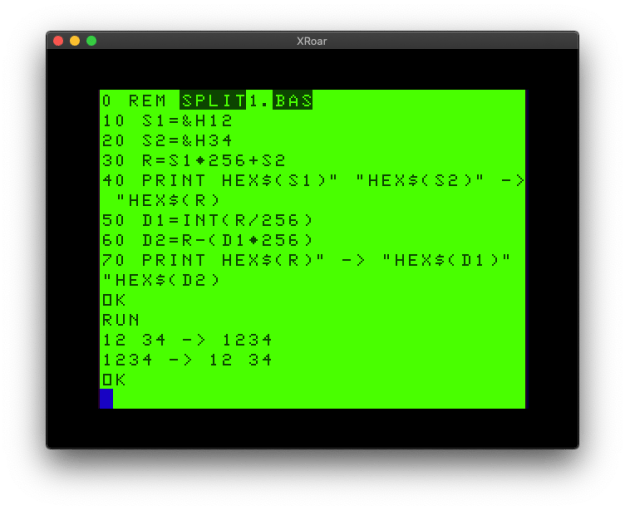
Here is a simple test program:

0 REM split1.bas
10 S1=&H12
20 S2=&H34
30 R=S1*256+S2
40 PRINT HEX$(S1)" "HEX$(S2)" -> "HEX$(R)
50 D1=INT(R/256)
60 D2=R-(D1*256)
70 PRINT HEX$(R)" -> "HEX$(D1)" "HEX$(D2)
Using BASIC to split 16-bit values, or combine two 8-bit values.

Benchmark digression

Have I been doing it wrong since the 1980s? Is the C-style way (using AND) any faster than the BASIC way (using INT)? Let’s try the C-style way using my trusty benchmark program:

0 REM split2.bas
5 DIM TE,TM,B,A,TT
6 R=&H1234
10 FORA=0TO3:TIMER=0:TM=TIMER
20 FORB=0TO1000
30 IF Z=42 THEN 100
40 B1=R/256
50 B2=R AND &HFF
70 NEXT
80 TE=TIMER-TM:PRINTA,TE
90 TT=TT+TE:NEXT:PRINTTT/A:END

This shows 1143. (Of course it could be made faster using hex and removing spaces and such, but this is just for comparison with the second version.)

And now let’s try it the traditional BASIC:

0 REM split3.bas
5 DIM TE,TM,B,A,TT
6 R=&H1234
10 FORA=0TO3:TIMER=0:TM=TIMER
20 FORB=0TO1000
30 IF Z=42 THEN 100
40 B1=INT(R/256)
50 B2=R-B1*256
70 NEXT
80 TE=TIMER-TM:PRINTA,TE
90 TT=TT+TE:NEXT:PRINTTT/A:END

This version reports 1498! Well I’ll be darned… INT and a divide and a subtract and a multiply is slow than a divide and an AND. Well, once I write it out like that, I guess it makes sense.

I suppose applying some things I learned in C to BASIC is paying off.

But I digress…

Are we there yet?

So getting back to the original task, I should be able to combine 8-bit values and split 16-bit values and shift them any way I want.

First let me modify the bit printing routine to handle 16-bit values.

IMPORTANT NOTE: Here’s the bit I was talking about earlier…

I thought I could just change the 0 to 7 into 0 to 15 to cover all 16 bits, but that resulted in an ?FC ERROR (function call). A bit of testing revealed that AND only works on values from 0 to 32767 (&H7FFF). That is the maximum value of a 16-bit SIGNED integer, which uses 15-bits for the number and 1-bit for the sign (+ or -).

Yipes! So I could only easily show 15-bits, and I really want that extra bit.

Note to Self: Look into the Color BASIC Unravelled book and see why this is.

So, it looks like I’ll just have to modify my 8-bit print routine to print each byte of a 16-bit value separately. Good thing we learned how to do that earlier in this article!

16-bit bit printing

Here is how I had to modify the routine:

0 REM bits16.bas

5 GOSUB 1000

10 Z=&H0000:GOSUB 500
20 Z=&HFF00:GOSUB 500
30 Z=&H00FF:GOSUB 500
40 Z=&HFFFF:GOSUB 500
50 END

500 REM PRINT BITS
501 ZZ=INT(Z/256):GOSUB 510
502 ZZ=Z-ZZ*256:GOSUB 510
503 PRINT:RETURN
510 FOR ZB=7 TO 0 STEP -1
520 IF ZZ AND ZB(ZB) THEN PRINT"1"; ELSE PRINT "0";
530 NEXT
540 RETURN

1000 REM INIT BIT ARRAY
1010 FOR ZB=0 TO 7
1020 ZB(ZB)=2^ZB
1030 NEXT
1040 RETURN

Whew! That works, and prints the following:

0000000000000000
1111111100000000
0000000011111111
1111111111111111

Okay, so I did not discover any amazing speedup (at least if we want to use values larger than 32767), but I did get it to work.

I saved the best bit for last…

Now we can try a little test to see if we can start with an 8-bit value, shift it to the left side of a 16-bit value, the start shifting one bit at a time right, then splitting up the resulting two bytes at each step. I will use a test byte of &HFF (11111111).

0 REM shift16.bas

5 GOSUB 1000

10 Z=&HFF  '11111111
15 Z=Z*256 '1111111100000000
20 FOR A=1 TO 8
25 REM SPLIT INTO TWO BYTES
26 B1=INT(Z/256)
27 B2=Z-(B1*256)
28 PRINT HEX$(B1)TAB(3)HEX$(B2)TAB(5)" = ";
30 GOSUB 500
35 REM /2 TO SHIFT RIGHT
40 Z=Z/2:NEXT
50 END

500 REM PRINT BITS
501 ZZ=INT(Z/256):GOSUB 510
502 ZZ=Z-ZZ*256:GOSUB 510
503 PRINT:RETURN
510 FOR ZB=7 TO 0 STEP -1
520 IF ZZ AND ZB(ZB) THEN PRINT"1"; ELSE PRINT "0";
530 NEXT
540 RETURN

1000 REM INIT BIT ARRAY
1010 FOR ZB=0 TO 7
1020 ZB(ZB)=2^ZB
1030 NEXT
1040 RETURN

And it displays:

Color BASIC shifting a 16-bit value and splitting it up into two 8-bit values.

Success!

I could now incorporate that routine into my code, and take the data for one 8×8 character (like the solid circle I started this article with) and end up with 16 8×8 characters representing each position it could be within a 2×1 block of characters.

2010 DATA 60,126,255,255,255,255,126,60

In conclusion…

Wow. That was a really long way to go to show multiplying by 256 and dividing by 2, wasn’t it? But maybe there are some useful routines in these examples.

And now it’s my turn to ask you:

  • Do you know a better/faster way to print 16-bit values in binary?
  • Do you know a faster way to combine two 8-bit values into a 16-bit value, or split a 16-bit value into two 8-bit values?
  • Is there a better/faster way to to bit shifting than multiplying or dividing by powers of 2?

Let me know in the comments, and maybe there will be a part 2 on this topic.

Until next time…

CoCo Notebook: mystery 6809 assembly

Welcome to the first installment of my new column, Allen’s Old CoCo Notebook. I will be sharing scans of pages from my original notebook I used during my earliest days with the Color Computer, and hopefully figuring out what all the stuff on them means.

Today’s installment deals with this page of hand written 6809 assembly:

CoCo Notebook: unknown 6809 disassembly

If memory serves, seeing the use of greater than “>” and less than “<” tells me this was a disassembly of some code, most likely done via Radio Shack’s EDTASM+ (either the cartridge that I started out with, or the disk version that I used when I got a disk drive).

But what does it do? First, let me try to transcribe it, hopefully without typos.

CLRA
COMB
NEG	<0
LDU	#16A
PULA	A,X
STA	>263C
STX	>263D
LDX	#261D
STX	>16B
LDD	<8A
STD	>2600
JMP	>AC7C
CLR	<70
STX	,S
LDX	>263F
LDA	,X+
STX	>263F
TSTA
BNE	3F3A
LDA	>263D
STA	>16A
STX	>16B
LDA	#0D
PULS	X,PC
NEG	<0
NEG	<27
…

The lack of memory addresses prevents me from knowing if this was a disassembly of a routine in the Color BASIC ROMs, but there are at least a few addresses that might offer some clues. I will consult the Color BASIC Unravelled book series and see what is at those locations.

CLRA
COMB
NEG	<0
LDU	#16A

Address $16a is indeed an addressed used by Color BASIC. It is an entry inside the RAM vector table At that location are three bytes which point to the “CONSOLE IN” input routine. Where it goes depends on what level and version of BASIC is installed. It seems to be loading that address into the U (user stack?) register of the 6809.

PULA	A,X
STA	>263C
STX	>263D

PULA A,X is pulling whatever is on the stack (pointed to by U) into the A and X register. I believe this would load the 8-bit value at $16A into A, and the following two bytes into the 16-bit X register. At the CONSOLE IN location should be a “JMP $xxxx” instruction, so this seems to be loading the JMP and address into registers.

It then stores them at $263c (JMP) and $263d. These locations are in the lower 32K address space so this is likely memory being used by some machine language program loaded into RAM — possibly its own dispatch table. That location should low look like:

$263c JMP
$263d $xx
$263e $yy

…where $xxyy is the address for CONSOLE IN in the ROM. This code is saving the current vector, likely so it can be restored when the program ends or, more likely, used for something else later.

LDX	#261D
STX	>16B

Next it loads the address $261d into register X. This is likely the address of some routine in the above-mentioned machine language program.

It stores that address at $16b, which is the address portion of the 3-byte CONSOLE IN vector entry. Thus, originally that looked like:

$16a JMP
$16b $xx
$16c $yy

…and it is replaced with:

$16a JMP
$16b $26
$16c $1d

This code is preserving where CONSOLE IN currently goes, then pointing it to a new routine. I am guessing that after this routine does whatever it does, it then calls the saved ROM CONSOLE IN code to complete the task.

I am now guessing that this may be part of a remote terminal driver — a program like REMOTE from a 1983 Rainbow magazine that would patch the input/output of BASIC to the serial port and allow for running a BBS.

LDD	<8A
STD	>2600
JMP	>AC7C

In the Color BASIC Unravelled book, the entry for memory location $8a says “PV DUMMY – THESE TWO BYTES ARE ALWAYS ZERO.” The same comment is found in Extended Color BASIC Unravelled, and Disk Extended Color BASIC Unravelled. But, for whatever reason, this code is loading these two bytes and saving them at location $2600.

It then jumps to $ac7c, which is in ROM space. That location says “THIS IS THE MAIN LOOP OF BASIC WHEN IN DIRECT MODE.” It looks like we have patched CONSOLE IN and then returned control to BASIC.

The next bit of code is an an unknown address, but since it is after a JMP it is probably the start of a new routine.

CLR	<70
STX	,S
LDX	>263F

This code sets the byte at $70 to zero. Or something. The comment for that location is “PV START OF STRING STORAGE (TOP OF FREE RAM)”.

It then saves X on the stack (or wherever the S stack pointer is pointing?), then loads X (indirect) with whatever two bytes are pointed to by $263f. Earlier we saved the CONSOLE IN entry at $263c to $263e, so this seems to be directly after those three bytes.

LDA	,X+
STX	>263F
TSTA
BNE	3F3A

Here it is loading A with a byte from X, which currently points to $263f. It then increments X by one. X must be a pointer to the next byte to be processed.

TSTA will see if A is zero. If it is not equal, it will branch (BNA) to $3f3a. This appears to be some kind of loop that goes through that memory until it finds a zero, updating the pointer along the way. I am betting this is some kind of buffer routine.

If A is zero, we continue to this next bit of code:

LDA	>263D
STA	>16A
STX	>16B
LDA	#0D
PULS	X,PC
NEG	<0
NEG	<27

A is loaded with an 8-bit value that $263d points to, which is the saved address of BASIC’s CONSOLE IN routine. It stores it at >16A, the first byte of the RAM vector for CONSOLE IN.

It then stores X at $16b and $16c. That restores the CONSOLE IN RAM vector back to what it was. This must be shutdown code.

The code that follows is probably cleanup code — though loading A with #0d (13, a carriage return) looks interesting.

…and then I stopped disassembling.

But why?

But why was I doing this? If it was code from Rainbow (REMOTE), I would have had a copy and not need to disassemble.

A quick check through the issue of Rainbow where REMOTE first appeared shows that it loaded at $3f00. The disassembly shows a branch to $3f3a, which is this in REMOTE:

REMOUT JSR RSOUT

Ah, this looks promising. And RSOUT is defined as:

RSOUT EQU $8E0C

And that address is somewhere in Extended Color BASIC. Turning to the Extended BASIC Unravelled book shows that to be “SEND CHAR IN ACCA OUT OVER RS232 OUTPUT.”

Bingo! The branch in my disassembly ends up at the CoCo ROM’s serial output routine.

It looks like I may have been disassembling REMOTE by Dan Downard. I believe it was the original version because of the date (1983) and because the next update (REMOTE2) moved its location to $7d00, requiring 32K.

Now I can look through the published source for REMOTE and find what they code was.

Moments later…

Unfortunately, I cannot find any matches for this code in the tiny ~130 byte REMOTE program. It looks like the branch location that matched up with REMOTE may have been a coincidence, or this code might have been a modified version of REMOTE. I recall at some point I customized one of the later versions (maybe after 1986) for some reason, but I had a printer by then and was not using this notebook.

Well, mystery not solved.

Do you recognize this code? Any clue what it goes to? Can you correct some of the things in my interpretation I did not understand?

Until next time…

Random Easter Egg

Updates:

  • 2022-12-09 – Fixed program listing.

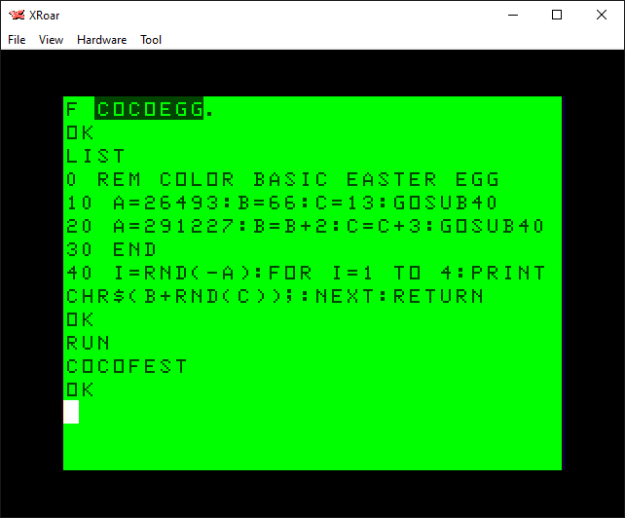
There is an interesting hidden message embedded in the Color BASIC ROM, and here is the code that reveals it:

0 REM COLOR BASIC EASTER EGG
10 A=26493:B=66:C=13:GOSUB40
20 A=291227:B=B+2:C=C+3:GOSUB40
30 END
40 I=RND(-A):FOR I=1 TO 4:PRINT CHR$(B+RND(C));:NEXT:RETURN

If you run this code, it will display this:

“COCOFEST” easter egg in the Color BASIC ROM!

Amazing, eh? How did they possibly know back in 1980 that COCOFEST would become a thing?

But actually, it’s just a random message, and not a hidden message at all. I learned of this trick from this video by 8-Bit Show and Tell that claims to share a hidden anti-Microsoft Easter egg in Commodore 64 BASIC… and then reveals how the prank works.

A hidden anti-Microsoft Easter egg in Commodore 64 BASIC! Or not…

If you tried to run that program on other flavors of BASIC, it probably would not work. It certainly does not produce the expected results on a CoCo.

10 A=125708:GOSUB 20:A=33435700:GOSUB 20:A=17059266:GOSUB 20
20 A=RND(-A)
30 A=INT(RND(A)*22):IF A THEN PRINT CHR$(A+64);:GOTO 30
40 PRINT:RETURN

This was the first video from 8-Bit Show and Tell I ever saw, and it’s lead me down quick a rabbit hole trying things he demonstrates on the Commodore computers on our beloved CoCo. And it all started with this random video that YouTube randomly showed me.

Monkeys and Shakespeare

The infinite monkey theerem states that…

“…a monkey hitting keys at random on a typewriter keyboard for an infinite amount of time will almost surely type any given text, such as the complete works of William Shakespeare.”

Wikipedia

We are just using BASIC’s RND() random number generator to simulate a monkey at a typewriter, and using short words instead of the complete works of Shakespeare.

It’s much quicker this way.

As previously discussed, the RND function generates a series of numbers that are not random. Each time you power up a CoCo, for instance, this code will produce the same “random” numbers the first time you run it:

FOR A=1 TO 8:PRINT RND(50);:NEXT
You get these same random numbers every time you power up the CoCo.

Try it for yourself using the web-based JS Mocha CoCo emulator.

In order to change the series of numbers, you pass a negative value into the RND() function, and that series will be used. If you do X=RND(-1), you will then get the same series of random values every time. If you do X=RND(-42), you get a different set of random numbers every time.

Magic!

Or math. But math is hard, and magic is just frustrating.

The monkey simulator

But how do you find which random seed value will give you the random numbers you want in the order you want them? The original prankster used brute-force trial and error.

A program can be designed that first seeds the RND function with -1, then generates a series of random numbers and tests to see if they are what it is looking for. In the case of the C64 version, it needed to see the numbers that represented the characters of the word followed by a ZERO to terminate the string.

If it did not work, it tries a seed of -2, and so on. This could take hours or days, and there is no guarantee the exact series of numbers will be found.

I decided to write a CoCo version of this monkey typewriter simulator, but I made some changes.

  1. First, I figured looking for “W”+”O”+”R”+”D” was more work than just looking for “W”+”O”+”R”+”D” without a 0 byte at the end. That should speed up the search, but require an extra bit of data in the display program since it now needs to know how many random values to use (the length of the word).
  2. The C64 version looked from A to the highest letter used (“BILL GATES SUCKS” scans A to U, though it doesn’t really need to try to find A since the earliest letter is B.) I figured that looking for A to Z (worst case, 26 choices) would be more work than just looking at the range of letters actually used in the word. For instance, finding “ABC” in a repeating random series of 26 numbers seems less likely than finding “ABC” if you were only using 3 random numbers. I made my generator look for a range covering only the letters being used. “CAT” would need numbers from “C” to “T”. “DOG” would need “D” to “O”. “ALACAZAM” would need “A” to “Z”. This meant my display program also needed to know the starting letter value and range value, in addition to the word length.

My version is not as clean and tidy as the C64 original

Here is the program I came up with. You can type in a word and it will present the range of letters it will look for, and then start searching until it finds it (or, weeks later, it has not and you give up):

10 REM rndwords.bas
20 POKE 65495,0
30 INPUT "TARGET STRING";T$
40 TL=LEN(T$)
50 IF TL=0 THEN 30
60 REM FIND LOWEST AND HIGHEST LETTER
70 LL=255:HL=0
80 FOR P=1 TO LEN(T$)
90 V=ASC(MID$(T$,P,1))
100 IF VHL THEN HL=V
120 ?V,LL;HL
130 NEXT
140 REM CALCULATE LETTER RANGE
150 R=HL-LL+1
160 PRINT "SEARCHING FOR: ";T$
170 PRINT "LETTER RANGE :";R;"(";CHR$(LL);" - ";CHR$(HL);")"
180 REM SEARCH...
190 FL=LL-1
200 FOR SD=1 TO 9999999
210 V=RND(-SD):A$=""
220 A$=A$+CHR$(FL+RND(R))
230 IF LEN(A$)<TL THEN 220
240 IF A$=T$ THEN PRINT -SD,T$
250 NEXT
1000 V=RND(-26493):FOR I=1 TO 4:PRINT CHR$(66+RND(13));:NEXT

Some words are found almost instantly. “HI” shows up immediately:

Finding random words in the Color BASIC RND function.

The output shows the random seed to start with (-5), the word it was looking for (“HI”), the ASCII character to add to the random numbers it finds, and the range to use in the RND functions.

To display the string back, you would modify my original COCOFEST program with the proper values, or do it manually:

V=RND(-5):FOR I=1 TO 2:PRINT CHR$(71+RND(2));:NEXT:PRINT

Here are some words I have found:

REM "COCO"
V=RND(-26493):FOR I=1 TO 4:PRINT CHR$(66+RND(13));:NEXT

REM "FEST"
1001 V=RND(-291227):FOR I=1 TO 4:PRINT CHR$(68+RND(16));:NEXT

REM "SUB"
1002 V=RND(-56403):FOR I=1 TO 3:PRINT CHR$(65+RND(20));:NEXT

REM "ETHA"
1003 V=RND(-1049135):FOR I=1 TO 4:PRINT CHR$(64+RND(20));:NEXT

I tried to find “COCOFEST” together, but after days and days of running, it still hadn’t. Perhaps it would have found it if I was searching the entire A-Z range versus just C-T. It’s random-ish, after all.

Perhaps one of you will take this concept and recreate the C64 version, looking for A-Z and a zero. Maybe that works better. I did not try.

Perhaps one of you will start compiling a dictionary of random words and we can use this as a secret decoder ring for passing cryptic messages to each other on Facebook.

Perhaps this will just be a passing random thought and we will never speak of it again.

But knowing me and this site, I expect we will speak of it again. Especially if I get any good comments to this post.

Until next time…