Category Archives: Misc

Life without the Cloud

Since this past summer, I have been without home internet. I previously went without phone and home internet for quite some time before, so it’s not nearly as shocking this time around.

It does make me realize how cloud dependent computing has become. Computers, in general, are far less useful without an internet connection. Today, so much syncing takes place automatically — online backups, Dropbox file sharing, photos in the Cloud, etc. It’s weird using a computer that doesn’t “magically’ have everything available that is available to my other devices.

Still, even when I had home internet, I still spent about 95% of time time on my iPad rather than the computers I have. I seem to only use them for heavy lifting these days, such as video or audio editing, website maintenance, and photo galleries.

How productive do you think you could be without internet access on your computer?

In other news, I have 28 draft articles going back to 2017 waiting for me to have time to complete them and post them here. Without internet, at least I have an excuse for not getting them done currently ;-)

Yo ho, yo ho, a (video) pirate’s life for me…

The following is a reprint of an article I originally wrote around November 11, 2002 at 4:17:20 a.m. CST. Apparently.

From: Allen Huffman

Date: November 11, 2002 4:17:20 AM CST

Subject: Yo ho, yo ho, a (video) pirate’s life for me…

The 1990s.  You remember them, don’t you?  It was a time of amazing things such as the mainstream birth of “alternative” music. Records were being phased out with CDs in long boxes taking over. You remember long boxes, don’t you?  Blockbuster Video was gearing up to be the first movie rental store that would never be missing a title you wanted thanks to VideoCDs.  You remember VideoCDs, don’t you?

Ah yes, VideoCDs. If you are in Asia, you probably know exactly what a VideoCD is.  You may even have a collection of all the latest blockbuster movies in this format. But if you live in America, you may have only heard of VCDs from spam junk mail offering software to let you copy any DVD down to a CD.  A movie on a CD?  It’s true, honest, even if the spam offer isn’t.  Thanks to video piracy, a whole new generation is discovering the video format that could have (and probably should have) changed the way we watch movies.

Imagine this.  It’s the 1990s, and LPs have given way to a new digital format for audio: the CD.  A tiny disc is capable of storing an hour or more of excellent quality audio without any scratches, pops, wow or flutter. Die hard audio enthusiasts are about the only people not embracing this new format. Soon the expression “you sound like a broken record” is meaningless to an entire generation raised on digital audio.  Soon this technology was being applied to computers, allowing you to store entire encyclopedias on one disc!  Amazing. And, of course, we understood this was a read only format.  Writing your own CD was total fantasy. And besides, who in the world had 600 megabytes of stuff to store on one? Hard drives weren’t even that big yet!

Speaking of… Early multimedia computers were hardly impressive. One early attempt to bring multimedia to the masses was a machine made by Phillips called CD-i which stood for Compact Disc Interactive. Just as the audio CD had a standard (“red book”), so did CD-i.  The goal was to create a line of players that allowed you to insert a disc that contained multimedia — without needing a computer. The CD-i player shipped with an encyclopedia, and many games were available.  A player was about $1000 at first, and that still made it far cheaper than a home computer with CD multimedia support.  Sadly, CD-i never took off.  No one wanted a stand alone box to play games on CDs with. Imagine that.

Anyway, one of the CD-i standards is still found today — the Kodak Picture CD (back then under a slightly different name).  You could take a roll of film in for developing and get back a CD containing high resolution scans of your pictures. Over a decade later, this idea is actually starting to take off even though low cost digital cameras and scanners have greatly reduced market potential. But Picture CD not the important format — the important one was VideoCD: the VHS killer.

VideoCD would require a special hardware cartridge to be plugged in to the CD-i player.  This hardware allowed you to play up to 70 minutes of VHS-quality video from a standard CD.  (The cartridge handled something known as MPEG-1 video. Today almost everyone has heard of MPEG formats such as MP3s as well as DVD which uses MPEG-2.)  In a way, VideoCD is the father of DVD.  The DVD disc you see today has over 4 gigabytes of MPEG-2 video, while a VideoCD movie usually shipped on two discs with each holding up to 70 minutes of MPEG-1. But I digress.

A small selection of movies was available in VideoCD format in America.  Even as recently as 1996 you could still buy movies on VideoCD at Best Buy (as well as CD-i titles) but today the format is almost completely forgotten in America.  Why?  Because the thought of playing a movie on a CD was just silly.  Who wants that?  Ironically, a decade later a much more expensive technology (with “much better” rather than just “same or better” quality as VHS) did win the hearts of millions as DVDs became the fastest growing standard ever.  (Happy 5th birthday, DVD format!)

So was VideoCD just too early?  I think so.  Why did you mention Blockbuster at the start of this musing?  I was just about to get to that. Here is the part that makes me sad, folks. We lost out, big time, by VCD not taking off in America.  If consumers had embraced the format, we could have seen dedicated VCD players in the sub-$100 format long before low grade VCRs (with many more moving parts) ever made it there. Movies would have had instant access like an audio CD, and would never degrade.  And, here’s the fun part, companies like Blockbuster were talking about adding a satellite receiver to let them download and write (today we call it “burning”) your favorite movie to a VideoCD so you could rent any title you want. (Note: Later Blockbuster did experiment with making rental video games on programmable cartridges available this way.)

Long before the thought of high speed broadband internet access (and downloading illegal copies of the latest theatrical release) was even imagined, the rental industry had already found a way to embrace a new technology and make money off of it.  It was perfect.  Better than VHS quality, never needed cleaning, cheaper players (eventually) and movies that would cost less to produce than VHS (just look at the price of a blank CD today versus even the cheapest blank video tapes).  A missed opportunity.

So here I sit, wading through tons of junk mail and always finding an offer to “copy any DVD to CD” somewhere in the stack. The pirates have discovered a way to use something everyone else has forgotten. It seems it always works this way. After all, it was the pornography industry that had the most to do with the success of VHS in the first place, so I guess I shouldn’t be surprised.

The next time you sit down to enjoy the latest blockbuster movie on DVD, pause for a moment as you realize you could have been doing this a decade ago. The next time you go to rent your favorite title and it’s out of stock, think about the video store that could have been if only CD writers had existed and pirates were making use of the them to make the format popular…

Speaking of popular, you realize that CDs are now older than most cars, right? Twenty years is a very long time for any technology, so soon, when talking about how you used to rip tunes from CD, you may find yourself asking:

“You remember CDs, don’t you?”

RadioShack is back!

Have you checked the RadioShack store locator page lately? I did, last week, and instead of just finding three dealer stores in my state (none within an hour), I was surprised to see on in nearby Ankeny, Iowa. It was in some place called HobbyTown.

Somehow I missed the announcement that the Shack posted to their Facebook page back in July. Indeed, they now have a store-within-a-store at some HobbyTown locations.

I went to visit this location, and thought I’d share a trip report.

HobbyTown… Remote controlled cars, model rockets, and … RadoShack Express!
Yes, Virginia. There IS a RadioShack inside.
They only have the electronics parts, all displayed on the wall. No answering machines, video cables, or cell phones.
Even perfboards! This IS your father’s RadioShack! Except it’s still missing the space between the words :(

There was also another small glass cabinet nearby with a few other parts, and at the front checkout counter they had RadioShack brand batteries and such.

I have been working on some projects for Halloween, and found several items that I could put to use. I picked up a 12V buzzer, some 12V lights, some button switches, and some wire nuts. (Yeah, I know I could buy a whole bag of industrial wire nuts at the hardware store for just a bit more, but I only needed a few and “it was just a few bucks.”)

My bounty from my first trip to a RadioShack Express. They even use the old RS catalog numbers (after the RSH).

Leave a comment if you have a RadioShack near you.

Mandela Effect and Wayne’s World

I’m placing this here for searching engine visibility…

Mandela Effect amuses me because there was one that impacted me, involving a painting I remember seeing in the past twenty years, which does not exist. I have a plausible theory to explain that one, though.

Tonight, I saw Wayne’s World at a local theater. Two things stood out at me:

  1. During the first Wayne’s World segment, they bring on a guy who invented a Flowbee parody called the Suck Cut. I had remembered it being called the Suck ‘n Cut, but since I haven’t seen the movie since it first came out, I guess I just made the actual name more complicated and less like what it was a parody off. Flowbee, Suckcut. Not sure why I remembered it with extra stuff added.
  2. During the guitar store scene, Wayne picks up a guitar and starts to play the intro to Stairway to Heaven. I was very familiar with this song because I worked in a music store that sold guitars at the time of the movie’s release. But what he plays was not at all Stairway. But the joke was still there.

Well, number two is a licensing thing. I found an article explaining that only the original theatrical print had him playing a few notes from Stairway, and all subsequent releases from VHS on had those notes changed.

I am wondering if number one was something similar. I do find references on the internet to folks calling it “Suck ‘n Cut” as well, but the clips are Suck Cut. Mandela Effecters call this residual effect.

I think I just misremembered. It’s just rough to suddenly realize you have been wrong for a quarter of a century and no one corrected you :)

Jolt Cola is back!

The legendary soda with “all the sugar, and twice the caffeine” is back! The soda, which first became available in 1985, went off the market around 2009. By that time, it had evolved away from the original cola, and was being sold as an energy drink in large cans that resembled AA batteries.

You can currently only find Jolt Cola at Dollar General Stores, or on Amazon. At Dollar General, it will be in the “valley of values” aisle, rather than with the other sodas or energy drinks. The best part is, the price for the larger 16 ounce cans is just $1. You can find out if your local Dollar General has them by visiting the map at:

Http://www.joltcola.com

On Amazon, you will be paying around $3 a can, shipped right to your doorstep.

Exciting news for 2018! More details later…

Sub-Etha Software to attend 2018 Chicago CoCoFEST!

FOR IMMEDIATE RELEASE:

Sub-Etha Software to attend 2018 Chicago CoCoFEST!

Des Moines, Iowa – January 11, 2018 – Iowa-based Sub-Etha Software has announced plans to attend the 2018 27th Annual “Last” Chicago CoCoFEST! The event will be held April 21 and 22, 2018 at the Heron Point Convention Center in Lombard, Illinois.

“We’ve missed a number of years over the past decade or so, but we don’t plan to miss this year,” says Sub-Etha co-founder and current operator, Allen Huffman. “Missing these shows sucks. And this year we don’t want it to suck.”

Sub-Etha Software plans to demonstrate Roger Taylor’s “CoCo on a Chip” FPGA project, as well as a few “vaporware” items from the company’s past, including the CoCo-VR project and CoCo Answering Machine project.

A selection of N.O.S. (new old stock) Sub-Etha items may be available on (probably unreadable) 5 1/4″ floppy disks in original (“vintage”) packaging.

There will not be any Jolt! Cola, because that no longer exists. And there might even be Jolt Cola, because thanks to a tip from L. Curtis Boyle in the comments, it went back in to production in late 2017!

About Sub-Etha Software

Sub-Etha Software was founded in Lufkin, Texas in 1990, as a partnership between Allen C. Huffman and Terry S. Todd. It made it’s first CoCoFest appearance at the First Annual Atlanta CoCoFest in 1990, and it’s first Chicago CoCoFest appearance at the First Annual “Last” Chicago CoCoFEST! in 1992. They may be contacted online at www.subethasoftware.com

About the Chicago CoCoFEST!

The 27th Annual “Last” Chicago CoCoFEST! is sponsored by the Glenside Color Computer Club of Illinois. They may be contacted online at www.glensideccc.com.

Contact:
Allen Huffman
alsplace@pobox.com
PO Box 7634,
Des Moines, Iowa
U.S.A.
Ph: 515-999-0227

###

Easy websites with the w3.css style sheet, part 4

See also: Part 1Part 2 and Part 3.

This article will assume you know at least something about HTML, and a bit about CSS – even if it is just the basic stuff like the simple code shown in the example in part 3:

<html>
  <head>
    <title>My First Home Page</title>
  </head>
  <body>
    <p>Welcome to my home page!</p>     
    <p>Check out my other pages:</p>
    <ul>
      <li><a href="about.html">About Me</a></li>
      <li><a href="mydog.html">My Dog</a></li>
      <li><a href="poetry.html">My Poems</a></li>
    </ul>
  </body>
</html>

That makes this:

My First Home Page

But, with a bit of additional CSS styles, we can colorize and do other effects.

<html>
  <head>
     <title>My First Home Page</title>
   </head>
   <body>
     <p style="color: red">Welcome to my home page!</p> 
     <p style="color: green">Check out my other pages:</p>
     <ul style="background: black">
       <li><a href="about.html">About Me</a></li>
       <li><a href="mydog.html">My Dog</a></li>
       <li><a href="poetry.html">My Poems</a></li>
     </ul>
   </body>
</html>

That might look like this:

My First Home Page … in COLOR!

Here is an excellent tutorial on CSS:

http://www.w3schools.com/css/

I was visiting this site a few weeks ago looking up some CSS things and I ran across a style sheet they had created which let you easily create navigation bars, menus, and responsive (scales to phone or desktop screens) websites. It was called w3.css:

http://www.w3schools.com/w3css/

By linking in that style sheet, and tagging items in your web page, you can turn a boring, bland HTML page in to something more modern. By just including the “w3.css” style sheet in your page, and adding a “class” parameter to an unordered list, you suddenly have a modern navigation menubar:

<html>
  <head>
    <title>My First Home Page</title>
    <link rel="stylesheet" href="http://www.w3schools.com/lib/w3.css">
  </head>
  <body>
    <ul class="w3-navbar w3-blue">
      <li><a href="about.html">About Me</a></li>
      <li><a href="mydog.html">My Dog</a></li>
      <li><a href="poetry.html">My Poems</a></li>
    </ul>
    <p>Welcome to my home page!</p> 
    <p>Check out my other pages by using the top menu.</p>
  </body>
</html>

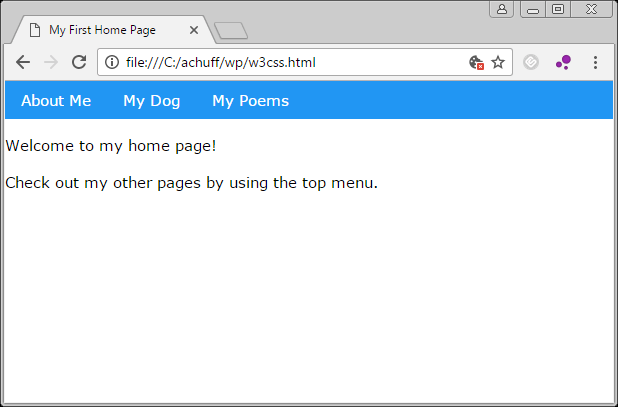
Since I wanted the menu bar to be at the top, I moved that line to the top. It looks like this:

My First Home Page … using w3.css!

And by adding a few more “class” tags, you can create horizontal side menus and a bunch more. For example, you can easily create a page layout, such as a navigation bar, left box, and main content area:

<html>
  <head>
    <title>My First Home Page</title>
  <link rel="stylesheet" href="http://www.w3schools.com/lib/w3.css">
  </head>
  <body>
    <ul class="w3-navbar w3-blue">
      <li><a href="about.html">About Me</a></li>
      <li><a href="mydog.html">My Dog</a></li>
      <li><a href="poetry.html">My Poems</a></li>
    </ul>
    <div class="w3-row">
      <div class="w3-third w3-container w3-green">
        <h2>Thought for the Day</h2> 
      </div>
      <div class="w3-twothird w3-container">
        <h2>Welcome to my home page!</h2> 
        <p>Check out my other pages by using the top menu.</p>
      </div>
    </div>
  </body>
</html>

…and suddenly you have this:

My First Home Page … now with CSS!

And, this design automatically becomes responsive, and resizes for phone screens:

My First Home Page … now responsive!

How cool is that?

I just had to share.

Explore the w3.css tutorial site for many examples. There are a ton of fun things you can do with very little work these days.

Have fun!

Easy websites with the w3.css style sheet, part 3

See also: Part 1 and Part 2.

Let’s set the wayback machine to 1995, when I first learned HTML.

The company where I worked had an internal web server. Many of the other engineers had their own small work-related web pages, so I wanted one too. I decided to learn HTML.

Consider this very, very simple HTML page:

<html>
    <head>
        <title>My First Home Page</title>
    </head>
    <body>
        <p>Welcome to my home page!</p>     
    </body>
</html>

This very simple page would present an empty screen with one short paragraph.

Perhaps we want to add a list of links to some other pages:

<html>
    <head>
        <title>My First Home Page</title>
    </head>
    <body>
        <p>Welcome to my home page!</p>     
        <p>Check out my other pages:</p>
        <ul>
            <li><a href="about.html">About Me</a></li>
            <li><a href="mydog.html">My Dog</a></li>
            <li><a href="poetry.html">My Poems</a></li>
        </ul>
    </body>
</html>

…and thus, the world wide web as we know it began, with endless, simple home pages.

HTML gave us many things, like bold text and italics, and even ways to make simple tables. As web browsers evolved, so did web pages, and soon designers were creating amazing sites by abusing the very simple HTML language.

And boy was it messy.

Netscape might show a web page differently than Internet Explorer, so designers had to use all kinds of tricks to try to make their sites viewable on different browsers and operating systems.

And boy was it messy.

Over the years, web developers came up with all kinds of hacks and tricks to make pages look “pretty” like they wanted, and look similar on different systems and browsers. They were using HTML in ways the language was never intended to be used.

Web browsers came and went, and the HTML standard evolved with browsers slowly becoming more standardized and able to render the same webpages similarly without (as many) hacks.

Somewhere along the line, cascading style sheets (CSS) started getting used, giving developers a proper way to instruct a browser on how to render HTML. The wikipedia page says CSS came out in 1996:

https://en.wikipedia.org/wiki/Cascading_Style_Sheets

…but it was many years before software supported it enough to make it widespread. I remember going through three or four expensive versions of the Dreamweaver web authoring program before finally getting one that sorta-kinda supported CSS.

I believe CSS finally came in to its own thanks to the introduction of the iPhone in 2007. This moved the world wide web from large desktop screens to tiny screens into our pockets. Since viewing full sized websites on a tiny screen wasn’t that fun, web standards continued to evolve with new approaches to make websites look less crappy on tiny screens while still looking nice on large computer screens.

And boy was it complicated…

Up next: How to make a modern looking website without having to learn (almost anything about) CSS.

Easy websites with the w3.css style sheet, part 2

Previously, I began this article by discussing my first experience making a website back in 1995, along with mentioning a custom program I wrote to help speed up the process.

Over the years, the web has grown considerably, and the HTML “language” has evolved and added more features. (Does anyone remember the “blink” HTML tag?) It’s taken two decades, but we are finally getting to the point where web browsers are finally standardized enough that website designers don’t have to rely on all kinds of hacks and tricks just to make their sites appear similar on different systems.

In the early days, a browser called Netscape dominated. Microsoft introduced their first Internet Explorer (bringing the World Wide Web to PC users) and Apple had whatever the heck it had. Other operating systems, like IBM’s OS/2 Warp, had browsers of their own … and all rendered HTML a bit differently.

It was a mess.

Pages wouldn’t look the same when using Netscape on a PC versus  Mac. Internet Explorer was even made for Macs at one point, and initially it added features that the PC version didn’t have.

It was a mess.

I know I just said that, but I feel it is worth repeating.

It was a mess.

Today, it seems pretty rare to find folks editing HTML by hand. There are endless options for HTML editors (like Dreamweaver) that aid in building websites using templates and libraries of HTML code. There are also tons of content management systems like WordPress (which this site currently uses) that let folks easily set up a site based on a pre-existing theme and customize it a bit without ever touching a line of code.

And this is why so much of the internet looks bland, boring, and similar. Folks like me pick out some very common WordPress theme and look like thousands of other sites using the same theme.

Because writing a modern-looking website is hard.

However, last week I stumbled upon something that appears to let my ancient 1995 HTML skills quickly and easily create a modern-looking website with very simple HTML code.

In the next installment, I will introduce you to the w3.css. If you have ever built HTML by hand, and are unaware of w3.css, hopefully you will be as impressed as I am by what it is capable of.

Until then…

Easy websites with the w3.css style sheet, part 1

This article will discuss an amazingly easy way to create modern websites using a cool thing I just found out about.

But, like most of my articles, we begin with a long, rambling story about my history with the web…

I built my first HTML web page in 1995, I think. It was the early and crude days of the World Wide Web. I remember having my first public website (which we all called “home pages” back then) on a free service called GeoPages. This server was later renamed to GeoCities and was eventually acquired by Yahoo!

Here is the Wikipedia entry with some of the history. It’s quite interesting seeing where things began:

https://en.wikipedia.org/wiki/Yahoo!_GeoCities

According to a news article referenced by Wikipedia, the name change happened in December 1995. I wish I still had copies of my first home page, but space was limited back then so few of us kept earlier versions of the things we did.

At some point, I moved my home page from GeoCities to Delphi, and it stayed there for awhile before I finally archived it to my own domain. It looks like I last updated it in 2000, so here is an archive of my old site that begin in 1995:

http://alsplace.os9al.com/alsplace.html
My original home page, as it was in 1999-ish.

Those were the days! HTML 1.0!

In those days, HTML was edited by hand in a text editor. I used the umacs editor on a SunOS workstation, and later, umacs for MS-DOS on a Toshiba laptop. I wrote several programs in C to help me built more complex sites by using template files and includes. I basically created a C-style “#ifdef”, “#include” and “#define” preprocessor for HTML, and also added variables.

If I wanted a consistent header and/or footer at the top of every page, I could create a file like “TOP.TEM” (top template) with that code, and then in my page files (INDEX.TEM, ABOUT.TEM, LINKS.TEM) I would do a “#include TOP.TEM”. When I ran my preprocessor, it would parse the files and generate the actual .HTM files. (Ah, those lousy days in the PC world where file names were limited to eight letters and a three letter extension!)

For variables, I could create a “#define EMAIL alsplace@pobox.com” in a template, and then anywhere the text “%EMAIL%” appeared in the file would get replaced with “alsplace@pobox.com”. It let me make global changes to my site and rebuild in seconds.

Years later, I would purchase the expensive Macromedia Dreamweaver, which is today known as Adobe Dreamweaver. (Hmmm, why is everything I use acquired by someone else?) This industrial strength web editor finally allowed me to edit in a more visual mode rather than raw HTML coding.

But, even though it added the concept of Library items and Templates, it was (and still is!) so far slower when generating a site than my ancient 1995 preprocessor.

But it looks much nicer and is easier to use.

Up next: From home page to hosting…