2022-09-19 – John K pointed out a typo in the program listing, which has been corrected.
This one comes from Carl England. We met him at the 1990 Atlanta CoCoFest. That was the first time Sub-Etha Software appeared anywhere, and we couldn’t afford a full booth so we split on with Carl. He will always be the SuperBoot guy to me (my all time favorite utility), but most may know him as the programmer being The Defeater – a disk copy tool that could make clones of copy protected disk. (Download some of his items here.)
Carl popped up in some Facebook comments recently with this odd bit of code.
10 PRINT"THIS LINE IS INVISIBLE":'%%%%%%%%%%%%%%%%%%%%%%%%%%%%%%%%%%
20 FORI=PEEK(25)*256+PEEK(26)TOPEEK(27)*256+PEEK(28)
30 IFPEEK(I)=37THENPOKEI,8
40 NEXT
Line 10 is a PRINT statement, followed by a comment and a bunch of percent symbols.
Line 20 is a loop that goes from the Start of BASIC to the End of BASIC.
Line 30 uses PEEK to look for a 37, which is the ASCII code for a percent sign. If it finds one, it POKEs it to 8 — a backspace.
Line 40 is just the NEXT for the loop.
If you run this program, it will modify line to and replace all those %’s with backspace characters. Then, if you LIST it, BASIC displays the line then immediately backspaces over it, too quick to see, making it look like there is no line there.
You could RUN this to modify the program, then DELete lines 20-40, and save it to tape or disk. You could then have a program you could load and run that would print a message, but LISTing it would appear as if nothing was there.
Carl said he used this to hide lines in some of his programs, but mentioned you could still see the code if you sent it to a printer using LLIST. Also, if you knew there was a line 10, you could EDIT 10 and SPACE through the line, revealing the code. I suppose you could SPACE until you got to the colon and then Hack the rest of the line, removing those backspace.
Followers of my ramblings know that I enjoy benchmarking BASIC. It is interesting to see how minor changes can produce major speed differences. And while BASIC is supposedly “completely predictable,” there are so many items that must be considered — line numbers, line length, number of variables, amount of strings, etc. — you can’t really look at any bit of code and know how fast it will run unless it’s something self contained like this:
10 FOR A=1 TO 1000
20 NEXT
Beyond things like that, there’s a lot of trail-and-error needed. Code like this:
...
100 FOR A=1 TO 100
110 Z=Z+1
120 NEXT
...
…can have dramatically different speeds depending on how many other variables there are, and where Z was declared in the list of them.
6809 assembly language is far more predictable. Every machine language instruction has a known amount of CPU cycles it takes to operate — based on variations of that code. For example, loading register A with a value:
lda #42
…should be 100% predictable simply by looking up the cycle counts for “load A” in some 6809 reference guide. The Motorola data sheet for the 6809 tells me that “LDA” takes 2 cycles.
So, really, there’s no benchmarking needed. You just have to look up the instructions (and their specific type — direct, indirect, etc.) and add up some numbers.
But where’s the fun in that?
William “Lost Wizard” Astle‘s LWTOOLS provides us with the lwasm assembler for Mac, Windows, Linux, etc. One of its features is cycle counting. It can generate a list of all the machine language bytes that the assembly source code turns in to and, optionally, include the cycle count for each line of assembly code.
I just learned about this and had to experiment…
Here is a simple assembly loop that clears the 32-column screen. I’ll add some comments that explain what it does, as if it were BASIC…
clear
    lda #96     * A=96 (green space)
clearwitha
    ldx #1024   * X=1024 (top left of screen)
loop
    sta ,x+     * POKE X,A:X=X+1
    cmpx #1536  * Compare X to 1536
    bne loop    * If X<>1536, GOTO loop
    rts         * RETURN
To clear the screen to spaces (character 96), it is called with:
bsr clear
To clear the screen with a different value, such as 128 for black, it can be called like this:
 lda #128
 bsr clearwitha
LWASM is able to tell me how many CPU cycles each instruction will take. To generate this, you have to include a special pragma command in the source code, or pass it in on the command line. In source code, it is done by using the special “opt” keyword followed by the pragma. The ones we are interested in are listed in the manual:
opt c  - enable cycle counts: [8]
opt cd - enable detailed cycle counts breaking down addressing modes: [5+3]
opt ct - show a running subtotal of cycles
opt cc - clear the running subtotal
Adding ” opt c” at the top of the source code will enable it, and then you would use the “-l” command line option to generate the list file which will not contain cycle counts. (You can also send the list output to a file using -lfilename if you prefer.)
You can also pass in this pragma using a command line “–pragma=c”, like this:
lwasm clear.asm -fbasic -oclear.bas --pragma=c -l
Above, I am assembling the program in to a BASIC loader which I can load from BASIC, and then RUN to load the machine language program in to memory. Here is what that command displays for me:
That’s a bit too wide of a listing for my comfort, so from now on I’ll just include the right portion of it — starting with the (number) in parenthesis. That is the cycle count. If you look at the “lda #96” line you will see it confirms “lda” takes two cycles:
(2) lda #96 * A=96 (green space)
Another pragma of interest is one that will start counting the total number of cycles code takes.
opt ct - show a running subtotal of cycles
If you just turned it on, it would be not be very useful since it would just be adding up all the instructions from top to bottom of the source, not taking in to consideration branching or subroutines or loops. But, we can clear that counter and start it at any point by including the “opt” keyword in the code around routines we are interested in.
opt cc - clear the running subtotal
And we can turn them off by putting “no” in front:
opt noct - STOP showing a running subtotal of cycles
In the case of my clear.asm program, I would want to clear the counter and turn it on right at the start of loop, and turn it off at the end of the loop. This would show me a running count of how many cycles that loop takes:
The numbers to the right of the (cycle) count numbers are the sum of all instructions from the moment the counter was enabled.
The code from “loop” to “bne loop” takes 11 cycles. Since each loop sets one byte on the screen, and since there are 512 bytes on the screen, clearing the screen this way will take 11 * 512 = 5632 cycles (plus a few extra before the loop, setting up X and A).
Instead of clearing the screen 8-bits at a time, I learned that using a 16-bit register would be faster. I changed the code to use a 16-bit D register instead of the 8-bit A register, like this:
clear16
    lda #96     * A=96
    tfr a,b     * B=A (D=A*256+B)
clearA16
    ldx #1024   * X=1024 (top left of screen)
    opt ct,cc   * Clear counter, turn it on.
loop16
    std ,x++    * POKE X,A:POKE X+1,B:X=X+1
    cmpx #1536  * Compare X to 1536.
    bne loop16  * If X<>1536, GOTO loop16
    opt noct    * Turn off counter.
    rts         * RETURN
Since 16-bit register D is made up of 8-bit registers A and B, I simply transfer whatever is in A to B and that makes both bytes of D the same as A. Then in the loop, I store D at X, and increment it by 2 (to get to the next two bytes). Looking at cycles again…
The code from “loop16” to “bne loop16” takes 13 cycles, which is longer than the original. But, each loop does two bytes instead of one. Instead of needing 512 times through the loop, it only needs 256. 13 * 256 = 3328 cycles. Progress!
And, if we can do 16-bits at a time, why not 32? Currently, D is the value to store, and X is where to store it. We could just store D twice in a row…
clear32
    lda #96     * A=96
    tfr a,b     * B=A (D=A*256+B)
clearA32
    ldx #1024   * X=1024 (top left of screen)
    opt ct,cc   * Clear counter, turn it on.
loop32
    std ,x++    * POKE X,A:POKE X+1,B:X=X+2
    std ,x++    * POKE X,A:POKE X+1,B:X=X+2
    cmpx #1536  * Compare X to 1536.
    bne loop32  * If X<>1536, GOTO loop32
    opt noct    * Turn off counter.
    rts         * RETURN
Let’s see what that does…
        clear32
(2)         lda #96     * A=96
(4)         tfr a,b     * B=A (D=A*256+B)
        clearA32
(3)         ldx #1024   * X=1024 (top left of screen)
            opt ct,cc   * Clear counter, turn it on.
                loop32
(7)     7           std ,x++    * POKE X,A:POKE X+1,B:X=X+2
(7)     14          std ,x++    * POKE X,A:POKE X+1,B:X=X+2
(3)     17          cmpx #1536  * Compare X to 1536.
(3)     20          bne loop32  * If X<>1536, GOTO loop32
                    opt noct    * Turn off counter.
(4)         rts         * RETURN
Above, the “loop32” to “bne loop32” takes 20 cycles. Each loop does four bytes, so only 128 times through the loop to clear all 512 bytes of the screen. 20 * 128 = 2560 cycles. More than double the speed of the original one byte version.
We could do 48-bits at a time by storing three times, but that math doesn’t work out since 512 is not divisible by 6 (I get 85.33333333). Perhaps we could do the loop 85 times to clear the first 510 bytes (6 * 85 = 510), then manually do one last 16-bit store to complete it. Maybe like this:
clear48
    lda #96     * A=96
    tfr a,b     * B=A (D=A*256+B)
clearA48
    ldx #1024   * X=1024 (top left of screen)
    opt ct,cc   * Clear counter, turn it on.
loop48
    std ,x++    * POKE X,A:POKE X+1,B:X=X+2
    std ,x++    * POKE X,A:POKE X+1,B:X=X+2
    std ,x++    * POKE X,A:POKE X+1,B:X=X+2
    cmpx #1536  * Compare X to 1536.
    bne loop48  * If X<>1536, GOTO loop32
    opt noct    * Turn off counter.
    std ,x      * POKE X,A:POKE X+1,B:X=X+2
    rts         * RETURN
We have jumped to 27 cycles per loop. Each loop stores 6 bytes, and it takes 85 times to get 510 bytes, plus 5 extra after it is over for the last two bytes. 27 * 85 = 2295 cycles + 5 = 2300 cycles! We are still moving in the right direction.
Just for fun, what if we did four stores, 8 bytes at a time?
clear64
    lda #96     * A=96
    tfr a,b     * B=A (D=A*256+B)
clearA64
    ldx #1024   * X=1024 (top left of screen)
    opt ct,cc   * Clear counter, turn it on.
loop64
    std ,x++    * POKE X,A:POKE X+1,B:X=X+2
    std ,x++    * POKE X,A:POKE X+1,B:X=X+2
    std ,x++    * POKE X,A:POKE X+1,B:X=X+2
    std ,x++    * POKE X,A:POKE X+1,B:X=X+2
    cmpx #1536  * Compare X to 1536.
    bne loop64  * If X<>1536, GOTO loop32
    opt noct    * Turn off counter.
    rts         * RETURN
34 cycles stores 8 bytes. 64 times through the loop to do all 512 screen bytes, so 64 * 34 = 2176 cycles.
By now, I think you can see where this is going. I believe this is called “loop unrolling”, since, if you wanted the fewest cycles, you could just code 256 “std ,x++” in a row (7 * 256) for 1792 cycles which would be fast but bulky code (each std ,x++ takes two bytes, so 512 bytes just for this copy routine).
There is always some balance between code size and speed. Larger programs took longer to load from tape or disk. But, if you didn’t mind load time, and you had extra memory available, tricks like this could really speed things up.
Blast it…
I have also read about “stack blasting” where you load values in to registers and then, instead of storing each register, you set a stack pointer to the destination and just push the registers on the stack. I’ve never done that before. Let’s see if we can figure it out.
There are two stacks in the 6809 — one is the normal one used by the program (SP, I believe is the register?), and the other is the User Stack (register U). If we aren’t using it for a stack, we can use it as a 16-bit register, too.
The stack grows “up”, so if the stack pointer is 5000, and you push an 8-bit register, the pointer will move to 4999 (pointing to the most recent register pushed). If you then push a 16-bit register, it will move to 4997. This means it will have to work in reverse from our previous examples. By pointing the stack register to the end of the screen, we should be able to push registers on to the stack causing it to grow “up” to the top of the screen.
At first glance, it doesn’t look promising, since pushing D on to the user stack (U) takes more cycles than storing D at U:
(5)         std ,u

(6)         pshu d
But, it seems we make that up when pushing multiple registers since the cycle count does not grow as much as multiple stores do:
I also I see that STY is one cycle longer than STD or STX. This tells me to maybe avoid using Y like this…?
It looks good, though. 22 cycles compared to 10 seems quite the win. Let me see if I can do a clear routine using the User stack pointer and three 16-bit registers. We’ll compare this to the 48-bit clear shown earlier.
clear48s
    lda #96     * A=96
clearA48s
    tfr a,b     * B=A (D=A*256+B)
    tfr d,x     * X=D
    tfr d,y     * Y=D
    ldu #1536   * U=1536 (1 past end of screen)
    opt ct,cc   * Clear counter, turn it on.
loop48s
    pshu d,x,y
    cmpu #1026  * Compare U to 1026 (two bytes from start).
    bgt loop48s * If X<>1026, GOTO loop48s.
    opt noct    * Turn off counter.
    pshu d      * Final 2 bytes.
    rts         * RETURN
And the results are…
        clear48s
(2)         lda #96     * A=96
        clearA48s
(4)         tfr a,b     * B=A (D=A*256+B)
(4)         tfr d,x     * X=D
(4)         tfr d,y     * Y=D
(3)         ldu #1536   * U=1536 (1 past end of screen)
            opt ct,cc   * Clear counter, turn it on.
                loop48s
(10)    10          pshu d,x,y
(4)     14          cmpu #1026  * Compare U to 1026 (two bytes from start).
(3)     17          bgt loop48s * If X>1026, GOTO loop48s
                    opt noct    * Turn off counter.
(6)                 pshu d      * Final 2 bytes.
(4)         rts         * RETURN
From “loop48s” to “bgt loop48s” we end up with 17 cycles compared to 27 using the std method. 85 * 17 = 1445 cycles + 6 final cycles = 1551 cycles. It looks like using stack push/pulls might be a real nice way to do this type of thing, provided the user stack is available, of course.
When setting a register to zero, I have been told to use “CLR” instead of “LDx #0”. Let’s see what that is all about…
(2)         lda #0
(1)         clra

(3)         ldd #0
(2)         clrd
Ah, now know a CLRA is twice as fast as LDA #0, and CLRD is one cycle faster than LDD #0. Nice.
Other 16-bit registers such as X, Y, and U do not have a CLR op code, so LDx will be have to be used there, I suppose.
I then wondered if it made more sense to CLR a memory location, or clear a register then store that register there.
(6)         clr 1024

(1)         clra
(4)         sta 1024
It appears in this case, it is less cycles to clear a register then store it in memory. Interesting. And using a 16-bit value:
(3)         ldd #0
(5)         std 1024
That is one cycle faster than doing a “clra / sta 1024 / sta 1025” it seems. It is also one byte less in size, so win win.
There is a lot to learn here, and from these experiments, I’m already seeing some things are not like I would have guessed.
I hope this inspires you to play with these LWASM options and see what your code is doing. During the writing of this article, I learned how to use that User Stack, and I expect that will come in handy if I decide to do any updates to my Invaders09 game some day…
A year or two ago, I ran across some C code at my day that finally got me to do an experiment…
When I was first using a modem to dial in to BBSes, it was strictly a text-only interface. No pictures. No downloads. Just messages. (Heck a physical bulletin board at least would let you put pictures on it! Maybe whoever came up with the term BBS was just forward thinking?)
The first program I ever had that sent a program over the modem was DFT (direct file transfer). It was magic.
Later, I got one that used a protocol known as XMODEM. It seems like warp speed compared to DFT!
XMODEM would send a series of bytes, followed by a checksum of those bytes, then the other end would calculate a checksum over the received bytes and compare. If they matched, it went on to the next series of bytes… If it did not, it would resend those bytes.
Very simple. And, believe it or not, checksums are still being used by modern programmers today, even though newer methods have been created (such as CRC).
Checking the sum…
A checksum is simple the value you get when you add up all the bytes of some data. Checksum values are normally not floating point, so they will be limited to a fixed range. For example, an 8-bit checksum (using one byte) can hold a value of 0 to 255. A 16-bit checksum (2 bytes) can hold a value of 0-65535. Since checksums can be much higher values, especially if using an 8-bit checksum, the value just rolls over.
For example, if the current checksum calculated value is 250 for an 8-bit checksum, and the next byte being counted is a 10, the checksum would be 250+10, but that exceeds what a byte can hold. The value just rolls over, like this:
250 + 10: 251, 252, 253, 254, 255, 0, 1, 2, 3, 4
Thus, the checksum after adding that 10 is now 4.
Here is a simple 8-bit checksum routine for strings in Color BASIC:
0 REM CHKSUM8.BAS
10 INPUT "STRING";A$
20 GOSUB 100
30 PRINT "CHECKSUM IS";CK
40 GOTO 10

100 REM 8-BIT CHECKSUM ON A$
110 CK=0
120 FOR A=1 TO LEN(A$)
130 CK=CK+ASC(MID$(A$,A,1))
140 IF CK>255 THEN CK=CK-255
150 NEXT
160 RETURN
Line 140 is what handles the rollover. If we had a checksum of 250 and the next byte was a 10, it would be 260. That line would detect it, and subtract 255, making it 4. (The value starts at 0.)
The goal of a checksum is to verify data and make sure it hasn’t been corrupted. You send the data and checksum. The received passes the data through a checksum routine, then compares what it calculated with the checksum that was sent with the message. If they do not match, the data has something wrong with it. If they do match, the data is less likely to have something wrong with it.
Double checking the sum.
One of the problems with just adding (summing) up the data bytes is that two swapped bytes would still create the same checksum. For example “HELLO” would have the same checksum as “HLLEO”. Same bytes. Same values added. Same checksum.
A good 8-bit checksum.
However, if one byte got changed, the checksum would catch that.
A bad 8-bit checksum.
It would be quite a coincidence if two data bytes got swapped during transfer, but I still wouldn’t use a checksum on anything where lives were at stake if it processed a bad message because the checksum didn’t catch it ;-)
Another problem is that if the value rolls over, that means a long message or a short message could cause the same checksum. In the case of an 8-bit checksum, and data bytes that range from 0-255, you could have a 255 byte followed by a 1 byte and that would roll over to 0. A checksum of no data would also be 0. Not good.
Checking the sum: Extreme edition
A 16-bit or 32-bit checksum would just be a larger number, reducing how often it could roll over.
For a 16-bit value, ranging from 0-65535, you could hold up to 257 bytes of value 255 before it would roll over:
255 * 257 = 65535
But if the data were 258 bytes of value 255, it would roll over:
255 * 258 = 65790 -> rollover to 255.
Thus, a 258-byte message of all 255s would have the same checksum as a 1-byte message of a 255.
To update the Color BASIC program for 16-bit checksum, change line 140 to be:
140 IF CK>65535 THEN CK=CK-65535
Conclusion
Obviously, an 8-bit checksum is rather useless, but if a checksum is all you can do, at least use a 16-bit checksum. If you were using the checksum for data packets larger than 257 bytes, maybe a 48-bit checksum would be better.
Or just use a CRC. They are much better and catch things like bytes being out of order.
But I have no idea how I’d write one in BASIC.
One more thing…
I almost forgot what prompted me to write this. I found some code that would flag an error if the checksum value was 0. When I first saw that, I thought “but 0 can be a valid checksum!”
For example, if there was enough data bytes that caused the value to roll over from 65535 to 0, that would be a valid checksum. To avoid any large data causing value to add up to 0 and be flagged bad, I added a small check for the 16-bit checksum validation code:
if ((checksum == 0) && (datasize < 258)) // Don't bother doing this.
{
    // checksum appears invalid.
}
else if (checksum != dataChecksum)
{
    // checksum did not match.
}
else
{
    // guess it must be okay, then! Maybe...
}
But, what about a buffer full of 00s? The checksum would also be zero, which would be valid.
On August 21, 1994 I began writing a space invaders game for the Radio Shack TRS-80 Color Computer. The game was written in 6809 assembly language, and ran under the Microware OS-9 operating sytem as opposed to the ROM-based Disk Extended Color BASIC.
It did not initially start out as an OS-9 game. It started out as a NitrOS9 game. NitrOS9 was (and still is) a greatly optimized and enhanced version of the stock OS-9 for the Color Computer. It was initially a set of patches that took advantage of the hidden features of the Hitatchi 6309 chip. Many of us did CPU swaps in our CoCo 3s specifically to be able to run this faster version of OS-9. Years later, NitrOS-9 was backported to run on a stock 6809 and the project continues today with the Ease of Use edition where it comes ready to run and bundled with all kinds of utilities, applications, and games. (I think my game is even on there.)
The reason I chose to write a game was after learning about a new system call that NitrOS9 added. It allowed mapping in graphics screen memory so a program could directly access it — just like from BASIC. With that in mind, I wrote a simple demo that had a peace-sign space ship that could move left and right and fire (multishots!), as well as a scrolling star background.
I believe my game demo source might have been published in The International OS-9 Underground magazine at some point.
As soon as I figure out how to make WordPress allow uploading a .asm source file, I’ll share it here.
But I digress. Again.
Invaders09 Secrets
Version 1.00 was completed on September 24, 1994. It was first sold at the 1994 Atlanta CoCoFest. I don’t remember how many copies the game sold over its lifetime, but I do know it was not enough to retire on. :)
On December 26, 1994, version 1.01 was released. This contained code by Robert Gault that allowed the game to work on machines with more than 512K memory. (Robert was also responsible for code that allowed the game to work on stock OS-9, as well.)
A big update happened on January 29, 1995, when the game was upgraded from a 4-color screen to glorious 16 colors.
1.03 was completed on February 4, 1995 and included bug fixes.
Almost twenty years later, to the day, I did a 1.04 update. The title screen text removed my old P.O. Box from Texas, and replaced it with an e-mail address. I also added the “secret” command line option to the help screen, so it would no longer be secret. There had also been a bug that caused the fonts to sometimes fail to load, which I found and fixed. There were also some bad bits in the graphics I had never noticed (but could see clearly on a modern monitor) which were corrected.
Something old. Something new?
I pulled up this source code today and was looking at it to see what all I’d have to do to convert it to run under Disk Extended Color BASIC. I’d have to learn about keyboard and joystick reading in assembly, as well as how to map in graphics screens. I’d also have to take care of the blips and boops, and create my own graphical text engine for displaying game and title screen messages.
I don’t know how to do any of that, yet.
But I did discover something I have no recollection of… The game contains its own font data, which it loads when the game first runs. (Note to self: Better check and make sure the game cleans that font up and deallocates it when the game exits.)
The font data is a series of fcb byte entries like these:
I went there, and was able to recreate this “hidden stuff” in the font:
https://petscii.krissz.hu/
I had hidden a teeny tiny “42” in the font character set… Something no one would ever see, and that I had forgotten about.
Sub-Etha Software had other hidden 42s in other programs we distributed. I bet I’ve forgotten about some of them, as well…
But wait, there’s more … BASIC!
I took the code I wrote to display VIC-20 font data on a CoCo and updated it a bit, with this font data.
Invaders09 font data displayed on PMODE 0 under Extended Color BASIC.
You can adjust the WD variable in line 10 based on what PMODE you want to see it in. Change that to 32 and PMODE 4 and you get it in the size it would be on a CoCo 32-column screen. Use 16 and that will work with PMODE 0 or PMODE 2. (PMODE 1 and 3 are color modes and just look weird since they take the 8 bits and turn them in to four 2-bit color pixels).
Enjoy…
0 REM INVADERS09 CHARSET
10 WD=16 '16=PMODE 0/2, 32=4
20 PMODE 0,1:PCLS:SCREEN 1,1
30 L=1536+2048:C=0
40 FOR R=0 TO 7:READ D:IF D=-1 THEN 999
50 POKE L+(WD*R),D:NEXT
60 L=L+1:C=C+1:IF C>=WD THEN C=0:L=L+(WD*8)
70 GOTO 40
999 GOTO 999
1000 ' hidden stuff in the font! :)
1010 DATA 0,87,81,119,20,23,0,0
1020 DATA 0,87,81,119,20,23,0,0
1030 DATA 0,87,81,119,20,23,0,0
1040 DATA 0,87,81,119,20,23,0,0
1050 DATA 0,87,81,119,20,23,0,0
1060 DATA 0,87,81,119,20,23,0,0
1070 DATA 0,87,81,119,20,23,0,0
1080 DATA 0,87,81,119,20,23,0,0
1090 DATA 0,87,81,119,20,23,0,0
1100 DATA 0,87,81,119,20,23,0,0
1110 DATA 0,87,81,119,20,23,0,0
1120 DATA 0,87,81,119,20,23,0,0
1130 DATA 0,87,81,119,20,23,0,0
1140 DATA 0,87,81,119,20,23,0,0
1150 DATA 0,87,81,119,20,23,0,0
1160 DATA 0,87,81,119,20,23,0,0
1170 DATA 0,87,81,119,20,23,0,0
1180 DATA 0,87,81,119,20,23,0,0
1190 DATA 0,87,81,119,20,23,0,0
1200 DATA 0,87,81,119,20,23,0,0
1210 DATA 0,87,81,119,20,23,0,0
1220 DATA 0,87,81,119,20,23,0,0
1230 DATA 0,87,81,119,20,23,0,0
1240 DATA 0,87,81,119,20,23,0,0
1250 DATA 0,87,81,119,20,23,0,0
1260 DATA 0,87,81,119,20,23,0,0
1270 DATA 0,87,81,119,20,23,0,0
1280 DATA 0,87,81,119,20,23,0,0
1290 DATA 0,87,81,119,20,23,0,0
1300 DATA 0,87,81,119,20,23,0,0
1310 DATA 0,87,81,119,20,23,0,0
1320 DATA 0,87,81,119,20,23,0,0
1330 ' 32 (space)
1340 DATA 0, 0, 0, 0, 0, 0, 0, 0
1350 DATA 16, 16, 24, 24, 24, 0, 24, 0
1360 DATA 102, 102, 204, 0, 0, 0, 0, 0
1370 DATA 68, 68, 255, 68, 255, 102, 102, 0
1380 DATA 24, 126, 64, 126, 6, 126, 24, 0
1390 DATA 98, 68, 8, 16, 49, 99, 0, 0
1400 DATA 62, 32, 34, 127, 98, 98, 126, 0
1410 DATA 56, 56, 24, 48, 0, 0, 0, 0
1420 DATA 12, 24, 48, 48, 56, 28, 12, 0
1430 DATA 48, 56, 28, 12, 12, 24, 48, 0
1440 DATA 0, 24, 36, 90, 36, 24, 0, 0
1450 DATA 0, 24, 24, 124, 16, 16, 0, 0
1460 DATA 0, 0, 0, 0, 0, 48, 48, 96
1470 DATA 0, 0, 0, 126, 0, 0, 0, 0
1480 DATA 0, 0, 0, 0, 0, 48, 48, 0
1490 ' 47 /
1500 DATA 2, 2, 4, 24, 48, 96, 96, 0
1510 DATA 126, 66, 66, 70, 70, 70, 126, 0
1520 DATA 8, 8, 8, 24, 24, 24, 24, 0
1530 DATA 126, 66, 2, 126, 96, 98, 126, 0
1540 DATA 124, 68, 4, 62, 6, 70, 126, 0
1550 DATA 124, 68, 68, 68, 126, 12, 12, 0
1560 DATA 126, 64, 64, 126, 6, 70, 126, 0
1570 DATA 126, 66, 64, 126, 70, 70, 126, 0
1580 DATA 62, 2, 2, 6, 6, 6, 6, 0
1590 DATA 60, 36, 36, 126, 70, 70, 126, 0
1600 DATA 126, 66, 66, 126, 6, 6, 6, 0
1610 DATA 0, 24, 24, 0, 24, 24, 0, 0
1620 DATA 0, 24, 24, 0, 24, 24, 48, 0
1630 DATA 6, 12, 24, 48, 28, 14, 7, 0
1640 DATA 0, 0, 126, 0, 126, 0, 0, 0
1650 DATA 112, 56, 28, 6, 12, 24, 48, 0
1660 DATA 126, 6, 6, 126, 96, 0, 96, 0
1670 ' 64
1680 DATA 60, 66, 74, 78, 76, 64, 62, 0
1690 DATA 60, 36, 36, 126, 98, 98, 98, 0
1700 DATA 124, 68, 68, 126, 98, 98, 126, 0
1710 DATA 126, 66, 64, 96, 96, 98, 126, 0
1720 DATA 124, 66, 66, 98, 98, 98, 124, 0
1730 DATA 126, 64, 64, 124, 96, 96, 126, 0
1740 DATA 126, 64, 64, 124, 96, 96, 96, 0
1750 DATA 126, 66, 64, 102, 98, 98, 126, 0
1760 DATA 66, 66, 66, 126, 98, 98, 98, 0
1770 DATA 16, 16, 16, 24, 24, 24, 24, 0
1780 DATA 4, 4, 4, 6, 6, 70, 126, 0
1790 DATA 68, 68, 68, 126, 98, 98, 98, 0
1800 DATA 64, 64, 64, 96, 96, 96, 124, 0
1810 DATA 127, 73, 73, 109, 109, 109, 109, 0
1820 DATA 126, 66, 66, 98, 98, 98, 98, 0
1830 DATA 126, 66, 66, 98, 98, 98, 126, 0
1840 DATA 126, 66, 66, 126, 96, 96, 96, 0
1850 DATA 126, 66, 66, 66, 66, 78, 126, 0
1860 DATA 124, 68, 68, 126, 98, 98, 98, 0
1870 DATA 126, 66, 64, 126, 6, 70, 126, 0
1880 DATA 126, 16, 16, 24, 24, 24, 24, 0
1890 DATA 66, 66, 66, 98, 98, 98, 126, 0
1900 DATA 98, 98, 98, 102, 36, 36, 60, 0
1910 DATA 74, 74, 74, 106, 106, 106, 126, 0
1920 DATA 66, 66, 66, 60, 98, 98, 98, 0
1930 DATA 66, 66, 66, 126, 24, 24, 24, 0
1940 DATA 126, 66, 6, 24, 96, 98, 126, 0
1950 ' 91 [
1960 DATA 126, 64, 64, 96, 96, 96, 126, 0
1970 ' 92 \
1980 DATA 64,64,32,24,12,6,6,0
1990 ' 93 ]
2000 DATA 126, 2, 2, 6, 6, 6, 126, 0
2010 ' 94 up arrow
2020 DATA 24,52,98,0,0,0,0,0
2030 ' 95 _
2040 DATA 0, 0, 0, 0, 0, 0, 0, 255
2050 ' 96 `
2060 DATA 96, 48, 0, 0, 0, 0, 0, 0
2070 ' 97 a
2080 DATA 0, 0, 62, 2, 126, 98, 126, 0
2090 DATA 64, 64, 126, 70, 70, 70, 126, 0
2100 DATA 0, 0, 126, 66, 96, 98, 126, 0
2110 DATA 2, 2, 126, 66, 70, 70, 126, 0
2120 DATA 0, 0, 124, 68, 124, 98, 126, 0
2130 DATA 62, 34, 32, 120, 48, 48, 48, 0
2140 DATA 0, 0, 126, 66, 98, 126, 2, 62
2150 DATA 64, 64, 126, 66, 98, 98, 98, 0
2160 DATA 16, 0, 16, 16, 24, 24, 24, 0
2170 DATA 0, 2, 0, 2, 2, 2, 98, 126
2180 DATA 96, 96, 100, 68, 126, 70, 70, 0
2190 DATA 16, 16, 16, 16, 24, 24, 24, 0
2200 DATA 0, 0, 98, 126, 74, 106, 106, 0
2210 DATA 0, 0, 126, 66, 98, 98, 98, 0
2220 DATA 0, 0, 126, 66, 98, 98, 126, 0
2230 DATA 0, 0, 126, 66, 66, 126, 96, 96
2240 DATA 0, 0, 126, 66, 78, 126, 2, 2
2250 DATA 0, 0, 124, 96, 96, 96, 96, 0
2260 DATA 0, 0, 126, 64, 126, 6, 126, 0
2270 DATA 16, 16, 126, 16, 24, 24, 24, 0
2280 DATA 0, 0, 66, 66, 98, 98, 126, 0
2290 DATA 0, 0, 98, 98, 98, 36, 24, 0
2300 DATA 0, 0, 66, 74, 106, 126, 36, 0
2310 DATA 0, 0, 98, 126, 24, 126, 98, 0
2320 DATA 0, 0, 98, 98, 98, 36, 24, 112
2330 DATA 0, 0, 126, 108, 24, 50, 126, 0
2340 DATA 14, 24, 24, 112, 24, 24, 14, 0
2350 DATA 24, 24, 24, 0, 24, 24, 24, 0
2360 DATA 112, 24, 24, 14, 24, 24, 112, 0
2370 DATA 50, 126, 76, 0, 0, 0, 0, 0
2380 DATA 102, 51, 153, 204, 102, 51, 153, 204
2390 DATA 102, 51, 153, 204, 102, 51, 153, 204
2400 DATA -1
Occasionally I see a really “nice little touch” that a programmer took the time to add. For instance, some programs will restore the screen to what it looked like before the program ran. I decided I would do this for a project I was working on, and thought I’d share the super simple routine:
* Save/Restore screen.
* lwasm savescreen.bas -fbasic -osavescreen.bas --map

    org $3f00

* Test function.
start
    * Save the screen.
    bsr savescreensub   * GOSUB savescreensub

    * Fill screen.
    ldx #SCREENSTART    * X=Start of screen.
    lda #255            * A=255 (orange block).
loop
    sta ,x+             * Store A at X, X=X+1.
    cmpx #SCREENEND     * Compare X to SCREENEND.
    ble loop            * IF X<=SCREENEND, GOTO loop.

    * Wait for keypress.
getkey
    jsr [$a000]         * Call POLCAT ROM routine.
    beq getkey          * If no key, GOTO getkey.

    * Restore screen.
    bsr restorescreensub * GOSUB restorescreensub

    rts                 * RETURN

* Subroutine
SCREENSTART equ 1024    * Start of screen memory.
SCREENEND   equ 1536    * Last byte of screen memory.

savescreensub
    pshs x,y,d          * Save registers we will use.
    ldx #SCREENSTART    * X=Start of screen.
    ldy #screenbuf      * Y=Start of buffer.
saveloop
    ldd ,x++            * Load D with 2 bytes at X, X=X+2.
    std ,y++            * Store D at Y, Y=Y+2.
    cmpx #SCREENEND     * Compare X to SCREENEND.
    blt saveloop        * If X<=SCREENEND, GOTO saveloop.
    puls x,y,d,pc       * Resture used registers and return.
    *rts

restorescreensub
    pshs x,y,d          * Save registers we will use.
    ldx #screenbuf      * X=Start of buffer.
    ldy #SCREENSTART    * Y=Start of screen.
restoreloop
    ldd ,x++            * Load D with 2 bytes at X, X=X+2.
    std ,y++            * Store D at Y, Y=Y+2.
    cmpy #1535          * Compare Y to SCREENEND.
    blt restoreloop     * If Y<=SCREENEND, GOTO restoreloop.
    puls x,y,d,pc       * Resture used registers and return.
    *rts

* This would go in your data area.
screenbuf rmb SCREENEND-SCREENSTART+1

    end
There are two routines – savescreensub and restorescreensub – named that way just so I would know they are subroutines designed to be called by bsr/lbsr/jsr.
They make use of a 512-byte buffer (in the case of the CoCo’s 32×16 screen).
savescreensub will copy all the bytes currently on the text screen over to the buffer. restorescreensub will copy all the saved bytes in the buffer back to the screen.
Last year, I participated in #SepTandy for the first time by posting a different CoCo-related video to YouTube every day:
This year, I am hoping to have a CoCo-related blog post on this site every day, and perhaps some videos too. My CoCo videos will be on my Sub-Etha Software channel:
While wandering through the Color/Extended/Disk BASIC Unraveled books trying to figure out how the RAM hooks worked, I came across a technique that I had never used.
So of course I’m going to digress with a bunch of other stuff first.
GOTO and GOSUB
In BASIC, you can run code using GOTO or GOSUB. GOTO jumps to a specific line number and runs from there. If that code needs to get back to the main loop, it has to do so with another GOTO.
10 REM MAIN LOOP
20 A$=INKEY$:IF A$="" THEN 20
30 IF A$="L" THEN GOTO 100
40 IF A$="R" THEN GOTO 200
50 GOTO 10

100 REM MOVE LEFT
...
190 GOTO 10

200 REM MOVE RIGHT
...
290 GOTO 10
This is fine for code that does one specific thing at one specific place, but the routines at 100 and 200 could not be used anywhere else in the program unless after such use they always resumed running at line 10.
GOSUB is often a better option, since it eliminates the need for the subroutine to know where it must GOTO at the end:
10 REM MAIN LOOP
20 A$=INKEY$:IF A$="" THEN 20
30 IF A$="L" THEN GOSUB 100
40 IF A$="R" THEN GOSUB 200
50 GOTO 10

100 REM MOVE LEFT
...
190 RETURN

200 REM MOVE RIGHT
...
290 RETURN
There are inefficiencies to the above code, as well as some potential problems, but it’s good enough for an example.
When GOSUB is seen, BASIC remembers the exact spot after the line number and saves it somewhere. It then jumps to that line number, and when a RETURN is seen, it retrieves the saved location and jumps back there to continue executing.
The location is saved on a stack, so you can GOSUB from a GOSUB from a GOSUB, as long as there is enough memory to remember all those locations.
Stack Notes
Think of the stack like a stack of POST-IT(tm) notes. When a GOSUB happens, the return location is written on a piece of paper, then that paper is placed somewhere. If another GOSUB is seen, that location is written on paper and then stuck on top of the previous one, and so on. You end up with a stack of locations. When a RETURN is seen, it grabs the top piece of paper and returns to that location, then that paper is discarded.
10 PRINT "TEST START"
20 GOSUB 100
30 PRINT "TEST END"
40 END

100 REM FIRST
110 PRINT "  FIRST START"
120 GOSUB 200
130 PRINT "  FIRST END"
140 RETURN

200 REM SECOND
210 PRINT "    SECOND START"
220 PRINT "    SECOND END"
230 RETURN
Running that program prints:
TEST START
  FIRST START
    SECOND START
    SECOND END
  FIRST END
TEST END
Test calls First which calls Second. When Second returns, it returns back to First. When First returns, it returns back to Start.
If you ever leave a GOSUB with a GOTO, that return location is still there, saved, and that memory is never returned to the BASIC program. This will crash a program:
10 PRINT X
20 X=X+1
30 GOSUB 10
Each GOSUB adds a return location to the BASIC stack, and since the program is recursively calling itself without ever RETURNing, it will eventually run out of BASIC stack space. In the test I just did, I received an ?OM ERROR (out of memory) at count 3247. On a system with less RAM available (smaller RAM, larger program, etc.) that will happen more often.
This is a STACK OVERFLOW, and languages like C, assembly, etc. can all have them. (I assume that’s where the Q&A site www.stackoverflow.com got its name from.)
Some environments have stack checking, and they will terminate the offending program with an error message when this happens. This is what happened with the ?OM ERROR. Beyond BASIC, operating systems generally take care of this stack checking. Programs written in C or 6809 assembly running under OS-9 most certainly will get terminated with a stack overflow if they try to use more than the OS reserved for them. (Ah, if I only understood this way back then. I just knew to keep adding more memory to a command until it ran without crashing…)
Assembly GOTO and GOSUB
In 6809 assembly, a GOTO equivalent would be like a BRx branch instruction or a JMP jump instruction. The earlier BASIC example might look like this in CoCo assembly:
mainloop
  jsr [$a002]   * Call ROM POLCAT routine, key comes back in A.
  beq mainloop  * If A="", GOTO mainloop.
  cmpa 'L       * Compare A to character "L".
  beq moveleft  * If A="L", GOTO moveleft.
  cmpa 'R       * Compare A to character "R".
  beq moveright * If A="R", GOTO moveright.
  bra mainloop  * GOTO mainloop.

moveleft
  ...
  bra mainloop  * GOTO mainloop.

moveright
  ...
   bra mainloop * GOTO mainloop.
For very simple logic, assembly can be quite similar to BASIC.
GOSUB would be BSR branch subroutine or JSR jump subroutine operation. Here is what the second BASIC example might look like in assembly:
  jsr [$a002]     * Call ROM POLCAT routine, key comes back in A.
  beq mainloop    * If A="", GOTO mainloop.
  cmpa 'L         * Compare A to character "L".
  bsr moveleft    * If A="L", GOSUB moveleft.
  cmpa 'R         * Compare A to character "R".
  bsr moveright   * If A="R", GOSUB moveright.
  bra mainloop    * GOTO mainloop.

moveleft
  ...
  rts             * RETURN.

moveright
  ...
  rts             * RETURN.
Very simple code like this would be a good way for a BASIC programmer to tip-toe in to the land of assembly language. It’s quite fun, until you realize how much work is needed for anything that is not as simple ;-)
And now the third example… Since assembly does not have a PRINT command, I created a simple subroutine that uses the ROM CHROUT routine to print out whatever character is in the A register.
* lwasm jsrtest.asm -fbasic -ojsrtest.bas --map

    org $3f00

start
    * 10 PRINT "TEST START"
    ldx #teststartmsg   * X=Start of message.
    jsr print           * GOSUB print.

    * 20 GOSUB 100
    jsr first           * GOSUB first.
    ldx #testendmsg     * X=Start of message.

    * 30 PRINT "TEST END"
    jsr print           * GOSUB print.

    * 40 END
    rts                 * RETURN

first
    * 110 PRINT "  FIRST START"
    ldx #firststartmsg  * X=Start of message.
    jsr print           * GOSUB print.

    * 120 GOSUB 200
    jsr second

    * 130 PRINT "  FIRST END"
    ldx #firstendmsg    * X=Start of message.
    jsr print           * GOSUB print.

    * 140 RETURN
    rts                 * RETURN

second
    * 210 PRINT "    SECOND START"
    ldx #secondstartmsg * X=Start of message.
    jsr print           * GOSUB print.

    * 230 PRINT "    SECOND END"
    ldx #secondendmsg   * X=Start of message.
    jsr print           * GOSUB print.

    * 240 RETURN
    rts                 * RETURN

* PRINT subroutine. Prints the string pointed to by X.
print
    lda ,x+
    beq done
    jsr [$a002]
    bra print
done
    lda #13
    jsr [$a002]
    rts

* Data storage for the string messages.
teststartmsg
    fcc "TEST START"
    fcb 0

testendmsg
    fcc "TEST END"
    fcb 0

firststartmsg
    fcc "  FIRST START"
    fcb 0

firstendmsg
    fcc "  FIRST END"
    fcb 0

secondstartmsg
    fcc "    SECOND START"
    fcb 0

secondendmsg
    fcc "    SECOND END"
    fcb 0
Here is a BASIC loader for the above assembly routine. You can load and RUN this, then type EXEC &H3F00 to run it.
10 READ A,B
20 IF A=-1 THEN 70
30 FOR C = A TO B
40 READ D:POKE C,D
50 NEXT C
60 GOTO 10
70 END
80 DATA 16128,16267,142,63,62,189,63,45,189,63,16,142,63,73,189,63,45,57,142,63,82,189,63,45,189,63,32,142,63,96,189,63,45,57,142,63,108,189,63,45,142,63,125,189,63,45,57,166,128,39,6,173,159,160,2,32,246,134,13,173,159,160,2,57,84,69,83,84,32
90 DATA 83,84,65,82,84,0,84,69,83,84,32,69,78,68,0,32,32,70,73,82,83,84,32,83,84,65,82,84,0,32,32,70,73,82,83,84,32,69,78,68,0,32,32,32,32,83,69,67,79,78,68,32,83,84,65,82,84,0,32,32,32,32,83,69,67,79,78,68,32,69,78,68,0,-1,-1
Stack Overflow in assembly
Just for fun… Here is the GOSUB crash program in assembly. 99% of this code is just a crappy routine I had to write to print out a decimal number.
    org $3f00

start
    ldx #0              * X=0
loop
    * 10 PRINT X
    jsr printx          * GOSUB printx.

    * 20 X=X+1
    leax 1,x            * X=X+1

    * 30 GOSUB 10
    bsr loop            * GOSUB loop.

    rts                 * Return to BASIC.

*
* Crappy routine I just put together to try to print out a decimal number.
*
printx
    * Init buffer to 000000.
    lda #'0
    sta numberstring
    sta numberstring+1
    sta numberstring+2
    sta numberstring+3
    sta numberstring+4
    sta numberstring+5

    * X is our counter.
    tfr x,d         * Copy X to D

tenthousands
    cmpd #10000
    blt thousands
    subd #10000
    inc numberstring
    bra tenthousands

thousands
    cmpd #1000
    blt hundreds
    subd #1000
    inc numberstring+1
    bra thousands

hundreds
    cmpd #100
    blt tens
    subd #100
    inc numberstring+2
    bra hundreds

tens
    cmpd #10
    blt ones
    subd #10
    inc numberstring+3
    bra hundreds

ones
    cmpd #0
    blt print
    subd #1
    inc numberstring+4

print
    ldy #numberstring
printloop
    lda ,y+
    jsr [$a002]
    cmpy #bufferend
    bne printloop

    lda #13
    jsr [$a002]
    rts

numberstring fcb 5  * Holds 00000-99999
bufferend equ numberstring+5
Thank you for ignoring my poorly-coded “printx” subroutine.
When I run this, it crashes after printing 08141. I believe it is a much smaller number than the BASIC one because it has much less memory for the stack. Since this program starts in memory at the 32K mark (&H3F00), the stack has from end of RAM (&HFF00) down to the end of this program. As the stack grows, without stack checking, it eventually overwrites the running assembly code, crashing the computer.
Let’s pretend we never did that.
What are we learning?
At the start of this article, I mentioned something I just learned from looking at other assembly code. I learned how to get out of an assembly GOSUB routine without needing to return. Just like BASIC, calling a subroutine recursively will cause a crash. Unlike BASIC, there is no stack checking when running raw 6809 code without an operating system, so it can really crash BASIC and require a reset of the computer.
There is a way to GOTO out of an assembly routine without leaving that GOSUB program counter memory on the stack. You simply move the stack pointer by 2 places.
For example, say you had assembly code that was like this BASIC:
10 GOSUB 100
100 GOSUB 200
200 ...
The stack would look like this:
      <- Next GOSUB would be stored here.
[200] <- Top of stack. RETURN would use this.
[100]
[ 10]
BASIC has no way to throw away whatever GOSUB entry is on the top of the stack, but it is simple to do in assembly just by adding 2 to the S (stack pointer) register.
start
    jsr first    * GOSUB first.
    rts          * RETURN

first
    jsr second   * GOSUB second.
    rts          * RETURN

second
    leas 2,S     * Move stack pointer down two bytes.

    rts          * RETURN
By the time the code gets to “second”, the assembly stack should look like this:
         <- Next bsr/jsr would be stored here.
[first]  <- Top of stack. RTS would use this.
[start]
When the second routine does “leas 2,s”, the stack pointer moves down and it looks like this:
[xxxxx]  <- Next bsr/jsr would be stored here.
[start]  <- Top of stack. RTS would use this.
Side Note: Data on the stack is never erased, but will be overwritten the next time something is stored there. The [xxxxx] is actually still [first].
Now if the subroutine does an RTS, it will be returning to start and not first. Thus, if you add that to the assembly and run it, the output will be:
TEST START
  FIRST START
    SECOND START
    SECOND END
TEST END
I do not know of a legal way to do the same in BASIC, but I am sure there is some POKE that could be done to achieve the same thing.
The Microsoft BASIC ROMs do this trick often, when patching in new routines that override some function.
In the previous installment, I shared an inefficient BASIC program that could draw a spiral pattern around the screen at whatever location and size was specified. Since the program was not very efficient, I then shared an improved version that ran almost three times faster. This is what it looked like:
YouTube video of spiralbas2.bas
Using this type of spiral pattern would make a nice transition between a title or high score screen and the actual game screen. It would be useful to have a reverse spiral that started with a solid color screen and spiraled outward to reveal the screen, but that is something for the future.
For now, I wanted to explain why the original BASIC code was written so oddly. It was written so oddly because this was not originally BASIC code. I wrote the routine in assembly, then back-ported it to BASIC. Some of you may remember the time I took one of my old BASIC programs and ported it to C. Yeah, this is kinda like that. But different.
The routine in assembly language seems quite a bit faster :-)
YouTube video of spiral.asm
In 6809 assembly, the main registers that are used include two 8-bit registers (A and B) and two 16-bit registers (X and Y). There are not enough registers to serve as all the variables needed for this program, so I made use of memory – storing values then retrieving them later. Much like my BASIC version, this assembly is not as good as it should be. Ideally, it should be routine where you load a few registers, then call the function, such as:
But I also wanted to specify the character (color) to use for the spiral, and I was out of registers. Thus, memory locations.
I used the RMB statement to remember two bytes in memory after the program:
XSTEPS rmb 1
YSTEPS rmb 1
This let me load the X and Y steps (width and height) of the spiral to draw in those memory locations, so the routine only needed a register for the character/color, and another pointing to the starting position:
 ldx #1024  ; point X to starting screen position
 lda #32    ; width...
 sta XSTEPS ; stored at XSTEPS
 lda #16    ; height...
 sta YSTEPS ; stored at YSTEPS
 ldb #255   ; b is color/character to use
 bsr right  ; start of spiral routine
I think I may redo it at some point, and use just one memory location for the color/character, then use registers A and B for the width and height. Looking at this now, that seems a bit cleaner.
But I digress…
Here is the 6809 assembly code I came up with, with the BASIC version included as comments so you can compare:
* lwasm spiralasm.asm -fbasic -ospiralasm.bas --map

    org $3f00

start:
 ldx #1024      * 10 CLS
 lda #96
 ldb #96
clearloop
 std ,x++
 cmpx #1536
 bne clearloop

                * 15 ' X=START MEM LOC
 ldx #1024      * 20 X=1024

                * 25 ' XS=XSTEPS (WIDTH)
 lda #32        * 30 XS=32
 sta XSTEPS
                * 35 ' YS=YSTEPS (HEIGHT)
 lda #16        * 40 YS=16
 sta YSTEPS
                * 45 ' B=CHAR TO POKE
 ldb #255       * 50 B=255
 bsr right      * 60 GOSUB 100

 ldx #1024      * 70 X=1024
 lda #18        * 71 XS=18
 sta XSTEPS
 lda #8         * 72 YS=8
 sta YSTEPS
 ldb #175       * 73 B=175 '143+32
 bsr right      * 74 GOSUB 100

 ldx #1294      * 75 X=1294 '1024+14+32*8
 lda #18        * 76 XS=18
 sta XSTEPS
 lda #8         * 77 YS=8
 sta YSTEPS
 ldb #207       * 78 B=207 '143+64
 bsr right      * 79 GOSUB 100

 ldx #1157      * 80 X=1157 '1024+5+32*4
 lda #22        * 81 XS=22
 sta XSTEPS
 lda #8         * 82 YS=8
 sta YSTEPS
 ldb #239       * 83 B=239 '143+96
 bsr right      * 84 GOSUB 100

goto            * 99 GOTO 99
    jsr [$a000] * POLCAT ROM routine
    cmpa #3     * break key
    bne goto
    rts

right           * 100 ' RIGHT
 lda XSTEPS     * 110 A=XS
rightloop
 stb ,x         * 120 POKE X,B
 deca           * 130 A=A-1
 beq rightdone  * 140 IF A=0 THEN 170
 leax 1,x       * 150 X=X+1
 bra rightloop  * 160 GOTO 120
rightdone
 leax 32,x      * 170 X=X+32
 dec YSTEPS     * 180 YS=YS-1
 beq done       * 190 IF YS=0 THEN 600

down            * 200 ' DOWN
 lda YSTEPS     * 210 A=YS
downloop
 stb ,x         * 220 POKE X,B
 deca           * 230 A=A-1
 beq downdone   * 240 IF A=0 THEN 270
 leax 32,x      * 250 X=X+32
 bra downloop   * 260 GOTO 220
downdone
 leax -1,x      * 270 X=X-1
 dec XSTEPS     * 280 XS=XS-1
 beq done       * 290 IF XS=0 THEN 600

left            * 300 ' LEFT
 lda XSTEPS     * 310 A=XS
leftloop
 stb ,x         * 320 POKE X,B
 deca           * 330 A=A-1
 beq leftdone   * 340 IF A=0 THEN 370
 leax -1,x      * 350 X=X-1
 bra leftloop   * 360 GOTO 320
leftdone
 leax -32,x     * 370 X=X-32
 dec YSTEPS     * 380 YS=YS-1
 beq done       * 390 IF YS=0 THEN 600

up              * 400 ' UP
 lda YSTEPS     * 410 A=YS
uploop
 stb ,x         * 420 POKE X,B
 deca           * 430 A=A-1
 beq updone     * 440 IF A=0 THEN 470
 leax -32,x     * 450 X=X-32
 bra uploop     * 460 GOTO 420
updone
 leax 1,x       * 470 X=X+1
 dec XSTEPS     * 480 XS=XS-1
 beq done       * 490 IF XS=0 THEN 600

 bra right      * 500 GOTO 100
done
 rts            * 600 RETURN

XSTEPS rmb 1
YSTEPS rmb 1
This experiment made me think about other assembly routines I’ve used, and what they would look like in BASIC. For example, I like to type this one in which will go through every byte of the 32-column text screen and increment it by one. It loops through this making a neat effect:
YouTube video of screeninc.asm
Here is that code:
    org $3f00

start ldx #1024
loop dec ,x+
 cmpx #1536
 bne loop
 bra start
 end
You can even try it yourself right in a web browser:
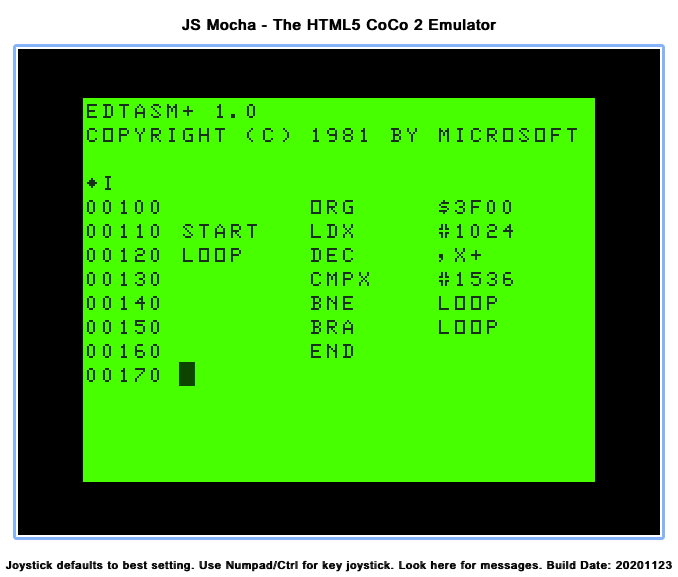
From the center list, select “EDTASM” and then click “Load Bin“. This will load the Microsoft Editor/Assembler for the CoCo.
Once ESTASM 1.0 is loaded, at the “*” prompt, type “I” to go in to input mode. The prompt will change in to line number.
At line number “00100”, type: (right arrow for tab)ORG(right arrow)$3F00(enter) START(right arrow)LDX(right arrow)#1024(enter) LOOP(right arrow)DEC ,X+(enter) (right arrow)CMPX(right arrow)#1536(enter) (right arrow)BNE(right arrow)LOOP(enter) (right arrow)BRA(right arrow)START(enter) (right arrow)END(enter)
Exit the editor by pressing ESCape (break key). This returns to the “*” prompt.
Assemble the program by typing “A/IM/WE“. If there are any errors, explaining how editing works in EDTASM is beyond this article, so you could just restart EDTASM and begin again.
If it built with “00000 TOTAL ERRORS”, enter the Z-Bug debugger by typing “Z“. The prompt will change to a “#” symbol.
Run the program by typing “G START“. The screen should do the effect shown in the YouTube video above.
JS Mocha emulator running Microsoft EDTASM+
EDTASM NOTE: The use of tabs (right arrow) is just cosmetic and makes the source code look nice. Instead of doing all the (right arrow) stuff in step #4, you could just type spaces instead. It just wouldn’t look as nice in the listing.
With that tangent out of the way, here is what a literal translation of that short program might look like in Color BASIC:
10 X=1024
20 A=PEEK(X)
30 A=A-1:IF A<0 THEN A=255
40 POKE X,A
50 X=X+1
60 IF X<>1536 THEN 20
70 GOTO 10
80 END
And if you run that, you will see it takes over twelve seconds to go through the screen each time. Thus, assembly code is really the only way to go for this type of thing.
But, if speed is not an issue, translating 6809 assembly to BASIC can certainly be done, at least for simple things like this. But why would one want to?
This example is especially slow because BASIC has no command that replicates the assembly “DEC” operation. DECrement will decrement a register value, or a byte in memory. In this case, “DEC ,X+” say “decrement the byte at location X, then increment X by one.” Thus, replicating that in BASIC takes using the PEEK and POKE commands. Also, when you INCrement or DECrement a byte in assembly, it rolls over at the end. i.e., you can increment 0 all the way up to 255, then incrementing that again rolls over to 0. For decrement, it’s the opposite — start at 255, and decrement until it gets to zero, where a decrement would make it roll over back to 255. In BASIC, subtracting one just ends up making a negative number, so the rollover has to be achieved through the extra code in line 30.
There is more that needs to be done to this spiral routine, but I’ll save that for the future…
It seems each 80s computer system had certain styles to programs that ran on them. There was a certain “look” to the loading screens of many Commodore 64 games, for example.
On the Radio Shack Color Computer, programs often made use of the low-resolution 64×32 8-color semigraphics to create title screens. Graphical games would often drop back to text mode between levels, presenting information on the 32×16 “nuclear green” text screen.
Some programmers would create transitions between screens, such as wiping left to right with a solid color. One of my favorite transitions was a spiral pattern, where the outside drew towards the center of the screen.
Here is an example of that type of effect, albeit done quite slowing in Color BASIC by a program I wrote for this article:
spiralbas.bas
The above video shows the spiral routine being used to spiral in the full 32×16 screen (in orange), then three more spirals done at different sizes, locations and colors, just to test the routine.
The program looks like this:
0 REM SPIRAL.BAS

10 CLS
15 ' X=START MEM LOC
20 X=1024
25 ' XS=XSTEPS (WIDTH)
30 XS=32
35 ' YS=YSTEPS (HEIGHT)
40 YS=16
45 ' B=CHAR TO POKE
50 B=255
60 GOSUB 100

70 X=1024
71 XS=18
72 YS=8
73 B=175 '143+32
74 GOSUB 100

75 X=1294 '1024+14+32*8
76 XS=18
77 YS=8
78 B=207 '143+64
79 GOSUB 100

80 X=1157 '1024+5+32*4
81 XS=22
82 YS=8
83 B=239 '143+96
84 GOSUB 100

99 GOTO 99

100 ' RIGHT
110 A=XS
120 POKE X,B
130 A=A-1
140 IF A=0 THEN 170
150 X=X+1
160 GOTO 120
170 X=X+32
180 YS=YS-1
190 IF YS=0 THEN 600

200 ' DOWN
210 A=YS
220 POKE X,B
230 A=A-1
240 IF A=0 THEN 270
250 X=X+32
260 GOTO 220
270 X=X-1
280 XS=XS-1
290 IF XS=0 THEN 600

300 ' LEFT
310 A=XS
320 POKE X,B
330 A=A-1
340 IF A=0 THEN 370
350 X=X-1
360 GOTO 320
370 X=X-32
380 YS=YS-1
390 IF YS=0 THEN 600

400 ' UP
410 A=YS
420 POKE X,B
430 A=A-1
440 IF A=0 THEN 470
450 X=X-32
460 GOTO 420
470 X=X+1
480 XS=XS-1
490 IF XS=0 THEN 600

500 GOTO 100

600 RETURN
If you wanted to try this yourself, without using a real Color Computer or even having an emulator installed on your computer, you could:
Select “Machine:” of Tandy CoCo (NTSC) (or PAL if you prefer). It will even run on a Dragon, so the default machine is fine.
Click its “Load…” button then browse/select the text file you just saved.
From the emulator, type “CLOAD” and the program will load as if it was loading from a cassette tape.
Type “RUN” and see it in all it’s 32×16 text mode glory.
The worst code is bad code.
This program is small, and it’s written in a rather odd way. While there were some BASICs that only allowed one command per line, Microsoft Color BASIC was not one of those. You could pack lines together (which reduced code size and improved speed). You will also notice it is missing using commands like FOR/NEXT. This was intentional, since this program was written like this to match a 6809 assembly implementation that I will be sharing later in this article series.
I suppose if BASIC did not have FOR/NEXT, this would be okay:
0 REM DO THIS 10 TIMES, SLOWLY
10 A=10
20 PRINT "HELLO"
30 A=A-1
40 IF A>1 THEN 20
But this is slow because it is doing variable math (A=A-1) and a comparison (A>1) each time through. Using FOR/NEXT would be much faster:
0 ROM DO THIS 10 TIMES, FASTER
10 FOR A=1 TO 10
20 PRINT "HELLO"
30 NEXT
The RIGHT/DOWN/LEFT/UP routines could be made about three times faster by changing them to FOR/NEXT loops:
100 ' RIGHT
    110 FOR A=X TO X+XS-1
    120 POKE A,B
    160 NEXT
    170 X=A+31
    180 YS=YS-1
    190 IF YS=0 THEN 600

    200 ' DOWN
    210 FOR A=X TO X+32*(YS-1) STEP 32
    220 POKE A,B
    260 NEXT
    270 X=A-33
    280 XS=XS-1
    290 IF XS=0 THEN 600

    300 ' LEFT
    310 FOR A=X TO X-XS+1 STEP -1
    320 POKE A,B
    360 NEXT
    370 X=A-31
    380 YS=YS-1
    390 IF YS=0 THEN 600

    400 ' UP
    410 FOR A=X TO X-32*(YS-1) STEP -32
    420 POKE A,B
    460 NEXT
    470 X=A+33
    480 XS=XS-1
    490 IF XS=0 THEN 600
If I set TIMER=0 at the start of the first version, and print TIMER at the end, it prints around 973 (just over 16 seconds).
The FOR/NEXT version shows 360 (about 6 seconds). “Almost” three times faster.
spiralbas2.bas
And, by packing lines together and doing some other tricks, it could be made even faster.
So, as you can see, doing it the slow way wouldn’t make sense if this article was just about doing the spiral in BASIC.
In the next installment, I will share the 6809 assembly version, unless there are enough “here is a faster way” comments to this section that I need to share them, first.