
This, and more styles, available here:
https://www.teepublic.com/t-shirt/2489009-cocofest-2018-2?store_id=131646


This, and more styles, available here:
https://www.teepublic.com/t-shirt/2489009-cocofest-2018-2?store_id=131646
FOR IMMEDIATE RELEASE:
Sub-Etha Software announces more 2018 Chicago CoCoFEST! plans
Des Moines, Iowa – March 14, 2018 – Iowa-based Sub-Etha Software reveals more plans for the upcoming 2018 27th Annual “Last” Chicago CoCoFEST! to be held April 21 and 22, 2018 at the Heron Point Convention Center in Lombard, Illinois.
“The biggest news,” says Sub-Etha co-founder Allen Huffman, “is that we will have Jolt Cola to drink during the road trip to Lombard, and maybe enough extra to share during the event.”
Among the new offerings at this year’s event will be CoCoWiFi, an inexpensive internet modem device that allows connecting the CoCo up to a WiFi network for accessing remote internet sites using telnet and other protocols. Both fully assembled and do-it-yourself kits are expected to be available, with pricing to be announced at the show.
“CoCoWiFi is pretty cool,” says Huffman. “It looks like an old-school Hayes Smartmodem and can be used on any model Color Computer with any terminal program. If the MC-10 has a terminal program, I bet it would work there too. The best part about it is if you don’t wanna buy it, you can spend about $10 and put one together yourself without any soldering. But we’ll be glad to sell you one for much more than that.”
Another new offering will be SirSound, the serial port multi-voice sound device. SirSound provides (1980s) arcade-quality background music and sound effects from BASIC. It uses built-in commands with no assembly language or special drivers needed.
“SirSound is one of the funnest things I have ever worked on this month,” adds Huffman. “You can play the Frogger theme song just by typing a PRINT command. I expect it could also play the Pac-Man theme, too, but we haven’t tested that, yet.”
SirSound is still under development, as well as SirSound S (6-voices in stereo), SirSound Plus (SirSound with the ability to play stereo digital files) and Sir Sound S Plus. There will also be an open-source SirSound Jr project made available. It will have the most of the same features as SirSound, but will be limited to just 1-voice tone music. Beep beep.
“We also will have a selection of new-old-stock Sub-Etha items in original packaging for those who like to collect useless 5 1/4: floppy disks with photocopied instructions stored in plastic baggies. Of course, master disk images of all this stuff has been uploaded to the Color Computer Archive and will be available for free, too.”
Be sure to drop by Sub-Etha Software’s table in the main exhibitor hall during the event.
About Sub-Etha Software
Sub-Etha Software was founded in Lufkin, Texas in 1990, as a partnership between Allen C. Huffman and Terry S. Todd. It made it’s first CoCoFest appearance at the First Annual Atlanta CoCoFest in 1990, and it’s first Chicago CoCoFest appearance at the First Annual “Last” Chicago CoCoFEST! in 1992. They may be contacted online at www.subethasoftware.com
About the Chicago CoCoFEST!
The 27th Annual “Last” Chicago CoCoFEST! is sponsored by the Glenside Color Computer Club of Illinois. They may be contacted online at www.glensideccc.com.
Contact:
Allen Huffman
alsplace@pobox.com
PO Box 7634,
Des Moines, Iowa
U.S.A.
Ph: 515-999-0227
###

One year ago, on March 9, 2017, Sub-Etha Software announced the Sir Sound CoCo Sound Card, today referred to as SirSound, without the space. Today we present to you the first public demonstration of the project.
This 7-minute video walks through the basic concept of the device, and shows how easy it is to convert BASIC “PLAY” music to use the SirSound device.
This 4-minute video shows how multi-voice music will be handled. It demonstrates 3-part harmony, and also a quick version of the Frogger arcade game theme music, all from BASIC.
More to come…
“It is fun to reinvent the wheel. If it were not for folks doing this, we would never have built a better mouse trap…” – Some Dude
But when it comes to expansion cartridges (Paks) for the Tandy/Radio Shack TRS-80 Color Computer, what if we never had to reinvent the wheel again?
These days, it is easy to make virtual hardware by the use of FPGAs and other such devices. At a smaller level, there are already examples of expansion cartridges that have the ability to remap themselves into different I/O registers, all through software. This type of programmable hardware would be the basis of the PreciousPak.

Such hardware could, through software control, present itself at various I/O addresses within the CoCo’s memory map. This would allow it to appear at the same memory locations used by the RS-232 Pak, or the Orchestra-90 Pak, or anything else.
Then, the core hardware of the cartridge would be something like a programmable PIC chip or AVR (Arduino) processor, acting as an interface between the CoCo memory map and external hardware via SPI bus, I2C or TTL UART.
This is not intended to be a “one pak to do everything.” Think of it as the hardware equivalent of Jim Brain’s CoCoFLASH product. His smart flash Pak can be reprogrammed with various ROM Pak images, allowing it to act like any of those original ROM Paks. In the case of PreciousPak, it would require loading with custom firmware and adding the proper expansion hardware to it.
Here are some of the things PreciousPak could be easily made to do…

The PreciousPak could have special firmware loaded on it’s processor to emulate the 6551 UART chip found in the the Deluxe RS-232 Program Pak. This code would fix the known bugs, and could implement an internal buffer allowing for better speeds without data loss. An inexpensive TTL-to-RS232 module would be plugged in to provide the standard RS-232 connector.
The PreciousPak could interface with a Digital-to-Analog converter, and map in to the Orchestra-90 I/O address, and become an Orchestra-90 Pak. For advanced use, the firmware might even be made to allow loading up an Orch-90 music file and have it play in the background while the CoCo does other things. (Orch-90+!)
Of course, the PreciousPak could interface with an SD card module or USB flash drive adapter and then have firmware to make it look like a Kenton or other SCS/IDE interface. This would allow it to leverage already-existing OS-9 drivers and builds of RGB-DOS. Depending on the capability of the core PreciousPak hardware, perhaps it could even be made to emulate the Western Digital 1773 floppy drive chipset and act like a true floppy drive, similar to how CoCoSDC currently works. (Though, I expect this would require much more capability than would be needed for most other devices, so why bother…)
Firmware could emulate the 6850 UART, used by various CoCo MIDI Interfaces. A simple TTL-to-MIDI adapter would be plugged in, giving MIDI ports. By making it look like a 6850 in the standard CoCo MIDI Pak address, it would instantly be compatible with all existing MIDI software.
Completely new sound hardware could be added, and the firmware could translate incoming commands as needed. Software written to use the Texas Instruments SN76489 chip (like in the GameMaster Cartridge by John Linville) could work on this sound pak, provided whatever native sound chip it used was similar, and the firmware translated the commands.
Perhaps firmware could exist to allow dynamically switching into different modes, to emulate the types of sound found in Roger Taylor’s CoCo on a Chip FPGA project, or Gary Becker’s CoCoFPGA project. Perhaps it could be made to provide some level of emulation of the Tandy Speech/Sound Pak.
This common hardware design would allow more folks to come out with custom hardware. With dozens of types of expansion devices based on the same core board, manufacturing costs could be reduced. And, with many expansion add-ons being off-the-shelf parts (like adding .92 cent RS-232 adapter), the overall cost of many items would probably be a fraction of what a custom board would cost.
There are so many off-the-shelf devices available today that could be made into such a Pak… Real time clocks, camera modules, WiFi, etc.
And, for folks on a budget that might now want to buy multiple paks all set up for different devices, they could buy just the core board, and then several of the add-on interfaces. They’d have to swap out firmware and modules before they could use it, of course, but it would be possible.
I find it a very intriguing idea.
But, unless someone with the know-how steps forward to do it, it will remain just a proposal.
I was calling it OnePak, but there is a company by that domain name.
Updates:
This is a fairly detailed guide to configuring a cheap ESP8266 WiFI module to act as a WiFi modem, then wiring it up to any computer with a traditional RS-232 port.
It can be as simple as hooking up four wires, or many more wires, or even making a breadboard prototype:


Currently, we have to download and build the special Zimodem firmware, but as soon as I figure out what it takes just to load a pre-built binary, this section will be removed.
The ESP8266 is a tiny WiFi device that can also run custom code. The development module version has a built-in USB-Serial adapter that can be used for debugging and loading firmware, and also gives a convenient way to power the module.
You will need a standard USB to microUSB cable to hook the ESP to a computer so you can load the firmware. Most Android phones use this type of cable, as do things like the Raspberry Pi. If you don’t have one, you can probably buy one at the local gas station.
This cable will also provide power for the ESP module, so it will need to be hooked to a computer’s USB port, or into a USB power supply like a phone charger. Again, commonly available even at the local gas station.
The ones I found have a standard DB9 female connector and contain circuitry that will convert the 3.3V chip-level TTL signals used by the ESP chip to standard 12V RS-232 levels that a computer uses. These will often will come with a short 4-wire jumper cable that can be used to hook them up to the ESP module.

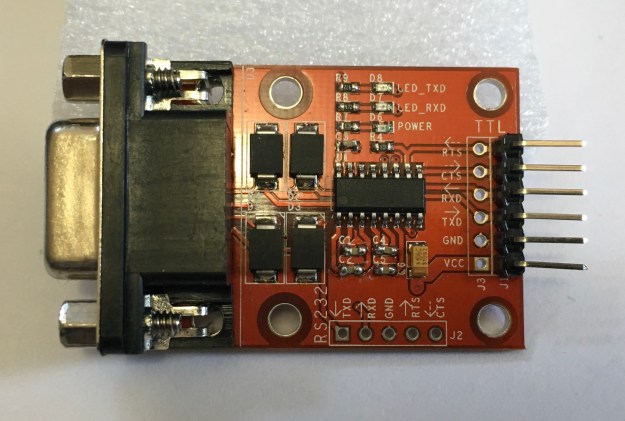

Most of the RS-232 to TTL adapters I have seen come with a set of jumper wires with female ends. They slide over the pins on the board, and then slide over the pins of whatever you are connecting it to. They allow hooking up parts without needing soldering skills or even a breadboard. I find bundles of 40 of these for under $3.

Optionally, if you want something that is a bit more “stable” (without exposed pins and such), you can use a breadboard and male-to-male jumper wires, then plug everything up and jumper them together.
You will need a cable to go from your computer’s RS-232 port to the adapter. Your cable will depend on the type of RS-232 to TTL adapter you have. All the ones I have use DB-9 female connectors, but there are some that use a male connector.
For example, my Radio Shack Color Computer has a 4-pin DIN connector for the built-in Serial I/O port. Back then, cables where made that had a male 4-pin DIN connector on one end (to plug into the CoCo) and a male DB-25 connector on the other (to plug into a modem). If I could find my old cables, I could use them, but I would still need a DB-25 to DB-9 adapter to go between that cable and the smaller DB-9 connector of the RS-232 to TTL adapter.
Another common type of serial cable is a NULL modem cable, which was used to hook two computers together by serial ports. I have a NULL modem cable that has the male 4-PIN DIN connector on one end and a female DB-9 on the other. Since it is a NULL modem cable, it has the TX and RX lines swapped so it can plug directly to a “modern” PC’s serial port DB-9 male connector. To use this cable, I needed a male DB-9 to male DB-9 NULL modem adapter, which will swap the TX and RX again, making it a normal cable like the RS-232 to TTL adapter requires, and change the gender so it will plug into the TTL adapter.
I also have the Deluxe RS-232 Program Pak, which provides a full RS-232 port with a female DB-25 connector. To use that, I ordered a standard male DB-25 to male DB-9 cable from Amazon. This will plug directly from my RS-232 Pak to the RS-232 to TTL adapter.
Basically, you will need whatever serial cable your system requires and a way to convert it to plug into a DB-9 connector.
The ESP modules have their own software installed, and it includes a command mode where you can use “AT” commands (similar to the old Hayes Smartmodem standard) to do various WiFi things. But, this is not setup to emulate an old modem connection. Instead, we will use Bo Zimmerman’s excellent replacement firmware called Zimodem. He provides the source code, but you will have to download and build it, then load it into your module.
I am now maintaining a special version of Zimodem that has things set up for normal RS-232 use. (By default, the original Zimodem works in a Commodore mode for 8266, and normal for ESP32. My version works in normal mode for both.)
Most of the low-cost ESP parts use serial hardware that is not recognized by a Mac or PC (not sure about Linux). If you plug up your ESP part to your computer and it is not recognized as a serial port (Like COM5: on windows, or /dev/cu.SLAB_USBtoUART on Mac), you will need drivers.
Most sellers will provide links to where to find drivers. For the Amazon parts I purchased, they used the CP2012 chipset, and I had to download and install the drivers for it. Once installed, you can plug the ESP module up and it should show up as a new serial port device.
Because of the various methods available to install ESP firmware, I have split them out into a separate article.
Please read this article for details on how to load the firmware onto the module without needing to install the Arduino IDE, download the sources, and build it yourself.
Once the firmware has been installed on the module, you can open up the Serial Monitor in the Arduino IDE and verify it is running. You will need to set it to 1200 baud to match the default speed used by Zimodem, and have it set to “Carriage return“. You can type “AT” and it should respond with “OK”. You can type “AT+CONFIG” and it should startup the configuration process.

If you get this far, you are ready to hook it up to the RS-232 to TTL adapter and then connect it to your computer.
For simple serial ports, all you may need to do is hook up TX (transmit), RX (receive), VCC (3.3v) and GND (ground) between the ESP module and the TTL adapter. Here is the pinout of the NodeMCU ESP8266-12E module:

All you have to do is connect the jumper wires between the pins of this module, and the matching pins on the TTL adapter. Some TTL adapters may have TX and RX reversed, but in general you want to hook up like this:
3-wire hookup:

    TTL         ESP8266
    ===         ==================
2   RX  <------ TX  GPIO1 (TX)
3   TX  ------> RX  GPIO3 (RX)
5   GND <------ GND GND
    VCC <------ 3V3 3.3V
For one of my adapters, I found it would not work using the 3.3V pin, and I had to switch to using the Vin (voltage input) pin, which would be the 5V coming off the USB connection. *THIS IS NOT RIGHT since the I/O pins of the ESP modules are mean to handle 3.3V and not 5V, so use caution. If you absolutely can’t get it to work on 3.3V, you can do what I did, but you risk frying the ESP.* I have other adapters that work properly at 3.3V.
It looks like this (note I am using the incorrect Vin instead of VCC):
WARNING! Keep all the bare metal pins from touching anything else! They could cause a short if they made contact with any metal. To reduce the chance of this happening, I used some of the non-conductive packing foam that the ESP module came in, and plugged the exposed pins into it:

There are still a few exposed pins, and on the top side of the module are lots of metal parts and solder connections, so just make sure you keep away from any metal parts!
Now I was able to hook this up to my Color Computer’s Serial I/O port and load up an old terminal program and start using Zimodem.

A quick tidbit on RS-232…
There are nine lines used for RS-232. They go between the computer (DTE, data terminal equipment) to the device (DCE, data communication equipment). Prepare for many acronyms!
TX and RX: You can think of most lines as one-way paths, with some lines going from the computer to the device, and others going from the device to the computer. For instance, transmit (TX) from the computer goes one way to receive (RX) of the device. On the device, it’s transmit goes one way to the receive of the computer.
CTS and RTS: Some lines are used for flow control. Each device has a request to send (RTS) output line that goes to the other side’s clear to send (CTS) input line. CTS goes to RTS, and RTS goes to CTS, similar to have TX and RX and handled. For example, the computer turns on RTS (request to send) to tell the remote device it is okay to send data. The remote device reads this on it’s CTS (clear to send) pin. The reverse is also true, with the remote device’s RTS going to the computer’s CTS. Thus, if using flow control, the computer or device only send when their CTS (clear to send) line is active.
DCD: The device may also use carrier detect (DCD). For a telephone modem, when a call is connected, the device will turn on carrier detect. The computer can read the status of the DCD line to know if a connection is in progress.
RI: There is a ring indicator (RI) that was used by modems to indicate an incoming call. I’ve never used this at all, since the RS-232 interface I had back then wasn’t even wired for it.
DTR and DSR: I am less clear on how all these could be used, but in general, DTR was set by the computer to tell the remote device if it should hangup or not. The computer would “drop DTR” and that would force the modem to hangup. DSR is set by the device to indicate it is there and ready.
Here is a quick chart to explain them, specifically as how they are used by Zimodem:
 DTE (Comp.)        DCE (Modem)
 DB-9 Male          DB-9 Female
=============      =============
pin in    out      in    out pin
1   DCD <--------------- DCD   1
2   RX  <--------------- TX    2
3         TX  ---> RX          3
4         DTR ---> DTR         4
5   GND                  GND   5
6   DSR <--------------- DSR   6
7         RTS ---> CTS         7
8   CTS <--------------- RTS   8
9   RI  <--------------- RI    9
Some RS-232 interfaces require more than just TX and RX to be happy. The Color Computer’s RS-232 Pak, for example, uses a 6551 UART chip. This chip will not receive data unless it sees carrier detect (DCD). Old telephone modems would provide this DCD signal when a call was in progress, and drop the signal when the call ended This gave the computer a way to know if a connection was established or not. Unfortunately, this signal is not present in a 3-wire connection.
It was possible to hook two computers together without a modem by using a NULL modem cable. These cables would swap TX and RX, so one computer’s transmit would end up at the other computer’s receive. They would also often do some trickery to force the DCD signal to be active. They did this by tying some of the pins on the RS-232 port together:

If we really don’t care about this missing lines (like CTS/RTS flow control, DTR/DSR, etc.), we can modify the RS-232 to TTL adapter so make it provide a fake DCD signal back to the computer.
Using the above diagram as a reference, I was able to solder a few pins together and use a short piece of wire to recreate it on real hardware:

This modification makes it so anytime the computer enables DTR, it will make DCD and DSR read as if they are enabled. It is creating a fake status by looping the DTR signal back into the DCD and DSR input pins.
Since this 3-wire hookup also does not have CTS and RTS, if the computer is expecting CTS (clear to send) to be active, that can never happen and thus it can never send. This modification ties the outgoing RTS (request to send) back to the incoming CTS (clear to send). When the computer enables request to send, to tell the remote device it is okay to send, it will read that same signal as if the remote device sent in it’s own request to send (coming in on the CTS line of the computer).
So much stuff.
Suffice it to say, but tying these lines together, it will fool the RS-232 device into thinking there is an active carrier detect and data terminal ready signal from the demote device anytime DTR is enabled. And, it will see a clear to send signal anytime it turns on read to send… Loopy goodness!
With that said, if you don’t want to solder, you could pick up these RS-232 jumper devices and create the connection this way. Note that in this example, I do not have CTS and RTS tied together. For my specific test, I did not need it, but other RS-232 interfaces may require it.

Another option is to use an RS-232 to TTL adapter that actually provides more of these signals. For a bit more, you can find an adapter that has CTS and RTS as well:
By adding two more wires between Zimodem and the adapter, you can use real hardware flow control. Zimodem will only send when it sees a clear to send signal from the computer, and if Zimodem can’t handle all the data it is receiving, it will disable it’s request to send, so the computer’s CTS line indicates “stop sending me stuff!”
    TTL         ESP8266
    ===         ==================
2   RX  <------ TX  GPIO1 (TX)
3   TX  ------> RX  GPIO3 (RX)
5   GND <------ GND GND
7   RTS ------> D1  GPIO5  (CTS)
8   CTS <------ D2  GPIO4  (RTS)
    VCC <------ 3V3 3.3V
This configuration still would not work for my 6551-based RS-232 Pak. I would still need to fake the carrier detect.
The final, and best, solution is to use an RS-232 to TTL adapter that actually provides all the signals that Zimodem supports and that your RS-232 interface may require. This requires hooking up even more wires (ten total):
    TTL         ESP8266
    ===         ==================
1   DCD <------ D4  GPIO2 (DCD)
2   RX  <------ TX  GPIO1 (TX)
3   TX  ------> RX  GPIO3 (RX)
4   DTR ------> D6  GPIO12 (DTR)
5   GND <------ GND GND
6   DSR <------ D7  GPIO13 (DSR)
7   RTS ------> D1  GPIO5  (CTS)
8   CTS <------ D2  GPIO4  (RTS)
9   RI  <------ D5  GPIO14 (RI)
    VCC <------ 3V3 3.3V
Mine looks like this:
If all those wires get to you, you can also do the same thing on a breadboard:
Although the wiring seems complete, there is one final issue that needs to be solved.
Zimodem, when built for the ESP8266, inverts all the RS-232 signals. This is because that is how Commodore computers did it, and Zimodem was designed for Commodore users. Commodore inverts HIGH and LOW from the standard, so all signals have to be inverted in
Zimodem from their defaults. On Commodore, “HIGH” means active. For RS-232, “LOW” means
active.
What this means is even if you have the carrier detect wired up properly, Zimodem is going to send the opposite signal. When a connection is in progress, the signal will read as “no carrier” to a normal RS-232 interface. When Zimodem is ready to receive data, the request to send will look like the opposite.
This causes huge issues :)
If you are using my special build of Zimodem, you can skip this section. I already pre-configure my version as follows.
Fortunately, Zimodem is fully configurable. Using simple “AT” commands, you can change the behavior of any of the incoming or outgoing RS-232 signals that Zimodem uses. All you have to do is be able to send some commands and then save the Zimodem configuration. Here is the summary:
AT S Settings:
==============
0=HIGH is active (defualt).
1=LOW is active.
2=force HIGH
3=force LOW

Sig  SReg Default RS-232 Standard
===  ===  ======= =================
DCD  S46  0       1 (force LOW)
CTS  S48  0       1 (force LOW)
RTS  S50  0       1 (LOW is active)
RI   S52  0       1 (LOW is active)
DTR  S54  0       1 (LOW is active)
DSR  S56  0       1 (LOW is active)
You can set these commands one at a time, like:
ATS46=1
OK
ATS48=1
OK
...etc...
…but you may find that the moment you toggle one of them, you appear to be locked out. This is because the inverted defaults actually work to our advantage. On my interface, I need DCD before I can receive. Zimodem has no carrier, so it is sending out the inverted “there is no carrier” signal, which reads as “carrier detect” for me. The moment I “fix” that so it sends the normal signal, I suddenly have no carrier and can no longer receive data.
You may choose to send all the commands in one line:
ATS46=1S48=1S50=1S52=1S54=1S56=1
However, as soon as that is done, you may not see “OK”. Carrier detect is still flipped… You may be able to still send commands, but you would be typing blind if your interface requires DCD before it will receive. Because of this, I like to force DCD to be always on:
ATS46=3S48=1S50=1S52=1S54=1S56=1
That command flips everything, but makes sure DCD (S46) is forced low (3), so it appears like a carrier is always present. This lets me communicate with Zimodem at all times.
If I were running a BBS that relied on detecting carrier, I would have to leave that at S46=1 and just send commands blindly. (BUT, one of my old terminal programs, Greg-E-Term, is not coded in a way that makes this work. It seems if there is no DCD, it doesn’t let me send anything at all. Other terminal programs I have do not behave this way, so I consider it an issue with what GETerm was designed to do.)
With all of this said, there are probably still many omissions. A future article needs to be a summary of useful Zimodem commands and tutorials on how to use it.
I also want to cover another alternate approach to having to configure with all those ATS commands. In my case, I simple modified the source code so the version I built had them setup the normal way so I never had to do any configuration.
And I need to document how to just install a binary without using Arduino IDE.
Until then… Comments greatly appreciated.
Updates:
NOTE: These instructions are currently limited to devices like the NodeMCU ESP8266-12E and the NodeMCU-32S development kits:

These devices have a built-in USB-to-Serial interface, so they can be plugged up to a Mac/PC over a USB cable for uploading firmware. However, the instructions probably will work with things like the ESP-1 module by using a USB programming device that interfaces it to USB.

Customized Zimodem firmware for all three of these platforms is now being created.
The excellent Zimodem firmware by Bo Zimmerman turns a low-cost ESP8266 module into a WiFi smart modem. One of the challenges users face is how to get this firmware installed on their module to begin with. I have been providing steps on how to install and configure the Arduino IDE so you can download the Zimodem source, build it, and load it.
But, if you aren’t a developer and don’t really want to go through that many hoops, you can take an existing firmware binary file and just load it directly.
Here are the steps as I know them, for Windows (with a nice GUI), or Mac OS X/Linux (command line).
I have a customized version of the Zimodem firmware on my server pre-built for the NodeMCU ESP8266-12E devkit, NodeMCU-32S devkit, and ESP-1 module. Download this firmware image here:
The versions will be named as follows:
These names are the default names that the Arduino IDE creates, with the version number added.
Download the NodeMCU flasher program. There is a 32-bit and 64-bit version:
NOTE: A different utility may be needed for ESP32. There is one that espressif (the ESP chip creator) provides that does both ESP8266 and ESP32. It is a .rar file, and when I downloaded it under Window 10, it ended up as a .man file (?). I had to rename that to .rar, and then find a RAR extractor (I used a free one from the Microsoft store). If you are using an ESP32, you may want to try this:
Tutorial: http://iot-bits.com/esp32/esp32-flash-download-tool-tutorial/
With your ESP8266 module plugged in (so it appears as a COM: port to Windows), open the NodeMCU flasher program and select that COM port:

On the Advanced tab, uncheck the default internal firmware (that is the option you would use to restore an ESP8266 module back to factory firmware), and browse to the new firmware in the second line. Checkbox that line, and set the start address to 0x0000.

You might also go to the Advanced tab and increase the baud rate if you want the update to go faster. Once the binary file and COM port have been specified, return to the Operation tab and click Flash to begin the upload to the ESP8266.

…and when complete…

You can now restart the ESP8266 module and it should be using the new firmware.
I have tested this tool on ESP8266, but not on ESP32 yet. I will update this section when I do. It requires more steps to install and setup, but may be what we have to use for ESP32. Running it offers four different parts it can flash:

I will update this tutorial when I have confirmed how to use this.
Install esptool (a Python script) and pySerial (a Python library for talking to the serial port):
easy_install esptool
easy_install pyserial
NOTE: I think I hadto run this as super user, “sudo easy_install esptool”.
Identify the serial port connected to the ESP module. This can be done from a shell (Linux) or the Terminal (Mac). On Mac, can look for devices that begin with “cu”:
alsmbpro:temp allenh$ ls /dev/cu*
/dev/cu.Bluetooth-Incoming-Port /dev/cu.HC-05A-DevB /dev/cu.SLAB_USBtoUART
If you do not know what to look for, you could do this command before plugging in the ESP8266, then again after you plug it in and see what appears. (On my system, I know I installed Silicon Labs drivers, so I recognized the “SLAB” name.)
On Linux, I think you need to do ls /dev/ttyS*. (I also saw an exemple using “setserial -g /dev/ttyS[0123]”).
Now that you know what serial port is connected to the ESP module, run esptool.py specifying that port, and the firmware image to use. On my system:
esptool.py -p /dev/cu.SLAB_USBtoUART --baud 460800 write_flash --flash_size=detect 0 zimodem.ino.nodemcu-3.4.bin
If it works, you should see something like this:
prompt$ esptool.py -p /dev/cu.SLAB_USBtoUART --baud 460800 write_flash --flash_size=detect 0 zimodem.ino.nodemcu-3.4.bin
esptool.py v2.2.1
Connecting........_
Detecting chip type... ESP8266
Chip is ESP8266EX
Uploading stub...
Running stub...
Stub running...
Changing baud rate to 460800
Changed.
Configuring flash size...
Auto-detected Flash size: 4MB
Compressed 344528 bytes to 247587...
Wrote 344528 bytes (247587 compressed) at 0x00000000 in 5.8 seconds (effective 472.4 kbit/s)...
Hash of data verified.

Leaving...
Hard resetting...
You can now restart the ESP8266 module and it should be using the new firmware.
Once you have this special build of the firmware, you will be able to do over-the-air updates. Make sure you configure your Zimodem for your WiFi network by going through the:
AT+CONFIG
You can then use the command “AT&U” to see what the current version is. Bo is currently working on 3.4.
In stock Zimodem, firmware updates pull from Bo’s website for the two boards he support (the ESP-1, I think, and some flavor of ESP32). For my customized “CoCoWiFi” version, it will pull special builds from my website instead, and there are three different boards supported.
As I build new versions of this customized Zimodem firmware, I will place them on my server and you can type (from the Zimodem command mode):
AT&U=3.4
That will get whatever version I have available. You should not need to do any more USB updates, unless something goes horribly wrong, or you want to go back to stock NodeMCU firmware.
Please let me know if this works for you.
If you are using a NodeMCU-32S module like the one I ordered from Amazon:
HiLetgo ESP-WROOM-32 ESP32 ESP-32S Development Board 2.4GHz Dual-Mode WiFi + Bluetooth Dual Cores Microcontroller Processor Integrated with Antenna RF AMP Filter AP STA for Arduino IDE https://www.amazon.com/…/B…/ref=cm_sw_r_cp_tai_X5iFAbW6CD3ZJ
…you may want todo a few tweaks to the ZIMODEM. ZIMODEM is setup to build for Tools->Board->NodeMCU-32S.
There are two major differences in building Zimodem for the ESP8266 and the ESP-32:
//#define debugPrintf Serial.printf
#define debugPrintf doNothing
That will make it use the ESP32 code, and disable debug output.
//static HardwareSerial HWSerial(2);
#define HWSerial Serial
That will make the HWSerial port be the same one used by the USB console.
There is probably a better way, but this was the first time I got it going.
After that, the build you make will be controllable via USB port or the RS-232 port.
Things have been real busy lately at Sub-Etha Galactic Headquarters… Here are some updates:
The CoCoWiFi has been tested on the bitbanger serial port and things seem to work just fine.
On the RS-232 Pak, a modification was needed to make the pak actually receive data (forcing the carrier detect signal). This has been done by an easy soldering mod to the DB9 connector. The downside is that it does not provide true CD, and there is no support for hardware flow control or DTR to drop calls. For just a bit more, there are RS232-to-TTL adapters that provide hardware flow control, which might help for doing high speed transfers. However, the lack of carrier detect and DTR means they won’t work with a BBS like they should
Thanks to David Chesek, new RS232-to-TTL adapters were located that include all the signals. These would be the best choice for running with an RS-232 Pak. I have two different types of adapters, but have only done some initial testing. I was unsuccessful getting the first adapter to work. I plan to test the second version this week.
I hope to have a hardware announcement to make before the CoCoFEST!
I learned much while working on CoCoWiFi, so I returned to work on the previously “announced” SirSound project. I got everything wired up properly and was able to write a BASIC program to make it play tones. I also worked with John Strong and migrated the prototype over to an Arduino Nano (matching the original Arduino sound player board he sent me last year).
The next phases is to figure out the various modes that sound module will run in. I have proposed:
More to come…
I have been experimenting with hooking up low-cost ESP8266 WiFi modules to the Radio Shack Color Computer (or anything with an RS-232 port) using cheap RS232-to-TTL adapters. Most of these adapters only support 3-wire RS-232 (transmit, receive and ground). This is fine for most uses of the CoCo’s built-in Serial I/O port (bitbanger) since it is only a 4-pin DIN connector with TX, RX, GND and CD, and most things do not rely on carrier detect.
But, for the Deluxe RS-232 Program Pak, a hardware 6551 UART chip is used and that chip requires to see carrier detect before it will receive any data. A workaround is to simply tie some of the TTL converter pins together to make it always present DCD to the RS-232 Pak:

This works fine if you are just connecting to remote systems, but if you want to run a BBS, those often rely on carrier detect to know if a caller is online. If a caller disconnects without properly logging off, the system may sit there forever (worst case) or until some software timeout is reached and the system resets. During that time, it would be possible for the next person connecting to resume that session.
This was a real and common issue with BBSes back in the 1980s, for this very reason – lack of carrier detection.
Another issue is the lack of hardware flow control. There could be times when the ESP8266 could try to send data faster than the computer could process, and there is no way (other than XON/OFF, which can’t be used for binary transfers) to tell it to pause sending.
I have found RS232-to-TTL adapters that provided 5-wire signals (adding RTS and CTS), which is needed for this hardware flow control. Those are a bit more costly (I found one for $9 on Amazon), and still do not address the carrier detect issue.
Once again, David Chesek comes to the rescue. He located an adapter that supports all the RS-232 signals, including RI (ring indicator). It is available for $11.50 plus shipping from a company in Las Vegas called Pololu (and might even be manufactured there):

I took a gamble (pun intended) and ordered a few. I will report back as soon as I receive them and have had a chance to try them out.
Meanwhile, knowing such a thing exists, I did more searching and found a similar one on e-Bay from a seller called MDFLY. They have them for $3.25 plus shipping, and are shipped from California:

The board layouts are quite different, but the functionality should be similar. I will be comparing both of these (and noting shipping time) when I have them.
With either one of these boards, properly wired to additional pins on a full ESP8266 development module, it should be able to provide hardware flow control and carrier detect. (Sorry, the ESP-01 module only has two I/O pins, so we’d have to pick and choose what to support on that one — like DTR and DCD for BBS use, or CTS/RTS flow control.)
More to come…
The Radio Shack Deluxe RS-232 Operation Manual (Tandy).pdf for the Color Computer is based on a 6551 UART chip. The Pak provided a DB-25 with the following signals:
Built-in serial ports disappeared from modern computers a long time ago, but USB RS-232 adapters are available in case one is ever needed. For our 1980s Color Computer, RS-232 is one of the only available interfaces to the outside world.
The built-in 4-pin DIN connector (marked Serial I/O) is not a real serial port. Instead, it is just a set of pins that can be toggled on and off (to RS-232 voltage levels) through software. By writing software with the proper timing, this port can send out serial data. This technique is called “bit banging” and it was very common in systems of this era. (And, today, if you use an Arduino, the “SoftwareSerial” routines which turn any I/O pin into a serial port are doing the same thing.)
There are many modern things that use serial for communication, but they are doing so at chip-level voltages – called TTL level (transitor-transitor level). An example of this would be the I/O pins of a Raspberry Pi or Arduino. There are also a myriad of small devices that work over a TTL-level serial port, such as USB interfaces, WiFi modules, Bluetooth, and many more.
To interface one of these with an old computer with an RS-232 port, you can use an RS-232 to TTL adapter such as this one from Amazon:

This device has a DB-9 RS-232 port on one side, and pins on the other that represent the common signals of Transmit (TX), Receive (RX), Ground (GND) and voltage. Voltage is usually 5v or 3.3v depending on the device and what it will connect to. (An Arduino UNO has 5v I/O pins. A Raspberry Pi and some other models of Arduino use 3.3v pins.) The adapter has to match. Some are smart, and adjust based on the voltage they are given. Thus, if you are hooking an RS-232 device to an Arduino, you would power this TTL adapter from a 5V pin of the Arduino, and it should operate at 5v. Some adapters claim to adjust, so if you hook them up to a 3.3v pin on an Raspberry Pi, they work at 3.3v. The RS-232 side should be the same (traditional RS-232 voltage levels) in either case.
I have recently been experimenting with devices such as the ESP8266, which is a tiny (and cheap!) module that provides WiFi for about $2, and interfaces with TTL level serial. Using the CoCo’s built-in Serial I/O (bitbanger port) and a cable, I was able to hook the CoCo to one of these RS-232 TTL adapters and then hook that to the ESP8266. It worked great, limited only by the baud rate of the bitbanger! (Most older CoCo 1/2 terminal programs could only go about 1200 baud. The CoCo 3 has at least one terminal program, Twilight Term, that can operate a 9600 through the bitbanger port.)

Since the bitbanger port only has TX, RX, CD and GND (and CD is not really used unless software specifically uses it), hooking it up like this worked well. But, when trying to connect to the more robust RS-232 Pak (which can operate at speeds of up to 115200 baud), I ran into some problems.
The 6551 can transmit data just fine, but in order for it to receive, it expects to see a carrier detect signal (DCD). If you just hook up the RS-232 Pak cable to the TTL adapter, using only TX, RX, and GND, that signal will not be active and terminal programs will not read any of the incoming data. You can send, but not receive.
In order to make this work, you have to trick the RS-232 Pak into thinking there is a DCD signal. From exploring various mailing lists, Facebook groups, and web postings, I found several suggestions on how to do this. The overall method looked like this:
By tying certain lines together on the end that goes to the RS-232 Pak, the Pak will think there are signals present that really are not there. This makes it work, since it now thinks there is a carrier detect.
The above modification can be done on an RS-232 to TTL adapter with a soldering iron and a bit of wire. A small solder blob can be used to connect pins 7 (RTS) and 8 (RTS), then another blog can connect pins 1 (DCD) and 6 (DSR), then a jumper wire can be ran from that solder blob over to 4 (DTR).
Dave Chesek did a modification on is cable and it looked like this: (And apologizes to Dave if he isn’t proud of his soldering skills. They are much, much nicer than what I can do!)

Once that is done, you can use a DB25-to-DB9 cable (I ordered one from Amazon) and connect it to one of these RS232-to-TTL adapters (I ordered one from Amazon) using a gender changer (I ordered one from Amazon) or a serial cable that already had the proper ends on them. (The one I used was a Male to Female cable, so I needed the gender changer.)
This modification is enough to trick the RS-232 Pak into allowing receiving of data.
For those that don’t solder, you can also order some DB9-to-terminal block adapters like this:

I picked up a pair for around $8 because I wanted to find out which of the various suggestions would actually work. Through process of elimination, I found that the DCD+DSR+DTR was needed, but RTS+CTS was not. (And, some RS-DOS terminal programs worked with just DCD+DTR, which was one of the suggestions I was given.)
I hooked up short jumper wires like this:

For the CoCo’s RS-232 Pak, this works great for various RS-DOS programs I tested (Greg-E-Term, Ultimaterm) and OS-9/NitrOS-9 (Supercomm).
I had read that the RS-232 Pak won’t send without a certain signal being present, but from my experiments this week, this does not seem to be the case. Only the DCD situation must be taken care of.
With this information, you can now get an RS-232 Pak out to an RS232-to-TTL adapter and then hook up various devices. In the case of my ESP8266 experiments, I was powering the TTL adapter off the ESP8266 module. If I were trying to use something stand-alone, like an HC-05 bluetooth module, I would need an additional 5v or 3.3v power source to power the module and the adapter.
Let the games begin!