

Today we set the wayback machine (kids, ask your grandparents about Rocky and Bullwinkle) to the year of 1996…
But first, I digress.
Some of this will be wrong, but I hope it is at least “directionally accurate.” Feel free to correct (or nit pick, if you prefer) me in the comments.
In 1981, IBM entered the personal computer market with the original IBM-PC. You know the one. It had a cassette port on the back and booted into a Microsoft BASIC. If you were rich enough, you had one with a floppy disk drive and used PC-DOS.
PC-DOS was “created” by Microsoft (kid’s, ask your parents about how Microsoft made a deal with IBM to create a disk operating system for their new computer, then bought an existing disk operating system and sold it to IBM). A bit later, PC-DOS was sold by Microsoft under the name MS-DOS for use with non-IBM-made IBM PC clones.
Thank you for coming to my computer history talk.
8.3: The number that defined a (computer) generation
PC and MS-DOS used 8 characters for the filename with a 3 character extension: FILENAME.BAS, FILENAME.TXT, FILENAME.EXE, etc. This matched the filename convention that the Radio Shack Color Computer Disk Extended Color BASIC (aka, RS-DOS) used, though before PC-DOS, Microsoft used “BIN” for the extension of a binary versus “EXE” and “COM” on the PC-DOS machines. (Maybe BIN was Microsoft’s choice, and EXE was the choice of the original designers of what became known as PC-DOS? I’d look it up, but this has no relevance to this topic at hand.)
Microsoft Windows started out as basically a graphical program that ran from MS-DOS and gave mouse support and a way to run programs. The PCs still booted up into MS-DOS then “ran” the windows program.
Windows 95 and “LFNs”
Windows 95 was a huge change. It altered how “multitasking” would work and, for the first time, allowed long file names on a PC. Instead of being limited to 8.3 for a filename, they could now be up to 255 characters long, with mIxEd CaSe. From the wiki, I see this is called LFN:
https://en.wikipedia.org/wiki/Long_filename
If you created a long filename from Windows 95, it created a backwards compatible 8.3 filename for legacy DOS programs to use. “LongFileName.txt” would be written out as “LONGFI~1.TXT”. The first 6 characters were used, then a tilde and a number.
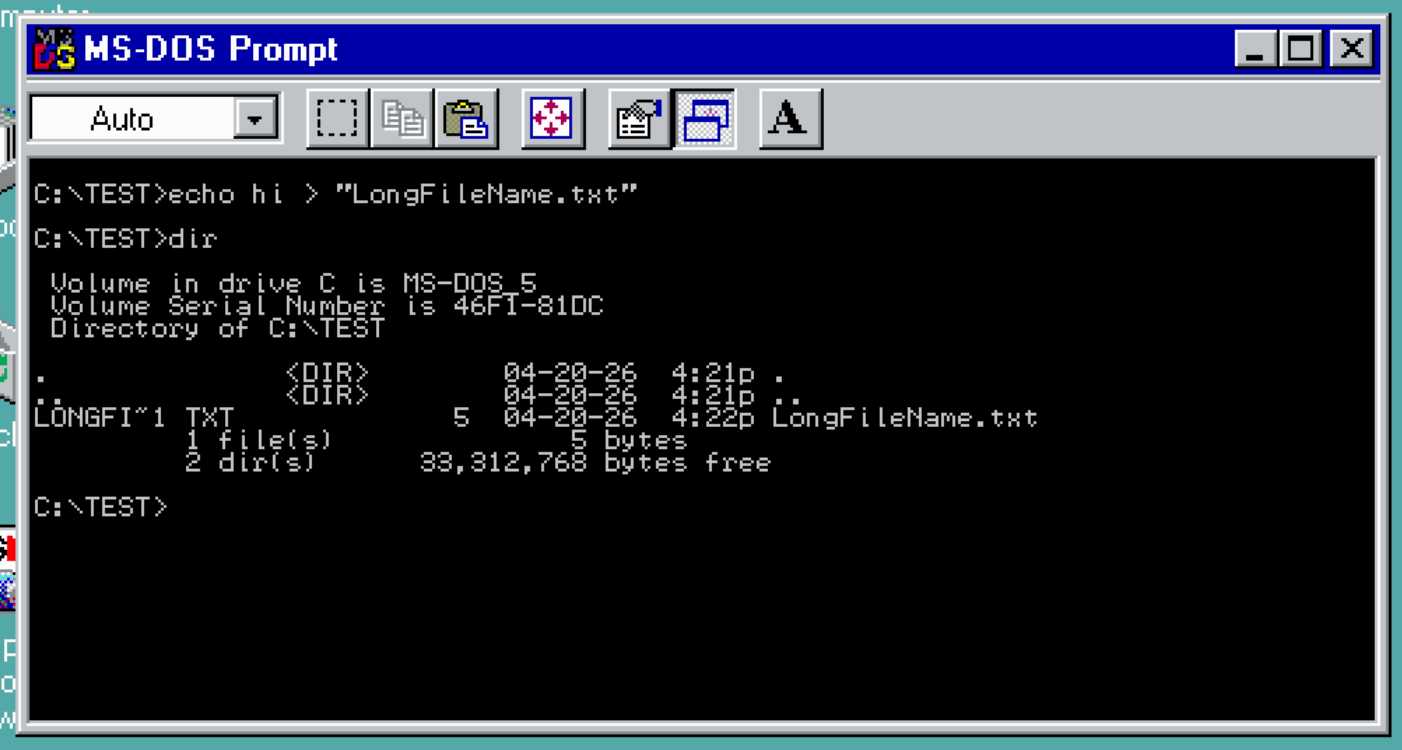
If you made an 8.3 filename under Windows 95, it would (mostly) work like you expect. Creating “FILENAME.TXT” resulted in “FILENAME.TXT” (and be shown as “Filename.txt” in Windows 95, even if you typed it in all uppercase, for some reason)…
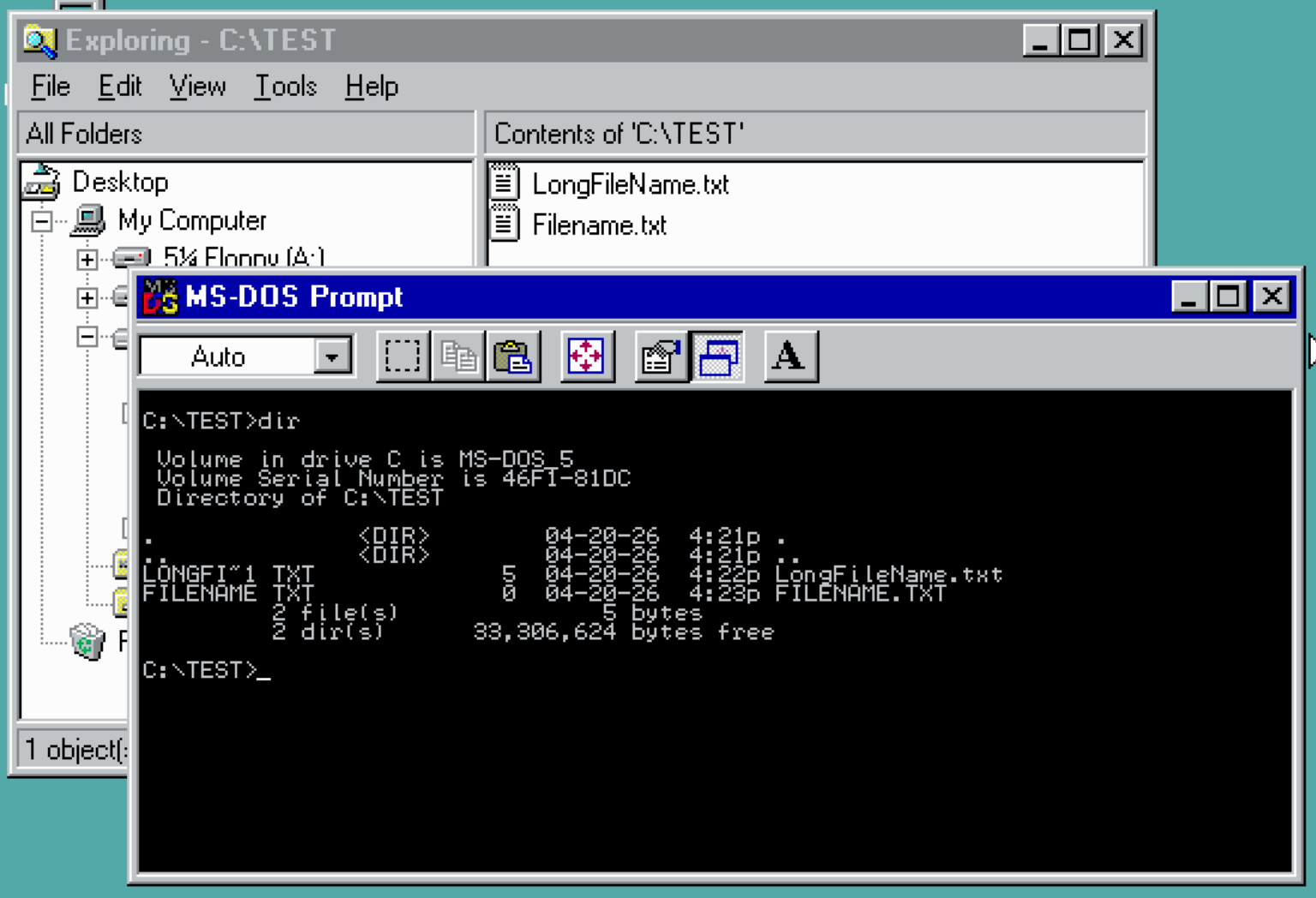
However, some filenames got the “~1” that did not need to. The “~1” should have one been necessary if there was another conflicting file in the directory that matched the first 8 characters and three character extension.
At the time, I was using an MS-DOS C compiler called Power-C. It was not LFN-aware so it only dealt with the 8.3 short filenames. A file like “INDEX.HTML” would become “INDEX~1.HTM” since it had a 4-character extension. But, it could have just become “INDEX.HTM” for the short name (provided there was not another filename that conflicted with).
I got tired of having to deal with “~1” in my website filenames and figured out you I rename them away and make that “INDEX~1.HTM” show up as “INDEX.HTM” (while the long filename was still “INDEX.HTML).
- Long filename “index.html” shows up as “INDEX~1.HTM”. rename index~1.htm index.htm
- New filename is “index.htm”. rename index.htm index.html
- New new filename is “index.html” for long filenames, and “index.htm” for short ;)

Today I bet the wiki entry would explain why it worked that way, but back in 1996 it was just a frustrating mystery.
DIRVERT.EXE
Of course I automated this process… I wrote DIRVERT.EXE, a simple command line program that would loop through a directory and RENAME things to remove the “~1” where possible. Here is what the comments said:
Windows 95 DOS directory converter thingie filter. Takes a Win 95 | directory and renames the 8.3 extentions like they should be… Maybe.
The problem: Pre-Win95 DOS programs don’t know how to deal with long filenames, which end up as “FILENA~1.TXT” to the DOS side. The only time this should be needed is _if_ the DOS name contains spaces or is a duplicate of another truncated filename. ie, “filename1.txt” could be shown as “FILENAME.TXT” but if a “filename2.txt” exists in the same dir, it would have to be “FILENA~2.TXT”. There is no reason for files such as “index.html” to have to be “INDEX~1.HTML”, so this program tries to fix those by renaming them.
To test: “copy con filename.txt”. If you then rename this to a long name with the same first 8.3 characters the same, the DOS name WILL stay the same. ie, “FILENAME.TXT … filenamethatislonger.txt_sothere” in the DIR listing. If you rename and change any of the characters, such as renaming to “filename.text” it will appear as “FILENA~1.TEX” even though it _could_ be “FILENAME.TEX” just fine. This is, in my opinion, a bug in the approach Microsoft took to the filenames. In the above example, this filter will do two renames to try to fix it back. First, it finds the short version of the Win95 name (ie, “filename.tex”) and it renames the DOS name to that. Then it renames it back to the long version. As long as there are no duplicates (those will generate rename errors and just be left alone), this should work just fine. For example, assume:
INDEX~1.HTM – index.html <- current name
this filter does: rename index~1.htm index.htm
INDEX.HTM – index.htm <- new name
then it does: rename index.htm index.html
INDEX.HTM – index.html <- final name, ~1 now gone :)
This won’t work 100% of the time. If there was also a file in there that was called “index.html2”, it would try to make it “index.htm” which would fail since there is already one. So, it would be left alone. Also, any files that might need a space in them ( AFILE.TXT — “a file.txt”) can not be fixed either. BUT, it seems that most anything else can. Note that when you run this, it may be normal to see some errors return from failed renames. No big deal.
Since this is just a filter, it poses no threat to damaging the directory other than renaming files, which is the only shell command it forks.
I used this program for years – right up until the end of my PC era (I switched full-time to a Macintosh in 2001). It is pointless and useless today, but I thought I’d share it. Here it is on GitHub, along with various other “stupid” utilities I wrote for my own use:
https://github.com/allenhuffman/oldcstuff/tree/main/DIRVERT
It appears I updated until 1998.
As I look at it today, I see it had a conditional compile for OS-9000, which was Microware’s OS-9 RTOS that ran on x86 PC hardware. I am unsure why this would have even been useful — perhaps for dealing with MS-DOS disks when reading them under OS-9000 using the PCF (PC File System) file manager? Ah, the things I have forgotten…
These were fun times. Until next time…
/*---------------------------------------------------------------------------|
| Dirvert V1.08 by Allen Huffman (allenh@pobox.com)                          |
| Copyright (C) 1996,97 by Sub-Etha Software                                 |
|----------------------------------------------------------------------------|
| Syntax: dir {directory} | dirvert -z                                       |
|         dirvert {directory}                                                |
|         dirvert -z < {dirfile.txt}                                         |
| Usage : Win95 directory long filename fixer (and filter).                  |
| Opts  : -? or /? = display this message                                    |
|         -L or /L = lowercase directory filenames.
|         -Z or /Z = read directory output from standard input (filter).     |
|----------------------------------------------------------------------------|
| NOTE:  It seems this does not work under OSR2!  Any ideas why it doesn't?  |
|                                                                            |
|       Windows 95 DOS directory converter thingie filter.  Takes a Win 95   |
| directory and renames the 8.3 extentions like they should be...  Maybe.    |
|                                                                            |
| The problem:  Pre-Win95 DOS programs don't know how to deal with long      |
| filenames, which end up as "FILENA~1.TXT" to the DOS side.  The only time  |
| this should be needed is _if_ the DOS name contains spaces or is a         |
| duplicate of another truncated filename.  ie, "filename1.txt" could be     |
| shown as "FILENAME.TXT" but if a "filename2.txt" exists in the same dir,   |
| it would have to be "FILENA~2.TXT".  There is no reason for files such as  |
| "index.html" to have to be "INDEX~1.HTML", so this program tries to fix    |
| those by renaming them.                                                    |
|                                                                            |
| To test:  "copy con filename.txt".  If you then rename this to a long      |
| name with the same first 8.3 characters the same, the DOS name WILL stay   |
| the same.  ie, "FILENAME.TXT ... filenamethatislonger.txt_sothere" in the  |
| DIR listing.  If you rename and change any of the characters, such as      |
| renaming to "filename.text" it will appear as "FILENA~1.TEX" even though   |
| it _could_ be "FILENAME.TEX" just fine.  This is, in my opinion, a bug in  |
| the approach Microsoft took to the filenames.  In the above example, this  |
| filter will do two renames to try to fix it back.  First, it finds the     |
| short version of the Win95 name (ie, "filename.tex") and it renames the    |
| DOS name to that.  Then it renames it back to the long version.  As long   |
| as there are no duplicates (those will generate rename errors and just be  |
| left alone), this should work just fine.  For example, assume:             |
|                                                                            |
| INDEX~1.HTM - index.html     <- current name                               |
|      this filter does:   rename index~1.htm index.htm                      |
| INDEX.HTM   - index.htm      <- new name                                   |
|      then it does:       rename index.htm index.html                       |
| INDEX.HTM   - index.html     <- final name, ~1 now gone :)                 |
|                                                                            |
| This won't work 100% of the time.  If there was also a file in there that  |
| was called "index.html2", it would try to make it "index.htm" which would  |
| fail since there is already one.  So, it would be left alone.  Also, any   |
| files that might need a space in them ( AFILE.TXT --- "a file.txt") can    |
| not be fixed either.  BUT, it seems that most anything else can.  Note     |
| that when you run this, it may be normal to see some errors return from    |
| failed renames.  No big deal.                                              |
|                                                                            |
| Since this is just a filter, it poses no threat to damaging the directory  |
| other than renaming files, which is the only shell command it forks.       |
|                                                                            |
| COMPILING NOTE:  This source defaults to compile in "debug mode" unless    |
| you pass in/define "NODEBUG", ie "cc -dNODEBUG dirver.c" to generate the   |
| actual "working" version.                                                  |
|----------------------------------------------------------------------------|
| Ed #    Date      What Happened                                       Who  |
|  --   --------    ------------------------------------------------    ---  |
|  01   96/09/25    Created                                             ach  |
|  02   96/10/06    Bug fix for filenames with spaces in them           ach  |
|  03   96/10/09    Fixed function style mistakes (see comments)        tc   |
|                   Added proper include file for string functions      tc   |
|                   Fixed no command line option bug                    tc   |
|  04   96/10/09    Fixed "fix" to no command line option bug to make        |
|                   it work again like it did in the first place :)     ach  |
|  05   96/10/23    Debug updates, startup output, and bacon.           ach  |
|  06   96/12/19    Updated comments, "-z" or "auto" operation.         ach  |
|  07   97/08/20    Added "-l" lowercase mode.                          ach  |
|  08   98/01/29    Use "stdout" instead of "stderr" now for DOS.       ach  |
|---------------------------------------------------------------------------*/

#include <stdio.h>
#include <stdlib.h>
#include <string.h>
#include <ctype.h>

void usage(void);

#define MAXLEN 80 /* max dir line length to accept */
#define WINLEN 80 /* won't work on win names longer than this :) */

#ifndef TRUE
#define TRUE 1
#endif
#ifndef FALSE
#define FALSE 0
#endif

int main( int argc, char *argv[] )
{
    char    line[MAXLEN];
    char    dosname[13];
    char    newname[13];
    char    win95name[WINLEN];
    char    cmd[160];
    int     count = 0;
    int     i,j;
    char    *ptr;
    char    doit = FALSE;
    char    lowerit = FALSE;

    for ( i=1 ; i<argc ; i++ ) {
        if ( argv[i][0] == '-' || argv[i][0] == '/' ) { /* option found! */
            switch( toupper(argv[i][1]) ) {
                case '?': /* request for help? */
                case 'H':
                    usage();
		case 'L':
                    lowerit = TRUE;
                    break;
                case 'Z': /* filter mode? */
                    doit = TRUE;
                    break;
                default:
                    fputs( "\nUnrecognized option: ", stdout );
                    fputs( argv[i], stdout );
                    fputs( "\n", stdout );
                    usage();
            }
        } else { /* must be a directory path? */
            strcpy( cmd, "dir " );
            strcat( cmd, argv[i] );
#ifdef _OS9000
            strcat( cmd, " ! " );
#else
            strcat( cmd, " | " );
#endif
            strcat( cmd, argv[0] );
            strcat( cmd, " -z" );
            if ( lowerit == TRUE ) strcat( cmd, " -l" );
#ifndef NODEBUG
            fprintf( stdout, "--- fork: %s\n", cmd );
#endif
            i = system( cmd ); /* forgive me, father, for I have sinned... */
            return( i );    /* get outta here */
        }
    }
    if ( doit != TRUE ) { /* if we aren't in auto mode, we can bail */
        usage();
    }

    fputs( "dirvert:  Processing directory output.\n", stdout );

    /*--------------------------------------------------|
    | Read as many lines as we can from standard input. |
    |--------------------------------------------------*/
    while( !feof( stdin ) ) {
        fgets( line, MAXLEN+1, stdin );

        if ( strlen(line)<44 ) continue;        /* ignore short lines */

        line[strlen(line)-1] = '\0';            /* convert CR into a NULL */

        /*----------------------------------------------------|
        | Check to see if the line contains filename entries. |
        |----------------------------------------------------*/
        if (( line[39] == ':' ) && ( line[15] != '<' )) {

            if ( lowerit != TRUE ) { /* skip bad names only if not lowerit mode */
                i = strcspn( line, "~" );           /* extended name? */
                if ( i == strlen(line) ) continue;  /* no, so skip */
            }

            /*--------------------------------|
            | Build existing DOS name string. |
            |--------------------------------*/
            i = strcspn( line, " " );           /* find first space */
            strncpy( dosname, line, i );        /* copy up to the space */
            dosname[i] = '\0';                  /* NULL terminate */
            strcat( dosname, "." );             /* append "." */
            strncat( dosname, line+9, 3 );      /* append extension */

            /*---------------------------|
            | Build the new name string. |
            |---------------------------*/
            ptr = line + 44;                    /* point to long filename */
            strncpy( win95name, ptr, WINLEN );  /* copy it over */

            if ( lowerit == TRUE ) {
                for ( i=0; i<strlen(win95name) ; i++ ) {
		    win95name[i] = (char)tolower( win95name[i] );
                }
            }

            i = strcspn( ptr, "." );            /* find extension */
            if ( i > 8 ) {                      /* extension past first 8? */
                j = 8;                          /* yes, crop there */
            } else {
                j = i;                          /* no, crop at extension */
            }
            strncpy( newname, ptr, j );         /* copy filename */
            newname[j] = '\0';                  /* NULL terminate */

            strcat( newname, "." );             /* append "." */

            if ( i < strlen(ptr) ) {            /* if it has an extension, */
                strncat( newname, ptr+i+1, 3 ); /* append it */
            }
#ifndef NODEBUG
            fprintf( stdout, "DOSname : %s\n", dosname );
            fprintf( stdout, "WINname : %s\n", win95name );
            fprintf( stdout, "NEWname : %s\n", newname );
#endif

/* this check could and should be done earlier somehow since none of this
   needs to be done of the resulting 8.3 filename is still invalid for DOS,
   such as containing spaces */

            /* if new name contains a space, it's not valid so ignore */
            if ( strcspn( newname, " " ) != strlen(newname) ) {
#ifndef NODEBUG
                fprintf( stdout, "--- This file cannot be changed.\n\n");
#endif
                continue;
            }

            /*--------------------------|
            | Fork the rename commands. |
            |--------------------------*/
            strcpy( cmd, "rename " );           /* build command line */
            strcat( cmd, dosname );
            strcat( cmd, " " );
            strcat( cmd, newname );
#ifndef NODEBUG
            fprintf( stdout, "--- fork: %s\n", cmd );
#else
            system( cmd ); /* forgive me, father, for I have sinned... */
#endif
            strcpy( cmd, "rename ");            /* build command line */
            strcat( cmd, newname );
            strcat( cmd, " \x22" );
            strcat( cmd, win95name );
            strcat( cmd, "\x22" );
#ifndef NODEBUG
            fprintf( stdout, "          %s\n\n", cmd );
#else
            system( cmd );
#endif
            count++;                            /* increment counter :) */
        }
    }
#ifndef NODEBUG
    fprintf( stdout, "%d directory entries processed.\n", count );
#endif

    return 0;
}

void usage(void)
{
    fputs( "\nDirvert V1.08 by Allen Huffman (allenh@pobox.com)\n", stdout );
    fputs( "Copyright (C) 1996-1998 by Sub-Etha Software\n\n", stdout );

    fputs( "Syntax: dir {directory} | dirvert -z\n", stdout );
    fputs( "        dirvert {directory}\n", stdout );
    fputs( "        dirvert -z < {dirfile.txt}\n", stdout );
    fputs( "Usage : Win95 directory long filename fixer (and filter).\n", stdout );
    fputs( "Opts  : -? or /? = display this message.\n", stdout );
    fputs( "        -L or /L = lowercase directory filenames.\n", stdout );
    fputs( "        -Z or /Z = read directory output from standard input (filter).\n", stdout );
#ifndef NODEBUG
    fputs( "\n*** DEBUG VERSION ***\n", stdout );
#endif

    exit(0);
}
Holy cow! I just noticed someone else’s initials in the file – tc. I bet that was my friend in Rochester, New York that helped me.