2024-03-09 – Added Dropbox link for direct download, any more background details. I have let Roger know I am now ready to download the 1987 version files and get those available.
Last year, Roger Taylor went through the effort and expense to have the Tandy/Radio Shack Color Computer 3’s custom “GIME” chip decapped and scanned. Super high resolution images are available. This should give someone with the knowledge and skills the ability to reproduce these custom chips.
Read more about this, and other fascinating projects, on Roger’s Patreon page. Consider supporting him. He has made some interesting acquisitions lately, including a “did we know this existed?” Mexico CoCo 3 called a MicroSEP II. He has also spend thousands of dollars to acquire the source code archives of the late Steve Bjork.
Use this “1986 GIME.torrent” file to download with a BitTorrent client and help seed it for others to get a backup of these files. I also have the files in a Dropbox share for those really patient with downloading 140+ GB of image files.
As we begin this part, let’s look at the BASIC Lights Out code as it stands currently:
5 REM SELECT GAME
6 GOSUB 6000
10 REM INITIALIZE GRID
20 GOSUB 4000
30 REM SHOW GRID
40 GOSUB 1000
47 IF LO=0 THEN PRINT "YOU WON!":END
48 PRINT "LIGHTS ON:";LO
50 REM INPUT SQUARE
60 GOSUB 2000
70 REM TOGGLE SQUARES
80 GOSUB 3000
90 REM REPEAT
100 GOTO 30

1000 REM SHOW GRID
1005 PRINT "GAME NUMBER:";GN
1010 FOR Y=0 TO 4
1020 FOR X=0 TO 4
1030 IF L(X,Y) THEN PRINT "X";:GOTO 1050
1040 PRINT ".";
1050 NEXT
1060 PRINT
1070 NEXT
1080 PRINT
1090 RETURN

2000 REM INPUT SQUARE
2010 INPUT "X,Y (0-4,0-4)";X,Y
2020 IF X<0 OR X>4 OR Y<0 OR Y>4 THEN 2010
2030 RETURN

3000 REM TOGGLE SQUARES
3010 L(X,Y)=NOT L(X,Y):LO=LO-(L(X,Y)*2+1)
3020 IF X>0 THEN L(X-1,Y)=NOT L(X-1,Y):LO=LO-(L(X-1,Y)*2+1)
3030 IF X<4 THEN L(X+1,Y)=NOT L(X+1,Y):LO=LO-(L(X+1,Y)*2+1)
3040 IF Y>0 THEN L(X,Y-1)=NOT L(X,Y-1):LO=LO-(L(X,Y-1)*2+1)
3050 IF Y<4 THEN L(X,Y+1)=NOT L(X,Y+1):LO=LO-(L(X,Y+1)*2+1)
3060 RETURN

4000 REM INITIALIZE GRID
4010 PRINT "INITIALIZING..."
4020 FOR A=1 TO 10
4030 Y=RND(5)-1
4040 X=RND(5)-1
4050 GOSUB 3000
4060 NEXT
4070 RETURN

6000 REM SELECT GAME
6010 PRINT "PLAY SPECIFIC GAME # (Y/N)?"
6020 S=S+1:A$=INKEY$:IF A$="" THEN 6020
6030 IF A$="Y" THEN 6060
6040 IF A$="N" THEN A=RND(-S)
6045 GN=RND(65535):A=RND(-GN)
6046 GOTO 6090
6050 GOTO 6020
6060 INPUT "PLAY GAME (1-65535)";GN
6070 IF GN<1 OR GN>65535 THEN 6060
6080 A=RND(-GN)
6090 RETURN
There are quite a few more things that could (and probably need to) be done:
The number of moves taken should be counted and displayed.
If the game is won, it just ENDs in line 47. It could ask the player if they want to play again.
There is no way to quit a game in progress other than hitting the break key.
The user interface (typing in coordinates such as “0,2”) is user-hostile. At the very least, we could label the rows/columns to show which values to type. Perhaps even labeling them “A B C D E …” across, and “1 2 3 4 5” vertically, similar to how chess boards are done.
Options for grids larger than 5×5 could be implemented with very little change in the code.
Once the game is “code complete“, there is also be some cleanup and renumbering that should be done. (Having those odd line numbers like 47 bugs me.)
Score (Counting Moves)
The current code only knows that you won the game (the game ends) or you are still playing. If one person plays game number 16809 and solves it in 80 moves, and another person plays the same game and solves it in 10 moves, they are both treated to the same ending – the game exits.
Let’s add a move counter. We’ll reset it at the start of a game…
10 REM INITIALIZE GRID
15 MV=0
20 GOSUB 4000
…and increment it after every move:
90 REM REPEAT
95 MV=MV+1
100 GOTO 30
We should also display the move count each time the grid is display. This is a good time to also move the “number of lights on” in to the display grid routine, too.
48 PRINT "LIGHTS ON:";LO (removed)

1000 REM SHOW GRID
1005 PRINT "GAME NUMBER:";GN
1010 FOR Y=0 TO 4
1020 FOR X=0 TO 4
1030 IF L(X,Y) THEN PRINT "X";:GOTO 1050
1040 PRINT ".";
1050 NEXT
1060 PRINT
1070 NEXT
1080 PRINT "MOVES:";MV;"LIGHTS ON:";LO
1090 RETURN
This now gives us a display of our game number (which was already there), the number of moves made so far (new), and the current count of how many lights are on (already there).
DONE: The number of moves taken should be counted and displayed.
Game Over
The next thing I want to add is a game over screen. When the game is on, this screen should display how many moves it took. It could then prompt the user to see if they want to play agan.
It could be as simple as this:
47 IF LO=0 THEN 200

200 REM GAME WON
220 PRINT "YOU WON IN";MV;"MOVES."
230 INPUT "PLAY AGAIN (Y/N)";Q$
240 IF Q$="Y" THEN 5
250 PRINT "GAME OVER"
260 END
DONE: If the game is won, it just ENDs in line 47. It could ask the player if they want to play again.
I give up!
The user should also be able to quit. Currently, the awful “type in an X,Y coordinate” thing is yucky, but we could make typing “-1,-1” end the game. (We will fix the user interface later.)
2000 REM INPUT SQUARE
2010 INPUT "X,Y (0-4,0-4 OR -1,-1)";X,Y
2015 IF X=-1 THEN IF Y=-1 THEN 230
2020 IF X<0 OR X>4 OR Y<0 OR Y>4 THEN 2010
2030 RETURN
This is so yucky, but the goal here is to get the code fully functional. We can make it nice later.
DONE: There is no way to quit a game in progress other than hitting the break key.
The user interface sucks!
Okay, this one will take more work, but a quick enhancement might be to just print the columns and rows so the player knows what to type. Also, humans like counting from one instead of zero (base-1 humans) so typing in things to match the base-0 arrays is not very human friendly. We can fix both things here.
1000 REM SHOW GRID
1005 PRINT "GAME NUMBER:";GN
1006 PRINT "   12345"
1010 FOR Y=0 TO 4
1015 PRINT Y+1;
1020 FOR X=0 TO 4
1030 IF L(X,Y) THEN PRINT "X";:GOTO 1050
1040 PRINT ".";
1050 NEXT
1060 PRINT
1070 NEXT
1080 PRINT "MOVES:";MV;"LIGHTS ON:";LO
1090 RETURN
…and…
2000 REM INPUT SQUARE
2010 INPUT "X,Y (1-5,1-5 OR 0,0)";X,Y
2015 IF X=0 THEN IF Y=0 THEN 230
2020 IF X<1 OR X>5 OR Y<1 OR Y>5 THEN 2010
2025 X=X-1:Y=Y-1
2030 RETURN
Now the user will see numbers above the grid, and to the left of the grid, and be able to enter them using 1-5 rather than 0-4. I made 0,0 exit as well to save the use from having to type the minus signs.
But, this interface still sucks. After we get the “text and typing” version done, we can do one that is more modern and uses the arrow keys to cursor around and select squares.
DONE: The user interface (typing in coordinates such as “0,2”) is user-hostile.
Bigger grid, please
Hey, let’s just get the basic game working first, then we can worry about “Deluxe Lights Out.”
DEFERRED: Options for grids larger than 5×5 could be implemented with very little change in the code.
Though us CoCo folks knew Steve Bjork from Zaxxon and other games he wrote, in his later years he was very active in the haunted house industry.
He was part of Haunt Hackers which made haunted house electroincs. His partner, Steve Koci, passed away in recent years, and with Bjork’s passing, the website went aware.
Here is the last image of the Haunt Hackers website that the Intennet Archive has a copy of:
If Lights Out always started with the same lights on, once you figured out how to win, you could repeat those steps and win every time. This reminds me of a wooden golf tee game I was given as a child. (If you have ever eaten at a Cracker Barrel restaurant, you probably have seen this — they have/had one on every table.)
I never learned how to win that game intentionally, but sometimes I would get lucky. This made visits to Cracker Barrel sometimes frustrating. The game had a listing of rankings based on how many pegs you had left at the end of the game. I was often an “EG-NO-RA-MOOSE.” :)
But then the iPhone happened in 2007, and a year later there was an App Store and you could play games on the phone! I found a peg game app and decided to learn and memorize the steps that win the game. I took screen shots of every step so I could consult them later. Here is one of those tiny 320×480 screen shots taken in 2008 on my original 2007 iPhone:
While I no longer remember those steps, I did for awhile, and visits to the Cracker Barrel were never the same. I was the peg game master! But soon it become boring and not worth playing since I knew how to win it every time.
Oh well. At least the collard greens and fried okra were still great.
Side Note: During research for this article, I found that Cracker Barrel has a blog post with the history of the peg game, as well as all the steps to solve it.
Blog post on the steps that solve the peg game every time.
But I digress…
“Random” game variations
The current program has an initializing routine which turns random lights on. But does it really?
As I wrote in an earlier article about RND, RND is not really random. On my CoCo, each time I turn it on, I can print some random numbers. Each time I power cycle and try it again, I will get those same “random” numbers. Here is an example of the first eight random numbers between 1 and 50 on the CoCo:
You get these same random numbers every time you power up the CoCo.
Any programmer that writes something that relies on RND to generate levels or patterns should be aware that it will make the same level or pattern each time the program runs from a fresh power up. BUT, in Color BASIC, you can seed the random number generator to change that pattern. It works by passing in a negative value to RND. When you do that, it seeds the number generator to a specific and repeatable sequence for that seed value.
If you run this code on a CoCo, you will see it print the same set of eight random numbers ten times:
10 FOR A=1 TO 10
20 B=RND(-42)
30 FOR B=1 TO 8
40 PRINT RND(50);:
50 NEXT
60 PRINT
70 NEXT
This means that if I powered up my computer and ran this Lights Out program, I would get the same pattern the next time I powered up and ran the program.
This is probably not a problem that really needs to be solved, but since there is a simple solution, it makes for a good excuse to discuss it.
Seeding the random number generator
In Extended Color BASIC, there is a TIMER function that starts at 0 on power up, then increments every 60th of a second until it rolls over and starts again from 0. Since the amount of time between power up, typing in “CLOAD” or whatever, and “RUN” will vary, using that value makes for a simple seed:
A=RND(-TIMER)
Just doing something like that at the start of the program should be enough to reduce chances that the patterns are not the same each time the game is played from a fresh start.
BUT, Color BASIC does not have TIMER. It would need a different approach to creating that number. If the program has a title/splash screen, it might sit in a loop waiting for the user to press a key to start. Something like that could be used to create a seed number:
PRINT "PRESS ANY KEY TO BEGIN:"
xx S=S+1:IF INKEY$="" THEN xx
A=RND(-S)
It is not perfect since if the user types RUN and quickly hits a key, there is a good potential that the program would be using one of only a few seeds based on the low numbers that the counter got to. But, hey, better than nothing… And that’s something.
We could also keep incrementing that S variable inside the main program loop. If the user chose to play again (our program does not offer that feature, yet), the value could be used to create more random patterns. This is probably overkill, but it would be simple to add.
Predictable randomness could be a feature…
I recall some game that came with Microsoft Windows (maybe a Solitaire, or perhaps Minesweeper) that had a spot where you entered a “game number” or something. This let you replay a specific game. I did not realize it at the time, but this was probably just seeding a random number generator so the order of the cards or the mines (whatever game it was) would be the same for those that wanted to try again.
Update: I was close! It was apparently FreeCell for Windows 95. I asked BING’s AI and it told me:
The game could try to randomize, but could also allow the user to pick a “game number” that would be repeatable. That could be a fun feature, since players could use it to practice different strategies.
It could be as simple as something like this (for Extended Color BASIC which has the TIMER function):
xx INPUT "PLAY GAME (1-65535, 0=RND)";S
IF S<0 OR S>65535 THEN xx
IF S=0 THEN S=TIMER
A=RND(-S)
Or if TIMER was not available, it could prompt the user then sit in a loop counting and use the count value as the seed. This is not a great approach, but might work…
PRINT "PLAY SPECIFIC GAME # (Y/N)?"
xx S=S+1:A$=INKEY$:IF A$="" THEN xx
IF A$="Y" THEN yy
IF A$="N" THEN A=RND(-S):GOTO zz
GOTO xx
yy INPUT "PLAY GAME (1-65535)";S
IF S<1 OR S>65535 THEN yy
A=RND(-S)
zz RETURN
I decided to add it to the program as a subroutine that can be called before the main game loop:
6000 REM SELECT GAME
6010 PRINT "PLAY SPECIFIC GAME # (Y/N)?"
6020 S=S+1:A$=INKEY$:IF A$="" THEN 6020
6030 IF A$="Y" THEN 6060
6040 IF A$="N" THEN A=RND(-S):GOTO 6090
6050 GOTO 6020
6060 INPUT "PLAY GAME (1-65535)";S
6070 IF S<1 OR S>65535 THEN 6060
6080 A=RND(-S)
6090 RETURN
I could just call this before the game begins:
5 REM SELECT GAME
6 GOSUB 6000
10 REM INITIALIZE GRID
20 GOSUB 4000
30 REM SHOW GRID
40 GOSUB 1000
47 IF LO=0 THEN PRINT "YOU WON!":END
48 PRINT "LIGHTS ON:";LO
50 REM INPUT SQUARE
60 GOSUB 2000
70 REM TOGGLE SQUARES
80 GOSUB 3000
90 REM REPEAT
100 GOTO 30
This would be simple enough to allow the user to replay a specific game. Here is a screen shot showing two instances of the XRoar emulator running the program, and generating the same pattern by using the same random seed:
This still is not 100% what we might want. While it does allow the user to request a specific game over and over, if they choose a random game, there is no way to get back to that game — it was chosen randomly.
To do that, we’d pick a random number for the “game number”, then use that as the seed value and display it as part of the game (so the user knows which number to use next time). We would still need to do some initial random seeding at the start so the game did not choose the same pattern of game numbers.
Here is a modification to the “select game” routine with some variable changes (GN for game number):
6000 REM SELECT GAME
6010 PRINT "PLAY SPECIFIC GAME # (Y/N)?"
6020 S=S+1:A$=INKEY$:IF A$="" THEN 6020
6030 IF A$="Y" THEN 6060
6040 IF A$="N" THEN A=RND(-S)
6045 GN=RND(65535):A=RND(-GN)
6046 GOTO 6090
6050 GOTO 6020
6060 INPUT "PLAY GAME (1-65535)";GN
6070 IF GN<1 OR GN>65535 THEN 6060
6080 A=RND(-GN)
6090 RETURN
Then, we could print the game number before it prints the grid each time:
1000 REM SHOW GRID
1005 PRINT "GAME NUMBER:";GN
1010 FOR Y=0 TO 4
1020 FOR X=0 TO 4
1030 IF L(X,Y) THEN PRINT "X";:GOTO 1050
1040 PRINT ".";
1050 NEXT
1060 PRINT
1070 NEXT
1080 PRINT
1090 RETURN
Now I can have the program generate a “random” game for me, and use that game number later to get the same puzzle.
At this point, we have a fairly playable (though ugly) version of a 5×5 Lights Out game.
There are a few more “nice to haves” we can add, so we’ll do those in the next installment.
In 1982 (possibly 1981?), I received my first computer, a Commodore VIC-20.
I taught myself BASIC and ended up sending in a simple game to a newsletter called VIC-NIC News.
Recently, someone sent me a scan of my program submission, ending a quest I had been on for almost a decade.
Here is that article from VIC-NIC News #6 (Volume 2, Number 4) from July/August 1983:
I thought it would be fun to walk through the program and see what it does…
0 rem 2024/2/11 fixed joystick
I added this line when I “fixed” the joystick routine so it could properly read the RIGHT direction. That fix, and the two numbers checked for moving the cup left or right, will be different than the original version published back in 1983.
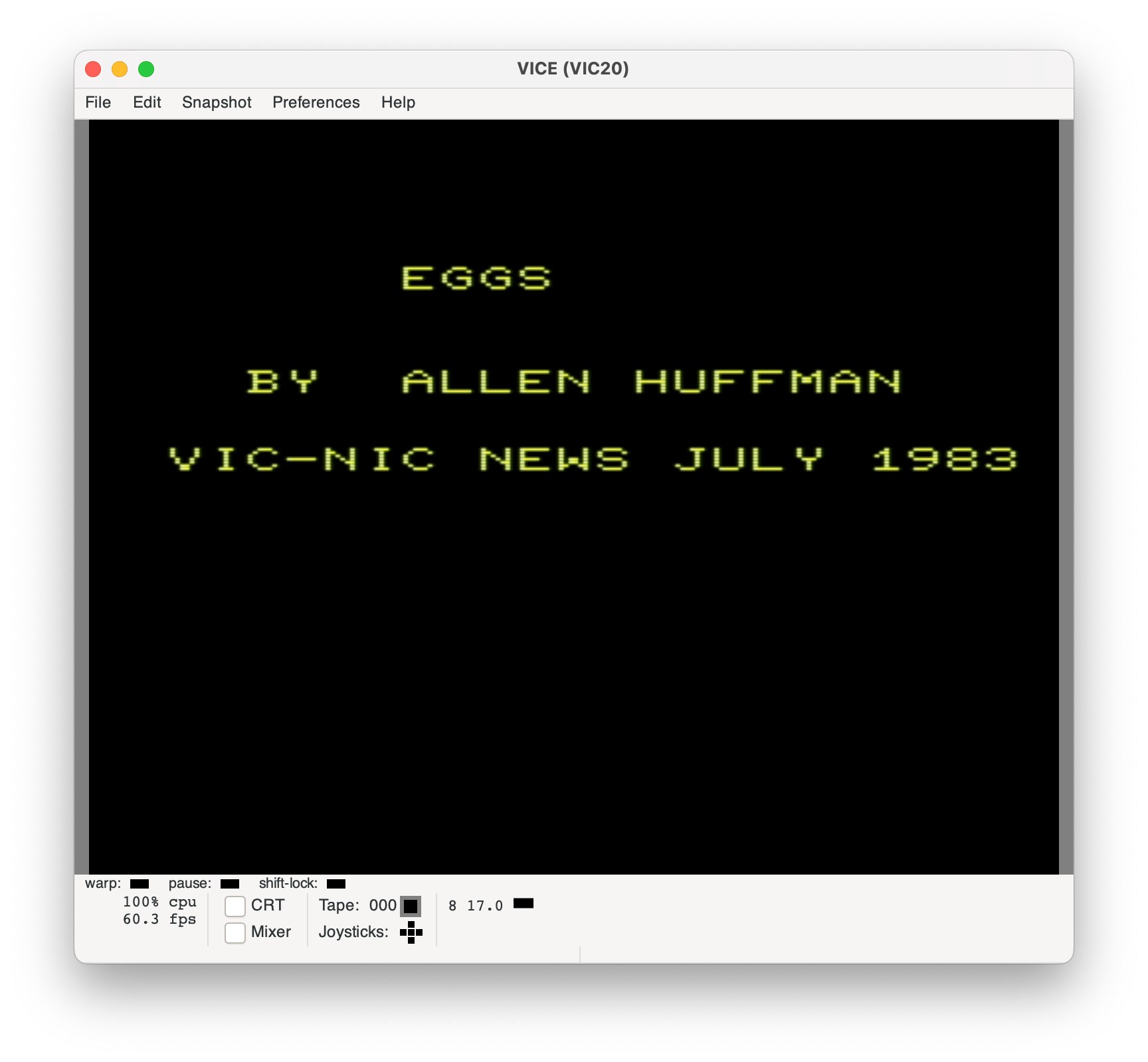
1 print"{clear}{down*3}      eggs"
2 print"{down*3}  by  allen huffman"
3 print"{down*2}vic-nic news july 1983"
4 forj=1to5000:next
I believe these lines were added by the VIC-NIC NEWS. The {words} in curly braces are ASCII notation for the Commodore escape codes you could put in PRINT statements. {clear} is the code for clearing the screen, and {down} is the code for moving the cursor down one line. Therefore, that clears the screen then moves down three lines before spacing over to print the game title. The text would print in UPPERCASE and the code appears in UPPERCASE on an actual VIC-20. These lines just print a simple title screen, then wait for a few seconds before starting the game.
5 poke36879,8:printchr$(147)
Heh. I remember joking that everything on the VIC-20 used the POKE command, and sure enough, the very first thing I do in my program was a POKE. I consulted a useful VIC-20 memory map document to find this:
900F     36879    Screen and border color register
                   bits 4-7 select background color
                   bits 0-2 select border color
                   bit 3 selects inverted or normal mode
The value of 8 is bit 3 , so I was leaving “normal” mode on and setting background and border colors to 0. I don’t recall what this does, so I tried it in the VICE VIC-20 emulator and see it makes the screen black with blue text:
Checking the PEEK value of 36879 on startup shows it defaults to 27, which is the bit pattern 00101011.
Border Color = 011 (3) Inverted/Normal = 1 (normal?) Background Color = 0010 (2)
As I searched for information on the colors, I found the wikipedia page for the VIC’s video chip. It lists the 16 colors the VIC-20 could produce as follows:
0 — black
1 — white
2 — red
3 — cyan
4 — purple
5 — green
6 — blue
7 — yellow
8 — orange
9 — light orange
10 — light red
11 — light cyan
12 — light purple
13 — light green
14 — light blue
15 — light yellow
With only three bits for the border color, the border can only use colors 0-7 (black through yellow). The background color uses four bits, so it can be any of the sixteen colors (0-15). I may have known this at the time, but if so, I had forgotten that the border could not be set to match all the possible screen colors.
In my case, setting the background and border to 0 makes it black.
If I had taken the original value (00101011, 27) and just cleared bit 3 (invert/normal, 00100011, 19), I see that it changes the text/foreground to inverted video:
Interesting. So I guess we are seeing inverted video on a black screen with black border? I really don’t know why, and I suspect I just saw that POKE in a magazine and liked it.
The print of CHR$(147) is the escape code that clears the screen. (Yep, there was not even a CLS type command in Commodore BASIC.)
10 b=8130:m=3:sc=0
15 e=int(rnd(1)*20)+7703
Two of these variables deal with locations within screen memory:
1E00-1FFF 7680-8191 Screen memory
B is the memory location of the player’s bucket. This is some spot on the bottom line of the screen. 7680 represents the top left character of the VIC’s 22×23 text screen. If you do the math, that is 506 bytes of memory used to represent the screen. But, screen memory of 7680-8191 is 512 bytes. The actual last visible byte on the screen is 8185. The player’s bucket is at 55 spots earlier, which is two full lines (22 bytes each) and 11 (half way in a 22 line screen). I am not sure why I started the game on the third line UP from the bottom, but I did.
M is how many men are left. Video games were very male-centric in the early days, I guess. Actually, in the early years, I don’t recall ever knowing a single girl that played video games, and do not recall seeing any in the arcades I went to, either.
SC is the score, which starts at 0.
E is the memory location of the falling egg. It starts at 7703 (the second byte of the second line) and then adds a random value of 0-19to it. This means I left out the left and right column of the screen for some reason. Looking at how I designed my later Factory TNT game, where the game had a border on the left and right and also a few lines at the bottom of conveyor belt graphics…
VIC-20 Factory TNT.
…it makes me wonder if I was already planning something like that for Eggs, but left it out to make the program smaller and easier to type in from a newsletter. (Above, you see I start the cup in Factory TNT 5 lines up, instead of 3 like Eggs, but it also limits the falling bombs under the spigots not using the left and right side of the screen. Curious.)
20 printchr$(19);chr$(5);"score:";sc
CHR$(19) homes the cursor to the top left. This would be like doing “PRINT@0,;” on the CoCo. The “SCORE:” is then printed with the current value.
25 pokeb,21:pokee,81
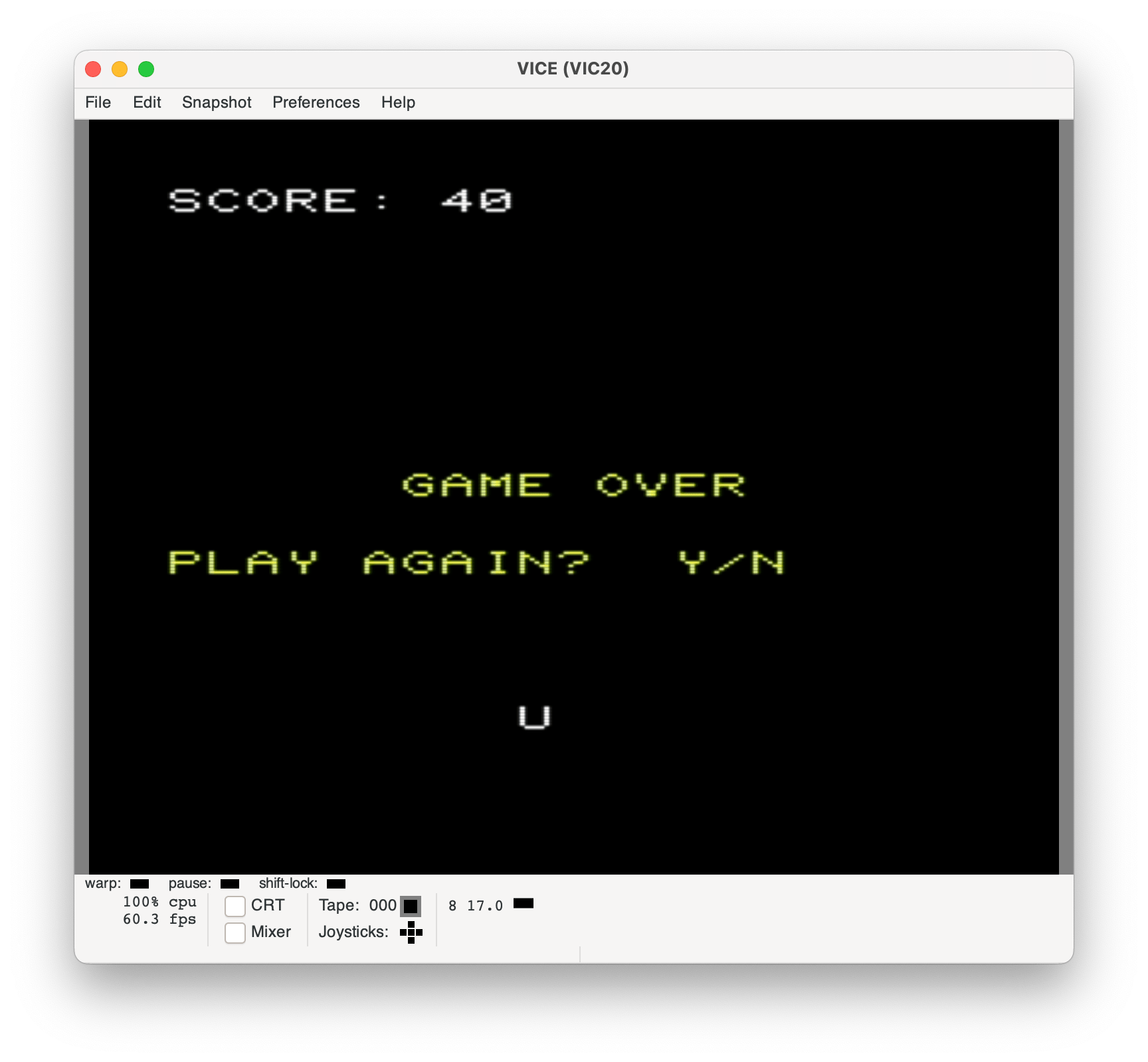
The character of 21 (a letter “U”) is POKEd to the player location, and a character 81 (filled circle) is POKEd to the falling egg location.
This code, which I must have gotten from some magazine, is the joystick code. The code in the original article used incorrect memory locations, and was unable to read the “right” direction. I must not have known why, and just changed the published version to use UP and DOWN to move left and right (or, maybe it worked for me, but VIC-NIC NEWS couldn’t get it to work due to a typo and changed the directions?). Either way, memory location 37152 contains the “right” joystick switch, and 37137 contains the “up, down, left and fire” switches. The bits in one of these gets used for different things, to the POKEs to 37154 are used to toggle one of the bytes from joystick mode to keyboard mode. When you do that POKE, part of the keyboard stops working, so it has to be POKEd back at the end.
Because of how this works — if you BREAK the program at the wrong time, during those lines when it is POKEd to joystick, you won’t be able to type all the characters on the keyboard. A frustrating issue ;-)
The joystick line basically takes the 4-bits (up, down, left and fire) from one memory location and the 1-bit (right) from the other location and combines them in to one byte. Because the bits read “1” when NOT pressed, and “0” when pressed, the code also inverts the results so “1” now means ON.
This IF statements check for directions. J=0 means nothing is pressed, so skip the rest. J=4 means the left button is pressed, so decrement the bucket location by one (moving it one to the left). J=16 means the right button is pressed, so increment the bucket location by one (moving it to the right).
65 ifb=8120thenb=b+1
70 ifb=8141thenb=b-1
These two checks make sure the bucket did not move too far left or right. B=8120 checks to see if the new position is in the first column. If so, too far, so move it back to the right one place. B=8141 is checking for the right column and if it is there, it moves it back left one. With am minor change, I could have made it so you could “wrap around” the screen, where if you moved to the right it would reset the position to the left, and vise versa. That might be an interesting update or option. (Allowing you to quickly “warp” from the left side of the screen to the right to catch an egg you might have otherwise missed.)
Hmm, thinking about this, maybe I shortened the number of rows that the egg drops so ensure you always had less time to move and catch it, increasing the challenge?
75 pokeb,21
80 pokee,32
85 e=e+22
90 pokee,81
At line 75, the player’s basket location has been updated so we POKE the “U” character (21) back on the screen. We then POKE a space (32) to where the egg is, erasing it. The Egg location is incremented by 22, moving it down to the next line, then the Egg character (81) is POKEd back to that new location.
Much like how the basket is checked against the left and right column of the screen, some checks for the falling egg location are done here. If the egg location is at or greater than 8120 (first character of three lines from the bottom of the screen) then it is checked to see if it is the same position of the basket (the player caught the egg).
I’d have to benchmark this and see if that “e>=8120” even needs to be there. If that condition is not true, it would just skip quickly to the end of the line and move on. I’m expecting the overhead of checking “e=b” is less (no long number to parse) so it would probably be faster to just always check “e=b”. If the egg was caught, GOTO 110 happens to increment the score.
There is another check for >=8120 and then “e<>b” skipping to another line. This is poorly coded. If the check for “bottom” line was needed, something like this might be better:
IF E>8120 THEN xxx
IF E=B THEN 110 (player caught it)
...else, player did not, handle here
xxx continue on...
Something like that would simplify the logic, speed it up, and reduce the program size. But hey, I was just learning BASIC.
After this, if the egg did not reach the bottom and get caught or not caught, it goes back up to line 25 to continue the program loop.
110 sc=sc+10:pokee,32:goto15
This is where we go when the player catches an egg. Score is incremented by 10, the egg is erased by POKEing a space there, and then we go to line 15 where a new egg position will be created and the process will start over.
115 m=m-1:pokee,32
120 ifm=0then135
125 goto15
115 is where we end up if the egg reaches the bottom and the player did NOT catch it. The “men left” variable will be decremented, and the egg erased.
If M gets to 0, then game over, which is handled at line 135.
Otherwise, we go back to line 15 to make a new falling egg and continue.
CHR$(17) is the escape code to move the cursor down one line, so the first line moves down five lines.
CHR$(32) is a space, so the second line prints six spaces over.
CHR$(158) sets the text color to yellow, it seems, and prints “GAME OVER”.
Then, for some reason, I don’t use the CHR$(17) to move down, and instead use the embedded screen code. This makes me wonder if I did this, or if it was changed by the VIC-NIC NEWSLETTER folks.
My choice of looking for “Y” or “N” is interesting. This works, and is short, but it is not how I would do it today. If GET A$ catches a “Y” we just RUN to start everything over. If it is an “N” we just END and stop right there. Otherwise we go back and check again.
This is kinda clever, since I would have thought of writing it like:
xxx GET A$:IF A$="" THEN xxx
IF A$="Y" THEN RUN
IF A$="N" THEN END
GOTO xxx
…and that would be larger. Was I smarter then?
And that, my friends, is my first published program. I do not know how close this code is to what became Factory TNT (it would have been trivial to rewrite from scratch) but I can definitely see similarities — it is effectively the same program, just with more graphics, sound and such added in the Factory TNT version.
And now I guess that is all I can possibly write about this program.
In my recently-recovered “first program I ever had published,” I noticed that the joystick was not working. I was testing on VICE (the Versatile Commodore Emulator) on a Mac. The code that I had to read the joystick was clearly something I found in a magazine or somewhere because I have no idea what it does:
I suspected maybe a typo was introduced when VIC-NIC NEWS typed in my program to print it out for publication. I did some searching to see how you were supposed to read the VIC-20 joystick. I was surprised that the Commodore VIC-20 manual didn’t offer any code to do this.
The VIC is designed to handle only one joystick, and it takes two bytes to control that joystick. In the VIC, location 37137 is PEEKed to read the joystick for the up, down, left, and fire button movements. Location 37152 is PEEKed to detect movements to the right.
…
To see just how easy it is to detect movement on the joystick, plug in your joystick, type in one of the following short programs, and then RUN. The programs simply PEEK the joystick control bytes, and then PRINT that reading to the screen.
For the VIC-20:
10 PRINT PEEK(37137), PEEK(37152) : GOTO 10
– Atari Magazine, issue 42
Curious. My code was not using either of those addresses. Either my code or this magazine had a typo.
I tried those two PEEKs in VICE and noticed only the fire button was making the values change. This matched the VICE joystick display also showing only the fire button working.
I then thought the joystick I was using (a USB joystick that came with my TheVIC20) might have an issue. I tested it using a joystick test program, and it appeared to read all directions correctly.
A bit of more searching and I found that the Mac version of VICE has has an issue with joysticks not working since sometime in 2022:
Even if my code was correct (to be determined), I would not be able to test it on the Mac version of VICE.
I then tried running Eggs from the Windows version of VICE and was able to see the joystick work — but, it was using UP and DOWN to move the cup left and right. Odd. I know I must have intended for it to use left and right, because my typed instructions clearly stated:
“Use joystick to move the cup left and right to catch falling eggs.”
– Eggs instructions.
While technically it didn’t say “move the joystick left or right,” I think it would have been a very odd choice for me to use “up” to mean left, and “down” to mean right, in a game like this.
This led me back to suspecting a typo in my joystick code. I went back to those two PEEKs from Atari magazine and tested them on the Windows version of VICE. This time, it seemed to change for all directions other than right. It gave values for Up, Up-Left, Left, Left-Down and Down, as well as the button. Clearly, this code was wrong (or maybe the Windows version of VICE also had an issue).
I decided to figure out where my joystick code came from. I searched for this code:
…and archive.org actually had a single match! It was found in Issue #8 of The TORPET (Toronto Pet) on page 31. This Commodore PET publication had a section about the then-new VIC-20. For fun, here is the entirety of their VIC-20 section:
VIC NOTES by John O’Hare
As of Mid October, 15,000 VIC’s have been sold in Japan, 15,000 more in the U.S., and, though not yet available in Europe, orders are accumulating fast. -JS
If you really want a color PET, Commodore suggests you consider buying a VIC as a peripheral for your PET! Seriously, it uses Upgrade BASIC V2, is cassette compatible, and has excellent color compared to Apple, and Atari. -JS
Some VIC POKE locations are:
51 decrements when key hit. 204 cursor on flag. 56 pointer to top of memory. 211 cursor column. 67 holds 1 when key hit. 214 cursor row. 197 value of key depressed. 36865 border position (vertical). 145 flag for left shift key. 36864 border position (horizontal). 245 detects special keys. 36869 pointer to character generator. 240= norm. 255 = 7168.
To read a joystick on a VIC (standard ATARI joystick works), use the following subroutine:
JO Values returned are: 1 = up, 17 = up and rt, 16= right, 18 = down and r t, 2 = down, 6 = down and Ift, 4= left, 5= up and Ift.
VIC GAME REVIEWS
VIC GAMES PAC, $25 from Creative Software. 3 VIC arcade games: VIC Trap, Seawolf, and Bounce Out. Seawolf and Bounce Out are machine language, with very fast action. Very good games, but could be better if they used Hi Res graphics. -JOH
– The TORPET, Issue #8, Page 31
Wow, early days – reporting only 15,000 VIC-20s had been sold at that point!
In my code, I check for the value of 18 to move the bucket left (“ifj=18thenb=b-1”) and a value of 17 to move the bucket right (“ifj=17thenb=b+1”). That matches the values for up and down in this TORPET article! I guess I really did mean for up and down to move left and right.
But I have a theory about this, which I will get to in a moment…
The thing I immediately noticed was this code used two different memory locations, while my program (as listed in VIC-NIC NEWS) used the same memory location twice. I consulted a VIC-20 memory map to see what all the various addresses are for:
37137 – Port A output register: (PA0) Bit 0=Serial CLK IN, (PA1) Bit 1=Serial DATA IN, (PA2) Bit 2=Joy 0, (PA3) Bit 3=Joy 1, (PA4) Bit 4=Joy 2, (PA5) Bit 5 = Lightpen/Fire button, (PA6) Bit 6=Cassette switch sense, (PA7) Bit 7=Serial ATN out
37151 – Port A (Sense cassette switch)
37152 – Port B output register: keyboard column scan, (PB3) Bit 3 =cassette write line, (PB7) Bit 7 =Joy 3
37154 – Data direction register B
The TORPET code looked wrong since one of the locations it was using had nothing to do with the joystick.
The Atari Magazine looked better since it used the two locations that mentioned joystick – 37137 and 37152. 37137 contains three joystick directions (Joy 0-2) plus the button. 37152 contains the final joystick direction (Joy 3). However, running this code doesn’t show anything changing for “right”.
I think the extra POKEs the code I used (and the code in The TORPET used) may explain that. It seems you have to POKE to change the purpose of some of this bits. 37154 is a data direction register for Port B (37152), and before my joystick code I POKE it to 127 which is a binary pattern of 01111111. After doing the joystick PEEK, the code POKEs it to 255, which is 11111111. I am suspecting that that 0 (bit 7) indicates read of whatever is hooked to that bit — which is Joy 3 (PB7). It looks like you turn it to 0, then you can PEEK it, then it gets set back to a 1 after.
…and now the second value changes when the joystick is pressed right. Huzzah!
It looks like the first byte reads up, down, left and fire, and the second is right. The POKE is only used to toggle the right bit on and off to do a read. It should get restored after (set back to 1) but in my quick demo, I didn’t bother to do that and I found I could not type certain keys. Aha, that explains “keyboard column scan.” That bit must be used to read a keyboard column, normally, and can be switched to read the joystick instead.
I will have to explore that more, later, but for now I can clearly see an issue with my code. By using only one of those locations, it is never reading the I/O bit that represents the “right” direction.
37151 does not have anything to do with the joystick. This code takes the PEEK of that location and ANDs it with 60 (bit pattern 00111100) telling me it is expecting to use four bits. That matches the four joystick bits that are at 37137:
Bit 2 – (PA2) Bit 2=Joy 0
Bit 3 – (PA3) Bit 3=Joy 1
Bit 4 – (PA4) Bit 4=Joy 2
Bit 5 – (PA5) Bit 5 = Lightpen/Fire button
I think The TORPET got it wrong, and that second PEEK should be 37137.
The PEEK of 37152 seems okay. It ANDs it with 128 (bit pattern 10000000) which matches looking for that bit for the joystick:
Bit 7 – (PB7) Bit 7 =Joy 3
I suspect Atari Magazine just omitted the POKE needed to have the bits come from the joystick port, and The TORPET just had the wrong address listed. Since I had never heard of The TORPET, I expect I got my code from one of the few magazines I had at the time (Family Computing, Compute or Compute’s Gazette).
I changed my code to use 37137, but it still did not work! Now I could only move to the right by pressing Up+Right.
I think it is time to figure out what this code is trying to do.
Figuring out what this code is trying to do
Let’s start with the “correct” TORPET code and dissect what it is doing:
37137 – Port A output register: (PA0) Bit 0=Serial CLK IN, (PA1) Bit 1=Serial DATA IN, (PA2) Bit 2=Joy 0, (PA3) Bit 3=Joy 1, (PA4) Bit 4=Joy 2, (PA5) Bit 5 = Lightpen/Fire button, (PA6) Bit 6=Cassette switch sense, (PA7) Bit 7=Serial ATN out
37152 – Port B output register: keyboard column scan, (PB3) Bit 3 =cassette write line, (PB7) Bit 7 =Joy 3
PEEK(37152) uses “AND 128” to get just the high bit (bit 7) of Port B, which is the “right” joystick direction. It will either be 0 (no right) or 128 (right). It then divides by 8 which effectively shifts that bit over three places to the right:
10000000 - 128 (original reading)
00010000 - 16 (after the divide by 8)
PEEK(37137) uses “AND 60” to mask out the four bits in the middle. If they were all “on” (you can’t do that with a normal joystick), it would read 00111100. It then divides by 4 which effectively shifts those bits over two places:
00111100 - 60 (original reading if all joystick inputs were "on")
00001111 - 15 (after the divide by 4)
It adds those two values together, so this code is creating a new value of 5 bits, where those five bits represent the joystick switches for up, down, left, right and fire (00011111). From looking at the bit pattern, this new byte represents the following:
Bit 0 – Up
Bit 1 – Down
Bit 2 – Left
Bit 3 – Fire
Bit 4 – Right
Next I wondered why the program uses “NOT.” From checking the PEEKs, I see that when a joystick switch is not on, it shows a 1. When it is activated, it shows a 0. The NOT is used to invert that logic:
If no switches are pressed, the value is 31 (00011111). NOT flips the bits, so that value becomes 11100000. (Actually, I think it is represented as 16-bits, so 11111111111000000.) I believe when you use AND/OR/etc. the value is treated as a 16-bit signed value (-32768 to 32767) with the high bit representing negative. There result is the 31 becomes a -32. This explains the “+32” at the end.
The result is a value that is 0 if no switches are pressed. All of this match (dividing, adding, NOTing) does make the routine slow so maybe we’ll play with speeding it up sometime…
Using this newly created bit pattern, the BASIC program could use specific values to represent a direction (up), or two directions at the same time (up+left). My game did not use the fire button, but I think the way you would check that would be to use AND on the JO value to look for that specific bit, that way the rest of the value could be anything (up+fire, up+left+fire, nothing+fire, etc.).
Here is a test program for the “fixed” TORPET code:
10 rem fixed torpet code
20 gosub 9000
30 if jo and 1 then print "up ";
40 if jo and 2 then print "down ";
50 if jo and 4 then print "left ";
60 if jo and 8 then print "fire ";
70 if jo and 16 then print "right";
80 if jo<>0 then print
90 goto 20
9000 poke 37154,127
9010 jo=(not((peek(37152)and128)/8+(peek(37137)and60)/4))+32
9020 poke 37154,255
9030 return
Though, a mystery I Have yet to understand, is why do so many VIC-20 joystick references say you can also use 37152 and 37151? This code also works:
Now … why did I use Up and Down in my original Eggs? I think this is because the joystick code I had was broken and never returned a value for right. This was because it was PEEKing the same byte twice instead of the second byte being the one that had the “right” switch! I probably couldn’t get it to work, so I just used UP and DOWN.
Using this “fixed” code, I could now alter my program to work like I originally intended:
And now, while I still wonder why so many VIC articles disagree on how to read the joystick, at least I can move left and right in my 1983 classic VIC-20 game Eggs…
The story so far… In the beginning, we learned a bit about the game Lights Out and its history. We then saw some very basic BASIC that implements the basic functionality of a basic game of this type. We still have a bit more work to do, such as initializing some of the squares to an “on” state and adding code to detect when the game has been won.
Let’s add that.
Game Initialization
Since variables in BASIC initialize as 0, and 0 means FALSE (the light is “off”), the initial grid would be shown with all lights off. Congratulations. You win!
To make it a game, we need to have some or all of those lights on when the game starts. My initial attempts of just randomly setting some number of lights to on seemed to often produce puzzles that could not be solved — even when using lookup tables (i.e., “cheating”) that show the winning patterns. Are there unsolvable patterns in Lights Out???
I consulted the chat section of the BING search engine, and asked it…
Yes, there are some configurations of the Lights Out game that cannot be solved. In fact, Marlow Anderson and Todd Feil proved in 1998 that not all configurations are solvable. However, it is important to note that these unsolvable configurations are not valid Lights Out puzzles.
– BING AI Chat
Well then. Since unsolvable patterns are not valid for Lights Out, tust turning on random lights is not an acceptable way to start a game.
Side Note: Card games like Solitaire certainly can be unwinnable depending on the order of cards in the deck. I am pretty sure games like Minesweeper are like that, too. But Lights Out patterns are always supposed to be winnable.
It seemed if you started with all lights off, you could simply work backwards by toggling lights on randomly until you got to a stopping point. Whatever pattern that is, the player was assured that there was a way to win. Instead of just turning on specific lights, I could just select a square and allow it to do the normal toggle (that light, plus the adjacent lights).
For my version, I will just make a very simple “initialize game” routine that does this. To do this, I will use a FOR/NEXT loop and generate random X/Y coordinates and call the “toggle” subroutine. This should end up with a random pattern that is 100% solvable.
4000 REM INITIALIZE GRID
4010 PRINT "INITIALIZING..."
4020 FOR A=1 TO 10
4030 X=RND(5)-1
4040 Y=RND(5)-1
4050 GOSUB 3000
4060 NEXT
4070 RETURN
This is what it is doing:
Line 4010 – Since the FOR/NEXT loop will cause a pause, I wanted to print out something to tell the player what was happening.
Line 4020 – A FOR/NEXT loop is done so the random grid selections can be done 10 times. (We’ll improve this later.)
Line 4030 – For X, RND is used to choose a number from 1 to 5. Since the DIM arrays are base-0 (0-4), we subtract 1 so Y will be a number form 0-4.
Line 4040 – Same thing, but for Y.
Line 4050 – We GOSUB to the routine that toggles the specific square (X,Y), and any adjacent squares.
Line 4060 – Continue the FOR/NEXT loop…
Line 4070 – We return back to wherever we were GOSUB’d from.
At the start of the game, we’d just “GOSUB 4000” to initialize the grid. Here is the complete code, so far:
10 REM INITIALIZE GRID
20 GOSUB 4000
30 REM SHOW GRID
40 GOSUB 1000
50 REM INPUT SQUARE
60 GOSUB 2000
70 REM TOGGLE SQUARES
80 GOSUB 3000
90 REM REPEAT
100 GOTO 30

1000 REM SHOW GRID
1010 FOR Y=0 TO 4
1020 FOR X=0 TO 4
1030 IF L(X,Y) THEN PRINT "X";:GOTO 1050
1040 PRINT ".";
1050 NEXT
1060 PRINT
1070 NEXT
1080 PRINT
1090 RETURN

2000 REM INPUT SQUARE
2010 INPUT "X,Y (0-4,0-4)";X,Y
2020 IF X<0 OR X>4 OR Y<0 OR Y>4 THEN 2010
2030 RETURN

3000 REM TOGGLE SQUARES
3010 L(X,Y)=NOT L(X,Y)
3020 IF X>0 THEN L(X-1,Y)=NOT L(X-1,Y)
3030 IF X<4 THEN L(X+1,Y)=NOT L(X+1,Y)
3040 IF Y>0 THEN L(X,Y-1)=NOT L(X,Y-1)
3050 IF Y<4 THEN L(X,Y+1)=NOT L(X,Y+1)
3060 RETURN

4000 REM INITIALIZE GRID
4010 PRINT "INITIALIZING..."
4020 FOR A=1 TO 10
4030 Y=RND(5)-1
4040 X=RND(5)-1
4050 GOSUB 3000
4060 NEXT
4070 RETURN
And it works! Even on a 1980 4K TRS-80 Color Computer (shown here, emulated in XRoar):
But the game still cannot be won because there is no code to check for a win ;-)
Defining a “Win”
Since the goal of Lights Out is to turn all the lights out, winning means that the number of lights that are on is zero. One simple (but slow) way to test for this condition would be to scan through the entire grid and add up how many lights are on.
5000 REM COUNT LIGHTS ON
5005 LO=0
5010 FOR Y=0 TO 4
5020 FOR X=0 TO 4
5030 IF L(X,Y) THEN LO=LO+1
5040 NEXT
5050 NEXT
5060 RETURN
To check, that routine is called. If LO=0 then the game has been won. Since the routine counts the number of “on” lights,, the user could also be told how many lights are on. I would probably add this right after it draws the grid, so the final winning grid is shown before the game ends.
10 REM INITIALIZE GRID
20 GOSUB 4000
30 REM SHOW GRID
40 GOSUB 1000
45 REM CHECK FOR WIN
46 GOSUB 5000
47 IF LO=0 THEN PRINT "YOU WON!":END
48 PRINT "LIGHTS ON:";LO
50 REM INPUT SQUARE
60 GOSUB 2000
70 REM TOGGLE SQUARES
80 GOSUB 3000
90 REM REPEAT
100 GOTO 30
For a small 5×5 grid, the CoCo seems plenty fast enough to do this check without much of a delay in between moves. If the machine were very slow, or the grid was very large (and thus, took much longer to check), this might not be the best approach.
Another option might be to start with a count of all lights that are on, and decrement that value each time a light is turned off. If a light is turned on, increment it. If the value reaches zero, the game has been won.
But how do we know which lights are on? We’d could just call our “count lights that are on” function after the grid is initialized and get that value.
Or, maybe we don’t use that routine at all. We could put the count routine directly in the routine that toggles the squares on and off:
3000 REM TOGGLE SQUARES
3010 L(X,Y)=NOT L(X,Y)
3020 IF X>0 THEN L(X-1,Y)=NOT L(X-1,Y)
3030 IF X<4 THEN L(X+1,Y)=NOT L(X+1,Y)
3040 IF Y>0 THEN L(X,Y-1)=NOT L(X,Y-1)
3050 IF Y<4 THEN L(X,Y+1)=NOT L(X,Y+1)
3060 RETURN
We could increment some variable every time a light is turned on, and decrement it any time a light is turned off.
It looks like our shortcut of using NOT is going to cause us more work. Since we aren’t manually setting the value to something meaning ON, and something else meaning OFF, we have no place add code to increment or decrement our Lights On count. Had we used 1 for on, and -1 for off, we could just add the value of the square (1 or -1) and been done.
But we didn’t.
We know after the NOT toggle, the value will be -1 or 0. Had it been 1 and -1, counting would be very straightforward. But with -1 and 0, we need to somehow make the -1 (meaning TRUE, a light was turned on) be an increment (+1), and the 0 (meaning FALSE, a light was turned off) to be a decrement (-1).
Side Note: There are many ways to write a program. In this one, I chose an easy way to toggle the lights. At the time, I was not considering counting the lights that were on. This NOT approach adds a bit more work to do the count. It could be that adding extra work here might be larger/slower than just doing a count routine that scans the whole grid. Depending on if we are going for speed or memory usage, the design decisions may need to be different.
Mapping this out, I find a simple solution. I can multiply the value (-1 or 0) by 2, and then add 1.
If the value is -1, multiplying by 2 will make it -2. Then adding 1 will make it -1.
If the value is 0, multiplying by 2 will be 0. Then adding 1 will make it 1.
ON: -1 * 2 = -2 + 1 = -1

OFF: 0 * 2 = 0 + 1 = 1
Well, that gets us a +/- 1, but it is backwards from what I would have preferred. To work around that, I can subtract the value. If you subtract -1, it is like adding one. And if you subtract 1, it is like adding a -1. Easy! :)
The updated routine looks like this:
3000 REM TOGGLE SQUARES
3010 L(X,Y)=NOT L(X,Y):LO=LO-(L(X,Y)*2+1)
3020 IF X>0 THEN L(X-1,Y)=NOT L(X-1,Y):LO=LO-(L(X-1,Y)*2+1)
3030 IF X<4 THEN L(X+1,Y)=NOT L(X+1,Y):LO=LO-(L(X+1,Y)*2+1)
3040 IF Y>0 THEN L(X,Y-1)=NOT L(X,Y-1):LO=LO-(L(X,Y-1)*2+1)
3050 IF Y<4 THEN L(X,Y+1)=NOT L(X,Y+1):LO=LO-(L(X,Y+1)*2+1)
3060 RETURN
Yuck. But hey, it works!
Now, instead of calling the “count all the squares” routine, we can just reset the LO “lights on” variable during the initialization routine, and it should be decremented/incremented as the game plays.
To test, let’s comment out the call that counts the squares:
10 REM INITIALIZE GRID
20 GOSUB 4000
30 REM SHOW GRID
40 GOSUB 1000
45 REM CHECK FOR WIN
46 REM GOSUB 5000
47 IF LO=0 THEN PRINT "YOU WON!":END
48 PRINT "LIGHTS ON:";LO
50 REM INPUT SQUARE
60 GOSUB 2000
70 REM TOGGLE SQUARES
80 GOSUB 3000
90 REM REPEAT
100 GOTO 30
I did a quick test, and this appears to work. It is also faster, since it bypasses the small delay that was happening each time it called the “count all 25 squares” routine. Nice.
Again, the overhead of adding the count in five locations (about 21 bytes each, so 100 bytes extra) does appear to be larger than the “count all the squares” routine. If code size were more important than speed, the count routine would make more sense.
But so far, it still fits on my 1980 4K CoCo with 1514 bytes left to spare (and more room once I remove the un-used “count all the squares” routine). We can add more code! :)
We now have a very primitive but functional version of Lights Out that should guarantee each “random” pattern can be won. The “random” patterns should keep someone from just learning the moves and repeating them to win the level if they play it over and over.
2024-02-10 – Added screen shots, and pasted in the code.
On February 2, 2024, I received an e-mail with the subject: Eggs program
Could this be someone who had a copy of the VIC-NIC News newsletter where my “Eggs” VIC-20 program appeared? The e-mail read:
Hi Allen,
I saw on your website you were looking for a copy of your Eggs program listing that was in The Vic-Nic News magazine.
I went through the issues I have (#1 thru 7) and found the listing in #6. If you still need it, I can scan the page and email it to you or copy it and mail it.
Take care,
(name to be added, pending permission)
– e-mail received on 2/2/2024
I replied back:
“Proof that VIC-NIC NEWS actually existed! I would very much like a scan of that issue. Actually, since this is so difficult to find, would you be willing to scan them all so we could get them uploaded somewhere? Maybe archive.org?
But yes. Please yes. I would very much like that. Very much.”
– my e-mail reply
And today, I received a scan of my Eggs program! I had pretty much given up ever finding a copy.
Thank you thank you thank you!
I recognize my doodles, but had forgotten I sent drawings in. Actually, I believe I sent the program in typed up via a typewriter. The instructions and the “ASCII art” representation of the game screen were typed by me, and the doodles were added. Actually, I did have some kind of thermal printer for my VIC-20, so perhaps I included the program printed out that way (I see it has a few embedded screen control codes in a few PRINT statements). It is very exciting to see this again.
There may still be some typos, and I think there may be an issue with the PEEKs used to read the joystick. Currently, the Mac version of the VICE Emulator has a bug an joysticks don’t work (well, the fire button does, but nothing else). I will test it on my TheVIC20 machine soon.
And here it is in all its glory!
Title Screen – I think they made this title screen. I hope I would have centered things better, if I had done it.
Game Play – A “U” for the players “bucket” (B variable), and a ball for the falling “egg” (E variable):
YouTube has been showing me videos from a channel called CoCo Town lately. This one, posted recently, focuses on emulators not getting the CoCo screen’s aspect ratio correct:
CoCo Town YouTube video.
I noticed that the recent XRoar emulator also changed its aspect ratio. It just felt “wrong” to me since I have basically only used XRoar for the past few years. Also, my CoCo 3 has been using a VGA monitor via the Cloud-9 FPGA VGA adapter. I have no idea how accurately it represents the CoCo output, but I know it is recreating it and making it fit on the VGA monitor.
With that in mind, I have a favor to ask. Can someone out there with a CoCo 1 or 2 hooked to a TV set send me a photo of what it looks like on your TV set? A front view of the startup green screen would be ideal.
Likewise, I’d like to see what the CoCo 3 looks like on an analog RGB monitor like the CM-8. I recall the CoCo 3 was very off center using the TV output, but if you can get a picture of that too, I’d appreciate it.
I was today year’s old when I realized the CoCo’s high-resolution color values actually make sense.
Let me just get this right out in the open…
“I feel dumb I never realized the PMODE colors in the manual were correct.”
– Allen
You all probably knew this. If I did, I forgot I knew it. And I really don’t think I ever knew it. Because dumb.
My first CoCo was a grey TRS-80 Color Computer that I got around 1984. Today we call it a “CoCo 1” but back then it was the only CoCo.
The CoCo had eight colors (nine if you count black) that it could display:
Color Adjustment Test Display, Radio Shack TRS-80 Color Computer Quick Reference Guide, page 55.
The colors are listed as:
0 – Black
1- Green
2 – Yellow
3 – Blue
4 – Red
5 – Buff (I always called it white)
6 – Cyan
7 – Magenta
8 – Orange
When you use the high resolution graphics (PMODEs), you have a choice of a higher high-resolution with 2 colors, or lower high-resolution with 4 colors. Each of these modes has two color sets, which select which 4 or 2 colors you can use on the screen. Here is how the Extended Color BASIC manual describe the PMODEs:
There are some high resolution graphics commands that let you specify a color — such as the COLOR, CIRCLE and DRAW — let you specify a color value to use. I found it odd that the color value was listed as “0-8” — as if you could use nine colors on a high resolution screen. You can’t! Only four, or two.
But the manual listed nine colors, anyway:
The first dumb thing I never realized until today was those high-resolution color numbers are the same as the ones for the text screen, as used by text commands CLS and SET. As I previously wrote about, I also did not realize that the colors available on the high resolution screens were actually the same as the ones on the text screen. I’d never seen them at the same time, and they always “looked different” to me.
But why did Microsoft let you specify color values 0-8 for a screen that can only have four colors? When I started playing with the CoCo again as a grown-up, I assumed Extended Color BASIC must have been ported from a system with more colors and they just left it as-is.
But the manual was weird about it. For example, it would tell you use use colors 5, 6, 7 and 8!
“If you want to try changing the dots’ colors, use buff (5), cyan (6), or magenta (7). Then change the color back to orange (8) before proceeding…”
– Extended Color BASIC manual, page 86
But I knew back then that this was just silly. If you used colors 1, 2, 3 and 4 in one mode, you could also use colors 1, 2, 3 and 4 in the other color set. You’d get the four unique colors in each mode, just different colors based on the mode. (Or you could use 0, 1, 2 and 3 just shifting the order over.)
The important part of the manual was listing which four colors you got when you used SCREEN to specify the color set to use:
SCREEN 1,0 gave you the green/yellow/blue/red colors on a green screen with green border, and SCREEN 1,1 gave you the buff/cyan/magenta/orange colors on a buff screen with a buff border.
Then, there were the higher high-resolution modes that only had two colors. The manual mentioned them (and the four color modes) later:
I guess they were introducing things slowly as you progressed through the chapters.
In a 2-color mode, SCREEN 1,0 gives you a green border with black background and you can draw in green. SCREEN 1,1 gives you a black screen with a white background and you can draw in white.
And my mind was blown when I realized that, though you could use 1-4 on any 4-color screen, or 1-2 on any 2-color screen, and get different colors, the way the manual tried to teach us was basically: “In this mode, use colors A to B. In that mode, use colors C to D” and so on.
Behold! PMODE 3,1:SCREEN 1,0 5-color mode showing what it draws for all 9 colors (0-8):
If you use the color chart, you can see you should be using colors 1-4:
1- Green
2 – Yellow
3 – Blue
4 – Red
If you go to PMODE 3,1:SCREEN 1,1 you get these colors:
And here is why the manual told you to use colors 5-8:
5 – Buff
6 – Cyan
7 – Magenta
8 – Orange
And in the 2-color mode, if you went PMODE 4,1:SCREEN 1,0 you would get the same two colors repeated over and over:
And that corresponds to using colors 0 and 1 in the chart:
0 – Black
1- Green
And PMODE 4,1:SCREEN 1,1 looks like this:
Here, you would want to use colors 0 and 5:
0 – Black
5 – Buff
I don’t know if ANY of us ever programmed using the numbers like that — mostly because the manual really did not make it clear which colors were part of which mode. You’d need a fancier chart that showed what you could do, like:
PMODE
SCREEN
0 Black
1 Green
2 Yellow
3 Blue
4 Red
5 Buff
6 Cyan
7 Magenta
8 Orange
0 or 2
0
X
X
0 or 2
1
X
X
1 or 3
0
X
X
X
X
1 or 3
1
X
X
X
X
The “correct” color values to use in high-resolution graphics ;-)
I would have needed to keep this chart nearby for reference until I memorized it.
What color values did you learn to use when you learned Extended Color BASIC? Leave a comment and let me know.
500 ' SHOW COLORS 505 DRAW"BM10,3 D8R8U8NL8 BR20 ND8 BR28 R8D4L8D4R8 BR20 R8U4NL8U4NL8 BR20 D4R8NU4D4 BR20 R8U4L8U4R8 BR20 NR8D8R8U4NL8BU4 BR20 R8D8 BR20 R8U8L8D4R8" 510 FOR C=0 TO 8 520 COLOR C 530 LINE (C*28,16)-(C*28+27,191),PSET,BF 540 NEXT 550 IF INKEY$="" THEN 550 560 RETURN