Monthly Archives: March 2023

Alex Evans’ BASIC UTILS change everything – part 2

See also: part 1, part 2 and part 3.

In the first part of this series, I didn’t explain who Alex Evans is or what his BASIC UTILS are. And I may not in this part, either. Rest assured, Alex Evans fans, I will be getting to this soon eventually.

The focus right now is looking at ways to make BASIC program lines that are longer than the 249 characters we can type in to the 251-byte input buffer. One way to do that is manually.

Previously I showed a three-line BASIC program that did three PRINT commands. By PEEKing through the memory of that program, we could see how it was stored:

Now that I understand how those bytes are stored, it seems it would be easy to copy them somewhere else in memory, and adjust the BASIC pointers for “start of program” and “start of variables” to reference the new location and see if it works.

And it almost does… Here’s a program that does it:

0 ' BASCLONE.BAS
10 ' START OF PROGRAM
20 ST=PEEK(25)*256+PEEK(26)
30 ' START OF VARIABLES
40 EN=PEEK(27)*256+PEEK(28)
50 ' SIZE OF PROGRAM
60 SZ=EN-ST
70 PRINT "THIS PROGRAM IS AT:"
80 PRINT "START: &H";HEX$(ST),"END: &H";HEX$(EN)
85 'PRINT "ARYTAB: &H";HEX$(PEEK(29)*256+PEEK(30)),;
86 'PRINT "ARYEND: &H";HEX$(PEEK(31)*256+PEEK(32))
90 ' NEW START
100 NS=ST+&H1000
110 PRINT "COPYING TO &H";HEX$(NS)
120 ' CLONE TO HIGHER MEMORY
130 FOR I=0 TO SZ
140 POKE NS+I,PEEK(ST+I)
150 NEXT
160 ' SHOW NEW LOCATION
170 PRINT "PROGRAM COPIED TO:"
180 PRINT "START: &H";HEX$(NS),"END: &H";HEX$(NS+SZ)
190 END
200 PRINT "START: &H";HEX$(PEEK(25)*256+PEEK(26)),"END: &H";HEX$(PEEK(27)*256+PEEK(28))

This program will start by showing the start and end of the BASIC program, and then it will copy that memory to 4K higher in memory (current start plus &H1000). After that, it prints the new start/end locations and ENDs. After running, we’d manually do the POKEs to set locations 25/26 and 27/28 to those values, and then we could RUN 200 to see if it works.
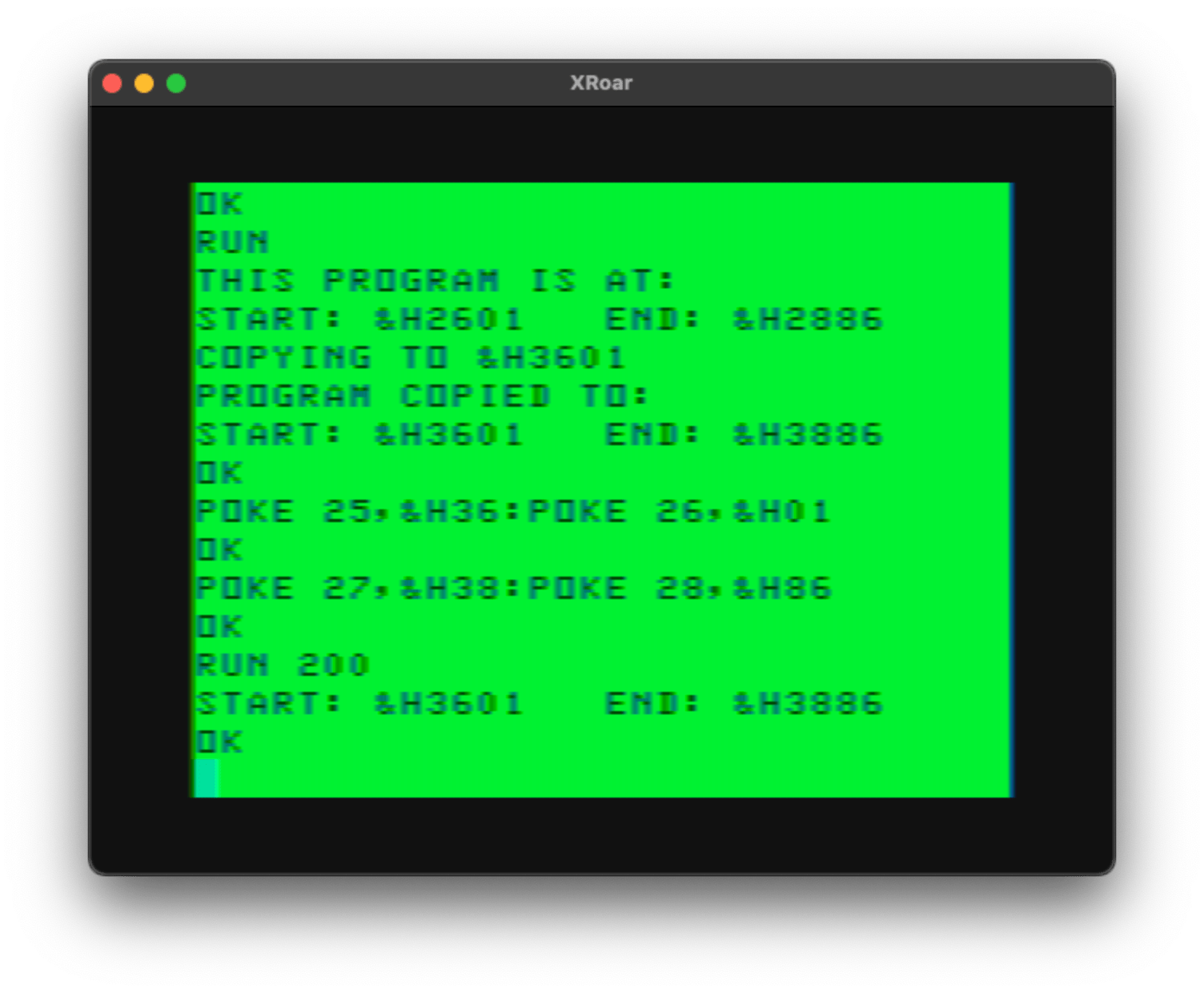
I am using HEX so it’s easy to figure out the MSB (most significant byte) and LSB (least significant byte) of the addresses for the later POKEs. You can see that I POKE 25 and 26 to the first two and last two digits of the new “START” address, and the same with 27 and 28 and the new “END” address.

Then I RUN 200 and it prints where it thinks the program is. It works!

Sorta. If I attempt to EDIT this program or add a new line, I end up with a corrupt program. There’s clearly more that needs to be done for this to really work, but it’s a good proof-of-concept.

Rather than figure out what all I need to do to make this work, I tried using the PCLEAR command. I know it will relocate the current BASIC program and adjust variables as needed. By repeating the same steps as before, I can see the “new” program is higher in memory, then by doing a PCLEAR 4 (which is what it was already set to), it relocates the BASIC back to where it should have been. I can then add a line 81 END and RUN it to see it print the location — matching the original.
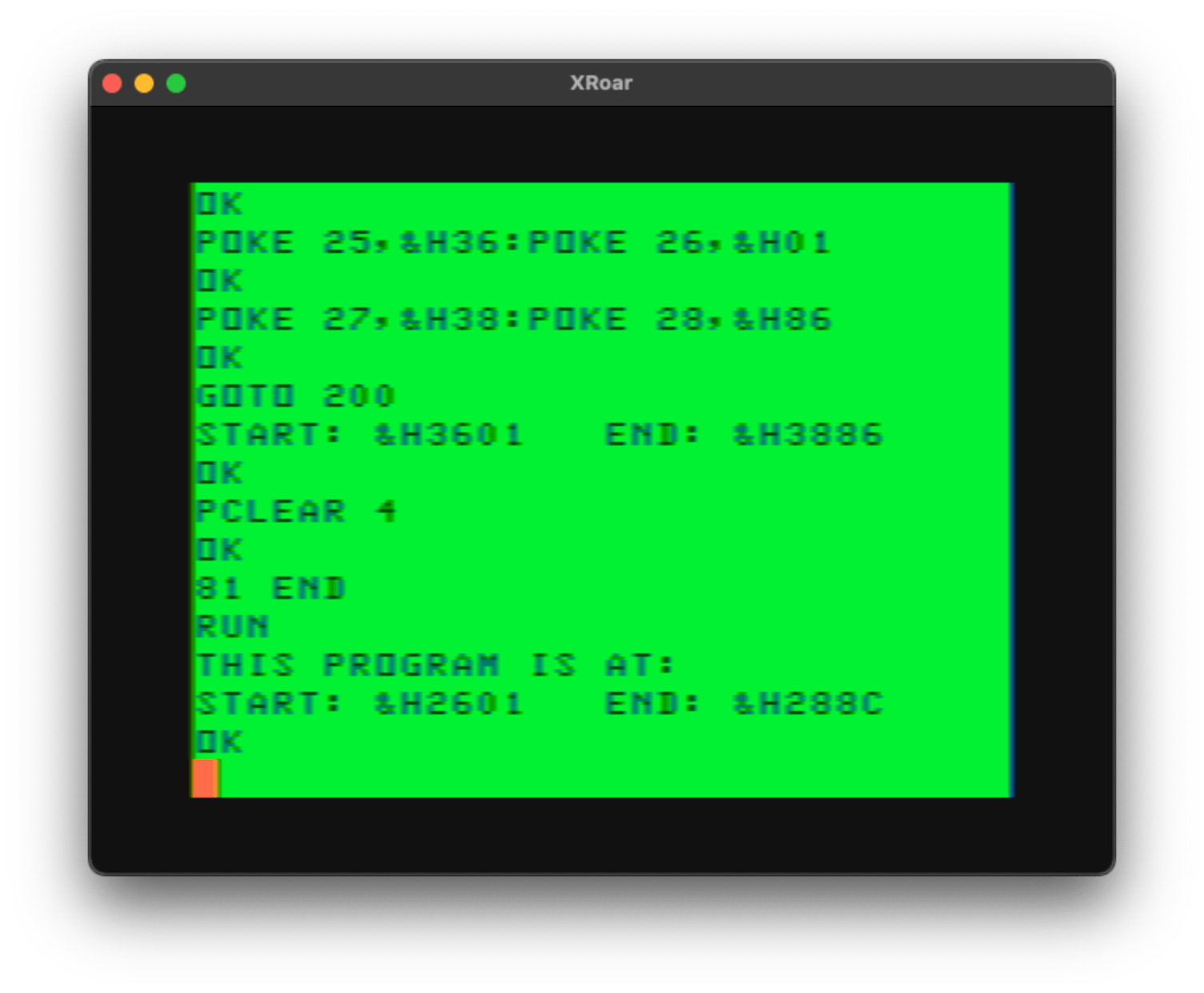
Okay, that’s cool. Probably not the correct way for it to be cool, but it does appear to work. For me. Sorta.

Creating BASIC where there was none

The real goal here is to create a BASIC program that has a line that goes well beyond the 249 character tapeable line length.

Going back to my earlier example that had PRINT”A”, we can see that the PRINT token was a value of 135 (&H87), and a quote is 34, then the character(s) to print, followed by another quote 34, then the zero at the end of the line. As a simple test, I will try to create a program that PRINTs the hex digits from 0 (&H0) to 255 (&HFF). I’ll add a semicolon at the end of each PRINT so each PRINT is on the same line. The program would look like this:

PRINT"0";:PRINT"1";: ... :PRINT"A";:PRINT"B";: ... PRINT"FF";

As a reminder a BASIC program has the format of…

  • 2 bytes – Address of next line
  • 2 bytes – Line number
  • n bytes – Tokenized line
  • 1 byte – 0 end of line marker.

To have BASIC create these bytes, I’ll first have it ask for the location in memory to begin creating the BASIC line(s).

Then I’ll use a variable that tracks the address each line starts and remember that so it can be filled in later when the address of the next line is known. I’ll then POKE out the two bytes representing the line number, and then POKE out the bytes for the tokenized line which will be the PRINT token, quote, the ASCII characters for the HEX$() of the number, another quote, then a semicolon and colon. This will repeat for all 255 hex values. Then the 0 will be stored, and after that, whatever address that is will be the start of the next line. That address will be stored back at the first two bytes of the line entry, then the program will end with two zeros marking the end of the program (no address for the next line).

I came up with this program:

0 'IMPOSSIBLE>BAS
10 CLEAR 300
20 PRINT "START: &H";HEX$(PEEK(25)*256+PEEK(26)),"END: &H";HEX$(PEEK(27)*256+PEEK(28))
30 INPUT "START ADDRESS";ST
40 ' CREATE THE IMPOSSIBLE LINE
50 ' LINE START ADDRESS
60 LS=ST
70 ' STORE LINE NUMBER (10)
80 POKE LS+2,0:POKE LS+3,10
90 ' ADDRESS TO STORE DATA
100 AD=LS+4
110 ' STORE REPEATING TOKENS:
120 ' PRINT"x";:
130 ' WHEN "x" IS A HEX NUMBER
140 FOR I=0 TO 255
150 ' BUILD DATA STRING
160 TK$=CHR$(&H87)+CHR$(34)+HEX$(I)+CHR$(34)+";:"
170 'PRINT TK$
180 FOR J=1 TO LEN(TK$)
190 POKE AD,ASC(MID$(TK$,J,1)):AD=AD+1
200 NEXT
210 NEXT
220 ' STORE FINAL TWO BYTES
230 POKE AD,0:POKE AD+1,0
240 ' STORE NEXT LINE ADDRESS
250 MS=INT(AD/256):LS=AD-(MS*256)
260 POKE LS,MS:POKE LS+1,LS
270 ' SHOW RESULTS
280 PRINT "START: &H";HEX$(ST),"END: &H";HEX$(AD+2)

Similar to the previous example, I RUN this program, then wait as it generates 256 PRINT statements on one huge line 10, and then do the POKEs for 25/26 and 27/28 shown on the screen, then a PCLEAR 4 to move this new program back to where it should be:

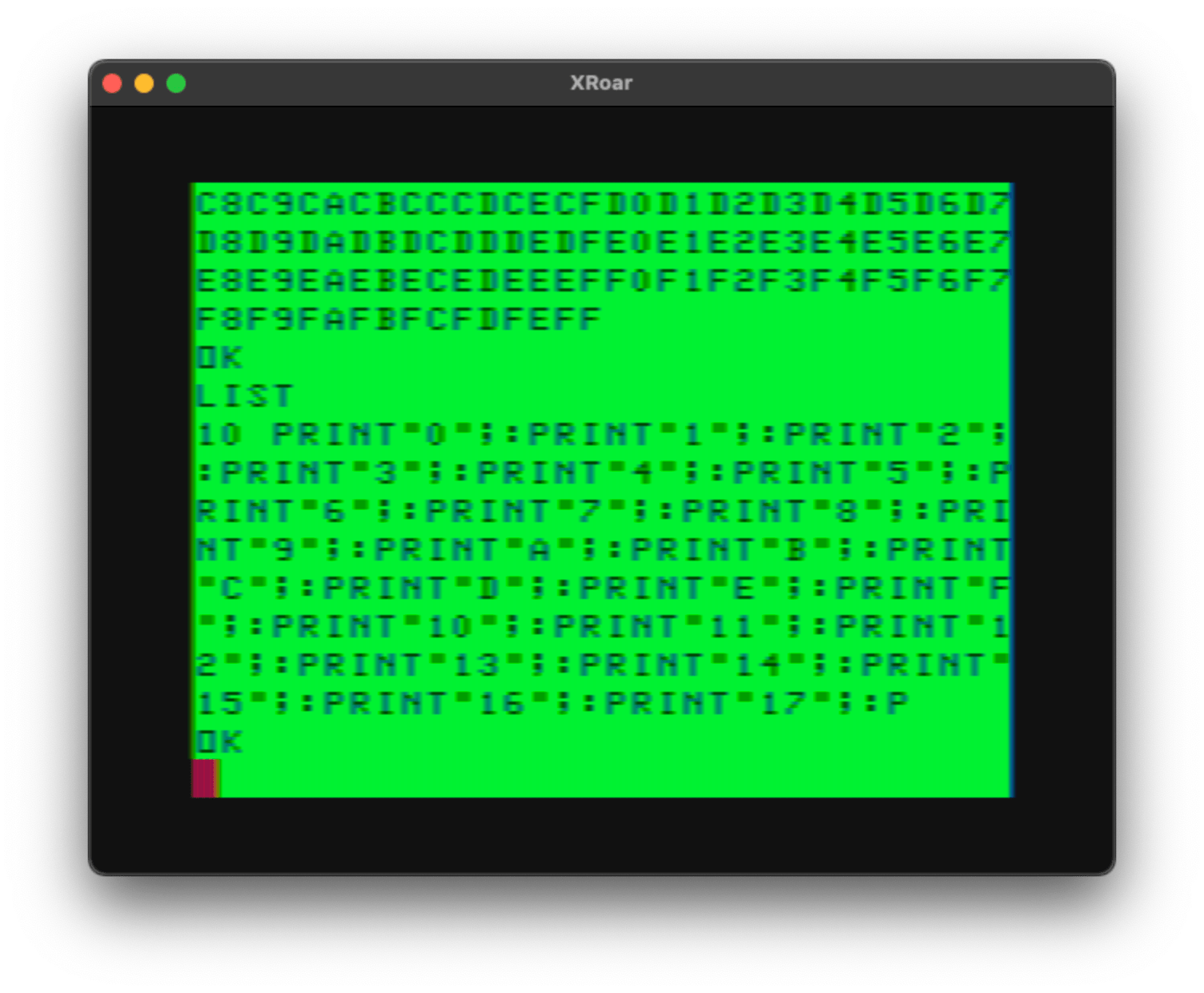
Once that is done, I can RUN to see it fill the screen with hex digits “0” to “FF” (more than fits on a screen), and attempting to LIST the program shows only one line, but only shows the first 249 or so bytes of it:
Checking the size of the program by doing:

PRINT (PEEK(27)*256+PEEK(28))-(PEEK(25)*256+PEEK(26))

…shows that this ONE LINE program is 1782 bytes! That’s quite the long program considering it’s only one line!

Due to the limit of the 251 byte input buffer, we cannot EDIT this line without losing everything after the 249 bytes we can type. If you EDIT and press ENTER, then LIST, you’ll see the program has been truncated.

But, it proves BASIC does indeed not care about how long a line can be.

Prove it!

By typing CSAVE”IMPOSS”,A (for tape) or SAVE”IMPOSS”,A (for disk), you can save the program out in ASCII (text). You could then transfer that file (using the toolshed decb utility or other similar program) to a PC/Mac and look at it in a text editor. This is what I see:

10 PRINT"0";:PRINT"1";:PRINT"2";:PRINT"3";:PRINT"4";:PRINT"5";:PRINT"6";:PRINT"7";:PRINT"8";:PRINT"9";:PRINT"A";:PRINT"B";:PRINT"C";:PRINT"D";:PRINT"E";:PRINT"F";:PRINT"10";:PRINT"11";:PRINT"12";:PRINT"13";:PRINT"14";:PRINT"15";:PRINT"16";:PRINT"17";:PRINT"18";:PRINT"19";:PRINT"1A";:PRINT"1B";:PRINT"1C";:PRINT"1D";:PRINT"1E";:PRINT"1F";:PRINT"20";:PRINT"21";:PRINT"22";:PRINT"23";:PRINT"24";:PRINT"25";:PRINT"26";:PRINT"27";:PRINT"28";:PRINT"29";:PRINT"2A";:PRINT"2B";:PRINT"2C";:PRINT"2D";:PRINT"2E";:PRINT"2F";:PRINT"30";:PRINT"31";:PRINT"32";:PRINT"33";:PRINT"34";:PRINT"35";:PRINT"36";:PRINT"37";:PRINT"38";:PRINT"39";:PRINT"3A";:PRINT"3B";:PRINT"3C";:PRINT"3D";:PRINT"3E";:PRINT"3F";:PRINT"40";:PRINT"41";:PRINT"42";:PRINT"43";:PRINT"44";:PRINT"45";:PRINT"46";:PRINT"47";:PRINT"48";:PRINT"49";:PRINT"4A";:PRINT"4B";:PRINT"4C";:PRINT"4D";:PRINT"4E";:PRINT"4F";:PRINT"50";:PRINT"51";:PRINT"52";:PRINT"53";:PRINT"54";:PRINT"55";:PRINT"56";:PRINT"57";:PRINT"58";:PRINT"59";:PRINT"5A";:PRINT"5B";:PRINT"5C";:PRINT"5D";:PRINT"5E";:PRINT"5F";:PRINT"60";:PRINT"61";:PRINT"62";:PRINT"63";:PRINT"64";:PRINT"65";:PRINT"66";:PRINT"67";:PRINT"68";:PRINT"69";:PRINT"6A";:PRINT"6B";:PRINT"6C";:PRINT"6D";:PRINT"6E";:PRINT"6F";:PRINT"70";:PRINT"71";:PRINT"72";:PRINT"73";:PRINT"74";:PRINT"75";:PRINT"76";:PRINT"77";:PRINT"78";:PRINT"79";:PRINT"7A";:PRINT"7B";:PRINT"7C";:PRINT"7D";:PRINT"7E";:PRINT"7F";:PRINT"80";:PRINT"81";:PRINT"82";:PRINT"83";:PRINT"84";:PRINT"85";:PRINT"86";:PRINT"87";:PRINT"88";:PRINT"89";:PRINT"8A";:PRINT"8B";:PRINT"8C";:PRINT"8D";:PRINT"8E";:PRINT"8F";:PRINT"90";:PRINT"91";:PRINT"92";:PRINT"93";:PRINT"94";:PRINT"95";:PRINT"96";:PRINT"97";:PRINT"98";:PRINT"99";:PRINT"9A";:PRINT"9B";:PRINT"9C";:PRINT"9D";:PRINT"9E";:PRINT"9F";:PRINT"A0";:PRINT"A1";:PRINT"A2";:PRINT"A3";:PRINT"A4";:PRINT"A5";:PRINT"A6";:PRINT"A7";:PRINT"A8";:PRINT"A9";:PRINT"AA";:PRINT"AB";:PRINT"AC";:PRINT"AD";:PRINT"AE";:PRINT"AF";:PRINT"B0";:PRINT"B1";:PRINT"B2";:PRINT"B3";:PRINT"B4";:PRINT"B5";:PRINT"B6";:PRINT"B7";:PRINT"B8";:PRINT"B9";:PRINT"BA";:PRINT"BB";:PRINT"BC";:PRINT"BD";:PRINT"BE";:PRINT"BF";:PRINT"C0";:PRINT"C1";:PRINT"C2";:PRINT"C3";:PRINT"C4";:PRINT"C5";:PRINT"C6";:PRINT"C7";:PRINT"C8";:PRINT"C9";:PRINT"CA";:PRINT"CB";:PRINT"CC";:PRINT"CD";:PRINT"CE";:PRINT"CF";:PRINT"D0";:PRINT"D1";:PRINT"D2";:PRINT"D3";:PRINT"D4";:PRINT"D5";:PRINT"D6";:PRINT"D7";:PRINT"D8";:PRINT"D9";:PRINT"DA";:PRINT"DB";:PRINT"DC";:PRINT"DD";:PRINT"DE";:PRINT"DF";:PRINT"E0";:PRINT"E1";:PRINT"E2";:PRINT"E3";:PRINT"E4";:PRINT"E5";:PRINT"E6";:PRINT"E7";:PRINT"E8";:PRINT"E9";:PRINT"EA";:PRINT"EB";:PRINT"EC";:PRINT"ED";:PRINT"EE";:PRINT"EF";:PRINT"F0";:PRINT"F1";:PRINT"F2";:PRINT"F3";:PRINT"F4";:PRINT"F5";:PRINT"F6";:PRINT"F7";:PRINT"F8";:PRINT"F9";:PRINT"FA";:PRINT"FB";:PRINT"FC";:PRINT"FD";:PRINT"FE";:PRINT"FF";:

Pretty cool! A one line program that is 1700+ bytes long. Sweet!

There’s got to be an easier way…

And we’ll do that in the next part.

Until then…

Alex Evans’ BASIC UTILS change everything – part 1

See also: part 1, part 2 and part 3.

Or at least a lot of things.

Or perhaps just one thing, but it’s pretty darned spiffy thing.

I’ll get to that shortly eventually. But first…

Typing in BASIC in BASIC

When it came to typing in BASIC, my Commodore VIC-20 had a full screen editor that let you cursor around the screen and type, pretty much, anywhere you wanted. You could cursor up to a command you just typed, change it, then hit enter and run it again. You could LIST a program, cursor up to a line, make a change, hit ENTER and it would be modified.

Sky-Ape-Er loader, lines -25.

This was one thing I missed when I switched from my VIC to a 64K Extended Color BASIC CoCo. Fortunately, the EDIT command in Extended BASIC ended up being much faster for me than cursoring around the screen and inserting/deleting things. It sure would have been nice to have both.

Side note: The irony that the computer with full screen editing did not have arrow keys, and the computer that had no full screen editing did have arrow keys, was not lost on me, even as a kid.

The original Color BASIC did not have the EDIT command. If you had an error or typo in a line, your only option was to retype the whole line. Since a 1980 4K CoCo had very little space for BASIC programs, and since each new line took an extra 5 bytes of overhead, I suppose many programmers had to pack lines as much as possible just to make the program fit… For those writing smaller programs, or with upgraded memory (you could get a 16K upgrade!), maybe they stuck to writing shorter lines…especially if they were used to having errors in the program.

Side note: In addition to saving program memory, packing multiple instructions on a line also sped up the program since it no longer had to scan over line numbers moving from instruction to instruction.

Line length limit

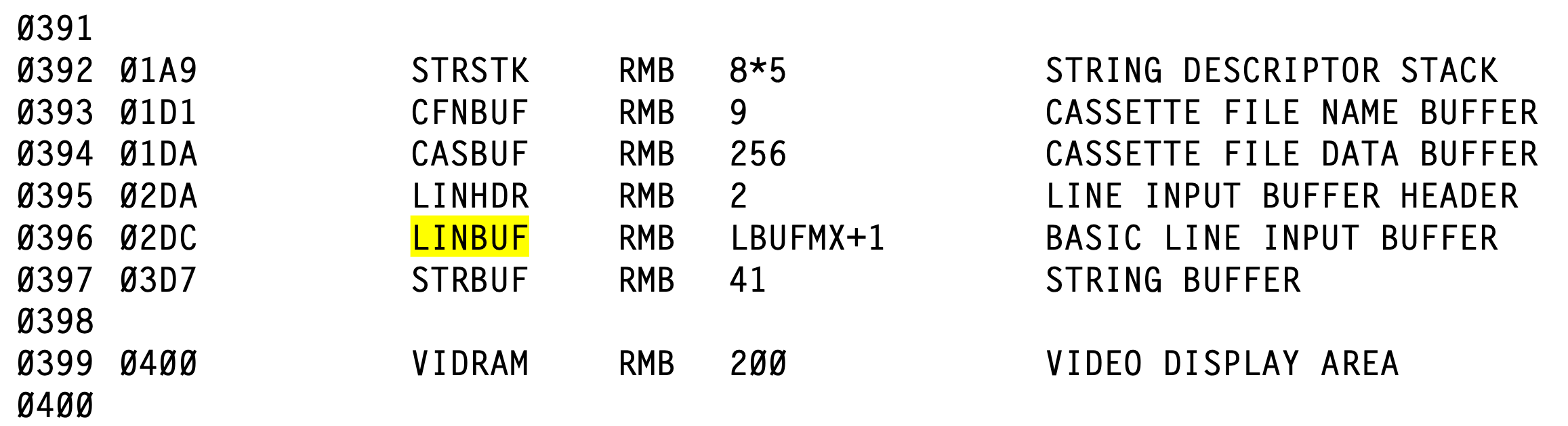
When you begin typing a line on the CoCo, everything you type is going in to a buffer in memory. The Color BASIC Unravelled disassembly book labels this buffer as LINBUF, and describes it as follows:

After line header comes LINBUF which is a 251-byte buffer to store BASIC input line as it is being typed in. This 251-byte area is also used for several different functions but primarily it is used as a line input buffer.

Color BASIC Unravelled, page F3

In the disassembly, I see that this buffer is located just a bit before the 512 bytes used by the 32-column screen.

The buffer is at &H2DC (732), followed by a 41 byte “STRING BUFFER” (whatever that is for) at &H3D7 (983) and then the &H200 (512) bytes for video at &H400 (1024).

The disassembly reserves “LBUFMX+1” bytes for this buffer, but even without looking that up, we could figure out how big the buffer is by subtracting the start of the STRBUF after it (&H3D7) from the start of the LINBUF (&H2DC). That gives us 251 bytes. And, indeed, looking up what LBUFMX is, we find it is indeed 250:

…so “LBUFMX+1” would give us the 251.

I like it when the math checks out.

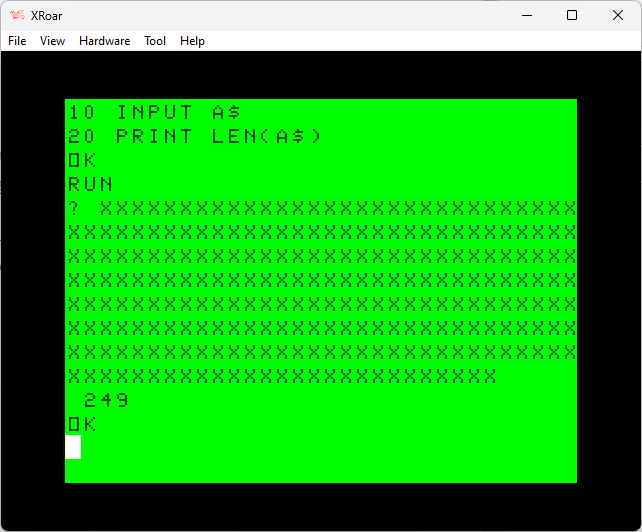
This means when you go to type in a BASIC program line, you shouldn’t be able to type any more than 251 characters. And, actually, it stops you after typing in the 249th character:

Above, you can see I was able to type seven (7) full 32-character lines (224 characters) and then twenty-five (25) more characters on the final line before BASIC stopped me. 224 + 25 is 249, with the cursor sitting at the 250th position. I’d have to look at the code to see why it stops there, since 249 isn’t the 251 I expected.

Something interesting happens when you press ENTER. That line will get tokenized, and BASIC keywords will be changed from the full word (such as “PRINT”) in to a one or two byte token that represents them. In this case, the PRINT keyword will become a one byte token, so the five bytes I typed for PRINT will become one byte. And then if I try to EDIT the line again, I should be able to “X”tend the line and add four more characters:

You can see after I typed “EDIT 10” and then typed “X” to extend to the end of the line, I could type four more characters.

BUT, if I then LIST the program, you won’t see all four of them — only three:

This is a bug in LIST. The four dots actually are still there, and you can see them PRINT when I run this program:

I suppose the point is, no matter what you do, you can’t enter more than 249 characters on a BASIC line.

Or can you?

Defining the limits

What was the limit set to 251? Why not 256 or 200 or something else? It seems to me that the LINBUF length limit may have been arbitrary based on how much memory was available. I suppose back in 1980 on a 4K machine, you didn’t want to take up half your memory for an input buffer that was unused any time you weren’t actually typing stuff in.

But, the actual BASIC interpreter doesn’t seem to care about line length. Looking at the Unravelled disassembly, here is the description of how a BASIC program is stored in memory:

Let’s ignore #1 for the moment. We’ll use this simple program as an example:

10 PRINT"A"
20 PRINT"B"
30 PRINT"C"

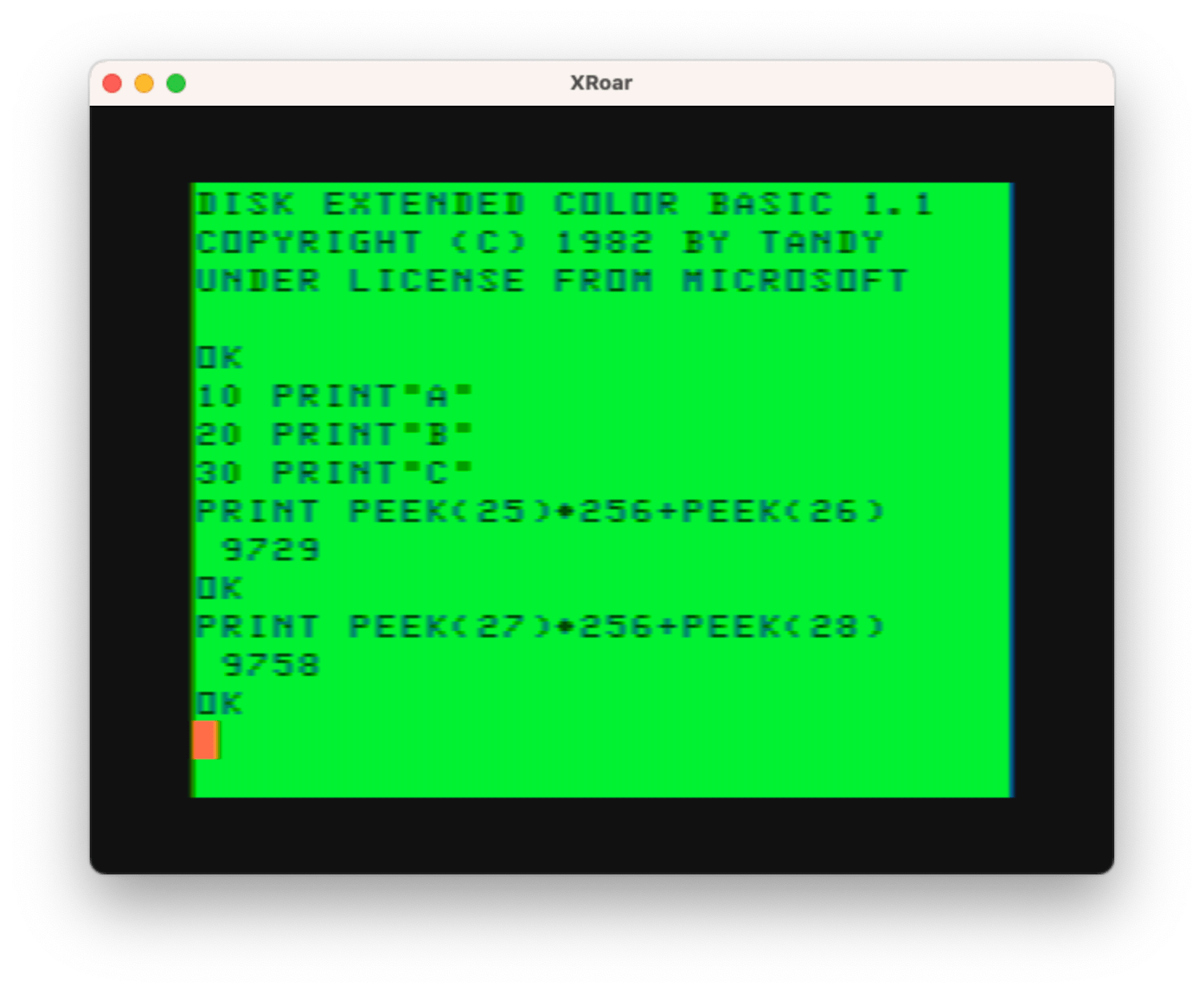
If I type that in, somewhere in memory it will be stored. The keyword PRINT will be turned in to a one byte token, and the rest — the quotes and letters — will be be stored as-is. The somewhere we can figure out by checking some memory locations:

Above, TXTTAB represents two bytes in memory at &H19 (25) and &H20 (26) that contain the address where the BASIC program is in memory. Since variables are stored directly after the BASIC program, we can use VARTAB (the start of variables) to figure out where BASIC ends.

PRINT PEEK(25)*256+PEEK(26)

PRINT PEEK(27)*256+PEEK(28)

This shows that my three line program is in memory from 9729 to 9758. Well, actually, 9757 would be the last byte of the BASIC program, since 9758 is the first byte of variable storage. But close enough!

If I were to PEEK the bytes in that range, I could see what the tokenized program looks like.

FOR I=PEEK(25)*256+PEEK(26) TO PEEK(27)*256+PEEK(28):PRINT PEEK(I);:NEXT

Or, print the two sets of PEEKs first and just use those numbers in the FOR loop:

Above we see the series of bytes that make up the BASIC program. In the earlier list…

…number 4 said the program ends with “two zero link bytes”, and we see a 73. Why? Because that 73 is the first byte of the variables after the program. #TheMoreYouKnow

Looking at those bytes, here is what they represent:

38 10 - address of next line
00 10 - line number 10
135   - PRINT keyword token
34    - quote
64    - A
34    - quote
0     - end of line
38 19 - address of next line
00 20 - line number 20
135   - PRINT keyword token
34    - quote
66    - B
34    - quote
0     - end of line
38 28 - address of next line
00 30 - line number 30
135   - PRINT keyword token
34    - quote
67    - C
34    - quote
0     - end of line
00 00 - address of next line (0 0 means end of program)

The “line number” ones are pretty simple. That’s the line number represented as two bytes.

Side note: Two bytes should allow for lines 0 to 65535, but BASIC only allows lines 0 to 63999. If you try to make a line 64000 or higher, you will get a ?SN ERROR. I guess they didn’t have room for a special “Line Number Too Large” error.

The “address of next line” one corresponds to the location in memory where the next line’s “address of next line” bytes will be. Thus, if you had a BASIC program starting in memory at 10000 (to to make the numbers look nice), it might look like this:

 Mem.        +----- 6 bytes of data ------+
 Addr        |                            |
10000: [4006][10][PRINT_TOKEN]["][A]["][00]
10006: [4013][10][PRINT_TOKEN]["][B]["][00]
10013: [40xx][10][PRINT_TOKEN]["][C]["][00]
10019: [0000]

At least, I think that’s pretty close.

You will notice that BASIC knows the address for the start of the next line, and uses a zero to represent end-of-line. There is no “line length” in there, which means BASIC is kind of like the honey badger… it doesn’t care about line length!

This makes me think that the limit is primarily the LINBUF buffer size. If we had a way to type longer lines, BASIC seems like it would handle them just fine. And this gives me a few ideas:

  1. Patch BASIC to use a larger input buffer so longer lines can be typed. This might also require patching other routines I haven’t looked at. For example, I think there’s some limit to what LIST does. This sounds like work and something that requires more knowledge than I have.
  2. Manually manipulate the BASIC program to create larger lines that can’t be typed. Programs such as Carl England’s CRUNCH will pack lines together to make them longer than you could actually type. (But how long? I dig in to this in a later article.)
  3. Something else…

In the next installment, we will explore some of these options…

Until then…

What is a CoCo? ChatGPT has some thoughts…

Meanwhile, over at chat.openai.com… I told it:

The CoCo is the nickname for the Radio Shack TRS-80 Color Computer. Can you come up with something that “COCO” stands for, that would be related?

– Me, to ChatGPT

It responded with some interesting suggestions…

Interesting question! The CoCo is indeed a nickname for the Radio Shack TRS-80 Color Computer, a line of home computers developed and sold by Tandy Corporation from 1980 to 1991¹. It was based on the Motorola 6809E processor and used the MC6847 Video Display Generator (VDG) chip¹³. It was also compatible with Microsoft BASIC and OS-9 operating system¹.

Some possible things that COCO could stand for, related to this computer, are:

  • Color Operating Computer Organization: A name for a group of enthusiasts or hobbyists who use or collect CoCo computers.
  • Colorful Objects with Computational Outputs: A description of the graphical capabilities of the CoCo, which could display up to 16 colors on screen⁴.
  • Commonly Observed Computerized Oracle: A humorous way of referring to the CoCo as a source of information or entertainment for its users.
  • Cooperative Online Colorful Operations: A term for multiplayer games or applications that could run on the CoCo using its serial port or modem⁴.

Source: Conversation with Bing, 3/16/2023
(1) TRS-80 Color Computer – Wikipedia. https://en.wikipedia.org/wiki/TRS-80_Color_Computer Accessed 3/16/2023.
(2) TRS-80 Color Computer – CoCopedia – The Tandy/Radio Shack Color …. https://www.cocopedia.com/wiki/index.php/TRS-80_Color_Computer Accessed 3/16/2023.
(3) Radio Shack TRS-80 Color Computer. https://oldcomputers.net/coco.html Accessed 3/16/2023.
(4) trs 80 computer products for sale | eBay. https://www.ebay.com/b/trs-80-computer/bn_7024741177 Accessed 3/16/2023.

– chat.openai.com

And, there was more…

  • Colorful Output with Creative Options: A way of highlighting the CoCo’s versatility and potential for different types of programs and projects.
  • Computerized Optical Colorful Oscilloscope: A reference to the CoCo’s ability to display graphics and sound using its VDG chip and 6-bit DAC.
  • Compact Original Colorful Object: A simple description of the CoCo’s physical appearance and design.
– chat.openai.com

There are only some many words beginning with C or O that make sense for this topic, but it might be fun to keep asking it until we find the ultimate backronym.

Until then…

These lines are just too long (for Color BASIC)!

These lines are just too long!

– Me at Walt Disney World

There is a limit to how long of a line you can type in Color BASIC, whether that be entering a program line, or typing at an INPUT prompt. The input buffer is defined as 251 bytes, as shown in the Color BASIC Unraveled book:

LINBUF is defined as 250.

So of course, as you type in really long lines, it stops after the … 249th character. The reason why is beyond the scope of this posting, but this topic will be discussed in an upcoming article series.

Here is an example:

The same is true for using the LINE INPUT command.

Even if the input buffer were larger, the largest string variable you can have is 255 characters, so that would be the maximum input size to avoid an ?LS ERROR (length of string). Here’s a short program to verify that, which uses the STRING$() function to create a string of a specified length containing a specified character.

CLEAR 300
A$=STRING$(255,"X")
A=A$+"X"
?LS ERROR

Something I had not thought about until today was that this length impacts anything that INPUTs, whether it is from the user typing on the keyboard, or reading data from a file.

When reading from a tape or disk file, INPUT and LINE INPUT expect to see zero or more characters with an ENTER at the end. But when creating a file, you can make a line as long as you want simply by using the semi-colon at the end of a PRINT command so it does not output an ENTER. Consider this example that prints a 510 character string with an ENTER at the end:

10 OPEN "O",#1,"510LINE"
20 PRINT #1,STRING$(255,"X");STRING$(255,"X")
30 CLOSE #1

That works fine, but how do you read it back? The string is now too long to be read in to INPUT or LINE INPUT. What will it do?

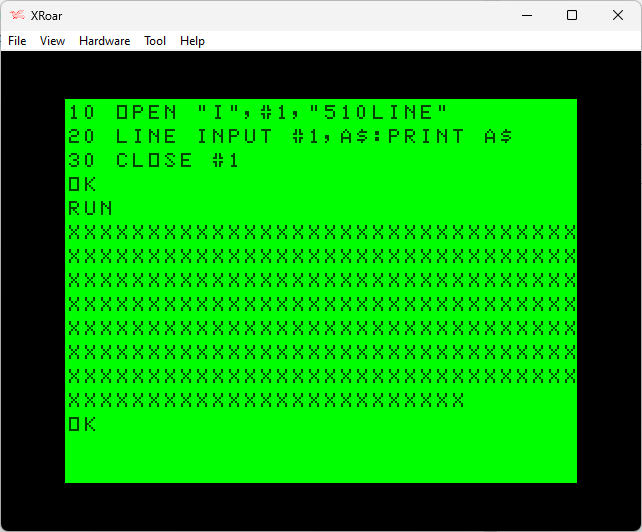
10 OPEN "I",#1,"5120LINE"
20 LINE INPUT #1,A$:PRINT A$
30 CLOSE #1

In this case, the disk input routine reads as much data as will fill the input buffer, then keeps scanning forward looking for the ENTER. The rest of the data on that string appears to be discarded.

If you were to count the Xs, or just PRINT LEN(A$), you would see that A$ contains the first 249 characters of the 510 string that was written to the file.

But what if the ENTER was not at the end? By adding a semi-colon to the end of the PRINT:

10 OPEN "O",#1,"510LINE"
20 PRINT #1,STRING$(255,"X");STRING$(255,"X");
30 CLOSE #1

…what would the input program do? (Same code as before, just now it’s reading from a file that has a 510 character line with no ENTER at the end.)

10 OPEN "I",#1,"5120LINE"
20 LINE INPUT #1,A$:PRINT A$
30 CLOSE #1

…the behavior will change. We will now get an ?IE ERROR (Input Past End of File). The INPUT and LINE INPUT routines need an ENTER, so while it scans forward looking for the end of the line, it hits the end of file before an ENTER, and that’s what it reports.

This tells us two things:

  1. Always have an ENTER at the end of a line.
  2. Don’t have the line longer than 249 bytes or any characters after it will be ignored.

Here is an example that creates a file with a 250-character line that contains 248 “X” characters followed by “YZ”. When read back, it only gets up to the Y (249 characters):

5 CLEAR 300
10 OPEN "O",#1,"250LINE"
20 PRINT #1,STRING$(248,"X");"YZ"
30 CLOSE #1
40 OPEN "I",#1,"250LINE"
50 LINE INPUT #1,A$:PRINT A$
60 CLOSE #1

And, since BASIC appears to keep scanning INPUT looking for an ENTER, you could make your tape or disk I/O take a really long time if you created some really huge line with no ENTER at the end, then tried to read it later.

Here is a program that writes 65,025 “X”s to a file with no ENTER at the end, and then tries to read it back:

0 'LINE2BIG.BAS
10 CLEAR 300
20 PRINT "WRITING FILE..."
30 OPEN "O",#1,"LINE2BIG"
40 FOR I=1 TO 255
50 PRINT I;
60 PRINT #1,STRING$(255,"X");
70 NEXT
80 CLOSE #1
90 PRINT:PRINT "READING FILE..."
100 OPEN "I",#1,"LINE2BIG"
110 LINE INPUT #1,A$:PRINT A$
120 CLOSE #1

If you run that, it will eventually try to read (and take a really long time) before erroring out with ?IE ERROR. Add “75 PRINT #1” to insert an ENTER at the end of the PRINT loop, and then it will just take a really long time trying to read, and print the first 249 characters of that 65,025 character string.

And that’s it for today, but I hope you took notes. LINBUF will return.

Until then…

Color BASIC program line info dump program

These days, I feel like I am regularly saying “I’ve learned more this week about X than I learned in Y years of using it back in the 1980s!”.

This is another one of those.

Each line of a Color BASIC program is tokenized (changing keywords like PRINT to a one or two byte token representing them) and then stored as follows:

  • 2-Bytes – Address in memory where next line starts
  • 2-Bytes – Line number (0-63999)
  • n-Bytes – Tokenized program line.
  • 1-Byte – Zero (0), indicating the end of the line

The four byte header and the 1 byte zero terminator mean that each line has an overhead of 5-bytes. You can see this by printing free memory and then adding a line that has a one byte token, such as “REM” or “PRINT”:

Above, you see the amount of memory decreases by 6 bytes after adding a line. That’s five bytes for the overhead, and one byte for the “REM” token.

The BASIC program starts in memory at a location stored in memory locations 25 and 26. You can see this by typing:

PRINT PEEK(25)*256+PEEK(27)

There are other such addresses that point to where variables start (directly after the program), and where string memory is. Here is an example program from an earlier article I wrote that shows them all. (The comments explain what each location is.)

0 ' BASINFO3.BAS

10 ' START OF BASIC PROGRAM
20 ' PEEK(25)*256+PEEK(26)

30 ' START OF VARIABLES
40 ' PEEK(27)*256+PEEK(28)

50 ' START OF ARRAYS
60 ' PEEK(29)*256+PEEK(30)

70 ' END OF ARRAYS (+1)
80 ' PEEK(31)*256+PEEK(32)

90 ' START OF STRING STORAGE
100 ' PEEK(33)*256+PEEK(34)

110 ' START OF STRING VARIABLES
120 ' PEEK(35)*256+PEEK(36)

130 ' TOP OF STRING SPACE/MEMSIZ
140 ' PEEK(39)*256+PEEK(40)

150 ' USING NO VARIABLES
160 PRINT "PROG  SIZE";(PEEK(27)*256+PEEK(28))-(PEEK(25)*256+PEEK(26)),;
170 PRINT "STR SPACE";(PEEK(39)*256+PEEK(40))-(PEEK(33)*256+PEEK(34))
180 PRINT "ARRAY SIZE";(PEEK(31)*256+PEEK(32))-(PEEK(29)*256+PEEK(30)),;
190 PRINT " STR USED";(PEEK(39)*256+PEEK(40))-(PEEK(35)*256+PEEK(36))
200 PRINT " VARS SIZE";(PEEK(29)*256+PEEK(30))-(PEEK(27)*256+PEEK(28)),;
210 PRINT " FREE MEM";(PEEK(33)*256+PEEK(34))-(PEEK(31)*256+PEEK(32))

I thought it might be interesting to write a BASIC program that displays information on each line of the BASIC program. That information would include:

  • Start address of the line
  • Address of the next line
  • Line number of the line

Here is what I came up with. It can use generic PRINT in lines 40 and 70 (for Color BASIC) or a nicer formatted PRINT USING (for Extended Color BASIC) in lines 50 an 80.

0 'BASINFO.BAS
1 REM BASINFO.BAS
2 REMBASINFO.BAS
10 PRINT " ADDR NADDR LINE# SIZ"
20 L=PEEK(25)*256+PEEK(26)
30 NL=PEEK(L)*256+PEEK(L+1)
40 'PRINT L;NL;
50 PRINT USING"##### #####";L;NL;
60 IF NL=0 THEN END
70 'PRINT PEEK(L+2)*256+PEEK(L+3);NL-L
80 PRINT USING" ##### ###";PEEK(L+2)*256+PEEK(L+3);NL-L
90 L=NL:GOTO 30

For this program, as shown, running on a virtual 32K Extended Color BASIC CoCo in the XRoar emulator, I see:

The first column (ADDR) is the address of the BASIC line in memory. After that is the address of where the next line begins (NADDR), and it will match the address shown at the start of the following line. The third column is the line number (LINE#), and last is the size of the line (SIZ) which includes the tokenized line AND the terminating zero byte at the end of it.

The final line has a “next address” of zero, indicating the end of the file.

At the start of the program I included three comments:

0 'BASINFO.BAS
1 REM BASINFO.BAS
2 REMBASINFO.BAS

In the output of the program, you see them described as:

 ADDR NADDR LINE# SIZ
 9729  9747     0  18  <- [0 'BASINFO.BAS]
 9747  9765     1  18  <- [1 REM BASINFO.BAS]
 9765  9782     2  17  <- [2 REMBASINFO.BAS]

You can see that the length of lines 0 and 1 are both 18, even though one looks like it should be shorter. In this case, the apostrophe (‘) abbreviation for REM seems to take as much space as “REM ” (with a space after it). This is because the apostrophe is encoded as a “:REM” (colon then REM). Alex Evans recently reminded me of this. This behavior would allow you to use it at the end of a line like this:

10 LINE INPUT A$'ASK FOR USERNAME

…instead of having to do:

10 LINE INPUT A$:REM ASK FOR USERNAME

But don’t do either! REMs at the end of the line can be the worst place to have REMs, since BASIC will have to scan past them to get to the next line, even if they are after a GOTO. This makes them slower. (Reminder to self: do an article on this since I’ve learned more since I original covered the topic in one of my Benchmarking BASIC articles…)

But I digress…

If you wanted to run this on your own program, you could do so by making this routine load at a high line of BASIC (higher than any lines you might be using), then you could save it as ASCII (SAVE”BASINFO”,A) and then use MERGE”BASINFO” (from disk) to bring those lines in to your program.

63000 PRINT " ADDR NADDR LINE# SIZ":L=PEEK(25)*256+PEEK(26)
63001 NL=PEEK(L)*256+PEEK(L+1):PRINT USING"##### #####";L;NL;:IF NL=0 THEN END ELSE PRINT USING" ##### ###";PEEK(L+2)*256+PEEK(L+3);NL-L:L=NL:GOTO 63001

Now you could do RUN 63000 to see what your program looks like. (The highest line number Color BASIC allows is 63999 so you could change that to 63998 and 63999 if you wanted absolutely the most line numbers available for your program ;-)

You could also add “IF L=63000 THEN END” somewhere and have it stop when it hits that routine.

What use is this?

For an upcoming article, I expect to use a version of this code to “prove” something as it relates to BASIC and the length of lines.

But, it might also be fun to generate some statistics — longest line, shortest line, a graph of the different line lengths, etc.

Until next time…

FreeRTOS: Virus?

The discussion about using FreeRTOS has come up at my day job in recent years, so a month or two ago I downloaded it from the official website with plans to take a look at it.

I never got around to it, but today our IT department contacted me about its removal from my system. The download was flagged to contain a virus. I am sharing this information here so it will show up in search engines:

Severe Gen:Variant.Tedy.307215 - Virus.Generic - Deleted

File - C:Users<username>DownloadsFreeRTOSv202212.00FreeRTOSv202212.00FreeRTOSDemoWIN32-MSVCDebugRTOSDemo.exe

md5: 2F1699A8E9DE9D946FD6DDCC4BCC2F45

It appears all I did was open the project and build it in Visual Studio. Nothing else on the system was flagged, and we use Visual Studio to build two of our in-house apps, so I am curious why this happened.

Anyone seen this? Please leave a comment.

Stay safe :)