Installing iOS apps direct without going through the App Store…

One of the features of Android is that you can install anything you want, from any source — such as a developer’s website. Until app stores made all of this obsolete, this was the way all software was distributed. Sure, there were always index sites, such as VersionTracker.com or Download.com, where you could find links to all the installers, but ultimately everything came direct from the developer.

By contrast, Apple’s iOS apps only install through Apple’s App Store. Except that’s never really been true. Even without jailbreaking an iPhone, you have always been able to install an app direct from a developer for testing purposes. The developer had to be registered with Apple, but beyond that there were no barriers. Downloader beware.

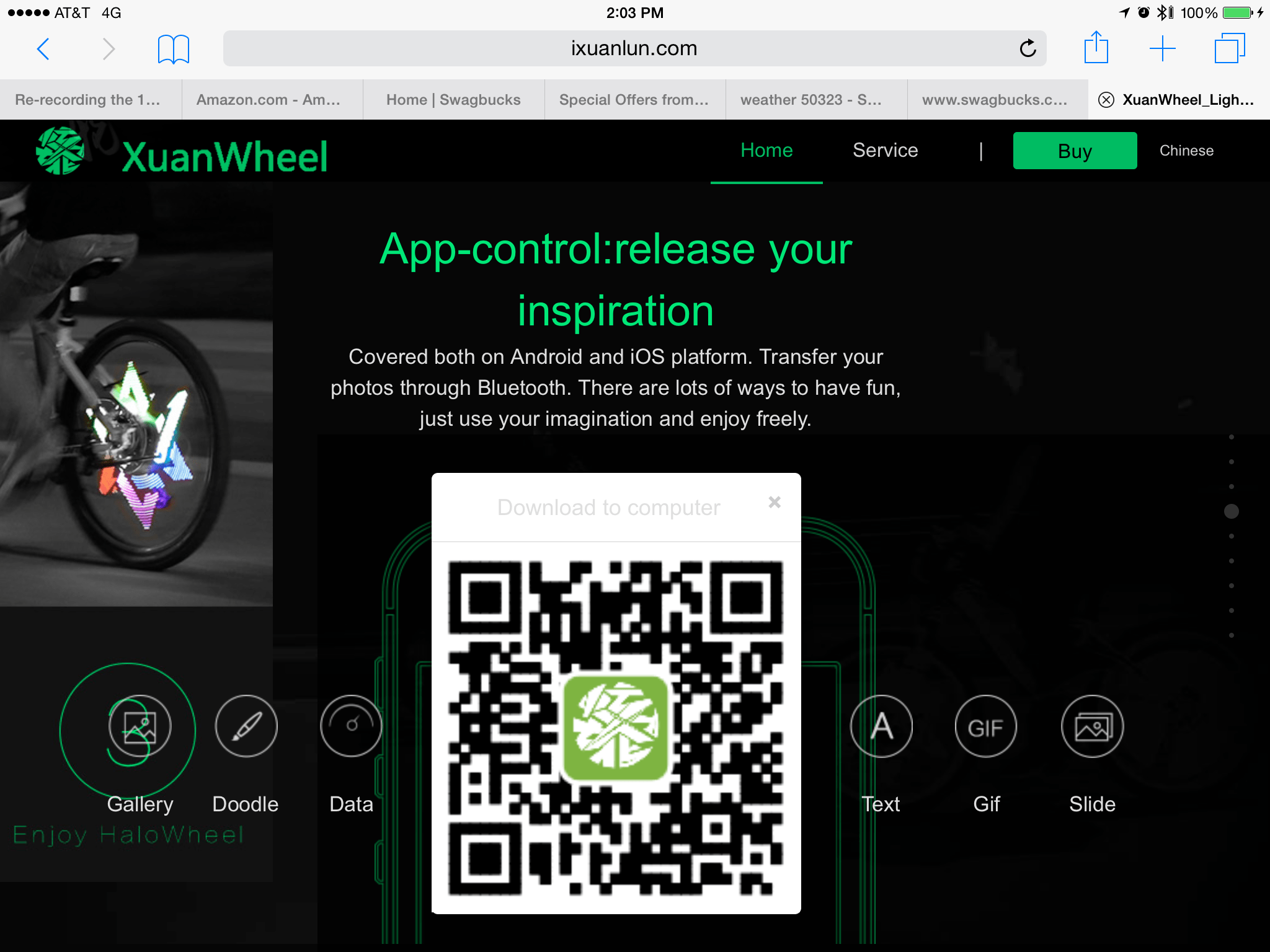
I recently came across what I believe is a misuse of this beta test capability… There is a computerized bicycle light I have been researching and it is programmed via an Android or iPhone app. Their app does not appear in Apple’s App Store. Instead, you get a QR code from their website which will take you to a special download website:

 
I don’t know why they don’t just post the link directly — I have a QR reader app, but most folks I know don’t. For those without a QR reader app, that location goes to:

http://fir.im/halowheelOversea

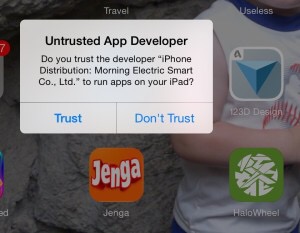
If you go there, you can download the iPhone app direct to your device, and your device will warn you:   


Do you trust this app? XuanWheel iOS app.


You can see the green app icon in the lower right of that screen shot.

So yes, a developer can do this… But isn’t supposed to. I assume they plan to get their app in the App Store at some point… Until then, I wonder how many are brave enouhg to directly install it?

Not me :)


Mac OS X Wireless Diagnostics to speed up WiFi

Did you know that Mac OS X has a hidden utility that will scan surrounding WiFi networks and suggest a better/faster channel for you to use?

Neither did I, until tonight.

After a few months of really slow Internet, I finally decided to contact CenturyLink to see what was wrong. My latency rates were over 800ms and, while speed tests showed good and Hulu and such would usually stream just fine, actual usage (web page loading) was SLOW SLOW SLOW. Anything with packets back and forth (not one way streaming, I guess) was SLOW.

After hooking my MacBook directly to the Actiontec Q1000 modem and shutting of WiFi, I found I was indeed getting fast speed… I then searched to see what could be the problem, and found this article:

http://osxdaily.com/2013/12/11/find-best-wi-fi-channel-wireless-tool-mac/

In it, it suggested the Wireless Diagnostics feature of Mac OS X. By holding down Option when you pull down the WiFi menu from the menu bar, you get more options:

Wireless Diagnostics in Mac OS X

Wireless Diagnostics in Mac OS X (hold down Option).

This brings up a neat little utility which has a Utilities menu with some cool features.

Wireless Diagnostics in Mac OS X

Wireless Diagnostics in Mac OS X is a cool “hidden” utility.

From the Utilities menu, I found Scan to be particularly useful. It will look at all the WiFi access points around you and recommend what channel you should set your WiFi base station/modem to for fastest performance:

Wireless Diagnostics in Mac OS X suggests the best channels to use.

Wireless Diagnostics in Mac OS X suggests the best channels to use.

And, most surprisingly to me, there is a WiFi packet sniffer built in! Enjoy!

Wireless Diagnostics in Mac OS X has a port sniffer!

Wireless Diagnostics in Mac OS X has a port sniffer!

P.S. – By switching from the “Automatic” channel 6 to channel 2, my latency went from 850ms to under 150ms. Still not great, but much better and maybe as much as I can do without moving my wireless devices around or building a Faraday cage around my home. :)

More on bike spoke light LED signs (POV)

  • 2004/8/09 – Adding link to Hokey Spokes.
  • 2014/8/10 – Adding link to manufacturer of YQ800X series products.

Last year, I posted an article discussing a cheap bike wheel LED display I picked up for $6 on e-Bay. Recently, I discovered many other ones seem much better. The cheap one I have has 32 blue LEDs, and is single sided, so you can only view it from on side of the bike. Since then, I have discovered full color versions with more LEDs and, most importantly, double-sided so they can be viewed on either side of the bike. Here is a rundown of my researc so far, mostly posted here so it can be indexed in Google, BING, etc. and maybe help others.

I will post links to the items available from Amazon (but NONE are actually sold BY Amazon, and most ship from China and take weeks to arrive). I have found hundreds of e-Bay stores selling them, too, often at far lower prices.

There is a company called ExcelVan that makes several, ranging from $20 to over $100.

The ones I have found so far include:

  1. YQ8003 – $45, double-sided, two arm, 128 LED, programmed via USB cable.
    http://www.amazon.com/Excelvan-Colorful-Waterproof-Programmable-customize/dp/B00WS2I8K2
  2. YQ8005 – $26, double-sided, two-arm, 96 LED, maybe not programmable (25 included pictures).
    http://www.amazon.com/Excelvan-Colorful-Pictures-Waterproof-Mountain/dp/B00W8QC1JC/ref=sr_1_cc_2?s=aps&ie=UTF8&qid=1439079623&sr=1-2-catcorr&keywords=YQ8005
  3. YQ8007 – $90 (but I found it for $40), double-sided, two-arm, 144 LED, programmable by SD memory card. This Amazon link is for a different brand name, so it is either a clone/bootleg or just another company selling the item under their name.
    http://www.amazon.com/Yongchengg-Programmable-Programming-Double-side-Waterproof/dp/B011U02790/ref=sr_1_1?s=sporting-goods&ie=UTF8&qid=1439079839&sr=1-1&keywords=YQ8007
  4. YQ8008 – $150 (Amazon Prime), double-sided, three-arm, 216 LEDs, programmable by SD memory card. By having THREE arms, it can display the color picture at a slower speed.
    http://www.amazon.com/gp/product//B00RE6KGNY/ref=twister_dp_update?ie=UTF8&psc=1

Update: Since the original posting, I think I have located the manufacturer of these devices. They produce YQ8001 to YQ8009. Some use preset patterns, some are programmable (they call them “DIY”), and some can even do video. I will try to put a chart together as I learn more.

Here is the YQ8003 installation video:

By searching for the “YQxxxx” numbers, you can find them being sold all over e-Bay and other online places — most shipping from China. The prices vary greatly. GearBest has the YQ8007 (they claim) for $40.99 with free shipping, for example.

XuanWheel (pic from Amazon store).

There is a difference in how they work, too. Some just display static photos, and some can display animation. But, the best one (maybe), is the XuanWheel.

http://www.ixuanlun.com/en/indexEnMobile.html

I believe it started out as an IndieGogo campaign called HaloWheel, but since Halo Wheels is a name of a bike wheel brand, maybe that’s why they changed it to XuanWheel? It is a double-sided, four-armed one that is programmed via Bluetooth over an Android or iOS device. This HaloWheel (per IndiGogo name) or XuanWheel (per website) runs $89 on Amazon (there is a $5 discount code right now) with free shipping (from China, so it takes a month to reach the USA). I found similar devices on e-Bay for as low as $73 (they may be knockoffs or clones).

This one looks like it can synchronize both wheel displays (if you have two). I could not find ANY information on what size hub it would fit, so I asked on YouTube and they replied:

The diameter of the hub should not be larger than 3.8 centimeter

WARNING: Their iOS app is not in the App Store. Instead, you just go and download it direct from their website. Assuming you like to just download random apps from sites in China… Yes, just like Android, you can directly install iOS apps without going through the App Store. BUT, they are not supposed to do that. That is, I think, how developers allow beta testers to get access to their apps before they are done and submitted to Apple. They only get a limited number of installs this way, I believe, and they are not meant to be distributing software like this. At least the iOS device will warn you:

Currently not in the App Store, you have to take changes with a non-inspected app from a website in China. Scary!

And lastly, there is even the Monkey Light Pro  by Monkeylectric that sells for $1000. It looks good, but not $1000 good!

More to come… I am hoping to have a review unit of one of these in a few weeks.

UPDATE: Commenter wb8nbs pointed me to Hokey Spokes, which at $20 16-LED spoke lights that can display preset patterns or simple one line text. The unique thing about them is you can use just one, or multiple. They sync to each other using infrared, and from the demo videos, it appears they all just do the same thing so all patterns look symmetrical (thus, any text would show the same in three places of the wheel when using three of these). Not color, but you can get them in different colors and create interesting rainbow effects. Not the most cost effective solution, but if you just want cool lights, one would be pretty cheap, and they ship from Indiana!

SPAM LITE

According to a bunch of tech news stories today (all echoing the same news from the same Symantec source), less than 50% of all e-mail is now spam. This is the lowest level of spam since September 2003.

istr-monthly-threat-report-spam-rate-lightbox

Keep that in mind when you complain about junk mail that makes it to your inbox… You should be seeing every other message as junk mail. Sadly, spam filters are also filtering out mail you want on a regular basis. I routinely log in to my spam filters and every day there are a few e-mails I manually release so I can read them that would otherwise never make it to me.

E-mail is broken, but like a car that needs a tune-up, it at least gets us to work most of the time…

Unlimited iPhone data with no contract for $30?

I bought my first cell phone in 1994. It was a bag phone I kept in my car. It was just magical to be able to make a short (but expensive) phone call without being home or at a pay phone. Since then I have had a variety of phones, including one of the first “smart phones” (before we had such a name) – a Kyocera 6500 (a Palm Pilot with a phone built in). It was just magical to be able to download e-mail or pull up a website without being at home or work on a computer.

I went through three PalmOS-based phones (the Kyocera 6500, a color Samsung SPH-i500 and a Treo 650) before the iPhone came out in 2007 and made those devices look absolutely primitive.

The iPhone was the first device I ever signed a contract for. Back then, pushy cell phone sales folk would push 2-year contracts because it made them money commission money. The dirty little secret was that the carriers did not require 2-years and all had 1-year contracts available (and in some cases, no contract plans too). This was at least still the case around 2002 or so when I spent a year selling phones for T-Mobile (recently rebranded from VoiceStream), Sprint, Nextel and others. At some point, things change.

I had never had to sign a contract to activate any of my phones until the iPhone in 2007 — and that was WITHOUT getting any kind of reduced price like we are used to today. Initially, you bought the iPhone at full price from an Apple Store then took it home to activate via iTunes. There was no negotiating. You either signed up for 2-years with AT&T, or couldn’t use the iPhone. Yep, we paid FULL PRICE for the phone PLUS signed a contract. AT&T had to change quite a bit to work with Apple (visual voice mail support, no AT&T branding on the device, activation done through Apple). At least there was unlimited data!

Today, there is a new generation of cell phone owners that just assumes you get the phone free (or $99, or $199, or…) and sign a two year contract. Most phone owners only care about having a phone that works when they need it (coverage) and has enough data for what they do, and enough text or voice time for how much they type of talk. Sadly, most are getting ripped off since today you can go to a no-contract carrier, pay full price for a device and still end up saving hundreds of dollars over the course of two years. And, be able to sell your device and get a new model at any time you want. And no cancellation fees if you device they suck and want to switch to a new carrier.

With that said, I haven’t had a cell phone since 2009. I have my original iPhone, and after its two year contract was up, I got the iPhone 3GS with another two year contract. In 2011, once my contract was done, I shut off service because I decided paying rent and having food was more important than being able to check e-mail in my pocket.

Adjusting to life without a smartphone, especially after having one for so long, was hard at first. I did have an iPad with unlimited AT&T data plan (no contract) so I wasn’t completely shut off, but I wasn’t bringing the iPad with me when I went on a bike ride. Instead, I’d use my old iPhone 3GS as a biking computer (using b.iCycle, which can preload maps) and I would stop at WiFi points (like outside a Burger King) if I wanted to check messages.

I always ran the risk of getting lost and being on a trail somewhere with no map and not being able to figure out where I was on the always-out-of-date paper trail maps I had with me. It sure would be nice to have data service during a ride, but certainly not worth having a 2-year contract and $65/month bill.

I considered activating a cheap Android on Virgin Mobile or Boost or some similar no contract carrier. They had plans with “unlimited text and data” (basically) for $35 a month (some discounting $5 if you linked it to your bank account to pay each month). However, my frustrations with a cheap Samsung Galaxy Rush phone I picked up for $20 from Best Buy made me realize a crappy phone with data wouldn’t be that great.

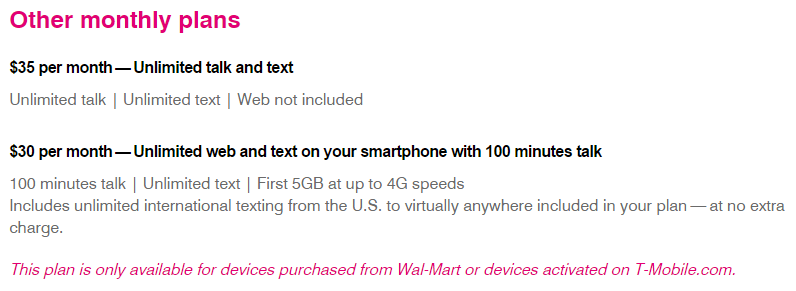
Was there a way I could bring data to my old iPhone 3GS? It was GSM, so only carriers like AT&T or T-Mobile would support it. AT&T was too expensive, and T-Mobile didn’t look much better until I noticed this on the bottom of their prepaid plans page:

A no-contract $30 "unlimited data" plan?

A no-contract $30 “unlimited data” plan?

Assuming T-Mobile has service where you are, $35 seems like a great price for someone who talks and texts a ton. For data, the $30 plan (with only 100 minutes of talk time) would be great.

I tried to contact T-Mobile to find out how to buy this (there was no clickable link) since it did say “devices activated on T-Mobile.com.” (I was not going to buy a phone from Wal-Mart.) A phone call ended up in a transfer and being on hold, so I quickly gave up and looked for another approach.

I ended up using Twitter to reach out to their support team. Very quickly I had a response asking me to register an account so they could direct message me. A series of short exchanges followed over the next day or so as I asked questions about this plan and how to get it, and whether or not I could just get a T-Mobile SIM and stick it in my 5+ year old iPhone 3GS and use it. I was aware that early on iPhone owners were able to unlock their phones and use them on T-Mobile, but at reduced speeds since the frequencies between AT&T and T-Mobile were different. They only shared the low-speed 2G (AT&T EDGE network) frequencies. T-Mobile support didn’t seem completely to understand what I was getting at, but on their assurance this could be done, I planned to give it a try.

Unfortunately, there didn’t seem to be any way to by this plan online. They sent me to a Wal-Mart to pick up a $30 kit:

http://www.walmart.com/ip/T-Mobile-Complete-SIM-Kit/39081494

At the time, it was on sale for $29.82 so I did an online Walmart.com purchase so I could just walk in to Wal-Mart later and pick it up (and earn me some Swagbucks referral points as well, making it even cheaper).

That evening I was able to remove my old AT&T SIM (where’s a paperclip when you need one) and then fit the new mini SIM in a plastic adapter and put it in my 2009 iPhone. After a short registration online, I had a working iPhone 3GS with slow EDGE data. I would now have a phone for emergencies, and data to get maps while on a bike ride.

More to come…
Some praise for Otterbox

Every now and then, I run across some example of “above and beyond” customer service that inspires me to send in positive feedback. Recently, I had such an experience with the Otterbox protective case company and wanted to share it with you.

Shortly after the original iPad came out, I purchased one (and a second for a gift). I fell in love with the Apple iPad case which let me prop the device up for watching videos, or for use as a keyboard stand. Unfortunately, I dropped my iPad enough over the years I had it that it received some minor damage to the metal corners. That Apple case, while fantasticly functional (still my favorite), was not very protective. I was still able to sell this “lightly damaged” iPad for about $250 when I got rid of it, but I expect I could have gotten more if it did not have drop damage.

When I purchased a refurbished iPad 3, I wanted to ensure I could get a higher resell value later on so I looked in to protective cases that were actually protective. There were a few I considered, but it was seeing one in person at (I think) an AT&T store in a local mall that made me choose the Otterbox Defender. I was ready to buy it from the very helpful AT&T rep after he assured me prices were pretty much the same everywhere because no on discounted them. But, when I walked next door and saw RadioShack sold the same case for $10 less, I decided maybe I would shop around for an even better price since clearly discounts were to be had.

Amazon won:

http://www.amazon.com/gp/product/B007IV7KRU/ref=oh_aui_detailpage_o00_s00?ie=UTF8&psc=1

Today, this $90 case can be found for under $60, but I don’t recall how much I paid for it when I ordered it on January 1, 2013. It certainly is a bulky case that makes things heavier, but it provided the protection I needed.

The thing about Otterbox that makes this special is their customer service. During my first year of using it, I dropped it and broke the corner off the plastic cover that is used to snap on and protect the screen (when not in use). My fault, my bad. I wrote Otterbox to see how much a replacement would cost and they sent me one under warranty. Excellent.

A bit later, my plastic screen cover had enough scratches (leaving my glass iPad screen flawless) that I wanted to rpelace it. I wrote in to ask how much this would cost, and explained my unit was out of warranty. To my surprise, they sent me a replacement screen cover. Excellent.

Shortly after this, the rubber flap that covers the dock connector finally broke off. After two years of daily use, the material had just given out. I wrote in this week to ask how much it would cost to buy a replacement. Once again, Otterbox is sending me a replacement under warranty.

I am very impressed with how Otterbox has treated me. I have purchased four Otterbox items over the years (though this is the only one that has ever been used enough to need replacement parts), and I will continue turning to them when I need a protective solution due to their outstanding support.

Thank you, Otterbox.

The end of Radio Shack as we know it?

This is a US-centric post, so apologies to those in areas where this is irrelevant. Our beloved Radio Shack is closing stores, while going through the form of bankruptcy protection that would allow them to downsize and regroup. Alas, this may not be the case at all. Darren Grant, CEO of Tandy Corporation in the UK, had passed along some information about the fate of the US Radio Shacks which sheds more light on what is really happening.

The trademark to Radio Shack may be sold at auction:

He also pointed me to this document that has details on how Sprint is trying to buy it:

https://cases.primeclerk.com/radioshack/Home-DownloadPDF?id1=NzY3NDc=&id2=0

If only we had a White Knight for Radio Shack in the US. Overseas, there had been Tandy stores (rather than Radio Shack, because that name was already taken). The Tandy stores shut down years ago, but in recent history, a new company has started up an online empire based on the classic brick-and-mortar legacy:

http://www.tandyonline.co.uk

Tandy UK today has many of the familiar Radio Shack brands from the past, like Archer. They have gone to original suppliers wherever possible to bring back items that were once lining the walls of Tandy stores over there. They even have items that were eliminated from the still-existing Radio Shacks in America. Plus, they have things like the Raspberry Pi 2 and Adafruit electronics kits.

I sure wish we could see something like this happen in the US.

If you have not visited the Tandy UK website, take a look. It’s what Radio Shack could have done over here.

ESP8266 $5 WiFi for Arduino?

This evening, I saw a reference to something called an ESP8266. A quick web search revealed it was a $5 WiFi chip that was mentioned last August 2014 on Hackaday:

As of this writing it has only been about six months since the discovery. At the time, little was known about it beyond some documents in Chinese and some early attempts to write code to use it. Today, however, you can find this part on Amazon for $7.99 with Prime shipping, or much cheaper on e-Bay with slow shipping from China:

http://www.amazon.com/s/ref=nb_sb_noss_1?url=search-alias%3Daps&field-keywords=ESP8266
http://www.ebay.com/itm/ESP8266-Serial-WIFI-Wireless-TransceiveR-Module-Send-Receive-LWIP-AP-STA-SY-/221619180149?pt=LH_DefaultDomain_0&hash=item3399885275

The chip can been hooked up to a UART (transmit and receive), or via SPI. This means, with a cheap TTL-to-RS232 adapter and a power supply, you could WiFi enable anything with an RS232 port with a bit of communications software.

The next time I have a few spare bucks, I plan to order one and see how easy it is to work with. It could be a fun way to WiFi-enable a CoCo or Arduino :)

And for those curious, here is a tutorial on using it I found:

http://www.instructables.com/id/Using-the-ESP8266-module/

Please leave a comment if you have worked with this chipset. It seems it might not take much to make a C library for Arduino that mirrored the official Arduino WiFi shield API, but used this inexpensive part.