On a 64K Color Computer, the BASIC ROMs configure it so the first 32K is RAM and the second 32K is ROM. It is easy to change a memory location and cause the upper 32K to be RAM, too, but if you did that from BASIC you would suddenly find yourself without the ROM and would have a nice crash.
Machine language programs that did not rely on any ROM calls could enable the 64K RAM mode and use the full 64K memory as they wished.
At some point, someone was the first to figure out they could copy the ROMs in to RAM, and then switch to RAM mode. This would allow them to be running BASIC from RAM, and thus it would be possible to use POKEs to modify the BASIC code and do patches.
In an effort to see who first figured this out and published details, I did some searching…
March 1982 – Frank Hogg
I found something on page 18 of the March 1982 issue of Color Computer News. The article was called “MORE ON 64K by Frank Hogg of Frank Hogg Labs.
Last month we showed you how to access the other 32K in your Color Computer bringing it up to the full 64K, This month we’re going to discuss some additional uses for that memory, plus a program to copy the ROM Basic into RAM and run it there;
– Frank Hogg, Color Computer News, March 1982
Included was a BASIC program that loaded the machine code, with example POKEs used to modify BASIC (such as changing the PRINT command to be WRITE).
The assembly code was listed in comments:
1820 ' THE MACHINE LANGUAGE
1830 ' PROGRAM TO MOVE BASIC TO
1840 ' RAM IS AS FOLLOWS:
1850 '
1860 '
1870 ' EP ORCC #$50 DIS. INTS.
1880 ' LDX #$8000 1ST ADDR.
1890 ' LOOP LDA ,X
1900 ' STA $FFDF MAP TYPE 1
1910 ' STA ,X+ IN RAM!
1920 ' STA $FFDE MAP TYPE 0
1930 ' CMPX #$FFOO LAST +1
1940 ' BNE LOOP
1950 ' STA $FFDF MAP TYPE 1
1960 ' ANDCC #$AF ENBL INTS
1970 ' RTS
Was this the first such program published?
April 1983 – Frank Hogg revisted
Frank had a follow-up in the April 1983 issue, as well, on page 19. It looks like an article, but it was labeled as a paid ad called “64K KORNER“:
The code listed was the same, but with updated comments. He also added a copyright notice as well as a small standalone BASIC loader:
1 ' Copyright 1983 by Frank Hogg Permission to use is
2 ' given for all but commercial use.
10 CLEAR 999
20 DATA 26,80,190,128,0,183,255,222,166,128
30 DATA 183,255,223,167,31,140,224,0,37,241,57
40 FOR I=1 TO 21:READ A:A$=A$+CHR$(A):NEXT I
50 P=VARPTR(A$)+1
60 POKE P,126
70 EXEC P
80 PRINT "NOW IN RAM!"
Frank chose to store the machine language bytes as characters of a string. He then gets the pointer to the 5-byte string descriptor and adds one to it. That makes P point to the unused byte which is directly in front of the two byte address of the string in string space. The string descriptor looks like this:
Addr of String in Mem
|
+-----+
| |
[Siz] [N/A] [MSB] [LSB] [N/A]
|
P points here
He then POKEs a 126 at that P location, which I believe is a machine language JMP instructions. Then he EXECutes P, which makes for a very clever way to execute this code!
[Siz] [JMP] [MSB] [LSB] [N/A]
I would have done it the long way like this:
P=VARPTR(A$)
EXEC PEEK(P+2)*256+PEEK(P+3)
Frank did much better.
July 1987 – Rainbow article
Another ROM to RAM program showed up in the July 1987 Rainbow on page 97. Joseph Forgione submitted a small utility to change BASIC’s “OK” prompt to say “READY.” In included a short DRIVER.BAS program which was a ROM to RAM routine:
1 DATA 26,80,142,128,0,127,255,222,166,132,127,255,223,167,132,48,1,140,255,0,38,239,28,159,57
2 FORA=&HE00 TO &HE18:READX:POKEA,X:NEXTA:EXEC3584:POKE65503,0:PRINT"OS IS NOW IN RAM!"
I fed those bytes in to the 6809 Simulator at www.6809.uk to see what it looked like:
This is very similar to Hogg’s original, except instead of incrementing X when the byte is stored (STA ,X+) the author chose to not do that, and have a different instruction add one to X (LEAX $01,X). That makes it a few bytes larger and a few clock cycles slower, not that anyone would really notice.
Where did it come from?
I have yet to locate the one I used back on my CoCo 1, but it was probably from my pre-disk drive days and is on some old cassette tape somewhere. I had never seen Color Computer News, so my version probably came from Rainbow Magazine, or perhaps one of the few issues of Color Computer Magazine or Hot CoCo I picked up from the newstand. I was unable to locate anything obvious in the Rainbow indexes except that 1987 article.
Variations of this code seem to pop up, even to this day. In 2016, Juan Castro provided me a routine which I used in an earlier article about 64K. It was a faster one, that copied 6 bytes at a time instead of just one.
If anyone know who did this first (or at least was the first time it was in print somewhere), please leave a comment.
Until then, we’ll say it was Frank Hogg in March 1982.
Due to reasons I discussed at length in an earlier article, the Microsoft BASIC in the Color Computer recognizes no more than 32K of RAM, minus the memory used for BASIC and screen memory.
When folks figured out how to upgrade the original Color Computer to 64K (by piggybacking 32K of RAM on top of the existing chips and running some wires), BASIC could not see or use that extra memory.
Enter the Dragon
Dragon Data, which sold the CoCo “clone” Dragon computers in the U.K., improved on this limitation with their Dragon 64 computer. It would boot up in a compatibility mode with the same memory limitation as the earlier Dragon 32 machines, but allowed entering a new mode that moved things around to allow more memory for BASIC.
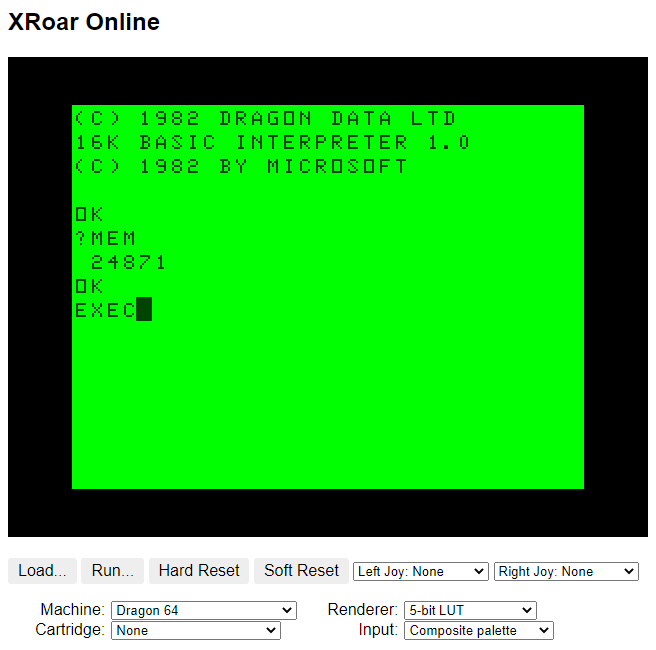
If you start up a cassette-based Dragon 64 in the XRoar Online emulator, you get 24871 bytes available to BASIC:
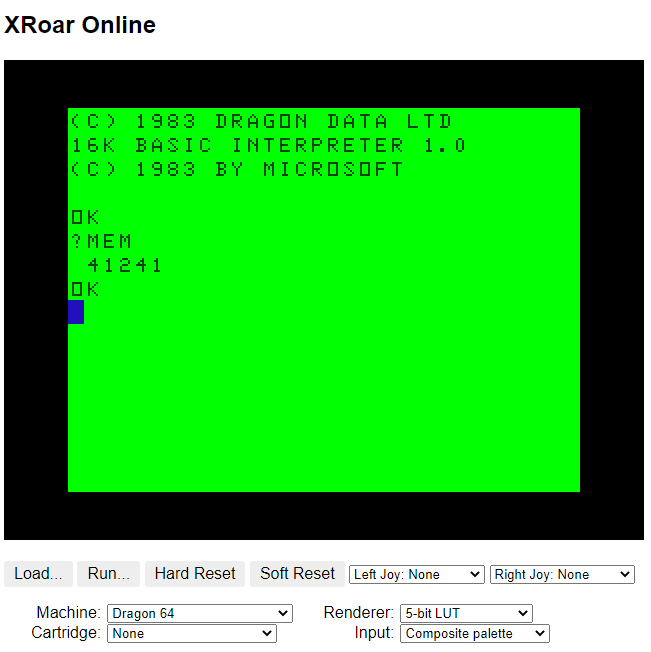
If you then typed EXEC (to execute a machine language routine), the default routine it executed would do some magic to relocate BASIC and restart it with 41241 bytes available. (Both of these values will be less if using a disk system.)
Oh how I wish we had gotten that feature added to the CoCo’s BASIC when 64K machines first came out. (There were rumors that the Deluxe Color Computer 2 would have had something like this as part of it’s new features, but that machine never came to exist beyond some mentions in the BASIC manuals.)
CoCo RAM: Don’t ask, don’t tell.
On the CoCo, once you got to 32K, the machine would show the maximum amount of memory available to BASIC — the same 24871 seen by a Dragon 32 machine.
On startup, a cassette-based CoCo has 24871 bytes available for BASIC.
If you had a 64K machine, it would still show the same value since that is all BASIC knew about. The rest of the 64K was hidden.
“Assembly Language or OS-9”
In those early years, it seemed the official line from Radio Shack was that 64K was usable only from assembly language or the OS-9 disk operating system.
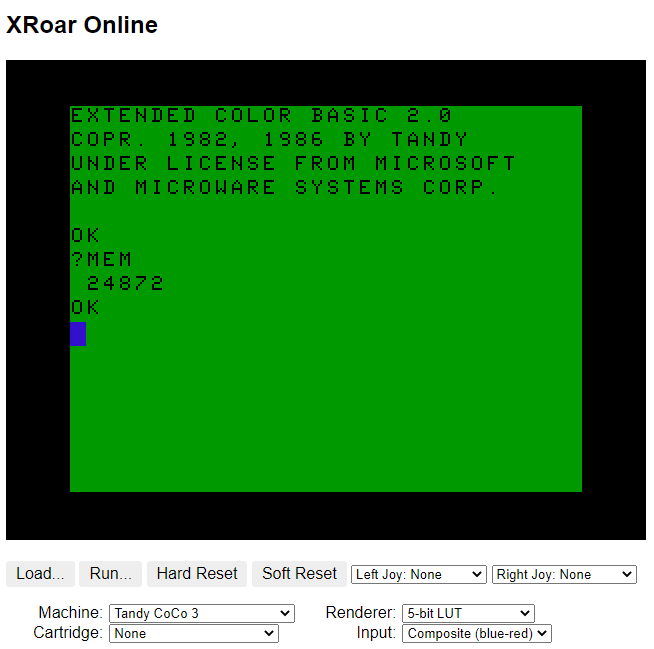
The same was true when the CoCo 3 came out in 1986. It came with 128K but could be expanded to 512K. Even though BASIC was enhanced to support the new graphics modes of the machine, it still only saw 32K available for BASIC programs. On a 512K CoCo 3, free memory for BASIC was reported as 24872:
…and now I am very curious to see where that extra byte came from.
Show me the mem’ry!
And here we are in 2022, over four decades after the first CoCo was sold in 1980, and folks are still wondering how to tell how much memory is in their machine.
One of the most suggested ways of determining if a CoCo 1 or 2 has 64K is to try to run the game Saylor Man from Tom Mix Software. It is notable for being the first CoCo game to require 64K, so if it runs … you have 64K and not just 32K.
But loading up a large program just to do a memory test isn’t the efficient way to do a memory check (even if it is the most fun way).
The second method is to run a short BASIC program that attempts to copy the BASIC ROMs in to RAM. If it works, and you can POKE to the BASIC ROM locations and change things, it proves you have 64K.
This test is convenient because it can be done by typing in a very short program in BASIC, rather than needing a way to download and transfer a tape or disk image of Sailor Man over to a CoCo.
In part 2, I’ll discuss several implementations of this “ROM to RAM” program, and then present a super simple 64K test program.
In the first part, the following Color BASIC program was shared:
5 CLEAR 100*255
10 MX=99
20 DIM A$(MX):AL=0:DL=-1
30 SZ=RND(255):SZ=255
40 A$=STRING$(SZ,"X")
50 GOSUB 1000:GOTO 30
999 END
1000 REM
1001 REM ADD NEW STRING
1002 REM
1010 IF AL=DL THEN GOSUB 2000
1020 GOSUB 3000:IF Z<1024 THEN GOSUB 2000
1030 PRINT "ADDING";LEN(A$)"BYTES AT";AL;Z
1040 A$(AL)=A$
1050 AL=AL+1:IF AL>MX THEN AL=0
1060 IF DL=-1 THEN DL=0
1070 RETURN
2000 REM
2001 REM DELETE OLD STRING
2002 REM
2010 PRINT ,"DELETING";DL
2020 A$(DL)=""
2030 DL=DL+1:IF DL>MX THEN DL=0
2040 GOSUB 5000
2050 RETURN
3000 REM
3001 REM GET FREE STRING SPACE
3002 REM
3010 Z=(PEEK(&H23)*256+PEEK(&H24))-(PEEK(&H21)*256+PEEK(&H22))
3020 RETURN
5000 REM
5001 REM PAUSE
5002 REM
5010 PRINT"[PAUSE]";
5020 IF INKEY$="" THEN 5020
5030 PRINT STRING$(7,8);:RETURN
The program allocates enough string space to hold 100 strings of 255 bytes each. It then starts adding line after line until it detects string memory is getting low. When that happens, the oldest line is deleted (set to “”). The process continues…
The “gut feeling” was that this program should have been able to hold 100 full sized strings, but since it did use a temporary A$ (created to be 255 strings line, and the string we would be adding to the array), it seemed logical that it would have to start purging lines maybe a few entries before the end.
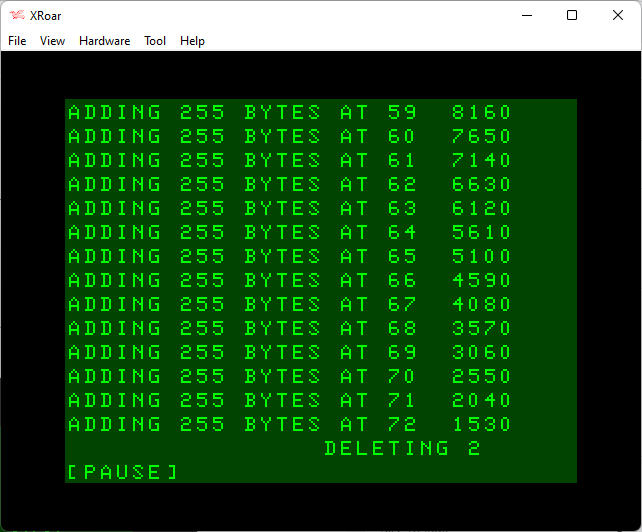
But instead, it starts deleting lines at around entry 47. And, the memory usage being printed out shows it drops by 510 byes each time instead of 255.
510 is an interesting number. That is 255 * 2. That makes it seem like each time we add a 255 byte string, we are using twice that memory.
And we are!
Strings may live again to see another day
The key to what is going on is in the main loop starting at line 30. We create a new A$ and set it to a string of 255 X’s. That string has to be stored somewhere, so it goes in to string memory. Then we do the GOSUB and add a string to the array, which copies our A$ in to the array A$(AL) entry.
When we go back to 30 for the next round, we create A$ again. The old copy of A$, in string memory, is deallocated, and a new A$ is created at the current string memory position. BASIC does not see if the old string space is large enough to be re-used. It just moves on to a new allocation of string space.
It looks like this… And note that strings fill from the end of the memory and move lower. Let’s say we have 16 bytes of reserved string memory (just to keep things fitting on this screen).
FRETOP points to where reserved string memory begins. MEMSIZ is the end of string memory. If we had done CLEAR 16, then FRETOP would be MEMSIZ-16.
STRTAB is where the next string will be added. It looks like this:
Later in the code, we assign that to the array, such as A$(0)=A$. Now A$(0) gets a copy of A$, and it looks like this (using lowercase ‘x’ to represent the copy of A$ that was put in A$(0)):
When we go back to do this again, a new A$ is created, and it gets stored next. The old string data is still there, but A$ has been updated to point to the new entry.
…and so on. As you can see, the way this loop was written, it is creating a new A$ every time through, copying it to the array (a new entry for that) and so on. That is why we see 510 each time through instead of just 255.
Now, if the string was short, we could have done A$=”XXXXXXXXXXXXX”. If we did that, the string would exist in program space and not in string memory. But we wanted a 255 byte string, and you can’t type a line that long in BASIC so STRING$() was used instead, which requires putting the string in string memory.
However, since in THIS version we are just using the same 255 character A$ over and over again, let’s make one change so we don’t create it every time through the loop. Just change the GOTO 30 in line 50 to be GOTO 50:
Now the program will create one A$, which will store at the start of string memory, and then loop over and over just making new entries in the array.
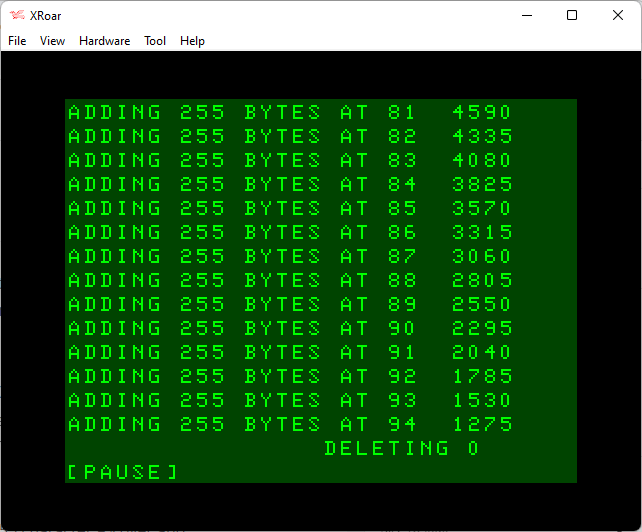
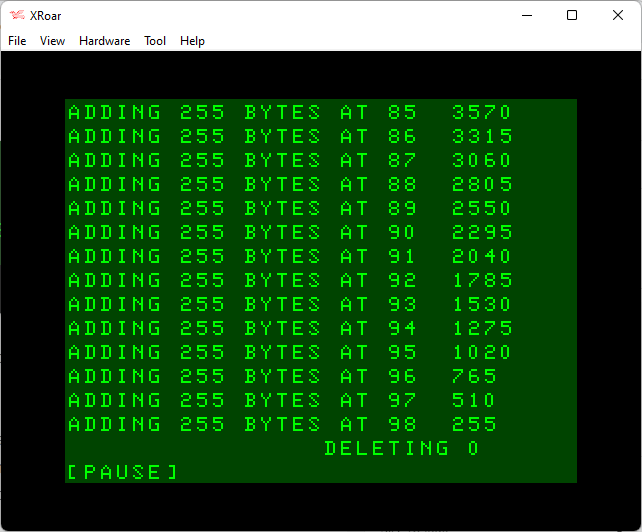
That small change will instantly change the results to be more like we might have expected. Now we get all the way to entry 94 before any string deleting happens:
And, from looking at that screen, each number is dropping by 255 bytes as we expected.
By the time it reached line 94, it saw that there were less than 1024 bytes of free string space left. 1024 would have held another four 255 byte strings, meaning actually had enough memory to have gotten to line 98 — just one line short of our max 99 before it rolls over. And that memory is where the initial 255-byte A$ is stored.
Tada! Mystery solved.
But wait! There’s more…
The reason I chose 1024 as a threshold was to allow for other temporary string use in the program. Things like LEFT$, MID$, STRING$ all make temporary strings. When you add two strings together it creates a third string that combines the first two. Be sure to check out my string theory article for more details on this — I learned quite a bit when researching it. I also learned that some things required strings that I did not expect to. Fun reads. Helps put you to sleep.
If I modify line 1020 to check for 255 bytes remaining instead of 1024, then re-run, I get this:
…and that is as perfect as it gets. Array is filled with strings 0-98, plus the temporary string, which is a total of 100 strings of 255-bytes each — and that is how much memory we set aside with CLEAR!
Now how much would you pay?
And because this program is self-aware when it comes to knowing how much string space is there, it can actually operate with much less string space. It will just delete old strings sooner.
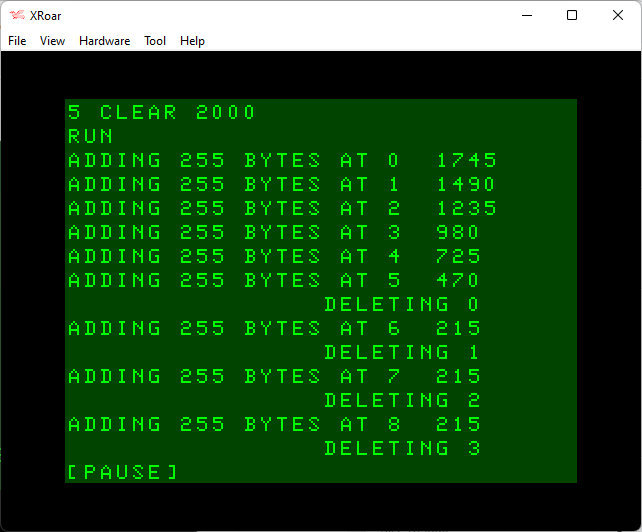
You can change the CLEAR in line 5 to something smaller, like 2000, and it will still work. But, 2000/255 is 7, so it has room for the A$ plus six array entries. I expect it would DELETE every 6 lines. Let’s try…
Bingo! After lines 0-5 (six lines) it deleted and old one, then since everything was now full, it had to delete every time it added something new.
And the point is…?
Well, let’s just say I wish I knew about this back in 1983 when I wrote my cassette-based Bulletin Board System, *ALLRAM*.
This program demonstrates Color BASIC’s string garbage collection. As strings are manipulated, string memory used will continue to grow until BASIC decides to clean up the string space and move things around a bit.
The program creates a string array and fills each entry up with string data. Using code that checks how much string space is remaining, it will delete old strings if string memory is low.
Watching it run reveals some curious things…
The Program
On an Extended or Disk BASIC system, you will need to do a PCLEAR 1 to get enough memory to run it.
Initialization
Line 5 – We CLEAR enough string space to hold 100 lines at their largest size of 255 characters. Note that when you use DIM to set an array size, it is base-0. Doing a DIM A$(99) gives you A$(0) to A$(99) — 100 elements. Thus, the CLEAR uses 100, but the DIM in the next line uses 99.
Line 10 – MX represents the maximum number of lines in the array.
Line 20 – DIM A$(MX) creates an array of 0-99 entries (100). AL is set to 0, and will be the line (array entry) we will ADD next. DL will be used to track the next line (array entry) we need to delete. DL is set to -1 for “nothing to delete yet.”
Main Loop
Line 30 – SZ is set to the length of the string we want to add. It has an unused RND at the start, but then SZ is hard-coded to 255. The program was designed to test random lengths of strings, but for this demo, we will be overriding that and making every string the maximum size.
Line 40 – GOSUB 1000 goes to a routine that will ADD a line. Then we GOTO 30 to create a new line and do it again.
Add New String subroutine
Line 1010 checks to see if the ADD line has caught up to the DELETE line. If it has, we GOSUB 2000 to handle deleting the delete line.
Line 1020 – GOSUB 3000 will return the amount of free string space in Z. If Z is less than 104, GOSUB 2000 is called to delete a string.
Line 1030 – It prints how long of a string is being added to which line, followed by the current free string space before the add.
Line 1040 – The string is added to the A$ array at position AL.
Line 1050 – AL (add line) is incremented by 1, moving it to the next line of the array. If AL is larger than the MX (max array entries), it will wrap around to entry 0.
Line 1070 – Returns.
Delete Old String subroutine
Line 2010 – Print which line is about to be deleted (set to “”).
Line 2020 – The A$ entry at position DL is set to “”, releasing the string memory it was using.
Line 2030 – DL (delete line) is incremented by one. If DL is larger than MX (max array entries), it will wrap around to entry 0.
Line 2040 – GOSUB 5000 is a pause routine so we can see what just happened.
Get Free String Space routine
Line 3010 – Z is calculated as the difference between the FRETOP (start of string storage) memory location and the STRTAB (start of string variables) in the reserved string area. This gives us how many bytes of unused string memory is available.
Line 2030 – Returns.
Pause subroutine
Line 510 – Print the message “[PAUSE]” with no carriage return at the end.
Line 5020 – If INKEY$ returns nothing (no key pressed), keep checking.
Line 5030 – Prints a string of 7 CHR$(8)s (backspace character) which will erase over the “[PAUSE]” prompt.
Based on the intent, one might think that running this would fill strings up to around entry 100, and then it would start deleting the old string
But is that what it will do?
Let’s run it and find out.
5 CLEAR 100*255
10 MX=99
20 DIM A$(MX):AL=0:DL=-1
30 SZ=RND(255):SZ=255
40 A$=STRING$(SZ,"X")
50 GOSUB 1000:GOTO 30
999 END
1000 REM
1001 REM ADD NEW STRING
1002 REM
1005 IF AL=DL THEN GOSUB 2000
1006 GOSUB 3000:IF Z<1024 THEN GOSUB 2000
1010 PRINT "ADDING";LEN(A$)"BYTES AT";AL;Z
1020 A$(AL)=A$
1030 AL=AL+1:IF AL>MX THEN AL=0
1040 IF DL=-1 THEN DL=0
1050 RETURN
2000 REM
2001 REM DELETE OLD STRING
2002 REM
2010 PRINT ,"DELETING";DL
2020 A$(DL)=""
2030 DL=DL+1:IF DL>MX THEN DL=0
2035 GOSUB5000
2040 RETURN
3000 REM
3001 REM GET FREE STRING SPACE
3002 REM
3010 Z=(PEEK(&H23)*256+PEEK(&H24))-(PEEK(&H21)*256+PEEK(&H22)):RETURN
5000 REM
5001 REM PAUSE
5002 REM
5010 PRINT"[PAUSE]";
5020 IF INKEY$="" THEN 5020
5030 PRINT STRING$(7,8);:RETURN
Running the Program
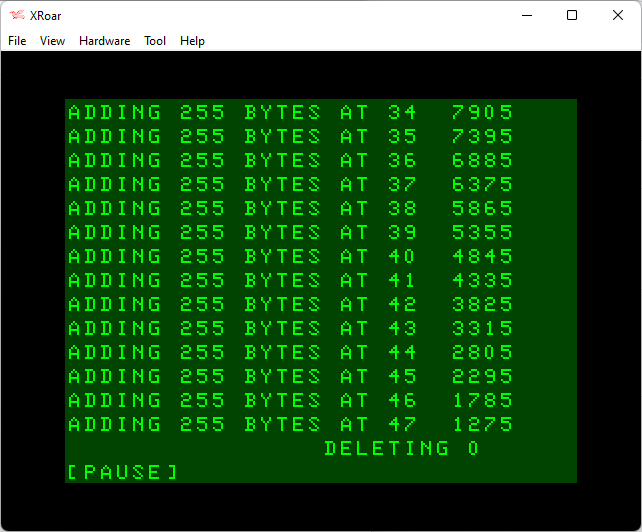
After a PCLEAR 1 and RUN, the program starts filling lines and we can see string memory going down. When it gets to line 47, there is only 1275 bytes of string space left.
And if we check those values, the difference between each one isn’t the 255 we might have expected. We clearly added a new 255 byte string, but memory went from 7905 to 7395 (510 bytes less) and continued down to 1785 to 1275 (510 bytes less). It appears each time we add a 255 byte string, it takes 510 bytes of string memory.
As we get to line 47, we must have had less than 1024 bytes of string memory left and the DELETE LINE subroutine is called. It deletes the oldest line, which is currently line 0. That should free up 255 bytes of string memory.
After pressing a key, we see the next few entries:
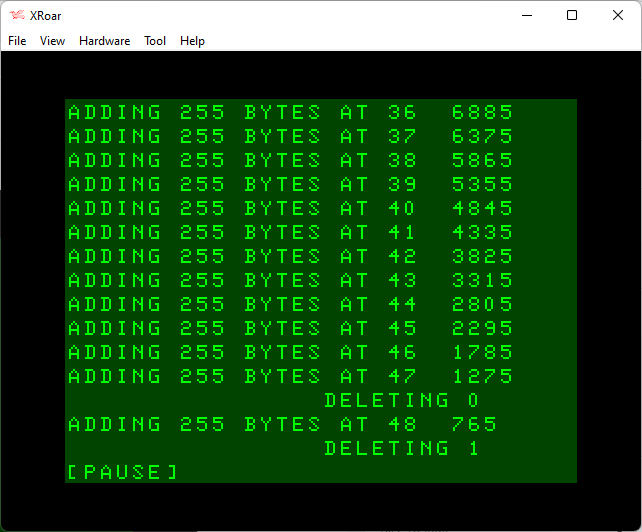
After deleting 0, memory has gone from 1275 to 756 (5120 bytes), so DELETE is called again. This time it deletes line 1.
We press a key and let it scroll a bit more until the next DELETE:
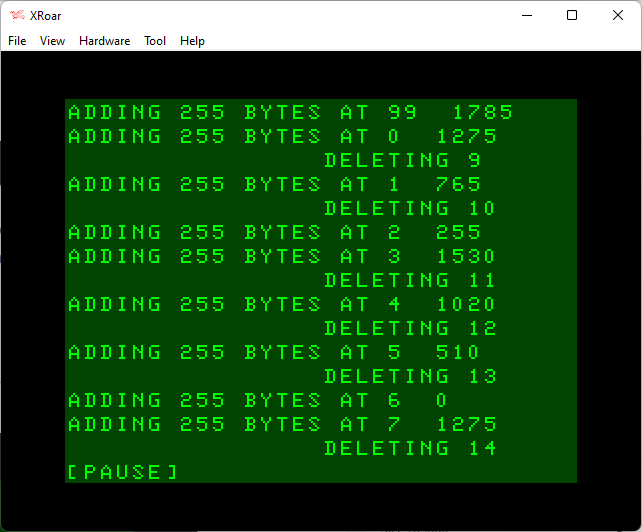
Here we see that, at some point, some string cleanup was done and our free string space grew larger. The trend of reducing by 510 bytes for each ned 255 byte string added continues…
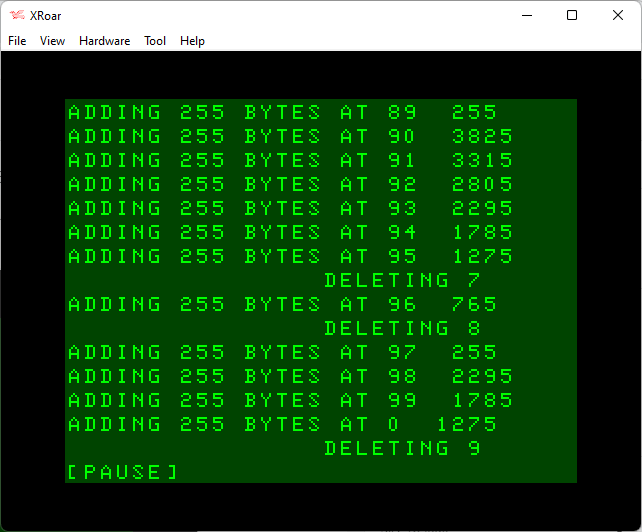
And the process repeats, until eventually we roll over at line 99.
From here on, things get a bit more predictable, with a DELETE happening almost every line — though sometimes every two lines.
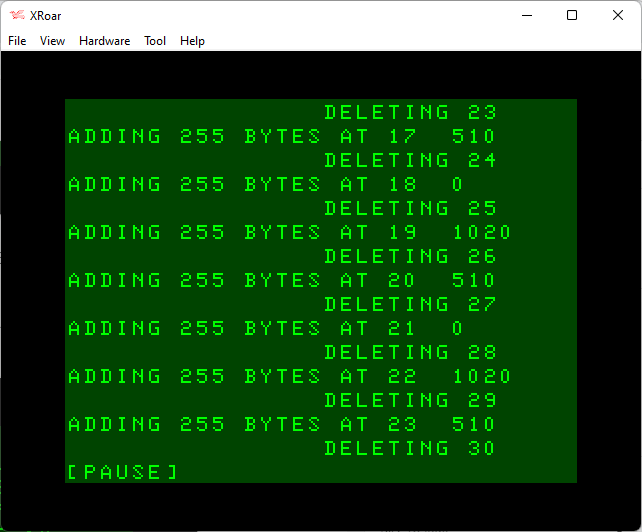
Eventually things settle in to a pattern of basically DELETING for every line ADDED.
Is it broken? Is it just poorly implemented? Or is it behaving exactly like it is supposed to?
This is just a (hopefully) short article following up on some tangents I went on while learning about Color BASIC string memory and VARTPR and other related (and nonrelated) items.
The story so far…
Color BASIC has reserved string memory that is located at the very top of the 32K that is accessible by BASIC. There are three 16-bit pointers maintained by BASIC that contain the starting address for this memory, the address where the next string will be inserted (sorta), and the end of this memory.
The Color BASIC Unraveled book called them FRETOP, STRTAB and MEMSIZ.
You can get the address in BASIC by using PEEK(x)*256+PEEK(y) with these memory locations:
FRETOP – 33 and 34
STRTAB – 35 and 36
MEMSIZ – 39 and 40
When digging in to this, I noticed the the MEMSIZ location returned on a 32K CoCo was 32766, and on a 16K it was 16382, and on a 4K CoCo it was 4094. The actual last byte of RAM was one byte higher (32767, 16383, and 4095), making me wonder if this was a mistake.
Indeed, when I checked on a CoCo 3, which had newer patches to BASIC done by Microware, the 32K value “correctly” reported 32767 as would have expected.
… That missing byte is needed so VAL can work on a string stored at the very top of string space. It needs to temporarily put a NUL byte after the string so the number parser knows when to stop. After executing, VAL restores the byte to its original value. Things would fail if the byte after the string data was ROM though. On the Coco3, that byte is in RAM so it didn’t need an extra reserved byte. I suspect, however, that Microware didn’t know that, or thought it was a bug in the original, or just didn’t notice when they replaced the now useless memory scan with a simple LDX. So, it’s not a bug in the original ROM and, accidental or not, … the behavior on the Coco3 [is] also correct.
– William Astle, 7/14/2022
This led me back to the ROM disassembly, where I did indeed locate where the VAL command will load a byte, store 0 there, then restore the original value later.
Color BASIC Unraveled, page B38.
Prove it or lose it.
Since Man cannot code on faith alone, Art “ADOS” Flexser provided a simple way to prove this to be true:
You can demonstrate the need for the extra byte on a 32/64K CoCo 1/2 by the following:
Change the top of string space to $7FFF rather than the usual $7FFE by POKE 40, 255:CLEAR, upping the LSB of MEMSIZ by one.
Then try PRINT VAL(“&H5”) and you get the rather surprising answer of 94! Why 94? Because that’s decimal for hex 5E, and the “E” has arisen from the first byte of Extended Basic at $8000.
On a CoCo 3, the top of string space is already at $7FFF, so you just need to put it into ROM/RAM mode with POKE&HFFDE,0 before entering PRINT VAL(“&H5”) to get the answer of 94.
Art Flexser, 7/17/2022
And there you have it — the reason why MEMSIZE is not actually pointing to the end of usable BASIC memory on a CoCo 1 or 2, and why it still works on a CoCo 3 after being changed to actually point to the end of usable BASIC memory.
The more you know …
Thanks, William and Art. Your knowledge is greatly apprecaited.
From the “wish I knew then what I (almost) know now” department..
On the Color Computer, the first 1K (1024 bytes) of RAM is reserved for the BASIC ROM code to use. In this article, we will look at some memory locations that pertain to our BASIC code, variables, arrays and strings.
Here are the locations as described in the Color BASIC Unraveled book:
Color BASIC Unraveled, page A1.
Each location contains a 16-bit number which is the address in memory of that information. Here are the values we are interested in, translated to decimal:
TXTTAB – 25 and 26
VARTAB – 27 and 28
ARYTAB – 29 and 30
ARYEND – 31 and 32
FRETOP – 33 and 34
STRTAB – 35 and 36
MEMSIZ – 39 and 40
To turn two bytes in to the 16-bit address, we take the PEEK of the first byte, multiply it by 256, then add the PEEK of the second byte. For TXTTAB (Beginning of BASIC program) we would do:
PRINT PEEK(25)*256+PEEK(26)
That value returned will be different depending on the configuration of the Color Computer.
Let’s dig in to what each of these locations means.
TXTTAB: Beginning of BASIC program – 25/26 (&H19/&H1A)
This location represents where in RAM the BASIC program starts.
PRINT PEEK(25)*256+PEEK(26)
On a CoCo with only Color BASIC (no Extended or Disk BASIC), storage for a BASIC program will be right after the 512 bytes of screen memory. The CoCo’s screen is stored at 1024 to 1535, so BASIC programs load at 1536.
START END SIZE DESC
----- ----- ----- --------------
0 1023 1024 ROM USE
1024 1535 512 TEXT SCREEN
1536 32767 31232 BASIC PROGRAM
With Extended BASIC added, some RAM after the text screen is used for high resolution graphics screens. By default, 6K is reserved on startup, but more or less can be specified using the PCEAR command. Since the smallest graphics screen using 1.5K (1536 bytes), allocation is done in multiples of that size. Thus, on startup, Extended BASIC has four 1.5K pages reserved for graphics. This means BASIC would start at 7668 on a CoCo with Extended BASIC.
START END SIZE DESC
----- ----- ----- --------------
0 1023 1024 ROM USE
1024 1535 512 TEXT SCREEN
1536 7679 6144 HI-RES GFX
7680 32767 25088 BASIC PROGRAM
With Disk BASIC, there is an additional 2K of RAM used just after screen memory at 1536, with the high resolution graphics screens after that.
START END SIZE DESC
----- ----- ----- --------------
0 1023 1024 ROM USE
1024 1535 512 TEXT SCREEN
1536 3583 2048 DISK ROM USE
3584 9727 6144 HI-RES GFX
9728 32767 23040 BASIC PROGRAM
NOTE about “START”: As I calculated this, I see that the starting location for BASIC is actually one byte higher than I expected. On a 4K CoCo, I expected BASIC to start at 1536, but PEEK(25)*256+PEEK(27) shows 1537. On an Extended BASIC CoCo, those peeks show 7681 instead of 7680. And on a Disk BASIC system, they show 9729 instead of 9728. I am not sure why it is off by one, but I’m sure someone smarter than I will have the answer in a comment.
NOTE about “END”: You will notice in my table the end location for BASIC is listed as 32766. That would only be true if the machine has 32K or 64K. If the machine had only 4K or 16K, it would be less. (Basically, MEMSIZE – START OF BASIC PROGRAM). And then it’s also off by by one byte for some reason (4094 on a 4K machine, 16382 on a 16K machine, and 32766 on a 32K machine). I’ll have to look in to this. Maybe I’m the one who is off…
NOTE about BASIC Memory: You may note I just said a 32K and 64K CoCo will show the same location for the end of BASIC memory. This is because reasons. See this article for a discussion about getting the most memory for BASIC, or just read this excerpt:
64K NOTE: The reason BASIC memory is the same for 32K and 64K is due to legacy designs. The 6809 processor can only address 16-bits of memory space (64K). The BASIC ROMs started in memory at $8000 (32768, the 32K halfway mark). This allowed the first 32K to be RAM for programs, and the upper 32K was for BASIC ROM, Extended BASIC ROM, Disk BASIC ROM and Program Pak ROMs. Early CoCo hackers figured out how to piggy-pack 32K RAM chips to get 64K RAM in a CoCo, but by default that RAM was “hidden” under the ROM address space. In assembly language, you could map out the ROMs and access the full 64K of RAM. But, since a BASIC program needed the BASIC ROMs, only the first 32K was available.
Note the use of parenthesis around each calculation. I was originally not using them, and was getting bad results because I made, as William Astle noted, “an elementary arithmetic error.”
Math is hard. Just ask Barbie.
Variable Table
The variable table is a series of 7 byte entries. The first two bytes are the variable name.
Variable Name (bytes 1 and 2) – If a variable is “LN”, the first two bytes would be “LN”. But, if the variable is a string such as LN$, the first byte would be “L” and the second byte would be the value of “L” + 128 (high bit set).
Variable Value (bytes 3-7) or String Descriptor (bytes 3, and 5-6)
If the variable is a number, the next five bytes are a floating point representation of the value.
If the variable is a string (high bit of the second name byte is set), the five bytes will be a string descriptor entry that contains the size and location of the string data bytes. A string descriptor only uses three of those five bytes. The first byte will be the length of the string (0-255), the next byte is unused, then the third and fourth bytes are the address of the string data in memory (located in reserved string space, to be discussed later in this article).
Here is a short program that will print out all the variables. The variables MUST be declared before this code runs. If any new variables are created inside the FOR/NEXT loop, it will not work as expected since the table will have been changed.
0 ' SHOWVARS.BAS
5 DIM VS,VE,L,VN$
10 VS=PEEK(27)*256+PEEK(28)
20 VE=PEEK(29)*256+PEEK(30)
30 FOR L=VS TO VE-5 STEP 7
40 VN$=CHR$(PEEK(L))+CHR$(PEEK(L+1) AND 127)
50 IF PEEK(L+1) AND 128 THEN VN$=VN$+"$"
60 PRINT VN$;
70 FOR I=0 TO 4
80 PRINT TAB(5*I+6);PEEK(L+2+I);
90 NEXT:PRINT
100 NEXT
Running this will show a list of all the variables in use, and the five bytes after the name.
Above, the VN$ entry shows that it is a 3 byte string located in memory at location 127*256+236 (32748). More on this later in the article.
You can test this code further by declaring more variables before line 10, such as with the DIM statement, or just adding declarations like A=42 or ZZ$=”TOP”.
6 DIM A,B,C,D,A$,B$,AB$,ZZ$
7 AB$="ABBA":ZZ$="TOP"
ARYTAB: Start of Arrays – 29/30 (&H1D/&H1E)
This location represents where arrays will be stored.
PRINT PEEK(29)*256+PEEK(30)
And if we know the start…
ARYEND: End of Arrays (+1) – 31/32 (&H&1F/&H20)
And this location represents where arrays end (though it returns one byte past the last entry of the arrays).
PRINT PEEK(31)*256+PEEK(32)
Arrays
This part gets a bit complicated and messy, so unless you plan on doing stuff with arrays, feel free to skip this section completely… :)
Arrays get stored in their own block of memory. Each array entry starts with a 5-byte header that contains the name of the array (2-bytes), the length of the array (2-bytes) and how many dimensions the array is (1-byte). It looks like this:
ARRAY TABLE ENTRY HEADER (5 bytes)
--------------------
[ ][ ][ ][ ][ ] - numeric array "NM"
N M AB CD #D - ABCD = memory used (header to end)
#D = number of dimension
DIM(X)=1 DIM(X,Y)=2
This is followed by one or more 2-byte entries that contain the dimension size for each dimension. A one dimensional array such as DIM X(10) would have two bytes representing 11. Remember that in BASIC, DIMensions are base 0. DIM X(10) gives you X(0) through X(10) for a total of 11 entries.
Since an array has to have at least one entry, the header will really always have at least 7 bytes. Here is an example for a two dimension array like DIM X(10,20)
ARRAY TABLE ENTRY HEADER (5 bytes + at 2 bytes per each dimension)
------------------------------------
[ ][ ][ ][ ][ ][ ][ ][ ][ ]- numeric array "LN"
N M AB CD #D D1 D1 D2 D2 - ABCD = memory used
- #D = number of dimensions
- D1D1 = number of dimension 1 entries
- D2D2 = number of dimension 1 entries
And, dimensions are backwards from how they are entered in BASIC. If you had this:
DIM AB(1,2,3,4)
You would have an array table entry that would be 15 bytes and look like this:
[65][66] [xx][xx] [4] [0][5] [0][4] [0][3] [0][2] [0][1]
[65][66] - name "AB"
[xx][xx] - total bytes used from header to end
[4] - four dimensions
[0][5] - DIM (x,x,x,4)
[0][4] - DIM (x,x,3,x)
[0][3] - DIM (x,2,x,x)
[0][2] - DIM (1,x,x,x)
After each header are a series of 5-byte entries (one for each element in the array) in the same format as variables – either 5-bytes representing a floating point number, or 5-bytes that make up the string descriptor (size and location of string data).
The blocks of entries are in the order listed in the array table. i.e, if you have DIM(1,2) you will first have 3 5-byte entries for the second dimension DIM(x,2) followed by 2 5-byte entries for the first dimension DIM(1,x).
I think.
Here is a program that shows the Array Table:
0 ' SHOWARRAYS.BAS
5 DIM SA,EA,L,AN$,I,AL
6 DIM X(1),Y(10),XY(2,3),ZZ(10,15,20),A$(10),UL$(10,3)
10 SA=PEEK(29)*256+PEEK(30)
20 EA=PEEK(31)*256+PEEK(32)
30 IF SA=EA THEN PRINT "NO ARRAYS":END
40 PRINT "ARRAYS FROM";SA;"TO";EA
45 PRINT "NAME TSIZE DIM .. .. .. .."
50 L=SA
60 AN$=CHR$(PEEK(L))+CHR$(PEEK(L+1) AND 127)
70 IF PEEK(L+1) AND 128 THEN AN$=AN$+"$"
80 PRINT AN$;
90 AL=PEEK(L+2)*256+PEEK(L+3)
100 PRINT TAB(4);AL;
110 PRINT TAB(11);PEEK(L+4);
120 FOR I=0 TO PEEK(L+4)-1
130 PRINT TAB(14+I*4);PEEK(L+5+I*2)*256+PEEK(L+5+I*2+1);
140 NEXT:PRINT
150 L=L+AL:IF L<EA THEN 60
And, with a bit of work, a program could be written to dump the 5-byte entrees for each array. I’ll add that to my “TODO” list…
FRETOP: Start of String Storage – 33/34 (&H21/&H22)
This location represents where reserved string memory begins. String space is reserved using the CLEAR command, with 200 bytes allocated by default. Strings are stored at the top of memory. Thus, on startup, this should print 200 bytes less than the end of BASIC memory:
PRINT PEEK(33)*256+PEEK(34)
If you change the amount of reserved string space, this number will change accordingly. Here we start out with 200 bytes reserved for strings, then change that to 0 bytes, then to 500 bytes:
If you wanted to know how much room is available for a BASIC program plus variables, you could take this value and subtract the start of BASIC location:
However, there is still some extra overhead so this value won’t match with what PRINT MEM shows. I guess it’s better to just PRINT MEM:
Maybe we’ll figure out what those “missing” 17 bytes are being used for.
STRTAB: Start of String Variables – 35/36 (&H22/&H24)
This location represents where the next string will be stored. Sorta.
PRINT PEEK(35)*256+PEEK(36)
Didn’t we just cover this? Not exactly. FRETOP shows where the string memory starts, but strings are actually stored from the top of memory, and grow downward. Meaning, if you have 200 bytes reserved, and place a ten byte string there (A$=”1234567890″), it will be located at the END of that 200 bytes, not at the start. This value points to where strings are stored within the reserved area.
If string memory were set to 16 bytes by using CLEAR 16, string memory would look like this:
At this point, we could add another one byte string, but anything longer would result in an ?OS ERROR (out of string space).
Here is a test program (and notice we are adding +”” to the end of each string. If that isn’t done, the string will be stored inside the BASIC program itself, and not in string memory.)
MEMSIZE should never move, as it is the highest memory location available to BASIC. FRETOP will move, depending on how many bytes are reserved for strings using the CLEAR command.
After the two strings in the previous example were added, it would look like this:
With these memory locations, we can determine how large a BASIC program is. We can detect how much string space is reserved, and calculate how much is being used or is free. We can figure out how much variable storage is being used, as well as array storage.
Most of these locations are never meant to be set by a program, but there is one exception. The CLEAR command can also be used to prevent BASIC from growing past a certain memory location. If you use a second parameter such as CLEAR 200,16000, it changes the MEMSIZ to that value.
The CLEAR command erases all variables, so there would be nothing for BASIC to relocate. Instead, this just changes MEMSIZE and adjusts the string values FRETOP and STRTOP and accordingly.
While it would be possible to manually POKE those six values and accomplish the same thing, there could always be unintended consequences. (But for fun, a BASIC program could be written that moves the string memory somewhere else, then POKEs the values to update it so BASIC keeps running.)
Conclusion
There might be some interesting things one could do by monitoring string space closely… Perhaps all the research I did for this article may be leading somewhere…
Until then…
BONUS CONTENT
Here is the program I used to calculate the tables in this article.
The C programming language has a few standard library functions that deal with strings, namely strcpy() (string copy) and strcat() (string concatenate).
Microsoft BASIC has similar string manipulation features built in to the language. For example, to copy an 8 character “string” in to a buffer (array of chars):
In BASIC, you do not need to allocate space for individual strings. Color BASIC allows doing whatever you want with a string provided it is 255 characters or less, and provided the total string space is large enough. By default, Color BASIC reserves 200 bytes for string storage. If you wanted to strcpy() “12345678” to a string variable, you would just do:
BUFFER1$="12345678"
Yes, that’s legal, but Color BASIC only recognizes the first two characters of a string name, so in reality, that is just like doing:
BU$="12345678"
If you need more than the default 200 bytes, the CLEAR command will reserve more string storage. For example, “CLEAR 500” or “CLEAR 10000”.
“CLEAR 500” would let you have five 100 character strings, or 500 one character strings.
And, keep in mind, strings stored in PROGRAM MEMORY do not use this space. For example, if you reduced string space to only 9 bytes, then tried to make a 10 byte string direct from BASIC:
CLEAR 9
A$="1234567890"
?OS ERROR
The wonderful “?OS ERROR” (Out of String Space).
BUT, if strings are declared inside PROGRAM data, BASIC references them from within your program instead of string memory:
…you would get a 48 character string (8 characters, added 6 times).
In C, using strcat(buffer, buffer) with the same buffer has a doubling effect each time, just like A$=A$+A$ does in BASIC each time.
And, adding a bunch of strings together like…
A$=A$+A$+A$+A$+A$+A$+A$+A$ '64 characters
…could also be done in three doubling steps like this:
A$=A$+A$:A$=A$+A$:A$=A$+A$ ' 64 characters
Two different ways to concatenate strings together to make a longer string. Which one should we use?
Must … Benchmark …
In my code, I just added my 8 character A$ up 8 times to make a 64 character string. Then I started thinking about it. And here we go…
Using my standard benchmark program, we will declare an 8 character string then add it together 8 times to make a 64 character string. Over and over and over, and time the results.
0 REM strcat1.BAS
5 DIM TE,TM,B,A,TT
10 FORA=0TO3:TIMER=0:TM=TIMER
20 FORB=0TO1000
30 A$="12345678"
40 A$=A$+A$+A$+A$+A$+A$+A$+A$
70 NEXT
80 TE=TIMER-TM:PRINTA,TE
90 TT=TT+TE:NEXT:PRINTTT/A:END
This produces an average of 1235.
Now we switch to the doubling three times approach:
0 REM strcat2.BAS
5 DIM TE,TM,B,A,TT
10 FORA=0TO3:TIMER=0:TM=TIMER
20 FORB=0TO1000
30 A$="12345678"
40 A$=A$+A$:A$=A$+A$:A$=A$+A$
70 NEXT
80 TE=TIMER-TM:PRINTA,TE
90 TT=TT+TE:NEXT:PRINTTT/A:END
This drops the time down to 888!
Adding separately three times versus add together eight times is a significant speed improvement.
Based on what I learned when exploring string theory (and being shocked when I realized how MID$, LEFT$ and RIGHT$ worked), I believe every time you do a string add, there is a new string created:
“A$=A$+A$+A$+A$+A$+A$+A$+A$” creates eight strings along the way.
Earlier in December, @BASIC10Liners on Twitter retweeted a tweet from Tony Lyon. The original tweet contained a photograph of a ZX81 BASIC program listing found in ‘Computer & Video Games’ magazine. The game ran on a 1K machine, and was a Space Invaders-style game, featuring a single invader.
This tweet was picked up and shared in the Tandy CoCo group on Facebook, and led to a number of folks porting it over to the CoCo. Jim Gerrie also ported it to the MC-10:
Jim also did the research to find the issue that the full article appeared in:
For the past few weeks, folks have been sharing optimizations and game improvements on Facebook, and I wanted to highlight one in particular.
Erico Monteiro is known for doing some impressive graphics work using the 8-color 64×32 resolution “mode” of the CoCo. He took the basic framework of the game, then sped it up and added new colors, animations and features.
David Healey, if you are out there, thank you for inspiring so many with your 1981 ZX81 program in that magazine…
While writing up my article on Color BASIC memory, I ran across something I was unaware of. Special thanks to William “Lost Wizard” Astle for his responses on the CoCo mailing list that got me pointed in the right direction…
BASIC memory looks like this:
+-------------+ 0
| SYSTEM USE |
+-------------+ 1024
| TEXT SCREEN |
+-------------+ 1536
| DISK USE |
+-------------+
| HI-RES GFX |
+-------------+
| BASIC PROG |
+-------------+
| VARIABLES |
+-------------+
| ARRAYS |
+-------------+
| FREE MEMORY |
+-------------+
| STRINGS |
+-------------+ 32767
Without Disk BASIC, “DISK USE” is not there, and without Extended BASIC, neither is “HI-RES GFX”.
To determine free memory available to BASIC (for program, variables or arrays), you would subtract the end of “ARRAYS” from the start of “STRINGS.” The locations that store this are at &H1F-&H20 (31-32) and &H21-&H22 (33-34).
Color BASIC Unraveled, page A1.
Each of those two byte locations holds a 16-bit address to some area of RAM. You can get the values by taking the first byte, multiplying it by 256, and adding the second byte.
PRINT "MEMSIZE:";PEEK(&H27)*256+PEEK(&H28)
Here is a program that prints out some pertinent information:
0 ' BASINFO2.BAS
10 ' START OF BASIC PROGRAM
20 BS=PEEK(25)*256+PEEK(26)
30 ' START OF VARIABLES
40 VS=PEEK(27)*256+PEEK(28)
50 ' START OF ARRAYS
60 SA=PEEK(29)*256+PEEK(30)
70 ' END OF ARRAYS (+1)
80 EA=PEEK(31)*256+PEEK(32)
90 ' START OF STRING STORAGE
100 SS=PEEK(33)*256+PEEK(34)
110 ' START OF STRING VARIABLES
120 SV=PEEK(35)*256+PEEK(36)
130 ' TOP OF STRING SPACE/MEMSIZ
140 ST=PEEK(39)*256+PEEK(40)
150 PRINT "PROG SIZE";(VS-BS),"STR SPACE";(ST-SS)
170 PRINT "ARRAY SIZE";(EA-SA)," STR USED";(ST-SV)
180 PRINT " VARS SIZE";(SA-VS)," FREE MEM";(SS-EA)
999 END
And here is that PRINT code, without using any variables. It could be made a subroutine that you could GOSUB to and see status of your memory usage:
There are some bytes missing somewhere. This made me wonder which was correct, so I consulted the PRINT MEM code in Color BASIC Unravelled. It had comments that shed some light on what is going on:
Color BASIC Unraveled, page B34.
“This is not a true indicator of free memory because BASIC requires a STKBUF size buffer for the stack for which MEM does not allow.”
– Color BASIC Unraveled, page B34.
On page A1, I see the definition for STKBUF:
STKBUF EQU 58 STACK BUFFER ROOM
I see code in the ROM that takes this in to consideration, adding the value of ARYEND plus the value of STKBUF.
Color BASIC Unraveled, page B20.
That routine is used to test if enough memory is available for something, and if there isn’t, it returns the ?OM ERROR.
But the difference I get is 12 bytes, not 58. What it BOTSTK? It looks like it is just before the pointer variables I have been working with. I just did not know what it was.
0017 BOTSTK RMB 2 BOTTOM OF STACK AT LAST CHECK
&H17 would be memory location 23. Let’s see where it is by doing…
PRINT PEEK(23)*256+PEEK(24)
That gives me a location about 30 bytes before FRETOP (start of string storage). Here is the program I am using:
0 ' BASPTRS.BAS
10 ' BOTTOM OF STACK
20 SP=PEEK(23)*256+PEEK(24)
30 ' START OF BASIC PROGRAM
40 BS=PEEK(25)*256+PEEK(26)
50 ' START OF VARIABLES
60 VS=PEEK(27)*256+PEEK(28)
70 ' START OF ARRAYS
80 SA=PEEK(29)*256+PEEK(30)
90 ' END OF ARRAYS (+1)
100 EA=PEEK(31)*256+PEEK(32)
110 ' START OF STRING STORAGE
120 SS=PEEK(33)*256+PEEK(34)
130 ' START OF STRING VARIABLES
140 SV=PEEK(35)*256+PEEK(36)
150 ' TOP OF STRING SPACE/MEMSIZ
160 ST=PEEK(39)*256+PEEK(40)
180 PRINT "START OF PROG",BS;(VS-BS)
190 PRINT "START OF VARS",VS;(SA-VS)
200 PRINT "START OF ARRAYS",SA;(EA-SA)
210 PRINT "END OF ARRAYS+1",EA
215 PRINT "BOTTOM OF STACK",SP
229 PRINT "START/STR STORE",SS;(ST-SS)
230 PRINT "START/STR VARS",SV;(ST-SV)
240 PRINT "TOP OF STRINGS",ST
250 PRINT "FREE MEMORY",(SP-EA)
999 END
William clarified a bit of this in a follow-up post.
Actually, currently available memory would be approximately the difference between BOTSTK and ARYEND less the STKBUF amount. MEM neglects to add the STKBUF adjustment in when it calculates the difference. Total usable memory under current PMODE/FILES/CLEAR settings would be the difference between BOTSTK and TXTTAB.
Note that the stack (and consequently the BOTSTK value) will grow downward from FOR loops, GOSUB, and expression evaluation. Expression evaluation can use a surprising amount of stack space depending on how many times it has to save state to evaluate a higher precedence operation, how many function calls are present, etc.
ARYEND is the top of all the memory used by the program itself, PMODE graphics pages, disk buffers and file descriptors, scalar variables, and arrays.
When calculating OM errors, it takes ARYEND, adds the amount of memory requested, adds the STKBUF amount, and then compares that with the current stack pointer. It does the comparison by storing S since you can’t directly compare two registers.
STKBUF is 58 for whatever reason. That’s sufficient to allow for a full interrupt frame (12 bytes) plus a buffer so routines can use the stack for saving registers, routine calls, etc., within reason, without having to continually do OM checks. It does this to prevent corrupting variables when memory is tight. Even so, there may be a few routines in Disk Basic that may still cause the stack to overflow into variable space when memory is very tight.
– William Astle, 7/8/2022
So how can we test? Using the XRoar emulator, I started with a standard 64K CoCo with Disk BASIC. PRINT MEM returns 22832 bytes free.
On startup, a disk-based CoCo has 22823 bytes available for BASIC.
For testing, I’ll create one line of BASIC that is just a REM statement:
10 REM
Now PRINT MEM shows 22817 bytes free. That is 6 bytes less, which is two bytes for where the next line will be (38 7), two bytes for the line number (00 10), the token for REM (130), and a NULL byte (0). Each new line number takes up 5 bytes plus whatever the content of the line is.
Now I want to reserve most of that memory for strings. I’ll do CLEAR 22800. After this, PRINT MEM shows 207… That can’t be right. Shouldn’t it really be 17?
In this case, the original PRINT MEM was already counting 200 bytes reserved for strings. When I did CLEAR 22800, it was release that 200 bytes, then redoing it as 22800 (so, 228600+200).
Let’s start over…
Okay, so let’s redo this. I restarted the CoCo back to where PRINT MEM shows 22823.
The next thing I did was type CLEAR 0 to reserve NO string space, then check PRINT MEM. It shows 23023 — the largest BASIC program I can have on this disk-based machine, unless I deallocate some graphics memory (6K is reserved for that, by default).
Now I enter in the “10 REM” line, and PRINT MEM again. It shows 23017 — 6 bytes less, as expected.
I try to type CLEAR 23017, which gives ?OM ERROR.
I back that off a bit to CLEAR 22960. PRINT MEM shows ?OM ERROR. And now I have hosed BASIC. Even CLEAR 0 now returns ?OM ERROR.
Is this a bug? I can still EDIT my line 10, and LIST it, but while CLEAR by itself works, it changes nothing. I’ve managed to consume so much memory, I can’t run the command I need to give it back.
Let’s start over again…
CoCo reset. CLEAR 0 entered. PRINT MEM shows 22823. 10 REM typed. PRINT MEM shows 23017.
This time I’ll try CLEAR 22950 to give BASIC a bit more room. PRINT MEM shows 67.
If this is accurate, I should be able to add 67 characters to the end of that REM statement.
I type “EDIT 10”, then “X” to extend to the end. I enter ten characters, then ENTER.
10 REM1234567890
PRINT MEM gives me an ?OM ERROR.
Now, the program still LISTS and would run (if it did anything), but clearly other things are broken.
I EDIT 10 and try to add another ten characters.
10 REM12345678901234567890
?OM ERROR.
And now, LINE 10 is completely gone! EDIT must try to “add” a line when it’s done, and if there’s no memory, the line is … erased?
PRINT MEM still shows 67, even though the “10 REM” seems to be gone. Where did that memory go? I try adding a total of 15 characters after the REM:
10 REM123456789012345
That works. PRINT MEM shows ?OM ERROR.
Let’s start over again again.
I reboot the CoCo, then CLEAR 22950. PRINT MEM shows 73 (there is no line number yet).
This “should” mean I could enter a line (5 bytes) that has 73-5=68 characters. But, if I tried to type anything longer than 16, I get ?OM ERROR (REM token is one byte, then 15 characters).
This tells me that when PRINT MEM shows me 67, I really only had 5+16=21 bytes available. 67-21=46 bytes difference.
Looking back at my BASIC POINTERS program output:
…I see the calculated free memory was 22042, versus PRINT MEM showing 22038. That is only four bytes different.
Questions keep stacking up
It is clear you cannot use PRINT MEM to know how much room you will have for a BASIC program. It is more of a guideline, within 50 or so bytes.
The wildcard is probably this mysterious (to me) “stack” that BASIC needs for operation. Depending on what is going on, the stack in-use may be larger or smaller, but the max limit is 58 bytes. And, STKBOT notes that is is “bottom of stack at last check” so it may not be reflecting the actual stack at the particular moment when the code looked at it.
I really don’t have any conclusions from this. When I started writing, I expected I’d find a set of PEEKs I could subtract to get a more accurate PRINT MEM value.
2022-09-19 – John K pointed out a typo in the program listing, which has been corrected.
This one comes from Carl England. We met him at the 1990 Atlanta CoCoFest. That was the first time Sub-Etha Software appeared anywhere, and we couldn’t afford a full booth so we split on with Carl. He will always be the SuperBoot guy to me (my all time favorite utility), but most may know him as the programmer being The Defeater – a disk copy tool that could make clones of copy protected disk. (Download some of his items here.)
Carl popped up in some Facebook comments recently with this odd bit of code.
10 PRINT"THIS LINE IS INVISIBLE":'%%%%%%%%%%%%%%%%%%%%%%%%%%%%%%%%%%
20 FORI=PEEK(25)*256+PEEK(26)TOPEEK(27)*256+PEEK(28)
30 IFPEEK(I)=37THENPOKEI,8
40 NEXT
Line 10 is a PRINT statement, followed by a comment and a bunch of percent symbols.
Line 20 is a loop that goes from the Start of BASIC to the End of BASIC.
Line 30 uses PEEK to look for a 37, which is the ASCII code for a percent sign. If it finds one, it POKEs it to 8 — a backspace.
Line 40 is just the NEXT for the loop.
If you run this program, it will modify line to and replace all those %’s with backspace characters. Then, if you LIST it, BASIC displays the line then immediately backspaces over it, too quick to see, making it look like there is no line there.
You could RUN this to modify the program, then DELete lines 20-40, and save it to tape or disk. You could then have a program you could load and run that would print a message, but LISTing it would appear as if nothing was there.
Carl said he used this to hide lines in some of his programs, but mentioned you could still see the code if you sent it to a printer using LLIST. Also, if you knew there was a line 10, you could EDIT 10 and SPACE through the line, revealing the code. I suppose you could SPACE until you got to the colon and then Hack the rest of the line, removing those backspace.