Last year, I posted an article dealing with Optimizing Color BASIC. In it, I covered a variety of techniques that could be done to speed up a BASIC program. While this was specifically written about the Microsoft Color BASIC on the Radio Shack Color Computers, I expect it may also apply to similar BASICs on other systems.
James J. left an interesting comment:
Oh yeah. If anyone cares to experiment with modifying the BASIC interpreter, it might be fun to make the symbol table “adaptive”. When you find a variable in the symbol table, if it’s not the first one, swap it with its predecessor. The idea is that the more frequently looked up symbols migrate towards the front and thus are more quickly found. The question is whether the migration improves things enough to make up for the swapping. – James J.
This got me curious as to how much of a difference this would make, so I did a little experiment.
In this Microsoft BASIC, variables get created when you first use them. Early on, I learned a tip that you could define all your variables at the start of your program and get that out of the way before your actual code begins. You can do this with the DIM statement:
DIM A,B,A$,B$
Originally, I thought DIM was only used to define an array, such as DIM A$(10).
I decided to use this to test how much of a difference variable placement makes. Variables defined first would be found quicker when you access them. Variables defined much later would take more time to find since the interpreter has to walk through all of them looking for a match.
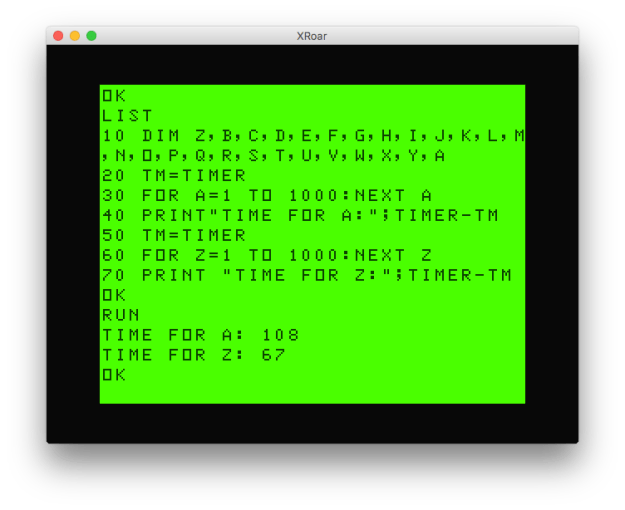
Using the Xroar CoCo/Dragon emulator, I wrote a simple test program that timed two FOR/NEXT loops using two different variables. It looks like this:
In BASIC, variables defined earlier are faster.
As you can see, with just two variables, A and Z, there wasn’t much difference between the time it takes to use them in a small FOR/NEXT loop. I expect if the loop time was much later, you’d see more and more difference.
But what if there were more variables? I changed line 10 to define 26 different variables (A through Z) then ran the same test:
In BASIC, variables defined last take more time to find, so they are slower.
Now we see quite a bit of difference between using A and using Z. If I knew Z was something I would be using the most, I might define it at the start of the DIM. I did another test, where I defined Z first, and A last:
In BASIC, define the most-used variables first to speed things up.
As expected, now the Z variable is faster than A.
Every time BASIC has to access a variable, it makes a linear (I assume*) search through all the variables looking for a match.
Side Note: * There is an excellent Super/Disk/Extended/Color Basic Unraveled book set which contains fully commented disassemblies of the ROMs. I could easily stop assuming and actually know if I was willing to take a few minutes to consult these books.
However, when I first posted these results to the Facebook CoCo group, James responded there:
Didn’t realize it made that much difference–doesn’t the interpreter’s FOR loop stack remember the symbol table entry for the control variable? – James J.
Indeed, this does seem to be a bad test. FOR/NEXT does not need the variable after the NEXT. If you omit the variable (just using NEXT by itself), it does not need to do this lookup and both get faster:
NEXT without a variable is faster.
I guess I need a better test.
How about using the variable directly, such as simple addition?
Variable addition is slower for later variables.
Z, being defined at the end, is slower. And if we reverse that (see line 10, defining Z first), Z becomes faster:
Variable addition is faster for earlier variables.
You can speed up programs by defining often-used variables earlier.
James’ suggestion about modifying the interpreter to do this automatically is a very interesting idea. If it continually did it, the program would adapt based on current usage. If it entered a subroutine that did a bunch of work, those variables would become faster, then when it exited and went back to other code, those variables would become faster.
I do not know if the BASIC language lasted long enough to ever evolve to this level, but it sure would be fun to apply these techniques to the old 8-bit machines and see how much better (er, faster) BASIC could become.
JohnStrong (StrongWare) chimed in on Facebook with another improvement to the screen clearing assembly code. He suggested using a 16-bit register to blast bytes to the screen instead of doing it 8-bits at a time. It looks like this:
* CLEARX.ASM v1.02
* by Allen C. Huffman of Sub-Etha Software
* www.subethasoftware.com / alsplace@pobox.com
*
* 1.01 use TSTA instead of CMPD per L. Curtis Boyle
* 1.02 use STDD for 16-bit copy per John Strong
*
* DEFUSRx() clear screen to character routine
*
* INPUT:   ASCII character to clear screen to
* RETURNS: 0 is successful
*         -1 if error
*
* EXAMPLE:
*   CLEAR 200,&H3F00
*   DEFUSR0=&H3F00
*   A=USR0(42)
*   PRINT A
*
ORGADDR EQU $3f00

INTCNV EQU $B3ED   * 46061
GIVABF EQU $B4F4   * 46324

       org  ORGADDR
start  jsr  INTCNV * get passed in value in D
                   * D is made up of A and B, so if
                   * A has anything in it, it must be
		   * greater than 255.
       tsta        * test for zero
       bne  error  * branch if it is not zero
       ldx  #$400  * load X with start of
loop   stb  ,x+    * store B register at X and increment X
       tfr  b,a    * transfer B to A
loop   std  ,x++   * store D (A and B) then increment X twice
       cmpx #$600  * compare X to end of screen
       bne  loop   * if not there, keep looping
       bra  return * done
error  ldd  #-1    * load D with -1 for error code
return jmp  GIVABF * return to caller

* lwasm --decb -o clearx3.bin clearx3.asm
* lwasm --decb -f basic -o clearx3.bas clearx3.asm
* decb copy -2 -r clearx3.bin ../Xroar/dsk/DRIVE0.DSK,CLEARX3.BIN
This change takes the byte to clear the screen to (in register B) and duplicates it (to register A), which affects the 16-bit register D since it is made up of A and B combined. Thus, if the desired byte is $2A (42), register D ends up being $2A2A.
Then, instead of copying one byte at a time, the loop copies two bytes at a time. The end result should be a faster screen clear. This ends up being two bytes larger than the second version, but still one byte smaller than my original version:
So far, we have looked at interfacing assembly language with BASIC to do some useless things (add one to a number), questionably useful things (clear screen to any given character), and actually useful things (high speed uppercasing of text).
In this installment, we will try to do something else actually useful: move the screen around.
But first, let me digress a bit.
The cross compiler I use, lwtools by Lost Wizard Enterprises, is able to compile code to run under COLOR BASIC or OS-9/NitrOS-9. It also has some other options I just learned about (thanks, William!) that I wanted to mention.
Previously, I shared a small bit of assembly that would clear the 32-column screen to any specified character:
ORGADDR EQU $3f00

GIVABF EQU  $B4F4  * 46324
INTCNV EQU  $B3ED  * 46061

       org  ORGADDR
start  jsr  INTCNV * get passed in value in D
                   * D is made up of A and B, so if
                   * A has anything in it, it must be
                   * greater than 255.
       tsta        * test for zero
       bne  error  * branch if it is not zero
       ldx  #$400  * load X with start of screen
loop   stb  ,x+    * store B register at X and increment X
       cmpx #$600  * compare X to end of screen
       bne  loop   * if not there, keep looping
       bra  return * done
error  ldd  #-1    * load D with -1 for error code
return jmp  GIVABF * return to caller
NOTE: This article is using version 2, from the previous article, and does not include John Strong’s updates.
I have been compiling these to .BIN files, copying them over to a disk image, and then loading them in the XRoar emulator. It turns out, the lwasm also has another output option: BASIC. It will actually generate a short BASIC program that will POKE that assembly code in to memory! You use the format (-f) option like this:
lwasm --decb -f basic -o clearx2.bas clearx2.asm
This would assemble clearx2.asm and output it as a BASIC program! It looks like this:
10 READ A,B
20 IF A=-1 THEN 70
30 FOR C = A TO B
40 READ D:POKE C,D
50 NEXT C
60 GOTO 10
70 END
80 DATA 16128,16151,189,179,237,77,38,12,142,4,0,231,128,140,6,0,38,249,32,3,204
,255,255,126,180,244,-1,-1
The assembly is turned in to data statements, and it appears this is even capable of handling programs with multiple ORG statements. The DATA begins with the start memory location and the end memory location for a block of code, and then the actual code bytes. Clever.
This would be an easy way to add assembly code to your BASIC program without needing to LOADM/CLOADM a separate .BIN file. It will also give us a simple way to test this code in the XRoar emulator without copying files to a disk image (more on this in a moment).
But I digress.
Scroll With It, Baby
In all the examples I have shown so far, any parameter passed in was used to do something — a value to add to, a character to clear the screen to, or a string to print in uppercase.
The USR command allows for up to 10 functions to be defined (USR0 through USR9). This lets you easily have ten different assembly routines to call. However, you can also just use the parameter passed in to handle multiple functions.
Suppose you wanted to write a simple maze game using the 32 column text screen. You could limit your maze to be 32×16 (the size of the screen), or you could try to have a much larger maze and scroll it within the viewable screen area.
Scrolling UP is easy … you just print something at the bottom of the screen, and BASIC moves the whole screen up. Try this:
10 PRINT TAB(RND(30));".":GOTO 10
That code will tab over a random number of spaces (0 to 30) and print a period. Over and over and over. If you run this, you see a cheesy scrolling star field (if stars were black and space was nuclear green).
Scrolling stars!
There was a famous Commodore BASIC program that did something similar using the PETASCII slash characters to generate a maze. There has even been an entire book written about this one liner:
The CoCo does not have the Commodore character set, but we do have “/” and “\” so we could try this:
10 PRINT CHR$(47+(RND(2)-1)*45);:GOTO 10
This will print either CHR$(47) (a slash) or randomly add 45 to print CHR$(92) (a backslash). We get a similar endless maze that scrolls up, but doesn’t look nearly as nice as the one on the Commodore.
Scrolling maze… Sorta.
See? Easy.
I expect I wasn’t the only kid who wrote simple space games like this, with the ship at the top and objects traveling up the screen towards it.
I think I may be digressing again, so let me get back to the main point.
If we wanted to scroll in the other direction, we could try to do it in BASIC by copying every byte down one line. Here is an attempt to do that by using PEEK and POKE:
10 CLS
20 REM SCROLL UP
30 FOR A=1 TO 100
40 PRINT TAB(RND(30));"."
50 NEXT
60 REM SCROLL DOWN
70 FOR A=1 TO 100
80 PRINT@0,TAB(RND(30));"."
90 GOSUB 2000 'DOWN
100 NEXT
999 GOTO 999
2000 REM SCROLL DOWN
2010 FOR Z=1535-32 TO 1024 STEP-1
2020 POKE Z+32,PEEK(Z)
2030 NEXT
2040 RETURN
XROAR TIP: If you want to try this out in the XRoar emulator, save the above listing out as a text file with the extension of .asc (“scrolldown.asc”). If you do that, in XRoar you can do “File -> Load” and point it to this file. Then, that file will act like a cassette with an ASCII program on it! You can then type “CLOAD” and load the program, without needing to transfer it to a disk image.
This program will let the stars scroll up the screen (100 lines worth) using normal PRINT, then it will try to make them scroll down the screen (100 times) using a PEEK/POKE subroutine.
Scrolling down is painfully slow this way. You can see this would be no way to write a game.
Side Note: If I were trying to write a “space ship flying through space” game, I would just draw the individual stars and other objects, moving them each time, instead of redrawing the entire screen. But that’s not the point of this silly code.
And, if we wanted to also scroll the screen left and right, we’d need similar (and painfully slow) code. Here is a brute-force BASIC program that attempts to move the screen in each direction using POKE and PEEK:
10 CLS
20 FOR A=1 TO 14
30 PRINT @32*A+A,"SCROLLING IS HARD"
40 NEXT
50 GOSUB 1000 'UP
60 GOSUB 2000 'DOWN
70 GOSUB 3000 'LEFT
80 GOSUB 4000 'RIGHT
999 GOTO 999
1000 REM SCROLL UP
1010 FOR A=1024+32 TO 1535
1020 POKE A-32,PEEK(A)
1030 NEXT
1040 RETURN
2000 REM SCROLL DOWN
2010 FOR A=1535-32 TO 1024 STEP-1
2020 POKE A+32,PEEK(A)
2030 NEXT
2040 RETURN
3000 REM SCROLL LEFT
3010 FOR A=1024+1 TO 1535-1
3020 POKE A,PEEK(A+1)
3030 NEXT
3040 RETURN
4000 REM SCROLL RIGHT
4010 FOR A=1535-1 TO 1024 STEP-1
4020 POKE A+1,PEEK(A)
4030 NEXT
4040 RETURN
If you run this, you see it prints a message down the screen, then SLOWLY moves every byte up, then back down, then left, then right. It is very slow. It also leaves leftover characters on the edge of the screen, with the idea being you would be drawing new characters over there if you were making a maze or something scroll.
It’s not elegant, nor is it pretty. Or useful.
Obviously, doing this to scroll a screen is not practical. Clever programmers will try to make large strings and then just print them in the proper position. It’s mush faster letting the BASIC ROM do the work for you. Here’s an example that will scroll a PAC-MAN maze up and down the screen:
10 DIM MZ$(31)
20 FOR A=0 TO 30:READ MZ$(A):NEXT
30 CLS
40 REM SCROLL MAZE DOWN
50 FOR ST=0 TO 15
60 FOR LN=0 TO 15
70 PRINT @LN*32,MZ$(LN+ST);
80 NEXT:NEXT
90 REM SCROLL MAZE UP
100 FOR ST=15 TO 0 STEP-1
110 FOR LN=0 TO 15
120 PRINT @LN*32,MZ$(LN+ST);
130 NEXT:NEXT
140 GOTO 40
999 GOTO 999
1000 DATA "XXXXXXXXXXXXXXXXXXXXXXXXXXXX"
1010 DATA "X            XX            X"
1020 DATA "X XXXX XXXXX XX XXXXX XXXX X"
1030 DATA "X XXXX XXXXX XX XXXXX XXXX X"
1040 DATA "X XXXX XXXXX XX XXXXX XXXX X"
1050 DATA "X                          X"
1060 DATA "X XXXX XX XXXXXXXX XX XXXX X"
1070 DATA "X XXXX XX XXXXXXXX XX XXXX X"
1080 DATA "X      XX    XX    XX      X"
1090 DATA "XXXXXX XXXXX XX XXXXX XXXXXX"
2100 DATA "     X XXXXX XX XXXXX X     "
2110 DATA "     X XX          XX X     "
2120 DATA "     X XX XXXXXXXX XX X     "
2130 DATA "XXXXXX XX X      X XX XXXXXX"
2140 DATA "          X      X          "
2150 DATA "XXXXXX XX X      X XX XXXXXX"
2160 DATA "     X XX XXXXXXXX XX X     "
2170 DATA "     X XX          XX X     "
2180 DATA "     X XX XXXXXXXX XX X     "
2190 DATA "XXXXXX XX XXXXXXXX XX XXXXXX"
3200 DATA "X            XX            X"
3210 DATA "X XXXX XXXXX XX XXXXX XXXX X"
3220 DATA "X XXXX XXXXX XX XXXXX XXXX X"
3230 DATA "X   XX                XX   X"
3240 DATA "XXX XX XX XXXXXXXX XX XX XXX"
3250 DATA "XXX XX XX XXXXXXXX XX XX XXX"
3260 DATA "X      XX    XX    XX      X"
3270 DATA "X XXXXXXXXXX XX XXXXXXXXXX X"
3280 DATA "X XXXXXXXXXX XX XXXXXXXXXX X"
3290 DATA "X                          X"
4200 DATA "XXXXXXXXXXXXXXXXXXXXXXXXXXXX"
If you run this, you will see an ASCII maze that is 31 lines tall get scrolled up and down the 16 line screen. Using PRINT to blast out a string of bytes is much faster than PEEK and POKE.
Fancy BASIC programmers would use this trick, storing all their characters in strings and printing them on the screen. If you want to add left and right scrolling, you could do that with longer strings and MID$ to just print the middle 32 characters of the string.
But I digress. Again.
While there are ways to do simulate screen scrolling somewhat fast in BASIC, assembly language will still be much faster. I present this simple code that has assembly versions of the BASIC code I presented earlier. Instead of having four different subroutines to GOSUB to, you can call it by using USR0(z) and giving it a direction code (1=up, 2=down, 3=left and 4=right).
It looks like this:
* SCRNMOVE.ASM v1.00
* by Allen C. Huffman of Sub-Etha Software
* www.subethasoftware.com / alsplace@pobox.com
*
* DEFUSRx() screen moving function
*
* INPUT:   direction (1=up, 2=down, 3=left, 4=right)
* RETURNS: 0 on success
*         -1 if invalid direction
*
* EXAMPLE:
*   CLEAR 200,&H3F00
*   DEFUSR0=&H3F00
*   A=USR0(1)
*
ORGADDR EQU $3f00

INTCNV EQU  $B3ED * 46061
GIVABF EQU  $B4F4 * 46324

UP     EQU  1
DOWN   EQU  2
LEFT   EQU  3
RIGHT  EQU  4
SCREEN EQU  1024 * top left of screen
END    EQU  1535 * bottom right of screen

     org   ORGADDR

start jsr  INTCNV * get incoming param in D
     cmpb  #UP
     beq   up
     cmpb  #DOWN
     beq   down
     cmpb  #LEFT
     beq   left
     cmpb  #RIGHT
     beq   right
     bra   error

up   ldx   #SCREEN+32
loopup lda  ,x
     sta    -32,x
     leax   1,x
     cmpx   #END
     ble    loopup
     bra    return

down ldx    #END-32
loopdown    lda ,x
     sta    32,x
     leax   -1,x
     cmpx   #SCREEN
     bge    loopdown
     bra    return

left ldx    #SCREEN+1
loopleft    lda ,x
     sta    -1,x
     leax   1,x
     cmpx   #END
     ble    loopleft
     bra    return

right ldx   #END-1
loopright   lda ,x
     sta    1,x
     leax   -1,x
     cmpx   #SCREEN
     bge    loopright
     bra    return

error ldd   #-1    * load D with -1 for error code
     bra    exit

return ldd  #0
exit jmp  GIVABF

* lwasm --decb -9 -o scrnmove.bin scrnmove.asm
* lwasm --decb -f basic -o scrnmove.bas scrnmove.asm
* decb copy -2 -r scrnmove.bin ../Xroar/dsk/DRIVE0.DSK,SCRNMOVE.BIN
If I use the “-f basic” option, I can produce a BASIC loader with DATA statements that contain the assembly language routines. I then renumbered them and made them a subroutine so at the top of the example program I can GOSUB to it, then install and use the routine.
1 CLEAR 200,&H3F00
2 GOSUB 1000
3 DEFUSR0=&H3F00
10 CLS
20 FOR A=1 TO 14
30 PRINT @32*A+A,"SCROLLING IS HARD"
40 NEXT
50 Z=USR0(1) 'UP
60 Z=USR0(2) 'DOWN
70 Z=USR0(3) 'LEFT
80 Z=USR0(4) 'RIGHT
999 GOTO 999
1000 REM LOAD ASM ROUTINE
1010 READ A,B
1020 IF A=-1 THEN 1070
1030 FOR C = A TO B
1040 READ D:POKE C,D
1050 NEXT C
1060 GOTO 1000
1070 RETURN
1080 DATA 16128,16225,189,179,237,193,1,39,14,193,2,39,27,193,3,39,40,193,4,39,52,32,66,142,4,32,166,132,167,136,224,48,1,140,5,255,47,244,32,54,142,5,223,166,132,167,136,32,48,31,140,4,0,44,244,32,37,142,4,1,166,132,167,31,48,1,140,5,255,47,245,32,21
1090 DATA 142,5,254,166,132,167,1,48,31,140,4,0,44,245,32,5,204,255,255,32,3,204,0,0,126,180,244,-1,-1
If you run this, you will see the screen jump and then it will look like the original example looked…it just happens almost instantly instead of taking minutes.
Now let’s try the star scrolling example again. Instead of GOSUBing to slow BASIC routines, we will use the assembly scroll up and down routines:
1 CLEAR 200,&H3F00
2 GOSUB 1000
3 DEFUSR0=&H3F00
5 SP$=STRING$(31," ")
10 CLS
20 REM SCROLL UP
30 FOR A=1 TO 100
35 PRINT @32*15,SP$;
40 PRINT @32*15,TAB(RND(30));".";
45 Z=USR0(1) 'UP
50 NEXT
60 REM SCROLL DOWN
70 FOR A=1 TO 100
80 PRINT@0,TAB(RND(30));"."
90 Z=USR0(2) 'DOWN
100 NEXT
110 GOTO 20
999 GOTO 999
1000 REM LOAD ASM ROUTINE
1010 READ A,B
1020 IF A=-1 THEN 1070
1030 FOR C = A TO B
1040 READ D:POKE C,D
1050 NEXT C
1060 GOTO 1000
1070 RETURN
1080 DATA 16128,16225,189,179,237,193,1,39,14,193,2,39,27,193,3,39,40,193,4,39,52,32,66,142,4,32,166,132,167,136,224,48,1,140,5,255,47,244,32,54,142,5,223,166,132,167,136,32,48,31,140,4,0,44,244,32,37,142,4,1,166,132,167,31,48,1,140,5,255,47,245,32,21
1090 DATA 142,5,254,166,132,167,1,48,31,140,4,0,44,245,32,5,204,255,255,32,3,204,0,0,126,180,244,-1,-1
You will notice scrolling up and down now go at the same speed, but it is slightly slower than the normal BASIC PRINT scroll up. This is because of line 35 and 75 that use a PRINT statement to erase a line before the screen scrolls. This is because my simple assembly routines don’t bother to do this (neither did the BASIC version).
If the usage is known, the assembly can easily be made to clear out whichever roll of column is being moved. Doing it inside the routine will be much faster than using a PRINT command (and, PRINT doesn’t help us if the screen is scrolling left or right).
Can we do better? I think so.
Next time … let’s make another pass over this screen scrolling routine and see if we can make it do something more useful.
A quick update on some code listed in the previous installment. I mentioned that the user was passing in an integer that represented which character (a byte) the screen would be cleared to. It would be passed in as a 16-bit value (register D). Since the screen characters were one byte, a check was added in case the value passed in was larger than 255 (cmpd #255).
In the comments, Justin chimed in:
You could also just do a clra to force the issue and avoid the compare and branch. – Justin
Justin’s suggestion would make the code smaller and ignore the first byte of register D. Thus, if the user did pass in anything higher, it would just chop off the excess. In binary, if the user passed in a value from 0-255, only bits would be set in register B. When the value was larger than 255, it would start setting bits in register A:
     Reg A     |     Reg B
0 0 0 0 0 0 0 0|0 0 0 0 0 0 0 0 = Reg D is 0
0 0 0 0 0 0 0 0|0 0 0 0 0 0 0 1 = Reg D is 1
0 0 0 0 0 0 0 0|1 1 1 1 1 1 1 1 = Reg D is 255
0 0 0 0 0 0 0 1|0 0 0 0 0 0 0 0 = Reg D is 256
If we just “clra”, we ensure the routine will never get a value greater than 8-bits. However, the user will get unexpected results. If they tried to pass in 256 (see above), register A would be cleared, and the value the routine would use would be 0. “Garbage in, garbage out!”
However, if error checking is desired, we still need to do a compare. L. Curtis Boyle suggested:
You could use TSTA. instead of CMPA #$00 to save a byte. – L. Curtis B.
I looked up the TST instruction, and it seems to test a byte in memory location or the A or B register and set some condition code register (CC) bits. If the high bit 7 is set, the CC register’s N bit will be set (testing for a negative value). If any bits are set, the CC register’z Z (zero) bit will be set (not zero). Hopefully I have that correct. The key point here is you can use TST to check for zero, and TSTA is a smaller instruction than CMPD. Here is the code:
* CLEARX.ASM v1.01
* by Allen C. Huffman of Sub-Etha Software
* www.subethasoftware.com / alsplace@pobox.com
*
* 1.01 use TSTA instead of CMPD per L. Curtis Boyle
*
* DEFUSRx() clear screen to character routine
*
* INPUT: ASCII character to clear screen to
* RETURNS: 0 is successful
* -1 if error
*
* EXAMPLE:
* CLEAR 200,&H3F00
* DEFUSR0=&H3F00
* A=USR0(42)
* PRINT A
*
ORGADDR EQU $3f00

GIVABF EQU  $B4F4  * 46324
INTCNV EQU  $B3ED  * 46061

       org  ORGADDR
start  jsr  INTCNV * get passed in value in D
       cmpd #255   * compare passed in value to 255
       bgt  error  * if greater, error
                   * D is made up of A and B, so if
                   * A has anything in it, it must be
                   * greater than 255.
       tsta        * test for zero
       bne  error  * branch if it is not zero
       ldx  #$400  * load X with start of screen
loop   stb  ,x+    * store B register at X and increment X
       cmpx #$600  * compare X to end of screen
       bne  loop   * if not there, keep looping
       bra  return * done
error  ldd  #-1    * load D with -1 for error code
return jmp  GIVABF * return to caller

* lwasm --decb -o clearx2.bin clearx2.asm
* decb copy -2 -r clearx2.bin ../Xroar/dsk/DRIVE0.DSK,CLEARX2.BIN
When I build this in to a .BIN file, the original showed 37 bytes, and this version shows 34 bytes. Here are the hex bytes that were generated:
It appears to save three bytes. Curtis mentioned saving one byte which I think is the case between a “CMPA #0” and “TSTA”.
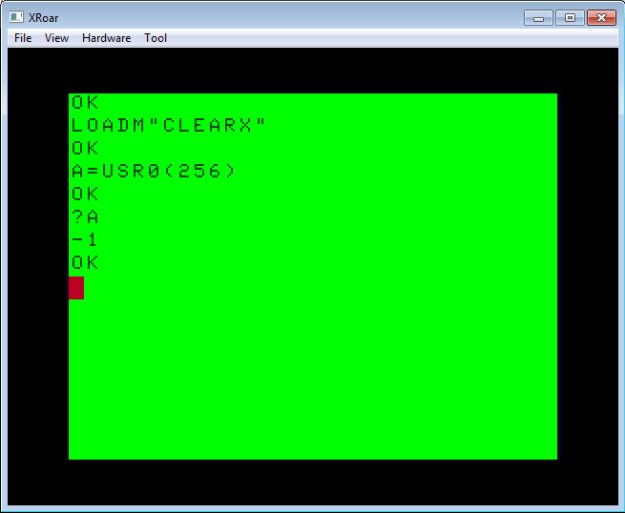
Best of all, with this change, it still works and rejects larger values:
CLEARX2: Electric Boogaloo
Thanks, Justin and Curtis, for those suggestions.
By the way, I know programmers often don’t bother with error checking. I mean, our code is perfect, right? And, clearing a screen is hardly anything that requires error checking. And while I agree, I noticed that even COLOR BASIC has error checking for it’s CLS command:
CLS with a value greater than 255 returns a Function Call error.
And, since the CoCo’s VDG chip supported nine colors, you only get colors for CLS 0 through CLS 8. If you try to clear to any value between 9 and 255, you get an easter egg:
CLS 9 through 255 present a Microsoft easter egg.
Bonus Question: There is also an additional CLS easter egg in the CoCo 3’s BASIC, Do you know what it is?
But I digress…
String Theory
You can really speed up a BASIC program by using assembly routines. For instance, while BASIC has great string manipulation routines, doing something simple like converting a string to uppercase can be painfully slow.
Suppose you were trying to write a text-based program and you wanted it to work on all Color Computer models. The original Color Computer 1 and early Color Computer 2 models could not display true lowercase – they displayed inverse characters instead. Later Tandy-branded CoCo 2s and the CoCo 3 could support lowercase.
To work on all systems, you might simply choose to put all your menu text in UPPERCASE. Or, you might store every string twice with an uppercase and mixed case version, and use a variable to know which one to print:
IF UC=1 PRINT "ENTER YOUR NAME:" ELSE PRINT "Enter your name:"
That would be one brute-force way to do it, but if your program used many strings, it would needlessly increase the size of your program. Instead, it might make sense to store all the strings in mixed case, and convert them to uppercase on output if needed.
Here is a very simple brute-force subroutine that does just this:
BASIC uppsercase subroutine.
And it works just fine…
Output of BASIC uppercase subroutine.
…but it’s slow. If no conversion is needed, the mixed case text instantly appears, but when conversion is needed, it crawls through the line character-by-character at speeds we haven’t seen text display at since the days of dial-up BBSes.
In an earlier series of articles, we discussed word-wrap routines in BASIC. Several folks contributed their versions, and we ranked them based on code size, RAM size and speed. There were many different approaches to the same thing, and the same applies to uppercasing a string, so please don’t take my brute-force example as the best way it can be done. It certainly isn’t, and can surely be improved.
But even the fastest BASIC routine won’t compare to doing the same thing in assembly.
Unfortunately, the USRx() command only allows you to pass in a numeric value, and not a string, so we can’t simply do something like:
A$=USR0("Convert this to all uppercase.") 'THIS WILL NOT WORK!
Pity. But, I was able to find the solution, and it involves another BASIC command known as VARPTR. This command gets the address of a variable in memory. You may recall that Darren Atkinson (creator of the CoCoSDC interface) used VARPTR in his version of the word-wrap routine:
This is our solution to passing in a string to USRx(). We can pass in the address of the string, and then the assembly code can figure it out from there. Here is how it works:
A$="This is a string in memory"
X = VARPTR(A$)
PRINT "A$ IS LOCATED AT ";X
If you run that code, you will see the address of that string in memory. We just need to understand how a string is stored.
The address does not point to the actual string data. Instead, it points to a few bytes of information that describe the string and where it is.
The first byte where the string is stored will be the size of that string:
A$="THIS IS A STRING IN MEMORY"
X = VARPTR(A$)
PRINT "A$ IS LOCATED AT";X
PRINT "A$ IS";PEEK(X);"LONG"
I forget what the second byte is used for, but bytes three and four are the actual address of the string character data:
PRINT "STRING DATA IS AT";PEEK(X+2)*256+PEEK(X+3)
On my system, it looks like this:
VARPTR of a string.
Once you know the actual starting place for the string data, you can see what that is in memory. In my case, the string length was 26 bytes, and the data started at 32709. I could use a FOR/NEXT loop and display the contents of that memory:
VARPTR string data example.
You will notice that the string information (length of string, location of string characters) is nowhere near the actual string data is. This is because the string characters could actually be in your program code, rather than in string memory. For example:
10 A$="THIS STRING IS IN THE PROGRAM"
Somewhere in RAM will be a string identification block with the length of the string and an address that points inside the program space. This makes it sort of an “embedded string” that lives inside your program. However, if you manipulate this string, BASIC will then make a copy of it in other memory and make the pointer go there. Thus, if you have a 10 character string like this:
10 A$="1234567890"
…and inside your code you do something like this:
20 A$=A$+"!"
…at that point, BASIC will no longer be pointing A$ to inside your code. It will be copied (pluy the “!”) to a new memory location inside of string space:
Here you can see that the location of the string (initially inside the program code space) moves to higher string memory RAM:
VARPTR shows you where the string moves to.
You won’t see memory decrease when this happens, because print MEM is showing you available program space. Strings live in a special section at the end of program memory. You may have seen the CLEAR command uses to reserve space for strings like this:
CLEAR 200
I believe 200 is the default if you don’t specify. In this case, the string started out inside the program’s code space and was not using any of that 200 bytes, and then after altering the string, it was copied in to the 200 bytes of string space.
Thus, if you want to see the impact, try running with “CLEAR 0” so there is NO ROOM for strings!
5 CLEAR 0 ' NO STRING SPACE
Now when we run that program, we see that the initial string works, because it is stored inside the program space, but the moment we try to add one character to it, there is no string memory available to copy the string to and it fails with an ?OS ERROR (out of string space).
?OS ERROR showing strings move from code space to string space.
This is something to be aware of if you are ever writing large programs with many strings. Rather than do something like this:
…which would then allocate string space to hold the length of A$, B$ and C$, you could keep those strings in program code space by just printing them out each time:
40 PRINT A$;B$;C$
The trick is to avoid BASIC having to allocate string memory and copy things over. If you need to do this, you can re-use a temporary string:
40 TS$=A$+B$+C$:GOSUB 1000:TS$=""
I think something like that would create a temporary string (TS) and copy all those code space strings over, then you could use it, and then setting it back to “” at the end would release that memory. If string memory is limited, tricks like this can really help out.
But I digress.
Now that we know how strings are stored, we can create an assembly routine that will serve as a UPPERCASE PRINT command.
Our assembly routine will be passed the address of the string, and then use byte 1 to get the length, and bytes 3 and 4 to get the location of the actual string characters. We can then walk through that memory and use the CHROUT ROM routine to output each character one-by-one, the same way BASIC does for PRINT.
Here is the routine:
* UCASE.ASM v1.00
* by Allen C. Huffman of Sub-Etha Software
* www.subethasoftware.com / alsplace@pobox.com
*
* DEFUSRx() uppercase output function
*
* INPUT: VARPTR of a string
* RETURNS: # chars processed
*
* EXAMPLE:
* CLEAR 200,&H3F00
* DEFUSR0=&H3F00
* A$="Print this in uppercase."
* PRINT A$
* A=USR0(VARPTR(A$))
*
ORGADDR EQU $3f00
dir
GIVABF EQU   $B4F4    * 46324
INTCNV EQU   $B3ED    * 46061
CHROUT EQU   $A002

       org   ORGADDR
start  jsr   INTCNV   * get passed in value in D
       tfr   d,x      * move value (varptr) to X
foo    ldb   ,x       * load string len to B
       ldy   2,x      * load string addr to Y
       beq   null     * exit if strlen is 0
       ldx   #0       * clear X (count of chars conv)
loop   lda   ,y       * load char in A
       cmpa  #'a      * compare to lowercase A
       blt   nextch   * if less, no conv needed
       cmpa  #'z      * compare to lowercase Z
       bgt   nextch   * if greater, no conv needed
lcase  suba  #32      * subtract 32 to make uppercase
       leax  1,x      * inc count of chars converted
nextch jsr   [CHROUT] * call ROM output character routine
       leay  1,y      * increment Y pointer
cont   decb           * decrement counter
       beq   exit     * if 0, go to exit
       bra   loop     * go to loop
exit   tfr   x,d      * move chars conv count to D
       bra   return   * return D to caller
null   ldd   #-1      * load -2 as error
return jmp   GIVABF   * return to caller

* lwasm --decb -o ucase.bin ucase.asm
* decb copy -2 -r ucase.bin ../Xroar/dsk/DRIVE0.DSK,UCASE.BIN
W will call our assembly routine like this:
A$="Convert this to uppercase."
A=USR0(VARPTR(A$))
And it should work on upper and lowercase strings automatically:
Uppercase output routine in assembly.
Now our uppercasing output routine is lightning fast.
Previously, we took a look at using the EXTENDED COLOR BASIC DEFUSR command to interface a bit of assembly language with a BASIC program. The example I gave simply added one to a value passed in:
Using DEFUSR to call assembly from BASIC.
That’s not very useful, so let’s do something a bit more visual.
One of my favorite bits of CoCo 6809 assembly code is this:
      org  $3f00
start ldx  #$400 * load X with start of 32-column screen
loop  inc  ,x+   * increment whatever is at X, then increment X
      cmpx #$600 * compare X with end of screen
      bne  loop  * if not end, go back to loop
      bra  start * go back to start
This endless loop will start incrementing every byte on the screen over and over making a fun display. I ran this code in the Mocha emulator (which has EDTASM available):
http://www.haplessgenius.com/mocha
Then I compiled it (“A/IM/WE/AO” – assemble, in memory, wait for errors, absolute origin – how can I still remember this???), and ran it in the debugger (“Z” for debugger, then “G START” to start it):
Mocha emulator running silly screen code.
This inspired me to make a small assembly routine to do something similar from BASIC. The CLS command can take an optional value (0-8) to specify what color to clear the screen to. Let’s make an assembly routine that will allow specifying ANY character to clear the screen to:
ORGADDR EQU $3f00

GIVABF EQU  $B4F4  * 46324
INTCNV EQU  $B3ED  * 46061

       org  ORGADDR
start  jsr  INTCNV * get passed in value in D
       cmpd #255   * compare passed in value to 255
       bgt  error  * if greater, error
       ldx  #$400  * load X with start of screen
loop   stb  ,x+    * store B register at X and increment X
       cmpx #$600  * compare X to end of screen
       bne  loop   * if not there, keep looping
       bra  return * done
error  ldd  #-1    * load D with -1 for error code
return jmp  GIVABF * return to caller
First, I added a bit of error checking so if the user passed in anything greater than 255, it will return -1 as an error code. Otherwise, it returns back the value passed in (that the screen was cleared to.)
Side Note: Hmmm. Since I know register D is register A and B combined, all I really need to do is make sure A is 0. i.e, “D=00xx”. If anything is in A, it is greater than the one byte value in B. I suppose I could also have done “cmpa #0 / bne error”. Doing something like that might be smaller and/or faster than comparing a 16-bit register. Anyone want to provide me a better way?
Since the 16-bit register D is made up of the two 8-bit registers A and B, I can just use B as the value passed in (0-255).
Here is what it would do with a bad value:
Clear X routine, bad value error.
And here is it with a valid value of 42:
Clear X with a value of 42.
So far so good.
In the next part, we’ll look at how to pass in a string instead of an integer.
This article series will demonstrate how to interface some 6809 assembly code with Microsoft BASIC on a Tandy/Radio Shack TRS-80 Color Computer.
BASIC on the Color Computer is easy, but not fast. 6809 assembly language is fast, but not easy. Fortunately, it’s easy (and fast?) to combine them, allowing you to write a BASIC program that makes use of some assembly language to speed things up.
Assembly code can be loaded (or POKEd) in to memory at a specific address and then invoked by the EXEC command. This is fine for a “go do this” type of routine. But, if you want the assembly code to interact with BASIC by returning values or modifying a variable or string, you can use a special BASIC command designed for this purpose.
The Color Computer’s original 1980 COLOR BASIC had a USR command which could be used to call an assembly language routine via a BASIC interface. From the Wikipedia entry:
USR(num) calls a machine language subroutine whose address is stored in memory locations 275 and 276. num is passed to the routine, and a return value is assigned when the routine is done
This allowed passing a numeric parameter in to the assembly routine, and getting back a status value.
When EXTENDED COLOR BASIC came out, USR was enhanced to allow defining multiple routines. It looks like this:
DEFUSR0=&H3F00
A=USR0(42)
That code would define USR0 to call an assembly routine starting at memory location &H3F00 and pass it the value of 42. That routine could then return a value back to the caller which would end up in the variable A.
There are two ROM routines that enable receiving a value from BASIC, and returning one back:
INTCNV will convert the integer passed in the USRx() call and store it in register D.
GIVABF will take whatever is in register D and return it to the USR0() call.
Here is a very simple assembly routine that would receive a value, add one to it, and return it.
ORGADDR EQU $3f00

GIVABF EQU $B4F4   * 46324
INTCNV EQU $B3ED   * 46061

       org  ORGADDR
start  jsr  INTCNV * get passed in value in D
       tfr  d,x    * transfer D to X so we can manipulate it
       leax 1,x    * add 1 to X
       tfr  x,d    * transfer X back to D
return jmp  GIVABF * return to caller
Using the lwtools 6809 cross compiler, I can compile it in to a .BIN file that is loadable in DISK BASIC:
lwasm --decb -o addone.bin addone.asm
I could then use the toolshed decb command to copy the binary to a .DSK image to run in an amulator such as Xroar. In my case, I have an image called DRIVE0.DSK I want to copy it to:
2016/1/19 – Added reference to earlier article about more memory for BASIC (and an excerpt about why BASIC is that way). Also added reference to Juan’s comment on improving the program. Added link to Facebook CoCo group.
2016/9/2 – Removed a duplicate line in the 2nd listing. Maybe fixed a typo or two.
On startup, a cassette-based CoCo has 24871 bytes available for BASIC.
Recently, Richard Ivey became the latest person in the Facebook TRS-80 / Color Computer group to ask how to tell if an old Radio Shack Color Computer had 64K without opening the case. The problem has to do with backwards compatibility. When the original Radio Shack TRS-80 Color Computer was released in 1980, it was sold as either a 4K or 16K system. Later, a 32K model would be available, and the Microsoft COLOR BASIC would give about 24K of free memory (with the rest of the memory used by the video display, cassette buffers, BASIC input buffer, etc.).
Update: See this earlier article about getting more memory for BASIC. Here is an excerpt:
64K NOTE: The reason BASIC memory is the same for 32K and 64K is due to legacy designs. The 6809 processor can only address 16-bits of memory space (64K). The BASIC ROMs started in memory at $8000 (32768, the 32K halfway mark). This allowed the first 32K to be RAM for programs, and the upper 32K was for BASIC ROM, Extended BASIC ROM, Disk BASIC ROM and Program Pak ROMs. Early CoCo hackers figured out how to piggy-pack 32K RAM chips to get 64K RAM in a CoCo, but by default that RAM was “hidden” under the ROM address space. In assembly language, you could map out the ROMs and access the full 64K of RAM. But, since a BASIC program needed the BASIC ROMs, only the first 32K was available.
When 64K upgraded became available, the original BASIC would still only report about 24K free since it had never been modified to make use of the extra memory. Thus, typing “PRINT MEM” on a 32K CoCo 1 shows the same thing it does on a 512K (or greater) CoCo 3.
So how do you tell? One easy way is to just try to load a program or game that requires 64K and see if it works. But, if all you have is the CoCo, there is a short program you could type in to test. (NOTE: See a better listing later in this article.)
10 READ A$:IF A$="X" THEN END
20 POKE 20000+N,VAL("&H"+A$)
30 N=N+1:GOTO 10
40 DATA 34,01,1A,50,10,8E,80,00
50 DATA B7,FF,DE,EC,A4,AE,22,EE
60 DATA 24,B7,FF,DF,ED,A1,AF,A1
70 DATA EF,A1,10,8C,FE,FC,25,E8
80 DATA 10,8C,FF,00,24,0C,B7,FF
90 DATA DE,EC,A4,B7,FF,DF,ED,A1
100 DATA 20,EE,35,01,39
110 DATA X
Thanks to Juan Castro for passing this along. I reformatted it so no line would be longer than the 32 column screen, hoping it makes it a bit easier to type in (though it does make the program longer, needing more, shorter lines).
On a 64K CoCo, this program will copy the ROMs to RAM and then switch in to all-RAM mode. RUN it, then type EXEC 20000 to execute it.
I believe this is the classic “ROM TO RAM” (or ROM2RAM) program that appeared somewhere in Rainbow magazine back probably around 1983. Basically, it places the system in to 64K mode (where memory addresses &H0000 to &HFFFF are all RAM) and copies the COLOR BASIC and, if installed, the EXTENDED and DISK BASIC ROMs in to that upper 64K so the system can still work.
If you type this in on a CoCo 1 or 2, then RUN it, it loads a small machine language program in starting ad memory address 20000. After this, you can type “EXEC 20000” to execute that machine language program. If you typed it in correctly, it should just return to BASIC and nothing should seem any different.
But, at this point (if it worked), the BASIC ROM is now in RAM, which means you can POKE to those memory locations and make changes.
Juan suggests an easy hack of changing where the prompt “OK” appears. He says:
Now try POKE &HABEF,89 — OK should become OY.
It worked for me in the Xroar emulator (configuration to emulated a 64K CoCo 2):
The BASIC “OK” prompt is changed to read “OY” (after placing the 64K CoCo in to all-RAM mode).
Thus, if you can run this program without it crashing, and that POKE works to change something formerly in ROM, your CoCo is operating in all-RAM mode and must have more than 32K.
In the future, I will have to track down a simpler way to test for 64K. Until then, happy typing…
Update: In the comments, Juan suggested making the following changes, so the program will execute the machine language program for you:
10 READ A$:IF A$=”X” THEN 35
20 POKE 20000+N,VAL("&H"+A$)
30 N=N+1:GOTO 10
35 EXEC 20000:POKE &HABEF,89:END
40 DATA 34,01,1A,50,10,8E,80,00
50 DATA B7,FF,DE,EC,A4,AE,22,EE
60 DATA 24,B7,FF,DF,ED,A1,AF,A1
70 DATA EF,A1,10,8C,FE,FC,25,E8
80 DATA 10,8C,FF,00,24,0C,B7,FF
90 DATA DE,EC,A4,B7,FF,DF,ED,A1
100 DATA 20,EE,35,01,39
110 DATA X
With those changes, now all you have to do is type RUN and it will load the machine language program, execute it (to copy ROM in to RAM), then poke the “OK” prompt to say “OY”. Thanks, Juan!
Thanks to Jim Gerrie, Nick Marentes, John Mark Mobley and Rogelio Pera for their initial submissions. A few more are still to be added, and I know of at least two others working on entries.
2021-12-15: Added screen shot of BASIC ROM assembly.
On the Radio Shack Color Computer, Extended Color BASIC added new commands to access high resolution graphics modes. The following modes of the CoCo’s Motoroal 6847 VDG chip (video display generator) were implemented:
PMODE 0 – 128×96 2-color (1536 bytes)
PMODE 1 – 128×96 4-color (3072 bytes)
PMODE 2 – 128×192 2-color (3072 bytes)
PMODE 3 – 128×192 4-color (6144 bytes)
PMODE 4 – 256×192 2-color (6144 bytes)
Extended Color BASIC allows a program to allocate up to eight 1536 byte pages of memory for graphics. If you wanted to use a single 128×96 PMODE 0 screen, you would want to reserve on page of memory for it (PCLEAR 1). If you wanted to use a 256×192 PMODE 4 screen, you would want to reserve four pages of memory (PCLEAR 4).
In BASIC, you could reserve eight pages (PCLEAR 8), and then draw on eight different PMODE 0 screens and flip between them, creating simple page-flipping animation. It was amazingly fun back then.
But this isn’t an article about graphics (though now that I think about it, I really want to write one).
By default, BASIC reserves four pages of graphics memory (6144 bytes) which, I guess, saves a BASIC program from having to do “PCLEAR 4” in it before using PMODE 4. Proper BASIC programs always did the PCLEAR anyway just to make sure the memory was available (for instance, if you typed PCLEAR 1 before you ran, the program would error out if it was assuming PCLEAR 4 was available). There have always been bad programmers.
The point of this article is to point out that, by default, BASIC has 6K less memory available to it. On startup, a 32K or 64K disk-based CoCo shows 22823 bytes free to BASIC:
On startup, the CoCo has 22823 bytes available for BASIC.
64K NOTE: The reason BASIC memory is the same for 32K and 64K is due to legacy designs. The 6809 processor can only address 16-bits of memory space (64K). The BASIC ROMs started in memory at $8000 (32768, the 32K halfway mark). This allowed the first 32K to be RAM for programs, and the upper 32K was for BASIC ROM, Extended BASIC ROM, Disk BASIC ROM and Program Pak ROMs. Early CoCo hackers figured out how to piggy-pack 32K RAM chips to get 64K RAM in a CoCo, but by default that RAM was “hidden” under the ROM address space. In assembly language, you could map out the ROMs and access the full 64K of RAM. But, since a BASIC program needed the BASIC ROMs, only the first 32K was available.
To get the most memory possible for BASIC we would want to not reserve any graphics pages. However, the PCLEAR command does not allow typing PCLEAR 0. The best we can do is PCLEAR 1, which still reserves 1536 bytes. Doing” PCLEAR 1″ and then “PRINT MEM” will show 27431 bytes free. I am not really sure why PCLEAR 0 was not implemented, but without it, there is always 1.5 K of memory wasted for BASIC programs that do not use high-resolution graphics.
However, it is very simple to achieve a PCLEAR 0 by using a few bytes of assembly language. The short program I use to do it is this:
This program reads the 9-byte assembly code and POKEs it in to memory, then EXECutes the routine. I chose to store it at memory location 1024, which is the start of the 32 column text screen. As a result, when it runs, it will put garbage on the first 9 characters of the screen. I just chose that memory since I knew no other program would use it (unless it was a temporary thing like this). If you understand the CoCo memory map, you can change that 1024 to any other safe location in memory and avoid having the text screen temporarily corrupted.
After running this, now a “PRINT MEM” will show 28967. Now we have 6144 bytes extra for our program! Big win.
However … 28K still isn’t quite the 32K we may have hoped for. This is because there is also memory reserved for the text screen (512 bytes, 1/2 K), cassette load buffers, BASIC input buffers, etc. There is additional memory reserved for Disk BASIC, so you actually have a bit more BASIC memory on a cassette-only system.
On startup, a cassette-based CoCo has 24871 bytes available for BASIC.
As you see above, 24871 bytes are available on a cassette-based CoCo on startup, which means there is about 2K of overhead to support Disk Extended Color BASIC. (Note to self: check these numbers.)
If we do the PCLEAR 0 on a cassette-based CoCo, we end up with 31015 bytes available to BASIC, and that is the most we can get (easily). If you do this:
PRINT PEEK(25)*256+PEEK(26)
…you will see what memory location your BASIC program starts at. After a PLCEAR 0 on a cassette-based CoCo, the value returned is 1537. The 32-column text screen is in memory from 1024 to 1536, meaning this is the very earliest in memory that a BASIC program can start. The only way to get more memory would be to extend the end, and we can’t because at the 32K mark, the BASIC ROMs begin. (Thus, 1537 to 32676 in memory is 31230, which is 215 bytes still missing. 200 bytes is reserved for strings, but a CLEAR 0 removes that, meaning there are only 15 bytes of BASIC overhead we can’t actually use.)
Not bad.
BONUS: Here is the nine bytes of assembly that my program POKEs in:
ldb #1
lda <$bc
tfr d,y
jmp >$96a3
Thanks to William Astle (Lost Wizard Enterprises, creator of LWTools) for translating my POKE bytes back in to the assembly code for me. It’ s been so long, I couldn’t remember what it was doing. In this case, it’s setting up the Y register and jumping in to a ROM routine that handles the PCLEAR, which I assume is being done to bypass the “?FC ERROR” check if the value of 0 is used from BASIC.
Here is the routine from Extended Color BASIC Unravelled:
Here is a new word wrap test program. It has new test string cases, and now reports the code space used and variable memory used in addition to time. In order to properly report code space, it may require some tweaking (unless you have it entered 100% byte-for-byte like I typed it). I will make a .DSK image available for download soon.
Your submission should be a subroutine that starts at line 1 and expects A$ to be the string to word wrap, WD to be the screen width to wrap to, and RETURNs and the end back to the caller.
The new test program records the start and end time (to determine speed), start and end memory (to determine variable usage), and displays the code size of the program minus the number of bytes of the test program (line 0, lines 100-end). It has the size of the “empty” test program (nothing from line 1-99) hard coded so it can reflect the overhead of your routine in those lines.
NOTE: The memory usage shown by this program is just variables, and not string space. Each variable used takes 7 bytes, and string data goes in the CLEAR xxx block of memory. If memory used shows 16, but you had to do a CLEAR 600 to make your routine work, you do require more than 16 bytes but I couldn’t
Configuring the Test
CODE SPACE: The code space value printed is hard coded to subtract the size of the test program with a value in line 260. If you retype the test program and change any spaces or anything that would alter the size, that constant value needs to be adjusted. You want it to print 0 when you have nothing in lines 1-99 and type GOTO 280. If it does not print 0, adjust the value subtracted at the end of line 280. (If it prints 4, add 4 to the value that is there. If it prints -2, subtract 2.)
MEMORY: If your program uses more than the default 200 bytes reserved for variables, adjust the CLEAR command in LINE 100. If you are pre-DIMensioning variables you plan to use, you can also add them to LINE 100 but this will count against your code size. It is a good thing to do for speed.
The Tests
The test program will perform the following tests:
An empty string.
A short string that does not need to word wrap.
A multi-line string of words that will need to word wrap. Its has words with characters ending in position 32 to test if the wrap routine uses that column without skipping extra spaces between lines.
A string with a word longer than 32 characters and one longer than 64 characters to test chopping of long words (where it just splits it in the middle).
I believe these will test all possible conditions, and will help us compare all the versions for code size, variable usage and execution speed.
WWTEST10.BAS – Version 1.0
0 GOTO 100:REM WW-TEST 1.0
100 CLS:CLEAR 200:DIM A$,M1,M2,T1,T2,WD
110 INPUT"SCREEN WIDTH [32]";WD
120 IF WD=0 THEN WD=32
130 TIMER=0:T1=TIMER
140 M1=MEM
150 PRINT "EMPTY STRING:"
160 A$="":GOSUB 1
170 PRINT "SHORT STRING:"
180 A$="THIS SHOULD NOT NEED TO WRAP.":GOSUB 1
190 PRINT "LONG STRING:"
200 A$="THIS IS A STRING WE WANT TO WORD WRAP. EACH LINE CONTAINS EXACTLY 32 CHARACTERS. IT SHOULD USE THE LAST COLUMN AND SHOW FOUR LINES.":GOSUB 1
210 PRINT "WORD > WIDTH:"
220 A$="SUPERCALIFRAGILISTICEXPIALIDOCIOUS IS A WORD TOO LONG TO FIT ON ONE LINE. THIS ONE TAKES OVER TWO: ABCDEFGHIJKLMNOPQRSTUVWXYZ1234567890ABCDEFGHIJKLMNOPQRSTUVWXYZ1234567890. DID IT WORK?":GOSUB 1
230 A$=""
240 T2=TIMER
250 PRINT"TIME TAKEN:"T2-T1
260 M2=MEM
270 PRINT"MEMORY USE:"M1-M2
280 PRINT"CODE SPACE:"PEEK(27)*256+PEEK(28)-PEEK(25)*256+PEEK(26)-767
290 END
Behold, the new champion of BASIC word wrap routines! Darren Atkinson sends in this two line wrap routine which makes use of the INSTR() function to find spaces in a string. It uses more integer variables, but does not use any strings. And, it’s FAST! It parses the test cases with a count of around 60 — half the time of the previous fast version! Size-wise, it clocks in at 231 bytes, which is five bytes smaller than his previous version. Jim Gerrie’s still has the edge in the size category, but to get this much more speed for just a few bytes more might be a worthy tradeoff.
Darren does note:
I’m not sure the speed increase will be as dramatic when printing strings with average length words.
– Darren
I believe this is because his routine zips through long lines immediately, but would spend more time searching for spaces in a normal sentence. I will do some benchmarks using normal sentences to see how it stacks up.
Here is the full version:
0 GOTO100
1 ST=1:LN=LEN(A$)+1:FORPP=1TOLN:LW=INSTR(PP,A$," "):IFLW THENIFLW-ST<WD THENPP=LW:NEXTELSEELSEPRINTMID$(A$,ST):RETURN
2 IFLW-ST=WD THENPRINTMID$(A$,ST,LW-ST);:PP=LW:ST=LW+1:NEXTELSEIFPP<>ST THENPRINTMID$(A$,ST,PP-ST-1):ST=PP:PP=PP-1:NEXTELSEPRINTMID$(A$,ST,LW-ST)" ";:PP=LW:ST=LW+1:NEXT
100 CLS
110 INPUT"SCREEN WIDTH [32]";WD
120 IF WD=0 THEN WD=32
130 INPUT"UPPERCASE ([0]=NO, 1=YES)";UC
140 TIMER=0:TM=TIMER
150 PRINT "SHORT STRING:"
160 A$="THIS SHOULD NOT NEED TO WRAP.":GOSUB 1
170 PRINT "LONG STRING:"
180 A$="This is a string we want to word wrap. I wonder if I can make something that will wrap like I think it should?":GOSUB 1
190 PRINT "WORD > WIDTH:"
200 A$="123456789012345678901234567890123 THAT WAS TOO LONG TO FIT BUT THIS IS EVEN LONGER ABCDEFGHIJKLMNOPQRSTUVWXYZ1234567890ABCDEFGHIJKLMNOPQRSTUVWXYZ1234 SO THERE.":GOSUB 1
210 PRINT"TIME TAKEN:"TIMER-TM
220 END
Hi approach uses a FOR/NEXT loop to scan through each character position. By doing an INSTR(A$,PP,” “) (PP being the position 1-length), he checks to see if that position would be past the end of the line and, if not, he updates the PP position so it continues from there. This lets the assembly BASIC routine rapidly scan for the spaces instead of the BASIC interpreter doing it one byte a at a time. Very clever!
Great job, Darren!
His routine gave me another idea, and I will be providing an updated test program to try a few other things and see how we all stack up.