On this date (4/10) in 2023, Steve Bjork passed away. I still haven’t quite come to grips with him being gone. The last time I saw him was during a visit to California in 2018. He and his wife joined us for the day at Knott’s Berry Farm. I regret not visiting again when I was in California in 2022 — but I guess I am not the only one that lost touch with folks during the Covid era.
Steve was not real fond of being in photos, which may be why I cannot find any of him from that visit … but he is in this one ;-)
Regrets are easy to accomplish.
I miss my friend. Now that there has been some time since I learned of his passing, I will try to share some stories of my Adventures with Steve.
The most famous CoCo easter egg has to be the hidden photo of the CoCo 3 programmers that shows up if you hold down CTRL-ALT while turning the machine on. (Alternatively, you can hold down CTRL-ALT and hit the reset button on the back of the machine to also display it.)
But, there’s another, which I’d bet came first, since it followed in the footsteps of a pre-existing easter egg that was in the original 1980 Color BASIC 1.0 ROM.
CLS 100
The CLS command is used to clear the screen. On the 32-column text screen, specifying a number from 0-8 will fill the screen with color blocks. That functionality was extended on the CoCo 3’s 40 and 80 column text screens, except there it could clear the screen to a true background color.
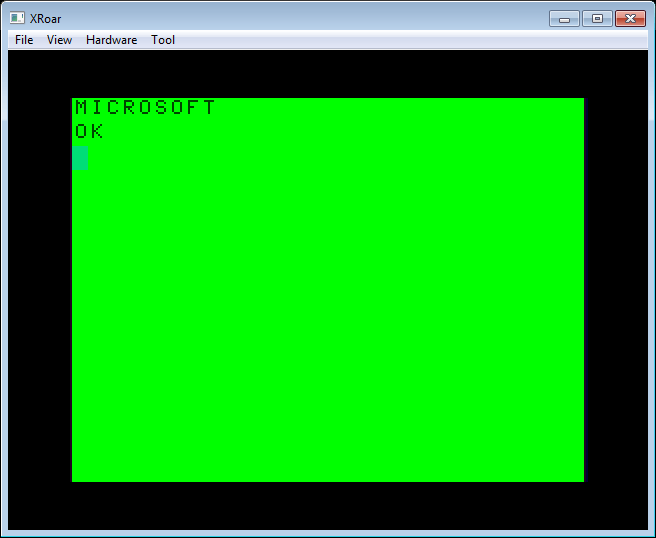
For the original CoCos, Microware included an easter egg in the CLS command. If you used a number greater than 8, instead of filling the screen with colored blocks it would display the word “MICROSOFT”.
CLS 9 through 255 present a Microsoft easter egg.
When Microware (not Microsoft) did the BASIC enhancements for the CoCo 3, they included a similar easter egg for the 40 and 80 column screens. If you did a CLS number outside of the range of 0-8, it would display “Microware Systems Corp.”
BUT, they added one special easter egg that you can only see once, then it disables itself (until the next power cycle or cold start). By typing CLS 100 you get to see the names of two of the programmers that worked on the project;
From that point on, if you type CLS 100 again you will only see the “Microware Systems Corp.” message.
In addition to making this easter egg a “one shot”, the programmers also took steps to hide their names so they would not be easily found by looking at the ROM code.
From Super Extended BASIC Unravelled, this note can be found in the memory map:
On startup, the ROMs are copied in to RAM, and these zero bytes will be in RAM at that range.
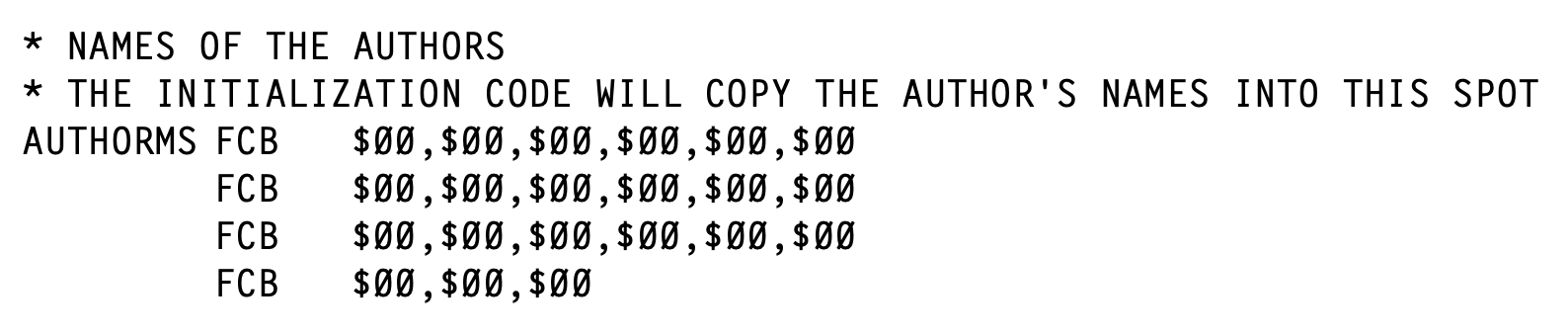
Then, during the CoCo 3 initialization code, there is a routine that copies the author names to that location. BUT, the data it copies is not the authors’ names — it’s an encoded version of the authors’ names:
Each of those bytes has its bits flipped. If the value in binary was 11110000, it would be encoded as 00001111. That effectively hides what those bytes represent from anyone just PEEKing around memory looking for text. There is a routine in the ROM that will start copying those bytes in to the other location, inverting the bits as it does so. It looks like this:
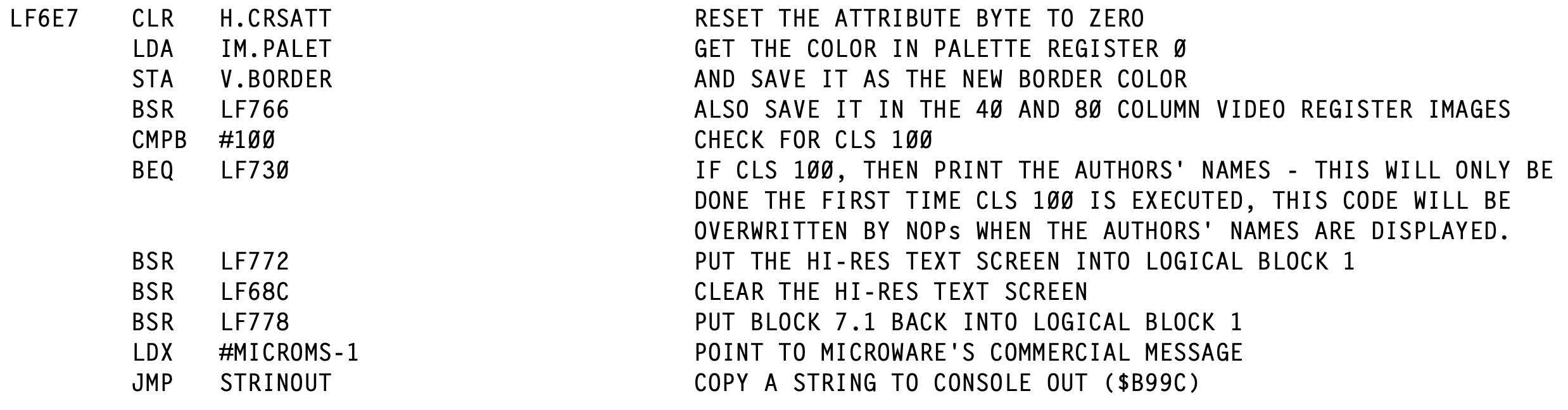
Here is the CLS code, which has special check for the value of 100 that will branch to a different routine:
The routine that is called when 100 is specified will display the easter egg and then wipe out the “Branch If Equal” instruction that calls it by replacing it with the NOP (no operation) instruction. Below is the code that does displays the egg and then disables it:
LF730 gets a pointer to the decoded author name message and displays it, then it starts in memory at F6F4 and stores a NOP byte there, and after it. That changes the two bytes the start out being “BEQ LF730” to “NOP NOP” effectively making the “CMP #100” useless since there is no longer an operation after it to make use of the results of that compare.
After those two bytes are changed to NOP, there is a loop that starts at memory location where AUTHORMS (F71B) is located and starts putting NOP bytes there until it gets to F74D. That destroys the evidence :) by wiping out everything in this table…
…and everything after it (the code) up to the LF74D label:
Thus, after CLS 100, the code that would have jumped to the routine is gone, the routine it would have jumped to is gone, and the data that the now gone routine would have displayed is also gone.
Nice.
Here is a short BASIC program that will dump the hex values of the name bytes on up through the code that displays them, then prints the name bytes out as text.
0 ' COCO3NAMES.BAS
10 WIDTH 40
20 FOR L=&HF71B TO &HF74C
30 PRINT HEX$(PEEK(L));" ";
40 NEXT
50 PRINT
60 FOR L=&HF71B TO &HF72F
70 PRINT CHR$(PEEK(L));
80 NEXT
If you boot a CoCo 3 and run this program, you will see it contains the bytes for the name text and the 6809 code:
Then if you type CLS 100 and run the program again you will see that those bytes are now all the NOP byte (&H12). Since this is not a printable character, nothing is printed after the hex values:
And that is more than we probably ever wanted to know about how the CLS 100 CoCo 3 Easter Egg works.
So let’s do a bit more…
Restoring (and customizing) the egg
Just for fun, I wrote this short BASIC program that does three things:
Restore the easter egg text to the memory from &HF71B-&HF72F.
Restore the display routine at &HF730 that prints the easter egg text and then deletes the easter egg text and the routine.
Restore the “branch if equal” that is supposed to happen after comparing the value of CLS to be 100.
And, as an added bonus, there is a line that will insert a “return from subroutine” RTS instruction in the display routine so it will not run the code that wipes out the easter egg text and display routine.
If you have already done a CLS 100, this code would restore the easter egg and let you run it again:
10 ' COCO3EGG.BAS
20 WIDTH 40
30 ' RESTORE EGG TEXT
40 EG$="T.Harris & T.Earles"
50 ' ROOM FOR UP TO 19 CHARS
60 LN=LEN(EG$)
70 IF LN>19 THEN LN=19
80 ' STORE THE EGG TEXT
90 FOR I=0 TO LN-1
100 POKE &HF71B+I,ASC(MID$(EG$,I+1))
110 NEXT
120 ' ADD CR and 0 BYTES
130 POKE &HF71B+I,13
140 POKE &HF71B+I+1,0
150 ' RESTORE DISPLAY ROUTINE
160 FOR L=&HF730 TO &HF756
170 READ V$:POKE L,VAL("&H"+V$)
180 NEXT
190 ' RESTORE CMP #100 "BEQ"
200 POKE &HF6F4,&H27:POKE &HF6F5,&H3A
210 ' DISABLE EGG KILL (RTS)
220 'POKE &HF73D,57
230 END
240 ' DISPLAY ROUTINE DATA
250 DATA 8D,40
260 DATA 17,FF,57
270 DATA 8D,41
280 DATA 8E,F7,1A
290 DATA BD,B9,9C
300 DATA 34,10
310 DATA 30,8D,FF,B1
320 DATA 86,12
330 DATA A7,80
340 DATA A7,84
350 DATA 30,8D,FF,CE
360 DATA A7,80
370 DATA 8C,F7,4D
380 DATA 25,F9
390 DATA 35,10
400 DATA 39
The DATA statements are organized like that to match the bytes shown in the Unravelled book’s listing of this routine. This helped me find and fix typos.
Line 220 is commented out, but that would place an RTS after the “JSR STRINOUT” in the LF730 display routine, causing it to return rather than do all the code that replaces stuff with the NOP bytes.
And, as an added bonus on top of the added bonus, you can change the easter egg string in line 40 to be anything you want, provided it is 19 characters or less. (Anything longer will just be cropped to the first 19 characters.) I changed mine to read “Sub-Etha Software” and had that message as my CLS 100 easter egg.
NOTE: I originally started writing this in November 2025, but kept thinking I’d do more work on it. I haven’t gotten around to it, so here you go…
Here is a Color BASIC 6809 assembly quickie… (That ended up not being very quick by the time I finished working through all of this…)
Recently I began working on an assembly language Color BASIC extension that makes certain characters move the cursor around the screen rather than just printing those characters (similar to what my VIC-20 could do). Initially, I created the 6809 assembly routine you could load into memory and EXEC. Next I decided to let it be called from DEF USR so I could pass in parameters and return a status code like A=USR0(-1). Next next I decided I wanted it to still work with EXEC so the user could use it either way–just use defaults with EXEC, or customize things using USR.
Then I ran into a snag…
USRx(n) or EXEC?
If the USR routine ONLY expected a number parameter, the code to handle both USR and EXEC seems easy. When calling a routine with EXEC, the D register will be zero (it seems). If it wasn’t zero, I could then do the JSR INTCNV call which would process the parameter in BASIC and put it in the D register.
; Show if routine is being called with USRx(n) or EXEC
ORGADDR equ $3e00 ; Where program loads in memory.
; Absolute addresses of ROM calls. CHROUT equ $A002 INTCNV equ $B3ED GIVABF equ $B4F4
org ORGADDR
; This code expects to have been called by USRx(x) or EXEC xxxx. start cmpd #0 ; called from EXEC? beq fromexec ; if yes, goto fromexec fromusr jsr INTCNV ; else, get USR number parameter in D pshs d ; save D leax usrmsg,pcr ; display "called from USR" message bsr print puls d ; restore D addd #1 ; add one to D jmp GIVABF ; return back to USR call.
; PRINT subroutine. Prints the 0-terminated string pointed to by X plus CR. print lda ,x+ beq printdone jsr [CHROUT] bra print printdone lda #13 jsr [CHROUT] rts
usrmsg fcc "CALLED FROM USR" fcb 0
execmsg fcc "CALLED FROM EXEC" fcb 0
end
When the routine starts, it checks to see what D is set to. If 0, it assumes it was called from EXEC and jumps to code that just prints “FROM EXEC” then ends.
If not 0, it assumes it was called from USR and the code calls the ROM INTCVT routine to parse the parameter and place it in D, then it prints “FROM USR”, increments D (just so we can verify it passed something back), and returns it back to BASIC.
Here it is in operation:
And all was right in the world… Until I tried just using EXEC by itself. After using it first with the address (“EXEC &H3E00”) BASIC will remembers that address so when you just type “EXEC” next it uses the previous address:
EXEC &H3E00
FROM EXEC

EXEC
?TM ERROR
Making the user always have to provide the EXEC address each time is not optimal. My solution was clearly not a solution.
But wait! There’s more…
I also learned about Sean Conner documenting how USR can also take a string parameter instead of just a number. If you are interested in USR, be sure to check out that link. He also has a cool 6809 compiler (“a09”) I just started playing with. It has some unique features not available in other compilers I have tried.
USRx(n) or USRx(“STRING”)
With this new knowledge, I had an idea to make my USR routine also be able to take a string for a special configuration function. I could let the user specify the four characters that will move the cursor by doing something like A=USR0(“udlr”). But, if you pass in a string and it calls INTCNV, that routine will check the parameter type and, if not a number, return with a ?TM ERROR (type mismatch).
This required me to learn how to tell whether USR was being called with a number or a string.
Under Extended Color BASIC (the original Color BASIC did things differently, see Sean’s page for details), the ROM code sets up some registers when calling the USR function. Sean documented these in his excellent blog post on USR. Basically, register A would be 0 if the USR parameter was a number, or 255 if it was a string. If it was a string, register X would have the address of the string descriptor (the location in memory that VARPTR returns) and register B would be the length of the string.
That is really convenient. Now you can have code that detects if it is being called from USR with a number or a string. My test code looked like this:
; Show if USR is being called with a number or a string.
ORGADDR equ $3e00 ; Where program loads in memory.
; Absolute addresses of ROM calls. CHROUT equ $A002 INTCNV equ $B3ED GIVABF equ $B4F4
org ORGADDR
; This code expects to have been called by USRx(x) or USRx("STRING") start tsta ; A=0 is USR(0), A=255 is USR("...") bne usrstring ; if not 0, goto usrstring usrnumber pshs d,x ; save D and X leax numbermsg,pcr ; display "number" message bsr print puls d,x ; restore D and X jsr INTCNV ; else, get USR number parameter in D addd #1 ; add one to D jmp GIVABF ; return back to USR call.
usrstring leax stringmsg,pcr ; display "string" message bsr print ldd #123 ; load D with return value jmp GIVABF ; return back to USR call.
; PRINT subroutine. Prints the 0-terminated string pointed to by X plus CR. print lda ,x+ beq printdone jsr [CHROUT] bra print printdone lda #13 jsr [CHROUT] rts
stringmsg fcc "STRING" fcb 0
numbermsg fcc "NUMBER" fcb 0
end
And here it is in operation:
Now I know how to detect a USRx(number) versus EXEC, and how to detect a USRx(number) versus a USRx(string). But, this has the same problem if called by EXEC with no address:
EXEC &3E00 NUMBER
EXEC NUMBER ?TM ERROR
It appears that using EXEC with the address after it sets registers up differently than using EXEC with no address (where it uses the last address EXEC used). While both end up at the code path for USRx(number), is seems that plain EXEC thinks it is returning an invalid type and the ?TM ERROR is displayed.
EXEC or EXEC xxxx or USRx(n) or USRx(“STRING”)
Can both routines be combined? On the CoCo mailing list, this all started when I asked: Is there a way to tell if a routine was called from USR versus EXEC? It was Sean’s reply that got me going down this rabbit hole:
Maybe.
Address $9D contains the address EXEC uses to jump to your code, so that should be called address. Also, X will also be this address (implementation detail).
For Color BASIC, you need to know you are running under Color BASIC. Address $112 is the address for USR, so this should point to your code. Also, upon calling, X should be equal to $AA2F and B should be 6 (both are implementation details).
For Extended Color BASIC, you need to know you are running under Extended Color BASIC (16 bits at $8000 are $4558). Addresses $013E through $0150 contain the USRn addresses, so one of these 10 addresses should point to your code. Also, A will equal the contents of address $06. If A=0, then X=$4F; if A=255, then X is pointing elsewhere (the string descriptor).
For Disk Extended Color BASIC, you need to know you are running under Disk Extended BASIC (16 bits at $C000 are $444B). The USRn addresses are now $095F through $0971, but other than that, it’s the same as Extended Color BASIC.
Based on all that, I think the best method might be (completely untested):
mycode cmpx #mycode beq called_by_exec ; otherwise, assume called by USR/USRn
Good luck.
-spc
– Sean Conner via the CoCo Mailing List
This gave me a lot of think about. I did some tests to see what register X looked like when being called by EXEC with or without an address, as well as looking at what was stored in the $9D memory location which is the address EXEC (with no address after it) will use. I created a simple program that would print the value of the X register and the value of $9D so I could test it and see what the pattern was. This code uses an undocumented ROM call that will print the value of the D register. (I learned about this call from Sean’s pages.)
ORGADDR equ $3e00 ; Where program loads in memory.
; Absolute addresses of items in RAM variables. EXECJP equ $9d location of jump address for EXEC
; Absolute addresses of ROM calls. REGDOUT EQU $BDCC ; Convert the value in ACCD into a decimal ; number and send it to CONSOLE OUT.
org ORGADDR
start tfr x,d ; X=D jsr REGDOUT lda #32 ; space jsr [CHROUT] ldd EXECJP ; load D with EXEC address jsr REGDOUT rts
end
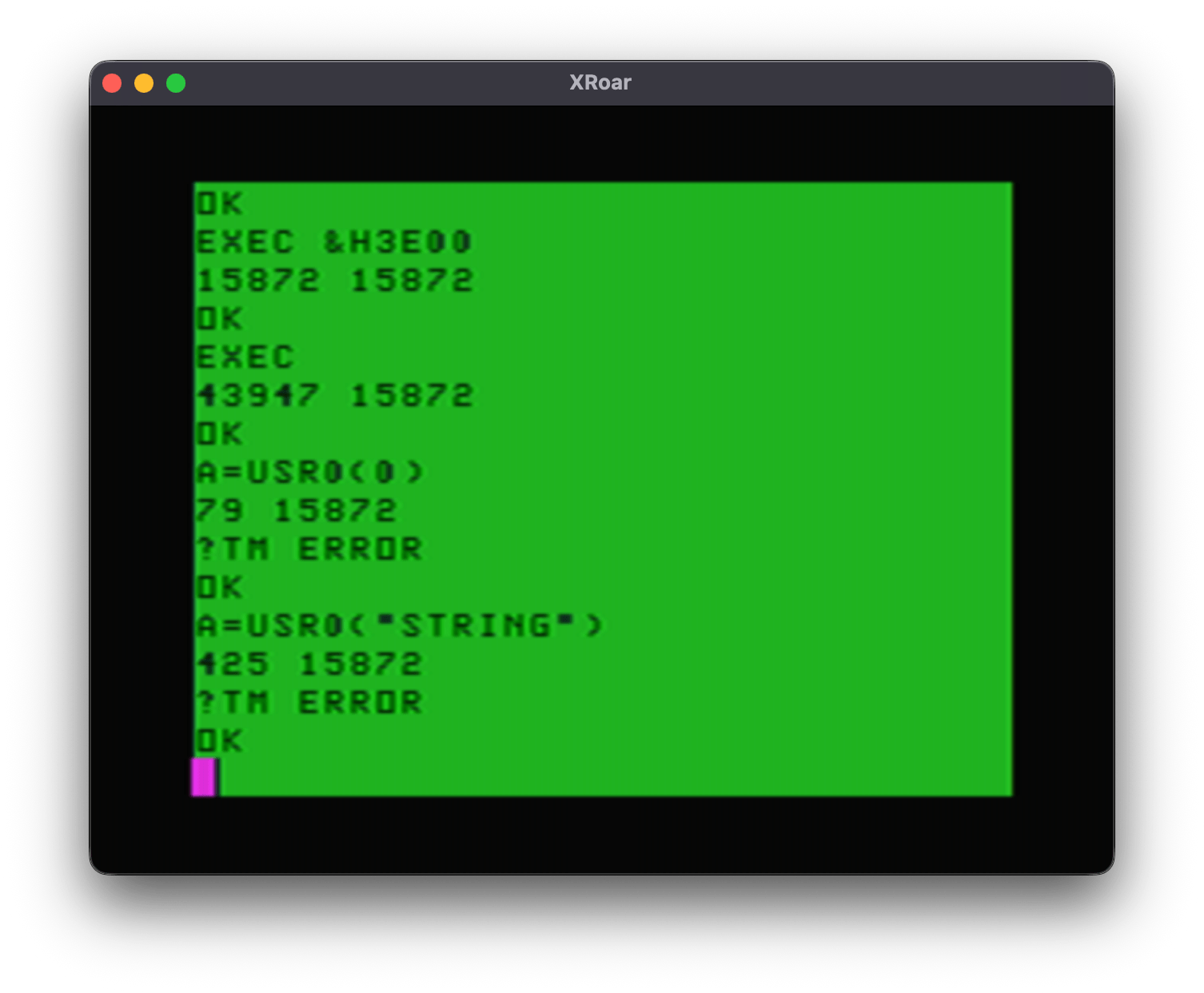
Now I could load this into memory, set up a DEFUSR0=&H3E00 and do some tests:
15872 ($3E00) is the start of my user program. EXEC with that address will have both X and the $9D memory location containing that value.
EXEC without an address will have 43947 ($ABAB) in X, and 15872 ($3E00) as the address of the last EXEC address specified. But what is $ABAB? Looking at the Color BASIC Unravelled book, that address is where the EXEC token is:
ABAB FDB EXEC
I did not dive into this, but I expect X was is used for the token scanning and since that was the last thing it found (no address after it to parse) that is what was in the register when it jumps to the user code.
When I tested A=USR0(0), I got a 79 in register X, and $9D still had the last EXEC address used. It then errored out with a ?TM ERROR due to this code not setting up a clean return back to a USR call.
And lastly, A=USR0(“STRING”) put 425 in register X, and $9D was still the last EXEC address used.
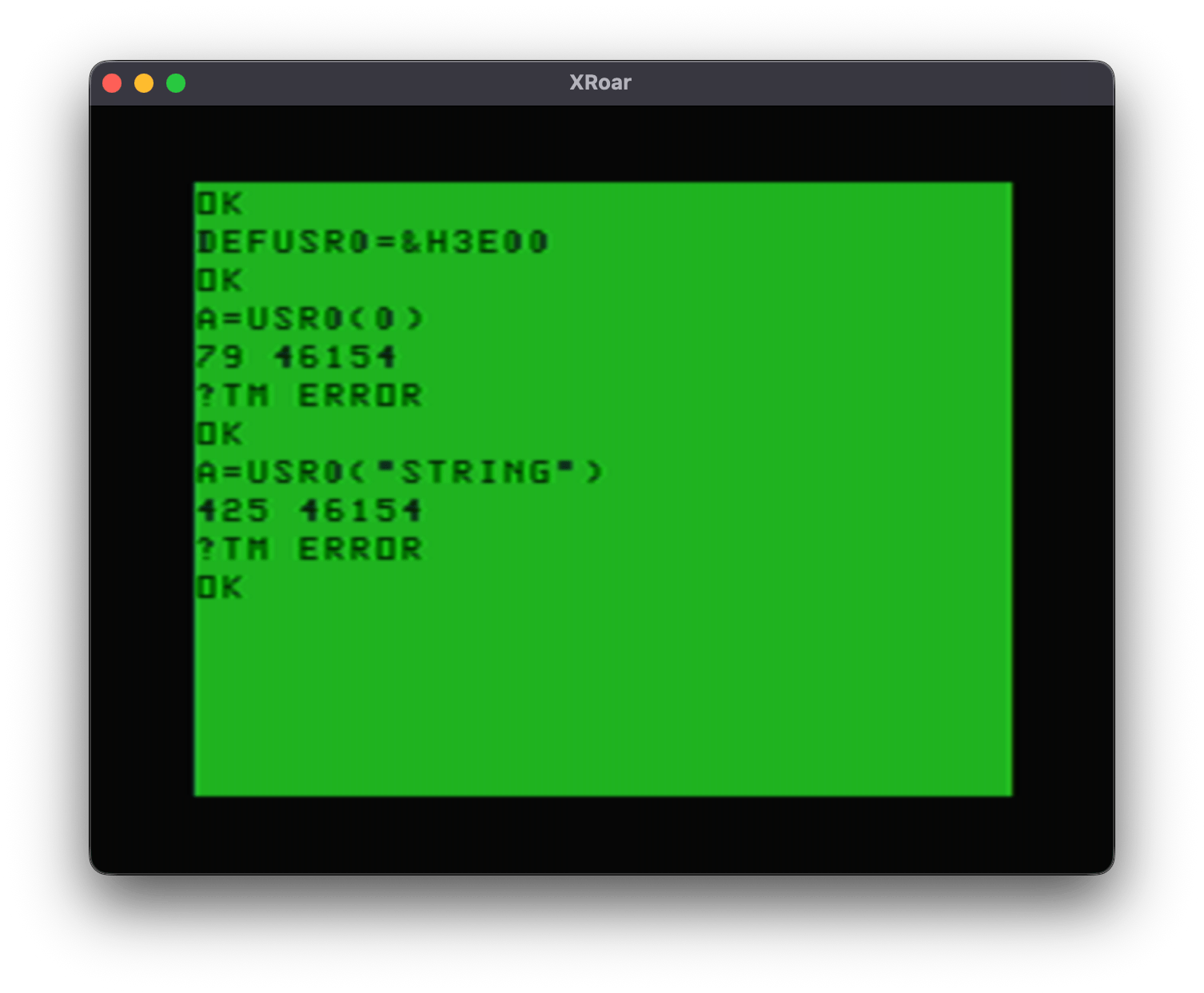
Now, had I done the USR calls first, that $9D would not be set up yet and it would look like this:
46154 ($B44A) appears to be the default value EXEC will use. By default, EXEC points to the routine that prints ?FC ERROR:
B44A FDB LB44A ARGUMENT OF EXEC COMMAND - SET TO ‘FC’ ERROR
So on a power cycle, typing EXEC is the same as typing EXEC &HB44A:
EXEC &HB44A ?FC ERROR
Having this value there is not useful for any of my checks since all that means is that the user has not done an EXEC with an address yet.
BUT, now that I see what happens with register X, I should be able to check it, and the $9D exec location and determine if I am being called by EXEC, EXEC xxxx, or a USRx command. Here is my test program:
ORGADDR equ $3e00 ; Where program loads in memory.
; Absolute addresses of items in RAM variables. EXECJP equ $9d location of jump address for EXEC
; Absolute addresses of ROM calls. CHROUT equ $A002
org ORGADDR
; This code expects to have been called by USRx(x). start cmpx #start ; called by "EXEC xxxx"? beq fromexec ; if yes, goto fromexec cmpx #$abab ; called by "EXEC"? bne fromusr ; if no, must be USR. goto fromusr ldx EXECJP ; get EXEC address cmpx #start ; called by "EXEC xxxx"? beq fromexec ; if yes, goto from exec fromusr leax usrmsg,pcr lbsr print rts fromexec leax execmsg,pcr lbsr print rts
; PRINT subroutine. Prints the 0-terminated string pointed to by X plus CR. print lda ,x+ beq printdone jsr [CHROUT] bra print printdone lda #13 jsr [CHROUT] rts
usrmsg fcc "FROM USR" fcb 0
execmsg fcc "FROM EXEC" fcb 0
end
And here is what it does:
I now have code that can properly (?) detect if it was called from EXEC xxxx, EXEC, or USR. This demo does not handle detecting a string parameter to USR, but … I think it proves it is possible to do it.
With a few more lines of assembly, I came up with this test program:
ORGADDR equ $3e00 ; Where program loads in memory.
; Absolute addresses of items in RAM variables. EXECJP equ $9d location of jump address for EXEC
; Absolute addresses of ROM calls. CHROUT equ $A002 INTCNV equ $B3ED GIVABF equ $B4F4
org ORGADDR
; This code can be called by USRx(n), USRx("STRING"), EXEC addr or EXEC. start cmpx #start ; called by "EXEC xxxx"? beq fromexec ; if yes, goto fromexec cmpx #$abab ; called by "EXEC"? bne fromusr ; if no, must be USR. goto fromusr ldx EXECJP ; get EXEC address cmpx #start ; called by "EXEC"? beq fromexec ; if yes, goto from exec fromusr tsta ; A=0? beq donumber ; if yes, number passed in. goto donumber. inca ; inc A so if 255 (string) it will be 0 now. beq dostring ; if A=0 (was 255), string. goto dostring. bra unknown ; else, goto unknown (this should never happen).
donumber leax numbermsg,pcr ; show "number" message bsr print jsr INTCNV ; get number that was passed in addd #1 ; add 1 to D jmp GIVABF ; return new number back to BASIC
dostring leax stringmsg,pcr ; show "string" message bsr print ldd #12345 ; load D with a return value jmp GIVABF ; return that number back to BASIC
unknown leax unknownmsg,pcr ; this should never happen lbsr print ; show "unknown" message rts
; PRINT subroutine. Prints the 0-terminated string pointed to by X plus CR. print lda ,x+ beq printdone jsr [CHROUT] bra print printdone lda #13 jsr [CHROUT] rts
execmsg fcc "FROM EXEC" fcb 0
numbermsg fcc "FROM USR(NUMBER)" fcb 0
stringmsg fcc "FROM USR(STRING)" fcb 0
unknownmsg fcc "UNKNOWN" fcb 0
end
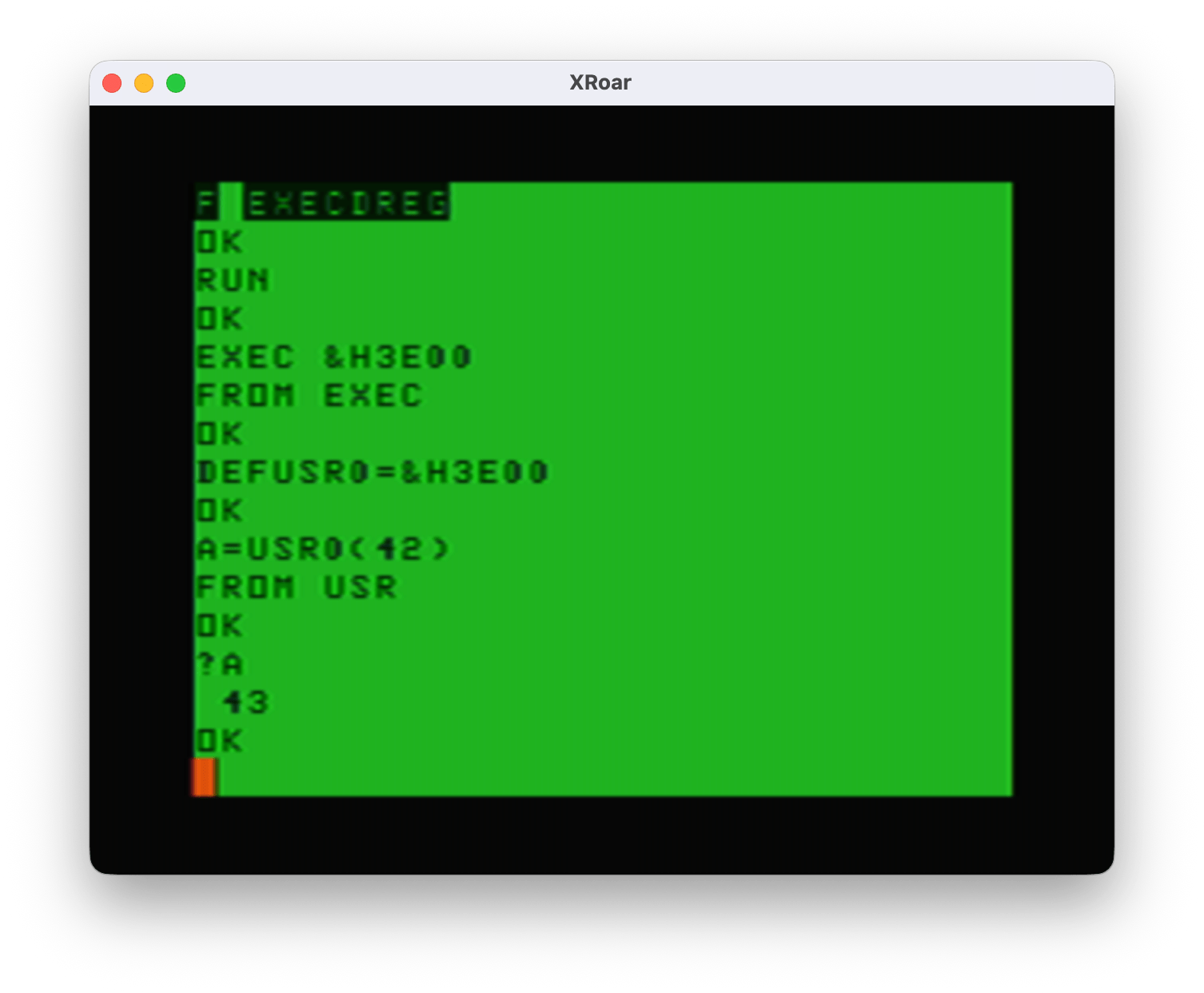
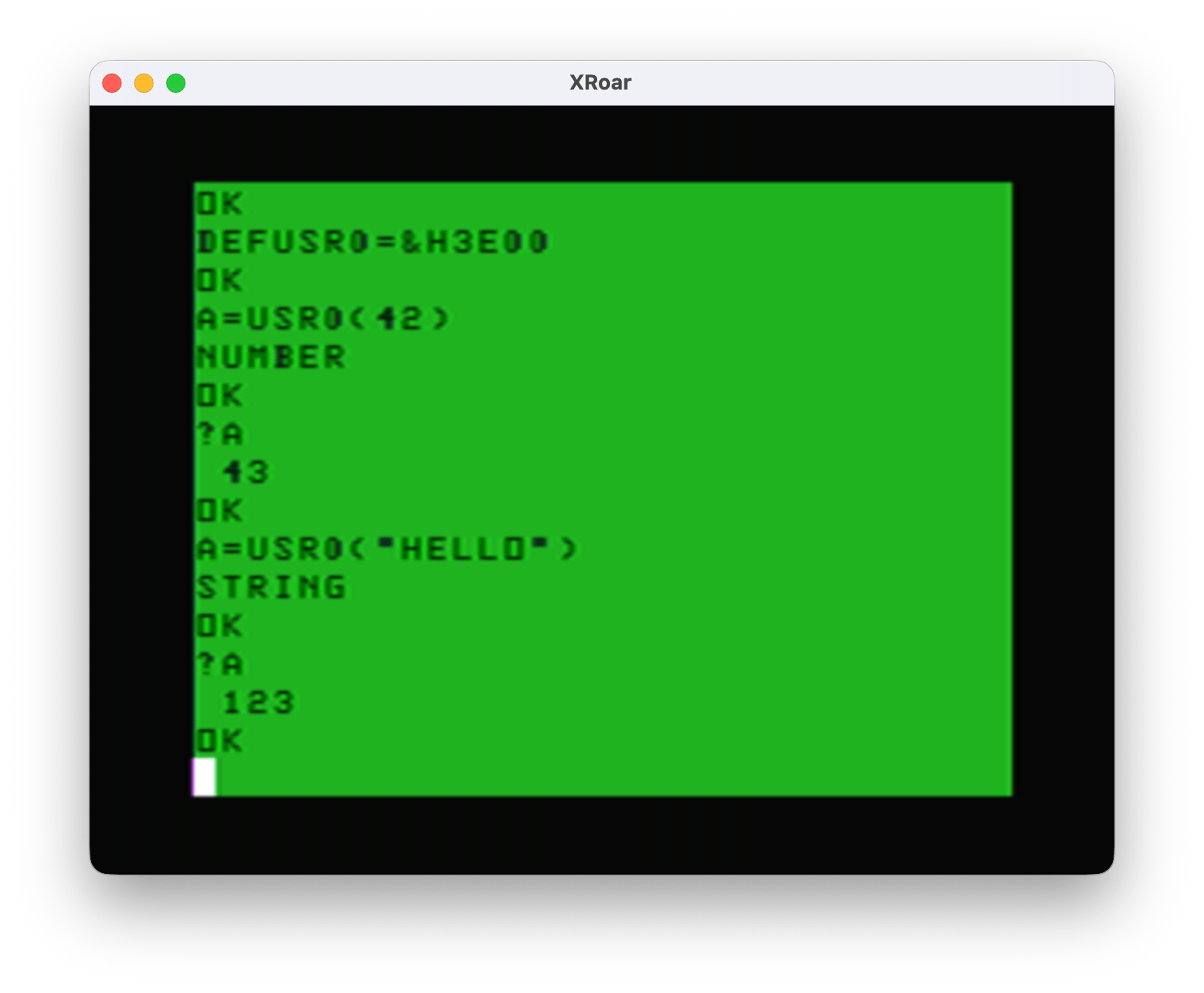
And here is what I get after loading this into memory:
DEF USR0=&H3E00
OK

A=USR0(42)
FROM USR(NUMBER)
PRINT A
43

A=USR0("STRING")
FROM USR(STRING)
PRINT A
12345

EXEC &H3E00
FROM EXEC

EXEC
FROM EXEC
I think we may have a winner! The important parts are:
start       cmpx    #start      ; called by "EXEC xxxx"?
            beq     fromexec    ; if yes, goto fromexec
            cmpx    #$abab      ; called by "EXEC"?
            bne     fromusr     ; if no, must be USR. goto fromusr
            ldx     EXECJP      ; get EXEC address
            cmpx    #start      ; called by "EXEC"?
            beq     fromexec    ; if yes, goto from exec
If X is the address of the user program, it was called by “EXEC xxx”
If not, then if X is NOT $ABAB, it was called by USR
Else, it was $ABAB, so the EXECJP ($9D) is checked to see if it is the address of the user program. If it is, it is from EXEC.
I hope that makes sense. If not, think of it like this:
X=program start – it was called from EXEC xxxx
X=$ABAB and EXECJP=program start – it was called by EXEC.
Anything else is USR.
Now what I need from you is to double check my work and tell me if I got this right, and if this method can be relied on.
Over the years I have shared many tidbits about Color BASIC.
This is another one.
A recent post by Juan Castro to the Groups.IO Color Computer mailing list caught my attention, mostly because he called me out by name in the subject line:
As a reminder, Color BASIC allows 1 or 2 character variable names. They must start with a letter (A-Z) and the second character can be either letter (A-Z) or number (A-0). BUT, the BASIC interpreter does let you type longer names for variables, but it only honors the first two characters. Here is a screenshot from a past blog post here (which I’d link to if I was not so lazy):
Color BASIC variables may be very long, but only the first two characters are used.
This is a reminder that, if you try to use variables longer than two characters, you have to make sure you always keep the first two characters unique since “LONGVARIABLE” and “LOST” and “LO” are all the same variable to BASIC.
…but not all variable name limits are the same.
To break the rule I just said, in Color BASIC, some variable names are forbidden. A forbidden variable is one you cannot use because it is already reserved for a keyword or token. For example, FOR is a keyword:roar
FOR I=1 TO 10
PRINT I
NEXT I
Because of this, even though BASIC only honors the first two characters of a variable name, you still cannot use “FOR” as a variable.
FOR=42
?SN ERROR
But you can use “FO”, since that is not long enough to be recognized as a BASIC token or keyword.
FO=42
PRINT FO
42
There are a number of two-character tokens, such as “TO” in the FOR/NEXT statement (“FOR I=1 TO 10”), and “AS” in the Disk BASIC FIELD statement (“FIELD #1,5 AS A$”), as well as “FN” which is used in DEF FN.
AS=42
?SN ERROR

FN=42
?SN ERROR

TO=42
?SN ERROR
This means if you wrote something for Color BASIC or Extended Color BASIC that uses “AS” as a variable, that would not work under Disk Extended Color BASIC.
BASIC ignores spaces
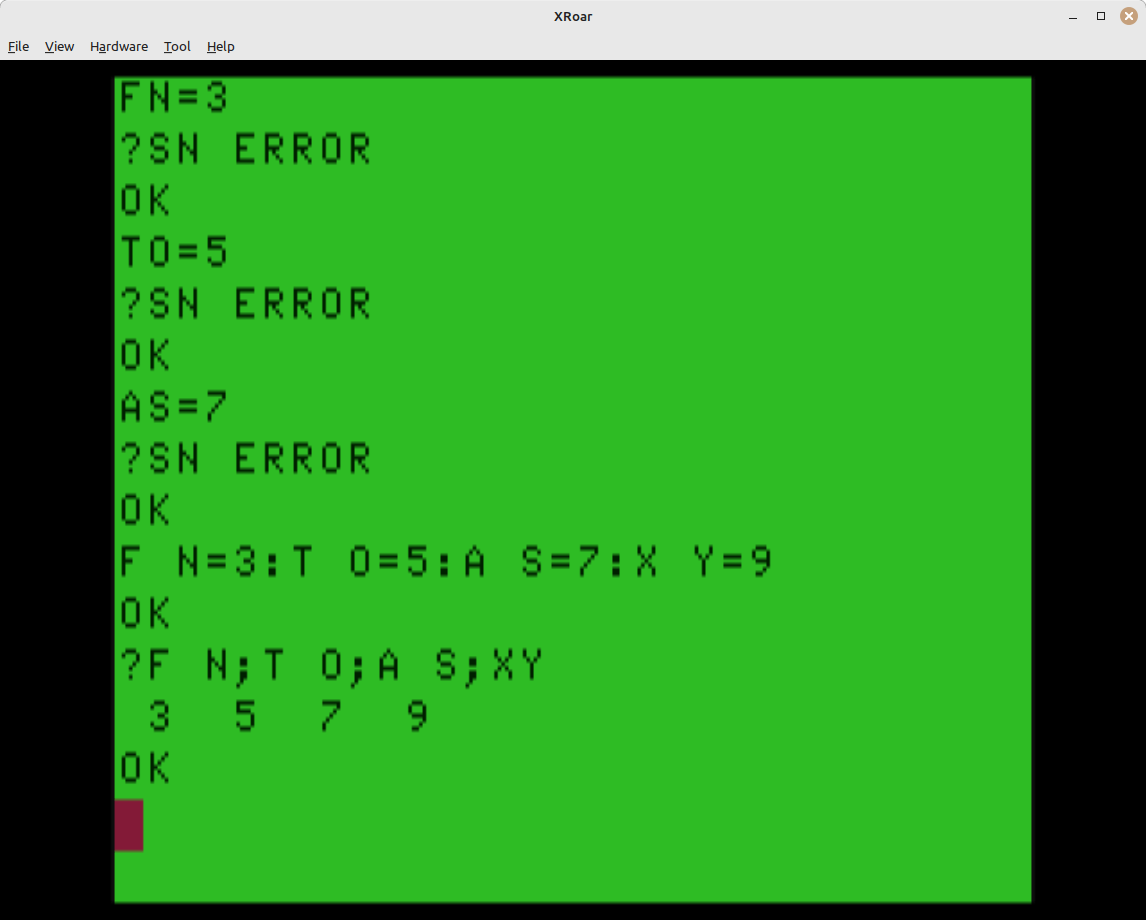
In recent years, someone pointed me to the fact that when scanning a BASIC line (either type in directly or when parsing a line of code in a program), spaces get ignored by the scanner. This means:
N M = 42
PRINT N M
42
That one surprised me when I learned it. This is probably why, when printing two variables, a semicolon is required between them:
N = 10
M = 20
PRINT N;M
10  20
And if you had done this (remember to CLEAR between these tests so variables are erased each time):
N = 10
M = 20
NM = 30
PRINT N M
30
PRINT N;M;N M
10  20  30
By the way, if you have ever wondered about that space printed in front of numeric variables when you do things like “PRINT X”, I covered why this happens in an earlier blog and included a simple patch to BASIC that removes that feature.
How to turn a forbidden variable into a non-forbidden one for fun and profit
Well, Juan Casto showed that using this “BASIC ignores spaces” quirk as a way to use forbidden variables. From his post:
Now it seems obvious. BASIC’s interpreter looks for keywords like “FOR” and will not recognize “F O R” or “FO R” as that token. The detokenizer honors the spaces.
But when it comes to variables, the spaces are ignored by the parser, so “T O” will not match as a token for “TO”, but will be processed as a variable “TO”.
Go figure.
Admittedly, space in two-character variable names look silly, but now I can finally update my old *ALLRAM* BBS to use the variable “TO$” for who a message is to:
FR$="ALLEN HUFFMAN"
T O$="JUAN CASTRO"
SB$="THAT'S REALLY COOL"
I suspect this was discovered by the early pioneers of BASIC, likely soon after the original Color Computer was released in 1980. If you know of a reference to this behavior from some early newsletter or magazine article, please let me know.
And as to Juan … thanks for sending me down a BASIC rabbit hole again…
Just when I thought I was out, they pull me back in.
In part 3 I showed a simple assembly language routine that would uppercase a string.
In part 5, this routine was made more better by contributions from commenters.
Today, I revisit this code and update it to use “what I now know” (thank you, Sean Conner) about being able to pass strings into a USR function without using VARPTR.
First, here is the code from part 5:
* UCASE.ASM v1.01 * by Allen C. Huffman of Sub-Etha Software * www.subethasoftware.com / alsplace@pobox.com * * 1.01 a bit smaller per Simon Jonassen * * DEFUSRx() uppercase output function * * INPUT: VARPTR of a string * RETURNS: # chars processed * * EXAMPLE: * CLEAR 200,&H3F00 * DEFUSR0=&H3F00 * A$="Print this in uppercase." * PRINT A$ * A=USR0(VARPTR(A$)) * ORGADDR EQU $3f00
opt 6809 * 6809 instructions only opt cd * cycle counting
org ORGADDR
start       jsr     INTCNV  * get passed in value in D
            tfr     d,x     * move value (varptr) to X
            ldy     2,x     * load string addr to Y
            beq     null    * exit if strlen is 0
            ldb     ,x      * load string len to B
            ldx     #0      * clear X (count of chars conv)
loop lda ,y+ * get next char, inc Y ; lda ,y * load char in A cmpa #'a * compare to lowercase A blt nextch * if less, no conv needed cmpa #'z * compare to lowercase Z bgt nextch * if greater, no conv needed lcase suba #32 * subtract 32 to make uppercase leax 1,x * inc count of chars converted nextch jsr [CHROUT] * call ROM output character routine ; leay 1,y * increment Y pointer cont decb * decrement counter bne loop * not done yet ; beq exit * if 0, go to exit ; bra loop * go to loop
exit tfr x,d * move chars conv count to D jmp GIVABF * return to caller
null ldd #-1 * load -2 as error return jmp GIVABF * return to caller
In the header comment you can see an example of the usage, and that it involved using VARPTR on a string to get the string’s descriptor location in memory, then pass that address into the USR function.
Now that I know we can just pass a string in directly, I thought it would be fun (?) to update this old code to use that method. Here is what I came up with. Note that I changed the “*” comments to “;” since the a09 assembly does not support those. If you wanted to run this in EDTASM, you would have to change those back.
; UCASE3.ASM v1.02 ; by Allen C. Huffman of Sub-Etha Software ; www.subethasoftware.com / alsplace@pobox.com ; ; 1.01 a bit smaller per Simon Jonassen ; 1.02 converted to allow passing a string in to USR ; ; DEFUSRx() uppercase output function ; ; INPUT: string ; RETURNS: # chars converted or -1 if error ; ; EXAMPLE: ; CLEAR 200,&H3F00 ; DEFUSR0=&H3F00 ; A$="Print this in uppercase." ; PRINT A$ ; A=USR0(A$) ; PRINT "CHARS CONVERTED:";A ; A=USR0("This is another test"); ; PRINT "CHARS CONVERTED:";A ; ORGADDR EQU $3f00
start jsr CHKSTR ; ?TM ERROR if not a string. ; X will be VARPTR, B will be string length tstb beq reterror ; exit if strlen is 0 ldy 2,x ; load string addr to Y ldx #0 ; clear X (count of chars conv)
loop lda ,y+ ; get next char, inc Y cmpa #'a ; compare to lowercase A blo nextch ; if less, no conv needed cmpa #'z ; compare to lowercase Z bhi nextch ; if greater, no conv needed suba #32 ; subtract 32 to make uppercase leax 1,x ; inc count of chars converted nextch jsr [CHROUT] ; call ROM output character routine decb ; decrement counter bne loop ; not done yet
tfr x,d ; move chars conv count to D bra return
reterror ldd #-1 ; load -1 as error return jmp GIVABF ; return to caller
Here are the changes… In the original version, I have this:
start jsr INTCNV * get passed in value in D tfr d,x * move value (varptr) to X ldy 2,x * load string addr to Y beq null * exit if strlen is 0 ldb ,x * load string len to B ldx #0 * clear X (count of chars conv)
That first jsr INTCNV expects a number parameter and, if not a number, it exits with ?TM ERROR. If it gets past that, the number is in the D register and it gets transferred over to X. In this case, the number is the value returned by VARPTR:
A=USR0(VARPTR(A$))
That value is the address of the 5-byte string descriptor that contains the address of the actual string data and the length of that data. Y is loaded with 2 bytes in from wherever X points which makes Y contain the address of the string data.
After this is a bug, I think. Looking at the comments, I think that “beq null” should be one line lower, like this:
start       jsr     INTCNV  * get passed in value in D
            tfr     d,x     * move value (varptr) to X
            ldy     2,x     * load string addr to Y
            ldb     ,x      * load string len to B
            beq     null    * exit if strlen is 0
            ldx     #0      * clear X (count of chars conv)
That way, Y is loaded with the address of the string data, then b is loaded with the length of that data, and the branch-if-equal check is now checking B. If the length is 0, it is an empty string so no processing can be done on it. (That’s a bug, right?)
The new code is this:
start       jsr     CHKSTR      ; ?TM ERROR if not a string.
            ; X will be VARPTR, B will be string length
            tstb
            beq     reterror    ; exit if strlen is 0
            ldy     2,x         ; load string addr to Y
            ldx     #0          ; clear X (count of chars conv)
The first line is something I learned from Sean Conner‘s excellent writeup on USR. That is an undocumented ROM call which checks is a variable is a string. If it isn’t, it will return back to BASIC with a ?TM ERROR. By having that check there, if the user tries to pass in a number, that error will be seen. As a bonus, if you try to EXEC that code, that, too, will show ?TM ERROR.
After that, B should be the length of the string so tstb checks that to be 0 (empty string) then the rest of the code is similar.
As I write this, I could have altered the order of my new code to do the tstb/beq after the ldy and then it would be closer to how the original worked. But since the original appears buggy, I won’t worry about that.
Now if I load this and set it up, I should see this:
DEF USR0=&H3F00

A=USR0(42)
?TM ERROR

A=USR0("This is a test")
THIS IS A TEST
Also, I notice that the value I return can be -1 if you pass in an empty string…
A=USR0("")
OK
PRINT A
-1
…and if it is non-empty, it is only the count of the characters that had to be converted. So “Hello World” converts the “ello” and “orld” for a return value of 8. It does not touch the uppercase “H” and “W” or the space.
I am not sure that is really useful. The code could be modified to return the length of the string it processed, but at least this way you know that a positive non-zero return value means it did do some work.
What do you use your computer for? [_] Word Processing [_] Businesss [_] Games/Fun [_] Telecom [_] Programming [_] Home Apps. [_] Music/MIDI [_] Graphics
I wrote a BASIC program which will create 68 files named “0.TXT” to “67.TXT”. Each file is 2304 bytes so it takes up a full granule. (That is not really important. It just helps makes things obvious if you look at the disk with a hex editor and want to know which file is at which sector.)
After making these files, it uses code from some of my other examples to scan through the directory and display it (FILEGRAN.BAS code, shown later in this post) and then it scans the directory and prints which granule each 1-gran file is using.
I can start with a freshly formatted disk then run this program and see where RS-DOS put each file.
Will it match the order RS-DOS used when making one huge file that takes up all 68 grans? Let’s find out…
10 '68FILES.BAS
20 PRINT "RUN THIS ON A BLANK DISK."
30 INPUT "DRIVE #";DR
40 'SWITCH TO THAT DRIVE
50 DRIVE DR
60 'GOTO 140
70 'MAKE FILES 0-67
80 FOR G=0 TO 67
90 F$=MID$(STR$(G),2)+".TXT"
100 PRINT "MAKING ";F$;
110 OPEN "O",#1,F$
120 CLOSE #1:PRINT
130 NEXT
140 'FILEGRAN.BAS
150 'DIR WITHOUT FILE SIZES
160 CLEAR 512:DIM SP$(1)
170 ' S - SECTOR NUMBER
180 FOR S=3 TO 11
190 ' SP$(0-1) - SECTOR PARTS
200 DSKI$ DR,17,S,SP$(0),SP$(1)
210 ' P - PART OF SECTOR
220 FOR P=0 TO 1
230 ' E - DIR ENTRY (4 P/SECT.)
240 FOR E=0 TO 3
250 ' GET 32 BYTE DIR ENTRY
260 DE$=MID$(SP$(P),1+E*32,32)
270 ' FB - FIRST BYTE OF NAME
280 FB=ASC(LEFT$(DE$,1))
290 ' SKIP DELETED FILES
300 IF FB=0 THEN 440
310 ' WHEN 255, DIR IS DONE
320 IF FB=255 THEN 470
330 ' PRINT NAME AND EXT.
340 'PRINT LEFT$(DE$,8);TAB(9);MID$(DE$,9,3);
350 ' FIRST TWO CHARS ONLY
360 PRINT LEFT$(DE$,2);"-";
361 'PRINT #-2,LEFT$(DE$,2);",";
370 ' FILE TYPE
380 'PRINT TAB(13);ASC(MID$(DE$,12,1));
390 ' BINARY OR ASCII
400 'IF ASC(MID$(DE$,13,1))=0 THEN PRINT "B"; ELSE PRINT "A";
410 ' STARTING GRANULE
420 PRINT USING("##  ");ASC(MID$(DE$,14,1));
421 'PRINT #-2,ASC(MID$(DE$,14,1))
430 CL=CL+1:IF CL=5 THEN CL=0:PRINT
440 NEXT
450 NEXT
460 NEXT
470 END
I modified this program to output to the printer (PRINT #-2) and then capture that output in the Xroar emulator in a text file. That gave me data which I put in a spreadsheet.
Next, I used a second program on a freshly formatted disk to create one big file fully filling up the disk. (The very last PRINT to the file will create a ?DF ERROR, which I now think is a bug. It should not do that until I try to write the next byte, I think.)
10 '1BIGFILE.BAS
20 PRINT"RUN THIS ON A BLANK DISK."
30 INPUT "DRIVE #";DR
40 'SWITCH TO THAT DRIVE
50 DRIVE DR
60 'MAKE ONE BIG 68 GRAN FILE
70 OPEN "O",#1,"1BIGFILE.TXT"
80 FOR G=0 TO 67
90 PRINT G;
100 T$=STRING$(128,G)
110 FOR T=1 TO 18
120 PRINT ".";
130 PRINT #1,T$;
140 NEXT
150 PRINT
160 NEXT
170 CLOSE #1
180 END
I ran another test program which would read the directory, then print out the granule chain of each file on the disk.
10 ' FILEGRAN.BAS
20 '
30 ' 0.0 2025-11-20 BASED ON FILEINFO.BAS
40 '
50 ' E$(0-1) - SECTOR HALVES
60 ' FT$ - FILE TYPE STRINGS
70 '
80 CLEAR 1500:DIM E$(1),FT$(3)
90 FT$(0)="BPRG":FT$(1)="BDAT":FT$(2)="M/L ":FT$(3)="TEXT "
100 '
110 ' DIR HOLDS UP TO 72 ENTRIES
120 '
130 ' NM$ - NAME
140 ' EX$ - EXTENSION
150 ' FT - FILE TYPE (0-3)
160 ' AF - ASCII FLAG (0/255)
170 ' FG - FIRST GRANULE #
180 ' BU - BYTES USED IN LAST SECTOR
190 ' SZ - FILE SIZE
200 ' GM - GRANULE MAP
210 '
220 DIM NM$(71),EX$(71),FT(71),AF(71),FG(71),BU(71),SZ(71),GM(67)
230 '
240 INPUT "DRIVE";DR
250 '
260 ' FILE ALLOCATION TABLE
270 ' 68 GRANULE ENTRIES
280 '
290 DIM FA(67)
300 DSKI$ DR,17,2,G$,Z$:Z$=""
310 FOR G=0 TO 67
320 FA(G)=ASC(MID$(G$,G+1,1))
330 NEXT
340 '
350 ' READ DIRECTORY
360 '
370 DE=0
380 FOR S=3 TO 11
390 DSKI$ DR,17,S,E$(0),E$(1)
400 '
410 ' PART OF SECTOR
420 '
430 FOR P=0 TO 1
440 '
450 ' ENTRY WITHIN SECTOR PART
460 '
470 FOR E=0 TO 3
480 '
490 ' DIR ENTRY IS 32 BYTES
500 '
510 E$=MID$(E$(P),E*32+1,32)
520 '
530 ' NAME IS FIRST 8 BYTES
540 '
550 NM$(DE)=LEFT$(E$,8)
560 '
570 ' EXTENSION IS BYTES 9-11
580 '
590 EX$(DE)=MID$(E$,9,3)
600 '
610 ' FILE TYPE IS BYTE 12
620 '
630 FT(DE)=ASC(MID$(E$,12,1))
640 '
650 ' ASCII FLAG IS BYTE 13
660 '
670 AF(DE)=ASC(MID$(E$,13,1))
680 '
690 ' FIRST GRANUAL IS BYTE 14
700 '
710 FG(DE)=ASC(MID$(E$,14,1))
720 '
730 ' BYTES USED IN LAST SECTOR
740 ' ARE IN BYTES 15-16
750 '
760 BU(DE)=ASC(MID$(E$,15,1))*256+ASC(MID$(E$,16,1))
770 '
780 ' IF FIRST BYTE IS 255, END
790 ' OF USED DIR ENTRIES
800 '
810 IF LEFT$(NM$(DE),1)=CHR$(255) THEN 1500
820 '
830 ' IF FIRST BYTE IS 0, FILE
840 ' WAS DELETED
850 '
860 IF LEFT$(NM$(DE),1)=CHR$(0) THEN 1480
870 '
880 ' SHOW DIRECTORY ENTRY
890 '
900 PRINT NM$(DE);TAB(9);EX$(DE);"  ";FT$(FT(DE));" ";
910 IF AF(DE)=0 THEN PRINT"BIN"; ELSE PRINT "ASC";
920 '
930 ' CALCULATE FILE SIZE
940 ' SZ - TEMP SIZE
950 ' GN - TEMP GRANULE NUM
960 ' SG - SECTORS IN LAST GRAN
970 ' GC - GRANULE COUNT
980 '
990 SZ=0:GN=FG(DE):SG=0:GC=0
1000 '
1010 ' GET GRANULE VALUE
1020 ' GV - GRAN VALUE
1030 '
1040 GV=FA(GN):GM(GC)=GN:GC=GC+1
1050 '
1060 ' IF TOP TWO BITS SET (C0
1070 ' OR GREATER), IT IS THE
1080 ' LAST GRANULE OF THE FILE
1090 ' SG - SECTORS IN GRANULE
1100 '
1110 IF GV>=&HC0 THEN SG=(GV AND &H1F):GOTO 1280
1120 '
1130 ' IF NOT, MORE GRANS
1140 ' ADD GRANULE SIZE
1150 '
1160 SZ=SZ+2304
1170 '
1180 ' MOVE ON TO NEXT GRANULE
1190 '
1200 GN=GV
1210 GOTO 1040
1220 '
1230 ' DONE WITH GRANS
1240 ' CALCULATE SIZE
1250 '
1260 ' FOR EMPTY FILES
1270 '
1280 IF SG>0 THEN SG=SG-1
1290 '
1300 ' FILE SIZE IS SZ PLUS
1310 ' 256 BYTES PER SECTOR
1320 ' IN LAST GRAN PLUS
1330 ' NUM BYTES IN LAST SECT
1340 '
1350 SZ(DE)=SZ+(SG*256)+BU(DE)
1360 PRINT " ";SZ(DE)
1370 '
1380 ' SHOW GRANULE MAP
1390 '
1400 C=0:PRINT "  ";
1410 FOR I=0 TO GC-1
1420 PRINT USING"##";GM(I);
1430 C=C+1:IF C=10 THEN PRINT:PRINT "  ";:C=0 ELSE PRINT " ";
1440 NEXT:PRINT
1450 '
1460 ' INCREMENT DIR ENTRY
1470 '
1480 DE=DE+1
1490 NEXT:NEXT:NEXT
1500 END
1510 ' SUBETHASOFTWARE.COM
Since there is only one big file on this disk, fully filling it, it only has one 68-entry granule chain to print. I modified the code to PRINT#-2 these values to the virtual printer so I could then copy the numbers into the same spreadsheet:
Now it seems clearly obvious that RS-DOS does something different when making a new file, versus what it does when expanding an existing file into a new granule.
I wanted a way to visualize this so, of course, I wrote a program to help me create a full ASCII representation of the granules, then edited the rest by hand.
Interesting! For small files, it alternates tracks starting before Track 17 (FAT/Directory) then after, repeating. For a big file, it starts like that before Track 17, then after and continues to the end of Track 35, then goes before Track 17 and works back to the start of the disk.
The Micro Works Digisector DS-69 / DS-68B digitizers were really cool tech in the 1980s. Looking back, I got to play with video digitizers, the Super Voice speech synthesizer that could “sing”, and even the E.A.R.S. “electronic audio recognition system” for voice commands. All of this on my Radio Shack Color Computer 3 in the late 1980s.
How many decades did it take for this tech to become mainstream in our phones or home assistants? We did it first ;-)
The DS-69 could capture 128×128 or 256×56 photos with 16 grey levels (4-bit greyscale). It also had a mode where it would capture 64 grey scales, though there was no viewer for this and I cannot find any attempts I made to use this mode.
I did, however, find some BASIC which I *think* I wrote that attempted to read a .PIX file and print it out to a printer using different ASCII characters to represent 16 different levels of grey. For example, a space would be bright white at level 0, and a “#” might be the darkest at level 15.
First, GREYTEST.BAS just tried to print blocks using these characters. I was testing.
5 DIM GR(15):FORA=0TO15:READGR(A):NEXT
10 PRINT#-2,"Grey Scale Printer Test:":PRINT#-2
15 FORA=0TO10:FORB=0TO15:PRINT#-2,STRING$(5,GR(B));:NEXT:PRINT#-2:NEXT
99 END
100 REM * Grey Scale Characters (0-15)
105 DATA 32,46,58,45,105,43,61,84,86,37,38,83,65,36,77,20
I asked the Google search engine, and its Gemini A.I. answered:
Dec.  ASCII
Value Character
----- ---------------------------
32    Space (invisible character)
46    . (period or full stop)
58    : (colon)
45    - (hyphen or minus sign)
105   i (lowercase i)
43    + (plus sign)
61    = (equals sign)
84    T (uppercase T)
86    V (uppercase V)
37    % (percent sign)
38    & (ampersand)
83    S (uppercase S)
65    A (uppercase A)
36    $ (dollar sign)
77    M (uppercase M)
20    NAK (Negative Acknowledge - a non-printable control character)
I must have been manually counting how many “dots” made up the characters and sorting them. I recall starting with the HPRINT font data in ROM (which is what my MiniBanners program used) to count the set dots in each letter, but the printer fonts would be different so I expect this table came from trial and error.
The 20 NAK (non printable) is an odd one, so I wonder if my printer DID print something for that – like a solid block graphic.
Proving memory is not always faulty, I also found TEST.BAS which appeared to open a .PIX file and print it out using this code:
0 POKE150,44:PRINT#-2,CHR$(27)CHR$(33)CHR$(27)CHR$(77)CHR$(27)CHR$(64)CHR$(15)
1 PRINT#-2
5 DIM GR(15):FORA=0TO15:READGR(A):NEXT
10 OPEN"D",#1,"SMILE.PIX",1:FIELD#1,1ASA$
11 PRINTLOF(1)
15 FORA=1TO64:PRINTA:FORB=0TO127:GET#1,A+B*64:GR=ASC(A$)
20 PRINT#-2,CHR$(GR(GR AND15));
25 NEXT:PRINT#-2:NEXT:CLOSE
99 END
100 REM * Grey Scale Characters (0-15)
105 DATA 32,46,58,47,62,63,61,84,86,37,38,90,65,69,77,35
I see line 10 opens the file with DIRECT mode with a field size of 1 assigned to string variable A$. This means doing a GET #1,X (where X is a byte offset in the file) would get that byte into A$ so I could get the ASCii value of it (0-15) and use that to know which character to print.
I have no idea if this worked… So let’s give it a try.
I see the program print “8192”, which is the Length Of File. A 128×128 image of bytes would be 16384 in size, so I am guessing each byte has two pixels in it, each 4-bits.
I see I am ANDing off the upper bits in line 20. It looks like I am throwing away every other pixel since no attempt I made to read those other 4-bits. This is likely because this was printing on an 80 column printer, which would not print 128 characters on a line. Instead, 64 would fit.
And, wow! It actually works! I had to reduce the font size down for it to display in the WordPress blog, but here is the output. Step back from the monitor if you can’t see it.
Since this is a symmetrical pattern, if we can figure out how to draw one quadrant, we can draw the others.
The pattern is 19 characters wide, which contains a center column of asterisks, and a left and right column that are spaces except for the center row of asterisks.
“As if they had planned it,” this means the pattern in each quadrants is 8 characters, matching the number of bits in a byte.
I typed it up to figure out what the bit pattern would be. (Actually, I typed up a bit of it, then pasted that into Copilot and had it tell me the bit pattern.)
That’s a mess, but in the left the “.” would represent the blank space down the left side up to the row of 19 asterisks. After that is the 8-bit pattern with “-” representing a space in the pattern (0 bit) and the “*” representing the asterisk (1 bit).
This let me quickly cobble together a proof-of-concept:
1 READ V
2 A$=STRING$(19,32):MID$(A$,10,1)="*"
3 FOR B=0 TO 7
4 IF V AND 2^B THEN MID$(A$,9-B,1)="*":MID$(A$,B+11,1)="*"
5 NEXT
6 PRINT A$:A$(L)=A$
7 L=L+1:IF L<8 THEN 1
8 PRINT STRING$(18,42)
9 FOR B=7 TO 0 STEP -1:PRINT A$(B):NEXT
10 DATA 2,81,48,114,9,4,162,81
Line 10 are the 8 rows of byte data for a quadrant of the snowflake.
Line 1 reads the first value from the DATA statement.
Line 2 builds a string of 19 spaces, then sets the character at position 10 (in the center) to an asterisk. Every row has this character set.
Line 3 begins a loop representing each bit in the byte (0-7).
Line 4 checks the read DATA value and ANDs it with the bit value (2 to the power of the the FOR/NEXT loop value). If it is set, the appropriate position in the left side of the string is set to an asterisk, and then the same is done for the right side. To mirror, the left side is center-minus-bit, and the right side is center-plus-bit.
Line 5 is the NEXT to continue doing the rest of the bits.
Line 6 prints the completed string, then stores that string in an A$() array. L has not been used yet so it starts at 0.
Line 7 increments L, and as long as it is still ess than 8 (0-7 for the first eight lines of the pattern) it goes back to line 1 to continue with the next DATA statement.
Line 8 once 8 lines have been done, the center row of 19 asterisks is printed.
Line 9 is a loop to print out the A$() lines we saved, backwards. As they were built in line 6, they went from 0 to 7. Now we print them backwards 7 to 0.
…and there we have a simple way to make this pattern, slowly:
Logiker 2025 pattern on a CoCo.
On a CoCo 3, adding a WIDTH 40 or WIDTH 80 before it would show the full pattern:
Logiker 2025 pattern on a CoCo 3.
My example program can be made much smaller by packing lines together and removing unnecessary spaces. One minor optimization I already did was doing the bits from 0 to 7 which removed the need to use “STEP -1” if counting backwards. Beyond that, this is the raw proof-of-concept idea of using bytes.
Other options folks have used in past challenges included rune-length type encoding (DATA showing how many spaces, then how many asterisks, to make the pattern) so that probably is worth investigating to see if it helps here.
Then, of course, someone will probably figure out a math pattern to make this snowflake.
A correction, and discovering the order RS-DOS writes things…
A correction from part 2… This example program had “BIN” and “ASC” mixed up. 0 should represent BINary files, and 255 for ASCii files. I fixed it in line 920. (I will try to edit/fix the original post when I get a moment.)
10 ' FILEINFO.BAS
20 '
30 ' 0.0 2023-01-25 ALLENH
40 ' 0.1 2023-01-26 ADD DR
50 ' 0.2 2023-01-27 MORE COMMENTS
55 ' 0.3 2025-11-18 BIN/ASC FIX
60 '
70 ' E$(0-1) - SECTOR HALVES
80 ' FT$ - FILE TYPE STRINGS
90 '
100 CLEAR 1500:DIM E$(1),FT$(3)
110 FT$(0)="BPRG":FT$(1)="BDAT":FT$(2)="M/L ":FT$(3)="TEXT "
120 '
130 ' DIR HOLDS UP TO 72 ENTRIES
140 '
150 ' NM$ - NAME
160 ' EX$ - EXTENSION
170 ' FT - FILE TYPE (0-3)
180 ' AF - ASCII FLAG (0/255)
190 ' FG - FIRST GRANULE #
200 ' BU - BYTES USED IN LAST SECTOR
210 ' SZ - FILE SIZE
220 '
230 DIM NM$(71),EX$(71),FT(71),AF(71),FG(71),BU(71),SZ(71)
240 '
250 INPUT "DRIVE";DR
260 '
270 ' FILE ALLOCATION TABLE
280 ' 68 GRANULE ENTRIES
290 '
300 DIM FA(67)
310 DSKI$ DR,17,2,G$,Z$:Z$=""
320 FOR G=0 TO 67
330 FA(G)=ASC(MID$(G$,G+1,1))
340 NEXT
350 '
360 ' READ DIRECTORY
370 '
380 DE=0
390 FOR S=3 TO 11
400 DSKI$ DR,17,S,E$(0),E$(1)
410 '
420 ' PART OF SECTOR
430 '
440 FOR P=0 TO 1
450 '
460 ' ENTRY WITHIN SECTOR PART
470 '
480 FOR E=0 TO 3
490 '
500 ' DIR ENTRY IS 32 BYTES
510 '
520 E$=MID$(E$(P),E*32+1,32)
530 '
540 ' NAME IS FIRST 8 BYTES
550 '
560 NM$(DE)=LEFT$(E$,8)
570 '
580 ' EXTENSION IS BYTES 9-11
590 '
600 EX$(DE)=MID$(E$,9,3)
610 '
620 ' FILE TYPE IS BYTE 12
630 '
640 FT(DE)=ASC(MID$(E$,12,1))
650 '
660 ' ASCII FLAG IS BYTE 13
670 '
680 AF(DE)=ASC(MID$(E$,13,1))
690 '
700 ' FIRST GRANUAL IS BYTE 14
710 '
720 FG(DE)=ASC(MID$(E$,14,1))
730 '
740 ' BYTES USED IN LAST SECTOR
750 ' ARE IN BYTES 15-16
760 '
770 BU(DE)=ASC(MID$(E$,15,1))*256+ASC(MID$(E$,16,1))
780 '
790 ' IF FIRST BYTE IS 255, END
800 ' OF USED DIR ENTRIES
810 '
820 IF LEFT$(NM$(DE),1)=CHR$(255) THEN 1390
830 '
840 ' IF FIRST BYTE IS 0, FILE
850 ' WAS DELETED
860 '
870 IF LEFT$(NM$(DE),1)=CHR$(0) THEN 1370
880 '
890 ' SHOW DIRECTORY ENTRY
900 '
910 PRINT NM$(DE);TAB(9);EX$(DE);"  ";FT$(FT(DE));" ";
920 IF AF(DE)=0 THEN PRINT"BIN"; ELSE PRINT "ASC";
930 '
940 ' CALCULATE FILE SIZE
950 ' SZ - TEMP SIZE
960 ' GN - TEMP GRANULE NUM
970 ' SG - SECTORS IN LAST GRAN
980 '
990 SZ=0:GN=FG(DE):SG=0
1000 '
1010 ' GET GRANULE VALUE
1020 ' GV - GRAN VALUE
1030 '
1040 GV=FA(GN)
1050 '
1060 ' IF TOP TWO BITS SET (C0
1070 ' OR GREATER), IT IS THE
1080 ' LAST GRANULE OF THE FILE
1090 ' SG - SECTORS IN GRANULE
1100 '
1110 IF GV>=&HC0 THEN SG=(GV AND &H1F):GOTO 1280
1120 '
1130 ' ELSE, MORE GRANS
1140 ' ADD GRANULE SIZE
1150 '
1160 SZ=SZ+2304
1170 '
1180 ' MOVE ON TO NEXT GRANULE
1190 '
1200 GN=GV
1210 GOTO 1040
1220 '
1230 ' DONE WITH GRANS
1240 ' CALCULATE SIZE
1250 '
1260 ' FOR EMPTY FILES
1270 '
1280 IF SG>0 THEN SG=SG-1
1290 '
1300 ' FILE SIZE IS SZ PLUS
1310 ' 256 BYTES PER SECTOR
1320 ' IN LAST GRAN PLUS
1330 ' NUM BYTES IN LAST SECT
1340 '
1350 SZ(DE)=SZ+(SG*256)+BU(DE)
1360 PRINT " ";SZ(DE)
1370 DE=DE+1
1380 NEXT:NEXT:NEXT
1390 END
1400 ' SUBETHASOFTWARE.COM
To test this routine, I created a program that let me type a file size (in bytes) and then it would make a .TXT file with that size as the filename (i.e, for 3000 bytes, it makes “3000.TXT”) and then I could run it through this program and see if everything matched.
It opens a file with the size as the filename, then writes out “*” characters to fill the file. This will be painfully slow for large files. If you want to make it much faster, share your work in a comment.
10 ' MAKEFILE.BAS
20 '
30 ' 0.0 2025-11-18 ALLENH
40 '
50 INPUT "FILE SIZE";SZ
60 F$=MID$(STR$(SZ),2)+".TXT"
70 OPEN "O",#1,F$
80 FOR A=1 TO SZ:PRINT #1,"*";:NEXT
90 CLOSE #1
100 DIR
110 GOTO 50
120 ' SUBETHASOFTWARE.COM
I was able to use this program in the Xroar emulator to create files of known sizes so I could verify the FILEINFO.BAS program was doing the proper thing.
It seems to be, so let’s move on…
A funny thing happened on the way to the disk…
I have been digging in to disk formats (OS-9 and RS-DOS) lately, and learning more things I wish I knew “back in the day.” For instance, I was curious how RS-DOS allocates granules (see part 1) when adding files to the disk. I wrote a test program that would write out 2304-byte blocks of data (the size of a granule) full of the number of the block. i.e., for the first write, I’d write 2304 0’s, then 2304 1’s and so on. My simple program looks like this:
10 'GRANULES.BAS
20 OPEN "O",#1,"GRANULES.TXT"
30 FOR G=0 TO 67
40 PRINT G;
50 T$=STRING$(128,G)
60 FOR T=1 TO 18
65 PRINT ".";
70 PRINT #1,T$;
80 NEXT
90 PRINT
100 NEXT
110 CLOSE #1
I ran this on a freshly formatted disk and let it fill the whole thing up. The very last write errors with a ?DF ERROR (disk full) so it never makes it to the close. I guess you can’t write that last byte without an error?
Now I should be able to look a the bytes on the disk and see where the 0’s went, the 15’s went, and so on, and see the order RS-DOS allocated those granules.
I made a simple test program for this:
0 'GRANDUMP.BAS
10 CLEAR 512
20 FOR G=0 TO 67
30 T=INT((G)/2):IF T>16 THEN T=T+1
40 IF INT(G/2)*2=G THEN S1=10:S2=18 ELSE S1=1:S2=9
50 'PRINT "GRANULE";G;TAB(13);"T";T;TAB(20);"S";S1;"-";S2
54 DSKI$0,T,S1,A$,B$
55 PRINT "GRANULE";G;ASC(A$)
60 NEXT G
Ignore the commented out stuff. Initially I was just getting it to convert a granule to Track/Sectors with code to skip Track 17 (FAT/Directory). And, to be honest, I had an AI write this and I just modified it ;-)
I then modified it to PRINT#-2 to the printer, and ran it in Xroar with the printer redirected to a text file. That gave me the following output:
Now I can see the order that RS-DOS allocates data on an empty disk.
The number in the third column represents the value of the bytes written to that 2304 granule. When I see “GRANULE 67” contains “34” as data, I know it was the 35th (numbers 0-34) granule written out.
Granules 0-33 are on tracks 0-16, then track 17 is skipped, then the remaining granules 34-67 are on tracks 18-34.
You can see that RS-DOS initially writes the data close to track 17, reducing the time it takes to seek from the directory to the file data. This makes sense, though as a teen, I guess I had some early signs of O.C.D. because I thought the directory should be at the start of the disk, and not in the middle ;-)
I brought this data into a spreadsheet, then sorted it by the “data” value (column 3). This let me see the order that granules are allocated (written to). I will add some comments:
GRANULE 33 0 <- first went to gran 33 GRANULE 32 1 <- second went to gran 32
And down the rabbit hole I go. Again. I have tasked an A.I. with creating some simple scripts to manipulate RS-DOS disk images (just for fun; the toolshed “decb” command already exists and works great and does more). While I understood the basic structure for an RS-DOS disk, I did not understand “how” RS-DOS actually allocated those granules. Now I have some insight. Perhaps I can make my tools replicate writing in the same way that RS-DOS itself does.
Look for a part 4. I have some more experiments to share.