On this date (4/10) in 2023, Steve Bjork passed away. I still haven’t quite come to grips with him being gone. The last time I saw him was during a visit to California in 2018. He and his wife joined us for the day at Knott’s Berry Farm. I regret not visiting again when I was in California in 2022 — but I guess I am not the only one that lost touch with folks during the Covid era.
Steve was not real fond of being in photos, which may be why I cannot find any of him from that visit … but he is in this one ;-)
Regrets are easy to accomplish.
I miss my friend. Now that there has been some time since I learned of his passing, I will try to share some stories of my Adventures with Steve.
The most famous CoCo easter egg has to be the hidden photo of the CoCo 3 programmers that shows up if you hold down CTRL-ALT while turning the machine on. (Alternatively, you can hold down CTRL-ALT and hit the reset button on the back of the machine to also display it.)
But, there’s another, which I’d bet came first, since it followed in the footsteps of a pre-existing easter egg that was in the original 1980 Color BASIC 1.0 ROM.
CLS 100
The CLS command is used to clear the screen. On the 32-column text screen, specifying a number from 0-8 will fill the screen with color blocks. That functionality was extended on the CoCo 3’s 40 and 80 column text screens, except there it could clear the screen to a true background color.
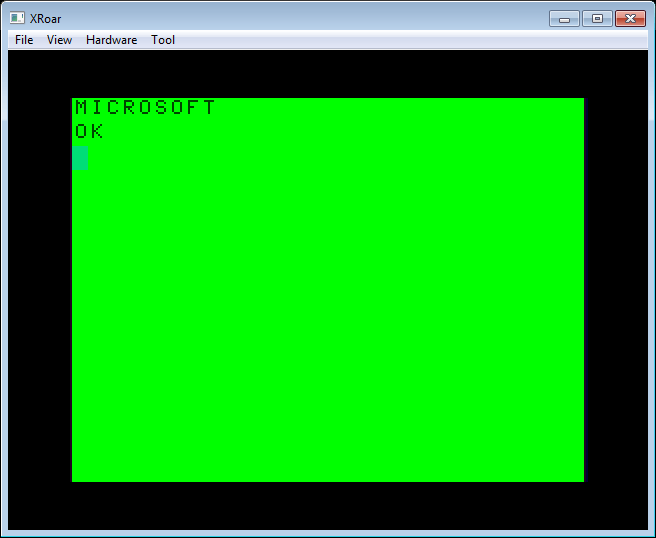
For the original CoCos, Microware included an easter egg in the CLS command. If you used a number greater than 8, instead of filling the screen with colored blocks it would display the word “MICROSOFT”.
CLS 9 through 255 present a Microsoft easter egg.
When Microware (not Microsoft) did the BASIC enhancements for the CoCo 3, they included a similar easter egg for the 40 and 80 column screens. If you did a CLS number outside of the range of 0-8, it would display “Microware Systems Corp.”
BUT, they added one special easter egg that you can only see once, then it disables itself (until the next power cycle or cold start). By typing CLS 100 you get to see the names of two of the programmers that worked on the project;
From that point on, if you type CLS 100 again you will only see the “Microware Systems Corp.” message.
In addition to making this easter egg a “one shot”, the programmers also took steps to hide their names so they would not be easily found by looking at the ROM code.
From Super Extended BASIC Unravelled, this note can be found in the memory map:
On startup, the ROMs are copied in to RAM, and these zero bytes will be in RAM at that range.
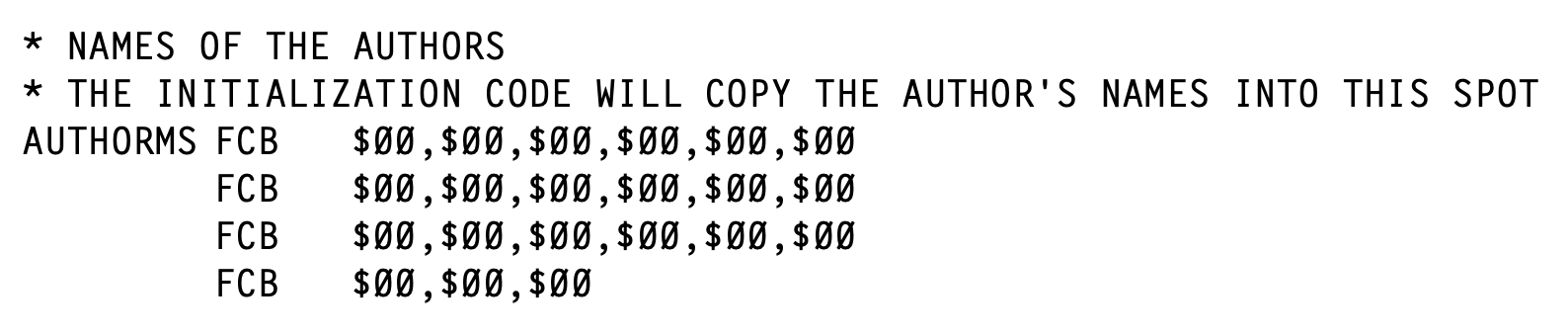
Then, during the CoCo 3 initialization code, there is a routine that copies the author names to that location. BUT, the data it copies is not the authors’ names — it’s an encoded version of the authors’ names:
Each of those bytes has its bits flipped. If the value in binary was 11110000, it would be encoded as 00001111. That effectively hides what those bytes represent from anyone just PEEKing around memory looking for text. There is a routine in the ROM that will start copying those bytes in to the other location, inverting the bits as it does so. It looks like this:
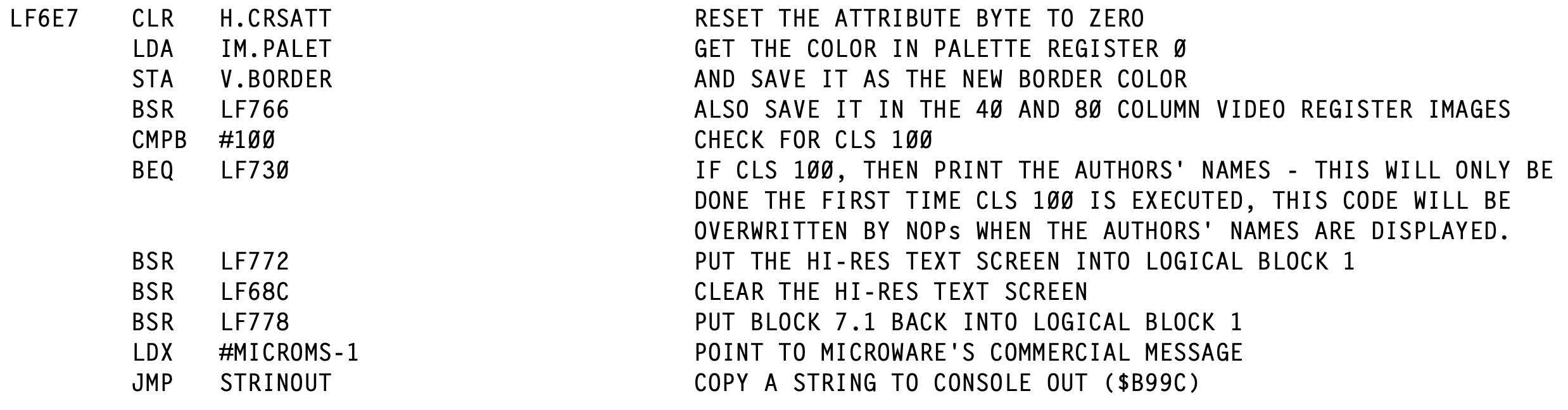
Here is the CLS code, which has special check for the value of 100 that will branch to a different routine:
The routine that is called when 100 is specified will display the easter egg and then wipe out the “Branch If Equal” instruction that calls it by replacing it with the NOP (no operation) instruction. Below is the code that does displays the egg and then disables it:
LF730 gets a pointer to the decoded author name message and displays it, then it starts in memory at F6F4 and stores a NOP byte there, and after it. That changes the two bytes the start out being “BEQ LF730” to “NOP NOP” effectively making the “CMP #100” useless since there is no longer an operation after it to make use of the results of that compare.
After those two bytes are changed to NOP, there is a loop that starts at memory location where AUTHORMS (F71B) is located and starts putting NOP bytes there until it gets to F74D. That destroys the evidence :) by wiping out everything in this table…
…and everything after it (the code) up to the LF74D label:
Thus, after CLS 100, the code that would have jumped to the routine is gone, the routine it would have jumped to is gone, and the data that the now gone routine would have displayed is also gone.
Nice.
Here is a short BASIC program that will dump the hex values of the name bytes on up through the code that displays them, then prints the name bytes out as text.
0 ' COCO3NAMES.BAS
10 WIDTH 40
20 FOR L=&HF71B TO &HF74C
30 PRINT HEX$(PEEK(L));" ";
40 NEXT
50 PRINT
60 FOR L=&HF71B TO &HF72F
70 PRINT CHR$(PEEK(L));
80 NEXT
If you boot a CoCo 3 and run this program, you will see it contains the bytes for the name text and the 6809 code:
Then if you type CLS 100 and run the program again you will see that those bytes are now all the NOP byte (&H12). Since this is not a printable character, nothing is printed after the hex values:
And that is more than we probably ever wanted to know about how the CLS 100 CoCo 3 Easter Egg works.
So let’s do a bit more…
Restoring (and customizing) the egg
Just for fun, I wrote this short BASIC program that does three things:
Restore the easter egg text to the memory from &HF71B-&HF72F.
Restore the display routine at &HF730 that prints the easter egg text and then deletes the easter egg text and the routine.
Restore the “branch if equal” that is supposed to happen after comparing the value of CLS to be 100.
And, as an added bonus, there is a line that will insert a “return from subroutine” RTS instruction in the display routine so it will not run the code that wipes out the easter egg text and display routine.
If you have already done a CLS 100, this code would restore the easter egg and let you run it again:
10 ' COCO3EGG.BAS
20 WIDTH 40
30 ' RESTORE EGG TEXT
40 EG$="T.Harris & T.Earles"
50 ' ROOM FOR UP TO 19 CHARS
60 LN=LEN(EG$)
70 IF LN>19 THEN LN=19
80 ' STORE THE EGG TEXT
90 FOR I=0 TO LN-1
100 POKE &HF71B+I,ASC(MID$(EG$,I+1))
110 NEXT
120 ' ADD CR and 0 BYTES
130 POKE &HF71B+I,13
140 POKE &HF71B+I+1,0
150 ' RESTORE DISPLAY ROUTINE
160 FOR L=&HF730 TO &HF756
170 READ V$:POKE L,VAL("&H"+V$)
180 NEXT
190 ' RESTORE CMP #100 "BEQ"
200 POKE &HF6F4,&H27:POKE &HF6F5,&H3A
210 ' DISABLE EGG KILL (RTS)
220 'POKE &HF73D,57
230 END
240 ' DISPLAY ROUTINE DATA
250 DATA 8D,40
260 DATA 17,FF,57
270 DATA 8D,41
280 DATA 8E,F7,1A
290 DATA BD,B9,9C
300 DATA 34,10
310 DATA 30,8D,FF,B1
320 DATA 86,12
330 DATA A7,80
340 DATA A7,84
350 DATA 30,8D,FF,CE
360 DATA A7,80
370 DATA 8C,F7,4D
380 DATA 25,F9
390 DATA 35,10
400 DATA 39
The DATA statements are organized like that to match the bytes shown in the Unravelled book’s listing of this routine. This helped me find and fix typos.
Line 220 is commented out, but that would place an RTS after the “JSR STRINOUT” in the LF730 display routine, causing it to return rather than do all the code that replaces stuff with the NOP bytes.
And, as an added bonus on top of the added bonus, you can change the easter egg string in line 40 to be anything you want, provided it is 19 characters or less. (Anything longer will just be cropped to the first 19 characters.) I changed mine to read “Sub-Etha Software” and had that message as my CLS 100 easter egg.
At the 1994 Atlanta CoCoFest, the following vendors were present:
Booth 20 was unoccupied, as the vendor did not make it. They did leave a stack of flyers explaining their absence. You can read the text of that flyer in the previous post.
Who was Klystronics? Beyond those that knew about it in 1994, the backstory was explained in my CoCoFest Chronicles book which you can download for free at the Color Computer archive.
First, my fest report text file (included in the book) alluded to it in the opening:
NOTE: Any discrepancies between what is contained in this report and what is real is merelycoincidental. This includes, but is not limited to, names, locations, events, and inside jokes(like klystrons).
– Allen Huffman’s 1994 Atlanta CoCoFest report text file
That report also mentioned the booth:
Klystronics — Another new vendor. This group was offering a large supply of “gently used” klystrons, complete with manuals. The minimal water damage their inventory had didn’t seem to effect operation, though the yellow discoloration made them no longer match the CoCo’s case.
– Allen Huffman’s 1994 Atlanta CoCoFest report text file
…but the full backstory was not explained until the book itself came out a few years later. From the book:
MORE BEHIND THE SCENES
The Story About Klystronics
One of the more interesting tales I get to tale is that of the “mysterious” vendor, Klystronics. They were listed in the Fest booklet, and even had a table which was empty except for some flyers and an empty business card holder. To the casual observer (i.e. someone who fell for it) it would appear they just didn’t make it to the show. To the less casual observer, one might have found some of the information on the flyer a bit curious.
Klystronics was a practical joke played for the benefit of one individual, Nick Johnson. At the time, Nick was hanging out on the GEnie online service (thanks to its then-outstanding Star*Services which offered unlimited non-prime access for about five dollars per month). Nick had a macro he would use far too often while in chat sessions which said “PLEASE DO NOT URINATE ON THE KLYSTRON.” Terry Todd and myself found this quite annoying.
At some point, our friend Bob Rutherford got together with us and we came up with the idea of Klystronics. Once the name was created, the joke fell into place. We acquired a booth, printed flyers (using a font I had never used for any Sub-Etha literature), and purchased a business card holder.
At the show, Nick wandered over and said “hey, did you guys know there is a company here called Klystronics?” or something to that effect. We held in laughter. He most likely was suspicious but if so he played along pretty well. The flyer had some meaningless babble about CoCo compatible Klystrons, but embedded in the words were numbers enclosed in brackets. If you put the letter next to the numbers together in numerical order you would decode the hidden message which basically clued one in to the fact that this was just a joke. At first Nick suspected something far more clever for the origin of the numbers, but towards the end of the show I do believe he figured it out. I am not quite sure if we ever told him officially that it really was us.
A few others were in on this joke, most notable Colin McKay. After the Fest, Colin played up the existence of Klystronics on the internet CoCo mailing list after someone wondered just who they were. Even Mike Knudsen chimed in observing that certainly they had nothing to do with the “klystron” tubes he was familiar with! He certainly was right. I have in my possession (thanks to Mike’s archives) a copy of the Klystronics message thread and I must say — it really makes me proud seeing how well this went over.
The following Fest, we planned to do more including having Bob Rutherford build a rather amazing device to attach to a CoCo. We never quire followed through, but Klystronics lived on in my Fest report — even though there was no booth nor mention of them in the official Fest booklet.
And now you know … the rest of the story. Maybe the comment about “water damage” will make a bit more sense.
Or, more likely, it will not.
I decided to post the original Kystronics flyer text on April 1, 2026. This was more involved than I expected. First, the raw text file seemed to use some embedded formatting codes. I could not remember what created them:
.pl1
.lm0
.ll137
.nf
This led me to trying to figure out how to export the document in a formatted version to match what I did back in 1994. I was using the text editor VED under OS-9 at the time, and suspected maybe I was using the companion VPT text formatted. After figuring out how to run it off my old OS-9 hard drive image in an emulator, I learned it did not like these codes.
Eventually, I just decided to feed it into A.I. (Copilot) and let it do it for me. It presented me with an ASCII version of document, correctly figuring out what codes mean blank lines, and what codes meant centered lines. BUT, it was 137 columns wide.
What? That wouldn’t even fit if I printed in landscape mode, which wasn’t even a thing on that printer back then.
A bit more research revealed I likely printed this on my Tandy DMP-132 printer in condensed mode, which would indeed allow 137 characters per line with a bit of margin on each side.
This led me to just simulating it by using a condensed dot matrix font and turning the text into a PDF.
That’s close-ish.
Some things seem obvious now…
As I pointed out, I tried to use a font Sub-Etha Software didn’t use for printing flyers, and change things up so it was not immediately obvious I created this. For instance, it spells “disc” with a C and I never did that. It also uses “Coco” without the second C capitalized. But, as I look at it now, I see a few things that would have tipped folks off.
First, back then, I typed DOS as “Dos” as if it was a word. So did Klystronics. (And other folks of that era, but still, a hint.)
Also, “S.E.S.” Dos and “B.H.” Dos? I’ve never heard of any RS-DOS replacements with those initials, but there were two companies at the fest that had matching initials.
I also misspelled separately the same way I’d be misspelling it today if it wasn’t for auto-correct. And so did Klystronics. My Fest reports were full of that misspelling as well as mixing of where/were.
Bored member? “lol”. That misspelling was intentional.
The document also has some things that could further tip off the joke.
16K RAM, but also supporting the Hi-Res Joystick Interface? Seems unlikely.
Color Computer 2 but NOT Color Computer 1? Why would that be?
Also, the name “Graham Cain” alluded to the two individuals behind it. One may be obvious, the other not at all.
But … the biggest tip was that there is also an encoded message hidden in this document. Look at the full text and see if you can decode it. That was the actual reveal.
HELLO! We are[14] sorry that we were unable to personally attend this[1] year’s CocoFest. We had some commercial accounts we needed to attend to and thus were unavailable. We hope to see you[9] next year at the 1995 Chicago CocoFest or at the upcoming Klystrone Con[4] ’95 in Aneheim.
WHAT IS KLYSTRONICS?
Klystronics, Inc. is an independent organization dealing in the sale and service of both new and used Klystrones.
WHAT IS A KLYSTRONE?
Klystronics, Inc. is an independent organization dealing in the sale and service of both new and used Klystrones.
WHY IS KLYSTRONICS AT A COCOFEST?
One of our[11] bored members, Graham Cain, got his start in the electronics field with a[3] TRS-80 Color Computer which was part of an in-home study course. His projects led him into P.C. interfacing and, along with other business partners, the formation of Klystronics in 1989. Most of the projects were industrial in nature and involved the usage of Klystrone units with commercial grade P.C. components, but Graham, remembering his roots with the Coco, used his knowledge and spare time to create a Coco Klystrone interface. Thus, Klystronics offers it’s services to both industrial users and Color Computer users.
HOW CAN I ORDER A KLYSTRONE FROM KLYSTRONICS?
Since we are[6] unable to take orders personally, you[13] can mail in your order or use our toll free 1-800 telephone ordering service. We accept personal and business checks, credit cards (Visa, MasterCard, Diner’s Club, Discover[10]), money orders, international postage, and C.O.D.s.
KLYSTRONE SYSTEM REQUIREMENTS:
o Color Computer 2 or 3 o Y-Cable of Multi-Pak Interface o Cassette Cable (if[8] sound desired) o Floppy Disc Drive (S.E.S./B.H.[5] Dos)
o 16K of R.A.M. or greater o Hi-Res Joystick Interface o Color Monitor recommended o OS-9 Drivers Sold Seperately
TECHNICAL SUPPORT FOR KLYSTRONE QUESTIONS:
Support is[2] provided 24 hours a day via long distance phone calls, or use our free computer bulletin board service (300-1200 baud). We may also be contacted via Prodigy, though response time may be slow. We are not responsible[7] if the message[12] is lost.
CONTACT
Please use the latest address and phone information as listed on our business cards.
FEST SPECIAL[15]!!!!! USED KLYSTRONES (SLIGHT WATER DAMAGE) 37% OFF!!!!!
I had originally envisioned this post to be another “Old C dog, new C tricks” article, but it really is more of a “how long has it done this? did I just never read the manual?” article.
In C, strcpy() is used to copy a C string (series of character bytes with a 0 byte marking the end of the string) to a new buffer. Some years ago, I wrote a series about the dangers of strcpy() and other functions that look for that 0 byte at the end. I later wrote a follow-up that discussed strcat().
char buffer[10];

strcpy (buffer, "Hello");
Which means something like this can crash your program:
char buffer[10];

strcpy (buffer, "This will cause a buffer overrun.);
strncpy(), on the other hand, takes a third parameter which is the maximum number of characters to copy. Once it reaches that number, it stops copying. If you are copying to a 20-byte buffer, setting this value to 20 will ensure you do not overwrite that 20 byte buffer.
char buffer[20];

strncpy (buffer, "Hello", sizeof(buffer));
But there’s a problem… While strncpy() will blindly copy the source to the destination and then add the terminating 0 byte (without any care or concern to how much room is available at the destination), strncpy() will only add the terminating 0 if the source is smaller than the maximum size value.
This part I was aware of. In my earlier articles, I suggested this as a workaround to ensure the destination is always 0 terminated, even if the source string is as large or larger than the destination buffer:
Above, sizeof(buffer) is 10. The copy would copy up to 9 bytes, so it would copy over “123456789”. Then, in the buffer at position 9 (bytes 0 to bytes 9 is ten bytes) it would place the zero.
Problem solved.
But that’s not important to this post.
Instead, there is another behavioral difference I wanted to mention — one that you likely already know. I must have know this and just forgotten. Surely I knew it. It even explains this in the C resource I use when looking up parameters to various C functions:
strncpy() will copy the bytes of the source buffer, and then pad the destination with zeros up until the maximum size value.
Above, this program makes a buffer and sets all the bytes in it to 0xff (just so we can see the results easier).
It then uses strcpy() to copy a string (which will copy up until the 0 byte at the end of the source string), and strncpy() to copy the string to a second butter, with the maximum size specified as the destination buffer size.
The first “buffer1” and “buffer2” shows the buffers initiated with 0xff’s.
The second “buffer1” shows the result of strcpy() – the five characters of “Hello” copied over, with a 0 byte added.
The second “buffer2” shows the same string copied using strncpy() with the size set to 16, the size of the buffer. You can see it copied the five characters of “Hello” and then filled the rest (up to the size) with 0 bytes.
Was this always the case with strncpy(), or did this get enhanced in later versions of C? I see this is fully documented at places like cplusplus.com:
Copy characters from string
Copies the first num characters of source to destination. If the end of the source C string (which is signaled by a null-character) is found before num characters have been copied, destination is padded with zeros until a total of num characters have been written to it.
No null-character is implicitly appended at the end of destination if source is longer than num. Thus, in this case, destination shall not be considered a null terminated C string (reading it as such would overflow).
– cplusplus.com entry on strncpy()
Why bring this up now?
The only reason I bring this up today is because I saw a new compiler warning I had never seen before recently.
warning: ‘strncpy’ output truncated before terminating nul copying X bytes from a string of the same length [-Wstringop-truncation]
That was the first time I’d ever seen this warning. It is a useful warning, since it informs you that the destination string will NOT be 0 terminated:
And that reminded me of that strncpy() behavior, and made me change how I was using it in my program.
I also saw this variation:
warning: 'strncpy' output truncated copying X bytes from a string of length Y [-Wstringop-truncation]
This warning popped up when I had a source buffer that was longer than the destination. That should be fine, since strncpy() is told how much to copy over, max. I was puzzled why this would even be a warning. I mean, you specifically put the number in there that says “copy up to X bytes.”
I find it odd that the first message (exactly length) lets you know you don’t have a 0 terminated destination buffer, but the second just says “hey, we couldn’t copy as much as you request.”
In 2005, I bought this M-Audio iControl USB interface from the local Apple Store. It was a real-world mirror of the on-screen controls in Apple’s GarageBand recording software. It was super cool and useful.
For the past decade, it has been collecting dust in a storage bin. I decided to get rid of it, and found two of the knobs had been broken due to my improper storage. I ended up designing some 3-D printed replacements. They are functional, but not necessarily pretty.
Now that I have them designed, I have put the item up for sale. I generally take excellent care of my gear, so I still had the original box, manual, packing materials, and even the original receipt and the “backpack” style Apple Store bag ;-) Pity I didn’t take more care I storing the actual unit during a few moves…
I post this here in case anyone ever does a web search because they broke some of their buttons. (Honestly, I should have designed one for the row of track volume knobs on the right as well, just in case, but I really just wanted to make it functional enough to sale.)
You can find the designs on my Tinkercad.com page.
NOTE: I originally started writing this in November 2025, but kept thinking I’d do more work on it. I haven’t gotten around to it, so here you go…
Here is a Color BASIC 6809 assembly quickie… (That ended up not being very quick by the time I finished working through all of this…)
Recently I began working on an assembly language Color BASIC extension that makes certain characters move the cursor around the screen rather than just printing those characters (similar to what my VIC-20 could do). Initially, I created the 6809 assembly routine you could load into memory and EXEC. Next I decided to let it be called from DEF USR so I could pass in parameters and return a status code like A=USR0(-1). Next next I decided I wanted it to still work with EXEC so the user could use it either way–just use defaults with EXEC, or customize things using USR.
Then I ran into a snag…
USRx(n) or EXEC?
If the USR routine ONLY expected a number parameter, the code to handle both USR and EXEC seems easy. When calling a routine with EXEC, the D register will be zero (it seems). If it wasn’t zero, I could then do the JSR INTCNV call which would process the parameter in BASIC and put it in the D register.
; Show if routine is being called with USRx(n) or EXEC
ORGADDR equ $3e00 ; Where program loads in memory.
; Absolute addresses of ROM calls. CHROUT equ $A002 INTCNV equ $B3ED GIVABF equ $B4F4
org ORGADDR
; This code expects to have been called by USRx(x) or EXEC xxxx. start cmpd #0 ; called from EXEC? beq fromexec ; if yes, goto fromexec fromusr jsr INTCNV ; else, get USR number parameter in D pshs d ; save D leax usrmsg,pcr ; display "called from USR" message bsr print puls d ; restore D addd #1 ; add one to D jmp GIVABF ; return back to USR call.
; PRINT subroutine. Prints the 0-terminated string pointed to by X plus CR. print lda ,x+ beq printdone jsr [CHROUT] bra print printdone lda #13 jsr [CHROUT] rts
usrmsg fcc "CALLED FROM USR" fcb 0
execmsg fcc "CALLED FROM EXEC" fcb 0
end
When the routine starts, it checks to see what D is set to. If 0, it assumes it was called from EXEC and jumps to code that just prints “FROM EXEC” then ends.
If not 0, it assumes it was called from USR and the code calls the ROM INTCVT routine to parse the parameter and place it in D, then it prints “FROM USR”, increments D (just so we can verify it passed something back), and returns it back to BASIC.
Here it is in operation:
And all was right in the world… Until I tried just using EXEC by itself. After using it first with the address (“EXEC &H3E00”) BASIC will remembers that address so when you just type “EXEC” next it uses the previous address:
EXEC &H3E00
FROM EXEC

EXEC
?TM ERROR
Making the user always have to provide the EXEC address each time is not optimal. My solution was clearly not a solution.
But wait! There’s more…
I also learned about Sean Conner documenting how USR can also take a string parameter instead of just a number. If you are interested in USR, be sure to check out that link. He also has a cool 6809 compiler (“a09”) I just started playing with. It has some unique features not available in other compilers I have tried.
USRx(n) or USRx(“STRING”)
With this new knowledge, I had an idea to make my USR routine also be able to take a string for a special configuration function. I could let the user specify the four characters that will move the cursor by doing something like A=USR0(“udlr”). But, if you pass in a string and it calls INTCNV, that routine will check the parameter type and, if not a number, return with a ?TM ERROR (type mismatch).
This required me to learn how to tell whether USR was being called with a number or a string.
Under Extended Color BASIC (the original Color BASIC did things differently, see Sean’s page for details), the ROM code sets up some registers when calling the USR function. Sean documented these in his excellent blog post on USR. Basically, register A would be 0 if the USR parameter was a number, or 255 if it was a string. If it was a string, register X would have the address of the string descriptor (the location in memory that VARPTR returns) and register B would be the length of the string.
That is really convenient. Now you can have code that detects if it is being called from USR with a number or a string. My test code looked like this:
; Show if USR is being called with a number or a string.
ORGADDR equ $3e00 ; Where program loads in memory.
; Absolute addresses of ROM calls. CHROUT equ $A002 INTCNV equ $B3ED GIVABF equ $B4F4
org ORGADDR
; This code expects to have been called by USRx(x) or USRx("STRING") start tsta ; A=0 is USR(0), A=255 is USR("...") bne usrstring ; if not 0, goto usrstring usrnumber pshs d,x ; save D and X leax numbermsg,pcr ; display "number" message bsr print puls d,x ; restore D and X jsr INTCNV ; else, get USR number parameter in D addd #1 ; add one to D jmp GIVABF ; return back to USR call.
usrstring leax stringmsg,pcr ; display "string" message bsr print ldd #123 ; load D with return value jmp GIVABF ; return back to USR call.
; PRINT subroutine. Prints the 0-terminated string pointed to by X plus CR. print lda ,x+ beq printdone jsr [CHROUT] bra print printdone lda #13 jsr [CHROUT] rts
stringmsg fcc "STRING" fcb 0
numbermsg fcc "NUMBER" fcb 0
end
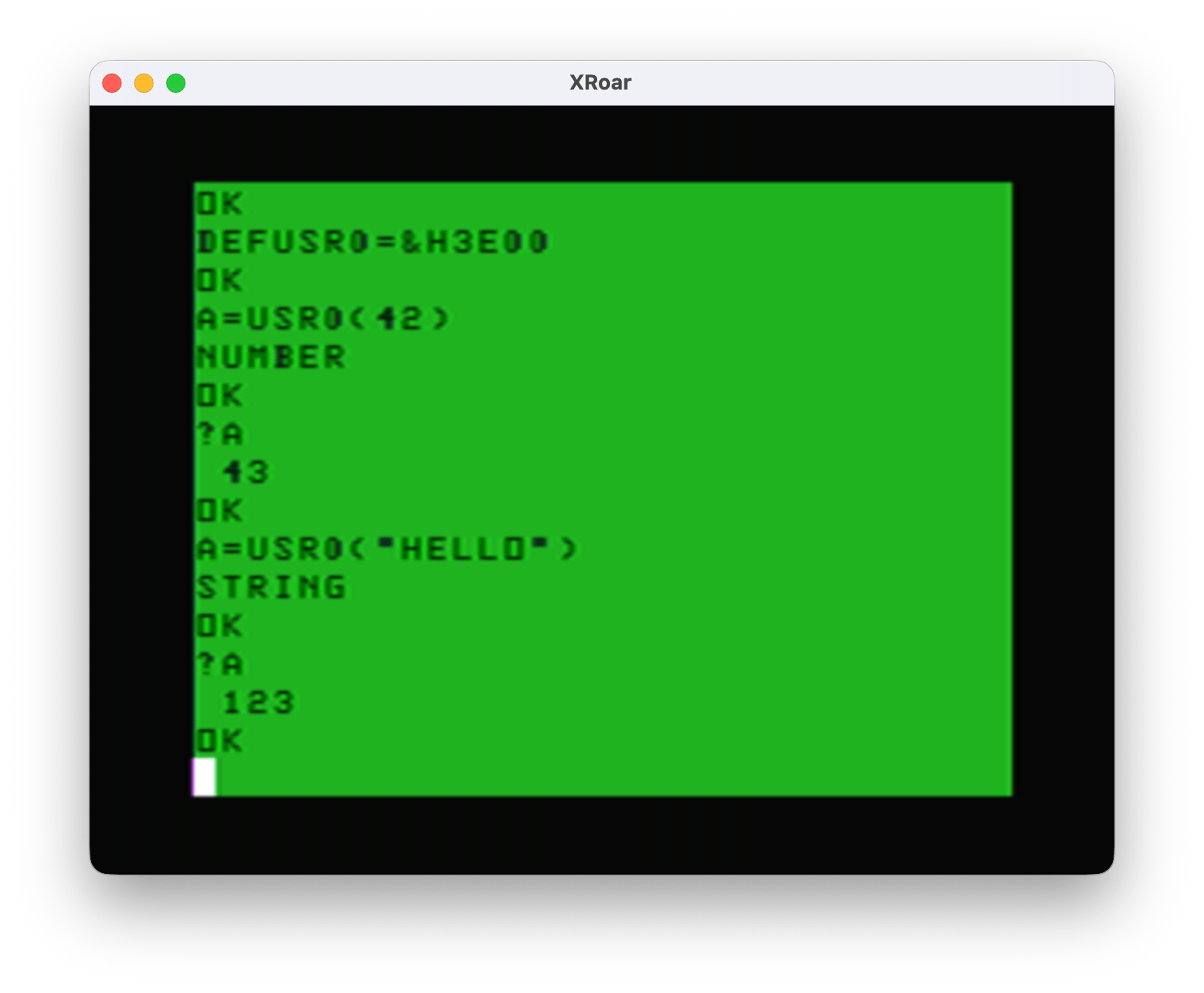
And here it is in operation:
Now I know how to detect a USRx(number) versus EXEC, and how to detect a USRx(number) versus a USRx(string). But, this has the same problem if called by EXEC with no address:
EXEC &3E00 NUMBER
EXEC NUMBER ?TM ERROR
It appears that using EXEC with the address after it sets registers up differently than using EXEC with no address (where it uses the last address EXEC used). While both end up at the code path for USRx(number), is seems that plain EXEC thinks it is returning an invalid type and the ?TM ERROR is displayed.
EXEC or EXEC xxxx or USRx(n) or USRx(“STRING”)
Can both routines be combined? On the CoCo mailing list, this all started when I asked: Is there a way to tell if a routine was called from USR versus EXEC? It was Sean’s reply that got me going down this rabbit hole:
Maybe.
Address $9D contains the address EXEC uses to jump to your code, so that should be called address. Also, X will also be this address (implementation detail).
For Color BASIC, you need to know you are running under Color BASIC. Address $112 is the address for USR, so this should point to your code. Also, upon calling, X should be equal to $AA2F and B should be 6 (both are implementation details).
For Extended Color BASIC, you need to know you are running under Extended Color BASIC (16 bits at $8000 are $4558). Addresses $013E through $0150 contain the USRn addresses, so one of these 10 addresses should point to your code. Also, A will equal the contents of address $06. If A=0, then X=$4F; if A=255, then X is pointing elsewhere (the string descriptor).
For Disk Extended Color BASIC, you need to know you are running under Disk Extended BASIC (16 bits at $C000 are $444B). The USRn addresses are now $095F through $0971, but other than that, it’s the same as Extended Color BASIC.
Based on all that, I think the best method might be (completely untested):
mycode cmpx #mycode beq called_by_exec ; otherwise, assume called by USR/USRn
Good luck.
-spc
– Sean Conner via the CoCo Mailing List
This gave me a lot of think about. I did some tests to see what register X looked like when being called by EXEC with or without an address, as well as looking at what was stored in the $9D memory location which is the address EXEC (with no address after it) will use. I created a simple program that would print the value of the X register and the value of $9D so I could test it and see what the pattern was. This code uses an undocumented ROM call that will print the value of the D register. (I learned about this call from Sean’s pages.)
ORGADDR equ $3e00 ; Where program loads in memory.
; Absolute addresses of items in RAM variables. EXECJP equ $9d location of jump address for EXEC
; Absolute addresses of ROM calls. REGDOUT EQU $BDCC ; Convert the value in ACCD into a decimal ; number and send it to CONSOLE OUT.
org ORGADDR
start tfr x,d ; X=D jsr REGDOUT lda #32 ; space jsr [CHROUT] ldd EXECJP ; load D with EXEC address jsr REGDOUT rts
end
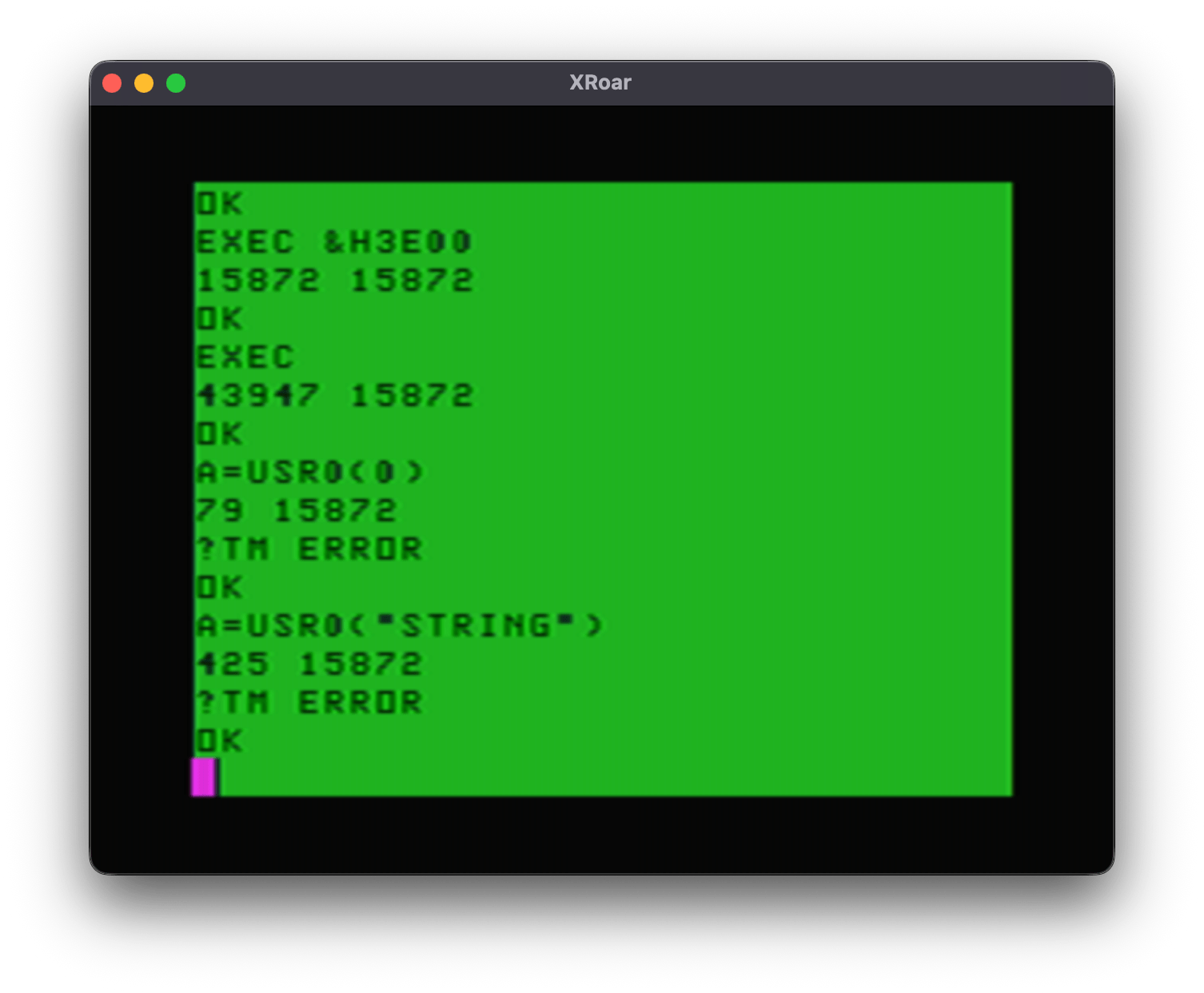
Now I could load this into memory, set up a DEFUSR0=&H3E00 and do some tests:
15872 ($3E00) is the start of my user program. EXEC with that address will have both X and the $9D memory location containing that value.
EXEC without an address will have 43947 ($ABAB) in X, and 15872 ($3E00) as the address of the last EXEC address specified. But what is $ABAB? Looking at the Color BASIC Unravelled book, that address is where the EXEC token is:
ABAB FDB EXEC
I did not dive into this, but I expect X was is used for the token scanning and since that was the last thing it found (no address after it to parse) that is what was in the register when it jumps to the user code.
When I tested A=USR0(0), I got a 79 in register X, and $9D still had the last EXEC address used. It then errored out with a ?TM ERROR due to this code not setting up a clean return back to a USR call.
And lastly, A=USR0(“STRING”) put 425 in register X, and $9D was still the last EXEC address used.
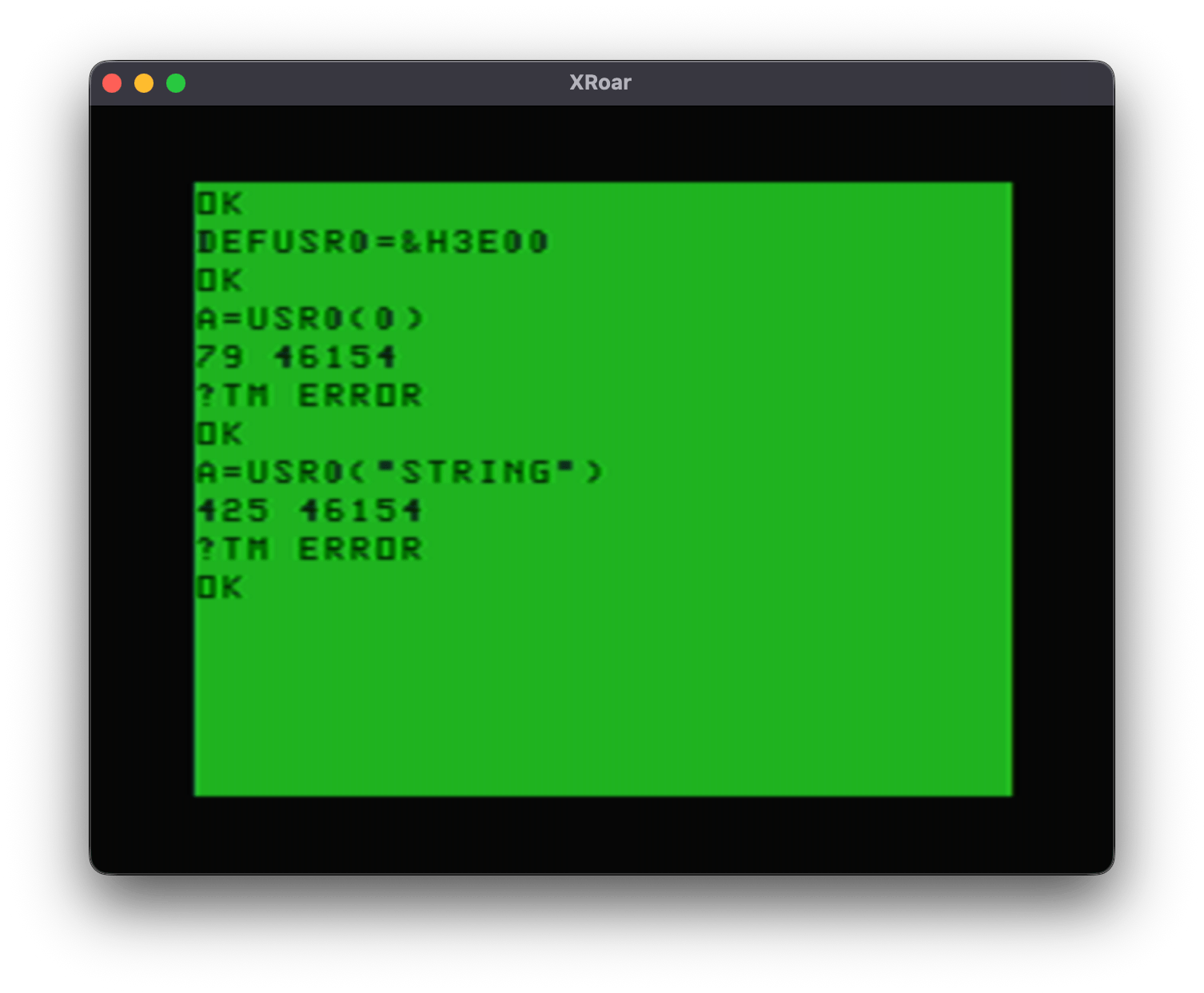
Now, had I done the USR calls first, that $9D would not be set up yet and it would look like this:
46154 ($B44A) appears to be the default value EXEC will use. By default, EXEC points to the routine that prints ?FC ERROR:
B44A FDB LB44A ARGUMENT OF EXEC COMMAND - SET TO ‘FC’ ERROR
So on a power cycle, typing EXEC is the same as typing EXEC &HB44A:
EXEC &HB44A ?FC ERROR
Having this value there is not useful for any of my checks since all that means is that the user has not done an EXEC with an address yet.
BUT, now that I see what happens with register X, I should be able to check it, and the $9D exec location and determine if I am being called by EXEC, EXEC xxxx, or a USRx command. Here is my test program:
ORGADDR equ $3e00 ; Where program loads in memory.
; Absolute addresses of items in RAM variables. EXECJP equ $9d location of jump address for EXEC
; Absolute addresses of ROM calls. CHROUT equ $A002
org ORGADDR
; This code expects to have been called by USRx(x). start cmpx #start ; called by "EXEC xxxx"? beq fromexec ; if yes, goto fromexec cmpx #$abab ; called by "EXEC"? bne fromusr ; if no, must be USR. goto fromusr ldx EXECJP ; get EXEC address cmpx #start ; called by "EXEC xxxx"? beq fromexec ; if yes, goto from exec fromusr leax usrmsg,pcr lbsr print rts fromexec leax execmsg,pcr lbsr print rts
; PRINT subroutine. Prints the 0-terminated string pointed to by X plus CR. print lda ,x+ beq printdone jsr [CHROUT] bra print printdone lda #13 jsr [CHROUT] rts
usrmsg fcc "FROM USR" fcb 0
execmsg fcc "FROM EXEC" fcb 0
end
And here is what it does:
I now have code that can properly (?) detect if it was called from EXEC xxxx, EXEC, or USR. This demo does not handle detecting a string parameter to USR, but … I think it proves it is possible to do it.
With a few more lines of assembly, I came up with this test program:
ORGADDR equ $3e00 ; Where program loads in memory.
; Absolute addresses of items in RAM variables. EXECJP equ $9d location of jump address for EXEC
; Absolute addresses of ROM calls. CHROUT equ $A002 INTCNV equ $B3ED GIVABF equ $B4F4
org ORGADDR
; This code can be called by USRx(n), USRx("STRING"), EXEC addr or EXEC. start cmpx #start ; called by "EXEC xxxx"? beq fromexec ; if yes, goto fromexec cmpx #$abab ; called by "EXEC"? bne fromusr ; if no, must be USR. goto fromusr ldx EXECJP ; get EXEC address cmpx #start ; called by "EXEC"? beq fromexec ; if yes, goto from exec fromusr tsta ; A=0? beq donumber ; if yes, number passed in. goto donumber. inca ; inc A so if 255 (string) it will be 0 now. beq dostring ; if A=0 (was 255), string. goto dostring. bra unknown ; else, goto unknown (this should never happen).
donumber leax numbermsg,pcr ; show "number" message bsr print jsr INTCNV ; get number that was passed in addd #1 ; add 1 to D jmp GIVABF ; return new number back to BASIC
dostring leax stringmsg,pcr ; show "string" message bsr print ldd #12345 ; load D with a return value jmp GIVABF ; return that number back to BASIC
unknown leax unknownmsg,pcr ; this should never happen lbsr print ; show "unknown" message rts
; PRINT subroutine. Prints the 0-terminated string pointed to by X plus CR. print lda ,x+ beq printdone jsr [CHROUT] bra print printdone lda #13 jsr [CHROUT] rts
execmsg fcc "FROM EXEC" fcb 0
numbermsg fcc "FROM USR(NUMBER)" fcb 0
stringmsg fcc "FROM USR(STRING)" fcb 0
unknownmsg fcc "UNKNOWN" fcb 0
end
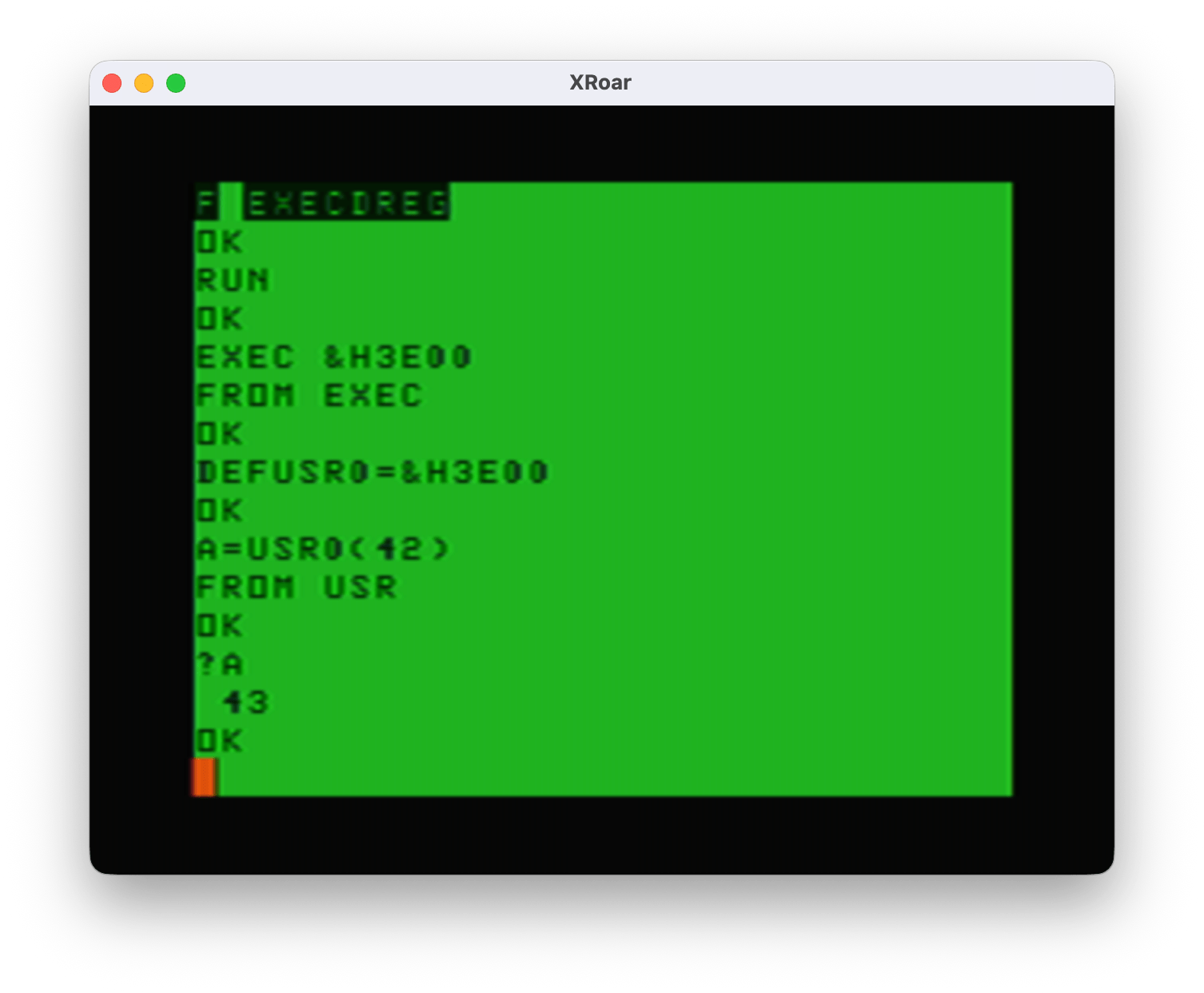
And here is what I get after loading this into memory:
DEF USR0=&H3E00
OK

A=USR0(42)
FROM USR(NUMBER)
PRINT A
43

A=USR0("STRING")
FROM USR(STRING)
PRINT A
12345

EXEC &H3E00
FROM EXEC

EXEC
FROM EXEC
I think we may have a winner! The important parts are:
start       cmpx    #start      ; called by "EXEC xxxx"?
            beq     fromexec    ; if yes, goto fromexec
            cmpx    #$abab      ; called by "EXEC"?
            bne     fromusr     ; if no, must be USR. goto fromusr
            ldx     EXECJP      ; get EXEC address
            cmpx    #start      ; called by "EXEC"?
            beq     fromexec    ; if yes, goto from exec
If X is the address of the user program, it was called by “EXEC xxx”
If not, then if X is NOT $ABAB, it was called by USR
Else, it was $ABAB, so the EXECJP ($9D) is checked to see if it is the address of the user program. If it is, it is from EXEC.
I hope that makes sense. If not, think of it like this:
X=program start – it was called from EXEC xxxx
X=$ABAB and EXECJP=program start – it was called by EXEC.
Anything else is USR.
Now what I need from you is to double check my work and tell me if I got this right, and if this method can be relied on.
At my day job (I just made a new category for these posts) we have been working on an official coding standard to use for our software projects. When I was hired five years ago, I was given a three-page document about “Software Best Practices” that served as a casual guide to how code should be formatted and how functions and variables should be named. From looking at the million+ lines of code I maintain, it is clear that some items were adhered to, while others were ignored completely (thankfully; I disliked the suggested variable naming).
BARR-C focuses on embedded C programming and, unlike the coding standards I have seen at other jobs, it focuses on bug reduction rather than making the code pretty. I purchased a physical copy of the book, but you can download a PDF of it for free:
While I consider myself quite stubborn or stuck in my ways, I can flip on a dime if presented compelling new information. The BARR-C standard is making me rethink a few things. Here is one example, which I share with you to get your take on it.
switch and case
// The way I have been using
switch (color)
{
    case RED:
        stop();
        break;

    case YELLOW:
        slow();
        break;

    case GREEN:
        speed();
        break;

    default:
        break;
}
I am very used to seeing the statements indented past the “case”. But, one of the editors I work with constantly moves those statements back to where they line up with the switch:
// The way one of my editors wants me to type it:
switch (color)
{
case RED:
    stop();
    break;

default:
    break;
}
I certainly don’t like the idea of code being at the same level of the braces. This seems like an odd default to me. Have you seen this elsewhere? ‘prolly has some specific name for this convention.
And recently, I ran into something new that has been added by a later C standard than any I have used. It does not allow variables to be declared inside the switch! That seemed odd, since–at some point–the C standard moved away from “all variables must be declared at the top of the function” to “yeah, wherever you want, it’s fine.”
void function ()
{
    int counter; // We used to have to do this only here.

    ...some lines later...

    while (active)
    {
        int counter = 0; // But now we can do it here.

        // ...stuff...
    }
}
Today, I prefer “variables used just in this bit of code” to be declared around that code so it is much easier to see what that variable is used for. Of course, this wouldn’t matter if every function was small enough to completely fit on the screen at the time. Sadly, I always seem to work with legacy functions that are hundreds of lines long.
But I digress…
There is something new (to me) that now disallows declaring variables in the case. I have seen this done (and still do it myself) for many years. To make it work, you need an extra set of curly braces which causes switch/cases that look like this:
switch (color)
{
    case RED:
    {
        int x; // Now works because braces.
        // ...stuff...
        break;
    }

    default:
        break;
}
I suppose this has advantages. It is making a scoped (is that the term?) variable just inside those braces of the case. Each case could make its own “x” and use it, if it wanted to, I suppose.
Side Note: Of course I had to try this out. Indeed, by default, this works without a peep from the compiler, but if you enable the proper warnings you will at least get “warning: declaration of ‘x’ shadows a previous local [-Wshadow]”.
int main()
{
    int x = 42;

    switch (x)
    {
        case 1:
        {
            int x = 1;
            printf ("x = %d\n", x);
            break;
        }

        case 2:
        {
            int x = 2;
            printf ("x = %d\n", x);
            break;
        }

        default:
            printf ("x = %d\n", x);
            break;
    }

    return 0;
}
But that’s not important to this story… The BARR-C is giving me a new formatting option, and a reason why I might want to do it. It lines up the “case” and “break” together:
switch (err)

{

    case ERR_A:

        ...

    break;


    case ERR_B:

        ...

    // Also perform the steps for ERR_C.

    case ERR_C:

        ...

    break;


    default:

        ...

    break;

}
I have never encountered the case/default and its break lined up like that before. It looks odd to me, and feels wrong. But the reason for this is given:
Reasoning: C’s switch statements are powerful constructs, but prone to errors such as omitted break statements and unhandled cases. By aligning the case labels with their break statements it is easier to spot a missing break.
– Embedded C Coding Standard, Michael Barr
Interesting. I have, on a number of occasions (including again recently), found a bug where a break was missing, or something happened where it got backspaced to the line above it where it was now at the end of a comment:
    case GIVE_UP:
        // Give up and return.break;

    default:
        // Never surrender!!!
        break;
This is a trivial example, but if there had actually been lines of code there, you’d have to look at the last line of each case to verify a break was there. But if you line up the case/break like this…
    case GIVE_UP:
        // Give up and return.break;

    default:
        // Never surrender!!!
    break;
…you can immediately notice a problem where the “patterns don’t match,” which our brains seem to notice easier.
Using curly braces would not make a missing break stand out — in fact, it might make you assume it is all good because you see the closing brace there.
So I kinda like it.
Even if I hate it.
What say you? Comments if you got ’em.
Side Note 2: Since I originally typed this in, I have now fully converted to this formatting look. And, it has already helped me spot an issue like the one I mentioned earlier — without me having to scrounge line by line through the code trying to figure out what is going on. Nice.
I switched to Mint Mobile, and the first month worked out well. My phone logged 16+ GB of data on this “unlimited talk, unlimited text and unlimited data” plan. It was cheaper than what I had on T-Mobile, which is amusing since Mint is owned by T-Mobile. T-Mobile also owns Sprint, and now US Cellular. Great coverage, and even cheaper plans for folks who don’t need “unlimited” data.
I prepaid for the longest term they offer – 12 months – and got in on a $15/month deal. But if that had not been an option, I could have gotten a plan with more data than I normally use for less than I was paying.
And all of this makes me think back to what I used to pay when the iPhone came out on AT&T ages ago. Back then, my limited minutes pan was $40, then I paid extra for text (not unlimited), and $20 to add data. Geesh.
During some research for my day job, I was pointed to a utility written by Guillaume Dargaud that converts LabWindows/CVI user interface files (.uir) over to HTML so they can run in a web browser instead of as a Windows UI app. The program, written in C, can be found here:
Have you ever seen this used in the wild? I was surprised to see it even supported in a non-mainstream compiler, like that one.
Looking at the list, this line could have been changed further:
Active = Mode not_eq VAL_INDICATOR and Visible and not Dimmed;
And indeed, that works:
#include <stdio.h>
#include <iso646.h>

// #define and    &&
// #define and_eq &=
// #define bitand &
// #define bitor  |
// #define compl  ~
// #define not    !
// #define not_eq !=
// #define or     ||
// #define or_eq  |=
// #define xor    ^
// #define xor_eq ^=

#define VAL_INDICATOR 1

int main()
{
    int Active = 0;

    int Mode = (VAL_INDICATOR + 1);
    int Visible = 1; // Visible
    int Dimmed = 1; // Dimmed

    printf ("Mode: %d  Visible: %d  Dimmed: %d\n", Mode, Visible, Dimmed);

    Active = Mode not_eq VAL_INDICATOR and Visible and not Dimmed;

    printf ("Active: %d\n", Active);

    Mode = (VAL_INDICATOR + 1);
    Visible = 1; // Visible
    Dimmed = 0; // NOT Dimmed

    printf ("Mode: %d  Visible: %d  Dimmed: %d\n", Mode, Visible, Dimmed);

    Active = Mode not_eq VAL_INDICATOR and Visible and not Dimmed;

    printf ("Active: %d\n", Active);

    return 0;
}
Coding standards such as the BARR-C Embedded Coding Standard specifically say not do do things like this since it makes the code harder to figure out since the user has to go look up what those defines are really set to. Imagine how the code might look fine, but be complete wrong, if a define were messed ;-)
Have you seen this? Do you do this? Leave a comment…