
Recently, Rick “Shanghai” Adams pointed me to a BASIC program he was working on for a PDP-8. Much like I now spend my time playing with BASIC from 1980 on a CoCo 1 emulator, Rick is going even further back and playing with a version of BASIC from a machine created in the 1960s.
And its a bit different.
I have previously posted about this machine (well, PDP systems in general) when I was trying to find the origins of the INSTR command in BASIC. Then I was able to dig up a 1971 PDP-11 manual that referenced this function for that BASIC.
Rick sent me a link to a two-player game called CHOMP. I was unfamiliar with it, but see it has its own wiki page.
https://en.wikipedia.org/wiki/Chomp
On that entry, it is presented as a chocolate bar made up of squares you can break off. The top left square is poison, so whoever takes that final piece loses.
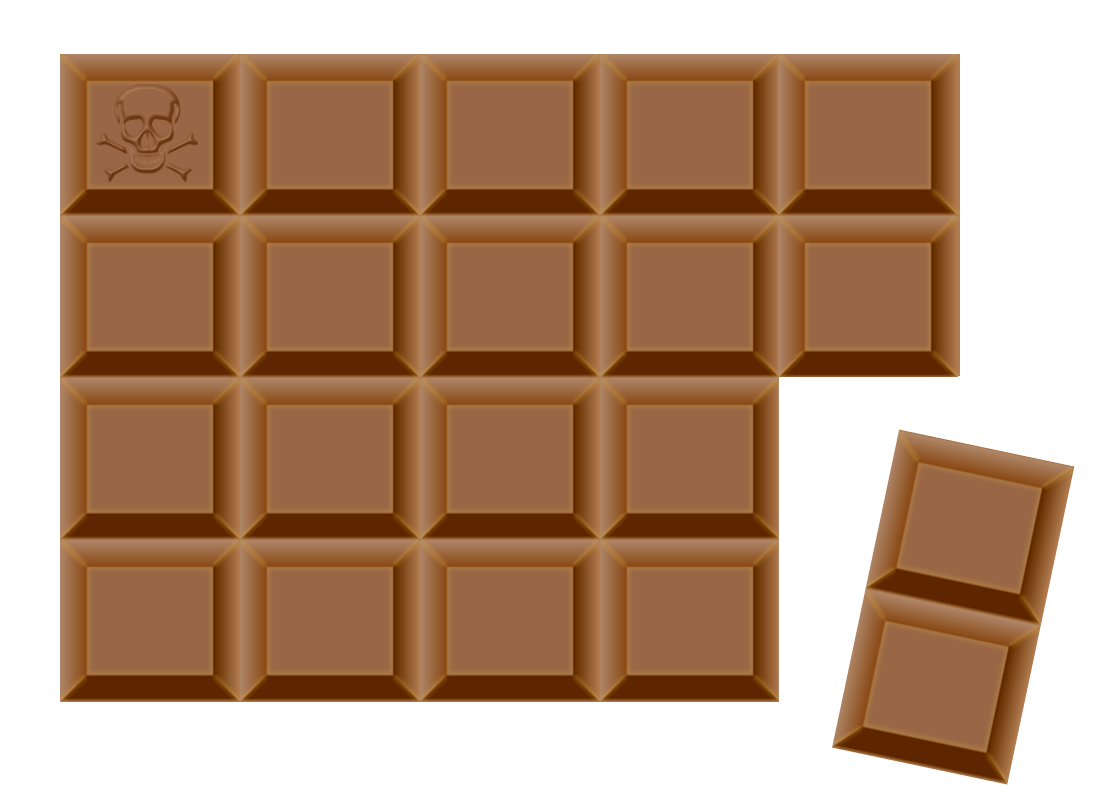
This helps me understand why the came is called CHOMP.
But I digress… This really has nothing to do with that game, though CHOMP will likely return in a future blog post here.
BASIC may have been cooler in the 1960s…
Rick has a BASIC preprocessor that allows him to write easy to read source code, then convert it into messy BASIC code with line numbers later. Here is a Guest The Number game from Rick’s GitHub:
https://github.com/yggdrasilradio/b8pp/blob/master/guess.txt
' Generate random number
randomize
x = int(100 * rnd(0)) + 1
' Intro
print "I'VE THOUGHT OF A NUMBER BETWEEN 1 AND 100."
print "CAN YOU GUESS WHAT IT IS?"
n = 0
60 n = n + 1
print "YOUR GUESS";
input g
if g <> x then 130
' Player wins!
print "YOU GUESSED IT IN"; n; "GUESSES!"
if n <= 7 then 120
print "BUT IT SHOULD HAVE ONLY TAKEN YOU 7 GUESSES."
120 stop
130 if g > x then 160
print "TOO LOW."
goto 60
160 print "TOO HIGH."
goto 60
end
That text is processed by his script and becomes this:
https://github.com/yggdrasilradio/b8pp/blob/master/guess.bas
1RANDOM\X=INT(100*RND(0))+1
2PRINT"I'VE THOUGHT OF A NUMBER BETWEEN 1 AND 100."
3PRINT"CAN YOU GUESS WHAT IT IS?"\N=0
60N=N+1\PRINT\PRINT"YOUR GUESS";\INPUTG\IFG<>XTHEN130\PRINT
61PRINT"YOU GUESSED IT IN";N;"GUESSES!"\IFN<=7THEN120
62PRINT"BUT IT SHOULD HAVE ONLY TAKEN YOU 7 GUESSES."
120STOP
130IFG>XTHEN160\PRINT"TOO LOW."\GOTO60
160PRINT"TOO HIGH."\GOTO60\END
…and that is the code that he loads and runs on the PDP emulator.
The first thing you will notice is the use of a backslash. Initially, I thought this was just in place of a colon. For example, I see things like:
PRINT "TOO HIGH"\GOTO 60
…and that looks like it is just…
PRINT "TOO HIGH":GOTO 60
…but once I started converting PDP CHOMP to work on the CoCo, I realized that was not the intent of the backslash there. It appears to be a way to have multiple lines without line numbers. The logic does not continue to flow through those slashes:
60N=N+1\PRINT\PRINT"YOUR GUESS";\INPUTG\IFG<>XTHEN130\PRINT
Above, if G is not equal to X, it goes to line 130. There is a PRINT after that which would NEVER be reached if these were just colons:
60N=N+1:PRINT:PRINT"YOUR GUESS";:INPUTG:IFG<>XTHEN130:PRINT
To port this to Microsoft Color BASIC, I would have to do something like this:
60 N=N+1:PRINT:PRINT"YOUR GUESS";:INPUTG:IFG<>XTHEN130
61 PRINT
And guess what? That is also not important to this blog post. But might be later to a follow up blog post about porting PDP BASIC CHOMP to CoCo BASIC CHOMP.
CHANGE is … good?
Rick has entered the Logiker Christmas Challenge in the past with entries done in this much earlier BASIC. I have seen him comment on the far more limited STRING handling in that version of BASIC which required some very different approaches to the challenges.
Now I understand what he means.
While looking at his CHOMP source code, there is a keyword I had never seen before – CHANGE. He explained it to me:
“The CHANGE statement converts strings to and from an array, and the zeroth element of the array is the length of the string”
– Rick Adams
I saw it used like this:
40	print
	print "YOUR MOVE";
	input m$
	change m$ to m
Or, in the converted BASIC:
40PRINT\PRINT"YOUR MOVE";\INPUTM$\CHANGEM$TOM
So if you did something like this:
M$="ABC"
CHANGE M$ TO M
…then you would get this:
FOR I=0 TO M(0):PRINT M(I):NEXT
3
65
66
67
- M(0) is the length of the converted string.
- M(1) is the first character of the string (“A”)
- M(2) is the second character of the string (“B)”
- M(3) is the third character of the string (“C”)
That’s kinda neat. To do the same thing on Color BASIC, we could make subroutines like this:
2000 'M TO M$
2010 M$="":FORZ=1TOM(0):M$=M$+CHR$(M(Z)):NEXT:RETURN

3000 'M$ TO M
3010 M(0)=LEN(M$):FORZ=1TOM(0):M(Z)=ASC(MID$(M$,Z)):NEXT:RETURN
And then we could change “CHANGE M$ TO M” to “GOSUB 3000” and “CHANGE M TO M$” to GOSUB 2000.
10 INPUT M$:GOSUB 3000
20 FOR I=0 TO M(0):PRINT M(I):NEXT:END
Or reverse it, if we created one manually:
10 M(0)=3:M(1)=65:M(2)=66:M(3)=67:GOSUB 2000
20 PRINT M$:END
Though Rick pointed out with MID$() and such available, there would be far easier ways to do this. But those subroutines are what I will be using so I can more directly run his PDP BASIC code with minimal changes.
Have you ever worked on a BASIC that used the CHANGE command? If so, what was it? Leave a comment, please.
Until next time…
Interesting. Do the CHANGE command expand each byte to words, or is it possible to have arrays of bytes in PDP-8 BASIC?
For a language that supports arrays of bytes it’s obviously trivial to access a string as individual bytes. C does this but then you have null terminated C strings rather than PASCAL strings like BASIC does.
I can’t find any BASIC that has support for arrays of bytes (but I haven’t done any extensive search). If there are any, it would be possible to have an array pointer point to a string and the other way around. Would probably mess up the garbage collection seriously though.
In theory you could add an integer array manually and have it point to a string, but it would be weird to have pairs of characters accessed as integers.
That is an interesting question. I recall one of the “big deals” about Microsoft BASIC was its support for floating point variables. I guess this means many earlier BASICs only did integer math? I will ask.