
Over the years I have shared many tidbits about Color BASIC.
This is another one.
A recent post by Juan Castro to the Groups.IO Color Computer mailing list caught my attention, mostly because he called me out by name in the subject line:
https://groups.io/g/ColorComputer/message/312
Color BASIC variable name limits
As a reminder, Color BASIC allows 1 or 2 character variable names. They must start with a letter (A-Z) and the second character can be either letter (A-Z) or number (A-0). BUT, the BASIC interpreter does let you type longer names for variables, but it only honors the first two characters. Here is a screenshot from a past blog post here (which I’d link to if I was not so lazy):

This is a reminder that, if you try to use variables longer than two characters, you have to make sure you always keep the first two characters unique since “LONGVARIABLE” and “LOST” and “LO” are all the same variable to BASIC.
…but not all variable name limits are the same.
To break the rule I just said, in Color BASIC, some variable names are forbidden. A forbidden variable is one you cannot use because it is already reserved for a keyword or token. For example, FOR is a keyword:roar
FOR I=1 TO 10
PRINT I
NEXT I
Because of this, even though BASIC only honors the first two characters of a variable name, you still cannot use “FOR” as a variable.
FOR=42
?SN ERROR
But you can use “FO”, since that is not long enough to be recognized as a BASIC token or keyword.
FO=42
PRINT FO
42
There are a number of two-character tokens, such as “TO” in the FOR/NEXT statement (“FOR I=1 TO 10”), and “AS” in the Disk BASIC FIELD statement (“FIELD #1,5 AS A$”), as well as “FN” which is used in DEF FN.
AS=42
?SN ERROR

FN=42
?SN ERROR

TO=42
?SN ERROR
This means if you wrote something for Color BASIC or Extended Color BASIC that uses “AS” as a variable, that would not work under Disk Extended Color BASIC.
BASIC ignores spaces
In recent years, someone pointed me to the fact that when scanning a BASIC line (either type in directly or when parsing a line of code in a program), spaces get ignored by the scanner. This means:
N M = 42
PRINT N M
42
That one surprised me when I learned it. This is probably why, when printing two variables, a semicolon is required between them:
N = 10
M = 20
PRINT N;M
10  20
And if you had done this (remember to CLEAR between these tests so variables are erased each time):
N = 10
M = 20
NM = 30
PRINT N M
30
PRINT N;M;N M
10  20  30
By the way, if you have ever wondered about that space printed in front of numeric variables when you do things like “PRINT X”, I covered why this happens in an earlier blog and included a simple patch to BASIC that removes that feature.
How to turn a forbidden variable into a non-forbidden one for fun and profit
Well, Juan Casto showed that using this “BASIC ignores spaces” quirk as a way to use forbidden variables. From his post:
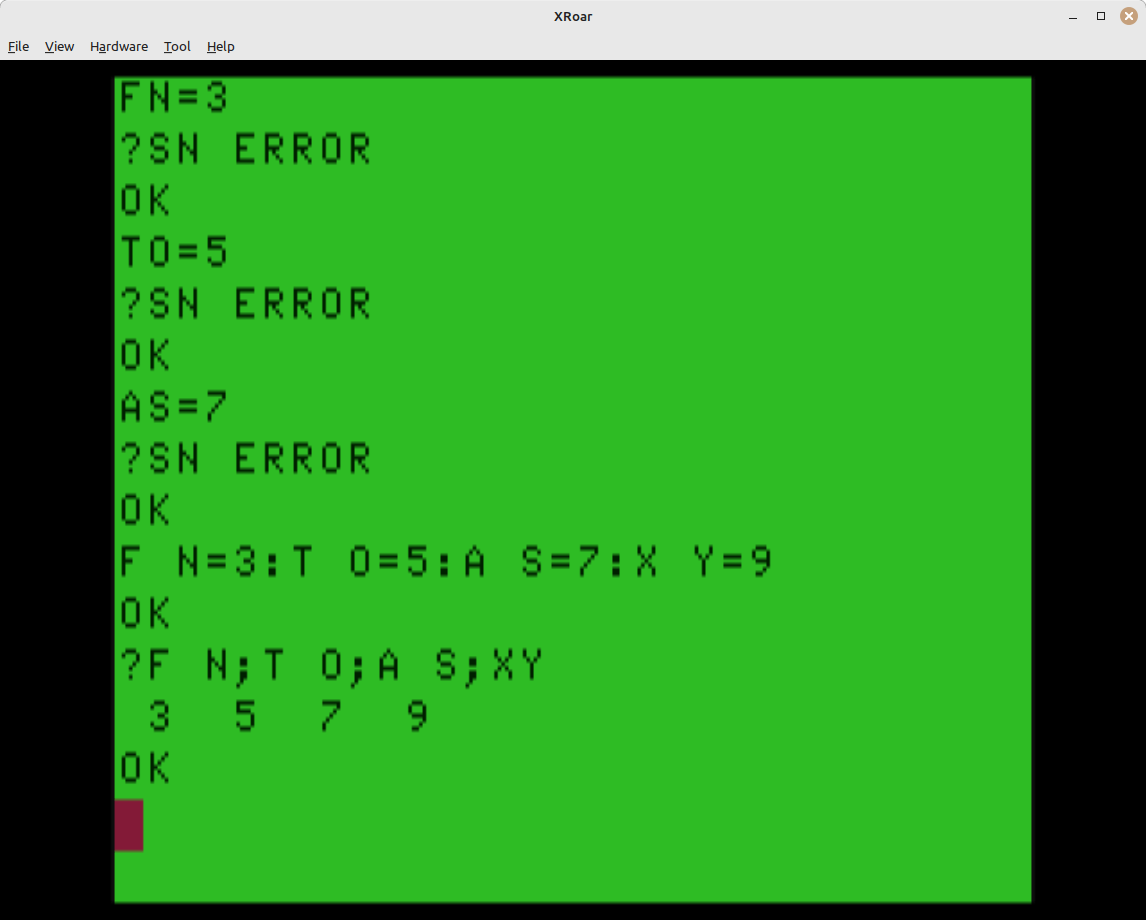
Now it seems obvious. BASIC’s interpreter looks for keywords like “FOR” and will not recognize “F O R” or “FO R” as that token. The detokenizer honors the spaces.
But when it comes to variables, the spaces are ignored by the parser, so “T O” will not match as a token for “TO”, but will be processed as a variable “TO”.
Go figure.
Admittedly, space in two-character variable names look silly, but now I can finally update my old *ALLRAM* BBS to use the variable “TO$” for who a message is to:
FR$="ALLEN HUFFMAN"
T O$="JUAN CASTRO"
SB$="THAT'S REALLY COOL"
Though why would you want to do that… (Please click on that link. That’s a web domain I own… ;)
Not invented here
I suspect this was discovered by the early pioneers of BASIC, likely soon after the original Color Computer was released in 1980. If you know of a reference to this behavior from some early newsletter or magazine article, please let me know.
And as to Juan … thanks for sending me down a BASIC rabbit hole again…
Until next time…
I’ve made it my mission to mercilessly drag you into any and all Color BASIC rabbit holes I find myself into. There will be more, I promise.
Hope springs eternal. Normally I would say “wish I knew then what I know now” but I’m still not sure what we’d do with it ;)
“(…) This means if you wrote something for Color BASIC or Extended Color BASIC that uses ‘AS’ as a variable, that would not work under Disk Extended Color BASIC.”
Sorta. If the working program with the AS variable was saved to cassette and then CLOAD’ed in a Disk BASIC machine, I believe it would still work. You could even edit BASIC lines that DON’T use that variable, save it to disk (NOT with the ,A qualifier) and it would STILL work.
Disclaimer: I haven’t tested any of the above.
That is an important detail. It’s not the name but the tokenizer that has the issue. So you could put an XX in the line then POKE it to the variable name maybe?
Yes! Exactly.
I suspect that you’d find much the same in Micro-Soft’s BASIC for the Altair.
It had not dawned on me to even try it elsewhere, but now I want to see if the VIC-20 (which I learned on) also worked this way.
Z80 TRS-80’s have it too: https://i.imgur.com/eM1ETQO.png
So does the MSX: https://i.imgur.com/80muuQl.png
It’s a Microsoft thing, yeah.
Thank you for your service.
The Aplle II is… different. Take a look at the last line. It seems they, contrary to the others, excise spaces first, THEN tokenize: https://i.imgur.com/nkTYgjb.png
Interesting. Was this Apple BASIC or MS BASIC for Apple? Also, the COmmodore tokenizer on the VIC didn’t need a space for things like:
FORI=1TOX
….I think.
Another thing that happens, similar to this, is the comments or rem that get in the way a lot during execution time since basic insists on reading it completely instead of jumping to the next line index that has it read from the current line
I don’t remember if you already mentioned this in an article.
I think so – I remember testing that a REM on a line by itself is better than a REM after a GOTO.
100 GOTO 1000:REM DRAW SCREEN
BASIC has to parse to the end of the line before it does the GOTO, if I recall.