Category Archives: Disk BASIC

CoCo Disk BASIC disk structure – part 4

I did a thing.

I wrote a BASIC program which will create 68 files named “0.TXT” to “67.TXT”. Each file is 2304 bytes so it takes up a full granule. (That is not really important. It just helps makes things obvious if you look at the disk with a hex editor and want to know which file is at which sector.)

After making these files, it uses code from some of my other examples to scan through the directory and display it (FILEGRAN.BAS code, shown later in this post) and then it scans the directory and prints which granule each 1-gran file is using.

I can start with a freshly formatted disk then run this program and see where RS-DOS put each file.

Will it match the order RS-DOS used when making one huge file that takes up all 68 grans? Let’s find out…

10 '68FILES.BAS
20 PRINT "RUN THIS ON A BLANK DISK."
30 INPUT "DRIVE #";DR
40 'SWITCH TO THAT DRIVE
50 DRIVE DR
60 'GOTO 140
70 'MAKE FILES 0-67
80 FOR G=0 TO 67
90 F$=MID$(STR$(G),2)+".TXT"
100 PRINT "MAKING ";F$;
110 OPEN "O",#1,F$
120 CLOSE #1:PRINT
130 NEXT
140 'FILEGRAN.BAS
150 'DIR WITHOUT FILE SIZES
160 CLEAR 512:DIM SP$(1)
170 ' S - SECTOR NUMBER
180 FOR S=3 TO 11
190 ' SP$(0-1) - SECTOR PARTS
200 DSKI$ DR,17,S,SP$(0),SP$(1)
210 ' P - PART OF SECTOR
220 FOR P=0 TO 1
230 ' E - DIR ENTRY (4 P/SECT.)
240 FOR E=0 TO 3
250 ' GET 32 BYTE DIR ENTRY
260 DE$=MID$(SP$(P),1+E*32,32)
270 ' FB - FIRST BYTE OF NAME
280 FB=ASC(LEFT$(DE$,1))
290 ' SKIP DELETED FILES
300 IF FB=0 THEN 440
310 ' WHEN 255, DIR IS DONE
320 IF FB=255 THEN 470
330 ' PRINT NAME AND EXT.
340 'PRINT LEFT$(DE$,8);TAB(9);MID$(DE$,9,3);
350 ' FIRST TWO CHARS ONLY
360 PRINT LEFT$(DE$,2);"-";
361 'PRINT #-2,LEFT$(DE$,2);",";
370 ' FILE TYPE
380 'PRINT TAB(13);ASC(MID$(DE$,12,1));
390 ' BINARY OR ASCII
400 'IF ASC(MID$(DE$,13,1))=0 THEN PRINT "B"; ELSE PRINT "A";
410 ' STARTING GRANULE
420 PRINT USING("## ");ASC(MID$(DE$,14,1));
421 'PRINT #-2,ASC(MID$(DE$,14,1))
430 CL=CL+1:IF CL=5 THEN CL=0:PRINT
440 NEXT
450 NEXT
460 NEXT
470 END

I modified this program to output to the printer (PRINT #-2) and then capture that output in the Xroar emulator in a text file. That gave me data which I put in a spreadsheet.

 68 Files
FILE GRAN
0 32
1 33
2 34
3 35
4 30
5 31
6 36
7 37
8 28
9 29
10 38
11 39
12 26
13 27
14 40
15 41
16 24
17 25
18 42
19 43
20 22
21 23
22 44
23 45
24 20
25 21
26 46
27 47
28 18
29 19
30 48
31 49
32 16
33 17
34 50
35 51
36 14
37 15
38 52
39 53
40 12
41 13
42 54
43 55
44 10
45 11
46 56
47 57
48 8
49 9
50 58
51 59
52 6
53 7
54 60
55 61
56 4
57 5
58 62
59 63
60 2
61 3
62 64
63 65
64 0
65 1
66 66
67 67

Next, I used a second program on a freshly formatted disk to create one big file fully filling up the disk. (The very last PRINT to the file will create a ?DF ERROR, which I now think is a bug. It should not do that until I try to write the next byte, I think.)

10 '1BIGFILE.BAS
20 PRINT"RUN THIS ON A BLANK DISK."
30 INPUT "DRIVE #";DR
40 'SWITCH TO THAT DRIVE
50 DRIVE DR
60 'MAKE ONE BIG 68 GRAN FILE
70 OPEN "O",#1,"1BIGFILE.TXT"
80 FOR G=0 TO 67
90 PRINT G;
100 T$=STRING$(128,G)
110 FOR T=1 TO 18
120 PRINT ".";
130 PRINT #1,T$;
140 NEXT
150 PRINT
160 NEXT
170 CLOSE #1
180 END

I ran another test program which would read the directory, then print out the granule chain of each file on the disk.

10 ' FILEGRAN.BAS
20 '
30 ' 0.0 2025-11-20 BASED ON FILEINFO.BAS
40 '
50 ' E$(0-1) - SECTOR HALVES
60 ' FT$ - FILE TYPE STRINGS
70 '
80 CLEAR 1500:DIM E$(1),FT$(3)
90 FT$(0)="BPRG":FT$(1)="BDAT":FT$(2)="M/L ":FT$(3)="TEXT "
100 '
110 ' DIR HOLDS UP TO 72 ENTRIES
120 '
130 ' NM$ - NAME
140 ' EX$ - EXTENSION
150 ' FT - FILE TYPE (0-3)
160 ' AF - ASCII FLAG (0/255)
170 ' FG - FIRST GRANULE #
180 ' BU - BYTES USED IN LAST SECTOR
190 ' SZ - FILE SIZE
200 ' GM - GRANULE MAP
210 '
220 DIM NM$(71),EX$(71),FT(71),AF(71),FG(71),BU(71),SZ(71),GM(67)
230 '
240 INPUT "DRIVE";DR
250 '
260 ' FILE ALLOCATION TABLE
270 ' 68 GRANULE ENTRIES
280 '
290 DIM FA(67)
300 DSKI$ DR,17,2,G$,Z$:Z$=""
310 FOR G=0 TO 67
320 FA(G)=ASC(MID$(G$,G+1,1))
330 NEXT
340 '
350 ' READ DIRECTORY
360 '
370 DE=0
380 FOR S=3 TO 11
390 DSKI$ DR,17,S,E$(0),E$(1)
400 '
410 ' PART OF SECTOR
420 '
430 FOR P=0 TO 1
440 '
450 ' ENTRY WITHIN SECTOR PART
460 '
470 FOR E=0 TO 3
480 '
490 ' DIR ENTRY IS 32 BYTES
500 '
510 E$=MID$(E$(P),E*32+1,32)
520 '
530 ' NAME IS FIRST 8 BYTES
540 '
550 NM$(DE)=LEFT$(E$,8)
560 '
570 ' EXTENSION IS BYTES 9-11
580 '
590 EX$(DE)=MID$(E$,9,3)
600 '
610 ' FILE TYPE IS BYTE 12
620 '
630 FT(DE)=ASC(MID$(E$,12,1))
640 '
650 ' ASCII FLAG IS BYTE 13
660 '
670 AF(DE)=ASC(MID$(E$,13,1))
680 '
690 ' FIRST GRANUAL IS BYTE 14
700 '
710 FG(DE)=ASC(MID$(E$,14,1))
720 '
730 ' BYTES USED IN LAST SECTOR
740 ' ARE IN BYTES 15-16
750 '
760 BU(DE)=ASC(MID$(E$,15,1))*256+ASC(MID$(E$,16,1))
770 '
780 ' IF FIRST BYTE IS 255, END
790 ' OF USED DIR ENTRIES
800 '
810 IF LEFT$(NM$(DE),1)=CHR$(255) THEN 1500
820 '
830 ' IF FIRST BYTE IS 0, FILE
840 ' WAS DELETED
850 '
860 IF LEFT$(NM$(DE),1)=CHR$(0) THEN 1480
870 '
880 ' SHOW DIRECTORY ENTRY
890 '
900 PRINT NM$(DE);TAB(9);EX$(DE);" ";FT$(FT(DE));" ";
910 IF AF(DE)=0 THEN PRINT"BIN"; ELSE PRINT "ASC";
920 '
930 ' CALCULATE FILE SIZE
940 ' SZ - TEMP SIZE
950 ' GN - TEMP GRANULE NUM
960 ' SG - SECTORS IN LAST GRAN
970 ' GC - GRANULE COUNT
980 '
990 SZ=0:GN=FG(DE):SG=0:GC=0
1000 '
1010 ' GET GRANULE VALUE
1020 ' GV - GRAN VALUE
1030 '
1040 GV=FA(GN):GM(GC)=GN:GC=GC+1
1050 '
1060 ' IF TOP TWO BITS SET (C0
1070 ' OR GREATER), IT IS THE
1080 ' LAST GRANULE OF THE FILE
1090 ' SG - SECTORS IN GRANULE
1100 '
1110 IF GV>=&HC0 THEN SG=(GV AND &H1F):GOTO 1280
1120 '
1130 ' IF NOT, MORE GRANS
1140 ' ADD GRANULE SIZE
1150 '
1160 SZ=SZ+2304
1170 '
1180 ' MOVE ON TO NEXT GRANULE
1190 '
1200 GN=GV
1210 GOTO 1040
1220 '
1230 ' DONE WITH GRANS
1240 ' CALCULATE SIZE
1250 '
1260 ' FOR EMPTY FILES
1270 '
1280 IF SG>0 THEN SG=SG-1
1290 '
1300 ' FILE SIZE IS SZ PLUS
1310 ' 256 BYTES PER SECTOR
1320 ' IN LAST GRAN PLUS
1330 ' NUM BYTES IN LAST SECT
1340 '
1350 SZ(DE)=SZ+(SG*256)+BU(DE)
1360 PRINT " ";SZ(DE)
1370 '
1380 ' SHOW GRANULE MAP
1390 '
1400 C=0:PRINT " ";
1410 FOR I=0 TO GC-1
1420 PRINT USING"##";GM(I);
1430 C=C+1:IF C=10 THEN PRINT:PRINT " ";:C=0 ELSE PRINT " ";
1440 NEXT:PRINT
1450 '
1460 ' INCREMENT DIR ENTRY
1470 '
1480 DE=DE+1
1490 NEXT:NEXT:NEXT
1500 END
1510 ' SUBETHASOFTWARE.COM

Since there is only one big file on this disk, fully filling it, it only has one 68-entry granule chain to print. I modified the code to PRINT#-2 these values to the virtual printer so I could then copy the numbers into the same spreadsheet:

 68 Files  Big File
FILE GRAN GRAN
0 32 32
1 33 33
2 34 34
3 35 35
4 30 36
5 31 37
6 36 38
7 37 39
8 28 40
9 29 41
10 38 42
11 39 43
12 26 44
13 27 45
14 40 46
15 41 47
16 24 48
17 25 49
18 42 50
19 43 51
20 22 52
21 23 53
22 44 54
23 45 55
24 20 56
25 21 57
26 46 58
27 47 59
28 18 60
29 19 61
30 48 62
31 49 63
32 16 64
33 17 65
34 50 66
35 51 67
36 14 30
37 15 31
38 52 28
39 53 29
40 12 26
41 13 27
42 54 24
43 55 25
44 10 22
45 11 23
46 56 20
47 57 21
48 8 18
49 9 19
50 58 16
51 59 17
52 6 14
53 7 15
54 60 12
55 61 13
56 4 10
57 5 11
58 62 8
59 63 9
60 2 6
61 3 7
62 64 4
63 65 5
64 0 2
65 1 3
66 66 0
67 67 1

Now it seems clearly obvious that RS-DOS does something different when making a new file, versus what it does when expanding an existing file into a new granule.

I wanted a way to visualize this so, of course, I wrote a program to help me create a full ASCII representation of the granules, then edited the rest by hand.

                           68    1 Big
Files File
Track 0 +------------+
| Granule 0 | 64 66
| Granule 1 | 65 67
Track 1 +------------+
| Granule 2 | 60 64
| Granule 3 | 61 65
Track 2 +------------+
| Granule 4 | 56 62
| Granule 5 | 57 63
Track 3 +------------+
| Granule 6 | 52 60
| Granule 7 | 53 61
Track 4 +------------+
| Granule 8 | 48 58
| Granule 9 | 49 59
Track 5 +------------+
| Granule 10 | 44 56
| Granule 11 | 45 57
Track 6 +------------+
| Granule 12 | 40 54
| Granule 13 | 41 55
Track 7 +------------+
| Granule 14 | 36 52
| Granule 15 | 37 53
Track 8 +------------+
| Granule 16 | 32 50
| Granule 17 | 33 51
Track 9 +------------+
| Granule 18 | 28 48
| Granule 19 | 29 49
Track 10 +------------+
| Granule 20 | 24 46
| Granule 21 | 25 47
Track 11 +------------+
| Granule 22 | 20 44
| Granule 23 | 21 45
Track 12 +------------+
| Granule 24 | 16 42
| Granule 25 | 17 43
Track 13 +------------+
| Granule 26 | 12 40
| Granule 27 | 13 41
Track 14 +------------+
| Granule 28 | 8 38
| Granule 29 | 9 39
Track 15 +------------+
| Granule 30 | 4 36
| Granule 31 | 5 37
Track 16 +------------+
| Granule 32 | 0 0 <- both start the same
| Granule 33 | 1 1
Track 17 +------------+
| FAT & |
| Directory |
Track 18 +------------+
| Granule 34 | 2 2
| Granule 35 | 3 3
Track 19 +------------+
| Granule 36 | 6 4 <- then big file continues
| Granule 37 | 7 5 writing to the end
Track 20 +------------+
| Granule 38 | 10 6
| Granule 39 | 11 7
Track 21 +------------+
| Granule 40 | 14 8
| Granule 41 | 15 9
Track 22 +------------+
| Granule 42 | 18 10
| Granule 43 | 19 11
Track 23 +------------+
| Granule 44 | 22 12
| Granule 45 | 23 13
Track 24 +------------+
| Granule 46 | 26 14
| Granule 47 | 27 15
Track 25 +------------+
| Granule 48 | 30 16
| Granule 49 | 31 17
Track 26 +------------+
| Granule 50 | 34 18
| Granule 51 | 35 19
Track 27 +------------+
| Granule 52 | 38 20
| Granule 53 | 39 21
Track 28 +------------+
| Granule 54 | 42 22
| Granule 55 | 43 23
Track 29 +------------+
| Granule 56 | 46 24
| Granule 57 | 47 25
Track 30 +------------+
| Granule 58 | 50 26
| Granule 59 | 51 27
Track 31 +------------+
| Granule 60 | 54 28
| Granule 61 | 55 29
Track 32 +------------+
| Granule 62 | 58 30
| Granule 63 | 59 31
Track 33 +------------+
| Granule 64 | 62 32
| Granule 65 | 63 33
Track 34 +------------+
| Granule 66 | 66 34
| Granule 67 | 67 35 <- then big file continues
+------------+ at Track 16

Interesting! For small files, it alternates tracks starting before Track 17 (FAT/Directory) then after, repeating. For a big file, it starts like that before Track 17, then after and continues to the end of Track 35, then goes before Track 17 and works back to the start of the disk.

Do I understand the sequence correctly?

To be continued…

CoCo Disk BASIC disk structure – part 3

See also: part 1, part 2 and part 3.

A correction, and discovering the order RS-DOS writes things…

A correction from part 2… This example program had “BIN” and “ASC” mixed up. 0 should represent BINary files, and 255 for ASCii files. I fixed it in line 920. (I will try to edit/fix the original post when I get a moment.)

10 ' FILEINFO.BAS
20 '
30 ' 0.0 2023-01-25 ALLENH
40 ' 0.1 2023-01-26 ADD DR
50 ' 0.2 2023-01-27 MORE COMMENTS
55 ' 0.3 2025-11-18 BIN/ASC FIX
60 '
70 ' E$(0-1) - SECTOR HALVES
80 ' FT$ - FILE TYPE STRINGS
90 '
100 CLEAR 1500:DIM E$(1),FT$(3)
110 FT$(0)="BPRG":FT$(1)="BDAT":FT$(2)="M/L ":FT$(3)="TEXT "
120 '
130 ' DIR HOLDS UP TO 72 ENTRIES
140 '
150 ' NM$ - NAME
160 ' EX$ - EXTENSION
170 ' FT - FILE TYPE (0-3)
180 ' AF - ASCII FLAG (0/255)
190 ' FG - FIRST GRANULE #
200 ' BU - BYTES USED IN LAST SECTOR
210 ' SZ - FILE SIZE
220 '
230 DIM NM$(71),EX$(71),FT(71),AF(71),FG(71),BU(71),SZ(71)
240 '
250 INPUT "DRIVE";DR
260 '
270 ' FILE ALLOCATION TABLE
280 ' 68 GRANULE ENTRIES
290 '
300 DIM FA(67)
310 DSKI$ DR,17,2,G$,Z$:Z$=""
320 FOR G=0 TO 67
330 FA(G)=ASC(MID$(G$,G+1,1))
340 NEXT
350 '
360 ' READ DIRECTORY
370 '
380 DE=0
390 FOR S=3 TO 11
400 DSKI$ DR,17,S,E$(0),E$(1)
410 '
420 ' PART OF SECTOR
430 '
440 FOR P=0 TO 1
450 '
460 ' ENTRY WITHIN SECTOR PART
470 '
480 FOR E=0 TO 3
490 '
500 ' DIR ENTRY IS 32 BYTES
510 '
520 E$=MID$(E$(P),E*32+1,32)
530 '
540 ' NAME IS FIRST 8 BYTES
550 '
560 NM$(DE)=LEFT$(E$,8)
570 '
580 ' EXTENSION IS BYTES 9-11
590 '
600 EX$(DE)=MID$(E$,9,3)
610 '
620 ' FILE TYPE IS BYTE 12
630 '
640 FT(DE)=ASC(MID$(E$,12,1))
650 '
660 ' ASCII FLAG IS BYTE 13
670 '
680 AF(DE)=ASC(MID$(E$,13,1))
690 '
700 ' FIRST GRANUAL IS BYTE 14
710 '
720 FG(DE)=ASC(MID$(E$,14,1))
730 '
740 ' BYTES USED IN LAST SECTOR
750 ' ARE IN BYTES 15-16
760 '
770 BU(DE)=ASC(MID$(E$,15,1))*256+ASC(MID$(E$,16,1))
780 '
790 ' IF FIRST BYTE IS 255, END
800 ' OF USED DIR ENTRIES
810 '
820 IF LEFT$(NM$(DE),1)=CHR$(255) THEN 1390
830 '
840 ' IF FIRST BYTE IS 0, FILE
850 ' WAS DELETED
860 '
870 IF LEFT$(NM$(DE),1)=CHR$(0) THEN 1370
880 '
890 ' SHOW DIRECTORY ENTRY
900 '
910 PRINT NM$(DE);TAB(9);EX$(DE);" ";FT$(FT(DE));" ";
920 IF AF(DE)=0 THEN PRINT"BIN"; ELSE PRINT "ASC";
930 '
940 ' CALCULATE FILE SIZE
950 ' SZ - TEMP SIZE
960 ' GN - TEMP GRANULE NUM
970 ' SG - SECTORS IN LAST GRAN
980 '
990 SZ=0:GN=FG(DE):SG=0
1000 '
1010 ' GET GRANULE VALUE
1020 ' GV - GRAN VALUE
1030 '
1040 GV=FA(GN)
1050 '
1060 ' IF TOP TWO BITS SET (C0
1070 ' OR GREATER), IT IS THE
1080 ' LAST GRANULE OF THE FILE
1090 ' SG - SECTORS IN GRANULE
1100 '
1110 IF GV>=&HC0 THEN SG=(GV AND &H1F):GOTO 1280
1120 '
1130 ' ELSE, MORE GRANS
1140 ' ADD GRANULE SIZE
1150 '
1160 SZ=SZ+2304
1170 '
1180 ' MOVE ON TO NEXT GRANULE
1190 '
1200 GN=GV
1210 GOTO 1040
1220 '
1230 ' DONE WITH GRANS
1240 ' CALCULATE SIZE
1250 '
1260 ' FOR EMPTY FILES
1270 '
1280 IF SG>0 THEN SG=SG-1
1290 '
1300 ' FILE SIZE IS SZ PLUS
1310 ' 256 BYTES PER SECTOR
1320 ' IN LAST GRAN PLUS
1330 ' NUM BYTES IN LAST SECT
1340 '
1350 SZ(DE)=SZ+(SG*256)+BU(DE)
1360 PRINT " ";SZ(DE)
1370 DE=DE+1
1380 NEXT:NEXT:NEXT
1390 END
1400 ' SUBETHASOFTWARE.COM

To test this routine, I created a program that let me type a file size (in bytes) and then it would make a .TXT file with that size as the filename (i.e, for 3000 bytes, it makes “3000.TXT”) and then I could run it through this program and see if everything matched.

It opens a file with the size as the filename, then writes out “*” characters to fill the file. This will be painfully slow for large files. If you want to make it much faster, share your work in a comment.


10 ' MAKEFILE.BAS
20 '
30 ' 0.0 2025-11-18 ALLENH
40 '
50 INPUT "FILE SIZE";SZ
60 F$=MID$(STR$(SZ),2)+".TXT"
70 OPEN "O",#1,F$
80 FOR A=1 TO SZ:PRINT #1,"*";:NEXT
90 CLOSE #1
100 DIR
110 GOTO 50
120 ' SUBETHASOFTWARE.COM

I was able to use this program in the Xroar emulator to create files of known sizes so I could verify the FILEINFO.BAS program was doing the proper thing.

It seems to be, so let’s move on…

A funny thing happened on the way to the disk…

I have been digging in to disk formats (OS-9 and RS-DOS) lately, and learning more things I wish I knew “back in the day.” For instance, I was curious how RS-DOS allocates granules (see part 1) when adding files to the disk. I wrote a test program that would write out 2304-byte blocks of data (the size of a granule) full of the number of the block. i.e., for the first write, I’d write 2304 0’s, then 2304 1’s and so on. My simple program looks like this:

10 'GRANULES.BAS
20 OPEN "O",#1,"GRANULES.TXT"
30 FOR G=0 TO 67
40 PRINT G;
50 T$=STRING$(128,G)
60 FOR T=1 TO 18
65 PRINT ".";
70 PRINT #1,T$;
80 NEXT
90 PRINT
100 NEXT
110 CLOSE #1

I ran this on a freshly formatted disk and let it fill the whole thing up. The very last write errors with a ?DF ERROR (disk full) so it never makes it to the close. I guess you can’t write that last byte without an error?

Now I should be able to look a the bytes on the disk and see where the 0’s went, the 15’s went, and so on, and see the order RS-DOS allocated those granules.

I made a simple test program for this:

0 'GRANDUMP.BAS
10 CLEAR 512
20 FOR G=0 TO 67
30 T=INT((G)/2):IF T>16 THEN T=T+1
40 IF INT(G/2)*2=G THEN S1=10:S2=18 ELSE S1=1:S2=9
50 'PRINT "GRANULE";G;TAB(13);"T";T;TAB(20);"S";S1;"-";S2
54 DSKI$0,T,S1,A$,B$
55 PRINT "GRANULE";G;ASC(A$)
60 NEXT G

Ignore the commented out stuff. Initially I was just getting it to convert a granule to Track/Sectors with code to skip Track 17 (FAT/Directory). And, to be honest, I had an AI write this and I just modified it ;-)

I then modified it to PRINT#-2 to the printer, and ran it in Xroar with the printer redirected to a text file. That gave me the following output:

GRANULE 0  67
GRANULE 1 66
GRANULE 2 65
GRANULE 3 64
GRANULE 4 63
GRANULE 5 62
GRANULE 6 61
GRANULE 7 60
GRANULE 8 59
GRANULE 9 58
GRANULE 10 57
GRANULE 11 56
GRANULE 12 55
GRANULE 13 54
GRANULE 14 53
GRANULE 15 52
GRANULE 16 51
GRANULE 17 50
GRANULE 18 49
GRANULE 19 48
GRANULE 20 47
GRANULE 21 46
GRANULE 22 45
GRANULE 23 44
GRANULE 24 43
GRANULE 25 42
GRANULE 26 41
GRANULE 27 40
GRANULE 28 39
GRANULE 29 38
GRANULE 30 37
GRANULE 31 36
GRANULE 32 1
GRANULE 33 0
GRANULE 34 3
GRANULE 35 2
GRANULE 36 5
GRANULE 37 4
GRANULE 38 7
GRANULE 39 6
GRANULE 40 9
GRANULE 41 8
GRANULE 42 11
GRANULE 43 10
GRANULE 44 13
GRANULE 45 12
GRANULE 46 15
GRANULE 47 14
GRANULE 48 17
GRANULE 49 16
GRANULE 50 19
GRANULE 51 18
GRANULE 52 21
GRANULE 53 20
GRANULE 54 23
GRANULE 55 22
GRANULE 56 25
GRANULE 57 24
GRANULE 58 27
GRANULE 59 26
GRANULE 60 29
GRANULE 61 28
GRANULE 62 31
GRANULE 63 30
GRANULE 64 33
GRANULE 65 32
GRANULE 66 35
GRANULE 67 34

Now I can see the order that RS-DOS allocates data on an empty disk.

The number in the third column represents the value of the bytes written to that 2304 granule. When I see “GRANULE 67” contains “34” as data, I know it was the 35th (numbers 0-34) granule written out.

Granules 0-33 are on tracks 0-16, then track 17 is skipped, then the remaining granules 34-67 are on tracks 18-34.

You can see that RS-DOS initially writes the data close to track 17, reducing the time it takes to seek from the directory to the file data. This makes sense, though as a teen, I guess I had some early signs of O.C.D. because I thought the directory should be at the start of the disk, and not in the middle ;-)

I brought this data into a spreadsheet, then sorted it by the “data” value (column 3). This let me see the order that granules are allocated (written to). I will add some comments:

GRANULE	33	0 <- first went to gran 33
GRANULE 32 1 <- second went to gran 32

...then it starts writing after Track 17...

GRANULE 35 2 <- third went to gran 35
GRANULE 34 3 <- fourth went to gran 34
GRANULE 37 4
GRANULE 36 5
GRANULE 39 6
GRANULE 38 7
GRANULE 41 8
GRANULE 40 9
GRANULE 43 10
GRANULE 42 11
GRANULE 45 12
GRANULE 44 13
GRANULE 47 14
GRANULE 46 15
GRANULE 49 16
GRANULE 48 17
GRANULE 51 18
GRANULE 50 19
GRANULE 53 20
GRANULE 52 21
GRANULE 55 22
GRANULE 54 23
GRANULE 57 24
GRANULE 56 25
GRANULE 59 26
GRANULE 58 27
GRANULE 61 28
GRANULE 60 29
GRANULE 63 30
GRANULE 62 31
GRANULE 65 32
GRANULE 64 33
GRANULE 67 34
GRANULE 66 35

...now that it has written to the final Track 35 (gran 66-67)...

GRANULE 31 36 <- before Track 17 and the original writes.
GRANULE 30 37
GRANULE 29 38
GRANULE 28 39
GRANULE 27 40
GRANULE 26 41
GRANULE 25 42
GRANULE 24 43
GRANULE 23 44
GRANULE 22 45
GRANULE 21 46
GRANULE 20 47
GRANULE 19 48
GRANULE 18 49
GRANULE 17 50
GRANULE 16 51
GRANULE 15 52
GRANULE 14 53
GRANULE 13 54
GRANULE 12 55
GRANULE 11 56
GRANULE 10 57
GRANULE 9 58
GRANULE 8 59
GRANULE 7 60
GRANULE 6 61
GRANULE 5 62
GRANULE 4 63
GRANULE 3 64
GRANULE 2 65
GRANULE 1 66
GRANULE 0 67 <- last write at the very first gran

And down the rabbit hole I go. Again. I have tasked an A.I. with creating some simple scripts to manipulate RS-DOS disk images (just for fun; the toolshed “decb” command already exists and works great and does more). While I understood the basic structure for an RS-DOS disk, I did not understand “how” RS-DOS actually allocated those granules. Now I have some insight. Perhaps I can make my tools replicate writing in the same way that RS-DOS itself does.

Look for a part 4. I have some more experiments to share.

To be continued…

CoCo Disk BASIC disk structure – part 2

See also: part 1, part 2 and part 3.

In the first installment, we began exploring the anatomy of a Disk BASIC disk and how it is made up of tracks and sectors. We also took a peek at the file allocation table (FAT) and a simple program was shared that would count the number of empty granules on the disk. It did this by reading the file allocations able sector (track 17, sector 2) and looking at the first 68 bytes (which represent the status of the 68 available granules). If a byte was 255, the granule is free.

But what if it isn’t free?

File allocation table (FAT) revisited

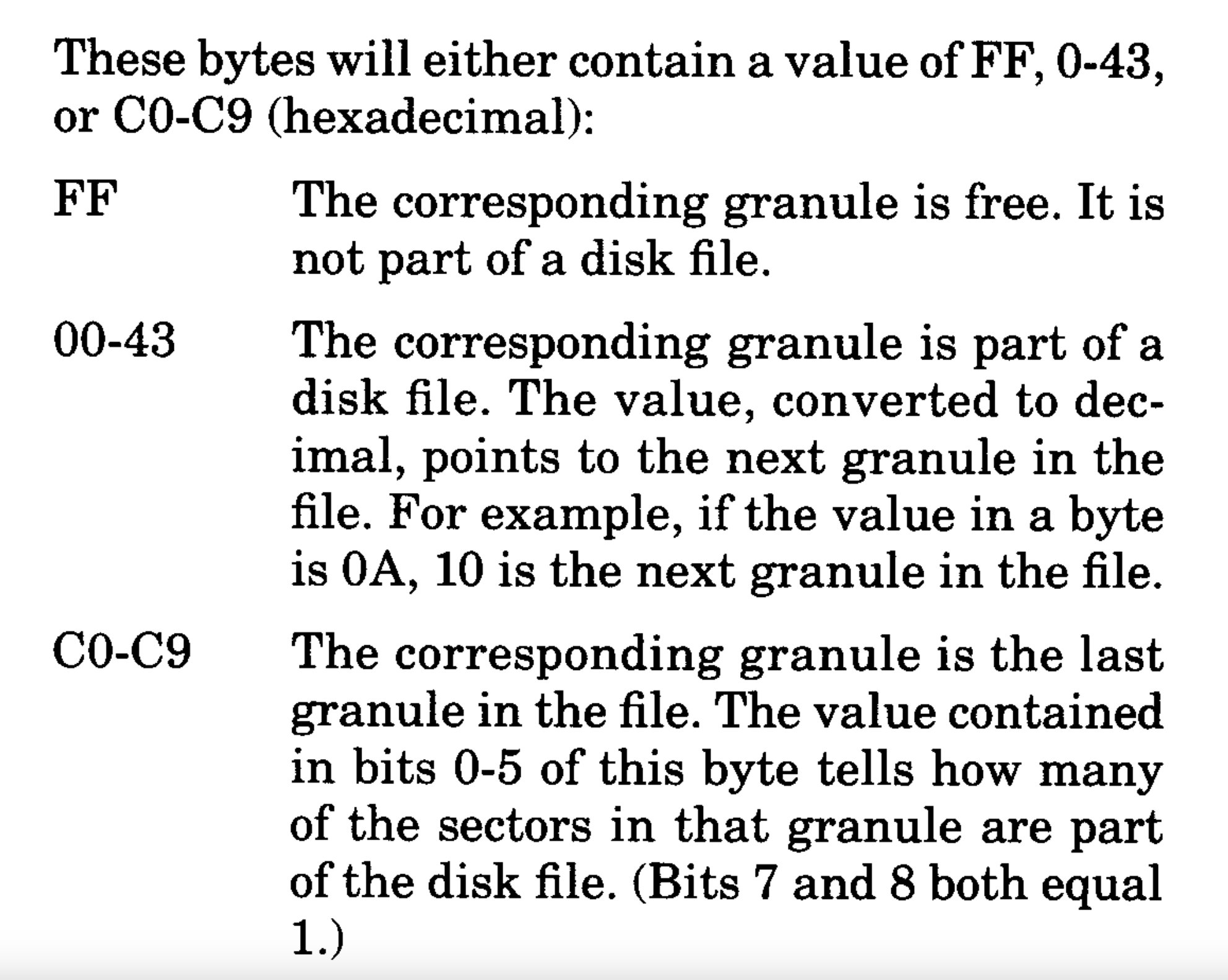
In that case, the number will represent one of two things:

  1. If the granule is used, but the file is larger and continues on to another granule, the value will be the granule number for the next granule of the file. It’s a linked list!
  2. If the granule is used, but the file does not continue to another granule, the top two bits will be set (11xxxxxx, hex value &HC0 or decimal 192) and the remaining five bits will indicate how many sectors of that granule are part of the file.

If each granule is 2304 (and it is), and a file is 6000 bytes, it is going to need three granules (2304 *3 = 6912) to store that file. That would be two full granules (4608 bytes) and then the remaining 1292 bytes (6000-4608=1392) in the third granule. 1392 bytes needs 6 sectors (6*256 = 1536) to fit the remaining data.

But, since files are not always exactly multiples of 256-bytes, there is one more bit of information that tells how many bytes in the final sector are used by the file. That value is part of the directory entry in bytes 14-15:

Since the full file size is not part of the directory entry, we will need to scan the File Allocation Table and do some calculations. Here are what the 68 bytes of the FAT can be:

RS-DOS FAT

To calculate the size of a file, we need to do these steps:

  1. Get the file’s directory entry (32 bytes), specifically byte 13 (the number of the first granule in the file) and bytes 14-15 (the number of bytes used in the last sector of the file).
  2. Read the FAT byte that corresponds to the start granule of the file, then…
    • If the value is 0-67, that is the number of the next granule used by the file. Add the size of the granule (2304 bytes) and get the next granule value.
    • If the value has high two bits set (11000000), the remaining value will be how many sectors of that granule are used by the file. Since this is the last sector, add the “number of bytes used in the last sector” from the directory entry (bytes 14-15) then the number of sectors minus 1 multiplied by the size of a sector (256).

“And it’s just that easy!”

So let’s try it… Here is a more “complete” DIR program, though this time instead of doing less, it does more by showing the size of the file in bytes, rather than how many granules it takes up on disk, and by showing file types in a more verbose/descriptive way.

To speed it up (even though it is still slow), it will load the FAT entries in to an array, along with the directory entries. This makes calculating the size easier since everything is now a variable in an array rather than having to read and parse bytes from a disk sector.

10 ' FILEINFO.BAS
20 '
30 ' 0.0 2023-01-25 ALLENH
40 ' 0.1 2023-01-26 ADD DR
50 ' 0.2 2023-01-27 MORE COMMENTS
60 '
70 ' E$(0-1) - SECTOR HALVES
80 ' FT$ - FILE TYPE STRINGS
90 '
100 CLEAR 1500:DIM E$(1),FT$(3)
110 FT$(0)="BPRG":FT$(1)="BDAT":FT$(2)="M/L ":FT$(3)="TEXT "
120 '
130 ' DIR HOLDS UP TO 72 ENTRIES
140 '
150 ' NM$ - NAME
160 ' EX$ - EXTENSION
170 ' FT - FILE TYPE (0-3)
180 ' AF - ASCII FLAG (0/255)
190 ' FG - FIRST GRANULE #
200 ' BU - BYTES USED IN LAST SECTOR
210 ' SZ - FILE SIZE
220 '
230 DIM NM$(71),EX$(71),FT(71),AF(71),FG(71),BU(71),SZ(71)
240 '
250 INPUT "DRIVE";DR
260 '
270 ' FILE ALLOCATION TABLE
280 ' 68 GRANULE ENTRIES
290 '
300 DIM FA(67)
310 DSKI$ DR,17,2,G$,Z$:Z$=""
320 FOR G=0 TO 67
330 FA(G)=ASC(MID$(G$,G+1,1))
340 NEXT
350 '
360 ' READ DIRECTORY
370 '
380 DE=0
390 FOR S=3 TO 11
400 DSKI$ DR,17,S,E$(0),E$(1)
410 '
420 ' PART OF SECTOR
430 '
440 FOR P=0 TO 1
450 '
460 ' ENTRY WITHIN SECTOR PART
470 '
480 FOR E=0 TO 3
490 '
500 ' DIR ENTRY IS 32 BYTES
510 '
520 E$=MID$(E$(P),E*32+1,32)
530 '
540 ' NAME IS FIRST 8 BYTES
550 '
560 NM$(DE)=LEFT$(E$,8)
570 '
580 ' EXTENSION IS BYTES 9-11
590 '
600 EX$(DE)=MID$(E$,9,3)
610 '
620 ' FILE TYPE IS BYTE 12
630 '
640 FT(DE)=ASC(MID$(E$,12,1))
650 '
660 ' ASCII FLAG IS BYTE 13
670 '
680 AF(DE)=ASC(MID$(E$,13,1))
690 '
700 ' FIRST GRANUAL IS BYTE 14
710 '
720 FG(DE)=ASC(MID$(E$,14,1))
730 '
740 ' BYTES USED IN LAST SECTOR
750 ' ARE IN BYTES 15-16
760 '
770 BU(DE)=ASC(MID$(E$,15,1))*256+ASC(MID$(E$,16,1))
780 '
790 ' IF FIRST BYTE IS 255, END
800 ' OF USED DIR ENTRIES
810 '
820 IF LEFT$(NM$(DE),1)=CHR$(255) THEN 1390
830 '
840 ' IF FIRST BYTE IS 0, FILE
850 ' WAS DELETED
860 '
870 IF LEFT$(NM$(DE),1)=CHR$(0) THEN 1370
880 '
890 ' SHOW DIRECTORY ENTRY
900 '
910 PRINT NM$(DE);TAB(9);EX$(DE);"  ";FT$(FT(DE));" ";
920 IF AF(DE)=0 THEN PRINT"ASC"; ELSE PRINT "BIN";
930 '
940 ' CALCULATE FILE SIZE
950 ' SZ - TEMP SIZE
960 ' GN - TEMP GRANULE NUM
970 ' SG - SECTORS IN LAST GRAN
980 '
990 SZ=0:GN=FG(DE):SG=0
1000 '
1010 ' GET GRANULE VALUE
1020 ' GV - GRAN VALUE
1030 '
1040 GV=FA(GN)
1050 '
1060 ' IF TOP TWO BITS SET (C0
1070 ' OR GREATER), IT IS THE
1080 ' LAST GRANULE OF THE FILE
1090 ' SG - SECTORS IN GRANULE
1100 '
1110 IF GV>=&HC0 THEN SG=(GV AND &H1F):GOTO 1280
1120 '
1130 ' ELSE, MORE GRANS
1140 ' ADD GRANULE SIZE
1150 '
1160 SZ=SZ+2304
1170 '
1180 ' MOVE ON TO NEXT GRANULE
1190 '
1200 GN=GV
1210 GOTO 1040
1220 '
1230 ' DONE WITH GRANS
1240 ' CALCULATE SIZE
1250 '
1260 ' FOR EMPTY FILES
1270 '
1280 IF SG>0 THEN SG=SG-1
1290 '
1300 ' FILE SIZE IS SZ PLUS
1310 ' 256 BYTES PER SECTOR
1320 ' IN LAST GRAN PLUS
1330 ' NUM BYTES IN LAST SECT
1340 '
1350 SZ(DE)=SZ+(SG*256)+BU(DE)
1360 PRINT " ";SZ(DE)
1370 DE=DE+1
1380 NEXT:NEXT:NEXT
1390 END
1400 ' SUBETHASOFTWARE.COM

It looks like this:

And that, I suppose, is about as much disk talk as I can handle for the moment. Let me know in the comments if I missed anything else important.

Until then…

CoCo Disk BASIC disk structure – part 1

See also: part 1, part 2 and part 3.

I know I must have learned at least some basic stuff about the layout of an RS-DOS disk, because I had a directory searching routine in my first commercial CoCo program – Huffman K1 Librarian sold by Rulaford Research.

That product was a MIDI program that would load or save sound patches (synthesizer voices) to and from a Kawai K1 synthesizer. For functions where you were going to send a patch, it would allow showing all directory of the files of that type. The extension was used to determine if it was a single patch or a block. Though today, I cannot remember the details on what a “block” was for the K1.

Looking at that program now, it would have been nice if I had allowed the user to just cursor around the files and select one, rather than having the user type the name in. Maybe I’ll fix that in a version 1.3 someday … though I sold my K1 long ago, as well as all my CoCo MIDI gear, so I wouldn’t have any way to actually test the update. So maybe I won’t.

Anatomy of an RS-DOS disk

Back in those days, we’d refer to Disk Extended Color BASIC (DECB) as “RS-DOS”. I’m not sure why “Radio Shack DOS” was used for a name, since I don’t recall it saying this anywhere on the screen or in the manuals, but someone must have come up with it and it caught on. (Much like the nickname “CoCo”.)

RS-DOS had a simple file system that was described in detail in the back of the Disk BASIC manual. Back then, most of this was probably beyond me, since looking at it today it still is. It’s interesting that it described the technical details of the disk beyond just the tracks and sector data that could actually be used from BASIC — at least in the 1981 TRS-80 Color Computer Disk System Owners Manual & Programming Guide.

I also found it interesting that by the 1986 version of the manual, which was the version available after the CoCo 3 was released, this technical information had been removed.

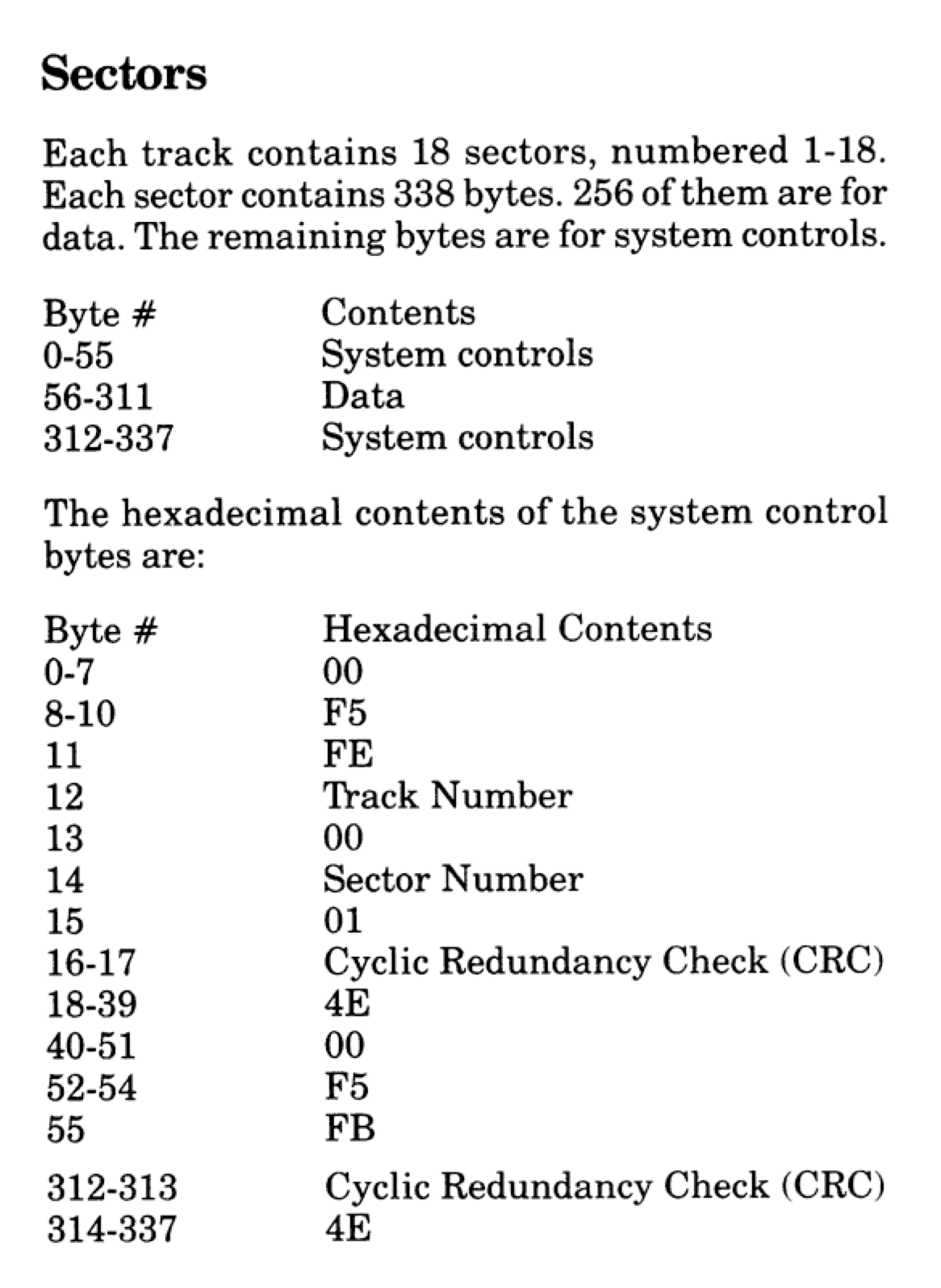
Above, out of those 338 bytes, the only section we got to use was the 256 data bytes. The rest was used by the FD1773 floppy drive controller chip.

Looking back at the 1981 manual, the format of an RS-DOS disk was pretty clearly defined. The disk drive was a single-sided 35 track device, and each of those tracks contain 18 sectors. Each sector was 256 bytes. Each track of 18 256-byte sectors could hold 4608 bytes. This meant that a disk could hold 161,280 bytes of data! (35 * 18 * 256) Wow, 157K of storage!

Side Note: Although Radio Shack never updated the Disk BASIC ROM to take advantage of it, the floppy controller was capable of supporting up to three double-sided 80 track (720K) floppy drives. Others came up with patches (or replacement DOS ROMs) that let BASIC handle this. This was also supported in disk operating systems such as OS-9 (which was sold by Radio Shack) and FLEX. But, we’re sticking with generic Disk Extended Color BASIC for this article series, so 35 tracks it is…

While 157K sounds pretty amazing, we didn’t actually get to use all of that from BASIC. Track 17 was used to store the directory and file allocation table (FAT). Yep, even back then, Microsoft (who wrote this Disk BASIC) already had a FAT file system… Just not the FAT we became familiar with via PC-DOS/MS-DOS a few years later.

Since track 17 could not be used for data storage, that left us with 34 tracks we could use — 156,672 bytes. Oh well, 153K of high speed disk access sure beats cassette storage. Or, as we learned, “68 granules” of high speed disk access.

Side Note: Tracks are numbers from 0 to 34, so track 17 is actually the 18th track. Sectors, however, are numbers 1 to 18. Go figure. Drives were numbers 0 to 3, so sectors are really the odd one here.

Here is a representation of the 35 tracks on a disk (numbers 0 to 34):

+----------+
| Track 00 | - 4608 bytes
+----------+
| Track 01 | - 4608 bytes
+----------+
|    ...   |
|    ...   |
+----------+
| Track 17 | - File Allocation Table and Directory
+----------+
|    ...   |
|    ...   |
+----------+
| Track 33 | - 4608 bytes
+----------+
| Track 34 | - 4608 bytes
+----------+

And here is a representation of the 256-byte sectors inside a track (numbered 1 to 18):

Track X
+----+----+----+-----+----+----+----+
| 01 | 02 | 03 | ... | 06 | 07 | 18 | - 256 bytes each
+----+----+----+-----+----+----+----+

Granule

gran·ule /ˈɡranˌyo͞ol/ noun
a small compact particle of a substance.

– https://www.merriam-webster.com/dictionary/granule

Each of the available 34 tracks was split in half (each half being 9 256-byte sectors) and called granules. Each granule was, therefore, 9 * 256 bytes in size — 2304 bytes.

To see how much space was free on disk, we could type:

PRINT FREE(0)

…and that would print a number, such as 68 for a completely empty disk, or 0 for a full one. Granules never made much sense to me back then, and I don’t suppose they really do today except that it was “half a track.” I don’t know if that would have meant much to me before I got in to OS-9 years later and learned way more about floppy disks.

Track 17, where the directory and FAT were stored, was two more granules of storage we didn’t get to use.

Here is a representation of the granules of a disk, numbers 0 to 68:

Track 00 +------------+
         | Granule 00 | - Sectors 1-9   (2304 bytes)
         | Granule 01 | - Sectors 10-18 (2304 bytes)
Track 01 +------------+
         | Granule 02 | - Sectors 1-9   (2304 bytes)
         | Granule 03 | - Sectors 10-18 (2304 bytes)
Track xx +------------+
         |     ...    |
Track 16 +------------+
         | Granule 33 | - Sectors 1-9   (2304 bytes)
         | Granule 34 | - Sectors 10-18 (2304 bytes)
Track 17 +------------+
         | FAT &      | - 4608 bytes
         | Directory  |
Track 18 +------------+
         | Granule 35 | - Sectors 1-9   (2304 bytes)
         | Granule 36 | - Sectors 10-18 (2304 bytes)
Track xx +------------+
         |     ...    |
Track 34 +------------+
         | Granule 67 | - Sectors 1-9   (2304 bytes)
         | Granule 68 | - Sectors 10-18 (2304 bytes)
         +------------+

Here is a simple program that displays this information on the CoCo 32-column screen. Use UP/DOWN arrows to go track by track, or SHIFT-UP/SHIFT-DOWN to go a page at a time:

10 'DISKMAP.BAS
20 '
30 ' TRACKS & SECTORS
40 '
50 CLS
60 PRINT"TRACK         SECTORS"
70 PRINT"          (1-9)    (10-18)"
80 PRINT STRING$(27,"-");
90 ST=0:PG=12
100 FOR A=0 TO PG
110 TR=ST+A
120 PRINT@96+32*A,TR;
130 IF TR=17 THEN PRINT TAB(10);"FAT & DIRECTORY ";:GOTO 160
140 IF TR<17 THEN GR=(TR*2)+1 ELSE GR=((TR-1)*2)+1
150 PRINT TAB(9);"GRAN";GR;TAB(19);"GRAN";GR+1;
160 NEXT
170 A$=INKEY$:IF A$="" THEN 170
180 IF A$=CHR$(94) THEN ST=ST-1
190 IF A$=CHR$(95) THEN ST=ST-PG-1
200 IF A$=CHR$(10) THEN ST=ST+1
210 IF A$=CHR$(91) THEN ST=ST+PG+1
220 IF ST<0 THEN ST=0
230 IF ST>34-PG THEN ST=34-PG
240 GOTO 100

If you wanted to use all of an RS-DOS disk, a CoCo program could use disk access commands to read/write sectors to any spot on the disk — including track 17 — and manually use all 70 granules for storage. But, if it did that, typing “DIR” would not produce expected results (they would be no directory) and trying to SAVE something on this disk would overwrite data (if it worked at all; it would have needed valid directory information to even do this).

But I digress…

Track 17

Of the 18 sectors contained in track 17, sectors 1 and 12-18 were “for future use.” Radio Shack never used them, as far as I know, but third party patches to Disk BASIC did use them for other features, such as supporting 40 track drives.

  • Sector 1 – Unused (“for future use”)
  • Sector 2 – File Allocation Table (FAT)
  • Sectors 3-11 – Directory Entries
  • Sectors 13-18 – Unused (“for future use”)

FAT (File Allocation Table)

The first 68 bytes of Sector 2 contained the file allocation table. Each byte represented the status of one of the available granules on the disk. If the granule was not used by any file, the byte representing it would be set to 255 (&HFF). I expect that the FREE() command simply read Track 17, Sector 2, and quickly scanned the first 68 bytes, counting how many were 255.

DSKI$ / DSKO$

Let’s do a quick tangent here. Disk BASIC provided two commands for reading and writing sectors on the disk. DSKI (disk input) and DSKO (disk output) needed a drive number (0-3), track number (0-34), and a sector number (1-18) to read or write from/to. Since a Color BASIC string variable could not be longer than 255 (the maximum size a byte could represent for length), a string could not hold an entire sector. Because of this, DSKI and DSKO split the sector up in to two 128-byte strings like this:

CLERA 256
DSKI$ 0,17,2,A$,B$

Above, the CLEAR 256 is needed to increase string space from the default 200 bytes to enough to store the full sector in A$ and B$ and two 128 byte strings. Keep in mind, more memory will be needed when you do any manipulation on either of those strings. As you will see below, CLEAR 384 is really needed at the very least, since if you do a MID$() or LEFT$() on A$ or B$, enough string memory has to be available to hold a copy of that string (256+128 is 384). See my string abuse article for a deep dive in to why that is the case.

For DSKI$, the first parameter is the drive (0-3), the second is the track (0-34) and the third is the sector (1-18). After that are two string variables that will hold the two halves of the 256-byte sector. In this example, A$ holds the fist 128 bytes, and B$ holds the second 128 bytes.

I only wanted to mention this so I could show a BASIC program that calculates how much space is free on a disk by reading the FAT bytes. It might look something like this:

0 'DISKFREE.BAS
10 CLEAR 384
20 INPUT "DRIVE";DR
30 DSKI$ DR,17,2,A$,B$
40 FOR I=1 TO 68
50 IF MID$(A$,I,1)=CHR$(255) THEN FG=FG+1
60 NEXT
70 PRINT "FREE GRANULES:";FG

This could, of course, be made smaller and faster. And, if you wanted to show the free space in bytes, you could just multiply the free granules (FG) variable by 2304, the side of a granule:

70 PRINT "FREE SPACE:";FG*2304;"BYTES"

Of course, the FREE(0) command could also have been used for this, even getting the value in a variable:

10 PRINT "FREE GRANULES:";FREE(0)

10 PRINT "FREE SPACE:";FREE(0)*2304;"BYTES"

10 FG=FREE(0):PRINT "FREE GRANULES:";FG

10 FS=FREE(0)*2304:PRINT "FREE SPACE:";FS;"BYTES"

But I digress.

But what if the granule is being used by a file? If you wanted to see the values in the non-free granules used on the disk, you could modify the program as follows:

0 'DISKFREE.BAS
10 CLEAR 384
20 INPUT "DRIVE";DR
30 DSKI$ DR,17,2,A$,B$
40 FOR I=1 TO 68
50 GN=ASC(MID$(A$,I,1))
55 IF GN=255 THEN FG=FG+1 ELSE PRINT GN;
60 NEXT:PRINT
70 PRINT "FREE GRANULES:";FG

If you run that, you will probably see values that are outside of the range of a granule number (0-67). This will be explained later when we discuss the FAT in more detail.

Directory

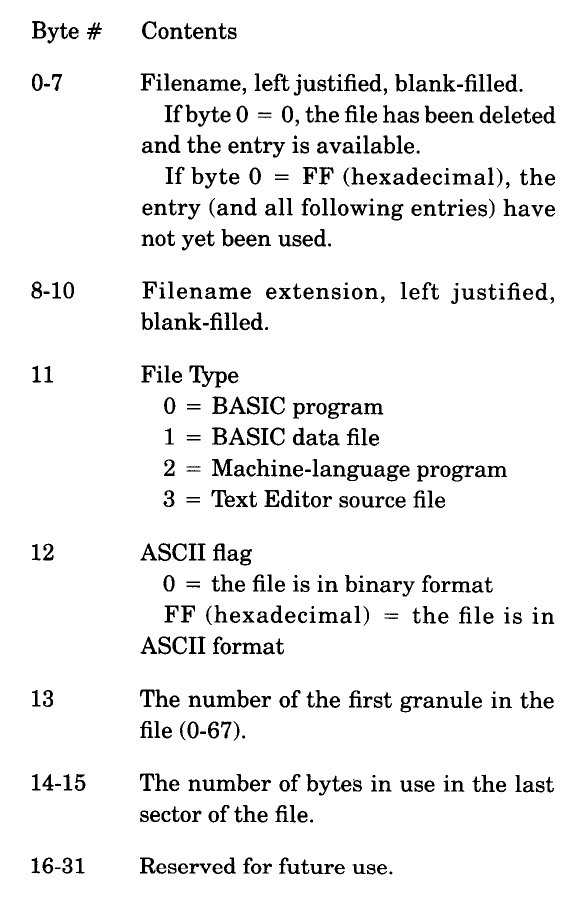
Track 17 sectors 3-11 are used for the directory. The 1981 Color Computer Disk System manual described the directory layout on page 58 as follows:

Using DSKI$, we can write a program that will display the names of files in the directory. We can do this by reading each sector and then parsing the 32-byte directory entries.

10 CLEAR 512:DIM SP$(1)
20 INPUT "DRIVE";DR
30 ' S - SECTOR NUMBER
40 FOR S=3 TO 11
50 ' SP$(0-1) - SECTOR PARTS
60 DSKI$ DR,17,S,SP$(0),SP$(1)
70 ' P - PART OF SECTOR
80 FOR P=0 TO 1
90 ' E - DIR ENTRY (4 P/SECT.)
100 FOR E=0 TO 3
110 ' GET 32 BYTE DIR ENTRY
120 DE$=MID$(SP$(P),1+E*32,32)
130 ' FB - FIRST BYTE OF NAME
140 FB=ASC(LEFT$(DE$,1))
150 ' SKIP DELETED FILES
160 IF FB=0 THEN 250
170 ' WHEN 255, DIR IS DONE
180 IF FB=255 THEN END
190 ' PRINT NAME AND EXT.
200 PRINT LEFT$(DE$,8);TAB(9);MID$(DE$,9,3);
210 ' FILE TYPE
220 PRINT TAB(13);ASC(MID$(DE$,12,1));
230 ' BINARY OR ASCII
240 IF ASC(MID$(DE$,13,1))=0 THEN PRINT "B" ELSE PRINT "A"
250 NEXT
260 NEXT
270 NEXT

Running this program will produce output similar to the DIR command, except without the file size. Calculating the file size is more involved, and requires scanning through the FAT to find the series of granules that are allocated for the file. We’ll get to that in the next part of this series.

Bonus: File Exists?

Here’s some useless code. This routine will determine if a file exists. Rather than parse each 32 byte portion of the sectors, I decided to use INSTR() to see if the target filename string exists anywhere in the sector strings. To make sure “EMP” didn’t show up as a match for a file named “EMPTY”, I pad the target string with spaces just like they are stored in the directory.

10 INPUT "FILE NAME";F$
20 ' PAD NAME WITH SPACES
30 F$=F$+STRING$(8-LEN(F$)," ")
40 FOR S=3 TO 17
50 DSKI$ 0,17,S,A$,B$
60 IF INSTR(A$,F$) OR INSTR(B$,F$) THEN PRINT "FOUND":END
70 NEXT

This could be improved by having the process stop as soon as it finds an entry starting with 255 (no more directories after that point). To keep the code small, a simple “55 IF ASC(LEFT$(A$,1))=255 THEN END” would be enough. It might still read a sector more than it needs to, since it’s not checking every entry in the string, but that would be a way to do it with minimal code.

We’ll do something less useless in part 2.

Until then…