See also: part 1, part 2, part 3, part 4, part 5, part 6, part 7 and part 8.
A quick update on some code listed in the previous installment. I mentioned that the user was passing in an integer that represented which character (a byte) the screen would be cleared to. It would be passed in as a 16-bit value (register D). Since the screen characters were one byte, a check was added in case the value passed in was larger than 255 (cmpd #255).
In the comments, Justin chimed in:
You could also just do a clra to force the issue and avoid the compare and branch. – Justin
Justin’s suggestion would make the code smaller and ignore the first byte of register D. Thus, if the user did pass in anything higher, it would just chop off the excess. In binary, if the user passed in a value from 0-255, only bits would be set in register B. When the value was larger than 255, it would start setting bits in register A:
     Reg A     |     Reg B
0 0 0 0 0 0 0 0|0 0 0 0 0 0 0 0 = Reg D is 0
0 0 0 0 0 0 0 0|0 0 0 0 0 0 0 1 = Reg D is 1
0 0 0 0 0 0 0 0|1 1 1 1 1 1 1 1 = Reg D is 255
0 0 0 0 0 0 0 1|0 0 0 0 0 0 0 0 = Reg D is 256
If we just “clra”, we ensure the routine will never get a value greater than 8-bits. However, the user will get unexpected results. If they tried to pass in 256 (see above), register A would be cleared, and the value the routine would use would be 0. “Garbage in, garbage out!”
However, if error checking is desired, we still need to do a compare. L. Curtis Boyle suggested:
You could use TSTA. instead of CMPA #$00 to save a byte. – L. Curtis B.
I looked up the TST instruction, and it seems to test a byte in memory location or the A or B register and set some condition code register (CC) bits. If the high bit 7 is set, the CC register’s N bit will be set (testing for a negative value). If any bits are set, the CC register’z Z (zero) bit will be set (not zero). Hopefully I have that correct. The key point here is you can use TST to check for zero, and TSTA is a smaller instruction than CMPD. Here is the code:
* CLEARX.ASM v1.01
* by Allen C. Huffman of Sub-Etha Software
* www.subethasoftware.com / alsplace@pobox.com
*
* 1.01 use TSTA instead of CMPD per L. Curtis Boyle
*
* DEFUSRx() clear screen to character routine
*
* INPUT: ASCII character to clear screen to
* RETURNS: 0 is successful
* -1 if error
*
* EXAMPLE:
* CLEAR 200,&H3F00
* DEFUSR0=&H3F00
* A=USR0(42)
* PRINT A
*
ORGADDR EQU $3f00

GIVABF EQU  $B4F4  * 46324
INTCNV EQU  $B3ED  * 46061

       org  ORGADDR
start  jsr  INTCNV * get passed in value in D
       cmpd #255   * compare passed in value to 255
       bgt  error  * if greater, error
                   * D is made up of A and B, so if
                   * A has anything in it, it must be
                   * greater than 255.
       tsta        * test for zero
       bne  error  * branch if it is not zero
       ldx  #$400  * load X with start of screen
loop   stb  ,x+    * store B register at X and increment X
       cmpx #$600  * compare X to end of screen
       bne  loop   * if not there, keep looping
       bra  return * done
error  ldd  #-1    * load D with -1 for error code
return jmp  GIVABF * return to caller

* lwasm --decb -o clearx2.bin clearx2.asm
* decb copy -2 -r clearx2.bin ../Xroar/dsk/DRIVE0.DSK,CLEARX2.BIN
When I build this in to a .BIN file, the original showed 37 bytes, and this version shows 34 bytes. Here are the hex bytes that were generated:
clearx.hex:
:103F0000BDB3ED108300FF2E0C8E0400E7808C06FD
:0B3F10000026F92003CCFFFF7EB4F474

clearx2.hex:
:103F0000BDB3ED4D260C8E0400E7808C060026F92B
:083F10002003CCFFFF7EB4F496
It appears to save three bytes. Curtis mentioned saving one byte which I think is the case between a “CMPA #0” and “TSTA”.
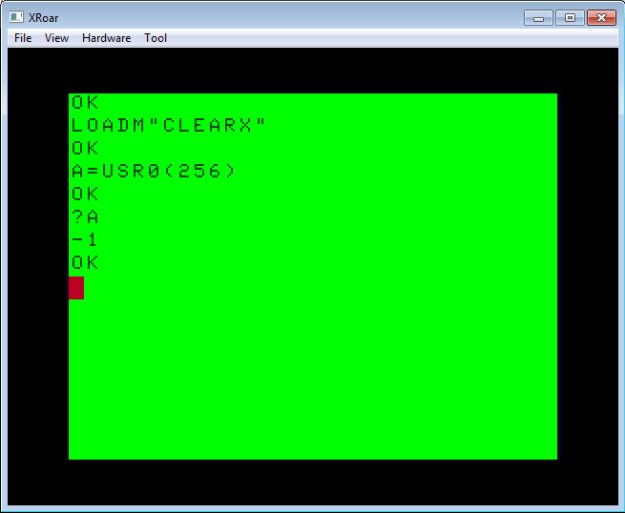
Best of all, with this change, it still works and rejects larger values:

Thanks, Justin and Curtis, for those suggestions.
By the way, I know programmers often don’t bother with error checking. I mean, our code is perfect, right? And, clearing a screen is hardly anything that requires error checking. And while I agree, I noticed that even COLOR BASIC has error checking for it’s CLS command:

And, since the CoCo’s VDG chip supported nine colors, you only get colors for CLS 0 through CLS 8. If you try to clear to any value between 9 and 255, you get an easter egg:

Bonus Question: There is also an additional CLS easter egg in the CoCo 3’s BASIC, Do you know what it is?
But I digress…
String Theory
You can really speed up a BASIC program by using assembly routines. For instance, while BASIC has great string manipulation routines, doing something simple like converting a string to uppercase can be painfully slow.
Suppose you were trying to write a text-based program and you wanted it to work on all Color Computer models. The original Color Computer 1 and early Color Computer 2 models could not display true lowercase – they displayed inverse characters instead. Later Tandy-branded CoCo 2s and the CoCo 3 could support lowercase.
To work on all systems, you might simply choose to put all your menu text in UPPERCASE. Or, you might store every string twice with an uppercase and mixed case version, and use a variable to know which one to print:
IF UC=1 PRINT "ENTER YOUR NAME:" ELSE PRINT "Enter your name:"
That would be one brute-force way to do it, but if your program used many strings, it would needlessly increase the size of your program. Instead, it might make sense to store all the strings in mixed case, and convert them to uppercase on output if needed.
Here is a very simple brute-force subroutine that does just this:

And it works just fine…

…but it’s slow. If no conversion is needed, the mixed case text instantly appears, but when conversion is needed, it crawls through the line character-by-character at speeds we haven’t seen text display at since the days of dial-up BBSes.
In an earlier series of articles, we discussed word-wrap routines in BASIC. Several folks contributed their versions, and we ranked them based on code size, RAM size and speed. There were many different approaches to the same thing, and the same applies to uppercasing a string, so please don’t take my brute-force example as the best way it can be done. It certainly isn’t, and can surely be improved.
But even the fastest BASIC routine won’t compare to doing the same thing in assembly.
Unfortunately, the USRx() command only allows you to pass in a numeric value, and not a string, so we can’t simply do something like:
A$=USR0("Convert this to all uppercase.") 'THIS WILL NOT WORK!
Pity. But, I was able to find the solution, and it involves another BASIC command known as VARPTR. This command gets the address of a variable in memory. You may recall that Darren Atkinson (creator of the CoCoSDC interface) used VARPTR in his version of the word-wrap routine:
This is our solution to passing in a string to USRx(). We can pass in the address of the string, and then the assembly code can figure it out from there. Here is how it works:
A$="This is a string in memory"
X = VARPTR(A$)
PRINT "A$ IS LOCATED AT ";X
If you run that code, you will see the address of that string in memory. We just need to understand how a string is stored.
The address does not point to the actual string data. Instead, it points to a few bytes of information that describe the string and where it is.
The first byte where the string is stored will be the size of that string:
A$="THIS IS A STRING IN MEMORY"
X = VARPTR(A$)
PRINT "A$ IS LOCATED AT";X
PRINT "A$ IS";PEEK(X);"LONG"
I forget what the second byte is used for, but bytes three and four are the actual address of the string character data:
PRINT "STRING DATA IS AT";PEEK(X+2)*256+PEEK(X+3)
On my system, it looks like this:

Once you know the actual starting place for the string data, you can see what that is in memory. In my case, the string length was 26 bytes, and the data started at 32709. I could use a FOR/NEXT loop and display the contents of that memory:

You will notice that the string information (length of string, location of string characters) is nowhere near the actual string data is. This is because the string characters could actually be in your program code, rather than in string memory. For example:
10 A$="THIS STRING IS IN THE PROGRAM"
Somewhere in RAM will be a string identification block with the length of the string and an address that points inside the program space. This makes it sort of an “embedded string” that lives inside your program. However, if you manipulate this string, BASIC will then make a copy of it in other memory and make the pointer go there. Thus, if you have a 10 character string like this:
10 A$="1234567890"
…and inside your code you do something like this:
20 A$=A$+"!"
…at that point, BASIC will no longer be pointing A$ to inside your code. It will be copied (pluy the “!”) to a new memory location inside of string space:
10 A$="1234567890"
20 GOSUB 1000
30 A$=A$+1
40 GOSUB 1000
50 END
1000 X=VARPTR(A$)
1010 PRINT"VARP:";X
1020 PRINT"SIZE:";PEEK(X)
1030 PRINT"LOC :";PEEK(X+2)*256+PEEK(X+3)
1040 PRINT
1050 RETURN
Here you can see that the location of the string (initially inside the program code space) moves to higher string memory RAM:

You won’t see memory decrease when this happens, because print MEM is showing you available program space. Strings live in a special section at the end of program memory. You may have seen the CLEAR command uses to reserve space for strings like this:
CLEAR 200
I believe 200 is the default if you don’t specify. In this case, the string started out inside the program’s code space and was not using any of that 200 bytes, and then after altering the string, it was copied in to the 200 bytes of string space.
Thus, if you want to see the impact, try running with “CLEAR 0” so there is NO ROOM for strings!
5 CLEAR 0 ' NO STRING SPACE
Now when we run that program, we see that the initial string works, because it is stored inside the program space, but the moment we try to add one character to it, there is no string memory available to copy the string to and it fails with an ?OS ERROR (out of string space).

This is something to be aware of if you are ever writing large programs with many strings. Rather than do something like this:
10 A$="[DELTA BBS]"
20 B$="MAIN MENU"
30 C$=" >"
40 PR$=A$+B$+C$:PRINT PR$
…which would then allocate string space to hold the length of A$, B$ and C$, you could keep those strings in program code space by just printing them out each time:
40 PRINT A$;B$;C$
The trick is to avoid BASIC having to allocate string memory and copy things over. If you need to do this, you can re-use a temporary string:
40 TS$=A$+B$+C$:GOSUB 1000:TS$=""
I think something like that would create a temporary string (TS) and copy all those code space strings over, then you could use it, and then setting it back to “” at the end would release that memory. If string memory is limited, tricks like this can really help out.
But I digress.
Now that we know how strings are stored, we can create an assembly routine that will serve as a UPPERCASE PRINT command.
Our assembly routine will be passed the address of the string, and then use byte 1 to get the length, and bytes 3 and 4 to get the location of the actual string characters. We can then walk through that memory and use the CHROUT ROM routine to output each character one-by-one, the same way BASIC does for PRINT.
Here is the routine:
* UCASE.ASM v1.00
* by Allen C. Huffman of Sub-Etha Software
* www.subethasoftware.com / alsplace@pobox.com
*
* DEFUSRx() uppercase output function
*
* INPUT: VARPTR of a string
* RETURNS: # chars processed
*
* EXAMPLE:
* CLEAR 200,&H3F00
* DEFUSR0=&H3F00
* A$="Print this in uppercase."
* PRINT A$
* A=USR0(VARPTR(A$))
*
ORGADDR EQU $3f00
dir
GIVABF EQU   $B4F4    * 46324
INTCNV EQU   $B3ED    * 46061
CHROUT EQU   $A002

       org   ORGADDR
start  jsr   INTCNV   * get passed in value in D
       tfr   d,x      * move value (varptr) to X
foo    ldb   ,x       * load string len to B
       ldy   2,x      * load string addr to Y
       beq   null     * exit if strlen is 0
       ldx   #0       * clear X (count of chars conv)
loop   lda   ,y       * load char in A
       cmpa  #'a      * compare to lowercase A
       blt   nextch   * if less, no conv needed
       cmpa  #'z      * compare to lowercase Z
       bgt   nextch   * if greater, no conv needed
lcase  suba  #32      * subtract 32 to make uppercase
       leax  1,x      * inc count of chars converted
nextch jsr   [CHROUT] * call ROM output character routine
       leay  1,y      * increment Y pointer
cont   decb           * decrement counter
       beq   exit     * if 0, go to exit
       bra   loop     * go to loop
exit   tfr   x,d      * move chars conv count to D
       bra   return   * return D to caller
null   ldd   #-1      * load -2 as error
return jmp   GIVABF   * return to caller

* lwasm --decb -o ucase.bin ucase.asm
* decb copy -2 -r ucase.bin ../Xroar/dsk/DRIVE0.DSK,UCASE.BIN
W will call our assembly routine like this:
A$="Convert this to uppercase."
A=USR0(VARPTR(A$))
And it should work on upper and lowercase strings automatically:

Now our uppercasing output routine is lightning fast.
To be continued…