Previously, I started discussing C compiler warnings, with specific intent to discuss this one:
warning: comparing floating point with == or != is unsafe [-Wfloat-equal]
I presented a simple question — what would this print?
int main()
{
    float var1;

    var1 = 902.1;

    if (var1 == 902.1)
    {
        printf ("it is!\n");
    }
    else
    {
        printf ("it is NOT.\n");
    }

    return EXIT_SUCCESS;
}
On my Windows 10 computer running GCC (via the free Code:Blocks editor), I get see “it is NOT.” This goes back to an earlier article I wrote about how 902.1 cannot be represented with a 32-bit floating point. In that article, I tested setting a “float” and a “double” to 902.1 and printed the results:
As you can see, a 64-bit double precision floating point value can accurately display 902.1, while a 32-bit floating point cannot. The key here is that in C a floating point number defaults to being double precision, so when you say:
var = 123.456;
…you are assigning 123.456 (a double) to var (a float).
float var1;

var1 = 902.1;
var1 (a float) was being assigned 902.1 (a double) and being truncated. There is a potential loss of precision that a compiler warning could tell you about.
If, with warnings enabled, comparing a floating point using == (equal) or != (not equal) is considered “unsafe,” how do we make it safe?
Ah, compiler warnings. We hate you, yet we need you.
Recently at my day job, I noticed we were running with a very low C compiler warning level. I decided to crank it up a bit then rebuild.
It was a disasters. Thousands of compiler warnings scrolled by as it churned away for about five minutes. Many were coming from header files provided by the tool company! Things like windows.h and even things they included from standard ANSI C headers like stdint.h. What a mess!
I was able to figure out how to disable certain warnings to clean up the ones I could not fix, leaving me with a ton of legitimate warnings in our own code.
Some were harmless (if you knew what you were doing), like comparing signed to unsigned values, which I’ve previously discussed. Some complained about missing or incorrect prototypes.
A favorite useful one is when it complains about initialized variables that could be accessed, such as:
int variable;

switch (something)
{
   case 1:
      variable = 10;
      break;

   default:
      break;
}

printd ("variable: %d\n", variable);
Above, if “something” did not match one of the case statements (1 in this example), it would never be set, and the print would be using whatever random crap was in the space occupied by “variable” later. This is a nice warning to have.
Others were about unused variables or unused parameters. For example:
int function (int notUsed)
{
     return 42;
}
Compiler warnings can notify you that you have a variable declared that isn’t getting used. You can tell the compiler “Yeah, I know” by doing this:
int function (int notUsed)
{
    (void)notUsed; // Not used!
    return 42;
}
Each time you clean up a warning like that, you tell the compiler (and others who inspect the code) “I meant to do that!” And, sometimes you find actual bugs that were hidden before.
I’ve written a bit about floating point issues in the past, but the warning today is this one:
warning: comparing floating point with == or != is unsafe [-Wfloat-equal]
Basically, while you can do…
int a;
int b;

if (a == b) { ...something... };
…you cannot…
float a;
float b;

if (a == b) { ...something...}
…at least, you can’t without getting a warning. Due to how floating point works, simple code may fail in interesting ways:
int main()
{
    float var1;

    var1 = 902.1;

    if (var1 == 902.1)
    {
        printf ("it is!\n");
    }
    else
    {
        printf ("it is NOT.\n");
    }

    return EXIT_SUCCESS;
}
Recently, I had the urge to be lazy and have the computer do my work for me. I was designing some 8×8 graphics characters for the Commodore VIC-20 and wanted one for each offset position in a 2-character block (see image to the right).
Using modern tools like the Windows-based CBM prg Studio I could have easily edited each one by hand to get the desired result (which is what I did to create that image), but I thought it might be more fun to just design one character and write a program to create the other shifted frames.
I have bit shifted in C programming many times (because it has a bit shift operator) but I don’t recall ever knowingly doing it in BASIC.
Bit shifting basics
Bit shifting is where you take all the bits in a byte (or word, or long, whatever) and move them left or right. Here is an example of shifting the byte value 00111100 to the right:
If you just want to shift and don’t care about the bit that “falls off the edge,” it is as simple as multiplying or dividing the value by 2.
To demonstrate this, we first need a program that will display a byte as bits.
0 REM bitsslow.bas
10 Z=&H00:GOSUB 500
20 Z=&HF0:GOSUB 500
30 Z=&H0F:GOSUB 500
40 Z=&HFF:GOSUB 500
50 END

500 REM PRINT BITS
510 FOR ZB=7 TO 0 STEP -1
520 IF Z AND 2^ZB THEN PRINT"1"; ELSE PRINT "0";
530 NEXT
540 PRINT:RETURN
The routine at line 500 will print the value in variable Z as bits. It is hard coded to only work with a byte (0-255). When I run that, this is what it displays:
00000000
11110000
00001111
11111111
Those lines correspond to &H00, &HF0, &H0F and &FF. I show them in hex so the bit pattern is easier to see (0=0000, F=1111).
A bit faster…
My bit printing routine is so slow that you can see it print the digits one at a time. This is due to the math that goes on in line 520 for each bit check. To speed things up, we could pre-calculate an array of those powers of two (1, 2, 4, 8, 16, 32, 64, 128) and use that instead:
0 REM bitsfast.bas

5 GOSUB 1000

10 Z=&H00:GOSUB 500
20 Z=&HF0:GOSUB 500
30 Z=&H0F:GOSUB 500
40 Z=&HFF:GOSUB 500
50 END

500 REM PRINT BITS
510 FOR ZB=7 TO 0 STEP -1
520 IF Z AND ZB(ZB) THEN PRINT"1"; ELSE PRINT "0";
530 NEXT
540 PRINT:RETURN

1000 REM INIT BIT ARRAY
1010 FOR ZB=0 TO 7
1020 ZB(ZB)=2^ZB
1030 NEXT
1040 RETURN
Line 5 will GOSUB to our initialization routine which sets up the power-of-two array ZB(). After that, the routine at 500 can be called as it previously was, except now it will print so fast you can’t really see it printing.
Now let’s use this routine to demonstrate bit shifting by multiplying or dividing by 2.
Bit shifting left
0 REM bitshftl.bas
5 GOSUB 1000
10 Z=1 '00000001
20 FOR A=1 TO 8
30 GOSUB 500
35 REM *2 TO SHIFT LEFT
40 Z=Z*2:NEXT
50 END
500 REM PRINT BITS
510 FOR ZB=7 TO 0 STEP -1
520 IF Z AND ZB(ZB) THEN PRINT"1"; ELSE PRINT "0";
530 NEXT
540 PRINT:RETURN
1000 REM INIT BIT ARRAY
1010 FOR ZB=0 TO 7
1020 ZB(ZB)=2^ZB
1030 NEXT
1040 RETURN
In line 10, Z starts out with 1, which is the bit pattern of 00000001. It is then multiplied by 2 in a loop eight times, each time shifting the bit one place to the left. The output looks like this:
And if we start out with Z being 128 (bit pattern 10000000) and divide by 2, it will shift right:
0 REM bitshftr.bas
5 GOSUB 1000
10 Z=128 '10000000
20 FOR A=1 TO 8
30 GOSUB 500
35 REM /2 TO SHIFT RIGHT
40 Z=Z/2:NEXT
50 END
500 REM PRINT BITS
510 FOR ZB=7 TO 0 STEP -1
520 IF Z AND ZB(ZB) THEN PRINT"1"; ELSE PRINT "0";
530 NEXT
540 PRINT:RETURN
1000 REM INIT BIT ARRAY
1010 FOR ZB=0 TO 7
1020 ZB(ZB)=2^ZB
1030 NEXT
1040 RETURN
I spent far too much time coming up with an approach that would get me which bits were going to be shifted off to the right (using AND), and then placing those in a new variable and then shifting those bits to the left to line up where they would have ended up if I had just shifted a 16-bit value…
…then I realized that was silly, because I could just use a 16-bit value in BASIC!
16-bits in BASIC
You may have seen things like this which print out memory locations BASIC is using:
PRINT PEEK(25)*256+PEEK(26)
In Color BASIC, memory locations 25 and 26 contain the 16-bit address for where BASIC memory starts. Since PEEK only works on a single byte, it takes two PEEKs to get the two bytes that make up the 16-byte address, and some math to turn the two 8-bit values into one 16-bit value.
On my virtual CoCo in the Xroar emulator, memory location 25 contains 38 (&H26) and memory location 26 contains 1 (&h01). To turn those two 8-bit values into a 16-bit address, I need to somehow shift the 38/&H28 left eight times into a new 16-bit value, and then add (or OR) in the 1/&H01 value.
In C, one of the ways we’d do this is by using the bit shift operator:
uint16_t Result;
uint8_2  Byte1;
uint8_2  Byte2;
Byte1 = Peek(25); // Made up function to get a memory value.
Byte2 = Peek(26);
Result = (Byte1 << 8) | Byte2; // Shift Byte1 left 8 bits,
                               // OR in Byte2.
// Or...
Result = (Byte1 << 8) + Byte2; // Since the right 8 bits are empty,
                               // adding would have the same result.
…but there are many other ways to do the same thing, some much faster than these two approaches.
Back to BASIC
Shifting left can be done by multiplying the value by 2. To shift once, you might have:
V = V * 2
To shift twice, you could do:
V = V * 2 * 2
…but that looks silly. You’d just multiply by 4. And to bit shift three places (2 * 2 * 2) you could multiply by 8. See the pattern? They are all powers of 2 (2, 4, 8, 16, 32, 64, 128, 256, etc.)
So to shift 8 places left, you multiply by 256. Thus, the C example I gave earlier is represented in BASIC by:
10 B1=PEEK(25)
20 B2=PEEK(26)
30 R=(B1*256)+B2
Tada! When I first saw things like “X=PEEK(Y)*PEEK(Z)” back then, I did not understand why it worked, I just knew it did. And I was also confused at why the CoCo was like that, since on the VIC-20 it would have been “X=PEEK(Y)+256*PEEK(Z)”. See the differences? On the CoCo’s 6809 processor, a 16-bit value is YYZZ, but on the VIC-20’s 6502 processor it is stored the opposite as ZZYY. Thus, on my VIC, you would take the second location and multiply it by 256 then add the first location.
But I digress.
A bit more…
The previous example shows how you are effectively shifting a byte (B1) left 8 places so it ends up at the top 8-bits of a new 16-bit value. Something like that would work very well for shifting an 8-bit value into different positions of two characters (two bytes).
My approach would be this:
R will be the result, a value representing 16-bits (two bytes, 0-65535 in range).
Since I am shifting right (in this example), my first step is to get the 8-bit source value into the top 8-bits (left most bits) of the R result variable.
Next I will shift that entire R variable to the right, and then extract the left and right 8-bits as separate variables which is my output values.
Extract? Well, that will be the reverse of what we just did. In C, you can turn a 16-bit value into two 8-bit values like this:
uint16_t Source;
uint8_2  Byte1;
uint8_2  Byte2;
Source = 0x1234;           // Some 16-bit value.
Byte1 = (Source >> 8);     // Shift left 8-bits to the right.
Byte2 = (Source & 0x00ff); // Mask off top 8-bits.
…though there are many other (faster/better ways to do this). But, we could do this in BASIC the same way.
If shifting left is multiplying by 256, then shifting right must be dividing by 256.
10 R=&H1234
20 B1=(R/256)
30 B2=(R AND &HFF)
IMPORTANT NOTE: As I got to a later point in this article, I discovered a huge problem with this approach. If you didn’t already know it (I didn’t), I’ll explain it in just a bit… When I write, I’m usually learning as I type, and I decided to keep this stream of consciousness intact.
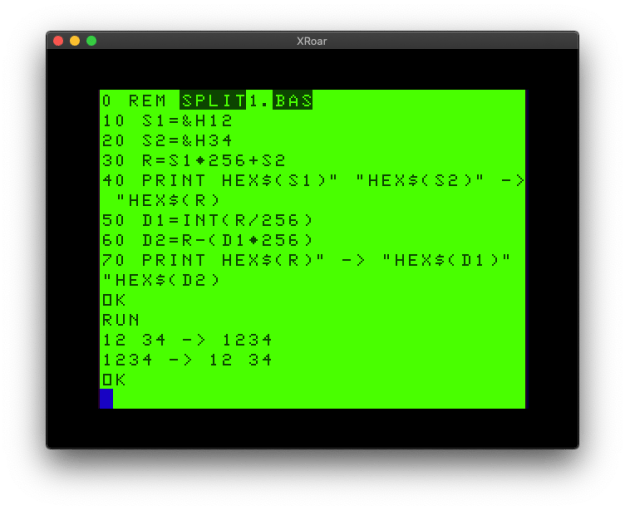
That is the first time I’ve ever done it that way in BASIC (duplicating the way C does it). The way I’ve commonly seen it done in BASIC is this:
Using BASIC to split 16-bit values, or combine two 8-bit values.
Benchmark digression
Have I been doing it wrong since the 1980s? Is the C-style way (using AND) any faster than the BASIC way (using INT)? Let’s try the C-style way using my trusty benchmark program:
0 REM split2.bas
5 DIM TE,TM,B,A,TT
6 R=&H1234
10 FORA=0TO3:TIMER=0:TM=TIMER
20 FORB=0TO1000
30 IF Z=42 THEN 100
40 B1=R/256
50 B2=R AND &HFF
70 NEXT
80 TE=TIMER-TM:PRINTA,TE
90 TT=TT+TE:NEXT:PRINTTT/A:END
This shows 1143. (Of course it could be made faster using hex and removing spaces and such, but this is just for comparison with the second version.)
And now let’s try it the traditional BASIC:
0 REM split3.bas
5 DIM TE,TM,B,A,TT
6 R=&H1234
10 FORA=0TO3:TIMER=0:TM=TIMER
20 FORB=0TO1000
30 IF Z=42 THEN 100
40 B1=INT(R/256)
50 B2=R-B1*256
70 NEXT
80 TE=TIMER-TM:PRINTA,TE
90 TT=TT+TE:NEXT:PRINTTT/A:END
This version reports 1498! Well I’ll be darned… INT and a divide and a subtract and a multiply is slow than a divide and an AND. Well, once I write it out like that, I guess it makes sense.
I suppose applying some things I learned in C to BASIC is paying off.
But I digress…
Are we there yet?
So getting back to the original task, I should be able to combine 8-bit values and split 16-bit values and shift them any way I want.
First let me modify the bit printing routine to handle 16-bit values.
IMPORTANT NOTE: Here’s the bit I was talking about earlier…
I thought I could just change the 0 to 7 into 0 to 15 to cover all 16 bits, but that resulted in an ?FC ERROR (function call). A bit of testing revealed that AND only works on values from 0 to 32767 (&H7FFF). That is the maximum value of a 16-bit SIGNED integer, which uses 15-bits for the number and 1-bit for the sign (+ or -).
Yipes! So I could only easily show 15-bits, and I really want that extra bit.
Note to Self: Look into the Color BASIC Unravelled book and see why this is.
So, it looks like I’ll just have to modify my 8-bit print routine to print each byte of a 16-bit value separately. Good thing we learned how to do that earlier in this article!
16-bit bit printing
Here is how I had to modify the routine:
0 REM bits16.bas

5 GOSUB 1000

10 Z=&H0000:GOSUB 500
20 Z=&HFF00:GOSUB 500
30 Z=&H00FF:GOSUB 500
40 Z=&HFFFF:GOSUB 500
50 END

500 REM PRINT BITS
501 ZZ=INT(Z/256):GOSUB 510
502 ZZ=Z-ZZ*256:GOSUB 510
503 PRINT:RETURN
510 FOR ZB=7 TO 0 STEP -1
520 IF ZZ AND ZB(ZB) THEN PRINT"1"; ELSE PRINT "0";
530 NEXT
540 RETURN

1000 REM INIT BIT ARRAY
1010 FOR ZB=0 TO 7
1020 ZB(ZB)=2^ZB
1030 NEXT
1040 RETURN
Okay, so I did not discover any amazing speedup (at least if we want to use values larger than 32767), but I did get it to work.
I saved the best bit for last…
Now we can try a little test to see if we can start with an 8-bit value, shift it to the left side of a 16-bit value, the start shifting one bit at a time right, then splitting up the resulting two bytes at each step. I will use a test byte of &HFF (11111111).
0 REM shift16.bas

5 GOSUB 1000

10 Z=&HFF  '11111111
15 Z=Z*256 '1111111100000000
20 FOR A=1 TO 8
25 REM SPLIT INTO TWO BYTES
26 B1=INT(Z/256)
27 B2=Z-(B1*256)
28 PRINT HEX$(B1)TAB(3)HEX$(B2)TAB(5)" = ";
30 GOSUB 500
35 REM /2 TO SHIFT RIGHT
40 Z=Z/2:NEXT
50 END

500 REM PRINT BITS
501 ZZ=INT(Z/256):GOSUB 510
502 ZZ=Z-ZZ*256:GOSUB 510
503 PRINT:RETURN
510 FOR ZB=7 TO 0 STEP -1
520 IF ZZ AND ZB(ZB) THEN PRINT"1"; ELSE PRINT "0";
530 NEXT
540 RETURN

1000 REM INIT BIT ARRAY
1010 FOR ZB=0 TO 7
1020 ZB(ZB)=2^ZB
1030 NEXT
1040 RETURN
And it displays:
Color BASIC shifting a 16-bit value and splitting it up into two 8-bit values.
Success!
I could now incorporate that routine into my code, and take the data for one 8×8 character (like the solid circle I started this article with) and end up with 16 8×8 characters representing each position it could be within a 2×1 block of characters.
2010 DATA 60,126,255,255,255,255,126,60
In conclusion…
Wow. That was a really long way to go to show multiplying by 256 and dividing by 2, wasn’t it? But maybe there are some useful routines in these examples.
And now it’s my turn to ask you:
Do you know a better/faster way to print 16-bit values in binary?
Do you know a faster way to combine two 8-bit values into a 16-bit value, or split a 16-bit value into two 8-bit values?
Is there a better/faster way to to bit shifting than multiplying or dividing by powers of 2?
Let me know in the comments, and maybe there will be a part 2 on this topic.
Welcome to the first installment of my new column, Allen’s Old CoCo Notebook. I will be sharing scans of pages from my original notebook I used during my earliest days with the Color Computer, and hopefully figuring out what all the stuff on them means.
Today’s installment deals with this page of hand written 6809 assembly:
CoCo Notebook: unknown 6809 disassembly
If memory serves, seeing the use of greater than “>” and less than “<” tells me this was a disassembly of some code, most likely done via Radio Shack’s EDTASM+ (either the cartridge that I started out with, or the disk version that I used when I got a disk drive).
But what does it do? First, let me try to transcribe it, hopefully without typos.
The lack of memory addresses prevents me from knowing if this was a disassembly of a routine in the Color BASIC ROMs, but there are at least a few addresses that might offer some clues. I will consult the Color BASIC Unravelled book series and see what is at those locations.
CLRA
COMB
NEG	<0
LDU	#16A
Address $16a is indeed an addressed used by Color BASIC. It is an entry inside the RAM vector table At that location are three bytes which point to the “CONSOLE IN” input routine. Where it goes depends on what level and version of BASIC is installed. It seems to be loading that address into the U (user stack?) register of the 6809.
PULA	A,X
STA	>263C
STX	>263D
PULA A,X is pulling whatever is on the stack (pointed to by U) into the A and X register. I believe this would load the 8-bit value at $16A into A, and the following two bytes into the 16-bit X register. At the CONSOLE IN location should be a “JMP $xxxx” instruction, so this seems to be loading the JMP and address into registers.
It then stores them at $263c (JMP) and $263d. These locations are in the lower 32K address space so this is likely memory being used by some machine language program loaded into RAM — possibly its own dispatch table. That location should low look like:
$263c JMP $263d $xx $263e $yy
…where $xxyy is the address for CONSOLE IN in the ROM. This code is saving the current vector, likely so it can be restored when the program ends or, more likely, used for something else later.
LDX	#261D
STX	>16B
Next it loads the address $261d into register X. This is likely the address of some routine in the above-mentioned machine language program.
It stores that address at $16b, which is the address portion of the 3-byte CONSOLE IN vector entry. Thus, originally that looked like:
$16a JMP $16b $xx $16c $yy
…and it is replaced with:
$16a JMP $16b $26 $16c $1d
This code is preserving where CONSOLE IN currently goes, then pointing it to a new routine. I am guessing that after this routine does whatever it does, it then calls the saved ROM CONSOLE IN code to complete the task.
I am now guessing that this may be part of a remote terminal driver — a program like REMOTE from a 1983 Rainbow magazine that would patch the input/output of BASIC to the serial port and allow for running a BBS.
LDD	<8A
STD	>2600
JMP	>AC7C
In the Color BASIC Unravelled book, the entry for memory location $8a says “PV DUMMY – THESE TWO BYTES ARE ALWAYS ZERO.” The same comment is found in Extended Color BASIC Unravelled, and Disk Extended Color BASIC Unravelled. But, for whatever reason, this code is loading these two bytes and saving them at location $2600.
It then jumps to $ac7c, which is in ROM space. That location says “THIS IS THE MAIN LOOP OF BASIC WHEN IN DIRECT MODE.” It looks like we have patched CONSOLE IN and then returned control to BASIC.
The next bit of code is an an unknown address, but since it is after a JMP it is probably the start of a new routine.
CLR	<70
STX	,S
LDX	>263F
This code sets the byte at $70 to zero. Or something. The comment for that location is “PV START OF STRING STORAGE (TOP OF FREE RAM)”.
It then saves X on the stack (or wherever the S stack pointer is pointing?), then loads X (indirect) with whatever two bytes are pointed to by $263f. Earlier we saved the CONSOLE IN entry at $263c to $263e, so this seems to be directly after those three bytes.
LDA	,X+
STX	>263F
TSTA
BNE	3F3A
Here it is loading A with a byte from X, which currently points to $263f. It then increments X by one. X must be a pointer to the next byte to be processed.
TSTA will see if A is zero. If it is not equal, it will branch (BNA) to $3f3a. This appears to be some kind of loop that goes through that memory until it finds a zero, updating the pointer along the way. I am betting this is some kind of buffer routine.
If A is zero, we continue to this next bit of code:
A is loaded with an 8-bit value that $263d points to, which is the saved address of BASIC’s CONSOLE IN routine. It stores it at >16A, the first byte of the RAM vector for CONSOLE IN.
It then stores X at $16b and $16c. That restores the CONSOLE IN RAM vector back to what it was. This must be shutdown code.
The code that follows is probably cleanup code — though loading A with #0d (13, a carriage return) looks interesting.
…and then I stopped disassembling.
But why?
But why was I doing this? If it was code from Rainbow (REMOTE), I would have had a copy and not need to disassemble.
Ah, this looks promising. And RSOUT is defined as:
RSOUT EQU $8E0C
And that address is somewhere in Extended Color BASIC. Turning to the Extended BASIC Unravelled book shows that to be “SEND CHAR IN ACCA OUT OVER RS232 OUTPUT.”
Bingo! The branch in my disassembly ends up at the CoCo ROM’s serial output routine.
It looks like I may have been disassembling REMOTE by Dan Downard. I believe it was the original version because of the date (1983) and because the next update (REMOTE2) moved its location to $7d00, requiring 32K.
Now I can look through the published source for REMOTE and find what they code was.
Moments later…
Unfortunately, I cannot find any matches for this code in the tiny ~130 byte REMOTE program. It looks like the branch location that matched up with REMOTE may have been a coincidence, or this code might have been a modified version of REMOTE. I recall at some point I customized one of the later versions (maybe after 1986) for some reason, but I had a printer by then and was not using this notebook.
Well, mystery not solved.
Do you recognize this code? Any clue what it goes to? Can you correct some of the things in my interpretation I did not understand?
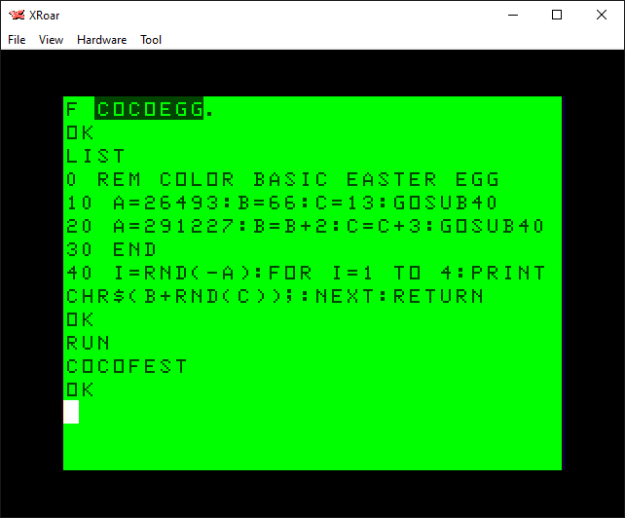
There is an interesting hidden message embedded in the Color BASIC ROM, and here is the code that reveals it:
0 REM COLOR BASIC EASTER EGG
10 A=26493:B=66:C=13:GOSUB40
20 A=291227:B=B+2:C=C+3:GOSUB40
30 END
40 I=RND(-A):FOR I=1 TO 4:PRINT CHR$(B+RND(C));:NEXT:RETURN
If you run this code, it will display this:
“COCOFEST” easter egg in the Color BASIC ROM!
Amazing, eh? How did they possibly know back in 1980 that COCOFEST would become a thing?
But actually, it’s just a random message, and not a hidden message at all. I learned of this trick from this video by 8-Bit Show and Tell that claims to share a hidden anti-Microsoft Easter egg in Commodore 64 BASIC… and then reveals how the prank works.
A hidden anti-Microsoft Easter egg in Commodore 64 BASIC! Or not…
If you tried to run that program on other flavors of BASIC, it probably would not work. It certainly does not produce the expected results on a CoCo.
10 A=125708:GOSUB 20:A=33435700:GOSUB 20:A=17059266:GOSUB 20
20 A=RND(-A)
30 A=INT(RND(A)*22):IF A THEN PRINT CHR$(A+64);:GOTO 30
40 PRINT:RETURN
This was the first video from 8-Bit Show and Tell I ever saw, and it’s lead me down quick a rabbit hole trying things he demonstrates on the Commodore computers on our beloved CoCo. And it all started with this random video that YouTube randomly showed me.
“…a monkey hitting keys at random on a typewriter keyboard for an infinite amount of time will almost surely type any given text, such as the complete works of William Shakespeare.”
Wikipedia
We are just using BASIC’s RND() random number generator to simulate a monkey at a typewriter, and using short words instead of the complete works of Shakespeare.
It’s much quicker this way.
As previously discussed, the RND function generates a series of numbers that are not random. Each time you power up a CoCo, for instance, this code will produce the same “random” numbers the first time you run it:
FOR A=1 TO 8:PRINT RND(50);:NEXT
You get these same random numbers every time you power up the CoCo.
In order to change the series of numbers, you pass a negative value into the RND() function, and that series will be used. If you do X=RND(-1), you will then get the same series of random values every time. If you do X=RND(-42), you get a different set of random numbers every time.
Magic!
Or math. But math is hard, and magic is just frustrating.
The monkey simulator
But how do you find which random seed value will give you the random numbers you want in the order you want them? The original prankster used brute-force trial and error.
A program can be designed that first seeds the RND function with -1, then generates a series of random numbers and tests to see if they are what it is looking for. In the case of the C64 version, it needed to see the numbers that represented the characters of the word followed by a ZERO to terminate the string.
If it did not work, it tries a seed of -2, and so on. This could take hours or days, and there is no guarantee the exact series of numbers will be found.
I decided to write a CoCo version of this monkey typewriter simulator, but I made some changes.
First, I figured looking for “W”+”O”+”R”+”D” was more work than just looking for “W”+”O”+”R”+”D” without a 0 byte at the end. That should speed up the search, but require an extra bit of data in the display program since it now needs to know how many random values to use (the length of the word).
The C64 version looked from A to the highest letter used (“BILL GATES SUCKS” scans A to U, though it doesn’t really need to try to find A since the earliest letter is B.) I figured that looking for A to Z (worst case, 26 choices) would be more work than just looking at the range of letters actually used in the word. For instance, finding “ABC” in a repeating random series of 26 numbers seems less likely than finding “ABC” if you were only using 3 random numbers. I made my generator look for a range covering only the letters being used. “CAT” would need numbers from “C” to “T”. “DOG” would need “D” to “O”. “ALACAZAM” would need “A” to “Z”. This meant my display program also needed to know the starting letter value and range value, in addition to the word length.
My version is not as clean and tidy as the C64 original
Here is the program I came up with. You can type in a word and it will present the range of letters it will look for, and then start searching until it finds it (or, weeks later, it has not and you give up):
10 REM rndwords.bas
20 POKE 65495,0
30 INPUT "TARGET STRING";T$
40 TL=LEN(T$)
50 IF TL=0 THEN 30
60 REM FIND LOWEST AND HIGHEST LETTER
70 LL=255:HL=0
80 FOR P=1 TO LEN(T$)
90 V=ASC(MID$(T$,P,1))
100 IF VHL THEN HL=V
120 ?V,LL;HL
130 NEXT
140 REM CALCULATE LETTER RANGE
150 R=HL-LL+1
160 PRINT "SEARCHING FOR: ";T$
170 PRINT "LETTER RANGE :";R;"(";CHR$(LL);" - ";CHR$(HL);")"
180 REM SEARCH...
190 FL=LL-1
200 FOR SD=1 TO 9999999
210 V=RND(-SD):A$=""
220 A$=A$+CHR$(FL+RND(R))
230 IF LEN(A$)<TL THEN 220
240 IF A$=T$ THEN PRINT -SD,T$
250 NEXT
1000 V=RND(-26493):FOR I=1 TO 4:PRINT CHR$(66+RND(13));:NEXT
Some words are found almost instantly. “HI” shows up immediately:
Finding random words in the Color BASIC RND function.
The output shows the random seed to start with (-5), the word it was looking for (“HI”), the ASCII character to add to the random numbers it finds, and the range to use in the RND functions.
To display the string back, you would modify my original COCOFEST program with the proper values, or do it manually:
V=RND(-5):FOR I=1 TO 2:PRINT CHR$(71+RND(2));:NEXT:PRINT
Here are some words I have found:
REM "COCO"
V=RND(-26493):FOR I=1 TO 4:PRINT CHR$(66+RND(13));:NEXT

REM "FEST"
1001 V=RND(-291227):FOR I=1 TO 4:PRINT CHR$(68+RND(16));:NEXT

REM "SUB"
1002 V=RND(-56403):FOR I=1 TO 3:PRINT CHR$(65+RND(20));:NEXT

REM "ETHA"
1003 V=RND(-1049135):FOR I=1 TO 4:PRINT CHR$(64+RND(20));:NEXT
I tried to find “COCOFEST” together, but after days and days of running, it still hadn’t. Perhaps it would have found it if I was searching the entire A-Z range versus just C-T. It’s random-ish, after all.
Perhaps one of you will take this concept and recreate the C64 version, looking for A-Z and a zero. Maybe that works better. I did not try.
Perhaps one of you will start compiling a dictionary of random words and we can use this as a secret decoder ring for passing cryptic messages to each other on Facebook.
Perhaps this will just be a passing random thought and we will never speak of it again.
But knowing me and this site, I expect we will speak of it again. Especially if I get any good comments to this post.
After I dove into ELSE efficiency, and then dove into it a bit deeper, I realized one of the major things that slows down BASIC is having to scan to the end of the line in order to find the next line.
In part 7 of my Optimizing Color BASIC series, I noticed that a GOTO or GOSUB was much slower if there were things on the line after it:
10 GOTO 100:REM THIS GOES TO THE INPUT ROUTINE
When BASIC is searching for a line number, each line entry has a size which lets it skip ahead to the next line if the line number did not match. But, once BASIC is processing a line, it does not track that. If the parser gets one token in to a line and it has to GOTO somewhere else, it has to scan forward until it finds the end of the line, then it can start scanning line numbers and skipping lines again.
Thus, one should not put comments on the ends of lines. They have to be parsed through. It is much faster to put comments on their own lines, though that takes up a more memory since each new line number takes 5 bytes.
This is one of the reasons this…
30 IF Z=1 THEN 100 ELSE IF Z=2 THEN 200 ELSE IF Z=3 THEN 300 ELSE IF Z=4 THEN 400
…can be slower than…
30 IF Z=1 THEN 100
31 IF Z=2 THEN 200
32 IF Z=3 THEN 300
33 IF Z=4 THEN 400
In the first example, if Z=1, BASIC still has to scan through all the remaining bytes of the line until it finds the end. In the second example, BASIC gets the line number then is already at the end and can immediately start scanning.
Thus, to add to my previous ELSE discussion, we should stop doing this:
30 IF X=1 THEN X=X+1:GOTO 70
If X is NOT 1, BASIC still has to scan through the rest of the line before it can check whatever happens next. Instead, it ican be much faster to do this:
30 IF X=1 THEN 100
...
100 X=X+1:GOTO xxx
There is a caveat to this. Things in BASIC are quite predictable. This change makes it faster to get to line 100 to do the actual work (X=X+1). BUT, from line 100 it could be much slower to get back to the top if there were a bunch of lines before the target line. If it’s a GOTO near the top of the program, it’s fast. If it’s a loop around 500, and you try to GOTO 500, that could be much slower if it had to scan through all the lines from 10 to 499 to get there.
This is when organizing code locations comes in very important, but that is a discussion for another time.
But other than situations like that, this is faster way:
10 REM MAIN LOOP

20 REM GET Z OR WHATEVER
30 IF Z=1 THEN 100
31 IF Z=2 THEN 200
32 IF Z=3 THEN 300
33 IF Z=4 THEN 400

40 REM NO KEY, DO IDLE LOOP STUFF
50 GOTO 10
100 X=X+1:GOTO 10
200 X=X-1:GOTO 10
300 Y=Y+1:GOTO 10
400 Y=Y-1:GOTO 10
If Z=4, the code will get there much faster since there is less for it to scan through after each Z check.
The location of where the work is done (later in the program or back at the top) is the only thing that can make this slower (or faster). Once a program gets large enough, moving things around may help speed up certain things but will slow down other things. I guess, much like real estate, location matters.
I guess we can stop using ELSE, and stop doing work on IF lines. And that goes for things like this:
IF SC=1000 THEN LV=LV+1
At 1000 points, we get a new life! However, every time through that loop when SC is not 1000, BASIC has to skip over “THEN LV=LV+1”, wasting cycles. The savings would be huge over the life of that loop to just do:
IF SC=1000 THEN 1000
…and let 1000 handle LV=LV+1 and returning back with a GOTO. GOSUB might be better, but that might be slower for something like this since:
IF SC=1000 THEN GOSUB 1000
…has an extra token (and potentially spaces, if you use them for readability) versus:
IF SC=1000 THEN 1000
WHEN this code runs (SC=1000), it may be faster to GOSUB and RETURN than it would be to GOTO/GOTO. BUT, most of the time the main loop is running that code will not be called and parsing past the GOSUB will just be wasting time.
if (input(DIGITAL_IN1) == HIGH)
{
   ...
}

if (input(DIGITAL_IN2) == HIGH)
{
   ...
}

if (input(DIGITAL_IN3) == HIGH)
{
   ...
}
This code led me to having to open schematics and figure out what digital input 1, 2 and 3 where.
So I used the free CodeBlocks editor refactor “Rename Symbol” feature to change their names to:
if (input(ROBOT_ON_FIRE_IN1) == HIGH)
{
   ...
}

if (input(BATTERY_OVERLOAD_IN2) == HIGH)
{
   ...
}

if (input(DUST_BIN_FULL_IN3) == HIGH)
{
   ...
}
…but using names that made sense for my application ;-)
Someone must have thought it was important to include the input number (IN1, IN2 and IN3) — possibly so they would not need to look through defines to see what value goes to what input — so I kept those in my names.
But now, when I find this code months down the line, I’ll immediately know which function is most likely detecting that the robot is on fire.
05-20-2020: Fixed a few typos, added a few more sentences.
From wikipedia.com
Every since I first learned about the Max Headroom signal hijacking incident in 1987, I’ve been fascinated about it. There has been much coverage of this over the years, including some interesting “recreations” of behind-the-scenes footage.
There has even been a documentary about the incident. Here are some to check out:
However, one thing remains consistent when I watch videos that theorize on this, or read the REDDIT threads, etc. Most seem to think that this was an inside job (it probably was; would be the easiest explanation). But, most don’t seem to realize how much you could do with good home equipment back in the early 1980s, let alone towards the end of that decade.
1980s home video was better than folks think.
My first encounter with a home video recorder was one my father had — a huge, hulking machine with giant push buttons and a pop up tray to insert the VHS tape. This was around 1980 or 1981.
Over the years, he had all kinds of cool video equipment. We had an early video camera, which could hook to the VCR using an adapter box that would power the camera and turn it’s output into audio/video cables. This camera was an old-style camera that would leave streaks when you moved it past lights due to the way the image sensor worked. Early, ancient stuff!
Later he had a backpack-sized VHS unit that could be ran off a 12V power supply or battery, and we took it, and the external camera, to Walt Disney World in 1982. As a young teen, it took me and another kid to lug it around (one with the recorder strapped to him, and the other operating the camera). This was all consumer equipment.
He also had Betamax (then later a SuperBeta) equipment as well. Folks commenting don’t seem to remember that Beta was widespread for awhile — early video rental stores had both VHS and BETA movies available to rent.
HomeTV!
Before the FCC put and end to it, we had in-home TV stations! You could buy a box that would transmit video to a nearby TV. And by nearby, I mean down the block. My father would broadcast movies in the evenings and let the neighbors know so they could tune in and watch. And that TV transmitter box could be ran on batteries. I remember one Thanksgiving (? or maybe it was a Christmas ?) where I was walking around the festivities with the luggable VHS unit and camera, recording stuff while others watched what I was doing on the TV in the living room. I guess that was really cool, but it was all just normal stuff to me, having grown up around it.
And it kept getting better…
Each time my dad upgraded, the new equipment was even batter. I still have the full size SuperVHS camcorder my father gave me after he upgraded to 8mm video (and it still works!).
Back to Max
Back to the Max Headroom incident… a few things I want to say:
Often you say people say Max was autistic, or drunk, or just nervous. But why? It does not seem to have been a live recording. There is an edit in the middle of the video! At best, the first half could be live then they switch to a tape, or the first part could be a tape and they switch to live, but it would be much easier to just pre-record and hit PLAY on a VCR. Max may have been drunk, but the evidence suggests he wanted it that way or he could have just re-recorded everything.
The edit is often pointed out as being proof that he was a TV station insider because the edit is perfect. Look up “flying erase head.” You could buy VCRs that had this, and they would make seamless cuts from one recording to the next. They cost more, but you could buy a consumer recorder that had one. It was not anything magical or special. BUT, you didn’t even need one. That luggable portable VCR we had could often do really clean edits — even without a flying erase head! My dad edited so many productions using two of those units (including videos that ran at booths at boat shows, that I did computer graphics for, and even a travel video for the island of Belize, which I’d never heard of back then). We had another unit after that one which was not portable, but did edits so well I did STOP MOTION animation with it. Just a nice consumer VCR! You did NOT need professional equipment to get a clean edit.
As to how they hijacked the signal, TV and radio stations commonly had (and still do) their studios at one place, and beamed their broadcast signal to the remote transmitter. Theories say they were up on a tall building. But why? Every radio station remote with a MARTI unit could broadcast from car dealerships. Heck, the run down AM radio station I worked at in 1987 had one, and it was ancient. And TV stations would go “live” from remote events all the time from their news van. I think the folks who talked about a vehicle (why a van?) being used probably make more sense than climbing up a building. It would be far easier to just park somewhere near the receiving dish and beam a low power signal to it, but I only have experience with doing that with radio stations. (There would be a lot of other issues, since I believe the remote news van would be beaming a different type of signal to a special receiver, and would NOT be capable of sending in the broadcast signal.) But, getting a signal in between the studio and the remote transmitter location could be done from the ground. (Or from a building; but it seems far riskier to climb a building and set equipment up.)
In a city the size of Chicago, I have no doubt that cameras and transmitters and all kinds of video things were readily available to those who wanted them. The only magic part here is the equipment that was used to overpower the TV station’s broadcast signal. An insider would have information, but folks could buy a lot of used equipment like this even back then (before eBay). The requirement to have need a license to operate it did not prevent you from buying it. (Anyone could by a HAM radio, but it was illegal to use it without a license, for example, and we had a place where I grew up that sold police radios and such.)
So who knows. Insider (or at least someone from the industry) makes sense. HAM radio/electronics hobbyists? Sure, why not. But I wish folks would drop the claims of the clean edit as proof it was someone with professional equipment. At least the Oddity guy talked about it looking like it was on a VHS unit (though that was just because of the poor picture quality — the fact that it did such a lean edit shows it would have been a higher quality machine).
I sure hope one day we hear the story behind this event.
My recent return to exploring my old Commodore VIC-20 code has reminded me about the main reason I jumped ship to a Radio Shack TRS-80 Color Computer: Extended Color BASIC. The older CBM BASIC V2 used by the VIC was missing keywords like ELSE, and had no functions for graphics or sounds. While I am having a blast re-learning how to program VIC-20 games, I sure do miss things like ELSE.
But should I?
IF/THEN/ELSE versus IF/THEN versus ON/GOTO
Pop quiz time! Suppose you were trying to determine if you needed to move a game character up, down, left or right. Which is the faster way to handle four choices?
30 IF Z=1 THEN 100 ELSE IF Z=2 THEN 200 ELSE IF Z=3 THEN 400 ELSE IF Z=4 THEN 500
…or…
30 IF Z=1 THEN 100
31 IF Z=2 THEN 200
32 IF Z=3 THEN 400
33 IF Z=4 THEN 500
Of course, if the values were only 1, 2, 3 and 4, you wouldn’t do either. Instead, you might just do:
ON Z GOTO 100,200,300,400
…but for the sake of this question, assume the values are not in any kind of order that allows you to do that.
IF/THEN/Work/ELSE versus IF/THEN/WORK
Suppose you were a junior high kid learning to program and you wanted to update some player X/Y positions based on keyboard input. Which one of these would be faster?
30 IF Z=1 THEN X=X+1 ELSE IF Z=2 THEN X=X-1 IF Z=3 THEN Y=Y+1 IF Z=4 THEN Y=Y-1
…versus…
30 IF Z=1 THEN X=X+1
31 IF Z=2 THEN X=X-1
32 IF Z=3 THEN Y=Y+1
33 IF Z=4 THEN Y=Y-1
All is not fair
I should point out that the speed it takes to run these snippets depends on the value of Z. For the sake of this article, let’s assume no key is pressed, so Z is set to something that is not 1, 2, 3 or 4.
Obviously, when there are four IFs in a row (either in a single line with ELSE, or on separate lines), the order of the checks determines how fast you get to each one. If Z is 1, and that is the first IF check, that happens faster than if Z is 4 and the code has to check against 1, 2 and 3 before finally checking against 4.
The same thing applies in languages that use switch/case type logic, so the things that need to be the fastest or happen most often should be at the top of the list and checked before things that happen less often.
Because of this, to be fair, we should also check best case (Z=1) and worst case (Z=4) and see what that does.
Benchmarking going to a line
In my benchmark program, this one counted to 954:
0 REM elsetst1.bas '954
5 DIM TE,TM,B,A,TT
10 FORA=0TO3:TIMER=0:TM=TIMER
20 FORB=0TO1000
30 IF Z=1 THEN 100 ELSE IF Z=2 THEN 200 ELSE IF Z=3 THEN 400 ELSE IF Z=4 THEN 500
70 NEXT
80 TE=TIMER-TM:PRINTA,TE
90 TT=TT+TE:NEXT:PRINTTT/A:END
And this one was a tiny bit faster. It counted to 942:
0 REM elsetst1.bas '942
5 DIM TE,TM,B,A,TT
10 FORA=0TO3:TIMER=0:TM=TIMER
20 FORB=0TO1000
30 IF Z=1 THEN 100
31 IF Z=2 THEN 200
32 IF Z=3 THEN 300
33 IF Z=4 THEN 400
70 NEXT
80 TE=TIMER-TM:PRINTA,TE
90 TT=TT+TE:NEXT:PRINTTT/A:END
Thus, using ELSE was a bit worse if none of the conditions were true.
IF we could have used ON/GOTO, that would be blazing at 253!
0 REM elsetst3.bas '253
5 DIM TE,TM,B,A,TT
10 FORA=0TO3:TIMER=0:TM=TIMER
20 FORB=0TO1000
30 ON Z GOTO 100,200,300,400
70 NEXT
80 TE=TIMER-TM:PRINTA,TE
90 TT=TT+TE:NEXT:PRINTTT/A:END
But I said we couldn’t, because I changed the rules to “do work” rather than “go to a line.”
Benchmarking doing work
Doing work with ELSE clocked in at 601:
0 REM elsetst4.bas '601
5 DIM TE,TM,B,A,TT
10 FORA=0TO3:TIMER=0:TM=TIMER
20 FORB=0TO1000
30 IF Z=1 THEN X=X+1 ELSE IF Z=2 THEN X=X-1 IF Z=3 THEN Y=Y+1 IF Z=4 THEN Y=Y-1
70 NEXT
80 TE=TIMER-TM:PRINTA,TE
90 TT=TT+TE:NEXT:PRINTTT/A:END
Since ELSE was slower to go to a line, I thought maybe it would be here, too, but instead, splitting the statements was slower. This one reports 963:
0 REM elsetst5.bas '963
5 DIM TE,TM,B,A,TT
10 FORA=0TO3:TIMER=0:TM=TIMER
20 FORB=0TO1000
30 IF Z=1 THEN X=X+1
31 IF Z=2 THEN X=X-1
32 IF Z=3 THEN Y=Y+1
33 IF Z=4 THEN Y=Y-1
70 NEXT
80 TE=TIMER-TM:PRINTA,TE
90 TT=TT+TE:NEXT:PRINTTT/A:END
It seems like ELSE has its place, but not for just going to a line.
Best versus Worst: FIGHT!
Let’s try some best and worst cases now. For this test, I’ll resolve the jumps to lines 100, 200, 300 and 400 by adding this:
100 GOTO 70
200 GOTO 70
300 GOTO 70
400 GOTO 70
That will greatly slow things down since we have to search forward to the new line, then it has to start back at the top of the program and search forward to find line 70. BUT, it will be consistent from test to test. I’ll add a “6 Z=1” or “6 Z=4” line.
If you are using IF to go to some code, ON/GOTO is the fastest, following by separate lines. Even in the worst case, separate lines are still a tiny bit faster, which surprised me. I suspect it’s the time it takes to parse the ELSE versus a new line number. Retesting with all the spaces removed might change the results and make them closer.
But it does look like we need to stop doing “IF X=Y THEN ZZZ ELSE IF X=Y THEN ZZZ ELSE” unless we really need the extra bytes ELSE saves over a new line number.
And if you are trying to do work, ELSE seems substantially faster than separate line numbers. But, in both cases, best and worst case are very close. I believe this is a benchmark issue, since the time to scan a few lines is tiny compared to the time it takes to do something like “X=X+1”, and both best and worst case do the same amount of work. A better test would need to be performed.
Bonus
There is a way to speed up the separate line statements when doing work, especially for better case. Consider this:
0 REM elsetst6.bas '1034
5 DIM TE,TM,B,A,TT
10 FORA=0TO3:TIMER=0:TM=TIMER
20 FORB=0TO1000
30 IF Z=1 THEN X=X+1:GOTO 70
31 IF Z=2 THEN X=X-1:GOTO 70
32 IF Z=3 THEN Y=Y+1:GOTO 70
33 IF Z=4 THEN Y=Y-1
70 NEXT
80 TE=TIMER-TM:PRINTA,TE
90 TT=TT+TE:NEXT:PRINTTT/A:END
By adding the GOTO, if line 30 is satisfied (Z=1), the parser can start searching for line 70 without having to do the check against Z three more times. But, when a case is not satisfied, it now has to parse through the GOTO token and a line number to find the end of the line, meaning that for worst case (Z=4) it should be a bit slower.
It looks like there’s a significant improvement for best case, and a slight decrease in performance for worst case (the overhead of skipping more characters to find the end of the line for the false conditions).
The more you know…
I guess I am learning quite a bit by revisiting the VIC-20 and having to do things without ELSE.
I got stuck on my multi-part Sky-Ape-Er dissection tangent, so I thought I’d do something different for today’s VIC-20 Tuesday.
The VIC-20 uses programmable character based graphics, You can change the pixels that make up a letter “A” to be a small 8×8 icon of a spaceship, for instance. But, when you move that letter A to different spots on the screen, it jumps 8 pixels at a time making movement quite jerky (as demonstrated by all my VIC-20 programs):
Since I don’t have time to write a full article at the moment, I’ll share this small VIC-20 program and come back to discuss what it is doing, and why it is doing it, later.
30 print"{clear}{reverse on}frames:"
60 for c=0 to 7:print chr$(65+c);chr$(73+c):print:next
70 gosub 950
100 poke 36869,255
105 rem
108 rem go thru each row of the character
109 rem
110 for ln=0 to 7
115 rem
118 rem read value, multiply by 256 to make 16-bits
119 rem
120 read v:v=v*256
125 rem
128 rem go thru each frame character
129 rem
130 for ch=0 to 7
135 rem
138 rem split 16-bit value into 8-bit values
139 rem
140 b1=int(v/256)
150 b2=v-(b1*256)
155 rem
158 rem poke shifted value in each charater
159 rem
160 poke 7176+ch*8+ln,b1
170 poke 7176+ch*8+ln+64,b2
175 rem
178 rem shift 16-bit value to the right one bit
179 rem
180 v=v/2
190 next
200 next
210 gosub 950
900 poke 36869,240:poke 198,0
910 end
950 get a$:if a$="" then 950
960 return
1000 DATA 60,126,255,255,255,255,126,60