Monthly Archives: April 2023

CoCo Disk BASIC disk structure – part 1

See also: part 1, part 2 and part 3.

I know I must have learned at least some basic stuff about the layout of an RS-DOS disk, because I had a directory searching routine in my first commercial CoCo program – Huffman K1 Librarian sold by Rulaford Research.

That product was a MIDI program that would load or save sound patches (synthesizer voices) to and from a Kawai K1 synthesizer. For functions where you were going to send a patch, it would allow showing all directory of the files of that type. The extension was used to determine if it was a single patch or a block. Though today, I cannot remember the details on what a “block” was for the K1.

Looking at that program now, it would have been nice if I had allowed the user to just cursor around the files and select one, rather than having the user type the name in. Maybe I’ll fix that in a version 1.3 someday … though I sold my K1 long ago, as well as all my CoCo MIDI gear, so I wouldn’t have any way to actually test the update. So maybe I won’t.

Anatomy of an RS-DOS disk

Back in those days, we’d refer to Disk Extended Color BASIC (DECB) as “RS-DOS”. I’m not sure why “Radio Shack DOS” was used for a name, since I don’t recall it saying this anywhere on the screen or in the manuals, but someone must have come up with it and it caught on. (Much like the nickname “CoCo”.)

RS-DOS had a simple file system that was described in detail in the back of the Disk BASIC manual. Back then, most of this was probably beyond me, since looking at it today it still is. It’s interesting that it described the technical details of the disk beyond just the tracks and sector data that could actually be used from BASIC — at least in the 1981 TRS-80 Color Computer Disk System Owners Manual & Programming Guide.
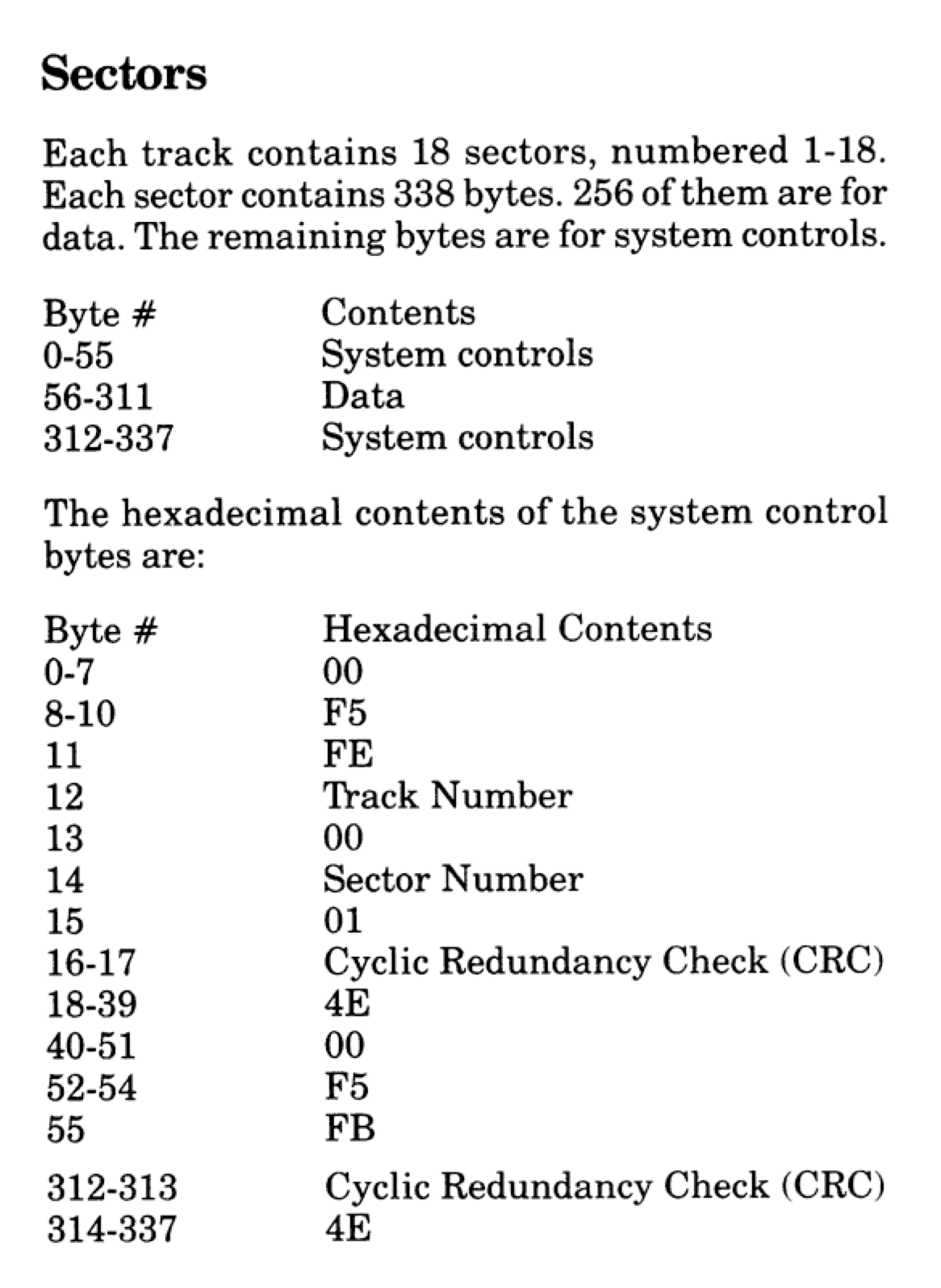
I also found it interesting that by the 1986 version of the manual, which was the version available after the CoCo 3 was released, this technical information had been removed.

Above, out of those 338 bytes, the only section we got to use was the 256 data bytes. The rest was used by the FD1773 floppy drive controller chip.

Looking back at the 1981 manual, the format of an RS-DOS disk was pretty clearly defined. The disk drive was a single-sided 35 track device, and each of those tracks contain 18 sectors. Each sector was 256 bytes. Each track of 18 256-byte sectors could hold 4608 bytes. This meant that a disk could hold 161,280 bytes of data! (35 * 18 * 256) Wow, 157K of storage!

Side Note: Although Radio Shack never updated the Disk BASIC ROM to take advantage of it, the floppy controller was capable of supporting up to three double-sided 80 track (720K) floppy drives. Others came up with patches (or replacement DOS ROMs) that let BASIC handle this. This was also supported in disk operating systems such as OS-9 (which was sold by Radio Shack) and FLEX. But, we’re sticking with generic Disk Extended Color BASIC for this article series, so 35 tracks it is…

While 157K sounds pretty amazing, we didn’t actually get to use all of that from BASIC. Track 17 was used to store the directory and file allocation table (FAT). Yep, even back then, Microsoft (who wrote this Disk BASIC) already had a FAT file system… Just not the FAT we became familiar with via PC-DOS/MS-DOS a few years later.

Since track 17 could not be used for data storage, that left us with 34 tracks we could use — 156,672 bytes. Oh well, 153K of high speed disk access sure beats cassette storage. Or, as we learned, “68 granules” of high speed disk access.

Side Note: Tracks are numbers from 0 to 34, so track 17 is actually the 18th track. Sectors, however, are numbers 1 to 18. Go figure. Drives were numbers 0 to 3, so sectors are really the odd one here.

Here is a representation of the 35 tracks on a disk (numbers 0 to 34):

+----------+
| Track 00 | - 4608 bytes
+----------+
| Track 01 | - 4608 bytes
+----------+
|    ...   |
|    ...   |
+----------+
| Track 17 | - File Allocation Table and Directory
+----------+
|    ...   |
|    ...   |
+----------+
| Track 33 | - 4608 bytes
+----------+
| Track 34 | - 4608 bytes
+----------+

And here is a representation of the 256-byte sectors inside a track (numbered 1 to 18):

Track X
+----+----+----+-----+----+----+----+
| 01 | 02 | 03 | ... | 06 | 07 | 18 | - 256 bytes each
+----+----+----+-----+----+----+----+

Granule

gran·ule /ˈɡranˌyo͞ol/ noun
a small compact particle of a substance.

– https://www.merriam-webster.com/dictionary/granule

Each of the available 34 tracks was split in half (each half being 9 256-byte sectors) and called granules. Each granule was, therefore, 9 * 256 bytes in size — 2304 bytes.

To see how much space was free on disk, we could type:

PRINT FREE(0)

…and that would print a number, such as 68 for a completely empty disk, or 0 for a full one. Granules never made much sense to me back then, and I don’t suppose they really do today except that it was “half a track.” I don’t know if that would have meant much to me before I got in to OS-9 years later and learned way more about floppy disks.

Track 17, where the directory and FAT were stored, was two more granules of storage we didn’t get to use.

Here is a representation of the granules of a disk, numbers 0 to 68:

Track 00 +------------+
         | Granule 00 | - Sectors 1-9   (2304 bytes)
         | Granule 01 | - Sectors 10-18 (2304 bytes)
Track 01 +------------+
         | Granule 02 | - Sectors 1-9   (2304 bytes)
         | Granule 03 | - Sectors 10-18 (2304 bytes)
Track xx +------------+
         |     ...    |
Track 16 +------------+
         | Granule 33 | - Sectors 1-9   (2304 bytes)
         | Granule 34 | - Sectors 10-18 (2304 bytes)
Track 17 +------------+
         | FAT &      | - 4608 bytes
         | Directory  |
Track 18 +------------+
         | Granule 35 | - Sectors 1-9   (2304 bytes)
         | Granule 36 | - Sectors 10-18 (2304 bytes)
Track xx +------------+
         |     ...    |
Track 34 +------------+
         | Granule 67 | - Sectors 1-9   (2304 bytes)
         | Granule 68 | - Sectors 10-18 (2304 bytes)
         +------------+

Here is a simple program that displays this information on the CoCo 32-column screen. Use UP/DOWN arrows to go track by track, or SHIFT-UP/SHIFT-DOWN to go a page at a time:

10 'DISKMAP.BAS
20 '
30 ' TRACKS & SECTORS
40 '
50 CLS
60 PRINT"TRACK         SECTORS"
70 PRINT"          (1-9)    (10-18)"
80 PRINT STRING$(27,"-");
90 ST=0:PG=12
100 FOR A=0 TO PG
110 TR=ST+A
120 PRINT@96+32*A,TR;
130 IF TR=17 THEN PRINT TAB(10);"FAT & DIRECTORY ";:GOTO 160
140 IF TR<17 THEN GR=(TR*2)+1 ELSE GR=((TR-1)*2)+1
150 PRINT TAB(9);"GRAN";GR;TAB(19);"GRAN";GR+1;
160 NEXT
170 A$=INKEY$:IF A$="" THEN 170
180 IF A$=CHR$(94) THEN ST=ST-1
190 IF A$=CHR$(95) THEN ST=ST-PG-1
200 IF A$=CHR$(10) THEN ST=ST+1
210 IF A$=CHR$(91) THEN ST=ST+PG+1
220 IF ST<0 THEN ST=0
230 IF ST>34-PG THEN ST=34-PG
240 GOTO 100

If you wanted to use all of an RS-DOS disk, a CoCo program could use disk access commands to read/write sectors to any spot on the disk — including track 17 — and manually use all 70 granules for storage. But, if it did that, typing “DIR” would not produce expected results (they would be no directory) and trying to SAVE something on this disk would overwrite data (if it worked at all; it would have needed valid directory information to even do this).

But I digress…

Track 17

Of the 18 sectors contained in track 17, sectors 1 and 12-18 were “for future use.” Radio Shack never used them, as far as I know, but third party patches to Disk BASIC did use them for other features, such as supporting 40 track drives.

  • Sector 1 – Unused (“for future use”)
  • Sector 2 – File Allocation Table (FAT)
  • Sectors 3-11 – Directory Entries
  • Sectors 13-18 – Unused (“for future use”)

FAT (File Allocation Table)

The first 68 bytes of Sector 2 contained the file allocation table. Each byte represented the status of one of the available granules on the disk. If the granule was not used by any file, the byte representing it would be set to 255 (&HFF). I expect that the FREE() command simply read Track 17, Sector 2, and quickly scanned the first 68 bytes, counting how many were 255.

DSKI$ / DSKO$

Let’s do a quick tangent here. Disk BASIC provided two commands for reading and writing sectors on the disk. DSKI (disk input) and DSKO (disk output) needed a drive number (0-3), track number (0-34), and a sector number (1-18) to read or write from/to. Since a Color BASIC string variable could not be longer than 255 (the maximum size a byte could represent for length), a string could not hold an entire sector. Because of this, DSKI and DSKO split the sector up in to two 128-byte strings like this:

CLERA 256
DSKI$ 0,17,2,A$,B$

Above, the CLEAR 256 is needed to increase string space from the default 200 bytes to enough to store the full sector in A$ and B$ and two 128 byte strings. Keep in mind, more memory will be needed when you do any manipulation on either of those strings. As you will see below, CLEAR 384 is really needed at the very least, since if you do a MID$() or LEFT$() on A$ or B$, enough string memory has to be available to hold a copy of that string (256+128 is 384). See my string abuse article for a deep dive in to why that is the case.

For DSKI$, the first parameter is the drive (0-3), the second is the track (0-34) and the third is the sector (1-18). After that are two string variables that will hold the two halves of the 256-byte sector. In this example, A$ holds the fist 128 bytes, and B$ holds the second 128 bytes.

I only wanted to mention this so I could show a BASIC program that calculates how much space is free on a disk by reading the FAT bytes. It might look something like this:

0 'DISKFREE.BAS
10 CLEAR 384
20 INPUT "DRIVE";DR
30 DSKI$ DR,17,2,A$,B$
40 FOR I=1 TO 68
50 IF MID$(A$,I,1)=CHR$(255) THEN FG=FG+1
60 NEXT
70 PRINT "FREE GRANULES:";FG

This could, of course, be made smaller and faster. And, if you wanted to show the free space in bytes, you could just multiply the free granules (FG) variable by 2304, the side of a granule:

70 PRINT "FREE SPACE:";FG*2304;"BYTES"

Of course, the FREE(0) command could also have been used for this, even getting the value in a variable:

10 PRINT "FREE GRANULES:";FREE(0)

10 PRINT "FREE SPACE:";FREE(0)*2304;"BYTES"

10 FG=FREE(0):PRINT "FREE GRANULES:";FG

10 FS=FREE(0)*2304:PRINT "FREE SPACE:";FS;"BYTES"

But I digress.

But what if the granule is being used by a file? If you wanted to see the values in the non-free granules used on the disk, you could modify the program as follows:

0 'DISKFREE.BAS
10 CLEAR 384
20 INPUT "DRIVE";DR
30 DSKI$ DR,17,2,A$,B$
40 FOR I=1 TO 68
50 GN=ASC(MID$(A$,I,1))
55 IF GN=255 THEN FG=FG+1 ELSE PRINT GN;
60 NEXT:PRINT
70 PRINT "FREE GRANULES:";FG

If you run that, you will probably see values that are outside of the range of a granule number (0-67). This will be explained later when we discuss the FAT in more detail.

Directory

Track 17 sectors 3-11 are used for the directory. The 1981 Color Computer Disk System manual described the directory layout on page 58 as follows:
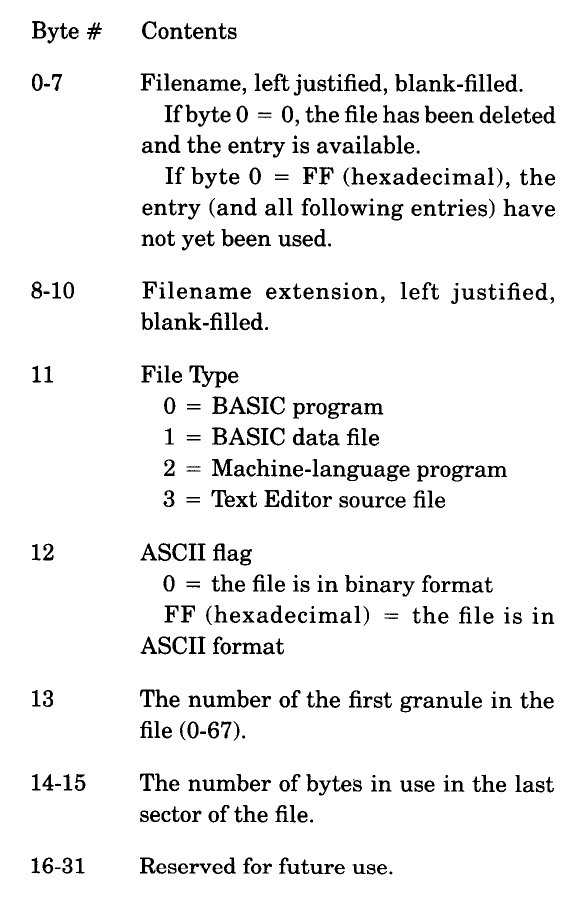
Using DSKI$, we can write a program that will display the names of files in the directory. We can do this by reading each sector and then parsing the 32-byte directory entries.

10 CLEAR 512:DIM SP$(1)
20 INPUT "DRIVE";DR
30 ' S - SECTOR NUMBER
40 FOR S=3 TO 11
50 ' SP$(0-1) - SECTOR PARTS
60 DSKI$ DR,17,S,SP$(0),SP$(1)
70 ' P - PART OF SECTOR
80 FOR P=0 TO 1
90 ' E - DIR ENTRY (4 P/SECT.)
100 FOR E=0 TO 3
110 ' GET 32 BYTE DIR ENTRY
120 DE$=MID$(SP$(P),1+E*32,32)
130 ' FB - FIRST BYTE OF NAME
140 FB=ASC(LEFT$(DE$,1))
150 ' SKIP DELETED FILES
160 IF FB=0 THEN 250
170 ' WHEN 255, DIR IS DONE
180 IF FB=255 THEN END
190 ' PRINT NAME AND EXT.
200 PRINT LEFT$(DE$,8);TAB(9);MID$(DE$,9,3);
210 ' FILE TYPE
220 PRINT TAB(13);ASC(MID$(DE$,12,1));
230 ' BINARY OR ASCII
240 IF ASC(MID$(DE$,13,1))=0 THEN PRINT "B" ELSE PRINT "A"
250 NEXT
260 NEXT
270 NEXT

Running this program will produce output similar to the DIR command, except without the file size. Calculating the file size is more involved, and requires scanning through the FAT to find the series of granules that are allocated for the file. We’ll get to that in the next part of this series.

Bonus: File Exists?

Here’s some useless code. This routine will determine if a file exists. Rather than parse each 32 byte portion of the sectors, I decided to use INSTR() to see if the target filename string exists anywhere in the sector strings. To make sure “EMP” didn’t show up as a match for a file named “EMPTY”, I pad the target string with spaces just like they are stored in the directory.

10 INPUT "FILE NAME";F$
20 ' PAD NAME WITH SPACES
30 F$=F$+STRING$(8-LEN(F$)," ")
40 FOR S=3 TO 17
50 DSKI$ 0,17,S,A$,B$
60 IF INSTR(A$,F$) OR INSTR(B$,F$) THEN PRINT "FOUND":END
70 NEXT

This could be improved by having the process stop as soon as it finds an entry starting with 255 (no more directories after that point). To keep the code small, a simple “55 IF ASC(LEFT$(A$,1))=255 THEN END” would be enough. It might still read a sector more than it needs to, since it’s not checking every entry in the string, but that would be a way to do it with minimal code.

We’ll do something less useless in part 2.

Until then…

Write BASIC easier with Alex Evans Python scripts

I’ve mentioned the BASIC Utilities from Alex Evans quite a bit lately. These Python scripts can be run on any system that has Python. I have used them under Windows 11 and macOS. In addition to having scripts that will tokenize and de-tokenize BASIC programs, it has some other interesting capabilities. One is the ability to have a BASIC source file that is written in a more user-friendly way — using labels instead of line numbers, and then only having them where needed.

Consider this example of a “guess the number” game:

NUMBER = RND(100)

PRINT "I AM THINKING OF A NUMBER FROM"
PRINT "1 TO 100. CAN YOU GUESS IT?"

LOOP: INPUT "WHAT IS YOUR GUESS";GUESS

IF GUESS > NUMBER THEN PRINT "THAT IS TOO HIGH!"
IF GUESS < NUMBER THEN PRINT "THAT IS TOO LOW!"
IF GUESS = NUMBER THEN PRINT "YOU GOT IT!":END

GOTO LOOP

This code can be processed through “coco_pack.py” and it will become a tokenized program (guess.bas.pack) that runs on a CoCo. The PACK routine will do things like rename longer variables (such as “GUESS”) to valid short ones, as well as change labels (LABEL:) in to line numbers. Obviously, it also adds line numbers to everything in between, giving the programmer one less thing to worry about.

I processed this file using “coco_pack.py -t guess.bas” to have it generate a text file (-t) rather than a tokenized file. It produced “guess.bas.pack” as a text file which looked like this:

0 A=RND(100):PRINT"I AM THINKING OF A NUMBER FROM":PRINT"1 TO 100. CAN YOU GUESS IT?"
1 INPUT"WHAT IS YOUR GUESS";B:IFB>A THENPRINT"THAT IS TOO HIGH!"
2 IFB<A THENPRINT"THAT IS TOO LOW!"
3 IFB=A THENPRINT"YOU GOT IT!":END
4 GOTO1

You can see how it combined as much as possible on each line, taking three separate lines (RND, and two PRINTs) in to one. The INPUT needed to be on its own line since it will be the target of a GOTO loop. The first comparison (is guess too high) could be moved to the end of that line, but the next ones needed to be separate lines.

The result is something that looks a bit more friendly being turned in to something much more compact. Using “coco_pack guess.bas” without “-t” would have produced a tokenized file ready to load on the CoCo.

A warning about variable and label names

In BASIC, there are certain things you cannot use for variable names. You cannot have a variable named “FOR” since that is a keyword, but you can use “FO“. (Besides, if you use a variable name longer than two characters, the rest get ignored. “FOR” should be honored as “FO” and be allowed, but the BASIC parser has already found “FOR” and turned it in to a token … I think.)

Some variables work fine on Color BASIC, but cannot be used on Extended BASIC. “FN” is allowed on Color BASIC, but you cannot use “FN” as a variable under Extended/Disk BASIC because FN is a token (see DEF FN). “AS” works fine as a variable for Color or Extended BASIC, but cannot be used under Disk BASIC because “AS” is now a keyword (see the “FIELD” command).

The Alex Evans tools need to follow similar tools, since they are parsing the line looking for BASIC keywords to tokenize. If you tried to make a label called “ASK:”, as I initially did, you will find that a “GOTO ASK” does not work — it turns in to “GOTO ASx” where X is a variable it made, since it treated “AS” as a token, and then K as a variable. This is something that Alex may be able to resolve in a future update, but for right now, keep labels and long variables to things that are not conflicting with BASIC keywords.

Here’s an example of bad stuff. Notice that you can use leading tabs/spaces to help “prettify” the code if you want, but since it is still BASIC lines, everything that needs to be on the same line in BASIC will have to be on the same line of this code:

FOR=1

GOTO: PRINT "GOTO"
    GOTO GOTO

LOOP: PRINT "LOOP"
    GOTO LOOP

And here is what it tries to create:

0 FOR=1:PRINT"GOTO":GOTOGOTO
1 PRINT"LOOP":GOTO1

You can see it tried to make “FOR=1”, which will error out on the CoCo, and it did not treat “GOTO” as a label, since GOTO is a keyword.

Using LOOP: works just fine, since there is no LOOP keyword.

Just keep that in mind. This is a script that creates files, and not a full BASIC interpreter that can give you errors as you type things in. :)

A warning about line format

Since these are lines of BASIC, they have to be on the same line just as BASIC expects. You can NOT write something like:

REM * THIS WON'T WORK:
IF G > N
    PRINT "THAT IS TOO HIGH!"
ELSE IF G < N
    PRINT "THAT IS TOO LOW!"

…because that would be like doing this in BASIC:

10 REM * THIS WON'T WORK:
20 IF G > N
30 PRINT "THAT IS TOO HIGH"
40 ELSE IF G < N
50 PRINT "THAT IS TOO LOW!"

The PACK process would then combine lines and produce:

0 IFA>B
1 PRINT"THAT IS TOO HIGH!":ELSEIFA<B
2 PRINT"THAT IS TOO LOW!"

“It’s still BASIC, after all!”

Carl England’s CRUNCH versus Alex Evans’ PACK

After learning about some of the things the PACK script from Basic Utils from Alex Evans, I wondered how it compared to the Carl England CRUNCH program that ran directly on a CoCo.

The Test Program

First, I wanted to create a simple test program that would allow for lines to be packed together easily. To do this, I made a BASIC program that created a BASIC program. Each line would have a PRINT command followed by a quoted string of 32 characters (the width of the CoCo screen). My program creator looks like this:

0 'MTOOBIG.BAS
10 OPEN "O",#1,"TOOBIG.BAS"
20 FOR I=1 TO 26
30 PRINT #1,I*10;"PRINT ";CHR$(34);STRING$(32,64+I);CHR$(34);";"
40 NEXT
50 CLOSE #1

This program is designed to create a disk file, but it could have been modified to work on cassette by changing the device #1 to device #-1.

The resulting file “TOOBIG.BAS” can be loaded. It looks like this:

10 PRINT "AAAAAAAAAAAAAAAAAAAAAAAAAAAAAAAA";
20 PRINT "BBBBBBBBBBBBBBBBBBBBBBBBBBBBBBBB";
30 PRINT "CCCCCCCCCCCCCCCCCCCCCCCCCCCCCCCC";
40 PRINT "DDDDDDDDDDDDDDDDDDDDDDDDDDDDDDDD";
50 PRINT "EEEEEEEEEEEEEEEEEEEEEEEEEEEEEEEE";
60 PRINT "FFFFFFFFFFFFFFFFFFFFFFFFFFFFFFFF";
70 PRINT "GGGGGGGGGGGGGGGGGGGGGGGGGGGGGGGG";
80 PRINT "HHHHHHHHHHHHHHHHHHHHHHHHHHHHHHHH";
90 PRINT "IIIIIIIIIIIIIIIIIIIIIIIIIIIIIIII";
100 PRINT "JJJJJJJJJJJJJJJJJJJJJJJJJJJJJJJJ";
110 PRINT "KKKKKKKKKKKKKKKKKKKKKKKKKKKKKKKK";
120 PRINT "LLLLLLLLLLLLLLLLLLLLLLLLLLLLLLLL";
130 PRINT "MMMMMMMMMMMMMMMMMMMMMMMMMMMMMMMM";
140 PRINT "NNNNNNNNNNNNNNNNNNNNNNNNNNNNNNNN";
150 PRINT "OOOOOOOOOOOOOOOOOOOOOOOOOOOOOOOO";
160 PRINT "PPPPPPPPPPPPPPPPPPPPPPPPPPPPPPPP";
170 PRINT "QQQQQQQQQQQQQQQQQQQQQQQQQQQQQQQQ";
180 PRINT "RRRRRRRRRRRRRRRRRRRRRRRRRRRRRRRR";
190 PRINT "SSSSSSSSSSSSSSSSSSSSSSSSSSSSSSSS";
200 PRINT "TTTTTTTTTTTTTTTTTTTTTTTTTTTTTTTT";
210 PRINT "UUUUUUUUUUUUUUUUUUUUUUUUUUUUUUUU";
220 PRINT "VVVVVVVVVVVVVVVVVVVVVVVVVVVVVVVV";
230 PRINT "WWWWWWWWWWWWWWWWWWWWWWWWWWWWWWWW";
240 PRINT "XXXXXXXXXXXXXXXXXXXXXXXXXXXXXXXX";
250 PRINT "YYYYYYYYYYYYYYYYYYYYYYYYYYYYYYYY";
260 PRINT "ZZZZZZZZZZZZZZZZZZZZZZZZZZZZZZZZ";

Carl England’s CRUNCH

The CRUNCH utility by Carl England can be found on his The Defeater disk. You can download it from the Color Computer Archive site:

https://colorcomputerarchive.com/search?q=Carl+England

With my working disk in Drive 0, I mounted Carl’s disk image in Drive 1 and copied the CRUNCH program to my disk so I could get to it easier.

With my “TOOBIG.BAS” program loaded, I can then LOADM”CRUNCH”:EXEC to run it. Here is an example of what CRUNCH looks like (but ignore the program size shown at the bottom of the screen; this screen shot it from an earlier article where I was using it on a different program):

Carl England’s CRUCCH program, before.

For the correct size, here is the output of CRUNCH when processing on the “TOOBIG.BAS” test program:

You can see it managed to shrink the program by 102 bytes! There were no trailing quotes, REM statements, or THEN GOTOs to remove, but it could take out the space after each PRINT and pack the lines. Somewhat.

Inspecting the resulting program was not what I expected. It did some work, but not as much as it could — for example, while it did combine lines 10-60 in to one longer line, it left line 70 alone. The same thing happened with lines 140 and 210. This may be a bug.

UPDATE: Since I wrote this, I bribed William “Lost Wizard” Astle to disassemble the CRUNCH program for me, and provided the source to the original author Carl England (it was easier than hoping Carl could somehow find his source code from 23 years ago). Carl identified a one byte change to fix this issue, and I recompiled and it fixes the following behavior to match that of the Alex Evans tools. More on this in a future article…

10 PRINT"AAAAAAAAAAAAAAAAAAAAAAAAAAAAAAAA";:PRINT"BBBBBBBBBBBBBBBBBBBBBBBBBBBBBBBB";:PRINT"CCCCCCCCCCCCCCCCCCCCCCCCCCCCCCCC";:PRINT"DDDDDDDDDDDDDDDDDDDDDDDDDDDDDDDD";:PRINT"EEEEEEEEEEEEEEEEEEEEEEEEEEEEEEEE";:PRINT"FFFFFFFFFFFFFFFFFFFFFFFFFFFFFFFF";
70 PRINT"GGGGGGGGGGGGGGGGGGGGGGGGGGGGGGGG";
80 PRINT"HHHHHHHHHHHHHHHHHHHHHHHHHHHHHHHH";:PRINT"IIIIIIIIIIIIIIIIIIIIIIIIIIIIIIII";:PRINT"JJJJJJJJJJJJJJJJJJJJJJJJJJJJJJJJ";:PRINT"KKKKKKKKKKKKKKKKKKKKKKKKKKKKKKKK";:PRINT"LLLLLLLLLLLLLLLLLLLLLLLLLLLLLLLL";:PRINT"MMMMMMMMMMMMMMMMMMMMMMMMMMMMMMMM";
140 PRINT"NNNNNNNNNNNNNNNNNNNNNNNNNNNNNNNN";
150 PRINT"OOOOOOOOOOOOOOOOOOOOOOOOOOOOOOOO";:PRINT"PPPPPPPPPPPPPPPPPPPPPPPPPPPPPPPP";:PRINT"QQQQQQQQQQQQQQQQQQQQQQQQQQQQQQQQ";:PRINT"RRRRRRRRRRRRRRRRRRRRRRRRRRRRRRRR";:PRINT"SSSSSSSSSSSSSSSSSSSSSSSSSSSSSSSS";:PRINT"TTTTTTTTTTTTTTTTTTTTTTTTTTTTTTTT";
210 PRINT"UUUUUUUUUUUUUUUUUUUUUUUUUUUUUUUU";
220 PRINT"VVVVVVVVVVVVVVVVVVVVVVVVVVVVVVVV";:PRINT"WWWWWWWWWWWWWWWWWWWWWWWWWWWWWWWW";:PRINT"XXXXXXXXXXXXXXXXXXXXXXXXXXXXXXXX";:PRINT"YYYYYYYYYYYYYYYYYYYYYYYYYYYYYYYY";:PRINT"ZZZZZZZZZZZZZZZZZZZZZZZZZZZZZZZZ";

Using my “BASLINES.BAS” test program, I can get some stats on the line lengths before and after:

ADDR NADDR LINE# SIZ
 9729  9771    10  42
 9771  9813    20  42
 9813  9855    30  42
 9855  9897    40  42
 9897  9939    50  42
 9939  9981    60  42
 9981 10023    70  42
10023 10065    80  42
10065 10107    90  42
10107 10149   100  42
10149 10191   110  42
10191 10233   120  42
10233 10275   130  42
10275 10317   140  42
10317 10359   150  42
10359 10401   160  42
10401 10443   170  42
10443 10485   180  42
10485 10527   190  42
10527 10569   200  42
10569 10611   210  42
10611 10653   220  42
10653 10695   230  42
10695 10737   240  42
10737 10779   250  42
10779 10821   260  42
10821 10874 63000  53
10874 10997 63010 123
10997     0

The programs lines from 10 to 260 are all 42 bytes in length. The two lines after that are the BASLINES routine.

The CRUNCHed version looks like this:

 ADDR NADDR LINE# SIZ
 9729  9955    10 226
 9955  9996    70  41
 9996 10222    80 226
10222 10263   140  41
10263 10489   150 226
10489 10530   210  41
10530 10719   220 189
10719 10772 63000  53
10772 10895 63010 123
10895     0

It took 26 lines down to just seven, but the way it packed lines together is a bit odd, with a long line (226 bytes) then a short line (41 bytes), repeating. The 41 byte line is our original 42 byte line with the space after PRINT removed. The math checks out.

Alex Evans’ PACK

Alex Evans’ PACK did a better job, combining all 26 lines of code in to one impossibly long line:

0 PRINT"AAAAAAAAAAAAAAAAAAAAAAAAAAAAAAAA";:PRINT"BBBBBBBBBBBBBBBBBBBBBBBBBBBBBBBB";:PRINT"CCCCCCCCCCCCCCCCCCCCCCCCCCCCCCCC";:PRINT"DDDDDDDDDDDDDDDDDDDDDDDDDDDDDDDD";:PRINT"EEEEEEEEEEEEEEEEEEEEEEEEEEEEEEEE";:PRINT"FFFFFFFFFFFFFFFFFFFFFFFFFFFFFFFF";:PRINT"GGGGGGGGGGGGGGGGGGGGGGGGGGGGGGGG";:PRINT"HHHHHHHHHHHHHHHHHHHHHHHHHHHHHHHH";:PRINT"IIIIIIIIIIIIIIIIIIIIIIIIIIIIIIII";:PRINT"JJJJJJJJJJJJJJJJJJJJJJJJJJJJJJJJ";:PRINT"KKKKKKKKKKKKKKKKKKKKKKKKKKKKKKKK";:PRINT"LLLLLLLLLLLLLLLLLLLLLLLLLLLLLLLL";:PRINT"MMMMMMMMMMMMMMMMMMMMMMMMMMMMMMMM";:PRINT"NNNNNNNNNNNNNNNNNNNNNNNNNNNNNNNN";:PRINT"OOOOOOOOOOOOOOOOOOOOOOOOOOOOOOOO";:PRINT"PPPPPPPPPPPPPPPPPPPPPPPPPPPPPPPP";:PRINT"QQQQQQQQQQQQQQQQQQQQQQQQQQQQQQQQ";:PRINT"RRRRRRRRRRRRRRRRRRRRRRRRRRRRRRRR";:PRINT"SSSSSSSSSSSSSSSSSSSSSSSSSSSSSSSS";:PRINT"TTTTTTTTTTTTTTTTTTTTTTTTTTTTTTTT";:PRINT"UUUUUUUUUUUUUUUUUUUUUUUUUUUUUUUU";:PRINT"VVVVVVVVVVVVVVVVVVVVVVVVVVVVVVVV";:PRINT"WWWWWWWWWWWWWWWWWWWWWWWWWWWWWWWW";:PRINT"XXXXXXXXXXXXXXXXXXXXXXXXXXXXXXXX";:PRINT"YYYYYYYYYYYYYYYYYYYYYYYYYYYYYYYY";:PRINT"ZZZZZZZZZZZZZZZZZZZZZZZZZZZZZZZZ";

Using my “BASLINES” program, here is what it shows:

 ADDR NADDR LINE# SIZ
 9729 10695     0 966
10695 10748 63000  53
10748 10871 63010 123
10871     0

Yes, that’s right! Alex Evans’ PACK turned the entire 26 line program in to ONE line 0 that was 966 bytes long. Wowza.

I plan to do more tests to see if there are any tricks that CRUNCH does that PACK does not, so you have that to look forward to…

Until next time…

Alex Evans’ BASIC UTILS change everything – part 3

Or…

An easier way

See also: part 1, part 2 and part 3.

So far, we’ve explored how BASIC programs are stored in memory, experimented with moving a program somewhere else in memory and making it run, then finally creating a stupid one line program that features over 1700 bytes of PRINT statements — an impossible (to type in) program!

But there’s certainly easier ways. And one such easier way was created by Alex Evans, though I’m not sure if his intent was to create stupid crazy long line programs or not.

Over on Alex’s Github page is a series of Python scripts that manipulate CoCo BASIC programs:

https://github.com/varmfskii/basic_utils

Alex has created routines to convert an ASCII program to a tokenized one, as well as convert tokenized BASIC program to ASCII. Very useful!

But, he also has routines to RENUMBER a program, and even PACK and UNPACK a program. It’s the PACK and UNPACK that caught my interest, once I realized what they could do.

Another interesting on is the “RE ID” script, which allows you to create a BASIC program as a text file and use long, descriptive variable names. The REID script will convert them all to short variables that actually work in BASIC. That could be fun.

Let’s look at how these are used… To make them work, you just need Python installed. Mac and Linux come with it, but for Windows you’ll need to download it. You can then run these scripts as if they were programs, though specific details for Windows are something I can’t currently add because I haven’t tried it yet.

BASIC UTILS

Converting between ASCII text file and tokenized BASIC:

  • coco_tokenize.py – Convert BASIC program in text form to tokenized form.
Usage: coco_tokenize.py [<opts>] [<iname>] [<oname>]
	-b	--basic=<dialect>	basic dialect
	-c	--cassette		tokenized cassette file
	-d	--disk			tokenized disk file (default)
	-h	--help			this help
	-i<n>	--input=<file>		input file
	-o<n>	--output=<file>		output file
  • coco_detokenize.py – Convert a tokenized BASIC program into text.
Usage: coco_detokenize.py [<opts>] [<iname>] [<oname>]
	-b	--basic=<dialect>	basic dialect
	-c	--cassette		tokenized cassette file
	-d	--disk			tokenized disk file (default)
	-h	--help			this help
	-i<n>	--input=<file>		input file
	-o<n>	--output=<file>		output file

Packing BASIC program lines together, or splitting them up:

  • coco_pack.py – Make a BASIC program take as little space as possible.
Usage: coco_pack.py [<opts>] [<iname>] [<oname>]
	-b	--basic=<dialect>	basic dialect
	-c	--cassette		tokenized cassette file
	-d	--disk			tokenized disk file (default)
	-h	--help			this help
	-i<n>	--input=<file>		input file
	-k	--token-len		line length is for tokenized form
	-m	--maxline=<num>		maximum line length
	-o<n>	--output=<file>		output file
	-t	--text			output as text file
	-x	--text-len		line length is for untokenized form
  • coco_unpack.py – Split a BASIC program up to one command per line.
Usage: coco_unpack.py [<opts>] [<iname>] [<oname>]
	-b	--basic=<dialect>	basic dialect
	-c	--cassette		tokenized cassette file
	-d	--disk			tokenized disk file (default)
	-h	--help			this help
	-i<n>	--input=<file>		input file
	-n	--no-whitespace		do not add extra whitespace
	-o<n>	--output=<file>		output file

Renumbering the program:

  • coco_renumber.py – Adjust line numbers.
Usage: coco_renumber.py [<opts>] [<iname>] [<oname>]
	-b	--basic=<dialect>	basic dialect
	-c	--cassette		tokenized cassette file
	-d	--disk			tokenized disk file (default)
	-h	--help			this help
	-i<n>	--input=<file>		input file
	-o<n>	--output=<file>		output file
	-s<n>	--start=<num>		starting line number
	-t	--text			output as text file
	-v<n>	--interval=<num>	interval between line numbers

Renaming long variables:

  • coco_reid.py – Transform variable names. This allows source code with long meaningful variable names to fit the restrictions of BASIC. This will also obfuscate existing variable names since they are replaced by A, B, C, etc.
Usage: coco_reid.py [<opts>] [<iname>] [<oname>]
	-b	--basic=<dialect>	basic dialect
	-c	--cassette		tokenized cassette file
	-d	--disk			tokenized disk file (default)
	-h	--help			this help
	-i<n>	--input=<file>		input file
	-o<n>	--output=<file>		output file
	-t	--text			output as text file

Tokenizing / Detokenizing

To test these programs, I had a copy of my ALLRAM BBS from 1983. The file I had was an ASCII text file, so I was able to convert it to a tokenized BASIC program:

% coco_tokenize.py allram.bas
% ls -l allram.bas*          
-rw-r--r--@ 1 allenh  staff  6230 Apr  3  2013 allram.bas
-rw-r--r--@ 1 allenh  staff  5125 Feb 13 21:23 allram.bas.tok

Above, you can see the original test file (allram.bas) and the tokenized version (allram.bas.tok). If I had started with a tokenized file, I could convert it to ASCII like this:

% coco_detokenize.py allram.bas.tok 
% ls -l allram.bas*                
-rw-r--r--@ 1 allenh  staff  6230 Apr  3  2013 allram.bas
-rw-r--r--@ 1 allenh  staff  5125 Feb 13 21:23 allram.bas.tok
-rw-r--r--@ 1 allenh  staff  6229 Feb 13 21:23 allram.bas.tok.txt

The original “allram.bas” had a blank line at the start of the file, but other than that, it and the tokenized-then-detokenized “allram.bas.tok.txt” should be the same.

Packing

I already tried to make my *ALLRAM* BBS somewhat compact, but I’ve learned much more since 1983. Today I’d go through it line by line and combine them as much as I could. OR, I could just use “coco_pack.py” like this:

% ./coco_pack.py allram.bas    
% ls -l allram.bas*                
-rw-r--r--@ 1 allenh  staff  6230 Apr  3  2013 allram.bas
-rw-r--r--@ 1 allenh  staff  4441 Feb 13 21:26 allram.bas.pack
-rw-r--r--@ 1 allenh  staff  5125 Feb 13 21:23 allram.bas.tok
-rw-r--r--@ 1 allenh  staff  6229 Feb 13 21:25 allram.bas.tok.txt

“coco_pack” script will work on an ASCII file and produc a tokenized file that is more compact that if you’d just used “coco_tokenize” on the original file. In this case, my BASIC program (tokenized) was 5125 bytes. The packed version was 4441 bytes!

What did it do, I wondered? I then de-tokenized this packed version so I could look at it:

% ./coco_detokenize.py allram.bas.pack
% ls -l allram.bas*                 
-rw-r--r--@ 1 allenh  staff  6230 Apr  3  2013 allram.bas
-rw-r--r--@ 1 allenh  staff  4441 Feb 13 21:26 allram.bas.pack
-rw-r--r--@ 1 allenh  staff  5497 Feb 13 21:28 allram.bas.pack.txt
-rw-r--r--@ 1 allenh  staff  5125 Feb 13 21:23 allram.bas.tok
-rw-r--r--@ 1 allenh  staff  6229 Feb 13 21:25 allram.bas.tok.txt

And you can see there is now an “allram.bas.pack.txt” de-tokenized file. This allowed me to inspect and see what the routine was doing.

The pack routine removed all comments, as well as any unnecessary spaces. It also combines lines when possible, and renumbered by 1s (starting at line 0).

Original (first few lines):

0 REM *ALL RAM* BBS System 1.0
1 REM   Shareware / (C) 1983
2 REM     By Allen Huffman
3 REM  110 Champions Dr, #811
4 REM     Lufkin, TX 75901
5 CLS:FORA=0TO8:READA$:POKE1024+A,VAL("&H"+A$):NEXTA:EXEC1024:DATAC6,1,96,BC,1F,2,7E,96,A3
10 CLEAR21000:DIMNM$(200),MS$(19,10),A$,F$,S$,T$,BR$,CL$,NM$,PS$,PW$,A,B,C,CL,LN,LV,MS,NM,KY,UC
15 CL$=CHR$(12)+CHR$(14):BR$="*==============*==============*":GOSUB555

Packed:

0 CLS:FORJ=0TO8:READI$:POKE1024+J,VAL("&H"+I$):NEXTJ:EXEC1024:DATAC6,1,96,BC,1F,2,7E,96,A3:CLEAR21000:DIMA$(200),B$(19,10),I$,H$,F$,E$,B$,C$,A$,D$,G$,J,H,A,E,I,K,F,C,G,D:C$=CHR$(12)+CHR$(14):B$="*==============*==============*":GOSUB62

You can see it removed the REMs in lines 0-4, then combined lines 5, 10 and 15 in to one long line. You can also see it changed the variables names, reducing any 2-character names to a single character.

To explain the line combining, take a look at this simple program:

10 PRINT "A"
20 PRINT "B"
30 PRINT "C"

It would pack in to this:

0 PRINT"A":PRINT"B":PRINT"C"

Not all lines can be combined. If a line ends with a GOTO/GOSUB, putting anything after it wouldn’t be executed. The same is true for IF/THEN that go to a line.

For example:

10 IF A=1 THEN 100
20 IF A=2 THEN 200
30 IF A=3 THEN 300
40 END
100 REM 100
105 PRINT "100"
110 END
200 REM 200
205 PRINT "200"
210 END
300 REM 300
305 PRINT "300"
310 END

Above, the “IF A=n” lines can’t have anything after them (without modifying the program to use ELSE), so packing produces this:

0 IFA=1THEN4
1 IFA=2THEN5
2 IFA=3THEN6
3 END
4 PRINT"100":END
5 PRINT"200":END
6 PRINT"300":END

Above, the first three IF statements were left alone, since you couldn’t put anything after the “THEN”. Pack updated any GOTO that targeted a REM line to start after the REM so the REMs could be removed. (That is something it didn’t do a week or two ago when I first started writing this. Alex has made some substantial updates to the scripts lately.)

Side Note: For this example you could do something like “IF A=1 THEN 4 ELSE IF A=2 THEN 6 ELSE IF A=3 THEN 8” on one line. However, there are other examples where if the first condition was not met you still would want the following IFs to execute. There’s really no way for a script to know the intent, so it cannot “just assume” and change code like that.

The pack script is also capable of packing lines well beyond the 249 characters you can type. Consider this program made up of 26 PRINT commands:

10 PRINT "AAAAAAAAAAAAAAAAAAAAAAAAAA"
20 PRINT "BBBBBBBBBBBBBBBBBBBBBBBBBB"
30 PRINT "CCCCCCCCCCCCCCCCCCCCCCCCCC"
40 PRINT "DDDDDDDDDDDDDDDDDDDDDDDDDD"
50 PRINT "EEEEEEEEEEEEEEEEEEEEEEEEEE"
60 PRINT "FFFFFFFFFFFFFFFFFFFFFFFFFF"
70 PRINT "GGGGGGGGGGGGGGGGGGGGGGGGGG"
80 PRINT "HHHHHHHHHHHHHHHHHHHHHHHHHH"
90 PRINT "IIIIIIIIIIIIIIIIIIIIIIIIII"
100 PRINT "JJJJJJJJJJJJJJJJJJJJJJJJJJ"
110 PRINT "KKKKKKKKKKKKKKKKKKKKKKKKKK"
120 PRINT "LLLLLLLLLLLLLLLLLLLLLLLLLL"
130 PRINT "MMMMMMMMMMMMMMMMMMMMMMMMMM"
140 PRINT "NNNNNNNNNNNNNNNNNNNNNNNNNN"
150 PRINT "OOOOOOOOOOOOOOOOOOOOOOOOOO"
160 PRINT "PPPPPPPPPPPPPPPPPPPPPPPPPP"
170 PRINT "QQQQQQQQQQQQQQQQQQQQQQQQQQ"
180 PRINT "RRRRRRRRRRRRRRRRRRRRRRRRRR"
190 PRINT "SSSSSSSSSSSSSSSSSSSSSSSSSS"
200 PRINT "TTTTTTTTTTTTTTTTTTTTTTTTTT"
210 PRINT "UUUUUUUUUUUUUUUUUUUUUUUUUU"
220 PRINT "VVVVVVVVVVVVVVVVVVVVVVVVVV"
230 PRINT "WWWWWWWWWWWWWWWWWWWWWWWWWW"
240 PRINT "XXXXXXXXXXXXXXXXXXXXXXXXXX"
250 PRINT "YYYYYYYYYYYYYYYYYYYYYYYYYY"
260 PRINT "ZZZZZZZZZZZZZZZZZZZZZZZZZZ"

…and PACK would be able to combine them all in to ONE really long line:

0 PRINT"AAAAAAAAAAAAAAAAAAAAAAAAAA":PRINT"BBBBBBBBBBBBBBBBBBBBBBBBBB":PRINT"CCCCCCCCCCCCCCCCCCCCCCCCCC":PRINT"DDDDDDDDDDDDDDDDDDDDDDDDDD":PRINT"EEEEEEEEEEEEEEEEEEEEEEEEEE":PRINT"FFFFFFFFFFFFFFFFFFFFFFFFFF":PRINT"GGGGGGGGGGGGGGGGGGGGGGGGGG":PRINT"HHHHHHHHHHHHHHHHHHHHHHHHHH":PRINT"IIIIIIIIIIIIIIIIIIIIIIIIII":PRINT"JJJJJJJJJJJJJJJJJJJJJJJJJJ":PRINT"KKKKKKKKKKKKKKKKKKKKKKKKKK":PRINT"LLLLLLLLLLLLLLLLLLLLLLLLLL":PRINT"MMMMMMMMMMMMMMMMMMMMMMMMMM":PRINT"NNNNNNNNNNNNNNNNNNNNNNNNNN":PRINT"OOOOOOOOOOOOOOOOOOOOOOOOOO":PRINT"PPPPPPPPPPPPPPPPPPPPPPPPPP":PRINT"QQQQQQQQQQQQQQQQQQQQQQQQQQ":PRINT"RRRRRRRRRRRRRRRRRRRRRRRRRR":PRINT"SSSSSSSSSSSSSSSSSSSSSSSSSS":PRINT"TTTTTTTTTTTTTTTTTTTTTTTTTT":PRINT"UUUUUUUUUUUUUUUUUUUUUUUUUU":PRINT"VVVVVVVVVVVVVVVVVVVVVVVVVV":PRINT"WWWWWWWWWWWWWWWWWWWWWWWWWW":PRINT"XXXXXXXXXXXXXXXXXXXXXXXXXX":PRINT"YYYYYYYYYYYYYYYYYYYYYYYYYY":PRINT"ZZZZZZZZZZZZZZZZZZZZZZZZZZ"

That’s 886 characters of code on one line.

Pack is awesome!

But that’s not all…

Unpacking

An interesting feature of Alex’s tools is the ability to unpack a program down to something that looks pretty … but won’t run on a real CoCo. The unpack script will break everything down to one statement per line, but doesn’t add additional line numbers. This makes code prettier and easy to edit in a text editor:

1000 'USER INPUT
1005 LINE INPUT A$
 A$=LEFT$(A$,64)
 IF UC=0 OR A$=""THEN RETURN
1010 FOR C=1 TO LEN(A$)
 CH=ASC(MID$(A$,C,1))
 IF CH>96 THEN MID$(A$,C,1)=CHR$(CH-32)
1015 IF CH=92 THEN MID$(A$,C,1)="/"
1020 NEXT C
 UC=0
 RETURN
1050 'FUNCTION BORDER
1055 CLS
 PRINT CL$BR$
 PRINT TAB((32-LEN(A$))/2)A$
 PRINT BR$
 RETURN

Then, after editing, you can use pack to turn it back in to a compact program that could be tokenized to run on the CoCo.

But that’s still not all…

Re-ID-ing

It can be frustrating making a bunch of variables make sense when you are limited to one or two character variable names. Alex has a script that takes care of that, allowing you to create “unpacked” source code with long variables like this:

10 NUMBER = RND(100)
20 PRINT "I AM THINKING OF A NUMBER FROM"
30 PRINT "1 TO 100. CAN YOU GUESS IT?"
40 INPUT "WHAT IS YOUR GUESS";GUESS
50 IF GUESS > NUMBER THEN PRINT "THAT IS TOO HIGH!" ELSE IF GUESS < NUMBER THEN PRINT "THAT IS TOO LOW!" ELSE PRINT "YOU GOT IT!":END
60 GOTO 40

Doing a “coco_pack.py program.bas“, it will pack the lines together and create short variables replacing the long ones specified in the source code:

0 A=RND(100):PRINT"I AM THINKING OF A NUMBER FROM":PRINT"1 TO 100. CAN YOU GUESS IT?"
1 INPUT"WHAT IS YOUR GUESS";B:IFB>A THENPRINT"THAT IS TOO HIGH!"ELSEIFB<A THENPRINT"THAT IS TOO LOW!"ELSEPRINT"YOU GOT IT!":END
2 GOTO1

But that’s still not all…

You don’t even have to include line numbers for anything except targets of a GOTO/GOSUB. The original program could also be written like this:

NUMBER = RND(100)

PRINT "I AM THINKING OF A NUMBER FROM"
PRINT "1 TO 100. CAN YOU GUESS IT?"

40 INPUT "WHAT IS YOUR GUESS";GUESS

IF GUESS > NUMBER THEN PRINT "THAT IS TOO HIGH!" ELSE IF GUESS < NUMBER THEN PRINT "THAT IS TOO LOW!" ELSE PRINT "YOU GOT IT!":END

GOTO 40

Pack would turn it in to the same functional program:

0 B=RND(100):PRINT"I AM THINKING OF A NUMBER FROM":PRINT"1 TO 100. CAN YOU GUESS IT?"
1 INPUT"WHAT IS YOUR GUESS";A:IFA>B THENPRINT"THAT IS TOO HIGH!"ELSEIFA<B THENPRINT"THAT IS TOO LOW!"ELSEPRINT"YOU GOT IT!":END
2 GOTO1

But that’s still not all…

You don’t even need to use line numbers. A recent update to the script allows the use of a label (word followed by a colon):

NUMBER = RND(100)

PRINT "I AM THINKING OF A NUMBER FROM"
PRINT "1 TO 100. CAN YOU GUESS IT?"

LOOP: INPUT "WHAT IS YOUR GUESS";GUESS

IF GUESS > NUMBER THEN PRINT "THAT IS TOO HIGH!" ELSE IF GUESS < NUMBER THEN PRINT "THAT IS TOO LOW!" ELSE PRINT "YOU GOT IT!":END

GOTO LOOP

And that too turns in to the same packed program. This opens up some great possibilities, such as writing subroutines without having them tied to a particular line number:

SHOWBASICSTART: PRINT PEEK(25)*256+PEEK(26)
    RETURN

SHOWBASICEND: PRINT PEEK(27)*256+PEEK(28)-1
    RETURN

Then you could paste those routines in the code, and do a “GOTO SHOWBASICSTART” to use them!

Some caveats

When writing code like this, line numbers or labels only need to be included if there is a GOTO/GOSUB/etc. that goes to them. The source still needs to follow the flow of BASIC, meaning if you are writing an IF/THEN/ELSE, that should be all on one line

IF A=1 THEN PRINT "A=1" ELSE PRINT "A<>1"

Trying to spit them up like a modern language will not work:

REM *THIS WILL NOT WORK*

INPUT VALUE

10 IF VALUE=1 THEN
    PRINT "IT IS 1"
ELSE
    PRINT "IT IS NOT 1"

The script treats each line like a BASIC line, so the above test would produce:

0 INPUTVALA:IFVALA=1THEN
1 PRINT"IT IS 1":ELSE:PRINT"IT IS NOT 1"

Close, but no cigar! You can see it treats each line like a separate set of statements, and combines them with a colon between each. (Thus, the “:ELSE:”.)

So while it’s not a way to write modern-looking code, it does allow you to use long variable names and skip line numbers except where necessary.

Side Note: Alex has been adding code to allow concatenation long lines by using a backslash at the end. This was not working for me at the time of this writing, but I expect this last section will be.

Conclusion

These scripts open up some interesting possibilities for writing BASIC without having to deal with some of the limitations of basic (short variables names, line numbers, etc.). Just being able to write a program without having to renumber all the time when adding new lines in between existing lines is worth the price alone. (And the price is free, so there’s that.)

There have also been some new options added recently that I will discuss in future articles.

Until then…